

Product
About
Speak a language that is not supported by ImageFrame yet? We would appreciate it if you contribute on Crowdin!
About
Want to display information on your server in a fancy way?
Or maybe you want to display a nice animated TV screen in your home base?
Then this is the plugin for you!
Want HD and Full-color Images?
Check out ImageFrame Client, the complimentary mod for ImageFrame!
Videos
Want video demonstrations? Here are some videos made by some awesome people!
Video by ServerMiner in English:
Video by KasaiSora in English:
Features
1. Load Images onto Maps and Item Frames
- Load images from URLs!
- PNG, JPEG, WEBP & GIFs are supported!
- Get them in Map form or directly on Item Frames! (Select your Item Frames with the smart selection tool!)
- Automatic image fitting means your images won't be stretched!
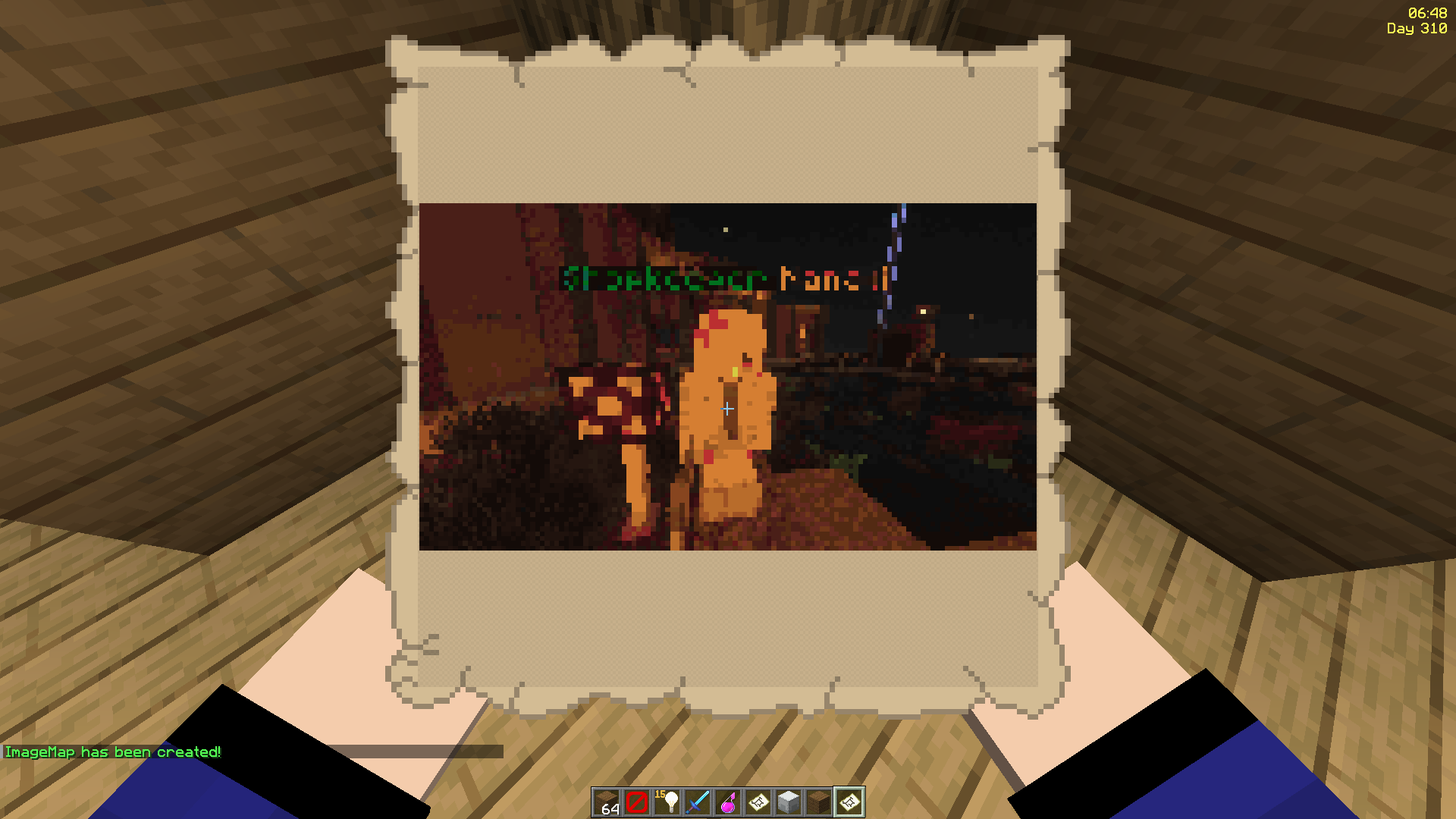
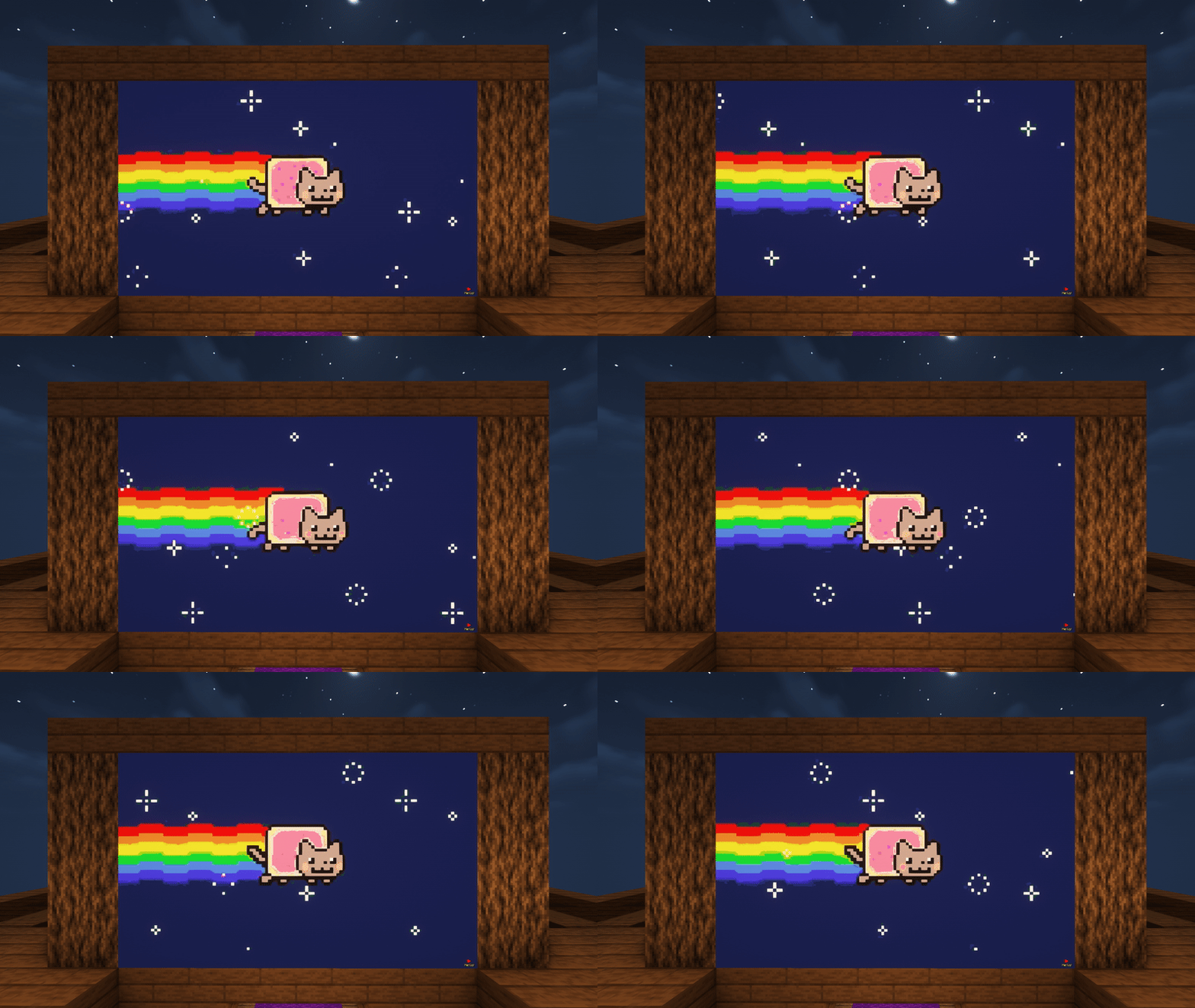
2. Even Works with Animated GIFs!
- Images will be animated if they are GIFs!
- Animated up to 1/20 of a second!
- Animation tasks run asynchronously
3. Define Custom Width and Height
- Have your image span across multiple maps
- Automatic image fitting works across all sizes too!
- Ideal for displaying on Item Frames!

^ These metro platform signs look awesome, don't they? Put together with ImageFrame and invisible glowing item frames!
4. Add Overlays to Regular Vanilla Maps!
- Create an image map with a regular vanilla map in your hand
- Or across multiple maps via selecting them in item frames!
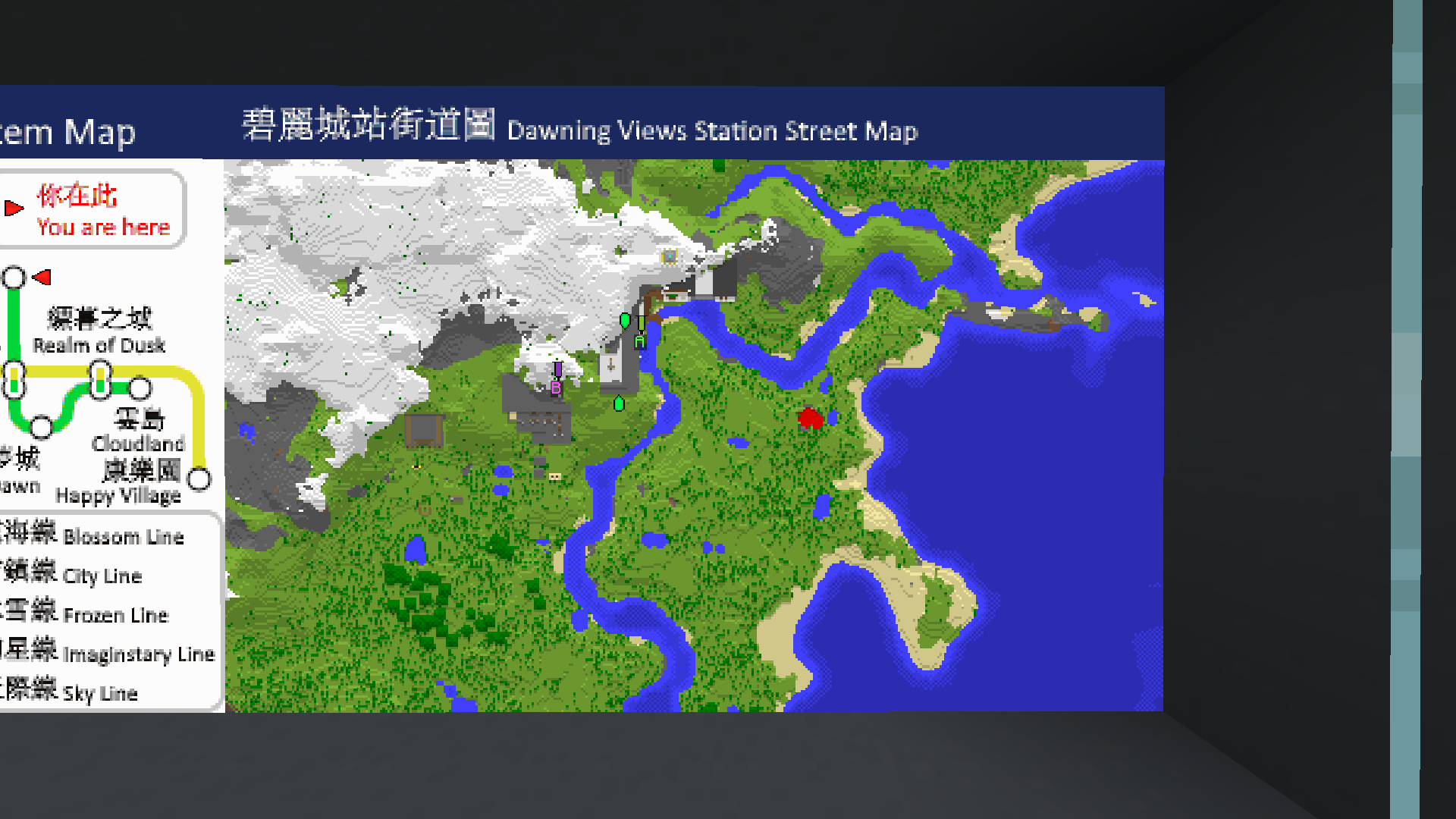
^ Notice the extra text with a blue background at the top of the map?
5. Combined ImageMap for Easy Placement!
- Get an entire multi-part ImageMap as one combined item!
- Automatically searches for space to place the ImageMap on an Item Frame wall (or floor/ceiling)
- The clicked Item Frame is treated as top-left if there is enough space
- When broken, the whole combined map is removed with a single combined map returned!
- Respect Item Frame protections on other plugins! (via calling Bukkit events)
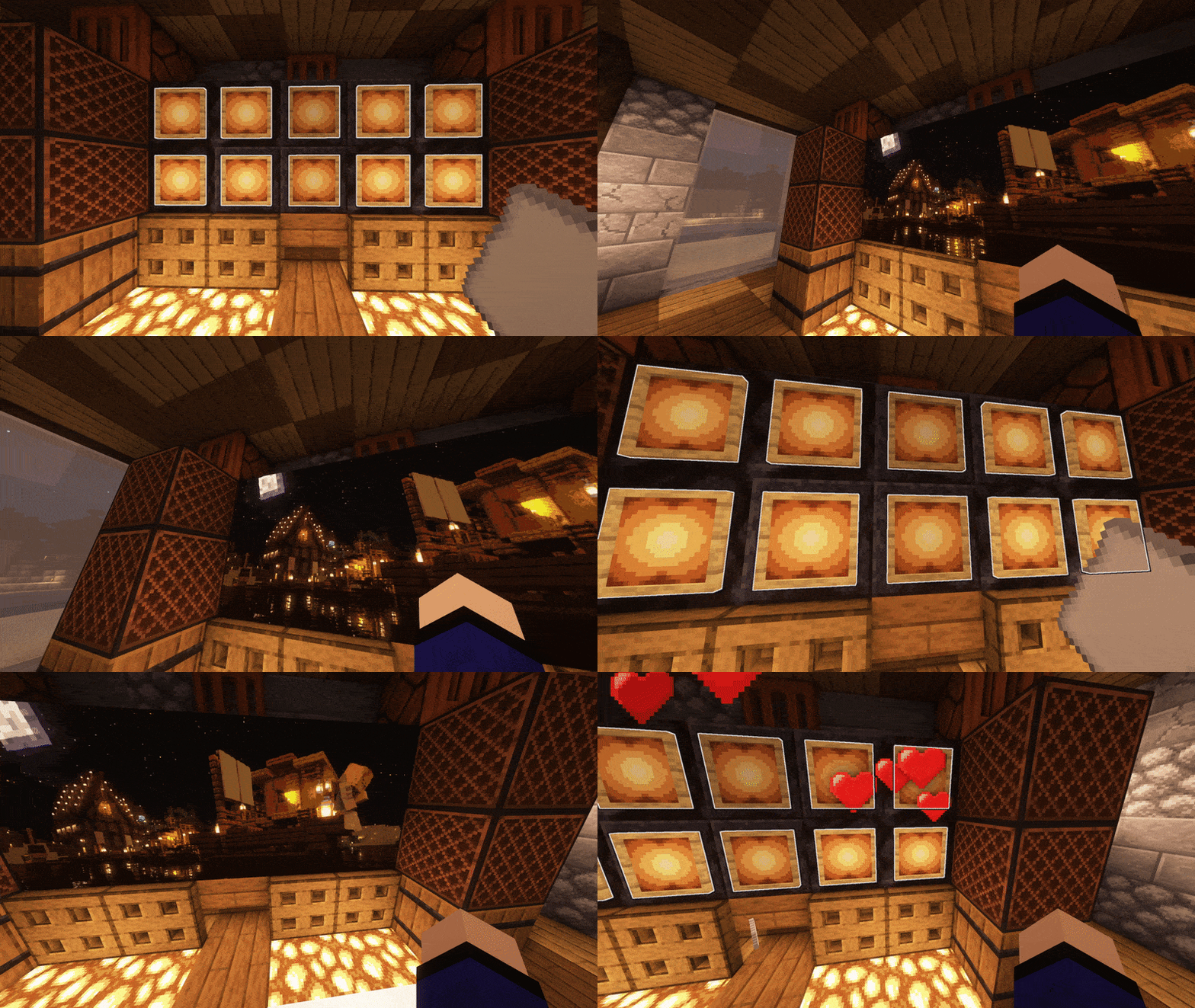
^ The hearts particle is from another plugin which listens to the EntityDamageEvent
^ Built-in Invisible Item Frames System
6. Refresh Maps Easily!
- Refresh all copies of the same image map from the URL source in one simple command!
- Ideal for displaying information that you'll have to update across your server every once a while, without having to go and replace every single one
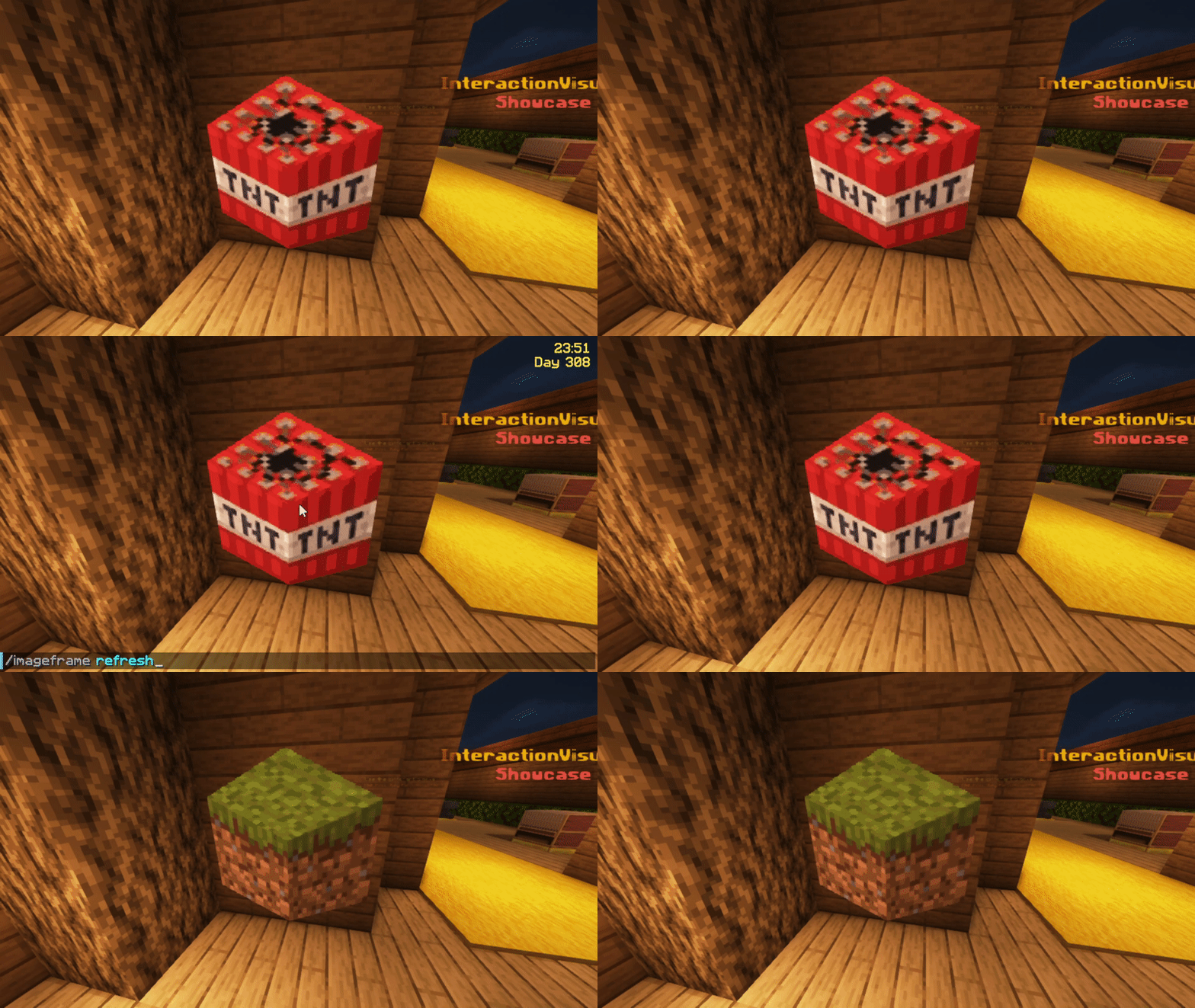
^ I've uploaded and replaced the TNT block with the grass block at the source URL, and I am holding 1 of the 4 maps in my hand
7. Add Map Markers To Your Images!
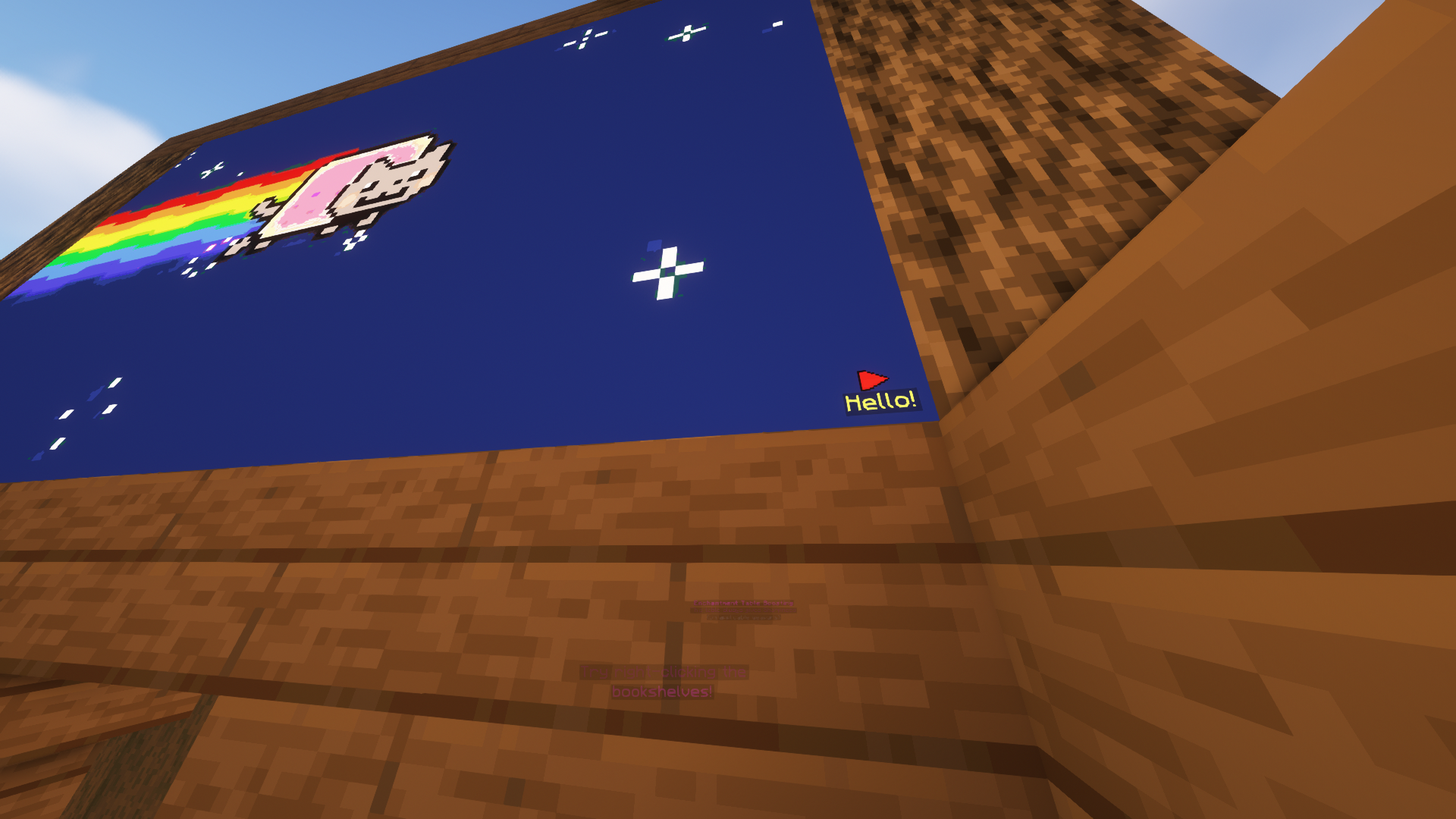
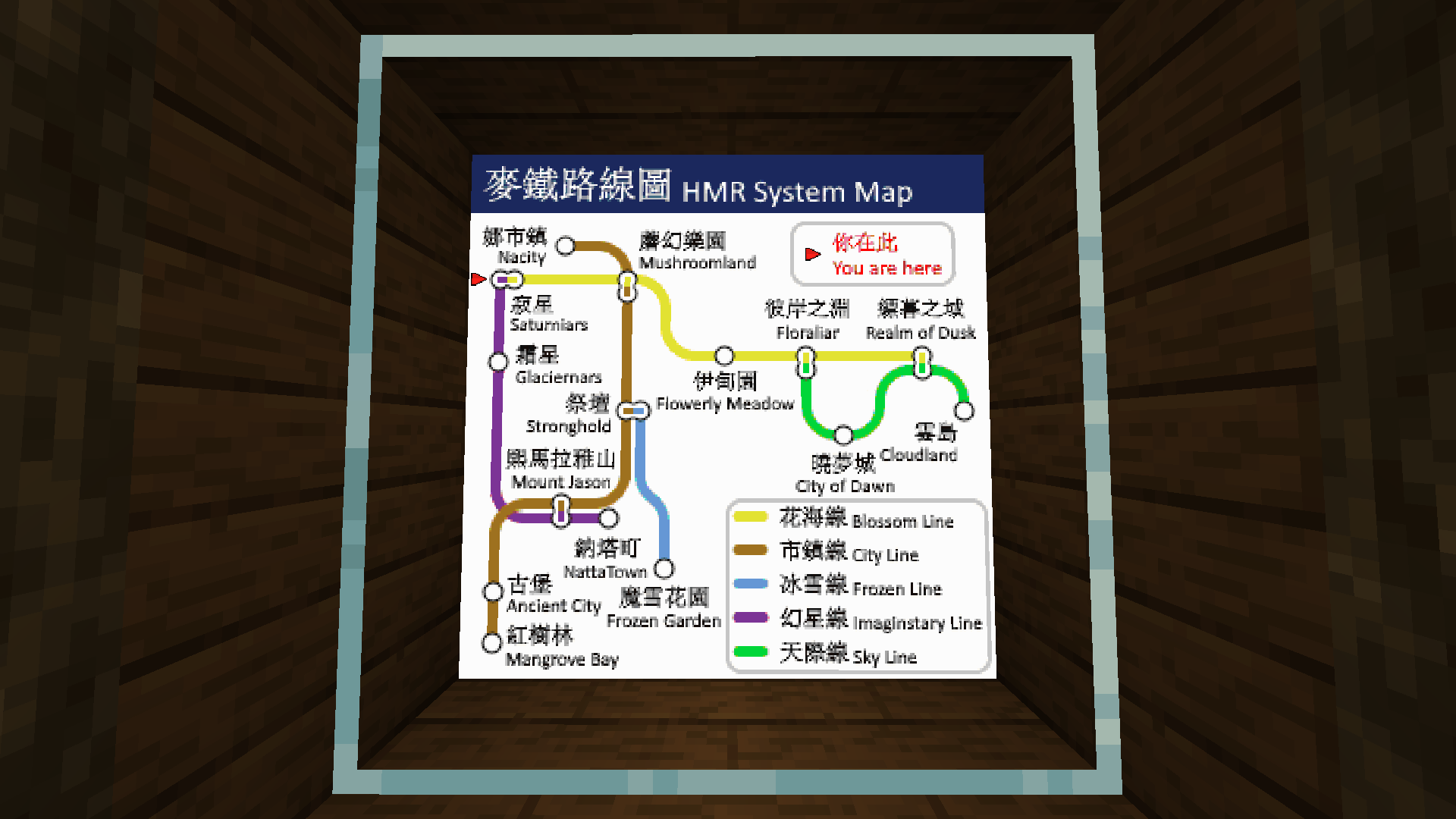
- Any map icon can be used! Such as the mansion and temple icons on Vanilla cartographer maps!
- They can also have an optional line of text below them
- Configurable max markers per map
- Ideal for marking locations on custom image maps!
8. Survival Friendly
- Require players in survival to have empty maps in their inventory to be able to create image maps (using player commands)
- Even works when directly creating images on Item Frames or getting the Combined ImageMap item!
- Configurable in the config
9. Easy to Keep Track and Manage
- Commands available to help you (both as players and admins) manage your (or everybody's) created image maps
- Ability to give access to ImageMaps to other players!
- Different permission levels for different players you decided to share maps with.
- Such as listing all maps of a player, renaming etc.
- Option to set an image creation limit per player (Can be different for each player!)
- Option to set a maximum size for a single image frame! (Customizable as always)
- Migration available for ImageMap, ImageOnMap and DrMap (Message me for more plugin support requests)
10. Invisible Item Frames
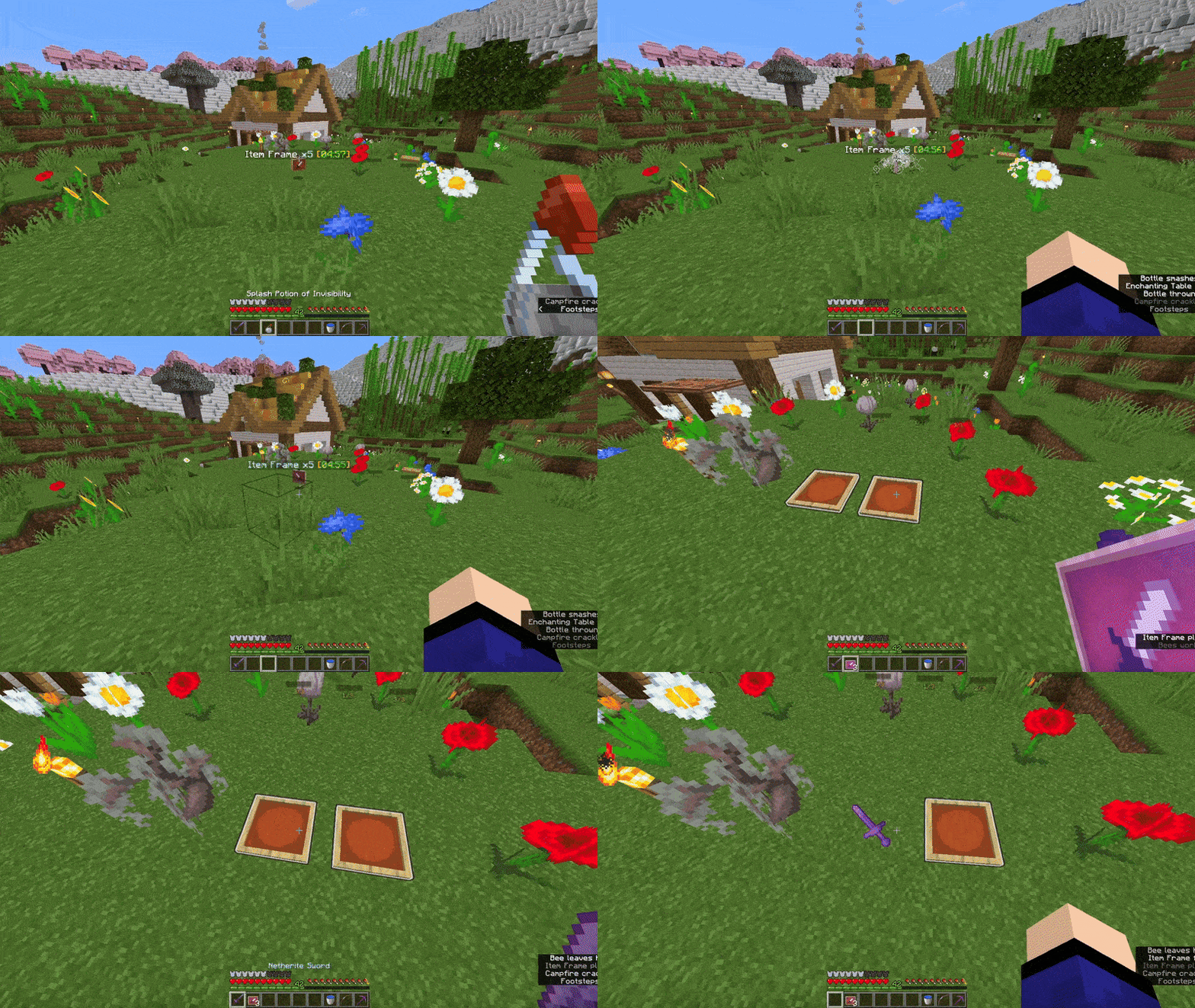
- Built-in support for survival-friendly invisible item frames!
- Splash item frame items with invisibility potions to obtain.
- Can adjusted in the config.
11. Languages
- All player-facing messages are translated to different languages depending on the player's client language.
- If the language you speak is not yet supported, please contribute on Crowdin so we can build a better plugin for everyone together!
12. Complementary Mod
- Check out this complementary mod, which lets you see images in HD, full colours, and more!
13. Multi-Server Support
- With MySQL storage support, you can have the same maps across multiple servers in your server network! (Plugin does not need to be installed on the Bungeecord/Velocity proxy)
Dependencies
- None!
Installation
- Put ImageFrame.jar into the plugins folder along with the required dependencies
- Start the server
- Edit the config (if you need to)
- Restart the server (if you changed something in the config in step 3)
Development Builds
Showcase Server
Want to see the plugin in action?
IP: mc.loohpjames.com

Commands
Legend:
For command ""/"" arguments,
You can access another players map if you have permission
through this syntax:
":"
For example: /if get LOOHP:map combined
Administration:
/imageframe reload - Reloads the plugin
/imageframe update - Check for updates
/imageframe storagemigrate - Storage type migration
Player:
/imageframe select - Select item frames to put image maps on
/imageframe create <name> <url> <width> <height> - Create a new image map
/imageframe create <name> <url> selection - Create a new image map and put it directly in your selected item frames
/imageframe create <name> <url> <width> <height> combined - Create a new image map and get its Combined ImageMap item
/imageframe overlay <name> <url> - Create a new image map that adds an overlay on a Minecraft Vanilla map you are holding
/imageframe overlay <name> <url> selection - Create a new image map that adds an overlay on a Minecraft Vanilla map in your selected item frames
/imageframe clone <name> <new_name> - Create a new image map with the same properties as the old one
/imageframe clone <name> <new_name> selection - Create a new image map with the same properties as the old one and put it directly in your selected item frames
/imageframe clone <name> <new_name> combined - Create a new image map with the same properties as the old one and get its Combined ImageMap item
/imageframe playback <name> pause - Toggle pause for an animated image map
/imageframe playback <name> jumpto <seconds> - Jump to a specific second for an animated image map
/imageframe refresh [optional:image_name] [optional:new_url] - Refresh a map you've created from source url
/imageframe info - Get info related to the image map you are holding
/imageframe get <name> - Get a self-created pre-existing image map
/imageframe get <name> selection - Put a self-created pre-existing image map directly on your selected item frames
/imageframe get <name> combined - Get a self-created pre-existing image map in its Combined ImageMap form
/imageframe delete <name> - Delete a self-created pre-existing image map
/imageframe rename <name> <new_name> - Rename a self-created pre-existing image map
/imageframe list - List all self-created pre-existing image maps
/imageframe marker add <image_name> <marker_name> <direction:0-15> <marker_type> [optional:caption] - Add a marker to your map
/imageframe marker remove <image_name> <marker_name> - Remove a marker from your map
/imageframe marker clear <image_name> - Clear all markers from your map
/imageframe setaccess <name> <player> <permission> - Set access permission of other players for your map
Moderation:
/imageframe list <player> - List a player's pre-existing image maps
/imageframe giveinvisibleframe <glowing/regular> [amount] [player] - Give invisible item frame items
/imageframe adminsetcreator <image_id> <player> - Change the creator of an image map
/imageframe adminmigrate <ImageMap/DrMap/ImageOnMap> - Migrate data from the selected and supported third-party plugin
Permissions
permissions:
  imageframe.create:
    default: op
    description: Allow players to create new image maps
  imageframe.create.animated:
    default: op
    description: Allow players to create new animated image maps
  imageframe.create.others:
    default: op
    description: Allow players to create image maps for other players, applies to overlay and clone, bypasses owning limit
  imageframe.overlay:
    default: op
    description: Allow players to overlay images on Vanilla maps
  imageframe.clone:
    default: op
    description: Allow players to make deep copies of their own image maps
  imageframe.playback:
    default: op
    description: Allow players to pause or set position of playback of their own animated image maps
  imageframe.select:
    default: op
    description: Allow players to select item frames
  imageframe.marker:
    default: op
    description: Allow players to add and remove markers on image maps
  imageframe.marker.unlimited:
    default: op
    description: Allow players to add unlimited markers on image maps
  imageframe.refresh:
    default: op
    description: Allow players to refresh image maps
  imageframe.rename:
    default: op
    description: Allow players to rename image maps
  imageframe.info:
    default: true
    description: Allow players to view image map data
  imageframe.list:
    default: true
    description: Allow players to list all image maps they've created
  imageframe.list.others:
    default: op
    description: Allow players to list all image maps a player have created
  imageframe.delete:
    default: op
    description: Allow players to delete an image map they've created
  imageframe.purge:
    default: false
    description: Allow players to purge all image maps created by a specific player
  imageframe.purge.all:
    default: false
    description: Allow players to purge all image maps at once
  imageframe.get:
    default: op
    description: Allow players to get an image map they've created
  imageframe.setaccess:
    default: op
    description: Allow players to change access permissions of their image maps
  imageframe.adminbypass:
    default: op
    description: Bypass all access restrictions and allow users to use and modify any image map
  imageframe.adminsetcreator:
    default: op
    description: Allow players to change the creator of any image map via the image map id
  imageframe.admindelete:
    default: op
    description: Allow players to delete any image map via the image map id
  imageframe.adminmigrate:
    default: op
    description: Allow players to migrate maps from supported plugins to ImageFrame
  imageframe.preference:
    default: true
    description: Allow players to update their player preferences
  imageframe.preference.others:
    default: op
    description: Allow players to update other players' player preferences
  imageframe.giveinvisibleframe:
    default: op
    description: Allow players to give invisible item frames
  imageframe.reload:
    default: op
    description: Allows you reload the config file
  imageframe.resync:
    default: op
    description: Allows you force sync changes from storage
  imageframe.storagemigrate:
    default: op
    description: Allows you to send data to a different storage type
  imageframe.update:
    default: op
    description: Allows you receive update messages
Default Config
Latest Config with Descriptions
Data usage
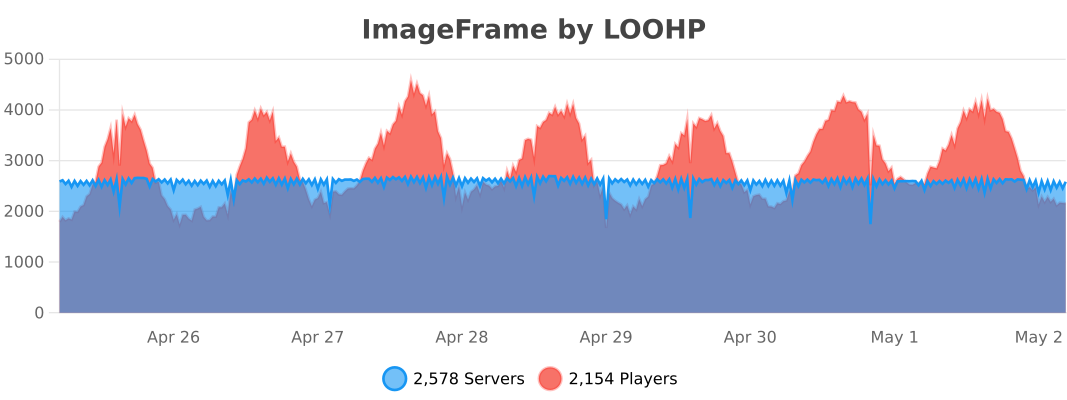
Usage statistics at https://bstats.org/plugin/bukkit/ImageFrame will be visible to the public with your server included in the statistics. No private information of your server is sent.
Update checking is also done via https://api.loohpjames.com to notify you whenever a new version is released. No private information of your server is sent.
Preview
Product images
Environment
Requirements & compatibility
Compatibility & requirements
FoliaPaperPurpurSpigot1.13 – 1.13.21.16 – 1.21.1126.126.1.126.1.226.2
Local host
Unsupported
Hosting on services
Required
Terms
License
Terms for using, modifying and redistributing this product.
GNU General Public License v3.0 onlyModrinth
Release
Latest release
Gallery
Project images
Screenshots and images from the original Modrinth page.
History
Project versions
Published versions and original Modrinth files.
v2026.1.4LatestRelease
29.06.2026 · 12 003 downloads
FoliaPaperPurpurSpigot1.161.16.11.16.21.16.31.16.41.16.51.171.17.1
v2026.1.3Release
19.06.2026 · 5 494 downloads
FoliaPaperPurpurSpigot1.161.16.11.16.21.16.31.16.41.16.51.171.17.1
- Support for Minecraft 26.2
- More dithering algorithms
- Plugin will now attempt to find the image when given an indirect link
v2026.1.2.1Beta
27.05.2026 · 5 889 downloads
FoliaPaperPurpurSpigot1.161.16.11.16.21.16.31.16.41.16.51.171.17.1
- Plugin will now attempt to find the image when given an indirect link
v2026.1.2Release
06.05.2026 · 13 522 downloads
FoliaPaperPurpurSpigot1.161.16.11.16.21.16.31.16.41.16.51.171.17.1
- Upload webpage now also translatable
- Fixed issue when getting new map id on 26.1 when the world has no maps
Please delete the upload folder in the ImageFrame plugin folder before starting the server after updating the JAR.
If you do not do this, the webpage will not be updated to the new version.
v2026.1.1.1Beta
25.04.2026 · 2 432 downloads
FoliaPaperPurpurSpigot1.161.16.11.16.21.16.31.16.41.16.51.171.17.1
- Improved upload server & webpage
- Upload server webpage messages are now translatable
v2026.1.1Release
09.04.2026 · 8 517 downloads
FoliaPaperPurpurSpigot1.161.16.11.16.21.16.31.16.41.16.51.171.17.1
- Fixed issue when getting new map id on 26.1
- Support for Minecraft 26.1.2
v2026.1.0Release
04.04.2026 · 2 803 downloads
FoliaPaperPurpurSpigot1.161.16.11.16.21.16.31.16.41.16.51.171.17.1
- Support for Minecraft 26.1.1
v1.9.0.1Beta
01.01.2026 · 19 476 downloads
FoliaPaperPurpurSpigot1.131.13.11.13.21.161.16.11.16.21.16.31.16.4
- Upload server failing to bind to port no longer causes the plugin to not enable
- Upload URL messages now explicitly have click events on the URL part
v1.9.0Release
24.12.2025 · 21 767 downloads
FoliaPaperPurpurSpigot1.131.13.11.13.21.161.16.11.16.21.16.31.16.4
- Added experimental support for ImageFrame Client for 1.21.4, 1.21.8, 1.21.10, & 1.21.11 clients
- Improved how ImageMap loaders and media loaders are registered for addons support
- Added beta support for cross-server MySQL storage support
- Fixed a problem with grindstones
- Internationalization for player-facing messages through community crowdsourcing!
- Added config option to have maps combined by default
v1.8.7.5Beta
01.12.2025 · 5 005 downloads
FoliaPaperPurpurSpigot1.161.16.11.16.21.16.31.16.41.16.51.171.17.1
- Internationalization for player-facing messages through community crowdsourcing!
- Added config option to have maps combined by default
Speak a language that is not supported by ImageFrame yet? We would appreciate it if you contribute on Crowdin!
v1.8.7.4Beta
26.11.2025 · 1 504 downloads
FoliaPaperPurpurSpigot1.161.16.11.16.21.16.31.16.41.16.51.171.17.1
- Fixed a critical problem where animated maps won't load a second time, introduced in 1.8.7.3
- Fixed a first time initialization error
- Fixed a problem with grindstones
v1.8.7.3Beta
23.11.2025 · 355 downloads
FoliaPaperPurpurSpigot1.161.16.11.16.21.16.31.16.41.16.51.171.17.1
- Added beta support for cross-server MySQL storage support
This version contains a critical bug that is fixed in 1.8.7.4. Please do not use this version.
v1.8.7.2Beta
16.11.2025 · 1 757 downloads
FoliaPaperPurpurSpigot1.161.16.11.16.21.16.31.16.41.16.51.171.17.1
- Improved how ImageMap loaders and media loaders are registered
- This enables feature addons to support more input formats
v1.8.7.1Beta
14.11.2025 · 672 downloads
FoliaPaperPurpurSpigot1.161.16.11.16.21.16.31.16.41.16.51.171.17.1
- Added experimental support for ImageFrame Client for 1.21.4, 1.21.8 & 1.21.10 clients
- Fixed platform scheduler relocation
v1.8.7Release
11.10.2025 · 16 138 downloads
FoliaPaperPurpurSpigot1.161.16.11.16.21.16.31.16.41.16.51.171.17.1
- Support for Minecraft 1.21.10
v1.8.5Release
17.07.2025 · 20 122 downloads
FoliaPaperPurpurSpigot1.161.16.11.16.21.16.31.16.41.16.51.171.17.1
- Support for Minecraft 1.21.8
v1.8.4Release
30.06.2025 · 4 951 downloads
FoliaPaperPurpurSpigot1.161.16.11.16.21.16.31.16.41.16.51.171.17.1
- Support for Minecraft 1.21.7
v1.8.3Release
20.06.2025 · 3 206 downloads
FoliaPaperPurpurSpigot1.161.16.11.16.21.16.31.16.41.16.51.171.17.1
- Support for Minecraft 1.21.6
v1.8.2Release
01.05.2025 · 9 754 downloads
FoliaPaperPurpurSpigot1.161.16.11.16.21.16.31.16.41.16.51.171.17.1
- Fixed a bug where images only appear after restart
v1.8.1Release
27.04.2025 · 921 downloads
FoliaPaperPurpurSpigot1.161.16.11.16.21.16.31.16.41.16.51.171.17.1
- Reverted old image cache strategy by default
- Made try delete empty map files false by default
- These options can be toggled in the config instead for the time being
- Fixed fakeMapIdsSet could be null
- Fixed recipe methods doesn't exist on old versions
v1.8.0Release
16.04.2025 · 2 700 downloads
FoliaPaperPurpurSpigot1.161.16.11.16.21.16.31.16.41.16.51.171.17.1
- Support for Minecraft 1.21.5
- Added embedded upload service feature
- Added playback papi placeholders
- Added survival-friendly way to obtain invisible item frames
- Various bug fixes
If you do not want to use the embedded upload service feature, make sure to edit the config as follows after you update.
#ImageFrame's convenient upload system where you can upload directly through an embedded web server
UploadService:
  #Changing this value requires a restart
  Enabled: false
If you do not want to use the survival-friendly way to obtain invisible item frames feature, make sure to edit the config as follows after you update.
InvisibleFrame:
  # Survival friendly way to get invisible item frames by splashing dropped items with invisibility potions
  # Set to -1 for unlimited
  # Set to 0 to disable
  MaxConversionsPerSplash: 0
v1.7.14.4Beta
15.02.2025 · 6 081 downloads
FoliaPaperPurpurSpigot1.16.51.17.11.18.21.19.41.20.61.21.4
- Beta testing for an embedded upload service for you to upload images directly to the server via a web page
- To set this up, you might to unblock your chosen port for the web server. It would be similar to how you setup plugins like dynmap or bluemap.
- To use this feature in-game, type
uploadin places where you need to provide a url.
If you do not want to use this feature, make sure to edit the config as follows after you update.
#ImageFrame's convenient upload system where you can upload directly through an embedded web server
UploadService:
  #Changing this value requires a restart
  Enabled: false
v1.7.14.2Beta
05.02.2025 · 989 downloads
FoliaPaperPurpurSpigot1.16.51.17.11.18.21.19.41.20.61.21.4
- Beta testing for the new survival-friendly way to obtain invisible item frames
- Added playback papi placeholders
If you do not want to use this feature, make sure to edit the config as follows after you update.
InvisibleFrame:
  # Survival friendly way to get invisible item frames by splashing dropped items with invisibility potions
  # Set to -1 for unlimited
  # Set to 0 to disable
  MaxConversionsPerSplash: 0
v1.7.14Release
18.01.2025 · 4 499 downloads
FoliaPaperPurpurSpigot1.16.51.17.11.18.21.19.41.20.61.21.4
- Fixed jumpTo while animated map is paused
- Check IF & world folder map ids too when creating new maps
- Fixed an error in certain versions on chunk load
v1.7.13Release
29.12.2024 · 1 963 downloads
FoliaPaperPurpurSpigot1.16.51.17.11.18.21.19.41.20.61.21.4
- Fixed combined map items jittering in the player inventory
v1.7.12Release
13.12.2024 · 2 284 downloads
FoliaPaperPurpurSpigot1.16.51.17.11.18.21.19.41.20.61.21.4
- Support for Minecraft 1.21.4
v1.7.11Release
16.11.2024 · 2 597 downloads
FoliaPaperPurpurSpigot1.16.51.17.11.18.21.19.41.20.61.21.3
- Support for Minecraft 1.21.3
v1.7.10Release
09.08.2024 · 8 528 downloads
FoliaPaperPurpurSpigot1.16.51.17.11.18.21.19.41.20.61.21.1
- Support for Minecraft 1.21.1
- Fixed combined maps being used for crafting
v1.7.9Release
22.06.2024 · 6 607 downloads
FoliaPaperPurpurSpigot1.16.51.17.11.18.21.19.41.20.61.21
- Support for Minecraft 1.21
- Fixes a bug on Folia
v1.7.8Release
11.05.2024 · 2 203 downloads
FoliaPaperPurpurSpigot1.16.51.17.11.18.21.19.41.20.6
- Support for Minecraft 1.20.6
- Moved away from reflection as much as possible
- Plugin now no longer depends on ProtocolLib
v1.7.7Release
14.12.2023 · 8 516 downloads
FoliaPaperPurpurSpigot1.16.51.17.11.18.21.19.41.20.4
- Support for Minecraft 1.20.4
- Fixed support for Folia
v1.7.6Release
26.09.2023 · 3 011 downloads
FoliaPaperPurpurSpigot1.16.51.17.11.18.21.19.41.20.2
- Support for Minecraft 1.20.2
- Wait 0.5 seconds before sending packets after player join
- Better Map Item Check
- Added SendAnimatedMapsOnMainThread
- VIEW_ANIMATED_MAPS preference can now also be "unset"
- Added preference command
- Create missing map views
- Added mapRenderersContextual option
- Added purge command
- Various bug fixes
v1.7.5Release
24.08.2023 · 5 342 downloads
FoliaPaperPurpurSpigot1.16.51.17.11.18.21.19.41.20.1
- Added ExemptMapIdsFromDeletion option
- Direct selection command also usable in the console /if select world x1 y1 z1 x2 y2 z2
- Info and Refresh Commands are no longer restricted to players
- Improve RAM usage
- Replaced pause command with playback command
- Allow the refresh command to be run by the console
- Initial Folia Support
- Many internal improvements and bug fixes
v1.7.4Release
08.06.2023 · 3 755 downloads
PaperPurpurSpigot1.16.51.17.11.18.21.19.41.20
- Support for Minecraft 1.20
- Fixed completionCallback NPE
- Added pause command
- Added ImageMapProcessing message
- Added ImageMap Migration
- Added admin map creation for other players
v1.7.3Release
20.03.2023 · 642 downloads
PaperPurpurSpigot1.16.51.17.11.18.21.19.4
- Fixed GIFs not running smoothly on Item Frames on 1.19.4
v1.7.2Release
16.03.2023 · 459 downloads
PaperPurpurSpigot1.16.51.17.11.18.21.19.4
- Support for Minecraft 1.19.4
- Fixed /if get selection
- Better handle ViaVersion legacy players
v1.7.1Release
03.03.2023 · 382 downloads
PaperPurpurSpigot1.16.51.17.11.18.21.19.3
- Fixed event registration on MC versions with no EntitiesLoadEvent
- Extended /if get to allow specifying which player
- Fixed denying combined maps into tables
v1.7.0Release
16.02.2023 · 204 downloads
PaperPurpurSpigot1.16.51.17.11.18.21.19.3
- Changed how Animated Images on Image Frames are sent, Network usage should drop drastically
- Added config option
MapPacketSendingRateLimitfor servers with players with insufficient bandwidth
v1.6.4Release
30.01.2023 · 188 downloads
PaperPurpurSpigot1.16.51.17.11.18.21.19.3
- Fixed animations where all frames are the same
v1.6.3Release
29.01.2023 · 210 downloads
PaperPurpurSpigot1.16.51.17.11.18.21.19.3
- Only send frames if they are different from the last for GIFs
- Account for custom worlds folder path
v1.6.2Release
02.01.2023 · 241 downloads
PaperPurpurSpigot1.16.51.17.11.18.21.19.3
- Fixed map creation
v1.6.1Release
29.12.2022 · 142 downloads
PaperPurpurSpigot1.16.51.17.11.18.21.19.3
- Hot Fix for Image loading and migration
- Fixed a race condition when creating maps
v1.6.0Release
15.12.2022 · 772 downloads
PaperPurpurSpigot1.16.51.17.11.18.21.19.21.19.3
- Support for Minecraft 1.19.3 (when ProtocolLib for 1.19.3 comes out)
- Admin commands reworked
- You can now use : to access another player's map if you have permission
- Added setaccess command for map sharing with other players
Scroll products with the wheel or arrows