
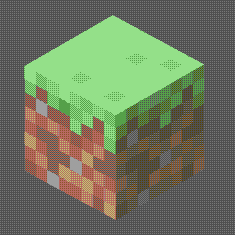
A Minecraft shader with multiple dithering styles to stylize your game!
Товар
Про товар
Dithering Shader
A Minecraft shader aimed to stylize your game using dithering effects
Features
- 6 dithering styles:
- Ordered (Bayer)
- Blue Noise
- Triangular Noise
- IGN Noise
- Random Channels
-
Halftone
-
6 Ordered Dithering (Bayer) Styles
- Monochrome
- Per-Channel
- Original Color
- Adjusted Threshold
- Hue-Preserving
-
Smooth Gradient
-
Multiple Bayer matrix sizes: 2×2, 4×4, 8×8, 16×16, 32×32
- Adjustable posterization
- Adjustable scaling factor (pixelation)
Pictures
Ordered (Bayer) Dithering - 3× scale, Original Color, 8×8  - 3× scale, Monochrome, 8×8  - 3× scale, Adjusted Threshold, 8×8  - 3× scale, Per-Channel, 8×8  Blue Noise Dithering - 3× scale  Triangular Noise - 3× scale  IGN Noise - 3× scale  Random Channels - 3× scale   Halftone - 3× scale  - 6× scale Installation
- First you need to install either OptiFine or the Iris mod to be able to load shaderpacks. (Choose Iris if you are unsure)
- Then you need to launch the game, and get to the Shaderpacks/Shaders menu in Video Settings.
- Open the shaderpacks folder by clicking the button in the menu. Download the Dithered Shader and put it in the shaderpacks folder.
- Get back in the game, and choose Dithered_Shader in the shaderpacks menu. (Refresh the menu if it doesn't appear)
Прев’ю
Зображення товару
Середовище
Вимоги та сумісність
Сумісність і вимоги
IrisOptifine1.17 – 1.21.4
Локальний хост
Required
Хостинг на сервісах
Unsupported
Умови
Ліцензія
Умови використання, зміни та поширення цього товару.
GNU Lesser General Public License v3.0 onlyModrinth
Реліз
Останній реліз
v1.0
02.05.2025 · Modrinth
Features
- 6 dithering styles:
- Ordered (Bayer)
- Blue Noise
- Triangular Noise
- IGN Noise
- Random Channels
-
Halftone
-
6 Ordered Dithering (Bayer) Styles
- Monochrome
- Per-Channel
- Original Color
- Adjusted Threshold
- Hue-Preserving
-
Smooth Gradient
-
Multiple Bayer matrix sizes: 2×2, 4×4, 8×8, 16×16, 32×32
- Adjustable posterization
- Adjustable scaling factor (pixelation)
Галерея
Зображення проєкту
Скриншоти та зображення з оригінальної сторінки Modrinth.
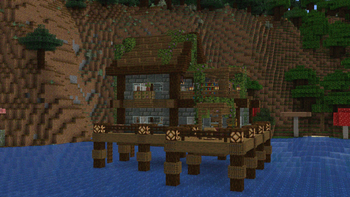
Ordered Dithering, 3x scale, Color
Історія
Версії проєкту
Опубліковані версії та оригінальні файли Modrinth.
v1.0ОстанняRelease
02.05.2025 · 7 630 завантаження
IrisOptifine1.171.17.11.181.18.11.18.21.191.19.11.19.2
Features
- 6 dithering styles:
- Ordered (Bayer)
- Blue Noise
- Triangular Noise
- IGN Noise
- Random Channels
-
Halftone
-
6 Ordered Dithering (Bayer) Styles
- Monochrome
- Per-Channel
- Original Color
- Adjusted Threshold
- Hue-Preserving
-
Smooth Gradient
-
Multiple Bayer matrix sizes: 2×2, 4×4, 8×8, 16×16, 32×32
- Adjustable posterization
- Adjustable scaling factor (pixelation)
Гортайте товари колесом або стрілками