

Shoulder Surfing Reloaded
v26.1.2-5.0.11+fabric
Modrinth
•
1 674 подписчики
•
Загрузок: 11 258 660
от
Exopandora
Highly configurable third person camera mod
Товар
О товаре
Shoulder Surfing Reloaded
Shoulder Surfing Reloaded is a highly configurable third person camera mod for minecraft.
Features
- Over-the-shoulder camera - see what you are interacting with in 3rd person
- Decoupled camera - walk left and right without turning your mouse
- Free look (default:
left alt) - keep walking in a direction while looking in a different one - Hotkeys to move the camera (default:
arrow keys,page upandpage down,oto switch shoulders) - Corrective cross-hair positioning when using adaptive or dynamic crosshair
- Adaptive player transparency - fades the player model to transparent when view is obstructed
- Highly configurable - customize your 3rd person experience with many configuration options
- Client side only - no server mods required
- Plugin API - implement custom camera behaviours and compatibility features with ease
Please note that this mod modifies the camera position and player movement, which can be an issue for servers with strict anti-cheat.
Use at your own risk!
Installation
Forge ### Prerequisites ### 1. Make sure [Minecraft Forge](http://files.minecraftforge.net/) is installed 2. Make sure Forge Config API Port ([CurseForge](https://www.curseforge.com/minecraft/mc-mods/forge-config-api-port-fabric), [Modrinth](https://modrinth.com/mod/forge-config-api-port)) is installed ### Manual ### 1. Navigate to `.minecraft/mods` 2. Move `ShoulderSurfing-Forge-[VERSION].jar` into the folder 3. Follow the steps below ### Launcher Settings ### 1. Select Forge as your profile 2. Launch Minecraft 3. Join a world or server 4. Use `arrow keys`, `page up` and `page down` to adjust the perspective, `o` to switch shoulders Fabric ### Prerequisites ### 1. Make sure [Fabric](https://fabricmc.net/) is installed 2. Make sure Fabric API ([CurseForge](https://www.curseforge.com/minecraft/mc-mods/fabric-api), [Modrinth](https://modrinth.com/mod/fabric-api)) is installed 3. Make sure Forge Config API Port ([CurseForge](https://www.curseforge.com/minecraft/mc-mods/forge-config-api-port-fabric), [Modrinth](https://modrinth.com/mod/forge-config-api-port)) is installed ### Manual ### 1. Navigate to `.minecraft/mods` 2. Move `ShoulderSurfing-Fabric-[VERSION].jar` into the folder 3. Follow the steps below ### Launcher Settings ### 1. Select Fabric as your profile 2. Launch Minecraft 3. Join a world or server 4. Use `arrow keys`, `page up` and `page down` to adjust the perspective, `o` to switch shoulders NeoForge ### Prerequisites ### 1. Make sure [NeoForge](https://neoforged.net/) is installed ### Manual ### 1. Navigate to `.minecraft/mods` 2. Move `ShoulderSurfing-NeoForge-[VERSION].jar` into the folder 3. Follow the steps below ### Launcher Settings ### 1. Select NeoForge as your profile 2. Launch Minecraft 3. Join a world or server 4. Use `arrow keys`, `page up` and `page down` to adjust the perspective, `o` to switch shouldersConfiguration
≥ 1.21: Ingame: Mods → ShoulderSurfing → Config (Manual: .minecraft/config/shouldersurfing-client.cfg)
≤ 1.20: Install Forge Config Screens (CurseForge, Modrinth) (Manual: .minecraft/config/shouldersurfing-client.cfg)
Plugin API
Shoulder Surfing Reloaded features a plugin API for third party mod developers.
This allows for implementing custom camera behaviours and compatibility features without the use of invasive mixins.
The documentation can be found in the wiki on GitHub.
It explains step by step on how to create and register your own plugin, and how you can implement and register custom callbacks.
FAQ
Q: Why is the player not looking at the position of the crosshair when holding item x?
A: This needs to be configured using the config options adaptive_crosshair_hold_items or adaptive_crosshair_use_items.
Q: Why is the player not rendered correctly when using shader pack x?
A: This is caused by player transparency effects of Shoulder Surfing Reloaded. Either disable them in the config (adjust_player_transparency) and restart your game or report this to the authors of the shader pack.
Q: Can you port feature x to version y?
A: No.
Q: Can you port this to quilt, liteloader, rift, etc.?
A: No.
Q: Can I add this to my modpack?
A: Yes.
License
MIT License, Original project by Sabar: Minecraft Forum, GitHub
Превью
Изображения товара
Окружение
Требования и совместимость
Совместимость и требования
FabricForgeNeoforge1.7.101.8.8 – 1.91.9.41.10.2 – 1.111.11.2 – 1.12.21.16 – 1.16.51.18 – 1.19.21.19.4 – 1.20.41.20.6 – 1.21.1126.1
Локальный хост
Required
Хостинг на сервисах
Unsupported
Условия
Лицензия
Условия использования, изменения и распространения этого товара.
MIT LicenseModrinth
Релиз
Последний релиз
v26.1.2-5.0.11+fabric
27.08.2026 · Modrinth
5.0.11
- Fixed compatibility with neat
5.0.10
- Fixed legacy API adapters calling the wrong API version in some cases, leading to potential crashes when other mods use the legacy API
5.0.7
- Fixed dynamic crosshair remaining active after switching perspective
5.0.6
- Fixed curios compatibility plugin loading
5.0.5
- Fixed obstruction indicator remaining visible after switching perspective
5.0.4
- Fixed incorrect behavior of setXRot and setYRot API methods
5.0.3
- Updated...
Галерея
Изображения проекта
Скриншоты и изображения из оригинальной страницы Modrinth.
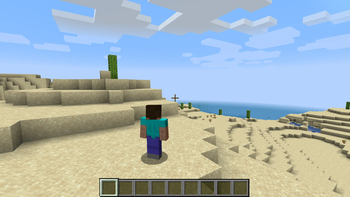
Shoulder Surfing Y-Adjustment
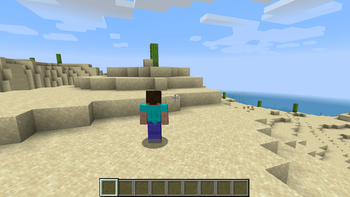
Shoulder Surfing Perspective
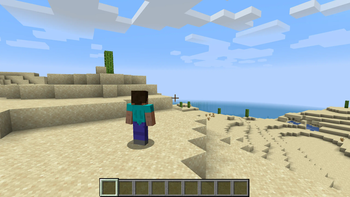
Shoulder Surfing X-Adjustment
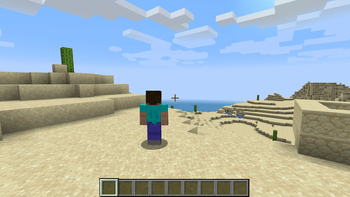
Shoulder Surfing Perspective
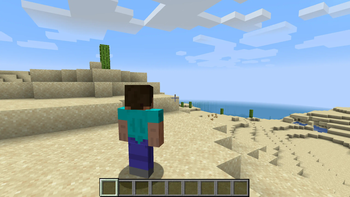
Shoulder Surfing Z-Adjustment
История
Версии проекта
Опубликованные версии и оригинальные файлы Modrinth.
v26.1.2-5.0.11+fabricПоследняяRelease
27.08.2026 · 1 917 загрузки
Fabric26.126.1.126.1.2
5.0.11
- Fixed compatibility with neat
5.0.10
- Fixed legacy API adapters calling the wrong API version in some cases, leading to potential crashes when other mods use the legacy API
5.0.7
- Fixed dynamic crosshair remaining active after switching perspective
5.0.6
- Fixed curios compatibility plugin loading
5.0.5
- Fixed obstruction indicator remaining visible after switching perspective
5.0.4
- Fixed incorrect behavior of setXRot and setYRot API methods
5.0.3
- Updated traditional and simplified Chinese translations (thanks to Xinyang-Gao)
- Added legacy API adapters for backwards compatibility
5.0.2
- Improved mod-compatibility
5.0.1
- Updated Russian translations (thanks to mpustovoi)
5.0.0
- Added config option to control player transparency effect when climbing (disabled by default)
- Changed default keybind for swapping shoulders from 'O' to 'U'
- Enabled config option "turn_player_x_rot_with_camera" by default
- Enabled config option "turn_player_y_rot_with_camera" by default
- Disabled config option "turn_with_player" by default
- The player no longer turns with the camera when "turn_with_player" is enabled
- The player now turns with the camera when 'pick_vector' is 'PLAYER' and 'crosshair_type' is 'DYNAMIC'
- Fixed eye height being too low when flying in creative
- Other optimizations and stability fixes
- Reorganized several config options. The following mapping can be used for migration:
- camera.fov_override_enabled → camera.fov.fov_override_enabled
- camera.fov_override → camera.fov.fov_override
- camera.dynamically_adjust_offsets → camera.offset.dynamic_offsets
- camera.camera_step_size → camera.offset.step_size
- camera.follow_player_rotations → camera.turn_with_player
- camera.follow_player_rotations_delay → camera.turn_with_player_delay
- crosshair.obstruction.show_obstruction_indicator → crosshair.obstruction.obstruction_indicator
- player.adjust_player_transparency → player.transparency.adjust_transparency
- player.player_x_rot_follows_camera → player.turning.turn_player_x_rot_with_camera
- player.player_y_rot_follows_camera → player.turning.turn_player_y_rot_with_camera
- player.player_y_rot_follow_angle_limit → player.turning.turn_player_y_rot_angle_limit
- player.turn_player_transparent_when_aiming → player.transparency.when_aiming
- Valkyrien Skies >2.4.11 is no longer marked as incompatible
- API: Replaced callback system with an event system
- API: It is now possible to register multiple plugin classes per mod
- API: The API was restructured and some parts were renamed. A migration guide can be found in the wiki: https://github.com/Exopandora/ShoulderSurfing/wiki/API-Documentation-v5-Migration
v26.1.2-5.0.11+neoforgeRelease
27.08.2026 · 190 загрузки
Neoforge26.126.1.126.1.2
5.0.11
- Fixed compatibility with neat
5.0.10
- Fixed legacy API adapters calling the wrong API version in some cases, leading to potential crashes when other mods use the legacy API
5.0.7
- Fixed dynamic crosshair remaining active after switching perspective
5.0.6
- Fixed curios compatibility plugin loading
5.0.5
- Fixed obstruction indicator remaining visible after switching perspective
5.0.4
- Fixed incorrect behavior of setXRot and setYRot API methods
5.0.3
- Updated traditional and simplified Chinese translations (thanks to Xinyang-Gao)
- Added legacy API adapters for backwards compatibility
5.0.2
- Improved mod-compatibility
5.0.1
- Updated Russian translations (thanks to mpustovoi)
5.0.0
- Added config option to control player transparency effect when climbing (disabled by default)
- Changed default keybind for swapping shoulders from 'O' to 'U'
- Enabled config option "turn_player_x_rot_with_camera" by default
- Enabled config option "turn_player_y_rot_with_camera" by default
- Disabled config option "turn_with_player" by default
- The player no longer turns with the camera when "turn_with_player" is enabled
- The player now turns with the camera when 'pick_vector' is 'PLAYER' and 'crosshair_type' is 'DYNAMIC'
- Fixed eye height being too low when flying in creative
- Other optimizations and stability fixes
- Reorganized several config options. The following mapping can be used for migration:
- camera.fov_override_enabled → camera.fov.fov_override_enabled
- camera.fov_override → camera.fov.fov_override
- camera.dynamically_adjust_offsets → camera.offset.dynamic_offsets
- camera.camera_step_size → camera.offset.step_size
- camera.follow_player_rotations → camera.turn_with_player
- camera.follow_player_rotations_delay → camera.turn_with_player_delay
- crosshair.obstruction.show_obstruction_indicator → crosshair.obstruction.obstruction_indicator
- player.adjust_player_transparency → player.transparency.adjust_transparency
- player.player_x_rot_follows_camera → player.turning.turn_player_x_rot_with_camera
- player.player_y_rot_follows_camera → player.turning.turn_player_y_rot_with_camera
- player.player_y_rot_follow_angle_limit → player.turning.turn_player_y_rot_angle_limit
- player.turn_player_transparent_when_aiming → player.transparency.when_aiming
- Valkyrien Skies >2.4.11 is no longer marked as incompatible
- API: Replaced callback system with an event system
- API: It is now possible to register multiple plugin classes per mod
- API: The API was restructured and some parts were renamed. A migration guide can be found in the wiki: https://github.com/Exopandora/ShoulderSurfing/wiki/API-Documentation-v5-Migration
v26.1.2-5.0.11+forgeRelease
27.08.2026 · 86 загрузки
Forge26.126.1.126.1.2
5.0.11
- Fixed compatibility with neat
5.0.10
- Fixed legacy API adapters calling the wrong API version in some cases, leading to potential crashes when other mods use the legacy API
5.0.7
- Fixed dynamic crosshair remaining active after switching perspective
5.0.6
- Fixed curios compatibility plugin loading
5.0.5
- Fixed obstruction indicator remaining visible after switching perspective
5.0.4
- Fixed incorrect behavior of setXRot and setYRot API methods
5.0.3
- Updated traditional and simplified Chinese translations (thanks to Xinyang-Gao)
- Added legacy API adapters for backwards compatibility
5.0.2
- Improved mod-compatibility
5.0.1
- Updated Russian translations (thanks to mpustovoi)
5.0.0
- Added config option to control player transparency effect when climbing (disabled by default)
- Changed default keybind for swapping shoulders from 'O' to 'U'
- Enabled config option "turn_player_x_rot_with_camera" by default
- Enabled config option "turn_player_y_rot_with_camera" by default
- Disabled config option "turn_with_player" by default
- The player no longer turns with the camera when "turn_with_player" is enabled
- The player now turns with the camera when 'pick_vector' is 'PLAYER' and 'crosshair_type' is 'DYNAMIC'
- Fixed eye height being too low when flying in creative
- Other optimizations and stability fixes
- Reorganized several config options. The following mapping can be used for migration:
- camera.fov_override_enabled → camera.fov.fov_override_enabled
- camera.fov_override → camera.fov.fov_override
- camera.dynamically_adjust_offsets → camera.offset.dynamic_offsets
- camera.camera_step_size → camera.offset.step_size
- camera.follow_player_rotations → camera.turn_with_player
- camera.follow_player_rotations_delay → camera.turn_with_player_delay
- crosshair.obstruction.show_obstruction_indicator → crosshair.obstruction.obstruction_indicator
- player.adjust_player_transparency → player.transparency.adjust_transparency
- player.player_x_rot_follows_camera → player.turning.turn_player_x_rot_with_camera
- player.player_y_rot_follows_camera → player.turning.turn_player_y_rot_with_camera
- player.player_y_rot_follow_angle_limit → player.turning.turn_player_y_rot_angle_limit
- player.turn_player_transparent_when_aiming → player.transparency.when_aiming
- Valkyrien Skies >2.4.11 is no longer marked as incompatible
- API: Replaced callback system with an event system
- API: It is now possible to register multiple plugin classes per mod
- API: The API was restructured and some parts were renamed. A migration guide can be found in the wiki: https://github.com/Exopandora/ShoulderSurfing/wiki/API-Documentation-v5-Migration
v26.2-5.0.11+neoforgeRelease
27.08.2026 · 222 загрузки
Neoforge26.2
5.0.11
- Fixed compatibility with neat
5.0.10
- Trigger new release build
5.0.7
- Fixed dynamic crosshair remaining active after switching perspective
5.0.6
- Fixed curios compatibility plugin loading
5.0.5
- Fixed obstruction indicator remaining visible after switching perspective
5.0.4
- Improved compatibility with other crosshair mods for forge build (thanks to Fealtous)
- Fixed incorrect behavior of setXRot and setYRot API methods
5.0.3
- Updated traditional and simplified Chinese translations (thanks to Xinyang-Gao)
5.0.2
- Improved mod-compatibility
5.0.1
- Updated Russian translations (thanks to mpustovoi)
5.0.0
- Added config option to control player transparency effect when climbing (disabled by default)
- Changed default keybind for swapping shoulders from 'O' to 'U'
- Enabled config option "turn_player_x_rot_with_camera" by default
- Enabled config option "turn_player_y_rot_with_camera" by default
- Disabled config option "turn_with_player" by default
- The player no longer turns with the camera when "turn_with_player" is enabled
- The player now turns with the camera when 'pick_vector' is 'PLAYER' and 'crosshair_type' is 'DYNAMIC'
- Fixed eye height being too low when flying in creative
- Other optimizations and stability fixes
- Reorganized several config options. The following mapping can be used for migration:
- camera.fov_override_enabled → camera.fov.fov_override_enabled
- camera.fov_override → camera.fov.fov_override
- camera.dynamically_adjust_offsets → camera.offset.dynamic_offsets
- camera.camera_step_size → camera.offset.step_size
- camera.follow_player_rotations → camera.turn_with_player
- camera.follow_player_rotations_delay → camera.turn_with_player_delay
- crosshair.obstruction.show_obstruction_indicator → crosshair.obstruction.obstruction_indicator
- player.adjust_player_transparency → player.transparency.adjust_transparency
- player.player_x_rot_follows_camera → player.turning.turn_player_x_rot_with_camera
- player.player_y_rot_follows_camera → player.turning.turn_player_y_rot_with_camera
- player.player_y_rot_follow_angle_limit → player.turning.turn_player_y_rot_angle_limit
- player.turn_player_transparent_when_aiming → player.transparency.when_aiming
- Valkyrien Skies >2.4.11 is no longer marked as incompatible
- API: Replaced callback system with an event system
- API: It is now possible to register multiple plugin classes per mod
- API: The API was restructured and some parts were renamed. A migration guide can be found in the wiki: https://github.com/Exopandora/ShoulderSurfing/wiki/API-Documentation-v5-Migration
v26.2-5.0.11+forgeRelease
27.08.2026 · 139 загрузки
Forge26.2
5.0.11
- Fixed compatibility with neat
5.0.10
- Trigger new release build
5.0.7
- Fixed dynamic crosshair remaining active after switching perspective
5.0.6
- Fixed curios compatibility plugin loading
5.0.5
- Fixed obstruction indicator remaining visible after switching perspective
5.0.4
- Improved compatibility with other crosshair mods for forge build (thanks to Fealtous)
- Fixed incorrect behavior of setXRot and setYRot API methods
5.0.3
- Updated traditional and simplified Chinese translations (thanks to Xinyang-Gao)
5.0.2
- Improved mod-compatibility
5.0.1
- Updated Russian translations (thanks to mpustovoi)
5.0.0
- Added config option to control player transparency effect when climbing (disabled by default)
- Changed default keybind for swapping shoulders from 'O' to 'U'
- Enabled config option "turn_player_x_rot_with_camera" by default
- Enabled config option "turn_player_y_rot_with_camera" by default
- Disabled config option "turn_with_player" by default
- The player no longer turns with the camera when "turn_with_player" is enabled
- The player now turns with the camera when 'pick_vector' is 'PLAYER' and 'crosshair_type' is 'DYNAMIC'
- Fixed eye height being too low when flying in creative
- Other optimizations and stability fixes
- Reorganized several config options. The following mapping can be used for migration:
- camera.fov_override_enabled → camera.fov.fov_override_enabled
- camera.fov_override → camera.fov.fov_override
- camera.dynamically_adjust_offsets → camera.offset.dynamic_offsets
- camera.camera_step_size → camera.offset.step_size
- camera.follow_player_rotations → camera.turn_with_player
- camera.follow_player_rotations_delay → camera.turn_with_player_delay
- crosshair.obstruction.show_obstruction_indicator → crosshair.obstruction.obstruction_indicator
- player.adjust_player_transparency → player.transparency.adjust_transparency
- player.player_x_rot_follows_camera → player.turning.turn_player_x_rot_with_camera
- player.player_y_rot_follows_camera → player.turning.turn_player_y_rot_with_camera
- player.player_y_rot_follow_angle_limit → player.turning.turn_player_y_rot_angle_limit
- player.turn_player_transparent_when_aiming → player.transparency.when_aiming
- Valkyrien Skies >2.4.11 is no longer marked as incompatible
- API: Replaced callback system with an event system
- API: It is now possible to register multiple plugin classes per mod
- API: The API was restructured and some parts were renamed. A migration guide can be found in the wiki: https://github.com/Exopandora/ShoulderSurfing/wiki/API-Documentation-v5-Migration
v26.2-5.0.11+fabricRelease
27.08.2026 · 6 711 загрузки
Fabric26.2
5.0.11
- Fixed compatibility with neat
5.0.10
- Trigger new release build
5.0.7
- Fixed dynamic crosshair remaining active after switching perspective
5.0.6
- Fixed curios compatibility plugin loading
5.0.5
- Fixed obstruction indicator remaining visible after switching perspective
5.0.4
- Improved compatibility with other crosshair mods for forge build (thanks to Fealtous)
- Fixed incorrect behavior of setXRot and setYRot API methods
5.0.3
- Updated traditional and simplified Chinese translations (thanks to Xinyang-Gao)
5.0.2
- Improved mod-compatibility
5.0.1
- Updated Russian translations (thanks to mpustovoi)
5.0.0
- Added config option to control player transparency effect when climbing (disabled by default)
- Changed default keybind for swapping shoulders from 'O' to 'U'
- Enabled config option "turn_player_x_rot_with_camera" by default
- Enabled config option "turn_player_y_rot_with_camera" by default
- Disabled config option "turn_with_player" by default
- The player no longer turns with the camera when "turn_with_player" is enabled
- The player now turns with the camera when 'pick_vector' is 'PLAYER' and 'crosshair_type' is 'DYNAMIC'
- Fixed eye height being too low when flying in creative
- Other optimizations and stability fixes
- Reorganized several config options. The following mapping can be used for migration:
- camera.fov_override_enabled → camera.fov.fov_override_enabled
- camera.fov_override → camera.fov.fov_override
- camera.dynamically_adjust_offsets → camera.offset.dynamic_offsets
- camera.camera_step_size → camera.offset.step_size
- camera.follow_player_rotations → camera.turn_with_player
- camera.follow_player_rotations_delay → camera.turn_with_player_delay
- crosshair.obstruction.show_obstruction_indicator → crosshair.obstruction.obstruction_indicator
- player.adjust_player_transparency → player.transparency.adjust_transparency
- player.player_x_rot_follows_camera → player.turning.turn_player_x_rot_with_camera
- player.player_y_rot_follows_camera → player.turning.turn_player_y_rot_with_camera
- player.player_y_rot_follow_angle_limit → player.turning.turn_player_y_rot_angle_limit
- player.turn_player_transparent_when_aiming → player.transparency.when_aiming
- Valkyrien Skies >2.4.11 is no longer marked as incompatible
- API: Replaced callback system with an event system
- API: It is now possible to register multiple plugin classes per mod
- API: The API was restructured and some parts were renamed. A migration guide can be found in the wiki: https://github.com/Exopandora/ShoulderSurfing/wiki/API-Documentation-v5-Migration
v1.21.1-5.0.11+fabricRelease
24.08.2026 · 2 679 загрузки
Fabric1.211.21.1
5.0.11
- Fixed a regression in the backport that caused the camera turning with player option to not work correctly.
5.0.10
- Fixed legacy API adapters calling the wrong API version in some cases, leading to potential crashes when other mods use the legacy API
5.0.9
- Fixed a crash when iris is installed
5.0.8
- Added back missing iris/oculus shader compatibility code for NeoForge
5.0.7
- Fixed dynamic crosshair remaining active after switching perspective
5.0.6
- Fixed curios compatibility plugin loading
- Fixed a crash on (neo)forge when un(loading) worlds
5.0.5
- Fixed obstruction indicator remaining visible after switching perspective
5.0.4
- Fixed incorrect behavior of setXRot and setYRot API methods
5.0.3
- Updated traditional and simplified Chinese translations (thanks to Xinyang-Gao)
- Added legacy API adapters for backwards compatibility
5.0.2
- Improved mod-compatibility
- Fixed obstruction crosshair rendering
5.0.1
- Updated Russian translations (thanks to mpustovoi)
5.0.0
- Added config option to control player transparency effect when climbing (disabled by default)
- Changed default keybind for swapping shoulders from 'O' to 'U'
- Enabled config option "turn_player_x_rot_with_camera" by default
- Enabled config option "turn_player_y_rot_with_camera" by default
- Disabled config option "turn_with_player" by default
- The player no longer turns with the camera when "turn_with_player" is enabled
- The player now turns with the camera when 'pick_vector' is 'PLAYER' and 'crosshair_type' is 'DYNAMIC'
- Fixed eye height being too low when flying in creative
- Other optimizations and stability fixes
- Reorganized several config options. The following mapping can be used for migration:
- camera.fov_override_enabled → camera.fov.fov_override_enabled
- camera.fov_override → camera.fov.fov_override
- camera.dynamically_adjust_offsets → camera.offset.dynamic_offsets
- camera.camera_step_size → camera.offset.step_size
- camera.follow_player_rotations → camera.turn_with_player
- camera.follow_player_rotations_delay → camera.turn_with_player_delay
- crosshair.obstruction.show_obstruction_indicator → crosshair.obstruction.obstruction_indicator
- player.adjust_player_transparency → player.transparency.adjust_transparency
- player.player_x_rot_follows_camera → player.turning.turn_player_x_rot_with_camera
- player.player_y_rot_follows_camera → player.turning.turn_player_y_rot_with_camera
- player.player_y_rot_follow_angle_limit → player.turning.turn_player_y_rot_angle_limit
- player.turn_player_transparent_when_aiming → player.transparency.when_aiming
- Valkyrien Skies >2.4.11 is no longer marked as incompatible
- API: Replaced callback system with an event system
- API: It is now possible to register multiple plugin classes per mod
- API: The API was restructured and some parts were renamed. A migration guide can be found in the wiki: https://github.com/Exopandora/ShoulderSurfing/wiki/API-Documentation-v5-Migration
v1.21.1-5.0.11+forgeRelease
24.08.2026 · 133 загрузки
Forge1.211.21.1
5.0.11
- Fixed a regression in the backport that caused the camera turning with player option to not work correctly.
5.0.10
- Fixed legacy API adapters calling the wrong API version in some cases, leading to potential crashes when other mods use the legacy API
5.0.9
- Fixed a crash when iris is installed
5.0.8
- Added back missing iris/oculus shader compatibility code for NeoForge
5.0.7
- Fixed dynamic crosshair remaining active after switching perspective
5.0.6
- Fixed curios compatibility plugin loading
- Fixed a crash on (neo)forge when un(loading) worlds
5.0.5
- Fixed obstruction indicator remaining visible after switching perspective
5.0.4
- Fixed incorrect behavior of setXRot and setYRot API methods
5.0.3
- Updated traditional and simplified Chinese translations (thanks to Xinyang-Gao)
- Added legacy API adapters for backwards compatibility
5.0.2
- Improved mod-compatibility
- Fixed obstruction crosshair rendering
5.0.1
- Updated Russian translations (thanks to mpustovoi)
5.0.0
- Added config option to control player transparency effect when climbing (disabled by default)
- Changed default keybind for swapping shoulders from 'O' to 'U'
- Enabled config option "turn_player_x_rot_with_camera" by default
- Enabled config option "turn_player_y_rot_with_camera" by default
- Disabled config option "turn_with_player" by default
- The player no longer turns with the camera when "turn_with_player" is enabled
- The player now turns with the camera when 'pick_vector' is 'PLAYER' and 'crosshair_type' is 'DYNAMIC'
- Fixed eye height being too low when flying in creative
- Other optimizations and stability fixes
- Reorganized several config options. The following mapping can be used for migration:
- camera.fov_override_enabled → camera.fov.fov_override_enabled
- camera.fov_override → camera.fov.fov_override
- camera.dynamically_adjust_offsets → camera.offset.dynamic_offsets
- camera.camera_step_size → camera.offset.step_size
- camera.follow_player_rotations → camera.turn_with_player
- camera.follow_player_rotations_delay → camera.turn_with_player_delay
- crosshair.obstruction.show_obstruction_indicator → crosshair.obstruction.obstruction_indicator
- player.adjust_player_transparency → player.transparency.adjust_transparency
- player.player_x_rot_follows_camera → player.turning.turn_player_x_rot_with_camera
- player.player_y_rot_follows_camera → player.turning.turn_player_y_rot_with_camera
- player.player_y_rot_follow_angle_limit → player.turning.turn_player_y_rot_angle_limit
- player.turn_player_transparent_when_aiming → player.transparency.when_aiming
- Valkyrien Skies >2.4.11 is no longer marked as incompatible
- API: Replaced callback system with an event system
- API: It is now possible to register multiple plugin classes per mod
- API: The API was restructured and some parts were renamed. A migration guide can be found in the wiki: https://github.com/Exopandora/ShoulderSurfing/wiki/API-Documentation-v5-Migration
v1.21.1-5.0.11+neoforgeRelease
24.08.2026 · 5 117 загрузки
Neoforge1.211.21.1
5.0.11
- Fixed a regression in the backport that caused the camera turning with player option to not work correctly.
5.0.10
- Fixed legacy API adapters calling the wrong API version in some cases, leading to potential crashes when other mods use the legacy API
5.0.9
- Fixed a crash when iris is installed
5.0.8
- Added back missing iris/oculus shader compatibility code for NeoForge
5.0.7
- Fixed dynamic crosshair remaining active after switching perspective
5.0.6
- Fixed curios compatibility plugin loading
- Fixed a crash on (neo)forge when un(loading) worlds
5.0.5
- Fixed obstruction indicator remaining visible after switching perspective
5.0.4
- Fixed incorrect behavior of setXRot and setYRot API methods
5.0.3
- Updated traditional and simplified Chinese translations (thanks to Xinyang-Gao)
- Added legacy API adapters for backwards compatibility
5.0.2
- Improved mod-compatibility
- Fixed obstruction crosshair rendering
5.0.1
- Updated Russian translations (thanks to mpustovoi)
5.0.0
- Added config option to control player transparency effect when climbing (disabled by default)
- Changed default keybind for swapping shoulders from 'O' to 'U'
- Enabled config option "turn_player_x_rot_with_camera" by default
- Enabled config option "turn_player_y_rot_with_camera" by default
- Disabled config option "turn_with_player" by default
- The player no longer turns with the camera when "turn_with_player" is enabled
- The player now turns with the camera when 'pick_vector' is 'PLAYER' and 'crosshair_type' is 'DYNAMIC'
- Fixed eye height being too low when flying in creative
- Other optimizations and stability fixes
- Reorganized several config options. The following mapping can be used for migration:
- camera.fov_override_enabled → camera.fov.fov_override_enabled
- camera.fov_override → camera.fov.fov_override
- camera.dynamically_adjust_offsets → camera.offset.dynamic_offsets
- camera.camera_step_size → camera.offset.step_size
- camera.follow_player_rotations → camera.turn_with_player
- camera.follow_player_rotations_delay → camera.turn_with_player_delay
- crosshair.obstruction.show_obstruction_indicator → crosshair.obstruction.obstruction_indicator
- player.adjust_player_transparency → player.transparency.adjust_transparency
- player.player_x_rot_follows_camera → player.turning.turn_player_x_rot_with_camera
- player.player_y_rot_follows_camera → player.turning.turn_player_y_rot_with_camera
- player.player_y_rot_follow_angle_limit → player.turning.turn_player_y_rot_angle_limit
- player.turn_player_transparent_when_aiming → player.transparency.when_aiming
- Valkyrien Skies >2.4.11 is no longer marked as incompatible
- API: Replaced callback system with an event system
- API: It is now possible to register multiple plugin classes per mod
- API: The API was restructured and some parts were renamed. A migration guide can be found in the wiki: https://github.com/Exopandora/ShoulderSurfing/wiki/API-Documentation-v5-Migration
v1.20.1-5.0.11+fabricRelease
24.08.2026 · 1 792 загрузки
Fabric1.201.20.1
5.0.11
- Fixed a regression in the backport that caused the camera turning with player option to not work correctly.
5.0.10
- Fixed legacy API adapters calling the wrong API version in some cases, leading to potential crashes when other mods use the legacy API
5.0.7
- Fixed dynamic crosshair remaining active after switching perspective
5.0.6
- Fixed curios compatibility plugin loading
- Fixed a crash on (neo)forge when un(loading) worlds
5.0.5
- Fixed obstruction indicator remaining visible after switching perspective
5.0.4
- Fixed incorrect behavior of setXRot and setYRot API methods
5.0.3
- Updated traditional and simplified Chinese translations (thanks to Xinyang-Gao)
- Added legacy API adapters for backwards compatibility
5.0.2
- Improved mod-compatibility
- Fixed obstruction crosshair rendering
5.0.1
- Updated Russian translations (thanks to mpustovoi)
- Fixed EMF compatibility
5.0.0
- Added config option to control player transparency effect when climbing (disabled by default)
- Changed default keybind for swapping shoulders from 'O' to 'U'
- Enabled config option "turn_player_x_rot_with_camera" by default
- Enabled config option "turn_player_y_rot_with_camera" by default
- Disabled config option "turn_with_player" by default
- The player no longer turns with the camera when "turn_with_player" is enabled
- The player now turns with the camera when 'pick_vector' is 'PLAYER' and 'crosshair_type' is 'DYNAMIC'
- Fixed eye height being too low when flying in creative
- Other optimizations and stability fixes
- Reorganized several config options. The following mapping can be used for migration:
- camera.fov_override_enabled → camera.fov.fov_override_enabled
- camera.fov_override → camera.fov.fov_override
- camera.dynamically_adjust_offsets → camera.offset.dynamic_offsets
- camera.camera_step_size → camera.offset.step_size
- camera.follow_player_rotations → camera.turn_with_player
- camera.follow_player_rotations_delay → camera.turn_with_player_delay
- crosshair.obstruction.show_obstruction_indicator → crosshair.obstruction.obstruction_indicator
- player.adjust_player_transparency → player.transparency.adjust_transparency
- player.player_x_rot_follows_camera → player.turning.turn_player_x_rot_with_camera
- player.player_y_rot_follows_camera → player.turning.turn_player_y_rot_with_camera
- player.player_y_rot_follow_angle_limit → player.turning.turn_player_y_rot_angle_limit
- player.turn_player_transparent_when_aiming → player.transparency.when_aiming
- Valkyrien Skies >2.4.11 is no longer marked as incompatible
- API: Replaced callback system with an event system
- API: It is now possible to register multiple plugin classes per mod
- API: The API was restructured and some parts were renamed. A migration guide can be found in the wiki: https://github.com/Exopandora/ShoulderSurfing/wiki/API-Documentation-v5-Migration
v1.20.1-5.0.11+forgeRelease
24.08.2026 · 9 767 загрузки
Forge1.201.20.1
5.0.11
- Fixed a regression in the backport that caused the camera turning with player option to not work correctly.
5.0.10
- Fixed legacy API adapters calling the wrong API version in some cases, leading to potential crashes when other mods use the legacy API
5.0.7
- Fixed dynamic crosshair remaining active after switching perspective
5.0.6
- Fixed curios compatibility plugin loading
- Fixed a crash on (neo)forge when un(loading) worlds
5.0.5
- Fixed obstruction indicator remaining visible after switching perspective
5.0.4
- Fixed incorrect behavior of setXRot and setYRot API methods
5.0.3
- Updated traditional and simplified Chinese translations (thanks to Xinyang-Gao)
- Added legacy API adapters for backwards compatibility
5.0.2
- Improved mod-compatibility
- Fixed obstruction crosshair rendering
5.0.1
- Updated Russian translations (thanks to mpustovoi)
- Fixed EMF compatibility
5.0.0
- Added config option to control player transparency effect when climbing (disabled by default)
- Changed default keybind for swapping shoulders from 'O' to 'U'
- Enabled config option "turn_player_x_rot_with_camera" by default
- Enabled config option "turn_player_y_rot_with_camera" by default
- Disabled config option "turn_with_player" by default
- The player no longer turns with the camera when "turn_with_player" is enabled
- The player now turns with the camera when 'pick_vector' is 'PLAYER' and 'crosshair_type' is 'DYNAMIC'
- Fixed eye height being too low when flying in creative
- Other optimizations and stability fixes
- Reorganized several config options. The following mapping can be used for migration:
- camera.fov_override_enabled → camera.fov.fov_override_enabled
- camera.fov_override → camera.fov.fov_override
- camera.dynamically_adjust_offsets → camera.offset.dynamic_offsets
- camera.camera_step_size → camera.offset.step_size
- camera.follow_player_rotations → camera.turn_with_player
- camera.follow_player_rotations_delay → camera.turn_with_player_delay
- crosshair.obstruction.show_obstruction_indicator → crosshair.obstruction.obstruction_indicator
- player.adjust_player_transparency → player.transparency.adjust_transparency
- player.player_x_rot_follows_camera → player.turning.turn_player_x_rot_with_camera
- player.player_y_rot_follows_camera → player.turning.turn_player_y_rot_with_camera
- player.player_y_rot_follow_angle_limit → player.turning.turn_player_y_rot_angle_limit
- player.turn_player_transparent_when_aiming → player.transparency.when_aiming
- Valkyrien Skies >2.4.11 is no longer marked as incompatible
- API: Replaced callback system with an event system
- API: It is now possible to register multiple plugin classes per mod
- API: The API was restructured and some parts were renamed. A migration guide can be found in the wiki: https://github.com/Exopandora/ShoulderSurfing/wiki/API-Documentation-v5-Migration
v26.2-5.0.10+forgeRelease
23.08.2026 · 104 загрузки
Forge26.2
5.0.10
- Trigger new release build
5.0.7
- Fixed dynamic crosshair remaining active after switching perspective
5.0.6
- Fixed curios compatibility plugin loading
5.0.5
- Fixed obstruction indicator remaining visible after switching perspective
5.0.4
- Improved compatibility with other crosshair mods for forge build (thanks to Fealtous)
- Fixed incorrect behavior of setXRot and setYRot API methods
5.0.3
- Updated traditional and simplified Chinese translations (thanks to Xinyang-Gao)
5.0.2
- Improved mod-compatibility
5.0.1
- Updated Russian translations (thanks to mpustovoi)
5.0.0
- Added config option to control player transparency effect when climbing (disabled by default)
- Changed default keybind for swapping shoulders from 'O' to 'U'
- Enabled config option "turn_player_x_rot_with_camera" by default
- Enabled config option "turn_player_y_rot_with_camera" by default
- Disabled config option "turn_with_player" by default
- The player no longer turns with the camera when "turn_with_player" is enabled
- The player now turns with the camera when 'pick_vector' is 'PLAYER' and 'crosshair_type' is 'DYNAMIC'
- Fixed eye height being too low when flying in creative
- Other optimizations and stability fixes
- Reorganized several config options. The following mapping can be used for migration:
- camera.fov_override_enabled → camera.fov.fov_override_enabled
- camera.fov_override → camera.fov.fov_override
- camera.dynamically_adjust_offsets → camera.offset.dynamic_offsets
- camera.camera_step_size → camera.offset.step_size
- camera.follow_player_rotations → camera.turn_with_player
- camera.follow_player_rotations_delay → camera.turn_with_player_delay
- crosshair.obstruction.show_obstruction_indicator → crosshair.obstruction.obstruction_indicator
- player.adjust_player_transparency → player.transparency.adjust_transparency
- player.player_x_rot_follows_camera → player.turning.turn_player_x_rot_with_camera
- player.player_y_rot_follows_camera → player.turning.turn_player_y_rot_with_camera
- player.player_y_rot_follow_angle_limit → player.turning.turn_player_y_rot_angle_limit
- player.turn_player_transparent_when_aiming → player.transparency.when_aiming
- Valkyrien Skies >2.4.11 is no longer marked as incompatible
- API: Replaced callback system with an event system
- API: It is now possible to register multiple plugin classes per mod
- API: The API was restructured and some parts were renamed. A migration guide can be found in the wiki: https://github.com/Exopandora/ShoulderSurfing/wiki/API-Documentation-v5-Migration
v26.2-5.0.10+neoforgeRelease
23.08.2026 · 207 загрузки
Neoforge26.2
5.0.10
- Trigger new release build
5.0.7
- Fixed dynamic crosshair remaining active after switching perspective
5.0.6
- Fixed curios compatibility plugin loading
5.0.5
- Fixed obstruction indicator remaining visible after switching perspective
5.0.4
- Improved compatibility with other crosshair mods for forge build (thanks to Fealtous)
- Fixed incorrect behavior of setXRot and setYRot API methods
5.0.3
- Updated traditional and simplified Chinese translations (thanks to Xinyang-Gao)
5.0.2
- Improved mod-compatibility
5.0.1
- Updated Russian translations (thanks to mpustovoi)
5.0.0
- Added config option to control player transparency effect when climbing (disabled by default)
- Changed default keybind for swapping shoulders from 'O' to 'U'
- Enabled config option "turn_player_x_rot_with_camera" by default
- Enabled config option "turn_player_y_rot_with_camera" by default
- Disabled config option "turn_with_player" by default
- The player no longer turns with the camera when "turn_with_player" is enabled
- The player now turns with the camera when 'pick_vector' is 'PLAYER' and 'crosshair_type' is 'DYNAMIC'
- Fixed eye height being too low when flying in creative
- Other optimizations and stability fixes
- Reorganized several config options. The following mapping can be used for migration:
- camera.fov_override_enabled → camera.fov.fov_override_enabled
- camera.fov_override → camera.fov.fov_override
- camera.dynamically_adjust_offsets → camera.offset.dynamic_offsets
- camera.camera_step_size → camera.offset.step_size
- camera.follow_player_rotations → camera.turn_with_player
- camera.follow_player_rotations_delay → camera.turn_with_player_delay
- crosshair.obstruction.show_obstruction_indicator → crosshair.obstruction.obstruction_indicator
- player.adjust_player_transparency → player.transparency.adjust_transparency
- player.player_x_rot_follows_camera → player.turning.turn_player_x_rot_with_camera
- player.player_y_rot_follows_camera → player.turning.turn_player_y_rot_with_camera
- player.player_y_rot_follow_angle_limit → player.turning.turn_player_y_rot_angle_limit
- player.turn_player_transparent_when_aiming → player.transparency.when_aiming
- Valkyrien Skies >2.4.11 is no longer marked as incompatible
- API: Replaced callback system with an event system
- API: It is now possible to register multiple plugin classes per mod
- API: The API was restructured and some parts were renamed. A migration guide can be found in the wiki: https://github.com/Exopandora/ShoulderSurfing/wiki/API-Documentation-v5-Migration
v26.2-5.0.10+fabricRelease
23.08.2026 · 5 854 загрузки
Fabric26.2
5.0.10
- Trigger new release build
5.0.7
- Fixed dynamic crosshair remaining active after switching perspective
5.0.6
- Fixed curios compatibility plugin loading
5.0.5
- Fixed obstruction indicator remaining visible after switching perspective
5.0.4
- Improved compatibility with other crosshair mods for forge build (thanks to Fealtous)
- Fixed incorrect behavior of setXRot and setYRot API methods
5.0.3
- Updated traditional and simplified Chinese translations (thanks to Xinyang-Gao)
5.0.2
- Improved mod-compatibility
5.0.1
- Updated Russian translations (thanks to mpustovoi)
5.0.0
- Added config option to control player transparency effect when climbing (disabled by default)
- Changed default keybind for swapping shoulders from 'O' to 'U'
- Enabled config option "turn_player_x_rot_with_camera" by default
- Enabled config option "turn_player_y_rot_with_camera" by default
- Disabled config option "turn_with_player" by default
- The player no longer turns with the camera when "turn_with_player" is enabled
- The player now turns with the camera when 'pick_vector' is 'PLAYER' and 'crosshair_type' is 'DYNAMIC'
- Fixed eye height being too low when flying in creative
- Other optimizations and stability fixes
- Reorganized several config options. The following mapping can be used for migration:
- camera.fov_override_enabled → camera.fov.fov_override_enabled
- camera.fov_override → camera.fov.fov_override
- camera.dynamically_adjust_offsets → camera.offset.dynamic_offsets
- camera.camera_step_size → camera.offset.step_size
- camera.follow_player_rotations → camera.turn_with_player
- camera.follow_player_rotations_delay → camera.turn_with_player_delay
- crosshair.obstruction.show_obstruction_indicator → crosshair.obstruction.obstruction_indicator
- player.adjust_player_transparency → player.transparency.adjust_transparency
- player.player_x_rot_follows_camera → player.turning.turn_player_x_rot_with_camera
- player.player_y_rot_follows_camera → player.turning.turn_player_y_rot_with_camera
- player.player_y_rot_follow_angle_limit → player.turning.turn_player_y_rot_angle_limit
- player.turn_player_transparent_when_aiming → player.transparency.when_aiming
- Valkyrien Skies >2.4.11 is no longer marked as incompatible
- API: Replaced callback system with an event system
- API: It is now possible to register multiple plugin classes per mod
- API: The API was restructured and some parts were renamed. A migration guide can be found in the wiki: https://github.com/Exopandora/ShoulderSurfing/wiki/API-Documentation-v5-Migration
v1.21.11-5.0.10+fabricRelease
07.08.2026 · 18 941 загрузки
Fabric1.21.11
5.0.10
- Fixed legacy API adapters calling the wrong API version in some cases, leading to potential crashes when other mods use the legacy API
5.0.7
- Fixed dynamic crosshair remaining active after switching perspective
5.0.6
- Fixed curios compatibility plugin loading
- Fixed a crash on (neo)forge when un(loading) worlds
5.0.5
- Fixed obstruction indicator remaining visible after switching perspective
5.0.4
- Fixed incorrect behavior of setXRot and setYRot API methods
5.0.3
- Updated traditional and simplified Chinese translations (thanks to Xinyang-Gao)
- Added legacy API adapters for backwards compatibility
5.0.2
- Improved mod-compatibility
5.0.1
- Updated Russian translations (thanks to mpustovoi)
5.0.0
- Added config option to control player transparency effect when climbing (disabled by default)
- Changed default keybind for swapping shoulders from 'O' to 'U'
- Enabled config option "turn_player_x_rot_with_camera" by default
- Enabled config option "turn_player_y_rot_with_camera" by default
- Disabled config option "turn_with_player" by default
- The player no longer turns with the camera when "turn_with_player" is enabled
- The player now turns with the camera when 'pick_vector' is 'PLAYER' and 'crosshair_type' is 'DYNAMIC'
- Fixed eye height being too low when flying in creative
- Other optimizations and stability fixes
- Reorganized several config options. The following mapping can be used for migration:
- camera.fov_override_enabled → camera.fov.fov_override_enabled
- camera.fov_override → camera.fov.fov_override
- camera.dynamically_adjust_offsets → camera.offset.dynamic_offsets
- camera.camera_step_size → camera.offset.step_size
- camera.follow_player_rotations → camera.turn_with_player
- camera.follow_player_rotations_delay → camera.turn_with_player_delay
- crosshair.obstruction.show_obstruction_indicator → crosshair.obstruction.obstruction_indicator
- player.adjust_player_transparency → player.transparency.adjust_transparency
- player.player_x_rot_follows_camera → player.turning.turn_player_x_rot_with_camera
- player.player_y_rot_follows_camera → player.turning.turn_player_y_rot_with_camera
- player.player_y_rot_follow_angle_limit → player.turning.turn_player_y_rot_angle_limit
- player.turn_player_transparent_when_aiming → player.transparency.when_aiming
- Valkyrien Skies >2.4.11 is no longer marked as incompatible
- API: Replaced callback system with an event system
- API: It is now possible to register multiple plugin classes per mod
- API: The API was restructured and some parts were renamed. A migration guide can be found in the wiki: https://github.com/Exopandora/ShoulderSurfing/wiki/API-Documentation-v5-Migration
v1.21.11-5.0.10+forgeRelease
07.08.2026 · 406 загрузки
Forge1.21.11
5.0.10
- Fixed legacy API adapters calling the wrong API version in some cases, leading to potential crashes when other mods use the legacy API
5.0.7
- Fixed dynamic crosshair remaining active after switching perspective
5.0.6
- Fixed curios compatibility plugin loading
- Fixed a crash on (neo)forge when un(loading) worlds
5.0.5
- Fixed obstruction indicator remaining visible after switching perspective
5.0.4
- Fixed incorrect behavior of setXRot and setYRot API methods
5.0.3
- Updated traditional and simplified Chinese translations (thanks to Xinyang-Gao)
- Added legacy API adapters for backwards compatibility
5.0.2
- Improved mod-compatibility
5.0.1
- Updated Russian translations (thanks to mpustovoi)
5.0.0
- Added config option to control player transparency effect when climbing (disabled by default)
- Changed default keybind for swapping shoulders from 'O' to 'U'
- Enabled config option "turn_player_x_rot_with_camera" by default
- Enabled config option "turn_player_y_rot_with_camera" by default
- Disabled config option "turn_with_player" by default
- The player no longer turns with the camera when "turn_with_player" is enabled
- The player now turns with the camera when 'pick_vector' is 'PLAYER' and 'crosshair_type' is 'DYNAMIC'
- Fixed eye height being too low when flying in creative
- Other optimizations and stability fixes
- Reorganized several config options. The following mapping can be used for migration:
- camera.fov_override_enabled → camera.fov.fov_override_enabled
- camera.fov_override → camera.fov.fov_override
- camera.dynamically_adjust_offsets → camera.offset.dynamic_offsets
- camera.camera_step_size → camera.offset.step_size
- camera.follow_player_rotations → camera.turn_with_player
- camera.follow_player_rotations_delay → camera.turn_with_player_delay
- crosshair.obstruction.show_obstruction_indicator → crosshair.obstruction.obstruction_indicator
- player.adjust_player_transparency → player.transparency.adjust_transparency
- player.player_x_rot_follows_camera → player.turning.turn_player_x_rot_with_camera
- player.player_y_rot_follows_camera → player.turning.turn_player_y_rot_with_camera
- player.player_y_rot_follow_angle_limit → player.turning.turn_player_y_rot_angle_limit
- player.turn_player_transparent_when_aiming → player.transparency.when_aiming
- Valkyrien Skies >2.4.11 is no longer marked as incompatible
- API: Replaced callback system with an event system
- API: It is now possible to register multiple plugin classes per mod
- API: The API was restructured and some parts were renamed. A migration guide can be found in the wiki: https://github.com/Exopandora/ShoulderSurfing/wiki/API-Documentation-v5-Migration
v1.21.11-5.0.10+neoforgeRelease
07.08.2026 · 457 загрузки
Neoforge1.21.11
5.0.10
- Fixed legacy API adapters calling the wrong API version in some cases, leading to potential crashes when other mods use the legacy API
5.0.7
- Fixed dynamic crosshair remaining active after switching perspective
5.0.6
- Fixed curios compatibility plugin loading
- Fixed a crash on (neo)forge when un(loading) worlds
5.0.5
- Fixed obstruction indicator remaining visible after switching perspective
5.0.4
- Fixed incorrect behavior of setXRot and setYRot API methods
5.0.3
- Updated traditional and simplified Chinese translations (thanks to Xinyang-Gao)
- Added legacy API adapters for backwards compatibility
5.0.2
- Improved mod-compatibility
5.0.1
- Updated Russian translations (thanks to mpustovoi)
5.0.0
- Added config option to control player transparency effect when climbing (disabled by default)
- Changed default keybind for swapping shoulders from 'O' to 'U'
- Enabled config option "turn_player_x_rot_with_camera" by default
- Enabled config option "turn_player_y_rot_with_camera" by default
- Disabled config option "turn_with_player" by default
- The player no longer turns with the camera when "turn_with_player" is enabled
- The player now turns with the camera when 'pick_vector' is 'PLAYER' and 'crosshair_type' is 'DYNAMIC'
- Fixed eye height being too low when flying in creative
- Other optimizations and stability fixes
- Reorganized several config options. The following mapping can be used for migration:
- camera.fov_override_enabled → camera.fov.fov_override_enabled
- camera.fov_override → camera.fov.fov_override
- camera.dynamically_adjust_offsets → camera.offset.dynamic_offsets
- camera.camera_step_size → camera.offset.step_size
- camera.follow_player_rotations → camera.turn_with_player
- camera.follow_player_rotations_delay → camera.turn_with_player_delay
- crosshair.obstruction.show_obstruction_indicator → crosshair.obstruction.obstruction_indicator
- player.adjust_player_transparency → player.transparency.adjust_transparency
- player.player_x_rot_follows_camera → player.turning.turn_player_x_rot_with_camera
- player.player_y_rot_follows_camera → player.turning.turn_player_y_rot_with_camera
- player.player_y_rot_follow_angle_limit → player.turning.turn_player_y_rot_angle_limit
- player.turn_player_transparent_when_aiming → player.transparency.when_aiming
- Valkyrien Skies >2.4.11 is no longer marked as incompatible
- API: Replaced callback system with an event system
- API: It is now possible to register multiple plugin classes per mod
- API: The API was restructured and some parts were renamed. A migration guide can be found in the wiki: https://github.com/Exopandora/ShoulderSurfing/wiki/API-Documentation-v5-Migration
v26.1.2-5.0.10+neoforgeRelease
07.08.2026 · 572 загрузки
Neoforge26.126.1.126.1.2
5.0.10
- Fixed legacy API adapters calling the wrong API version in some cases, leading to potential crashes when other mods use the legacy API
5.0.7
- Fixed dynamic crosshair remaining active after switching perspective
5.0.6
- Fixed curios compatibility plugin loading
5.0.5
- Fixed obstruction indicator remaining visible after switching perspective
5.0.4
- Fixed incorrect behavior of setXRot and setYRot API methods
5.0.3
- Updated traditional and simplified Chinese translations (thanks to Xinyang-Gao)
- Added legacy API adapters for backwards compatibility
5.0.2
- Improved mod-compatibility
5.0.1
- Updated Russian translations (thanks to mpustovoi)
5.0.0
- Added config option to control player transparency effect when climbing (disabled by default)
- Changed default keybind for swapping shoulders from 'O' to 'U'
- Enabled config option "turn_player_x_rot_with_camera" by default
- Enabled config option "turn_player_y_rot_with_camera" by default
- Disabled config option "turn_with_player" by default
- The player no longer turns with the camera when "turn_with_player" is enabled
- The player now turns with the camera when 'pick_vector' is 'PLAYER' and 'crosshair_type' is 'DYNAMIC'
- Fixed eye height being too low when flying in creative
- Other optimizations and stability fixes
- Reorganized several config options. The following mapping can be used for migration:
- camera.fov_override_enabled → camera.fov.fov_override_enabled
- camera.fov_override → camera.fov.fov_override
- camera.dynamically_adjust_offsets → camera.offset.dynamic_offsets
- camera.camera_step_size → camera.offset.step_size
- camera.follow_player_rotations → camera.turn_with_player
- camera.follow_player_rotations_delay → camera.turn_with_player_delay
- crosshair.obstruction.show_obstruction_indicator → crosshair.obstruction.obstruction_indicator
- player.adjust_player_transparency → player.transparency.adjust_transparency
- player.player_x_rot_follows_camera → player.turning.turn_player_x_rot_with_camera
- player.player_y_rot_follows_camera → player.turning.turn_player_y_rot_with_camera
- player.player_y_rot_follow_angle_limit → player.turning.turn_player_y_rot_angle_limit
- player.turn_player_transparent_when_aiming → player.transparency.when_aiming
- Valkyrien Skies >2.4.11 is no longer marked as incompatible
- API: Replaced callback system with an event system
- API: It is now possible to register multiple plugin classes per mod
- API: The API was restructured and some parts were renamed. A migration guide can be found in the wiki: https://github.com/Exopandora/ShoulderSurfing/wiki/API-Documentation-v5-Migration
v26.1.2-5.0.10+fabricRelease
07.08.2026 · 9 113 загрузки
Fabric26.126.1.126.1.2
5.0.10
- Fixed legacy API adapters calling the wrong API version in some cases, leading to potential crashes when other mods use the legacy API
5.0.7
- Fixed dynamic crosshair remaining active after switching perspective
5.0.6
- Fixed curios compatibility plugin loading
5.0.5
- Fixed obstruction indicator remaining visible after switching perspective
5.0.4
- Fixed incorrect behavior of setXRot and setYRot API methods
5.0.3
- Updated traditional and simplified Chinese translations (thanks to Xinyang-Gao)
- Added legacy API adapters for backwards compatibility
5.0.2
- Improved mod-compatibility
5.0.1
- Updated Russian translations (thanks to mpustovoi)
5.0.0
- Added config option to control player transparency effect when climbing (disabled by default)
- Changed default keybind for swapping shoulders from 'O' to 'U'
- Enabled config option "turn_player_x_rot_with_camera" by default
- Enabled config option "turn_player_y_rot_with_camera" by default
- Disabled config option "turn_with_player" by default
- The player no longer turns with the camera when "turn_with_player" is enabled
- The player now turns with the camera when 'pick_vector' is 'PLAYER' and 'crosshair_type' is 'DYNAMIC'
- Fixed eye height being too low when flying in creative
- Other optimizations and stability fixes
- Reorganized several config options. The following mapping can be used for migration:
- camera.fov_override_enabled → camera.fov.fov_override_enabled
- camera.fov_override → camera.fov.fov_override
- camera.dynamically_adjust_offsets → camera.offset.dynamic_offsets
- camera.camera_step_size → camera.offset.step_size
- camera.follow_player_rotations → camera.turn_with_player
- camera.follow_player_rotations_delay → camera.turn_with_player_delay
- crosshair.obstruction.show_obstruction_indicator → crosshair.obstruction.obstruction_indicator
- player.adjust_player_transparency → player.transparency.adjust_transparency
- player.player_x_rot_follows_camera → player.turning.turn_player_x_rot_with_camera
- player.player_y_rot_follows_camera → player.turning.turn_player_y_rot_with_camera
- player.player_y_rot_follow_angle_limit → player.turning.turn_player_y_rot_angle_limit
- player.turn_player_transparent_when_aiming → player.transparency.when_aiming
- Valkyrien Skies >2.4.11 is no longer marked as incompatible
- API: Replaced callback system with an event system
- API: It is now possible to register multiple plugin classes per mod
- API: The API was restructured and some parts were renamed. A migration guide can be found in the wiki: https://github.com/Exopandora/ShoulderSurfing/wiki/API-Documentation-v5-Migration
v26.1.2-5.0.10+forgeRelease
07.08.2026 · 241 загрузки
Forge26.126.1.126.1.2
5.0.10
- Fixed legacy API adapters calling the wrong API version in some cases, leading to potential crashes when other mods use the legacy API
5.0.7
- Fixed dynamic crosshair remaining active after switching perspective
5.0.6
- Fixed curios compatibility plugin loading
5.0.5
- Fixed obstruction indicator remaining visible after switching perspective
5.0.4
- Fixed incorrect behavior of setXRot and setYRot API methods
5.0.3
- Updated traditional and simplified Chinese translations (thanks to Xinyang-Gao)
- Added legacy API adapters for backwards compatibility
5.0.2
- Improved mod-compatibility
5.0.1
- Updated Russian translations (thanks to mpustovoi)
5.0.0
- Added config option to control player transparency effect when climbing (disabled by default)
- Changed default keybind for swapping shoulders from 'O' to 'U'
- Enabled config option "turn_player_x_rot_with_camera" by default
- Enabled config option "turn_player_y_rot_with_camera" by default
- Disabled config option "turn_with_player" by default
- The player no longer turns with the camera when "turn_with_player" is enabled
- The player now turns with the camera when 'pick_vector' is 'PLAYER' and 'crosshair_type' is 'DYNAMIC'
- Fixed eye height being too low when flying in creative
- Other optimizations and stability fixes
- Reorganized several config options. The following mapping can be used for migration:
- camera.fov_override_enabled → camera.fov.fov_override_enabled
- camera.fov_override → camera.fov.fov_override
- camera.dynamically_adjust_offsets → camera.offset.dynamic_offsets
- camera.camera_step_size → camera.offset.step_size
- camera.follow_player_rotations → camera.turn_with_player
- camera.follow_player_rotations_delay → camera.turn_with_player_delay
- crosshair.obstruction.show_obstruction_indicator → crosshair.obstruction.obstruction_indicator
- player.adjust_player_transparency → player.transparency.adjust_transparency
- player.player_x_rot_follows_camera → player.turning.turn_player_x_rot_with_camera
- player.player_y_rot_follows_camera → player.turning.turn_player_y_rot_with_camera
- player.player_y_rot_follow_angle_limit → player.turning.turn_player_y_rot_angle_limit
- player.turn_player_transparent_when_aiming → player.transparency.when_aiming
- Valkyrien Skies >2.4.11 is no longer marked as incompatible
- API: Replaced callback system with an event system
- API: It is now possible to register multiple plugin classes per mod
- API: The API was restructured and some parts were renamed. A migration guide can be found in the wiki: https://github.com/Exopandora/ShoulderSurfing/wiki/API-Documentation-v5-Migration
v1.21.1-5.0.10+fabricRelease
07.08.2026 · 6 644 загрузки
Fabric1.211.21.1
5.0.10
- Fixed legacy API adapters calling the wrong API version in some cases, leading to potential crashes when other mods use the legacy API
5.0.9
- Fixed a crash when iris is installed
5.0.8
- Added back missing iris/oculus shader compatibility code for NeoForge
5.0.7
- Fixed dynamic crosshair remaining active after switching perspective
5.0.6
- Fixed curios compatibility plugin loading
- Fixed a crash on (neo)forge when un(loading) worlds
5.0.5
- Fixed obstruction indicator remaining visible after switching perspective
5.0.4
- Fixed incorrect behavior of setXRot and setYRot API methods
5.0.3
- Updated traditional and simplified Chinese translations (thanks to Xinyang-Gao)
- Added legacy API adapters for backwards compatibility
5.0.2
- Improved mod-compatibility
- Fixed obstruction crosshair rendering
5.0.1
- Updated Russian translations (thanks to mpustovoi)
5.0.0
- Added config option to control player transparency effect when climbing (disabled by default)
- Changed default keybind for swapping shoulders from 'O' to 'U'
- Enabled config option "turn_player_x_rot_with_camera" by default
- Enabled config option "turn_player_y_rot_with_camera" by default
- Disabled config option "turn_with_player" by default
- The player no longer turns with the camera when "turn_with_player" is enabled
- The player now turns with the camera when 'pick_vector' is 'PLAYER' and 'crosshair_type' is 'DYNAMIC'
- Fixed eye height being too low when flying in creative
- Other optimizations and stability fixes
- Reorganized several config options. The following mapping can be used for migration:
- camera.fov_override_enabled → camera.fov.fov_override_enabled
- camera.fov_override → camera.fov.fov_override
- camera.dynamically_adjust_offsets → camera.offset.dynamic_offsets
- camera.camera_step_size → camera.offset.step_size
- camera.follow_player_rotations → camera.turn_with_player
- camera.follow_player_rotations_delay → camera.turn_with_player_delay
- crosshair.obstruction.show_obstruction_indicator → crosshair.obstruction.obstruction_indicator
- player.adjust_player_transparency → player.transparency.adjust_transparency
- player.player_x_rot_follows_camera → player.turning.turn_player_x_rot_with_camera
- player.player_y_rot_follows_camera → player.turning.turn_player_y_rot_with_camera
- player.player_y_rot_follow_angle_limit → player.turning.turn_player_y_rot_angle_limit
- player.turn_player_transparent_when_aiming → player.transparency.when_aiming
- Valkyrien Skies >2.4.11 is no longer marked as incompatible
- API: Replaced callback system with an event system
- API: It is now possible to register multiple plugin classes per mod
- API: The API was restructured and some parts were renamed. A migration guide can be found in the wiki: https://github.com/Exopandora/ShoulderSurfing/wiki/API-Documentation-v5-Migration
v1.21.1-5.0.10+forgeRelease
07.08.2026 · 288 загрузки
Forge1.211.21.1
5.0.10
- Fixed legacy API adapters calling the wrong API version in some cases, leading to potential crashes when other mods use the legacy API
5.0.9
- Fixed a crash when iris is installed
5.0.8
- Added back missing iris/oculus shader compatibility code for NeoForge
5.0.7
- Fixed dynamic crosshair remaining active after switching perspective
5.0.6
- Fixed curios compatibility plugin loading
- Fixed a crash on (neo)forge when un(loading) worlds
5.0.5
- Fixed obstruction indicator remaining visible after switching perspective
5.0.4
- Fixed incorrect behavior of setXRot and setYRot API methods
5.0.3
- Updated traditional and simplified Chinese translations (thanks to Xinyang-Gao)
- Added legacy API adapters for backwards compatibility
5.0.2
- Improved mod-compatibility
- Fixed obstruction crosshair rendering
5.0.1
- Updated Russian translations (thanks to mpustovoi)
5.0.0
- Added config option to control player transparency effect when climbing (disabled by default)
- Changed default keybind for swapping shoulders from 'O' to 'U'
- Enabled config option "turn_player_x_rot_with_camera" by default
- Enabled config option "turn_player_y_rot_with_camera" by default
- Disabled config option "turn_with_player" by default
- The player no longer turns with the camera when "turn_with_player" is enabled
- The player now turns with the camera when 'pick_vector' is 'PLAYER' and 'crosshair_type' is 'DYNAMIC'
- Fixed eye height being too low when flying in creative
- Other optimizations and stability fixes
- Reorganized several config options. The following mapping can be used for migration:
- camera.fov_override_enabled → camera.fov.fov_override_enabled
- camera.fov_override → camera.fov.fov_override
- camera.dynamically_adjust_offsets → camera.offset.dynamic_offsets
- camera.camera_step_size → camera.offset.step_size
- camera.follow_player_rotations → camera.turn_with_player
- camera.follow_player_rotations_delay → camera.turn_with_player_delay
- crosshair.obstruction.show_obstruction_indicator → crosshair.obstruction.obstruction_indicator
- player.adjust_player_transparency → player.transparency.adjust_transparency
- player.player_x_rot_follows_camera → player.turning.turn_player_x_rot_with_camera
- player.player_y_rot_follows_camera → player.turning.turn_player_y_rot_with_camera
- player.player_y_rot_follow_angle_limit → player.turning.turn_player_y_rot_angle_limit
- player.turn_player_transparent_when_aiming → player.transparency.when_aiming
- Valkyrien Skies >2.4.11 is no longer marked as incompatible
- API: Replaced callback system with an event system
- API: It is now possible to register multiple plugin classes per mod
- API: The API was restructured and some parts were renamed. A migration guide can be found in the wiki: https://github.com/Exopandora/ShoulderSurfing/wiki/API-Documentation-v5-Migration
v1.21.1-5.0.10+neoforgeRelease
07.08.2026 · 12 515 загрузки
Neoforge1.211.21.1
5.0.10
- Fixed legacy API adapters calling the wrong API version in some cases, leading to potential crashes when other mods use the legacy API
5.0.9
- Fixed a crash when iris is installed
5.0.8
- Added back missing iris/oculus shader compatibility code for NeoForge
5.0.7
- Fixed dynamic crosshair remaining active after switching perspective
5.0.6
- Fixed curios compatibility plugin loading
- Fixed a crash on (neo)forge when un(loading) worlds
5.0.5
- Fixed obstruction indicator remaining visible after switching perspective
5.0.4
- Fixed incorrect behavior of setXRot and setYRot API methods
5.0.3
- Updated traditional and simplified Chinese translations (thanks to Xinyang-Gao)
- Added legacy API adapters for backwards compatibility
5.0.2
- Improved mod-compatibility
- Fixed obstruction crosshair rendering
5.0.1
- Updated Russian translations (thanks to mpustovoi)
5.0.0
- Added config option to control player transparency effect when climbing (disabled by default)
- Changed default keybind for swapping shoulders from 'O' to 'U'
- Enabled config option "turn_player_x_rot_with_camera" by default
- Enabled config option "turn_player_y_rot_with_camera" by default
- Disabled config option "turn_with_player" by default
- The player no longer turns with the camera when "turn_with_player" is enabled
- The player now turns with the camera when 'pick_vector' is 'PLAYER' and 'crosshair_type' is 'DYNAMIC'
- Fixed eye height being too low when flying in creative
- Other optimizations and stability fixes
- Reorganized several config options. The following mapping can be used for migration:
- camera.fov_override_enabled → camera.fov.fov_override_enabled
- camera.fov_override → camera.fov.fov_override
- camera.dynamically_adjust_offsets → camera.offset.dynamic_offsets
- camera.camera_step_size → camera.offset.step_size
- camera.follow_player_rotations → camera.turn_with_player
- camera.follow_player_rotations_delay → camera.turn_with_player_delay
- crosshair.obstruction.show_obstruction_indicator → crosshair.obstruction.obstruction_indicator
- player.adjust_player_transparency → player.transparency.adjust_transparency
- player.player_x_rot_follows_camera → player.turning.turn_player_x_rot_with_camera
- player.player_y_rot_follows_camera → player.turning.turn_player_y_rot_with_camera
- player.player_y_rot_follow_angle_limit → player.turning.turn_player_y_rot_angle_limit
- player.turn_player_transparent_when_aiming → player.transparency.when_aiming
- Valkyrien Skies >2.4.11 is no longer marked as incompatible
- API: Replaced callback system with an event system
- API: It is now possible to register multiple plugin classes per mod
- API: The API was restructured and some parts were renamed. A migration guide can be found in the wiki: https://github.com/Exopandora/ShoulderSurfing/wiki/API-Documentation-v5-Migration
v1.20.1-5.0.10+fabricRelease
07.08.2026 · 4 414 загрузки
Fabric1.201.20.1
5.0.10
- Fixed legacy API adapters calling the wrong API version in some cases, leading to potential crashes when other mods use the legacy API
5.0.7
- Fixed dynamic crosshair remaining active after switching perspective
5.0.6
- Fixed curios compatibility plugin loading
- Fixed a crash on (neo)forge when un(loading) worlds
5.0.5
- Fixed obstruction indicator remaining visible after switching perspective
5.0.4
- Fixed incorrect behavior of setXRot and setYRot API methods
5.0.3
- Updated traditional and simplified Chinese translations (thanks to Xinyang-Gao)
- Added legacy API adapters for backwards compatibility
5.0.2
- Improved mod-compatibility
- Fixed obstruction crosshair rendering
5.0.1
- Updated Russian translations (thanks to mpustovoi)
- Fixed EMF compatibility
5.0.0
- Added config option to control player transparency effect when climbing (disabled by default)
- Changed default keybind for swapping shoulders from 'O' to 'U'
- Enabled config option "turn_player_x_rot_with_camera" by default
- Enabled config option "turn_player_y_rot_with_camera" by default
- Disabled config option "turn_with_player" by default
- The player no longer turns with the camera when "turn_with_player" is enabled
- The player now turns with the camera when 'pick_vector' is 'PLAYER' and 'crosshair_type' is 'DYNAMIC'
- Fixed eye height being too low when flying in creative
- Other optimizations and stability fixes
- Reorganized several config options. The following mapping can be used for migration:
- camera.fov_override_enabled → camera.fov.fov_override_enabled
- camera.fov_override → camera.fov.fov_override
- camera.dynamically_adjust_offsets → camera.offset.dynamic_offsets
- camera.camera_step_size → camera.offset.step_size
- camera.follow_player_rotations → camera.turn_with_player
- camera.follow_player_rotations_delay → camera.turn_with_player_delay
- crosshair.obstruction.show_obstruction_indicator → crosshair.obstruction.obstruction_indicator
- player.adjust_player_transparency → player.transparency.adjust_transparency
- player.player_x_rot_follows_camera → player.turning.turn_player_x_rot_with_camera
- player.player_y_rot_follows_camera → player.turning.turn_player_y_rot_with_camera
- player.player_y_rot_follow_angle_limit → player.turning.turn_player_y_rot_angle_limit
- player.turn_player_transparent_when_aiming → player.transparency.when_aiming
- Valkyrien Skies >2.4.11 is no longer marked as incompatible
- API: Replaced callback system with an event system
- API: It is now possible to register multiple plugin classes per mod
- API: The API was restructured and some parts were renamed. A migration guide can be found in the wiki: https://github.com/Exopandora/ShoulderSurfing/wiki/API-Documentation-v5-Migration
v1.20.1-5.0.10+forgeRelease
07.08.2026 · 115 821 загрузки
Forge1.201.20.1
5.0.10
- Fixed legacy API adapters calling the wrong API version in some cases, leading to potential crashes when other mods use the legacy API
5.0.7
- Fixed dynamic crosshair remaining active after switching perspective
5.0.6
- Fixed curios compatibility plugin loading
- Fixed a crash on (neo)forge when un(loading) worlds
5.0.5
- Fixed obstruction indicator remaining visible after switching perspective
5.0.4
- Fixed incorrect behavior of setXRot and setYRot API methods
5.0.3
- Updated traditional and simplified Chinese translations (thanks to Xinyang-Gao)
- Added legacy API adapters for backwards compatibility
5.0.2
- Improved mod-compatibility
- Fixed obstruction crosshair rendering
5.0.1
- Updated Russian translations (thanks to mpustovoi)
- Fixed EMF compatibility
5.0.0
- Added config option to control player transparency effect when climbing (disabled by default)
- Changed default keybind for swapping shoulders from 'O' to 'U'
- Enabled config option "turn_player_x_rot_with_camera" by default
- Enabled config option "turn_player_y_rot_with_camera" by default
- Disabled config option "turn_with_player" by default
- The player no longer turns with the camera when "turn_with_player" is enabled
- The player now turns with the camera when 'pick_vector' is 'PLAYER' and 'crosshair_type' is 'DYNAMIC'
- Fixed eye height being too low when flying in creative
- Other optimizations and stability fixes
- Reorganized several config options. The following mapping can be used for migration:
- camera.fov_override_enabled → camera.fov.fov_override_enabled
- camera.fov_override → camera.fov.fov_override
- camera.dynamically_adjust_offsets → camera.offset.dynamic_offsets
- camera.camera_step_size → camera.offset.step_size
- camera.follow_player_rotations → camera.turn_with_player
- camera.follow_player_rotations_delay → camera.turn_with_player_delay
- crosshair.obstruction.show_obstruction_indicator → crosshair.obstruction.obstruction_indicator
- player.adjust_player_transparency → player.transparency.adjust_transparency
- player.player_x_rot_follows_camera → player.turning.turn_player_x_rot_with_camera
- player.player_y_rot_follows_camera → player.turning.turn_player_y_rot_with_camera
- player.player_y_rot_follow_angle_limit → player.turning.turn_player_y_rot_angle_limit
- player.turn_player_transparent_when_aiming → player.transparency.when_aiming
- Valkyrien Skies >2.4.11 is no longer marked as incompatible
- API: Replaced callback system with an event system
- API: It is now possible to register multiple plugin classes per mod
- API: The API was restructured and some parts were renamed. A migration guide can be found in the wiki: https://github.com/Exopandora/ShoulderSurfing/wiki/API-Documentation-v5-Migration
v1.21.1-5.0.9+fabricRelease
23.07.2026 · 11 393 загрузки
Fabric1.211.21.1
5.0.9
- Fixed a crash when iris is installed
5.0.8
- Added back missing iris/oculus shader compatibility code for NeoForge
5.0.7
- Fixed dynamic crosshair remaining active after switching perspective
5.0.6
- Fixed curios compatibility plugin loading
- Fixed a crash on (neo)forge when un(loading) worlds
5.0.5
- Fixed obstruction indicator remaining visible after switching perspective
5.0.4
- Fixed incorrect behavior of setXRot and setYRot API methods
5.0.3
- Updated traditional and simplified Chinese translations (thanks to Xinyang-Gao)
- Added legacy API adapters for backwards compatibility
5.0.2
- Improved mod-compatibility
- Fixed obstruction crosshair rendering
5.0.1
- Updated Russian translations (thanks to mpustovoi)
5.0.0
- Added config option to control player transparency effect when climbing (disabled by default)
- Changed default keybind for swapping shoulders from 'O' to 'U'
- Enabled config option "turn_player_x_rot_with_camera" by default
- Enabled config option "turn_player_y_rot_with_camera" by default
- Disabled config option "turn_with_player" by default
- The player no longer turns with the camera when "turn_with_player" is enabled
- The player now turns with the camera when 'pick_vector' is 'PLAYER' and 'crosshair_type' is 'DYNAMIC'
- Fixed eye height being too low when flying in creative
- Other optimizations and stability fixes
- Reorganized several config options. The following mapping can be used for migration:
- camera.fov_override_enabled → camera.fov.fov_override_enabled
- camera.fov_override → camera.fov.fov_override
- camera.dynamically_adjust_offsets → camera.offset.dynamic_offsets
- camera.camera_step_size → camera.offset.step_size
- camera.follow_player_rotations → camera.turn_with_player
- camera.follow_player_rotations_delay → camera.turn_with_player_delay
- crosshair.obstruction.show_obstruction_indicator → crosshair.obstruction.obstruction_indicator
- player.adjust_player_transparency → player.transparency.adjust_transparency
- player.player_x_rot_follows_camera → player.turning.turn_player_x_rot_with_camera
- player.player_y_rot_follows_camera → player.turning.turn_player_y_rot_with_camera
- player.player_y_rot_follow_angle_limit → player.turning.turn_player_y_rot_angle_limit
- player.turn_player_transparent_when_aiming → player.transparency.when_aiming
- Valkyrien Skies >2.4.11 is no longer marked as incompatible
- API: Replaced callback system with an event system
- API: It is now possible to register multiple plugin classes per mod
- API: The API was restructured and some parts were renamed. A migration guide can be found in the wiki: https://github.com/Exopandora/ShoulderSurfing/wiki/API-Documentation-v5-Migration
v1.21.1-5.0.9+forgeRelease
23.07.2026 · 324 загрузки
Forge1.211.21.1
5.0.9
- Fixed a crash when iris is installed
5.0.8
- Added back missing iris/oculus shader compatibility code for NeoForge
5.0.7
- Fixed dynamic crosshair remaining active after switching perspective
5.0.6
- Fixed curios compatibility plugin loading
- Fixed a crash on (neo)forge when un(loading) worlds
5.0.5
- Fixed obstruction indicator remaining visible after switching perspective
5.0.4
- Fixed incorrect behavior of setXRot and setYRot API methods
5.0.3
- Updated traditional and simplified Chinese translations (thanks to Xinyang-Gao)
- Added legacy API adapters for backwards compatibility
5.0.2
- Improved mod-compatibility
- Fixed obstruction crosshair rendering
5.0.1
- Updated Russian translations (thanks to mpustovoi)
5.0.0
- Added config option to control player transparency effect when climbing (disabled by default)
- Changed default keybind for swapping shoulders from 'O' to 'U'
- Enabled config option "turn_player_x_rot_with_camera" by default
- Enabled config option "turn_player_y_rot_with_camera" by default
- Disabled config option "turn_with_player" by default
- The player no longer turns with the camera when "turn_with_player" is enabled
- The player now turns with the camera when 'pick_vector' is 'PLAYER' and 'crosshair_type' is 'DYNAMIC'
- Fixed eye height being too low when flying in creative
- Other optimizations and stability fixes
- Reorganized several config options. The following mapping can be used for migration:
- camera.fov_override_enabled → camera.fov.fov_override_enabled
- camera.fov_override → camera.fov.fov_override
- camera.dynamically_adjust_offsets → camera.offset.dynamic_offsets
- camera.camera_step_size → camera.offset.step_size
- camera.follow_player_rotations → camera.turn_with_player
- camera.follow_player_rotations_delay → camera.turn_with_player_delay
- crosshair.obstruction.show_obstruction_indicator → crosshair.obstruction.obstruction_indicator
- player.adjust_player_transparency → player.transparency.adjust_transparency
- player.player_x_rot_follows_camera → player.turning.turn_player_x_rot_with_camera
- player.player_y_rot_follows_camera → player.turning.turn_player_y_rot_with_camera
- player.player_y_rot_follow_angle_limit → player.turning.turn_player_y_rot_angle_limit
- player.turn_player_transparent_when_aiming → player.transparency.when_aiming
- Valkyrien Skies >2.4.11 is no longer marked as incompatible
- API: Replaced callback system with an event system
- API: It is now possible to register multiple plugin classes per mod
- API: The API was restructured and some parts were renamed. A migration guide can be found in the wiki: https://github.com/Exopandora/ShoulderSurfing/wiki/API-Documentation-v5-Migration
v1.21.1-5.0.9+neoforgeRelease
23.07.2026 · 10 350 загрузки
Neoforge1.211.21.1
5.0.9
- Fixed a crash when iris is installed
5.0.8
- Added back missing iris/oculus shader compatibility code for NeoForge
5.0.7
- Fixed dynamic crosshair remaining active after switching perspective
5.0.6
- Fixed curios compatibility plugin loading
- Fixed a crash on (neo)forge when un(loading) worlds
5.0.5
- Fixed obstruction indicator remaining visible after switching perspective
5.0.4
- Fixed incorrect behavior of setXRot and setYRot API methods
5.0.3
- Updated traditional and simplified Chinese translations (thanks to Xinyang-Gao)
- Added legacy API adapters for backwards compatibility
5.0.2
- Improved mod-compatibility
- Fixed obstruction crosshair rendering
5.0.1
- Updated Russian translations (thanks to mpustovoi)
5.0.0
- Added config option to control player transparency effect when climbing (disabled by default)
- Changed default keybind for swapping shoulders from 'O' to 'U'
- Enabled config option "turn_player_x_rot_with_camera" by default
- Enabled config option "turn_player_y_rot_with_camera" by default
- Disabled config option "turn_with_player" by default
- The player no longer turns with the camera when "turn_with_player" is enabled
- The player now turns with the camera when 'pick_vector' is 'PLAYER' and 'crosshair_type' is 'DYNAMIC'
- Fixed eye height being too low when flying in creative
- Other optimizations and stability fixes
- Reorganized several config options. The following mapping can be used for migration:
- camera.fov_override_enabled → camera.fov.fov_override_enabled
- camera.fov_override → camera.fov.fov_override
- camera.dynamically_adjust_offsets → camera.offset.dynamic_offsets
- camera.camera_step_size → camera.offset.step_size
- camera.follow_player_rotations → camera.turn_with_player
- camera.follow_player_rotations_delay → camera.turn_with_player_delay
- crosshair.obstruction.show_obstruction_indicator → crosshair.obstruction.obstruction_indicator
- player.adjust_player_transparency → player.transparency.adjust_transparency
- player.player_x_rot_follows_camera → player.turning.turn_player_x_rot_with_camera
- player.player_y_rot_follows_camera → player.turning.turn_player_y_rot_with_camera
- player.player_y_rot_follow_angle_limit → player.turning.turn_player_y_rot_angle_limit
- player.turn_player_transparent_when_aiming → player.transparency.when_aiming
- Valkyrien Skies >2.4.11 is no longer marked as incompatible
- API: Replaced callback system with an event system
- API: It is now possible to register multiple plugin classes per mod
- API: The API was restructured and some parts were renamed. A migration guide can be found in the wiki: https://github.com/Exopandora/ShoulderSurfing/wiki/API-Documentation-v5-Migration
v1.21.1-5.0.8+fabricRelease
23.07.2026 · 154 загрузки
Fabric1.211.21.1
5.0.8
- Added back missing iris/oculus shader compatibility code for NeoForge
5.0.7
- Fixed dynamic crosshair remaining active after switching perspective
5.0.6
- Fixed curios compatibility plugin loading
- Fixed a crash on (neo)forge when un(loading) worlds
5.0.5
- Fixed obstruction indicator remaining visible after switching perspective
5.0.4
- Fixed incorrect behavior of setXRot and setYRot API methods
5.0.3
- Updated traditional and simplified Chinese translations (thanks to Xinyang-Gao)
- Added legacy API adapters for backwards compatibility
5.0.2
- Improved mod-compatibility
- Fixed obstruction crosshair rendering
5.0.1
- Updated Russian translations (thanks to mpustovoi)
5.0.0
- Added config option to control player transparency effect when climbing (disabled by default)
- Changed default keybind for swapping shoulders from 'O' to 'U'
- Enabled config option "turn_player_x_rot_with_camera" by default
- Enabled config option "turn_player_y_rot_with_camera" by default
- Disabled config option "turn_with_player" by default
- The player no longer turns with the camera when "turn_with_player" is enabled
- The player now turns with the camera when 'pick_vector' is 'PLAYER' and 'crosshair_type' is 'DYNAMIC'
- Fixed eye height being too low when flying in creative
- Other optimizations and stability fixes
- Reorganized several config options. The following mapping can be used for migration:
- camera.fov_override_enabled → camera.fov.fov_override_enabled
- camera.fov_override → camera.fov.fov_override
- camera.dynamically_adjust_offsets → camera.offset.dynamic_offsets
- camera.camera_step_size → camera.offset.step_size
- camera.follow_player_rotations → camera.turn_with_player
- camera.follow_player_rotations_delay → camera.turn_with_player_delay
- crosshair.obstruction.show_obstruction_indicator → crosshair.obstruction.obstruction_indicator
- player.adjust_player_transparency → player.transparency.adjust_transparency
- player.player_x_rot_follows_camera → player.turning.turn_player_x_rot_with_camera
- player.player_y_rot_follows_camera → player.turning.turn_player_y_rot_with_camera
- player.player_y_rot_follow_angle_limit → player.turning.turn_player_y_rot_angle_limit
- player.turn_player_transparent_when_aiming → player.transparency.when_aiming
- Valkyrien Skies >2.4.11 is no longer marked as incompatible
- API: Replaced callback system with an event system
- API: It is now possible to register multiple plugin classes per mod
- API: The API was restructured and some parts were renamed. A migration guide can be found in the wiki: https://github.com/Exopandora/ShoulderSurfing/wiki/API-Documentation-v5-Migration
v1.21.1-5.0.8+forgeRelease
23.07.2026 · 22 загрузки
Forge1.211.21.1
5.0.8
- Added back missing iris/oculus shader compatibility code for NeoForge
5.0.7
- Fixed dynamic crosshair remaining active after switching perspective
5.0.6
- Fixed curios compatibility plugin loading
- Fixed a crash on (neo)forge when un(loading) worlds
5.0.5
- Fixed obstruction indicator remaining visible after switching perspective
5.0.4
- Fixed incorrect behavior of setXRot and setYRot API methods
5.0.3
- Updated traditional and simplified Chinese translations (thanks to Xinyang-Gao)
- Added legacy API adapters for backwards compatibility
5.0.2
- Improved mod-compatibility
- Fixed obstruction crosshair rendering
5.0.1
- Updated Russian translations (thanks to mpustovoi)
5.0.0
- Added config option to control player transparency effect when climbing (disabled by default)
- Changed default keybind for swapping shoulders from 'O' to 'U'
- Enabled config option "turn_player_x_rot_with_camera" by default
- Enabled config option "turn_player_y_rot_with_camera" by default
- Disabled config option "turn_with_player" by default
- The player no longer turns with the camera when "turn_with_player" is enabled
- The player now turns with the camera when 'pick_vector' is 'PLAYER' and 'crosshair_type' is 'DYNAMIC'
- Fixed eye height being too low when flying in creative
- Other optimizations and stability fixes
- Reorganized several config options. The following mapping can be used for migration:
- camera.fov_override_enabled → camera.fov.fov_override_enabled
- camera.fov_override → camera.fov.fov_override
- camera.dynamically_adjust_offsets → camera.offset.dynamic_offsets
- camera.camera_step_size → camera.offset.step_size
- camera.follow_player_rotations → camera.turn_with_player
- camera.follow_player_rotations_delay → camera.turn_with_player_delay
- crosshair.obstruction.show_obstruction_indicator → crosshair.obstruction.obstruction_indicator
- player.adjust_player_transparency → player.transparency.adjust_transparency
- player.player_x_rot_follows_camera → player.turning.turn_player_x_rot_with_camera
- player.player_y_rot_follows_camera → player.turning.turn_player_y_rot_with_camera
- player.player_y_rot_follow_angle_limit → player.turning.turn_player_y_rot_angle_limit
- player.turn_player_transparent_when_aiming → player.transparency.when_aiming
- Valkyrien Skies >2.4.11 is no longer marked as incompatible
- API: Replaced callback system with an event system
- API: It is now possible to register multiple plugin classes per mod
- API: The API was restructured and some parts were renamed. A migration guide can be found in the wiki: https://github.com/Exopandora/ShoulderSurfing/wiki/API-Documentation-v5-Migration
v1.21.1-5.0.8+neoforgeRelease
23.07.2026 · 186 загрузки
Neoforge1.211.21.1
5.0.8
- Added back missing iris/oculus shader compatibility code for NeoForge
5.0.7
- Fixed dynamic crosshair remaining active after switching perspective
5.0.6
- Fixed curios compatibility plugin loading
- Fixed a crash on (neo)forge when un(loading) worlds
5.0.5
- Fixed obstruction indicator remaining visible after switching perspective
5.0.4
- Fixed incorrect behavior of setXRot and setYRot API methods
5.0.3
- Updated traditional and simplified Chinese translations (thanks to Xinyang-Gao)
- Added legacy API adapters for backwards compatibility
5.0.2
- Improved mod-compatibility
- Fixed obstruction crosshair rendering
5.0.1
- Updated Russian translations (thanks to mpustovoi)
5.0.0
- Added config option to control player transparency effect when climbing (disabled by default)
- Changed default keybind for swapping shoulders from 'O' to 'U'
- Enabled config option "turn_player_x_rot_with_camera" by default
- Enabled config option "turn_player_y_rot_with_camera" by default
- Disabled config option "turn_with_player" by default
- The player no longer turns with the camera when "turn_with_player" is enabled
- The player now turns with the camera when 'pick_vector' is 'PLAYER' and 'crosshair_type' is 'DYNAMIC'
- Fixed eye height being too low when flying in creative
- Other optimizations and stability fixes
- Reorganized several config options. The following mapping can be used for migration:
- camera.fov_override_enabled → camera.fov.fov_override_enabled
- camera.fov_override → camera.fov.fov_override
- camera.dynamically_adjust_offsets → camera.offset.dynamic_offsets
- camera.camera_step_size → camera.offset.step_size
- camera.follow_player_rotations → camera.turn_with_player
- camera.follow_player_rotations_delay → camera.turn_with_player_delay
- crosshair.obstruction.show_obstruction_indicator → crosshair.obstruction.obstruction_indicator
- player.adjust_player_transparency → player.transparency.adjust_transparency
- player.player_x_rot_follows_camera → player.turning.turn_player_x_rot_with_camera
- player.player_y_rot_follows_camera → player.turning.turn_player_y_rot_with_camera
- player.player_y_rot_follow_angle_limit → player.turning.turn_player_y_rot_angle_limit
- player.turn_player_transparent_when_aiming → player.transparency.when_aiming
- Valkyrien Skies >2.4.11 is no longer marked as incompatible
- API: Replaced callback system with an event system
- API: It is now possible to register multiple plugin classes per mod
- API: The API was restructured and some parts were renamed. A migration guide can be found in the wiki: https://github.com/Exopandora/ShoulderSurfing/wiki/API-Documentation-v5-Migration
v1.21.11-5.0.7+neoforgeRelease
16.07.2026 · 554 загрузки
Neoforge1.21.11
5.0.7
- Fixed dynamic crosshair remaining active after switching perspective
5.0.6
- Fixed curios compatibility plugin loading
- Fixed a crash on (neo)forge when un(loading) worlds
5.0.5
- Fixed obstruction indicator remaining visible after switching perspective
5.0.4
- Fixed incorrect behavior of setXRot and setYRot API methods
5.0.3
- Updated traditional and simplified Chinese translations (thanks to Xinyang-Gao)
- Added legacy API adapters for backwards compatibility
5.0.2
- Improved mod-compatibility
5.0.1
- Updated Russian translations (thanks to mpustovoi)
5.0.0
- Added config option to control player transparency effect when climbing (disabled by default)
- Changed default keybind for swapping shoulders from 'O' to 'U'
- Enabled config option "turn_player_x_rot_with_camera" by default
- Enabled config option "turn_player_y_rot_with_camera" by default
- Disabled config option "turn_with_player" by default
- The player no longer turns with the camera when "turn_with_player" is enabled
- The player now turns with the camera when 'pick_vector' is 'PLAYER' and 'crosshair_type' is 'DYNAMIC'
- Fixed eye height being too low when flying in creative
- Other optimizations and stability fixes
- Reorganized several config options. The following mapping can be used for migration:
- camera.fov_override_enabled → camera.fov.fov_override_enabled
- camera.fov_override → camera.fov.fov_override
- camera.dynamically_adjust_offsets → camera.offset.dynamic_offsets
- camera.camera_step_size → camera.offset.step_size
- camera.follow_player_rotations → camera.turn_with_player
- camera.follow_player_rotations_delay → camera.turn_with_player_delay
- crosshair.obstruction.show_obstruction_indicator → crosshair.obstruction.obstruction_indicator
- player.adjust_player_transparency → player.transparency.adjust_transparency
- player.player_x_rot_follows_camera → player.turning.turn_player_x_rot_with_camera
- player.player_y_rot_follows_camera → player.turning.turn_player_y_rot_with_camera
- player.player_y_rot_follow_angle_limit → player.turning.turn_player_y_rot_angle_limit
- player.turn_player_transparent_when_aiming → player.transparency.when_aiming
- Valkyrien Skies >2.4.11 is no longer marked as incompatible
- API: Replaced callback system with an event system
- API: It is now possible to register multiple plugin classes per mod
- API: The API was restructured and some parts were renamed. A migration guide can be found in the wiki: https://github.com/Exopandora/ShoulderSurfing/wiki/API-Documentation-v5-Migration
v1.21.11-5.0.7+forgeRelease
16.07.2026 · 432 загрузки
Forge1.21.11
5.0.7
- Fixed dynamic crosshair remaining active after switching perspective
5.0.6
- Fixed curios compatibility plugin loading
- Fixed a crash on (neo)forge when un(loading) worlds
5.0.5
- Fixed obstruction indicator remaining visible after switching perspective
5.0.4
- Fixed incorrect behavior of setXRot and setYRot API methods
5.0.3
- Updated traditional and simplified Chinese translations (thanks to Xinyang-Gao)
- Added legacy API adapters for backwards compatibility
5.0.2
- Improved mod-compatibility
5.0.1
- Updated Russian translations (thanks to mpustovoi)
5.0.0
- Added config option to control player transparency effect when climbing (disabled by default)
- Changed default keybind for swapping shoulders from 'O' to 'U'
- Enabled config option "turn_player_x_rot_with_camera" by default
- Enabled config option "turn_player_y_rot_with_camera" by default
- Disabled config option "turn_with_player" by default
- The player no longer turns with the camera when "turn_with_player" is enabled
- The player now turns with the camera when 'pick_vector' is 'PLAYER' and 'crosshair_type' is 'DYNAMIC'
- Fixed eye height being too low when flying in creative
- Other optimizations and stability fixes
- Reorganized several config options. The following mapping can be used for migration:
- camera.fov_override_enabled → camera.fov.fov_override_enabled
- camera.fov_override → camera.fov.fov_override
- camera.dynamically_adjust_offsets → camera.offset.dynamic_offsets
- camera.camera_step_size → camera.offset.step_size
- camera.follow_player_rotations → camera.turn_with_player
- camera.follow_player_rotations_delay → camera.turn_with_player_delay
- crosshair.obstruction.show_obstruction_indicator → crosshair.obstruction.obstruction_indicator
- player.adjust_player_transparency → player.transparency.adjust_transparency
- player.player_x_rot_follows_camera → player.turning.turn_player_x_rot_with_camera
- player.player_y_rot_follows_camera → player.turning.turn_player_y_rot_with_camera
- player.player_y_rot_follow_angle_limit → player.turning.turn_player_y_rot_angle_limit
- player.turn_player_transparent_when_aiming → player.transparency.when_aiming
- Valkyrien Skies >2.4.11 is no longer marked as incompatible
- API: Replaced callback system with an event system
- API: It is now possible to register multiple plugin classes per mod
- API: The API was restructured and some parts were renamed. A migration guide can be found in the wiki: https://github.com/Exopandora/ShoulderSurfing/wiki/API-Documentation-v5-Migration
v1.21.11-5.0.7+fabricRelease
16.07.2026 · 20 799 загрузки
Fabric1.21.11
5.0.7
- Fixed dynamic crosshair remaining active after switching perspective
5.0.6
- Fixed curios compatibility plugin loading
- Fixed a crash on (neo)forge when un(loading) worlds
5.0.5
- Fixed obstruction indicator remaining visible after switching perspective
5.0.4
- Fixed incorrect behavior of setXRot and setYRot API methods
5.0.3
- Updated traditional and simplified Chinese translations (thanks to Xinyang-Gao)
- Added legacy API adapters for backwards compatibility
5.0.2
- Improved mod-compatibility
5.0.1
- Updated Russian translations (thanks to mpustovoi)
5.0.0
- Added config option to control player transparency effect when climbing (disabled by default)
- Changed default keybind for swapping shoulders from 'O' to 'U'
- Enabled config option "turn_player_x_rot_with_camera" by default
- Enabled config option "turn_player_y_rot_with_camera" by default
- Disabled config option "turn_with_player" by default
- The player no longer turns with the camera when "turn_with_player" is enabled
- The player now turns with the camera when 'pick_vector' is 'PLAYER' and 'crosshair_type' is 'DYNAMIC'
- Fixed eye height being too low when flying in creative
- Other optimizations and stability fixes
- Reorganized several config options. The following mapping can be used for migration:
- camera.fov_override_enabled → camera.fov.fov_override_enabled
- camera.fov_override → camera.fov.fov_override
- camera.dynamically_adjust_offsets → camera.offset.dynamic_offsets
- camera.camera_step_size → camera.offset.step_size
- camera.follow_player_rotations → camera.turn_with_player
- camera.follow_player_rotations_delay → camera.turn_with_player_delay
- crosshair.obstruction.show_obstruction_indicator → crosshair.obstruction.obstruction_indicator
- player.adjust_player_transparency → player.transparency.adjust_transparency
- player.player_x_rot_follows_camera → player.turning.turn_player_x_rot_with_camera
- player.player_y_rot_follows_camera → player.turning.turn_player_y_rot_with_camera
- player.player_y_rot_follow_angle_limit → player.turning.turn_player_y_rot_angle_limit
- player.turn_player_transparent_when_aiming → player.transparency.when_aiming
- Valkyrien Skies >2.4.11 is no longer marked as incompatible
- API: Replaced callback system with an event system
- API: It is now possible to register multiple plugin classes per mod
- API: The API was restructured and some parts were renamed. A migration guide can be found in the wiki: https://github.com/Exopandora/ShoulderSurfing/wiki/API-Documentation-v5-Migration
v26.1.2-5.0.7+fabricRelease
16.07.2026 · 10 450 загрузки
Fabric26.126.1.126.1.2
5.0.7
- Fixed dynamic crosshair remaining active after switching perspective
5.0.6
- Fixed curios compatibility plugin loading
5.0.5
- Fixed obstruction indicator remaining visible after switching perspective
5.0.4
- Fixed incorrect behavior of setXRot and setYRot API methods
5.0.3
- Updated traditional and simplified Chinese translations (thanks to Xinyang-Gao)
- Added legacy API adapters for backwards compatibility
5.0.2
- Improved mod-compatibility
5.0.1
- Updated Russian translations (thanks to mpustovoi)
5.0.0
- Added config option to control player transparency effect when climbing (disabled by default)
- Changed default keybind for swapping shoulders from 'O' to 'U'
- Enabled config option "turn_player_x_rot_with_camera" by default
- Enabled config option "turn_player_y_rot_with_camera" by default
- Disabled config option "turn_with_player" by default
- The player no longer turns with the camera when "turn_with_player" is enabled
- The player now turns with the camera when 'pick_vector' is 'PLAYER' and 'crosshair_type' is 'DYNAMIC'
- Fixed eye height being too low when flying in creative
- Other optimizations and stability fixes
- Reorganized several config options. The following mapping can be used for migration:
- camera.fov_override_enabled → camera.fov.fov_override_enabled
- camera.fov_override → camera.fov.fov_override
- camera.dynamically_adjust_offsets → camera.offset.dynamic_offsets
- camera.camera_step_size → camera.offset.step_size
- camera.follow_player_rotations → camera.turn_with_player
- camera.follow_player_rotations_delay → camera.turn_with_player_delay
- crosshair.obstruction.show_obstruction_indicator → crosshair.obstruction.obstruction_indicator
- player.adjust_player_transparency → player.transparency.adjust_transparency
- player.player_x_rot_follows_camera → player.turning.turn_player_x_rot_with_camera
- player.player_y_rot_follows_camera → player.turning.turn_player_y_rot_with_camera
- player.player_y_rot_follow_angle_limit → player.turning.turn_player_y_rot_angle_limit
- player.turn_player_transparent_when_aiming → player.transparency.when_aiming
- Valkyrien Skies >2.4.11 is no longer marked as incompatible
- API: Replaced callback system with an event system
- API: It is now possible to register multiple plugin classes per mod
- API: The API was restructured and some parts were renamed. A migration guide can be found in the wiki: https://github.com/Exopandora/ShoulderSurfing/wiki/API-Documentation-v5-Migration
v26.1.2-5.0.7+neoforgeRelease
16.07.2026 · 633 загрузки
Neoforge26.126.1.126.1.2
5.0.7
- Fixed dynamic crosshair remaining active after switching perspective
5.0.6
- Fixed curios compatibility plugin loading
5.0.5
- Fixed obstruction indicator remaining visible after switching perspective
5.0.4
- Fixed incorrect behavior of setXRot and setYRot API methods
5.0.3
- Updated traditional and simplified Chinese translations (thanks to Xinyang-Gao)
- Added legacy API adapters for backwards compatibility
5.0.2
- Improved mod-compatibility
5.0.1
- Updated Russian translations (thanks to mpustovoi)
5.0.0
- Added config option to control player transparency effect when climbing (disabled by default)
- Changed default keybind for swapping shoulders from 'O' to 'U'
- Enabled config option "turn_player_x_rot_with_camera" by default
- Enabled config option "turn_player_y_rot_with_camera" by default
- Disabled config option "turn_with_player" by default
- The player no longer turns with the camera when "turn_with_player" is enabled
- The player now turns with the camera when 'pick_vector' is 'PLAYER' and 'crosshair_type' is 'DYNAMIC'
- Fixed eye height being too low when flying in creative
- Other optimizations and stability fixes
- Reorganized several config options. The following mapping can be used for migration:
- camera.fov_override_enabled → camera.fov.fov_override_enabled
- camera.fov_override → camera.fov.fov_override
- camera.dynamically_adjust_offsets → camera.offset.dynamic_offsets
- camera.camera_step_size → camera.offset.step_size
- camera.follow_player_rotations → camera.turn_with_player
- camera.follow_player_rotations_delay → camera.turn_with_player_delay
- crosshair.obstruction.show_obstruction_indicator → crosshair.obstruction.obstruction_indicator
- player.adjust_player_transparency → player.transparency.adjust_transparency
- player.player_x_rot_follows_camera → player.turning.turn_player_x_rot_with_camera
- player.player_y_rot_follows_camera → player.turning.turn_player_y_rot_with_camera
- player.player_y_rot_follow_angle_limit → player.turning.turn_player_y_rot_angle_limit
- player.turn_player_transparent_when_aiming → player.transparency.when_aiming
- Valkyrien Skies >2.4.11 is no longer marked as incompatible
- API: Replaced callback system with an event system
- API: It is now possible to register multiple plugin classes per mod
- API: The API was restructured and some parts were renamed. A migration guide can be found in the wiki: https://github.com/Exopandora/ShoulderSurfing/wiki/API-Documentation-v5-Migration
v26.1.2-5.0.7+forgeRelease
16.07.2026 · 283 загрузки
Forge26.126.1.126.1.2
5.0.7
- Fixed dynamic crosshair remaining active after switching perspective
5.0.6
- Fixed curios compatibility plugin loading
5.0.5
- Fixed obstruction indicator remaining visible after switching perspective
5.0.4
- Fixed incorrect behavior of setXRot and setYRot API methods
5.0.3
- Updated traditional and simplified Chinese translations (thanks to Xinyang-Gao)
- Added legacy API adapters for backwards compatibility
5.0.2
- Improved mod-compatibility
5.0.1
- Updated Russian translations (thanks to mpustovoi)
5.0.0
- Added config option to control player transparency effect when climbing (disabled by default)
- Changed default keybind for swapping shoulders from 'O' to 'U'
- Enabled config option "turn_player_x_rot_with_camera" by default
- Enabled config option "turn_player_y_rot_with_camera" by default
- Disabled config option "turn_with_player" by default
- The player no longer turns with the camera when "turn_with_player" is enabled
- The player now turns with the camera when 'pick_vector' is 'PLAYER' and 'crosshair_type' is 'DYNAMIC'
- Fixed eye height being too low when flying in creative
- Other optimizations and stability fixes
- Reorganized several config options. The following mapping can be used for migration:
- camera.fov_override_enabled → camera.fov.fov_override_enabled
- camera.fov_override → camera.fov.fov_override
- camera.dynamically_adjust_offsets → camera.offset.dynamic_offsets
- camera.camera_step_size → camera.offset.step_size
- camera.follow_player_rotations → camera.turn_with_player
- camera.follow_player_rotations_delay → camera.turn_with_player_delay
- crosshair.obstruction.show_obstruction_indicator → crosshair.obstruction.obstruction_indicator
- player.adjust_player_transparency → player.transparency.adjust_transparency
- player.player_x_rot_follows_camera → player.turning.turn_player_x_rot_with_camera
- player.player_y_rot_follows_camera → player.turning.turn_player_y_rot_with_camera
- player.player_y_rot_follow_angle_limit → player.turning.turn_player_y_rot_angle_limit
- player.turn_player_transparent_when_aiming → player.transparency.when_aiming
- Valkyrien Skies >2.4.11 is no longer marked as incompatible
- API: Replaced callback system with an event system
- API: It is now possible to register multiple plugin classes per mod
- API: The API was restructured and some parts were renamed. A migration guide can be found in the wiki: https://github.com/Exopandora/ShoulderSurfing/wiki/API-Documentation-v5-Migration
v1.21.1-5.0.7+fabricRelease
16.07.2026 · 2 405 загрузки
Fabric1.211.21.1
5.0.7
- Fixed dynamic crosshair remaining active after switching perspective
5.0.6
- Fixed curios compatibility plugin loading
- Fixed a crash on (neo)forge when un(loading) worlds
5.0.5
- Fixed obstruction indicator remaining visible after switching perspective
5.0.4
- Fixed incorrect behavior of setXRot and setYRot API methods
5.0.3
- Updated traditional and simplified Chinese translations (thanks to Xinyang-Gao)
- Added legacy API adapters for backwards compatibility
5.0.2
- Improved mod-compatibility
- Fixed obstruction crosshair rendering
5.0.1
- Updated Russian translations (thanks to mpustovoi)
5.0.0
- Added config option to control player transparency effect when climbing (disabled by default)
- Changed default keybind for swapping shoulders from 'O' to 'U'
- Enabled config option "turn_player_x_rot_with_camera" by default
- Enabled config option "turn_player_y_rot_with_camera" by default
- Disabled config option "turn_with_player" by default
- The player no longer turns with the camera when "turn_with_player" is enabled
- The player now turns with the camera when 'pick_vector' is 'PLAYER' and 'crosshair_type' is 'DYNAMIC'
- Fixed eye height being too low when flying in creative
- Other optimizations and stability fixes
- Reorganized several config options. The following mapping can be used for migration:
- camera.fov_override_enabled → camera.fov.fov_override_enabled
- camera.fov_override → camera.fov.fov_override
- camera.dynamically_adjust_offsets → camera.offset.dynamic_offsets
- camera.camera_step_size → camera.offset.step_size
- camera.follow_player_rotations → camera.turn_with_player
- camera.follow_player_rotations_delay → camera.turn_with_player_delay
- crosshair.obstruction.show_obstruction_indicator → crosshair.obstruction.obstruction_indicator
- player.adjust_player_transparency → player.transparency.adjust_transparency
- player.player_x_rot_follows_camera → player.turning.turn_player_x_rot_with_camera
- player.player_y_rot_follows_camera → player.turning.turn_player_y_rot_with_camera
- player.player_y_rot_follow_angle_limit → player.turning.turn_player_y_rot_angle_limit
- player.turn_player_transparent_when_aiming → player.transparency.when_aiming
- Valkyrien Skies >2.4.11 is no longer marked as incompatible
- API: Replaced callback system with an event system
- API: It is now possible to register multiple plugin classes per mod
- API: The API was restructured and some parts were renamed. A migration guide can be found in the wiki: https://github.com/Exopandora/ShoulderSurfing/wiki/API-Documentation-v5-Migration
v1.21.1-5.0.7+forgeRelease
16.07.2026 · 137 загрузки
Forge1.211.21.1
5.0.7
- Fixed dynamic crosshair remaining active after switching perspective
5.0.6
- Fixed curios compatibility plugin loading
- Fixed a crash on (neo)forge when un(loading) worlds
5.0.5
- Fixed obstruction indicator remaining visible after switching perspective
5.0.4
- Fixed incorrect behavior of setXRot and setYRot API methods
5.0.3
- Updated traditional and simplified Chinese translations (thanks to Xinyang-Gao)
- Added legacy API adapters for backwards compatibility
5.0.2
- Improved mod-compatibility
- Fixed obstruction crosshair rendering
5.0.1
- Updated Russian translations (thanks to mpustovoi)
5.0.0
- Added config option to control player transparency effect when climbing (disabled by default)
- Changed default keybind for swapping shoulders from 'O' to 'U'
- Enabled config option "turn_player_x_rot_with_camera" by default
- Enabled config option "turn_player_y_rot_with_camera" by default
- Disabled config option "turn_with_player" by default
- The player no longer turns with the camera when "turn_with_player" is enabled
- The player now turns with the camera when 'pick_vector' is 'PLAYER' and 'crosshair_type' is 'DYNAMIC'
- Fixed eye height being too low when flying in creative
- Other optimizations and stability fixes
- Reorganized several config options. The following mapping can be used for migration:
- camera.fov_override_enabled → camera.fov.fov_override_enabled
- camera.fov_override → camera.fov.fov_override
- camera.dynamically_adjust_offsets → camera.offset.dynamic_offsets
- camera.camera_step_size → camera.offset.step_size
- camera.follow_player_rotations → camera.turn_with_player
- camera.follow_player_rotations_delay → camera.turn_with_player_delay
- crosshair.obstruction.show_obstruction_indicator → crosshair.obstruction.obstruction_indicator
- player.adjust_player_transparency → player.transparency.adjust_transparency
- player.player_x_rot_follows_camera → player.turning.turn_player_x_rot_with_camera
- player.player_y_rot_follows_camera → player.turning.turn_player_y_rot_with_camera
- player.player_y_rot_follow_angle_limit → player.turning.turn_player_y_rot_angle_limit
- player.turn_player_transparent_when_aiming → player.transparency.when_aiming
- Valkyrien Skies >2.4.11 is no longer marked as incompatible
- API: Replaced callback system with an event system
- API: It is now possible to register multiple plugin classes per mod
- API: The API was restructured and some parts were renamed. A migration guide can be found in the wiki: https://github.com/Exopandora/ShoulderSurfing/wiki/API-Documentation-v5-Migration
v1.21.1-5.0.7+neoforgeRelease
16.07.2026 · 7 723 загрузки
Neoforge1.211.21.1
5.0.7
- Fixed dynamic crosshair remaining active after switching perspective
5.0.6
- Fixed curios compatibility plugin loading
- Fixed a crash on (neo)forge when un(loading) worlds
5.0.5
- Fixed obstruction indicator remaining visible after switching perspective
5.0.4
- Fixed incorrect behavior of setXRot and setYRot API methods
5.0.3
- Updated traditional and simplified Chinese translations (thanks to Xinyang-Gao)
- Added legacy API adapters for backwards compatibility
5.0.2
- Improved mod-compatibility
- Fixed obstruction crosshair rendering
5.0.1
- Updated Russian translations (thanks to mpustovoi)
5.0.0
- Added config option to control player transparency effect when climbing (disabled by default)
- Changed default keybind for swapping shoulders from 'O' to 'U'
- Enabled config option "turn_player_x_rot_with_camera" by default
- Enabled config option "turn_player_y_rot_with_camera" by default
- Disabled config option "turn_with_player" by default
- The player no longer turns with the camera when "turn_with_player" is enabled
- The player now turns with the camera when 'pick_vector' is 'PLAYER' and 'crosshair_type' is 'DYNAMIC'
- Fixed eye height being too low when flying in creative
- Other optimizations and stability fixes
- Reorganized several config options. The following mapping can be used for migration:
- camera.fov_override_enabled → camera.fov.fov_override_enabled
- camera.fov_override → camera.fov.fov_override
- camera.dynamically_adjust_offsets → camera.offset.dynamic_offsets
- camera.camera_step_size → camera.offset.step_size
- camera.follow_player_rotations → camera.turn_with_player
- camera.follow_player_rotations_delay → camera.turn_with_player_delay
- crosshair.obstruction.show_obstruction_indicator → crosshair.obstruction.obstruction_indicator
- player.adjust_player_transparency → player.transparency.adjust_transparency
- player.player_x_rot_follows_camera → player.turning.turn_player_x_rot_with_camera
- player.player_y_rot_follows_camera → player.turning.turn_player_y_rot_with_camera
- player.player_y_rot_follow_angle_limit → player.turning.turn_player_y_rot_angle_limit
- player.turn_player_transparent_when_aiming → player.transparency.when_aiming
- Valkyrien Skies >2.4.11 is no longer marked as incompatible
- API: Replaced callback system with an event system
- API: It is now possible to register multiple plugin classes per mod
- API: The API was restructured and some parts were renamed. A migration guide can be found in the wiki: https://github.com/Exopandora/ShoulderSurfing/wiki/API-Documentation-v5-Migration
v26.2-5.0.7+neoforgeRelease
16.07.2026 · 1 439 загрузки
Neoforge26.2
5.0.7
- Fixed dynamic crosshair remaining active after switching perspective
5.0.6
- Fixed curios compatibility plugin loading
5.0.5
- Fixed obstruction indicator remaining visible after switching perspective
5.0.4
- Improved compatibility with other crosshair mods for forge build (thanks to Fealtous)
- Fixed incorrect behavior of setXRot and setYRot API methods
5.0.3
- Updated traditional and simplified Chinese translations (thanks to Xinyang-Gao)
5.0.2
- Improved mod-compatibility
5.0.1
- Updated Russian translations (thanks to mpustovoi)
5.0.0
- Added config option to control player transparency effect when climbing (disabled by default)
- Changed default keybind for swapping shoulders from 'O' to 'U'
- Enabled config option "turn_player_x_rot_with_camera" by default
- Enabled config option "turn_player_y_rot_with_camera" by default
- Disabled config option "turn_with_player" by default
- The player no longer turns with the camera when "turn_with_player" is enabled
- The player now turns with the camera when 'pick_vector' is 'PLAYER' and 'crosshair_type' is 'DYNAMIC'
- Fixed eye height being too low when flying in creative
- Other optimizations and stability fixes
- Reorganized several config options. The following mapping can be used for migration:
- camera.fov_override_enabled → camera.fov.fov_override_enabled
- camera.fov_override → camera.fov.fov_override
- camera.dynamically_adjust_offsets → camera.offset.dynamic_offsets
- camera.camera_step_size → camera.offset.step_size
- camera.follow_player_rotations → camera.turn_with_player
- camera.follow_player_rotations_delay → camera.turn_with_player_delay
- crosshair.obstruction.show_obstruction_indicator → crosshair.obstruction.obstruction_indicator
- player.adjust_player_transparency → player.transparency.adjust_transparency
- player.player_x_rot_follows_camera → player.turning.turn_player_x_rot_with_camera
- player.player_y_rot_follows_camera → player.turning.turn_player_y_rot_with_camera
- player.player_y_rot_follow_angle_limit → player.turning.turn_player_y_rot_angle_limit
- player.turn_player_transparent_when_aiming → player.transparency.when_aiming
- Valkyrien Skies >2.4.11 is no longer marked as incompatible
- API: Replaced callback system with an event system
- API: It is now possible to register multiple plugin classes per mod
- API: The API was restructured and some parts were renamed. A migration guide can be found in the wiki: https://github.com/Exopandora/ShoulderSurfing/wiki/API-Documentation-v5-Migration
v26.2-5.0.7+fabricRelease
16.07.2026 · 83 078 загрузки
Fabric26.2
5.0.7
- Fixed dynamic crosshair remaining active after switching perspective
5.0.6
- Fixed curios compatibility plugin loading
5.0.5
- Fixed obstruction indicator remaining visible after switching perspective
5.0.4
- Improved compatibility with other crosshair mods for forge build (thanks to Fealtous)
- Fixed incorrect behavior of setXRot and setYRot API methods
5.0.3
- Updated traditional and simplified Chinese translations (thanks to Xinyang-Gao)
5.0.2
- Improved mod-compatibility
5.0.1
- Updated Russian translations (thanks to mpustovoi)
5.0.0
- Added config option to control player transparency effect when climbing (disabled by default)
- Changed default keybind for swapping shoulders from 'O' to 'U'
- Enabled config option "turn_player_x_rot_with_camera" by default
- Enabled config option "turn_player_y_rot_with_camera" by default
- Disabled config option "turn_with_player" by default
- The player no longer turns with the camera when "turn_with_player" is enabled
- The player now turns with the camera when 'pick_vector' is 'PLAYER' and 'crosshair_type' is 'DYNAMIC'
- Fixed eye height being too low when flying in creative
- Other optimizations and stability fixes
- Reorganized several config options. The following mapping can be used for migration:
- camera.fov_override_enabled → camera.fov.fov_override_enabled
- camera.fov_override → camera.fov.fov_override
- camera.dynamically_adjust_offsets → camera.offset.dynamic_offsets
- camera.camera_step_size → camera.offset.step_size
- camera.follow_player_rotations → camera.turn_with_player
- camera.follow_player_rotations_delay → camera.turn_with_player_delay
- crosshair.obstruction.show_obstruction_indicator → crosshair.obstruction.obstruction_indicator
- player.adjust_player_transparency → player.transparency.adjust_transparency
- player.player_x_rot_follows_camera → player.turning.turn_player_x_rot_with_camera
- player.player_y_rot_follows_camera → player.turning.turn_player_y_rot_with_camera
- player.player_y_rot_follow_angle_limit → player.turning.turn_player_y_rot_angle_limit
- player.turn_player_transparent_when_aiming → player.transparency.when_aiming
- Valkyrien Skies >2.4.11 is no longer marked as incompatible
- API: Replaced callback system with an event system
- API: It is now possible to register multiple plugin classes per mod
- API: The API was restructured and some parts were renamed. A migration guide can be found in the wiki: https://github.com/Exopandora/ShoulderSurfing/wiki/API-Documentation-v5-Migration
v26.2-5.0.7+forgeRelease
16.07.2026 · 926 загрузки
Forge26.2
5.0.7
- Fixed dynamic crosshair remaining active after switching perspective
5.0.6
- Fixed curios compatibility plugin loading
5.0.5
- Fixed obstruction indicator remaining visible after switching perspective
5.0.4
- Improved compatibility with other crosshair mods for forge build (thanks to Fealtous)
- Fixed incorrect behavior of setXRot and setYRot API methods
5.0.3
- Updated traditional and simplified Chinese translations (thanks to Xinyang-Gao)
5.0.2
- Improved mod-compatibility
5.0.1
- Updated Russian translations (thanks to mpustovoi)
5.0.0
- Added config option to control player transparency effect when climbing (disabled by default)
- Changed default keybind for swapping shoulders from 'O' to 'U'
- Enabled config option "turn_player_x_rot_with_camera" by default
- Enabled config option "turn_player_y_rot_with_camera" by default
- Disabled config option "turn_with_player" by default
- The player no longer turns with the camera when "turn_with_player" is enabled
- The player now turns with the camera when 'pick_vector' is 'PLAYER' and 'crosshair_type' is 'DYNAMIC'
- Fixed eye height being too low when flying in creative
- Other optimizations and stability fixes
- Reorganized several config options. The following mapping can be used for migration:
- camera.fov_override_enabled → camera.fov.fov_override_enabled
- camera.fov_override → camera.fov.fov_override
- camera.dynamically_adjust_offsets → camera.offset.dynamic_offsets
- camera.camera_step_size → camera.offset.step_size
- camera.follow_player_rotations → camera.turn_with_player
- camera.follow_player_rotations_delay → camera.turn_with_player_delay
- crosshair.obstruction.show_obstruction_indicator → crosshair.obstruction.obstruction_indicator
- player.adjust_player_transparency → player.transparency.adjust_transparency
- player.player_x_rot_follows_camera → player.turning.turn_player_x_rot_with_camera
- player.player_y_rot_follows_camera → player.turning.turn_player_y_rot_with_camera
- player.player_y_rot_follow_angle_limit → player.turning.turn_player_y_rot_angle_limit
- player.turn_player_transparent_when_aiming → player.transparency.when_aiming
- Valkyrien Skies >2.4.11 is no longer marked as incompatible
- API: Replaced callback system with an event system
- API: It is now possible to register multiple plugin classes per mod
- API: The API was restructured and some parts were renamed. A migration guide can be found in the wiki: https://github.com/Exopandora/ShoulderSurfing/wiki/API-Documentation-v5-Migration
v1.20.1-5.0.7+forgeRelease
16.07.2026 · 200 874 загрузки
Forge1.201.20.1
5.0.7
- Fixed dynamic crosshair remaining active after switching perspective
5.0.6
- Fixed curios compatibility plugin loading
- Fixed a crash on (neo)forge when un(loading) worlds
5.0.5
- Fixed obstruction indicator remaining visible after switching perspective
5.0.4
- Fixed incorrect behavior of setXRot and setYRot API methods
5.0.3
- Updated traditional and simplified Chinese translations (thanks to Xinyang-Gao)
- Added legacy API adapters for backwards compatibility
5.0.2
- Improved mod-compatibility
- Fixed obstruction crosshair rendering
5.0.1
- Updated Russian translations (thanks to mpustovoi)
- Fixed EMF compatibility
5.0.0
- Added config option to control player transparency effect when climbing (disabled by default)
- Changed default keybind for swapping shoulders from 'O' to 'U'
- Enabled config option "turn_player_x_rot_with_camera" by default
- Enabled config option "turn_player_y_rot_with_camera" by default
- Disabled config option "turn_with_player" by default
- The player no longer turns with the camera when "turn_with_player" is enabled
- The player now turns with the camera when 'pick_vector' is 'PLAYER' and 'crosshair_type' is 'DYNAMIC'
- Fixed eye height being too low when flying in creative
- Other optimizations and stability fixes
- Reorganized several config options. The following mapping can be used for migration:
- camera.fov_override_enabled → camera.fov.fov_override_enabled
- camera.fov_override → camera.fov.fov_override
- camera.dynamically_adjust_offsets → camera.offset.dynamic_offsets
- camera.camera_step_size → camera.offset.step_size
- camera.follow_player_rotations → camera.turn_with_player
- camera.follow_player_rotations_delay → camera.turn_with_player_delay
- crosshair.obstruction.show_obstruction_indicator → crosshair.obstruction.obstruction_indicator
- player.adjust_player_transparency → player.transparency.adjust_transparency
- player.player_x_rot_follows_camera → player.turning.turn_player_x_rot_with_camera
- player.player_y_rot_follows_camera → player.turning.turn_player_y_rot_with_camera
- player.player_y_rot_follow_angle_limit → player.turning.turn_player_y_rot_angle_limit
- player.turn_player_transparent_when_aiming → player.transparency.when_aiming
- Valkyrien Skies >2.4.11 is no longer marked as incompatible
- API: Replaced callback system with an event system
- API: It is now possible to register multiple plugin classes per mod
- API: The API was restructured and some parts were renamed. A migration guide can be found in the wiki: https://github.com/Exopandora/ShoulderSurfing/wiki/API-Documentation-v5-Migration
v1.20.1-5.0.7+fabricRelease
16.07.2026 · 6 528 загрузки
Fabric1.201.20.1
5.0.7
- Fixed dynamic crosshair remaining active after switching perspective
5.0.6
- Fixed curios compatibility plugin loading
- Fixed a crash on (neo)forge when un(loading) worlds
5.0.5
- Fixed obstruction indicator remaining visible after switching perspective
5.0.4
- Fixed incorrect behavior of setXRot and setYRot API methods
5.0.3
- Updated traditional and simplified Chinese translations (thanks to Xinyang-Gao)
- Added legacy API adapters for backwards compatibility
5.0.2
- Improved mod-compatibility
- Fixed obstruction crosshair rendering
5.0.1
- Updated Russian translations (thanks to mpustovoi)
- Fixed EMF compatibility
5.0.0
- Added config option to control player transparency effect when climbing (disabled by default)
- Changed default keybind for swapping shoulders from 'O' to 'U'
- Enabled config option "turn_player_x_rot_with_camera" by default
- Enabled config option "turn_player_y_rot_with_camera" by default
- Disabled config option "turn_with_player" by default
- The player no longer turns with the camera when "turn_with_player" is enabled
- The player now turns with the camera when 'pick_vector' is 'PLAYER' and 'crosshair_type' is 'DYNAMIC'
- Fixed eye height being too low when flying in creative
- Other optimizations and stability fixes
- Reorganized several config options. The following mapping can be used for migration:
- camera.fov_override_enabled → camera.fov.fov_override_enabled
- camera.fov_override → camera.fov.fov_override
- camera.dynamically_adjust_offsets → camera.offset.dynamic_offsets
- camera.camera_step_size → camera.offset.step_size
- camera.follow_player_rotations → camera.turn_with_player
- camera.follow_player_rotations_delay → camera.turn_with_player_delay
- crosshair.obstruction.show_obstruction_indicator → crosshair.obstruction.obstruction_indicator
- player.adjust_player_transparency → player.transparency.adjust_transparency
- player.player_x_rot_follows_camera → player.turning.turn_player_x_rot_with_camera
- player.player_y_rot_follows_camera → player.turning.turn_player_y_rot_with_camera
- player.player_y_rot_follow_angle_limit → player.turning.turn_player_y_rot_angle_limit
- player.turn_player_transparent_when_aiming → player.transparency.when_aiming
- Valkyrien Skies >2.4.11 is no longer marked as incompatible
- API: Replaced callback system with an event system
- API: It is now possible to register multiple plugin classes per mod
- API: The API was restructured and some parts were renamed. A migration guide can be found in the wiki: https://github.com/Exopandora/ShoulderSurfing/wiki/API-Documentation-v5-Migration
v1.21.11-5.0.6+neoforgeRelease
13.07.2026 · 104 загрузки
Neoforge1.21.11
5.0.6
- Fixed curios compatibility plugin loading
- Fixed a crash on (neo)forge when un(loading) worlds
5.0.5
- Fixed obstruction indicator remaining visible after switching perspective
5.0.4
- Fixed incorrect behavior of setXRot and setYRot API methods
5.0.3
- Updated traditional and simplified Chinese translations (thanks to Xinyang-Gao)
- Added legacy API adapters for backwards compatibility
5.0.2
- Improved mod-compatibility
5.0.1
- Updated Russian translations (thanks to mpustovoi)
5.0.0
- Added config option to control player transparency effect when climbing (disabled by default)
- Changed default keybind for swapping shoulders from 'O' to 'U'
- Enabled config option "turn_player_x_rot_with_camera" by default
- Enabled config option "turn_player_y_rot_with_camera" by default
- Disabled config option "turn_with_player" by default
- The player no longer turns with the camera when "turn_with_player" is enabled
- The player now turns with the camera when 'pick_vector' is 'PLAYER' and 'crosshair_type' is 'DYNAMIC'
- Fixed eye height being too low when flying in creative
- Other optimizations and stability fixes
- Reorganized several config options. The following mapping can be used for migration:
- camera.fov_override_enabled → camera.fov.fov_override_enabled
- camera.fov_override → camera.fov.fov_override
- camera.dynamically_adjust_offsets → camera.offset.dynamic_offsets
- camera.camera_step_size → camera.offset.step_size
- camera.follow_player_rotations → camera.turn_with_player
- camera.follow_player_rotations_delay → camera.turn_with_player_delay
- crosshair.obstruction.show_obstruction_indicator → crosshair.obstruction.obstruction_indicator
- player.adjust_player_transparency → player.transparency.adjust_transparency
- player.player_x_rot_follows_camera → player.turning.turn_player_x_rot_with_camera
- player.player_y_rot_follows_camera → player.turning.turn_player_y_rot_with_camera
- player.player_y_rot_follow_angle_limit → player.turning.turn_player_y_rot_angle_limit
- player.turn_player_transparent_when_aiming → player.transparency.when_aiming
- Valkyrien Skies >2.4.11 is no longer marked as incompatible
- API: Replaced callback system with an event system
- API: It is now possible to register multiple plugin classes per mod
- API: The API was restructured and some parts were renamed. A migration guide can be found in the wiki: https://github.com/Exopandora/ShoulderSurfing/wiki/API-Documentation-v5-Migration
v1.21.11-5.0.6+fabricRelease
13.07.2026 · 3 304 загрузки
Fabric1.21.11
5.0.6
- Fixed curios compatibility plugin loading
- Fixed a crash on (neo)forge when un(loading) worlds
5.0.5
- Fixed obstruction indicator remaining visible after switching perspective
5.0.4
- Fixed incorrect behavior of setXRot and setYRot API methods
5.0.3
- Updated traditional and simplified Chinese translations (thanks to Xinyang-Gao)
- Added legacy API adapters for backwards compatibility
5.0.2
- Improved mod-compatibility
5.0.1
- Updated Russian translations (thanks to mpustovoi)
5.0.0
- Added config option to control player transparency effect when climbing (disabled by default)
- Changed default keybind for swapping shoulders from 'O' to 'U'
- Enabled config option "turn_player_x_rot_with_camera" by default
- Enabled config option "turn_player_y_rot_with_camera" by default
- Disabled config option "turn_with_player" by default
- The player no longer turns with the camera when "turn_with_player" is enabled
- The player now turns with the camera when 'pick_vector' is 'PLAYER' and 'crosshair_type' is 'DYNAMIC'
- Fixed eye height being too low when flying in creative
- Other optimizations and stability fixes
- Reorganized several config options. The following mapping can be used for migration:
- camera.fov_override_enabled → camera.fov.fov_override_enabled
- camera.fov_override → camera.fov.fov_override
- camera.dynamically_adjust_offsets → camera.offset.dynamic_offsets
- camera.camera_step_size → camera.offset.step_size
- camera.follow_player_rotations → camera.turn_with_player
- camera.follow_player_rotations_delay → camera.turn_with_player_delay
- crosshair.obstruction.show_obstruction_indicator → crosshair.obstruction.obstruction_indicator
- player.adjust_player_transparency → player.transparency.adjust_transparency
- player.player_x_rot_follows_camera → player.turning.turn_player_x_rot_with_camera
- player.player_y_rot_follows_camera → player.turning.turn_player_y_rot_with_camera
- player.player_y_rot_follow_angle_limit → player.turning.turn_player_y_rot_angle_limit
- player.turn_player_transparent_when_aiming → player.transparency.when_aiming
- Valkyrien Skies >2.4.11 is no longer marked as incompatible
- API: Replaced callback system with an event system
- API: It is now possible to register multiple plugin classes per mod
- API: The API was restructured and some parts were renamed. A migration guide can be found in the wiki: https://github.com/Exopandora/ShoulderSurfing/wiki/API-Documentation-v5-Migration
v1.21.11-5.0.6+forgeRelease
13.07.2026 · 95 загрузки
Forge1.21.11
5.0.6
- Fixed curios compatibility plugin loading
- Fixed a crash on (neo)forge when un(loading) worlds
5.0.5
- Fixed obstruction indicator remaining visible after switching perspective
5.0.4
- Fixed incorrect behavior of setXRot and setYRot API methods
5.0.3
- Updated traditional and simplified Chinese translations (thanks to Xinyang-Gao)
- Added legacy API adapters for backwards compatibility
5.0.2
- Improved mod-compatibility
5.0.1
- Updated Russian translations (thanks to mpustovoi)
5.0.0
- Added config option to control player transparency effect when climbing (disabled by default)
- Changed default keybind for swapping shoulders from 'O' to 'U'
- Enabled config option "turn_player_x_rot_with_camera" by default
- Enabled config option "turn_player_y_rot_with_camera" by default
- Disabled config option "turn_with_player" by default
- The player no longer turns with the camera when "turn_with_player" is enabled
- The player now turns with the camera when 'pick_vector' is 'PLAYER' and 'crosshair_type' is 'DYNAMIC'
- Fixed eye height being too low when flying in creative
- Other optimizations and stability fixes
- Reorganized several config options. The following mapping can be used for migration:
- camera.fov_override_enabled → camera.fov.fov_override_enabled
- camera.fov_override → camera.fov.fov_override
- camera.dynamically_adjust_offsets → camera.offset.dynamic_offsets
- camera.camera_step_size → camera.offset.step_size
- camera.follow_player_rotations → camera.turn_with_player
- camera.follow_player_rotations_delay → camera.turn_with_player_delay
- crosshair.obstruction.show_obstruction_indicator → crosshair.obstruction.obstruction_indicator
- player.adjust_player_transparency → player.transparency.adjust_transparency
- player.player_x_rot_follows_camera → player.turning.turn_player_x_rot_with_camera
- player.player_y_rot_follows_camera → player.turning.turn_player_y_rot_with_camera
- player.player_y_rot_follow_angle_limit → player.turning.turn_player_y_rot_angle_limit
- player.turn_player_transparent_when_aiming → player.transparency.when_aiming
- Valkyrien Skies >2.4.11 is no longer marked as incompatible
- API: Replaced callback system with an event system
- API: It is now possible to register multiple plugin classes per mod
- API: The API was restructured and some parts were renamed. A migration guide can be found in the wiki: https://github.com/Exopandora/ShoulderSurfing/wiki/API-Documentation-v5-Migration
v1.20.1-5.0.6+forgeRelease
13.07.2026 · 4 225 загрузки
Forge1.201.20.1
5.0.6
- Fixed curios compatibility plugin loading
- Fixed a crash on (neo)forge when un(loading) worlds
5.0.5
- Fixed obstruction indicator remaining visible after switching perspective
5.0.4
- Fixed incorrect behavior of setXRot and setYRot API methods
5.0.3
- Updated traditional and simplified Chinese translations (thanks to Xinyang-Gao)
- Added legacy API adapters for backwards compatibility
5.0.2
- Improved mod-compatibility
- Fixed obstruction crosshair rendering
5.0.1
- Updated Russian translations (thanks to mpustovoi)
- Fixed EMF compatibility
5.0.0
- Added config option to control player transparency effect when climbing (disabled by default)
- Changed default keybind for swapping shoulders from 'O' to 'U'
- Enabled config option "turn_player_x_rot_with_camera" by default
- Enabled config option "turn_player_y_rot_with_camera" by default
- Disabled config option "turn_with_player" by default
- The player no longer turns with the camera when "turn_with_player" is enabled
- The player now turns with the camera when 'pick_vector' is 'PLAYER' and 'crosshair_type' is 'DYNAMIC'
- Fixed eye height being too low when flying in creative
- Other optimizations and stability fixes
- Reorganized several config options. The following mapping can be used for migration:
- camera.fov_override_enabled → camera.fov.fov_override_enabled
- camera.fov_override → camera.fov.fov_override
- camera.dynamically_adjust_offsets → camera.offset.dynamic_offsets
- camera.camera_step_size → camera.offset.step_size
- camera.follow_player_rotations → camera.turn_with_player
- camera.follow_player_rotations_delay → camera.turn_with_player_delay
- crosshair.obstruction.show_obstruction_indicator → crosshair.obstruction.obstruction_indicator
- player.adjust_player_transparency → player.transparency.adjust_transparency
- player.player_x_rot_follows_camera → player.turning.turn_player_x_rot_with_camera
- player.player_y_rot_follows_camera → player.turning.turn_player_y_rot_with_camera
- player.player_y_rot_follow_angle_limit → player.turning.turn_player_y_rot_angle_limit
- player.turn_player_transparent_when_aiming → player.transparency.when_aiming
- Valkyrien Skies >2.4.11 is no longer marked as incompatible
- API: Replaced callback system with an event system
- API: It is now possible to register multiple plugin classes per mod
- API: The API was restructured and some parts were renamed. A migration guide can be found in the wiki: https://github.com/Exopandora/ShoulderSurfing/wiki/API-Documentation-v5-Migration
v1.20.1-5.0.6+fabricRelease
13.07.2026 · 1 022 загрузки
Fabric1.201.20.1
5.0.6
- Fixed curios compatibility plugin loading
- Fixed a crash on (neo)forge when un(loading) worlds
5.0.5
- Fixed obstruction indicator remaining visible after switching perspective
5.0.4
- Fixed incorrect behavior of setXRot and setYRot API methods
5.0.3
- Updated traditional and simplified Chinese translations (thanks to Xinyang-Gao)
- Added legacy API adapters for backwards compatibility
5.0.2
- Improved mod-compatibility
- Fixed obstruction crosshair rendering
5.0.1
- Updated Russian translations (thanks to mpustovoi)
- Fixed EMF compatibility
5.0.0
- Added config option to control player transparency effect when climbing (disabled by default)
- Changed default keybind for swapping shoulders from 'O' to 'U'
- Enabled config option "turn_player_x_rot_with_camera" by default
- Enabled config option "turn_player_y_rot_with_camera" by default
- Disabled config option "turn_with_player" by default
- The player no longer turns with the camera when "turn_with_player" is enabled
- The player now turns with the camera when 'pick_vector' is 'PLAYER' and 'crosshair_type' is 'DYNAMIC'
- Fixed eye height being too low when flying in creative
- Other optimizations and stability fixes
- Reorganized several config options. The following mapping can be used for migration:
- camera.fov_override_enabled → camera.fov.fov_override_enabled
- camera.fov_override → camera.fov.fov_override
- camera.dynamically_adjust_offsets → camera.offset.dynamic_offsets
- camera.camera_step_size → camera.offset.step_size
- camera.follow_player_rotations → camera.turn_with_player
- camera.follow_player_rotations_delay → camera.turn_with_player_delay
- crosshair.obstruction.show_obstruction_indicator → crosshair.obstruction.obstruction_indicator
- player.adjust_player_transparency → player.transparency.adjust_transparency
- player.player_x_rot_follows_camera → player.turning.turn_player_x_rot_with_camera
- player.player_y_rot_follows_camera → player.turning.turn_player_y_rot_with_camera
- player.player_y_rot_follow_angle_limit → player.turning.turn_player_y_rot_angle_limit
- player.turn_player_transparent_when_aiming → player.transparency.when_aiming
- Valkyrien Skies >2.4.11 is no longer marked as incompatible
- API: Replaced callback system with an event system
- API: It is now possible to register multiple plugin classes per mod
- API: The API was restructured and some parts were renamed. A migration guide can be found in the wiki: https://github.com/Exopandora/ShoulderSurfing/wiki/API-Documentation-v5-Migration
v26.1.2-5.0.6+neoforgeRelease
13.07.2026 · 134 загрузки
Neoforge26.126.1.126.1.2
5.0.6
- Fixed curios compatibility plugin loading
5.0.5
- Fixed obstruction indicator remaining visible after switching perspective
5.0.4
- Fixed incorrect behavior of setXRot and setYRot API methods
5.0.3
- Updated traditional and simplified Chinese translations (thanks to Xinyang-Gao)
- Added legacy API adapters for backwards compatibility
5.0.2
- Improved mod-compatibility
5.0.1
- Updated Russian translations (thanks to mpustovoi)
5.0.0
- Added config option to control player transparency effect when climbing (disabled by default)
- Changed default keybind for swapping shoulders from 'O' to 'U'
- Enabled config option "turn_player_x_rot_with_camera" by default
- Enabled config option "turn_player_y_rot_with_camera" by default
- Disabled config option "turn_with_player" by default
- The player no longer turns with the camera when "turn_with_player" is enabled
- The player now turns with the camera when 'pick_vector' is 'PLAYER' and 'crosshair_type' is 'DYNAMIC'
- Fixed eye height being too low when flying in creative
- Other optimizations and stability fixes
- Reorganized several config options. The following mapping can be used for migration:
- camera.fov_override_enabled → camera.fov.fov_override_enabled
- camera.fov_override → camera.fov.fov_override
- camera.dynamically_adjust_offsets → camera.offset.dynamic_offsets
- camera.camera_step_size → camera.offset.step_size
- camera.follow_player_rotations → camera.turn_with_player
- camera.follow_player_rotations_delay → camera.turn_with_player_delay
- crosshair.obstruction.show_obstruction_indicator → crosshair.obstruction.obstruction_indicator
- player.adjust_player_transparency → player.transparency.adjust_transparency
- player.player_x_rot_follows_camera → player.turning.turn_player_x_rot_with_camera
- player.player_y_rot_follows_camera → player.turning.turn_player_y_rot_with_camera
- player.player_y_rot_follow_angle_limit → player.turning.turn_player_y_rot_angle_limit
- player.turn_player_transparent_when_aiming → player.transparency.when_aiming
- Valkyrien Skies >2.4.11 is no longer marked as incompatible
- API: Replaced callback system with an event system
- API: It is now possible to register multiple plugin classes per mod
- API: The API was restructured and some parts were renamed. A migration guide can be found in the wiki: https://github.com/Exopandora/ShoulderSurfing/wiki/API-Documentation-v5-Migration
v26.1.2-5.0.6+forgeRelease
13.07.2026 · 64 загрузки
Forge26.126.1.126.1.2
5.0.6
- Fixed curios compatibility plugin loading
5.0.5
- Fixed obstruction indicator remaining visible after switching perspective
5.0.4
- Fixed incorrect behavior of setXRot and setYRot API methods
5.0.3
- Updated traditional and simplified Chinese translations (thanks to Xinyang-Gao)
- Added legacy API adapters for backwards compatibility
5.0.2
- Improved mod-compatibility
5.0.1
- Updated Russian translations (thanks to mpustovoi)
5.0.0
- Added config option to control player transparency effect when climbing (disabled by default)
- Changed default keybind for swapping shoulders from 'O' to 'U'
- Enabled config option "turn_player_x_rot_with_camera" by default
- Enabled config option "turn_player_y_rot_with_camera" by default
- Disabled config option "turn_with_player" by default
- The player no longer turns with the camera when "turn_with_player" is enabled
- The player now turns with the camera when 'pick_vector' is 'PLAYER' and 'crosshair_type' is 'DYNAMIC'
- Fixed eye height being too low when flying in creative
- Other optimizations and stability fixes
- Reorganized several config options. The following mapping can be used for migration:
- camera.fov_override_enabled → camera.fov.fov_override_enabled
- camera.fov_override → camera.fov.fov_override
- camera.dynamically_adjust_offsets → camera.offset.dynamic_offsets
- camera.camera_step_size → camera.offset.step_size
- camera.follow_player_rotations → camera.turn_with_player
- camera.follow_player_rotations_delay → camera.turn_with_player_delay
- crosshair.obstruction.show_obstruction_indicator → crosshair.obstruction.obstruction_indicator
- player.adjust_player_transparency → player.transparency.adjust_transparency
- player.player_x_rot_follows_camera → player.turning.turn_player_x_rot_with_camera
- player.player_y_rot_follows_camera → player.turning.turn_player_y_rot_with_camera
- player.player_y_rot_follow_angle_limit → player.turning.turn_player_y_rot_angle_limit
- player.turn_player_transparent_when_aiming → player.transparency.when_aiming
- Valkyrien Skies >2.4.11 is no longer marked as incompatible
- API: Replaced callback system with an event system
- API: It is now possible to register multiple plugin classes per mod
- API: The API was restructured and some parts were renamed. A migration guide can be found in the wiki: https://github.com/Exopandora/ShoulderSurfing/wiki/API-Documentation-v5-Migration
v26.1.2-5.0.6+fabricRelease
13.07.2026 · 2 219 загрузки
Fabric26.126.1.126.1.2
5.0.6
- Fixed curios compatibility plugin loading
5.0.5
- Fixed obstruction indicator remaining visible after switching perspective
5.0.4
- Fixed incorrect behavior of setXRot and setYRot API methods
5.0.3
- Updated traditional and simplified Chinese translations (thanks to Xinyang-Gao)
- Added legacy API adapters for backwards compatibility
5.0.2
- Improved mod-compatibility
5.0.1
- Updated Russian translations (thanks to mpustovoi)
5.0.0
- Added config option to control player transparency effect when climbing (disabled by default)
- Changed default keybind for swapping shoulders from 'O' to 'U'
- Enabled config option "turn_player_x_rot_with_camera" by default
- Enabled config option "turn_player_y_rot_with_camera" by default
- Disabled config option "turn_with_player" by default
- The player no longer turns with the camera when "turn_with_player" is enabled
- The player now turns with the camera when 'pick_vector' is 'PLAYER' and 'crosshair_type' is 'DYNAMIC'
- Fixed eye height being too low when flying in creative
- Other optimizations and stability fixes
- Reorganized several config options. The following mapping can be used for migration:
- camera.fov_override_enabled → camera.fov.fov_override_enabled
- camera.fov_override → camera.fov.fov_override
- camera.dynamically_adjust_offsets → camera.offset.dynamic_offsets
- camera.camera_step_size → camera.offset.step_size
- camera.follow_player_rotations → camera.turn_with_player
- camera.follow_player_rotations_delay → camera.turn_with_player_delay
- crosshair.obstruction.show_obstruction_indicator → crosshair.obstruction.obstruction_indicator
- player.adjust_player_transparency → player.transparency.adjust_transparency
- player.player_x_rot_follows_camera → player.turning.turn_player_x_rot_with_camera
- player.player_y_rot_follows_camera → player.turning.turn_player_y_rot_with_camera
- player.player_y_rot_follow_angle_limit → player.turning.turn_player_y_rot_angle_limit
- player.turn_player_transparent_when_aiming → player.transparency.when_aiming
- Valkyrien Skies >2.4.11 is no longer marked as incompatible
- API: Replaced callback system with an event system
- API: It is now possible to register multiple plugin classes per mod
- API: The API was restructured and some parts were renamed. A migration guide can be found in the wiki: https://github.com/Exopandora/ShoulderSurfing/wiki/API-Documentation-v5-Migration
v26.2-5.0.6+neoforgeRelease
13.07.2026 · 148 загрузки
Neoforge26.2
5.0.6
- Fixed curios compatibility plugin loading
5.0.5
- Fixed obstruction indicator remaining visible after switching perspective
5.0.4
- Improved compatibility with other crosshair mods for forge build (thanks to Fealtous)
- Fixed incorrect behavior of setXRot and setYRot API methods
5.0.3
- Updated traditional and simplified Chinese translations (thanks to Xinyang-Gao)
5.0.2
- Improved mod-compatibility
5.0.1
- Updated Russian translations (thanks to mpustovoi)
5.0.0
- Added config option to control player transparency effect when climbing (disabled by default)
- Changed default keybind for swapping shoulders from 'O' to 'U'
- Enabled config option "turn_player_x_rot_with_camera" by default
- Enabled config option "turn_player_y_rot_with_camera" by default
- Disabled config option "turn_with_player" by default
- The player no longer turns with the camera when "turn_with_player" is enabled
- The player now turns with the camera when 'pick_vector' is 'PLAYER' and 'crosshair_type' is 'DYNAMIC'
- Fixed eye height being too low when flying in creative
- Other optimizations and stability fixes
- Reorganized several config options. The following mapping can be used for migration:
- camera.fov_override_enabled → camera.fov.fov_override_enabled
- camera.fov_override → camera.fov.fov_override
- camera.dynamically_adjust_offsets → camera.offset.dynamic_offsets
- camera.camera_step_size → camera.offset.step_size
- camera.follow_player_rotations → camera.turn_with_player
- camera.follow_player_rotations_delay → camera.turn_with_player_delay
- crosshair.obstruction.show_obstruction_indicator → crosshair.obstruction.obstruction_indicator
- player.adjust_player_transparency → player.transparency.adjust_transparency
- player.player_x_rot_follows_camera → player.turning.turn_player_x_rot_with_camera
- player.player_y_rot_follows_camera → player.turning.turn_player_y_rot_with_camera
- player.player_y_rot_follow_angle_limit → player.turning.turn_player_y_rot_angle_limit
- player.turn_player_transparent_when_aiming → player.transparency.when_aiming
- Valkyrien Skies >2.4.11 is no longer marked as incompatible
- API: Replaced callback system with an event system
- API: It is now possible to register multiple plugin classes per mod
- API: The API was restructured and some parts were renamed. A migration guide can be found in the wiki: https://github.com/Exopandora/ShoulderSurfing/wiki/API-Documentation-v5-Migration
v26.2-5.0.6+forgeRelease
13.07.2026 · 123 загрузки
Forge26.2
5.0.6
- Fixed curios compatibility plugin loading
5.0.5
- Fixed obstruction indicator remaining visible after switching perspective
5.0.4
- Improved compatibility with other crosshair mods for forge build (thanks to Fealtous)
- Fixed incorrect behavior of setXRot and setYRot API methods
5.0.3
- Updated traditional and simplified Chinese translations (thanks to Xinyang-Gao)
5.0.2
- Improved mod-compatibility
5.0.1
- Updated Russian translations (thanks to mpustovoi)
5.0.0
- Added config option to control player transparency effect when climbing (disabled by default)
- Changed default keybind for swapping shoulders from 'O' to 'U'
- Enabled config option "turn_player_x_rot_with_camera" by default
- Enabled config option "turn_player_y_rot_with_camera" by default
- Disabled config option "turn_with_player" by default
- The player no longer turns with the camera when "turn_with_player" is enabled
- The player now turns with the camera when 'pick_vector' is 'PLAYER' and 'crosshair_type' is 'DYNAMIC'
- Fixed eye height being too low when flying in creative
- Other optimizations and stability fixes
- Reorganized several config options. The following mapping can be used for migration:
- camera.fov_override_enabled → camera.fov.fov_override_enabled
- camera.fov_override → camera.fov.fov_override
- camera.dynamically_adjust_offsets → camera.offset.dynamic_offsets
- camera.camera_step_size → camera.offset.step_size
- camera.follow_player_rotations → camera.turn_with_player
- camera.follow_player_rotations_delay → camera.turn_with_player_delay
- crosshair.obstruction.show_obstruction_indicator → crosshair.obstruction.obstruction_indicator
- player.adjust_player_transparency → player.transparency.adjust_transparency
- player.player_x_rot_follows_camera → player.turning.turn_player_x_rot_with_camera
- player.player_y_rot_follows_camera → player.turning.turn_player_y_rot_with_camera
- player.player_y_rot_follow_angle_limit → player.turning.turn_player_y_rot_angle_limit
- player.turn_player_transparent_when_aiming → player.transparency.when_aiming
- Valkyrien Skies >2.4.11 is no longer marked as incompatible
- API: Replaced callback system with an event system
- API: It is now possible to register multiple plugin classes per mod
- API: The API was restructured and some parts were renamed. A migration guide can be found in the wiki: https://github.com/Exopandora/ShoulderSurfing/wiki/API-Documentation-v5-Migration
v26.2-5.0.6+fabricRelease
13.07.2026 · 4 175 загрузки
Fabric26.2
5.0.6
- Fixed curios compatibility plugin loading
5.0.5
- Fixed obstruction indicator remaining visible after switching perspective
5.0.4
- Improved compatibility with other crosshair mods for forge build (thanks to Fealtous)
- Fixed incorrect behavior of setXRot and setYRot API methods
5.0.3
- Updated traditional and simplified Chinese translations (thanks to Xinyang-Gao)
5.0.2
- Improved mod-compatibility
5.0.1
- Updated Russian translations (thanks to mpustovoi)
5.0.0
- Added config option to control player transparency effect when climbing (disabled by default)
- Changed default keybind for swapping shoulders from 'O' to 'U'
- Enabled config option "turn_player_x_rot_with_camera" by default
- Enabled config option "turn_player_y_rot_with_camera" by default
- Disabled config option "turn_with_player" by default
- The player no longer turns with the camera when "turn_with_player" is enabled
- The player now turns with the camera when 'pick_vector' is 'PLAYER' and 'crosshair_type' is 'DYNAMIC'
- Fixed eye height being too low when flying in creative
- Other optimizations and stability fixes
- Reorganized several config options. The following mapping can be used for migration:
- camera.fov_override_enabled → camera.fov.fov_override_enabled
- camera.fov_override → camera.fov.fov_override
- camera.dynamically_adjust_offsets → camera.offset.dynamic_offsets
- camera.camera_step_size → camera.offset.step_size
- camera.follow_player_rotations → camera.turn_with_player
- camera.follow_player_rotations_delay → camera.turn_with_player_delay
- crosshair.obstruction.show_obstruction_indicator → crosshair.obstruction.obstruction_indicator
- player.adjust_player_transparency → player.transparency.adjust_transparency
- player.player_x_rot_follows_camera → player.turning.turn_player_x_rot_with_camera
- player.player_y_rot_follows_camera → player.turning.turn_player_y_rot_with_camera
- player.player_y_rot_follow_angle_limit → player.turning.turn_player_y_rot_angle_limit
- player.turn_player_transparent_when_aiming → player.transparency.when_aiming
- Valkyrien Skies >2.4.11 is no longer marked as incompatible
- API: Replaced callback system with an event system
- API: It is now possible to register multiple plugin classes per mod
- API: The API was restructured and some parts were renamed. A migration guide can be found in the wiki: https://github.com/Exopandora/ShoulderSurfing/wiki/API-Documentation-v5-Migration
v1.21.1-5.0.6+fabricRelease
13.07.2026 · 1 325 загрузки
Fabric1.211.21.1
5.0.6
- Fixed curios compatibility plugin loading
- Fixed a crash on (neo)forge when un(loading) worlds
5.0.5
- Fixed obstruction indicator remaining visible after switching perspective
5.0.4
- Fixed incorrect behavior of setXRot and setYRot API methods
5.0.3
- Updated traditional and simplified Chinese translations (thanks to Xinyang-Gao)
- Added legacy API adapters for backwards compatibility
5.0.2
- Improved mod-compatibility
- Fixed obstruction crosshair rendering
5.0.1
- Updated Russian translations (thanks to mpustovoi)
5.0.0
- Added config option to control player transparency effect when climbing (disabled by default)
- Changed default keybind for swapping shoulders from 'O' to 'U'
- Enabled config option "turn_player_x_rot_with_camera" by default
- Enabled config option "turn_player_y_rot_with_camera" by default
- Disabled config option "turn_with_player" by default
- The player no longer turns with the camera when "turn_with_player" is enabled
- The player now turns with the camera when 'pick_vector' is 'PLAYER' and 'crosshair_type' is 'DYNAMIC'
- Fixed eye height being too low when flying in creative
- Other optimizations and stability fixes
- Reorganized several config options. The following mapping can be used for migration:
- camera.fov_override_enabled → camera.fov.fov_override_enabled
- camera.fov_override → camera.fov.fov_override
- camera.dynamically_adjust_offsets → camera.offset.dynamic_offsets
- camera.camera_step_size → camera.offset.step_size
- camera.follow_player_rotations → camera.turn_with_player
- camera.follow_player_rotations_delay → camera.turn_with_player_delay
- crosshair.obstruction.show_obstruction_indicator → crosshair.obstruction.obstruction_indicator
- player.adjust_player_transparency → player.transparency.adjust_transparency
- player.player_x_rot_follows_camera → player.turning.turn_player_x_rot_with_camera
- player.player_y_rot_follows_camera → player.turning.turn_player_y_rot_with_camera
- player.player_y_rot_follow_angle_limit → player.turning.turn_player_y_rot_angle_limit
- player.turn_player_transparent_when_aiming → player.transparency.when_aiming
- Valkyrien Skies >2.4.11 is no longer marked as incompatible
- API: Replaced callback system with an event system
- API: It is now possible to register multiple plugin classes per mod
- API: The API was restructured and some parts were renamed. A migration guide can be found in the wiki: https://github.com/Exopandora/ShoulderSurfing/wiki/API-Documentation-v5-Migration
v1.21.1-5.0.6+forgeRelease
13.07.2026 · 73 загрузки
Forge1.211.21.1
5.0.6
- Fixed curios compatibility plugin loading
- Fixed a crash on (neo)forge when un(loading) worlds
5.0.5
- Fixed obstruction indicator remaining visible after switching perspective
5.0.4
- Fixed incorrect behavior of setXRot and setYRot API methods
5.0.3
- Updated traditional and simplified Chinese translations (thanks to Xinyang-Gao)
- Added legacy API adapters for backwards compatibility
5.0.2
- Improved mod-compatibility
- Fixed obstruction crosshair rendering
5.0.1
- Updated Russian translations (thanks to mpustovoi)
5.0.0
- Added config option to control player transparency effect when climbing (disabled by default)
- Changed default keybind for swapping shoulders from 'O' to 'U'
- Enabled config option "turn_player_x_rot_with_camera" by default
- Enabled config option "turn_player_y_rot_with_camera" by default
- Disabled config option "turn_with_player" by default
- The player no longer turns with the camera when "turn_with_player" is enabled
- The player now turns with the camera when 'pick_vector' is 'PLAYER' and 'crosshair_type' is 'DYNAMIC'
- Fixed eye height being too low when flying in creative
- Other optimizations and stability fixes
- Reorganized several config options. The following mapping can be used for migration:
- camera.fov_override_enabled → camera.fov.fov_override_enabled
- camera.fov_override → camera.fov.fov_override
- camera.dynamically_adjust_offsets → camera.offset.dynamic_offsets
- camera.camera_step_size → camera.offset.step_size
- camera.follow_player_rotations → camera.turn_with_player
- camera.follow_player_rotations_delay → camera.turn_with_player_delay
- crosshair.obstruction.show_obstruction_indicator → crosshair.obstruction.obstruction_indicator
- player.adjust_player_transparency → player.transparency.adjust_transparency
- player.player_x_rot_follows_camera → player.turning.turn_player_x_rot_with_camera
- player.player_y_rot_follows_camera → player.turning.turn_player_y_rot_with_camera
- player.player_y_rot_follow_angle_limit → player.turning.turn_player_y_rot_angle_limit
- player.turn_player_transparent_when_aiming → player.transparency.when_aiming
- Valkyrien Skies >2.4.11 is no longer marked as incompatible
- API: Replaced callback system with an event system
- API: It is now possible to register multiple plugin classes per mod
- API: The API was restructured and some parts were renamed. A migration guide can be found in the wiki: https://github.com/Exopandora/ShoulderSurfing/wiki/API-Documentation-v5-Migration
v1.21.1-5.0.6+neoforgeRelease
13.07.2026 · 2 510 загрузки
Neoforge1.211.21.1
5.0.6
- Fixed curios compatibility plugin loading
- Fixed a crash on (neo)forge when un(loading) worlds
5.0.5
- Fixed obstruction indicator remaining visible after switching perspective
5.0.4
- Fixed incorrect behavior of setXRot and setYRot API methods
5.0.3
- Updated traditional and simplified Chinese translations (thanks to Xinyang-Gao)
- Added legacy API adapters for backwards compatibility
5.0.2
- Improved mod-compatibility
- Fixed obstruction crosshair rendering
5.0.1
- Updated Russian translations (thanks to mpustovoi)
5.0.0
- Added config option to control player transparency effect when climbing (disabled by default)
- Changed default keybind for swapping shoulders from 'O' to 'U'
- Enabled config option "turn_player_x_rot_with_camera" by default
- Enabled config option "turn_player_y_rot_with_camera" by default
- Disabled config option "turn_with_player" by default
- The player no longer turns with the camera when "turn_with_player" is enabled
- The player now turns with the camera when 'pick_vector' is 'PLAYER' and 'crosshair_type' is 'DYNAMIC'
- Fixed eye height being too low when flying in creative
- Other optimizations and stability fixes
- Reorganized several config options. The following mapping can be used for migration:
- camera.fov_override_enabled → camera.fov.fov_override_enabled
- camera.fov_override → camera.fov.fov_override
- camera.dynamically_adjust_offsets → camera.offset.dynamic_offsets
- camera.camera_step_size → camera.offset.step_size
- camera.follow_player_rotations → camera.turn_with_player
- camera.follow_player_rotations_delay → camera.turn_with_player_delay
- crosshair.obstruction.show_obstruction_indicator → crosshair.obstruction.obstruction_indicator
- player.adjust_player_transparency → player.transparency.adjust_transparency
- player.player_x_rot_follows_camera → player.turning.turn_player_x_rot_with_camera
- player.player_y_rot_follows_camera → player.turning.turn_player_y_rot_with_camera
- player.player_y_rot_follow_angle_limit → player.turning.turn_player_y_rot_angle_limit
- player.turn_player_transparent_when_aiming → player.transparency.when_aiming
- Valkyrien Skies >2.4.11 is no longer marked as incompatible
- API: Replaced callback system with an event system
- API: It is now possible to register multiple plugin classes per mod
- API: The API was restructured and some parts were renamed. A migration guide can be found in the wiki: https://github.com/Exopandora/ShoulderSurfing/wiki/API-Documentation-v5-Migration
v1.21.11-5.0.5+neoforgeRelease
08.07.2026 · 153 загрузки
Neoforge1.21.11
5.0.5
- Fixed obstruction indicator remaining visible after switching perspective
5.0.4
- Fixed incorrect behavior of setXRot and setYRot API methods
5.0.3
- Updated traditional and simplified Chinese translations (thanks to Xinyang-Gao)
- Added legacy API adapters for backwards compatibility
5.0.2
- Improved mod-compatibility
5.0.1
- Updated Russian translations (thanks to mpustovoi)
5.0.0
- Added config option to control player transparency effect when climbing (disabled by default)
- Changed default keybind for swapping shoulders from 'O' to 'U'
- Enabled config option "turn_player_x_rot_with_camera" by default
- Enabled config option "turn_player_y_rot_with_camera" by default
- Disabled config option "turn_with_player" by default
- The player no longer turns with the camera when "turn_with_player" is enabled
- The player now turns with the camera when 'pick_vector' is 'PLAYER' and 'crosshair_type' is 'DYNAMIC'
- Fixed eye height being too low when flying in creative
- Other optimizations and stability fixes
- Reorganized several config options. The following mapping can be used for migration:
- camera.fov_override_enabled → camera.fov.fov_override_enabled
- camera.fov_override → camera.fov.fov_override
- camera.dynamically_adjust_offsets → camera.offset.dynamic_offsets
- camera.camera_step_size → camera.offset.step_size
- camera.follow_player_rotations → camera.turn_with_player
- camera.follow_player_rotations_delay → camera.turn_with_player_delay
- crosshair.obstruction.show_obstruction_indicator → crosshair.obstruction.obstruction_indicator
- player.adjust_player_transparency → player.transparency.adjust_transparency
- player.player_x_rot_follows_camera → player.turning.turn_player_x_rot_with_camera
- player.player_y_rot_follows_camera → player.turning.turn_player_y_rot_with_camera
- player.player_y_rot_follow_angle_limit → player.turning.turn_player_y_rot_angle_limit
- player.turn_player_transparent_when_aiming → player.transparency.when_aiming
- Valkyrien Skies >2.4.11 is no longer marked as incompatible
- API: Replaced callback system with an event system
- API: It is now possible to register multiple plugin classes per mod
- API: The API was restructured and some parts were renamed. A migration guide can be found in the wiki: https://github.com/Exopandora/ShoulderSurfing/wiki/API-Documentation-v5-Migration
v1.21.11-5.0.5+forgeRelease
08.07.2026 · 115 загрузки
Forge1.21.11
5.0.5
- Fixed obstruction indicator remaining visible after switching perspective
5.0.4
- Fixed incorrect behavior of setXRot and setYRot API methods
5.0.3
- Updated traditional and simplified Chinese translations (thanks to Xinyang-Gao)
- Added legacy API adapters for backwards compatibility
5.0.2
- Improved mod-compatibility
5.0.1
- Updated Russian translations (thanks to mpustovoi)
5.0.0
- Added config option to control player transparency effect when climbing (disabled by default)
- Changed default keybind for swapping shoulders from 'O' to 'U'
- Enabled config option "turn_player_x_rot_with_camera" by default
- Enabled config option "turn_player_y_rot_with_camera" by default
- Disabled config option "turn_with_player" by default
- The player no longer turns with the camera when "turn_with_player" is enabled
- The player now turns with the camera when 'pick_vector' is 'PLAYER' and 'crosshair_type' is 'DYNAMIC'
- Fixed eye height being too low when flying in creative
- Other optimizations and stability fixes
- Reorganized several config options. The following mapping can be used for migration:
- camera.fov_override_enabled → camera.fov.fov_override_enabled
- camera.fov_override → camera.fov.fov_override
- camera.dynamically_adjust_offsets → camera.offset.dynamic_offsets
- camera.camera_step_size → camera.offset.step_size
- camera.follow_player_rotations → camera.turn_with_player
- camera.follow_player_rotations_delay → camera.turn_with_player_delay
- crosshair.obstruction.show_obstruction_indicator → crosshair.obstruction.obstruction_indicator
- player.adjust_player_transparency → player.transparency.adjust_transparency
- player.player_x_rot_follows_camera → player.turning.turn_player_x_rot_with_camera
- player.player_y_rot_follows_camera → player.turning.turn_player_y_rot_with_camera
- player.player_y_rot_follow_angle_limit → player.turning.turn_player_y_rot_angle_limit
- player.turn_player_transparent_when_aiming → player.transparency.when_aiming
- Valkyrien Skies >2.4.11 is no longer marked as incompatible
- API: Replaced callback system with an event system
- API: It is now possible to register multiple plugin classes per mod
- API: The API was restructured and some parts were renamed. A migration guide can be found in the wiki: https://github.com/Exopandora/ShoulderSurfing/wiki/API-Documentation-v5-Migration
v1.21.11-5.0.5+fabricRelease
08.07.2026 · 10 913 загрузки
Fabric1.21.11
5.0.5
- Fixed obstruction indicator remaining visible after switching perspective
5.0.4
- Fixed incorrect behavior of setXRot and setYRot API methods
5.0.3
- Updated traditional and simplified Chinese translations (thanks to Xinyang-Gao)
- Added legacy API adapters for backwards compatibility
5.0.2
- Improved mod-compatibility
5.0.1
- Updated Russian translations (thanks to mpustovoi)
5.0.0
- Added config option to control player transparency effect when climbing (disabled by default)
- Changed default keybind for swapping shoulders from 'O' to 'U'
- Enabled config option "turn_player_x_rot_with_camera" by default
- Enabled config option "turn_player_y_rot_with_camera" by default
- Disabled config option "turn_with_player" by default
- The player no longer turns with the camera when "turn_with_player" is enabled
- The player now turns with the camera when 'pick_vector' is 'PLAYER' and 'crosshair_type' is 'DYNAMIC'
- Fixed eye height being too low when flying in creative
- Other optimizations and stability fixes
- Reorganized several config options. The following mapping can be used for migration:
- camera.fov_override_enabled → camera.fov.fov_override_enabled
- camera.fov_override → camera.fov.fov_override
- camera.dynamically_adjust_offsets → camera.offset.dynamic_offsets
- camera.camera_step_size → camera.offset.step_size
- camera.follow_player_rotations → camera.turn_with_player
- camera.follow_player_rotations_delay → camera.turn_with_player_delay
- crosshair.obstruction.show_obstruction_indicator → crosshair.obstruction.obstruction_indicator
- player.adjust_player_transparency → player.transparency.adjust_transparency
- player.player_x_rot_follows_camera → player.turning.turn_player_x_rot_with_camera
- player.player_y_rot_follows_camera → player.turning.turn_player_y_rot_with_camera
- player.player_y_rot_follow_angle_limit → player.turning.turn_player_y_rot_angle_limit
- player.turn_player_transparent_when_aiming → player.transparency.when_aiming
- Valkyrien Skies >2.4.11 is no longer marked as incompatible
- API: Replaced callback system with an event system
- API: It is now possible to register multiple plugin classes per mod
- API: The API was restructured and some parts were renamed. A migration guide can be found in the wiki: https://github.com/Exopandora/ShoulderSurfing/wiki/API-Documentation-v5-Migration
v26.1.2-5.0.5+neoforgeRelease
08.07.2026 · 238 загрузки
Neoforge26.126.1.126.1.2
5.0.5
- Fixed obstruction indicator remaining visible after switching perspective
5.0.4
- Fixed incorrect behavior of setXRot and setYRot API methods
5.0.3
- Updated traditional and simplified Chinese translations (thanks to Xinyang-Gao)
- Added legacy API adapters for backwards compatibility
5.0.2
- Improved mod-compatibility
5.0.1
- Updated Russian translations (thanks to mpustovoi)
5.0.0
- Added config option to control player transparency effect when climbing (disabled by default)
- Changed default keybind for swapping shoulders from 'O' to 'U'
- Enabled config option "turn_player_x_rot_with_camera" by default
- Enabled config option "turn_player_y_rot_with_camera" by default
- Disabled config option "turn_with_player" by default
- The player no longer turns with the camera when "turn_with_player" is enabled
- The player now turns with the camera when 'pick_vector' is 'PLAYER' and 'crosshair_type' is 'DYNAMIC'
- Fixed eye height being too low when flying in creative
- Other optimizations and stability fixes
- Reorganized several config options. The following mapping can be used for migration:
- camera.fov_override_enabled → camera.fov.fov_override_enabled
- camera.fov_override → camera.fov.fov_override
- camera.dynamically_adjust_offsets → camera.offset.dynamic_offsets
- camera.camera_step_size → camera.offset.step_size
- camera.follow_player_rotations → camera.turn_with_player
- camera.follow_player_rotations_delay → camera.turn_with_player_delay
- crosshair.obstruction.show_obstruction_indicator → crosshair.obstruction.obstruction_indicator
- player.adjust_player_transparency → player.transparency.adjust_transparency
- player.player_x_rot_follows_camera → player.turning.turn_player_x_rot_with_camera
- player.player_y_rot_follows_camera → player.turning.turn_player_y_rot_with_camera
- player.player_y_rot_follow_angle_limit → player.turning.turn_player_y_rot_angle_limit
- player.turn_player_transparent_when_aiming → player.transparency.when_aiming
- Valkyrien Skies >2.4.11 is no longer marked as incompatible
- API: Replaced callback system with an event system
- API: It is now possible to register multiple plugin classes per mod
- API: The API was restructured and some parts were renamed. A migration guide can be found in the wiki: https://github.com/Exopandora/ShoulderSurfing/wiki/API-Documentation-v5-Migration
v26.1.2-5.0.5+forgeRelease
08.07.2026 · 111 загрузки
Forge26.126.1.126.1.2
5.0.5
- Fixed obstruction indicator remaining visible after switching perspective
5.0.4
- Fixed incorrect behavior of setXRot and setYRot API methods
5.0.3
- Updated traditional and simplified Chinese translations (thanks to Xinyang-Gao)
- Added legacy API adapters for backwards compatibility
5.0.2
- Improved mod-compatibility
5.0.1
- Updated Russian translations (thanks to mpustovoi)
5.0.0
- Added config option to control player transparency effect when climbing (disabled by default)
- Changed default keybind for swapping shoulders from 'O' to 'U'
- Enabled config option "turn_player_x_rot_with_camera" by default
- Enabled config option "turn_player_y_rot_with_camera" by default
- Disabled config option "turn_with_player" by default
- The player no longer turns with the camera when "turn_with_player" is enabled
- The player now turns with the camera when 'pick_vector' is 'PLAYER' and 'crosshair_type' is 'DYNAMIC'
- Fixed eye height being too low when flying in creative
- Other optimizations and stability fixes
- Reorganized several config options. The following mapping can be used for migration:
- camera.fov_override_enabled → camera.fov.fov_override_enabled
- camera.fov_override → camera.fov.fov_override
- camera.dynamically_adjust_offsets → camera.offset.dynamic_offsets
- camera.camera_step_size → camera.offset.step_size
- camera.follow_player_rotations → camera.turn_with_player
- camera.follow_player_rotations_delay → camera.turn_with_player_delay
- crosshair.obstruction.show_obstruction_indicator → crosshair.obstruction.obstruction_indicator
- player.adjust_player_transparency → player.transparency.adjust_transparency
- player.player_x_rot_follows_camera → player.turning.turn_player_x_rot_with_camera
- player.player_y_rot_follows_camera → player.turning.turn_player_y_rot_with_camera
- player.player_y_rot_follow_angle_limit → player.turning.turn_player_y_rot_angle_limit
- player.turn_player_transparent_when_aiming → player.transparency.when_aiming
- Valkyrien Skies >2.4.11 is no longer marked as incompatible
- API: Replaced callback system with an event system
- API: It is now possible to register multiple plugin classes per mod
- API: The API was restructured and some parts were renamed. A migration guide can be found in the wiki: https://github.com/Exopandora/ShoulderSurfing/wiki/API-Documentation-v5-Migration
v26.1.2-5.0.5+fabricRelease
08.07.2026 · 3 833 загрузки
Fabric26.126.1.126.1.2
5.0.5
- Fixed obstruction indicator remaining visible after switching perspective
5.0.4
- Fixed incorrect behavior of setXRot and setYRot API methods
5.0.3
- Updated traditional and simplified Chinese translations (thanks to Xinyang-Gao)
- Added legacy API adapters for backwards compatibility
5.0.2
- Improved mod-compatibility
5.0.1
- Updated Russian translations (thanks to mpustovoi)
5.0.0
- Added config option to control player transparency effect when climbing (disabled by default)
- Changed default keybind for swapping shoulders from 'O' to 'U'
- Enabled config option "turn_player_x_rot_with_camera" by default
- Enabled config option "turn_player_y_rot_with_camera" by default
- Disabled config option "turn_with_player" by default
- The player no longer turns with the camera when "turn_with_player" is enabled
- The player now turns with the camera when 'pick_vector' is 'PLAYER' and 'crosshair_type' is 'DYNAMIC'
- Fixed eye height being too low when flying in creative
- Other optimizations and stability fixes
- Reorganized several config options. The following mapping can be used for migration:
- camera.fov_override_enabled → camera.fov.fov_override_enabled
- camera.fov_override → camera.fov.fov_override
- camera.dynamically_adjust_offsets → camera.offset.dynamic_offsets
- camera.camera_step_size → camera.offset.step_size
- camera.follow_player_rotations → camera.turn_with_player
- camera.follow_player_rotations_delay → camera.turn_with_player_delay
- crosshair.obstruction.show_obstruction_indicator → crosshair.obstruction.obstruction_indicator
- player.adjust_player_transparency → player.transparency.adjust_transparency
- player.player_x_rot_follows_camera → player.turning.turn_player_x_rot_with_camera
- player.player_y_rot_follows_camera → player.turning.turn_player_y_rot_with_camera
- player.player_y_rot_follow_angle_limit → player.turning.turn_player_y_rot_angle_limit
- player.turn_player_transparent_when_aiming → player.transparency.when_aiming
- Valkyrien Skies >2.4.11 is no longer marked as incompatible
- API: Replaced callback system with an event system
- API: It is now possible to register multiple plugin classes per mod
- API: The API was restructured and some parts were renamed. A migration guide can be found in the wiki: https://github.com/Exopandora/ShoulderSurfing/wiki/API-Documentation-v5-Migration
v1.20.1-5.0.5+forgeRelease
08.07.2026 · 47 381 загрузки
Forge1.201.20.1
5.0.5
- Fixed obstruction indicator remaining visible after switching perspective
5.0.4
- Fixed incorrect behavior of setXRot and setYRot API methods
5.0.3
- Updated traditional and simplified Chinese translations (thanks to Xinyang-Gao)
- Added legacy API adapters for backwards compatibility
5.0.2
- Improved mod-compatibility
- Fixed obstruction crosshair rendering
5.0.1
- Updated Russian translations (thanks to mpustovoi)
- Fixed EMF compatibility
5.0.0
- Added config option to control player transparency effect when climbing (disabled by default)
- Changed default keybind for swapping shoulders from 'O' to 'U'
- Enabled config option "turn_player_x_rot_with_camera" by default
- Enabled config option "turn_player_y_rot_with_camera" by default
- Disabled config option "turn_with_player" by default
- The player no longer turns with the camera when "turn_with_player" is enabled
- The player now turns with the camera when 'pick_vector' is 'PLAYER' and 'crosshair_type' is 'DYNAMIC'
- Fixed eye height being too low when flying in creative
- Other optimizations and stability fixes
- Reorganized several config options. The following mapping can be used for migration:
- camera.fov_override_enabled → camera.fov.fov_override_enabled
- camera.fov_override → camera.fov.fov_override
- camera.dynamically_adjust_offsets → camera.offset.dynamic_offsets
- camera.camera_step_size → camera.offset.step_size
- camera.follow_player_rotations → camera.turn_with_player
- camera.follow_player_rotations_delay → camera.turn_with_player_delay
- crosshair.obstruction.show_obstruction_indicator → crosshair.obstruction.obstruction_indicator
- player.adjust_player_transparency → player.transparency.adjust_transparency
- player.player_x_rot_follows_camera → player.turning.turn_player_x_rot_with_camera
- player.player_y_rot_follows_camera → player.turning.turn_player_y_rot_with_camera
- player.player_y_rot_follow_angle_limit → player.turning.turn_player_y_rot_angle_limit
- player.turn_player_transparent_when_aiming → player.transparency.when_aiming
- Valkyrien Skies >2.4.11 is no longer marked as incompatible
- API: Replaced callback system with an event system
- API: It is now possible to register multiple plugin classes per mod
- API: The API was restructured and some parts were renamed. A migration guide can be found in the wiki: https://github.com/Exopandora/ShoulderSurfing/wiki/API-Documentation-v5-Migration
v1.20.1-5.0.5+fabricRelease
08.07.2026 · 1 462 загрузки
Fabric1.201.20.1
5.0.5
- Fixed obstruction indicator remaining visible after switching perspective
5.0.4
- Fixed incorrect behavior of setXRot and setYRot API methods
5.0.3
- Updated traditional and simplified Chinese translations (thanks to Xinyang-Gao)
- Added legacy API adapters for backwards compatibility
5.0.2
- Improved mod-compatibility
- Fixed obstruction crosshair rendering
5.0.1
- Updated Russian translations (thanks to mpustovoi)
- Fixed EMF compatibility
5.0.0
- Added config option to control player transparency effect when climbing (disabled by default)
- Changed default keybind for swapping shoulders from 'O' to 'U'
- Enabled config option "turn_player_x_rot_with_camera" by default
- Enabled config option "turn_player_y_rot_with_camera" by default
- Disabled config option "turn_with_player" by default
- The player no longer turns with the camera when "turn_with_player" is enabled
- The player now turns with the camera when 'pick_vector' is 'PLAYER' and 'crosshair_type' is 'DYNAMIC'
- Fixed eye height being too low when flying in creative
- Other optimizations and stability fixes
- Reorganized several config options. The following mapping can be used for migration:
- camera.fov_override_enabled → camera.fov.fov_override_enabled
- camera.fov_override → camera.fov.fov_override
- camera.dynamically_adjust_offsets → camera.offset.dynamic_offsets
- camera.camera_step_size → camera.offset.step_size
- camera.follow_player_rotations → camera.turn_with_player
- camera.follow_player_rotations_delay → camera.turn_with_player_delay
- crosshair.obstruction.show_obstruction_indicator → crosshair.obstruction.obstruction_indicator
- player.adjust_player_transparency → player.transparency.adjust_transparency
- player.player_x_rot_follows_camera → player.turning.turn_player_x_rot_with_camera
- player.player_y_rot_follows_camera → player.turning.turn_player_y_rot_with_camera
- player.player_y_rot_follow_angle_limit → player.turning.turn_player_y_rot_angle_limit
- player.turn_player_transparent_when_aiming → player.transparency.when_aiming
- Valkyrien Skies >2.4.11 is no longer marked as incompatible
- API: Replaced callback system with an event system
- API: It is now possible to register multiple plugin classes per mod
- API: The API was restructured and some parts were renamed. A migration guide can be found in the wiki: https://github.com/Exopandora/ShoulderSurfing/wiki/API-Documentation-v5-Migration
v26.2-5.0.5+neoforgeRelease
08.07.2026 · 177 загрузки
Neoforge26.2
5.0.5
- Fixed obstruction indicator remaining visible after switching perspective
5.0.4
- Improved compatibility with other crosshair mods for forge build (thanks to Fealtous)
- Fixed incorrect behavior of setXRot and setYRot API methods
5.0.3
- Updated traditional and simplified Chinese translations (thanks to Xinyang-Gao)
5.0.2
- Improved mod-compatibility
5.0.1
- Updated Russian translations (thanks to mpustovoi)
5.0.0
- Added config option to control player transparency effect when climbing (disabled by default)
- Changed default keybind for swapping shoulders from 'O' to 'U'
- Enabled config option "turn_player_x_rot_with_camera" by default
- Enabled config option "turn_player_y_rot_with_camera" by default
- Disabled config option "turn_with_player" by default
- The player no longer turns with the camera when "turn_with_player" is enabled
- The player now turns with the camera when 'pick_vector' is 'PLAYER' and 'crosshair_type' is 'DYNAMIC'
- Fixed eye height being too low when flying in creative
- Other optimizations and stability fixes
- Reorganized several config options. The following mapping can be used for migration:
- camera.fov_override_enabled → camera.fov.fov_override_enabled
- camera.fov_override → camera.fov.fov_override
- camera.dynamically_adjust_offsets → camera.offset.dynamic_offsets
- camera.camera_step_size → camera.offset.step_size
- camera.follow_player_rotations → camera.turn_with_player
- camera.follow_player_rotations_delay → camera.turn_with_player_delay
- crosshair.obstruction.show_obstruction_indicator → crosshair.obstruction.obstruction_indicator
- player.adjust_player_transparency → player.transparency.adjust_transparency
- player.player_x_rot_follows_camera → player.turning.turn_player_x_rot_with_camera
- player.player_y_rot_follows_camera → player.turning.turn_player_y_rot_with_camera
- player.player_y_rot_follow_angle_limit → player.turning.turn_player_y_rot_angle_limit
- player.turn_player_transparent_when_aiming → player.transparency.when_aiming
- Valkyrien Skies >2.4.11 is no longer marked as incompatible
- API: Replaced callback system with an event system
- API: It is now possible to register multiple plugin classes per mod
- API: The API was restructured and some parts were renamed. A migration guide can be found in the wiki: https://github.com/Exopandora/ShoulderSurfing/wiki/API-Documentation-v5-Migration
v26.2-5.0.5+forgeRelease
08.07.2026 · 105 загрузки
Forge26.2
5.0.5
- Fixed obstruction indicator remaining visible after switching perspective
5.0.4
- Improved compatibility with other crosshair mods for forge build (thanks to Fealtous)
- Fixed incorrect behavior of setXRot and setYRot API methods
5.0.3
- Updated traditional and simplified Chinese translations (thanks to Xinyang-Gao)
5.0.2
- Improved mod-compatibility
5.0.1
- Updated Russian translations (thanks to mpustovoi)
5.0.0
- Added config option to control player transparency effect when climbing (disabled by default)
- Changed default keybind for swapping shoulders from 'O' to 'U'
- Enabled config option "turn_player_x_rot_with_camera" by default
- Enabled config option "turn_player_y_rot_with_camera" by default
- Disabled config option "turn_with_player" by default
- The player no longer turns with the camera when "turn_with_player" is enabled
- The player now turns with the camera when 'pick_vector' is 'PLAYER' and 'crosshair_type' is 'DYNAMIC'
- Fixed eye height being too low when flying in creative
- Other optimizations and stability fixes
- Reorganized several config options. The following mapping can be used for migration:
- camera.fov_override_enabled → camera.fov.fov_override_enabled
- camera.fov_override → camera.fov.fov_override
- camera.dynamically_adjust_offsets → camera.offset.dynamic_offsets
- camera.camera_step_size → camera.offset.step_size
- camera.follow_player_rotations → camera.turn_with_player
- camera.follow_player_rotations_delay → camera.turn_with_player_delay
- crosshair.obstruction.show_obstruction_indicator → crosshair.obstruction.obstruction_indicator
- player.adjust_player_transparency → player.transparency.adjust_transparency
- player.player_x_rot_follows_camera → player.turning.turn_player_x_rot_with_camera
- player.player_y_rot_follows_camera → player.turning.turn_player_y_rot_with_camera
- player.player_y_rot_follow_angle_limit → player.turning.turn_player_y_rot_angle_limit
- player.turn_player_transparent_when_aiming → player.transparency.when_aiming
- Valkyrien Skies >2.4.11 is no longer marked as incompatible
- API: Replaced callback system with an event system
- API: It is now possible to register multiple plugin classes per mod
- API: The API was restructured and some parts were renamed. A migration guide can be found in the wiki: https://github.com/Exopandora/ShoulderSurfing/wiki/API-Documentation-v5-Migration
v26.2-5.0.5+fabricRelease
08.07.2026 · 5 766 загрузки
Fabric26.2
5.0.5
- Fixed obstruction indicator remaining visible after switching perspective
5.0.4
- Improved compatibility with other crosshair mods for forge build (thanks to Fealtous)
- Fixed incorrect behavior of setXRot and setYRot API methods
5.0.3
- Updated traditional and simplified Chinese translations (thanks to Xinyang-Gao)
5.0.2
- Improved mod-compatibility
5.0.1
- Updated Russian translations (thanks to mpustovoi)
5.0.0
- Added config option to control player transparency effect when climbing (disabled by default)
- Changed default keybind for swapping shoulders from 'O' to 'U'
- Enabled config option "turn_player_x_rot_with_camera" by default
- Enabled config option "turn_player_y_rot_with_camera" by default
- Disabled config option "turn_with_player" by default
- The player no longer turns with the camera when "turn_with_player" is enabled
- The player now turns with the camera when 'pick_vector' is 'PLAYER' and 'crosshair_type' is 'DYNAMIC'
- Fixed eye height being too low when flying in creative
- Other optimizations and stability fixes
- Reorganized several config options. The following mapping can be used for migration:
- camera.fov_override_enabled → camera.fov.fov_override_enabled
- camera.fov_override → camera.fov.fov_override
- camera.dynamically_adjust_offsets → camera.offset.dynamic_offsets
- camera.camera_step_size → camera.offset.step_size
- camera.follow_player_rotations → camera.turn_with_player
- camera.follow_player_rotations_delay → camera.turn_with_player_delay
- crosshair.obstruction.show_obstruction_indicator → crosshair.obstruction.obstruction_indicator
- player.adjust_player_transparency → player.transparency.adjust_transparency
- player.player_x_rot_follows_camera → player.turning.turn_player_x_rot_with_camera
- player.player_y_rot_follows_camera → player.turning.turn_player_y_rot_with_camera
- player.player_y_rot_follow_angle_limit → player.turning.turn_player_y_rot_angle_limit
- player.turn_player_transparent_when_aiming → player.transparency.when_aiming
- Valkyrien Skies >2.4.11 is no longer marked as incompatible
- API: Replaced callback system with an event system
- API: It is now possible to register multiple plugin classes per mod
- API: The API was restructured and some parts were renamed. A migration guide can be found in the wiki: https://github.com/Exopandora/ShoulderSurfing/wiki/API-Documentation-v5-Migration
v1.21.1-5.0.5+fabricRelease
08.07.2026 · 2 022 загрузки
Fabric1.211.21.1
5.0.5
- Fixed obstruction indicator remaining visible after switching perspective
5.0.4
- Fixed incorrect behavior of setXRot and setYRot API methods
5.0.3
- Updated traditional and simplified Chinese translations (thanks to Xinyang-Gao)
- Added legacy API adapters for backwards compatibility
5.0.2
- Improved mod-compatibility
- Fixed obstruction crosshair rendering
5.0.1
- Updated Russian translations (thanks to mpustovoi)
5.0.0
- Added config option to control player transparency effect when climbing (disabled by default)
- Changed default keybind for swapping shoulders from 'O' to 'U'
- Enabled config option "turn_player_x_rot_with_camera" by default
- Enabled config option "turn_player_y_rot_with_camera" by default
- Disabled config option "turn_with_player" by default
- The player no longer turns with the camera when "turn_with_player" is enabled
- The player now turns with the camera when 'pick_vector' is 'PLAYER' and 'crosshair_type' is 'DYNAMIC'
- Fixed eye height being too low when flying in creative
- Other optimizations and stability fixes
- Reorganized several config options. The following mapping can be used for migration:
- camera.fov_override_enabled → camera.fov.fov_override_enabled
- camera.fov_override → camera.fov.fov_override
- camera.dynamically_adjust_offsets → camera.offset.dynamic_offsets
- camera.camera_step_size → camera.offset.step_size
- camera.follow_player_rotations → camera.turn_with_player
- camera.follow_player_rotations_delay → camera.turn_with_player_delay
- crosshair.obstruction.show_obstruction_indicator → crosshair.obstruction.obstruction_indicator
- player.adjust_player_transparency → player.transparency.adjust_transparency
- player.player_x_rot_follows_camera → player.turning.turn_player_x_rot_with_camera
- player.player_y_rot_follows_camera → player.turning.turn_player_y_rot_with_camera
- player.player_y_rot_follow_angle_limit → player.turning.turn_player_y_rot_angle_limit
- player.turn_player_transparent_when_aiming → player.transparency.when_aiming
- Valkyrien Skies >2.4.11 is no longer marked as incompatible
- API: Replaced callback system with an event system
- API: It is now possible to register multiple plugin classes per mod
- API: The API was restructured and some parts were renamed. A migration guide can be found in the wiki: https://github.com/Exopandora/ShoulderSurfing/wiki/API-Documentation-v5-Migration
v1.21.1-5.0.5+forgeRelease
08.07.2026 · 110 загрузки
Forge1.211.21.1
5.0.5
- Fixed obstruction indicator remaining visible after switching perspective
5.0.4
- Fixed incorrect behavior of setXRot and setYRot API methods
5.0.3
- Updated traditional and simplified Chinese translations (thanks to Xinyang-Gao)
- Added legacy API adapters for backwards compatibility
5.0.2
- Improved mod-compatibility
- Fixed obstruction crosshair rendering
5.0.1
- Updated Russian translations (thanks to mpustovoi)
5.0.0
- Added config option to control player transparency effect when climbing (disabled by default)
- Changed default keybind for swapping shoulders from 'O' to 'U'
- Enabled config option "turn_player_x_rot_with_camera" by default
- Enabled config option "turn_player_y_rot_with_camera" by default
- Disabled config option "turn_with_player" by default
- The player no longer turns with the camera when "turn_with_player" is enabled
- The player now turns with the camera when 'pick_vector' is 'PLAYER' and 'crosshair_type' is 'DYNAMIC'
- Fixed eye height being too low when flying in creative
- Other optimizations and stability fixes
- Reorganized several config options. The following mapping can be used for migration:
- camera.fov_override_enabled → camera.fov.fov_override_enabled
- camera.fov_override → camera.fov.fov_override
- camera.dynamically_adjust_offsets → camera.offset.dynamic_offsets
- camera.camera_step_size → camera.offset.step_size
- camera.follow_player_rotations → camera.turn_with_player
- camera.follow_player_rotations_delay → camera.turn_with_player_delay
- crosshair.obstruction.show_obstruction_indicator → crosshair.obstruction.obstruction_indicator
- player.adjust_player_transparency → player.transparency.adjust_transparency
- player.player_x_rot_follows_camera → player.turning.turn_player_x_rot_with_camera
- player.player_y_rot_follows_camera → player.turning.turn_player_y_rot_with_camera
- player.player_y_rot_follow_angle_limit → player.turning.turn_player_y_rot_angle_limit
- player.turn_player_transparent_when_aiming → player.transparency.when_aiming
- Valkyrien Skies >2.4.11 is no longer marked as incompatible
- API: Replaced callback system with an event system
- API: It is now possible to register multiple plugin classes per mod
- API: The API was restructured and some parts were renamed. A migration guide can be found in the wiki: https://github.com/Exopandora/ShoulderSurfing/wiki/API-Documentation-v5-Migration
v1.21.1-5.0.5+neoforgeRelease
08.07.2026 · 5 542 загрузки
Neoforge1.211.21.1
5.0.5
- Fixed obstruction indicator remaining visible after switching perspective
5.0.4
- Fixed incorrect behavior of setXRot and setYRot API methods
5.0.3
- Updated traditional and simplified Chinese translations (thanks to Xinyang-Gao)
- Added legacy API adapters for backwards compatibility
5.0.2
- Improved mod-compatibility
- Fixed obstruction crosshair rendering
5.0.1
- Updated Russian translations (thanks to mpustovoi)
5.0.0
- Added config option to control player transparency effect when climbing (disabled by default)
- Changed default keybind for swapping shoulders from 'O' to 'U'
- Enabled config option "turn_player_x_rot_with_camera" by default
- Enabled config option "turn_player_y_rot_with_camera" by default
- Disabled config option "turn_with_player" by default
- The player no longer turns with the camera when "turn_with_player" is enabled
- The player now turns with the camera when 'pick_vector' is 'PLAYER' and 'crosshair_type' is 'DYNAMIC'
- Fixed eye height being too low when flying in creative
- Other optimizations and stability fixes
- Reorganized several config options. The following mapping can be used for migration:
- camera.fov_override_enabled → camera.fov.fov_override_enabled
- camera.fov_override → camera.fov.fov_override
- camera.dynamically_adjust_offsets → camera.offset.dynamic_offsets
- camera.camera_step_size → camera.offset.step_size
- camera.follow_player_rotations → camera.turn_with_player
- camera.follow_player_rotations_delay → camera.turn_with_player_delay
- crosshair.obstruction.show_obstruction_indicator → crosshair.obstruction.obstruction_indicator
- player.adjust_player_transparency → player.transparency.adjust_transparency
- player.player_x_rot_follows_camera → player.turning.turn_player_x_rot_with_camera
- player.player_y_rot_follows_camera → player.turning.turn_player_y_rot_with_camera
- player.player_y_rot_follow_angle_limit → player.turning.turn_player_y_rot_angle_limit
- player.turn_player_transparent_when_aiming → player.transparency.when_aiming
- Valkyrien Skies >2.4.11 is no longer marked as incompatible
- API: Replaced callback system with an event system
- API: It is now possible to register multiple plugin classes per mod
- API: The API was restructured and some parts were renamed. A migration guide can be found in the wiki: https://github.com/Exopandora/ShoulderSurfing/wiki/API-Documentation-v5-Migration
v1.21.11-5.0.4+fabricRelease
30.06.2026 · 7 317 загрузки
Fabric1.21.11
5.0.4
- Fixed incorrect behavior of setXRot and setYRot API methods
5.0.3
- Updated traditional and simplified Chinese translations (thanks to Xinyang-Gao)
- Added legacy API adapters for backwards compatibility
5.0.2
- Improved mod-compatibility
5.0.1
- Updated Russian translations (thanks to mpustovoi)
5.0.0
- Added config option to control player transparency effect when climbing (disabled by default)
- Changed default keybind for swapping shoulders from 'O' to 'U'
- Enabled config option "turn_player_x_rot_with_camera" by default
- Enabled config option "turn_player_y_rot_with_camera" by default
- Disabled config option "turn_with_player" by default
- The player no longer turns with the camera when "turn_with_player" is enabled
- The player now turns with the camera when 'pick_vector' is 'PLAYER' and 'crosshair_type' is 'DYNAMIC'
- Fixed eye height being too low when flying in creative
- Other optimizations and stability fixes
- Reorganized several config options. The following mapping can be used for migration:
- camera.fov_override_enabled → camera.fov.fov_override_enabled
- camera.fov_override → camera.fov.fov_override
- camera.dynamically_adjust_offsets → camera.offset.dynamic_offsets
- camera.camera_step_size → camera.offset.step_size
- camera.follow_player_rotations → camera.turn_with_player
- camera.follow_player_rotations_delay → camera.turn_with_player_delay
- crosshair.obstruction.show_obstruction_indicator → crosshair.obstruction.obstruction_indicator
- player.adjust_player_transparency → player.transparency.adjust_transparency
- player.player_x_rot_follows_camera → player.turning.turn_player_x_rot_with_camera
- player.player_y_rot_follows_camera → player.turning.turn_player_y_rot_with_camera
- player.player_y_rot_follow_angle_limit → player.turning.turn_player_y_rot_angle_limit
- player.turn_player_transparent_when_aiming → player.transparency.when_aiming
- Valkyrien Skies >2.4.11 is no longer marked as incompatible
- API: Replaced callback system with an event system
- API: It is now possible to register multiple plugin classes per mod
- API: The API was restructured and some parts were renamed. A migration guide can be found in the wiki: https://github.com/Exopandora/ShoulderSurfing/wiki/API-Documentation-v5-Migration
v1.21.11-5.0.4+neoforgeRelease
30.06.2026 · 192 загрузки
Neoforge1.21.11
5.0.4
- Fixed incorrect behavior of setXRot and setYRot API methods
5.0.3
- Updated traditional and simplified Chinese translations (thanks to Xinyang-Gao)
- Added legacy API adapters for backwards compatibility
5.0.2
- Improved mod-compatibility
5.0.1
- Updated Russian translations (thanks to mpustovoi)
5.0.0
- Added config option to control player transparency effect when climbing (disabled by default)
- Changed default keybind for swapping shoulders from 'O' to 'U'
- Enabled config option "turn_player_x_rot_with_camera" by default
- Enabled config option "turn_player_y_rot_with_camera" by default
- Disabled config option "turn_with_player" by default
- The player no longer turns with the camera when "turn_with_player" is enabled
- The player now turns with the camera when 'pick_vector' is 'PLAYER' and 'crosshair_type' is 'DYNAMIC'
- Fixed eye height being too low when flying in creative
- Other optimizations and stability fixes
- Reorganized several config options. The following mapping can be used for migration:
- camera.fov_override_enabled → camera.fov.fov_override_enabled
- camera.fov_override → camera.fov.fov_override
- camera.dynamically_adjust_offsets → camera.offset.dynamic_offsets
- camera.camera_step_size → camera.offset.step_size
- camera.follow_player_rotations → camera.turn_with_player
- camera.follow_player_rotations_delay → camera.turn_with_player_delay
- crosshair.obstruction.show_obstruction_indicator → crosshair.obstruction.obstruction_indicator
- player.adjust_player_transparency → player.transparency.adjust_transparency
- player.player_x_rot_follows_camera → player.turning.turn_player_x_rot_with_camera
- player.player_y_rot_follows_camera → player.turning.turn_player_y_rot_with_camera
- player.player_y_rot_follow_angle_limit → player.turning.turn_player_y_rot_angle_limit
- player.turn_player_transparent_when_aiming → player.transparency.when_aiming
- Valkyrien Skies >2.4.11 is no longer marked as incompatible
- API: Replaced callback system with an event system
- API: It is now possible to register multiple plugin classes per mod
- API: The API was restructured and some parts were renamed. A migration guide can be found in the wiki: https://github.com/Exopandora/ShoulderSurfing/wiki/API-Documentation-v5-Migration
v1.21.11-5.0.4+forgeRelease
30.06.2026 · 176 загрузки
Forge1.21.11
5.0.4
- Fixed incorrect behavior of setXRot and setYRot API methods
5.0.3
- Updated traditional and simplified Chinese translations (thanks to Xinyang-Gao)
- Added legacy API adapters for backwards compatibility
5.0.2
- Improved mod-compatibility
5.0.1
- Updated Russian translations (thanks to mpustovoi)
5.0.0
- Added config option to control player transparency effect when climbing (disabled by default)
- Changed default keybind for swapping shoulders from 'O' to 'U'
- Enabled config option "turn_player_x_rot_with_camera" by default
- Enabled config option "turn_player_y_rot_with_camera" by default
- Disabled config option "turn_with_player" by default
- The player no longer turns with the camera when "turn_with_player" is enabled
- The player now turns with the camera when 'pick_vector' is 'PLAYER' and 'crosshair_type' is 'DYNAMIC'
- Fixed eye height being too low when flying in creative
- Other optimizations and stability fixes
- Reorganized several config options. The following mapping can be used for migration:
- camera.fov_override_enabled → camera.fov.fov_override_enabled
- camera.fov_override → camera.fov.fov_override
- camera.dynamically_adjust_offsets → camera.offset.dynamic_offsets
- camera.camera_step_size → camera.offset.step_size
- camera.follow_player_rotations → camera.turn_with_player
- camera.follow_player_rotations_delay → camera.turn_with_player_delay
- crosshair.obstruction.show_obstruction_indicator → crosshair.obstruction.obstruction_indicator
- player.adjust_player_transparency → player.transparency.adjust_transparency
- player.player_x_rot_follows_camera → player.turning.turn_player_x_rot_with_camera
- player.player_y_rot_follows_camera → player.turning.turn_player_y_rot_with_camera
- player.player_y_rot_follow_angle_limit → player.turning.turn_player_y_rot_angle_limit
- player.turn_player_transparent_when_aiming → player.transparency.when_aiming
- Valkyrien Skies >2.4.11 is no longer marked as incompatible
- API: Replaced callback system with an event system
- API: It is now possible to register multiple plugin classes per mod
- API: The API was restructured and some parts were renamed. A migration guide can be found in the wiki: https://github.com/Exopandora/ShoulderSurfing/wiki/API-Documentation-v5-Migration
v26.2-5.0.4+neoforgeRelease
30.06.2026 · 187 загрузки
Neoforge26.2
5.0.4
- Improved compatibility with other crosshair mods for forge build (thanks to Fealtous)
- Fixed incorrect behavior of setXRot and setYRot API methods
5.0.3
- Updated traditional and simplified Chinese translations (thanks to Xinyang-Gao)
5.0.2
- Improved mod-compatibility
5.0.1
- Updated Russian translations (thanks to mpustovoi)
5.0.0
- Added config option to control player transparency effect when climbing (disabled by default)
- Changed default keybind for swapping shoulders from 'O' to 'U'
- Enabled config option "turn_player_x_rot_with_camera" by default
- Enabled config option "turn_player_y_rot_with_camera" by default
- Disabled config option "turn_with_player" by default
- The player no longer turns with the camera when "turn_with_player" is enabled
- The player now turns with the camera when 'pick_vector' is 'PLAYER' and 'crosshair_type' is 'DYNAMIC'
- Fixed eye height being too low when flying in creative
- Other optimizations and stability fixes
- Reorganized several config options. The following mapping can be used for migration:
- camera.fov_override_enabled → camera.fov.fov_override_enabled
- camera.fov_override → camera.fov.fov_override
- camera.dynamically_adjust_offsets → camera.offset.dynamic_offsets
- camera.camera_step_size → camera.offset.step_size
- camera.follow_player_rotations → camera.turn_with_player
- camera.follow_player_rotations_delay → camera.turn_with_player_delay
- crosshair.obstruction.show_obstruction_indicator → crosshair.obstruction.obstruction_indicator
- player.adjust_player_transparency → player.transparency.adjust_transparency
- player.player_x_rot_follows_camera → player.turning.turn_player_x_rot_with_camera
- player.player_y_rot_follows_camera → player.turning.turn_player_y_rot_with_camera
- player.player_y_rot_follow_angle_limit → player.turning.turn_player_y_rot_angle_limit
- player.turn_player_transparent_when_aiming → player.transparency.when_aiming
- Valkyrien Skies >2.4.11 is no longer marked as incompatible
- API: Replaced callback system with an event system
- API: It is now possible to register multiple plugin classes per mod
- API: The API was restructured and some parts were renamed. A migration guide can be found in the wiki: https://github.com/Exopandora/ShoulderSurfing/wiki/API-Documentation-v5-Migration
v26.2-5.0.4+forgeRelease
30.06.2026 · 165 загрузки
Forge26.2
5.0.4
- Improved compatibility with other crosshair mods for forge build (thanks to Fealtous)
- Fixed incorrect behavior of setXRot and setYRot API methods
5.0.3
- Updated traditional and simplified Chinese translations (thanks to Xinyang-Gao)
5.0.2
- Improved mod-compatibility
5.0.1
- Updated Russian translations (thanks to mpustovoi)
5.0.0
- Added config option to control player transparency effect when climbing (disabled by default)
- Changed default keybind for swapping shoulders from 'O' to 'U'
- Enabled config option "turn_player_x_rot_with_camera" by default
- Enabled config option "turn_player_y_rot_with_camera" by default
- Disabled config option "turn_with_player" by default
- The player no longer turns with the camera when "turn_with_player" is enabled
- The player now turns with the camera when 'pick_vector' is 'PLAYER' and 'crosshair_type' is 'DYNAMIC'
- Fixed eye height being too low when flying in creative
- Other optimizations and stability fixes
- Reorganized several config options. The following mapping can be used for migration:
- camera.fov_override_enabled → camera.fov.fov_override_enabled
- camera.fov_override → camera.fov.fov_override
- camera.dynamically_adjust_offsets → camera.offset.dynamic_offsets
- camera.camera_step_size → camera.offset.step_size
- camera.follow_player_rotations → camera.turn_with_player
- camera.follow_player_rotations_delay → camera.turn_with_player_delay
- crosshair.obstruction.show_obstruction_indicator → crosshair.obstruction.obstruction_indicator
- player.adjust_player_transparency → player.transparency.adjust_transparency
- player.player_x_rot_follows_camera → player.turning.turn_player_x_rot_with_camera
- player.player_y_rot_follows_camera → player.turning.turn_player_y_rot_with_camera
- player.player_y_rot_follow_angle_limit → player.turning.turn_player_y_rot_angle_limit
- player.turn_player_transparent_when_aiming → player.transparency.when_aiming
- Valkyrien Skies >2.4.11 is no longer marked as incompatible
- API: Replaced callback system with an event system
- API: It is now possible to register multiple plugin classes per mod
- API: The API was restructured and some parts were renamed. A migration guide can be found in the wiki: https://github.com/Exopandora/ShoulderSurfing/wiki/API-Documentation-v5-Migration
v26.2-5.0.4+fabricRelease
30.06.2026 · 10 768 загрузки
Fabric26.2
5.0.4
- Improved compatibility with other crosshair mods for forge build (thanks to Fealtous)
- Fixed incorrect behavior of setXRot and setYRot API methods
5.0.3
- Updated traditional and simplified Chinese translations (thanks to Xinyang-Gao)
5.0.2
- Improved mod-compatibility
5.0.1
- Updated Russian translations (thanks to mpustovoi)
5.0.0
- Added config option to control player transparency effect when climbing (disabled by default)
- Changed default keybind for swapping shoulders from 'O' to 'U'
- Enabled config option "turn_player_x_rot_with_camera" by default
- Enabled config option "turn_player_y_rot_with_camera" by default
- Disabled config option "turn_with_player" by default
- The player no longer turns with the camera when "turn_with_player" is enabled
- The player now turns with the camera when 'pick_vector' is 'PLAYER' and 'crosshair_type' is 'DYNAMIC'
- Fixed eye height being too low when flying in creative
- Other optimizations and stability fixes
- Reorganized several config options. The following mapping can be used for migration:
- camera.fov_override_enabled → camera.fov.fov_override_enabled
- camera.fov_override → camera.fov.fov_override
- camera.dynamically_adjust_offsets → camera.offset.dynamic_offsets
- camera.camera_step_size → camera.offset.step_size
- camera.follow_player_rotations → camera.turn_with_player
- camera.follow_player_rotations_delay → camera.turn_with_player_delay
- crosshair.obstruction.show_obstruction_indicator → crosshair.obstruction.obstruction_indicator
- player.adjust_player_transparency → player.transparency.adjust_transparency
- player.player_x_rot_follows_camera → player.turning.turn_player_x_rot_with_camera
- player.player_y_rot_follows_camera → player.turning.turn_player_y_rot_with_camera
- player.player_y_rot_follow_angle_limit → player.turning.turn_player_y_rot_angle_limit
- player.turn_player_transparent_when_aiming → player.transparency.when_aiming
- Valkyrien Skies >2.4.11 is no longer marked as incompatible
- API: Replaced callback system with an event system
- API: It is now possible to register multiple plugin classes per mod
- API: The API was restructured and some parts were renamed. A migration guide can be found in the wiki: https://github.com/Exopandora/ShoulderSurfing/wiki/API-Documentation-v5-Migration
v26.1.2-5.0.4+neoforgeRelease
30.06.2026 · 203 загрузки
Neoforge26.126.1.126.1.2
5.0.4
- Fixed incorrect behavior of setXRot and setYRot API methods
5.0.3
- Updated traditional and simplified Chinese translations (thanks to Xinyang-Gao)
- Added legacy API adapters for backwards compatibility
5.0.2
- Improved mod-compatibility
5.0.1
- Updated Russian translations (thanks to mpustovoi)
5.0.0
- Added config option to control player transparency effect when climbing (disabled by default)
- Changed default keybind for swapping shoulders from 'O' to 'U'
- Enabled config option "turn_player_x_rot_with_camera" by default
- Enabled config option "turn_player_y_rot_with_camera" by default
- Disabled config option "turn_with_player" by default
- The player no longer turns with the camera when "turn_with_player" is enabled
- The player now turns with the camera when 'pick_vector' is 'PLAYER' and 'crosshair_type' is 'DYNAMIC'
- Fixed eye height being too low when flying in creative
- Other optimizations and stability fixes
- Reorganized several config options. The following mapping can be used for migration:
- camera.fov_override_enabled → camera.fov.fov_override_enabled
- camera.fov_override → camera.fov.fov_override
- camera.dynamically_adjust_offsets → camera.offset.dynamic_offsets
- camera.camera_step_size → camera.offset.step_size
- camera.follow_player_rotations → camera.turn_with_player
- camera.follow_player_rotations_delay → camera.turn_with_player_delay
- crosshair.obstruction.show_obstruction_indicator → crosshair.obstruction.obstruction_indicator
- player.adjust_player_transparency → player.transparency.adjust_transparency
- player.player_x_rot_follows_camera → player.turning.turn_player_x_rot_with_camera
- player.player_y_rot_follows_camera → player.turning.turn_player_y_rot_with_camera
- player.player_y_rot_follow_angle_limit → player.turning.turn_player_y_rot_angle_limit
- player.turn_player_transparent_when_aiming → player.transparency.when_aiming
- Valkyrien Skies >2.4.11 is no longer marked as incompatible
- API: Replaced callback system with an event system
- API: It is now possible to register multiple plugin classes per mod
- API: The API was restructured and some parts were renamed. A migration guide can be found in the wiki: https://github.com/Exopandora/ShoulderSurfing/wiki/API-Documentation-v5-Migration
v26.1.2-5.0.4+fabricRelease
30.06.2026 · 70 024 загрузки
Fabric26.126.1.126.1.2
5.0.4
- Fixed incorrect behavior of setXRot and setYRot API methods
5.0.3
- Updated traditional and simplified Chinese translations (thanks to Xinyang-Gao)
- Added legacy API adapters for backwards compatibility
5.0.2
- Improved mod-compatibility
5.0.1
- Updated Russian translations (thanks to mpustovoi)
5.0.0
- Added config option to control player transparency effect when climbing (disabled by default)
- Changed default keybind for swapping shoulders from 'O' to 'U'
- Enabled config option "turn_player_x_rot_with_camera" by default
- Enabled config option "turn_player_y_rot_with_camera" by default
- Disabled config option "turn_with_player" by default
- The player no longer turns with the camera when "turn_with_player" is enabled
- The player now turns with the camera when 'pick_vector' is 'PLAYER' and 'crosshair_type' is 'DYNAMIC'
- Fixed eye height being too low when flying in creative
- Other optimizations and stability fixes
- Reorganized several config options. The following mapping can be used for migration:
- camera.fov_override_enabled → camera.fov.fov_override_enabled
- camera.fov_override → camera.fov.fov_override
- camera.dynamically_adjust_offsets → camera.offset.dynamic_offsets
- camera.camera_step_size → camera.offset.step_size
- camera.follow_player_rotations → camera.turn_with_player
- camera.follow_player_rotations_delay → camera.turn_with_player_delay
- crosshair.obstruction.show_obstruction_indicator → crosshair.obstruction.obstruction_indicator
- player.adjust_player_transparency → player.transparency.adjust_transparency
- player.player_x_rot_follows_camera → player.turning.turn_player_x_rot_with_camera
- player.player_y_rot_follows_camera → player.turning.turn_player_y_rot_with_camera
- player.player_y_rot_follow_angle_limit → player.turning.turn_player_y_rot_angle_limit
- player.turn_player_transparent_when_aiming → player.transparency.when_aiming
- Valkyrien Skies >2.4.11 is no longer marked as incompatible
- API: Replaced callback system with an event system
- API: It is now possible to register multiple plugin classes per mod
- API: The API was restructured and some parts were renamed. A migration guide can be found in the wiki: https://github.com/Exopandora/ShoulderSurfing/wiki/API-Documentation-v5-Migration
v26.1.2-5.0.4+forgeRelease
30.06.2026 · 118 загрузки
Forge26.126.1.126.1.2
5.0.4
- Fixed incorrect behavior of setXRot and setYRot API methods
5.0.3
- Updated traditional and simplified Chinese translations (thanks to Xinyang-Gao)
- Added legacy API adapters for backwards compatibility
5.0.2
- Improved mod-compatibility
5.0.1
- Updated Russian translations (thanks to mpustovoi)
5.0.0
- Added config option to control player transparency effect when climbing (disabled by default)
- Changed default keybind for swapping shoulders from 'O' to 'U'
- Enabled config option "turn_player_x_rot_with_camera" by default
- Enabled config option "turn_player_y_rot_with_camera" by default
- Disabled config option "turn_with_player" by default
- The player no longer turns with the camera when "turn_with_player" is enabled
- The player now turns with the camera when 'pick_vector' is 'PLAYER' and 'crosshair_type' is 'DYNAMIC'
- Fixed eye height being too low when flying in creative
- Other optimizations and stability fixes
- Reorganized several config options. The following mapping can be used for migration:
- camera.fov_override_enabled → camera.fov.fov_override_enabled
- camera.fov_override → camera.fov.fov_override
- camera.dynamically_adjust_offsets → camera.offset.dynamic_offsets
- camera.camera_step_size → camera.offset.step_size
- camera.follow_player_rotations → camera.turn_with_player
- camera.follow_player_rotations_delay → camera.turn_with_player_delay
- crosshair.obstruction.show_obstruction_indicator → crosshair.obstruction.obstruction_indicator
- player.adjust_player_transparency → player.transparency.adjust_transparency
- player.player_x_rot_follows_camera → player.turning.turn_player_x_rot_with_camera
- player.player_y_rot_follows_camera → player.turning.turn_player_y_rot_with_camera
- player.player_y_rot_follow_angle_limit → player.turning.turn_player_y_rot_angle_limit
- player.turn_player_transparent_when_aiming → player.transparency.when_aiming
- Valkyrien Skies >2.4.11 is no longer marked as incompatible
- API: Replaced callback system with an event system
- API: It is now possible to register multiple plugin classes per mod
- API: The API was restructured and some parts were renamed. A migration guide can be found in the wiki: https://github.com/Exopandora/ShoulderSurfing/wiki/API-Documentation-v5-Migration
v1.21.1-5.0.4+fabricRelease
30.06.2026 · 2 908 загрузки
Fabric1.211.21.1
5.0.4
- Fixed incorrect behavior of setXRot and setYRot API methods
5.0.3
- Updated traditional and simplified Chinese translations (thanks to Xinyang-Gao)
- Added legacy API adapters for backwards compatibility
5.0.2
- Improved mod-compatibility
- Fixed obstruction crosshair rendering
5.0.1
- Updated Russian translations (thanks to mpustovoi)
5.0.0
- Added config option to control player transparency effect when climbing (disabled by default)
- Changed default keybind for swapping shoulders from 'O' to 'U'
- Enabled config option "turn_player_x_rot_with_camera" by default
- Enabled config option "turn_player_y_rot_with_camera" by default
- Disabled config option "turn_with_player" by default
- The player no longer turns with the camera when "turn_with_player" is enabled
- The player now turns with the camera when 'pick_vector' is 'PLAYER' and 'crosshair_type' is 'DYNAMIC'
- Fixed eye height being too low when flying in creative
- Other optimizations and stability fixes
- Reorganized several config options. The following mapping can be used for migration:
- camera.fov_override_enabled → camera.fov.fov_override_enabled
- camera.fov_override → camera.fov.fov_override
- camera.dynamically_adjust_offsets → camera.offset.dynamic_offsets
- camera.camera_step_size → camera.offset.step_size
- camera.follow_player_rotations → camera.turn_with_player
- camera.follow_player_rotations_delay → camera.turn_with_player_delay
- crosshair.obstruction.show_obstruction_indicator → crosshair.obstruction.obstruction_indicator
- player.adjust_player_transparency → player.transparency.adjust_transparency
- player.player_x_rot_follows_camera → player.turning.turn_player_x_rot_with_camera
- player.player_y_rot_follows_camera → player.turning.turn_player_y_rot_with_camera
- player.player_y_rot_follow_angle_limit → player.turning.turn_player_y_rot_angle_limit
- player.turn_player_transparent_when_aiming → player.transparency.when_aiming
- Valkyrien Skies >2.4.11 is no longer marked as incompatible
- API: Replaced callback system with an event system
- API: It is now possible to register multiple plugin classes per mod
- API: The API was restructured and some parts were renamed. A migration guide can be found in the wiki: https://github.com/Exopandora/ShoulderSurfing/wiki/API-Documentation-v5-Migration
v1.21.1-5.0.4+forgeRelease
30.06.2026 · 162 загрузки
Forge1.211.21.1
5.0.4
- Fixed incorrect behavior of setXRot and setYRot API methods
5.0.3
- Updated traditional and simplified Chinese translations (thanks to Xinyang-Gao)
- Added legacy API adapters for backwards compatibility
5.0.2
- Improved mod-compatibility
- Fixed obstruction crosshair rendering
5.0.1
- Updated Russian translations (thanks to mpustovoi)
5.0.0
- Added config option to control player transparency effect when climbing (disabled by default)
- Changed default keybind for swapping shoulders from 'O' to 'U'
- Enabled config option "turn_player_x_rot_with_camera" by default
- Enabled config option "turn_player_y_rot_with_camera" by default
- Disabled config option "turn_with_player" by default
- The player no longer turns with the camera when "turn_with_player" is enabled
- The player now turns with the camera when 'pick_vector' is 'PLAYER' and 'crosshair_type' is 'DYNAMIC'
- Fixed eye height being too low when flying in creative
- Other optimizations and stability fixes
- Reorganized several config options. The following mapping can be used for migration:
- camera.fov_override_enabled → camera.fov.fov_override_enabled
- camera.fov_override → camera.fov.fov_override
- camera.dynamically_adjust_offsets → camera.offset.dynamic_offsets
- camera.camera_step_size → camera.offset.step_size
- camera.follow_player_rotations → camera.turn_with_player
- camera.follow_player_rotations_delay → camera.turn_with_player_delay
- crosshair.obstruction.show_obstruction_indicator → crosshair.obstruction.obstruction_indicator
- player.adjust_player_transparency → player.transparency.adjust_transparency
- player.player_x_rot_follows_camera → player.turning.turn_player_x_rot_with_camera
- player.player_y_rot_follows_camera → player.turning.turn_player_y_rot_with_camera
- player.player_y_rot_follow_angle_limit → player.turning.turn_player_y_rot_angle_limit
- player.turn_player_transparent_when_aiming → player.transparency.when_aiming
- Valkyrien Skies >2.4.11 is no longer marked as incompatible
- API: Replaced callback system with an event system
- API: It is now possible to register multiple plugin classes per mod
- API: The API was restructured and some parts were renamed. A migration guide can be found in the wiki: https://github.com/Exopandora/ShoulderSurfing/wiki/API-Documentation-v5-Migration
v1.21.1-5.0.4+neoforgeRelease
30.06.2026 · 5 087 загрузки
Neoforge1.211.21.1
5.0.4
- Fixed incorrect behavior of setXRot and setYRot API methods
5.0.3
- Updated traditional and simplified Chinese translations (thanks to Xinyang-Gao)
- Added legacy API adapters for backwards compatibility
5.0.2
- Improved mod-compatibility
- Fixed obstruction crosshair rendering
5.0.1
- Updated Russian translations (thanks to mpustovoi)
5.0.0
- Added config option to control player transparency effect when climbing (disabled by default)
- Changed default keybind for swapping shoulders from 'O' to 'U'
- Enabled config option "turn_player_x_rot_with_camera" by default
- Enabled config option "turn_player_y_rot_with_camera" by default
- Disabled config option "turn_with_player" by default
- The player no longer turns with the camera when "turn_with_player" is enabled
- The player now turns with the camera when 'pick_vector' is 'PLAYER' and 'crosshair_type' is 'DYNAMIC'
- Fixed eye height being too low when flying in creative
- Other optimizations and stability fixes
- Reorganized several config options. The following mapping can be used for migration:
- camera.fov_override_enabled → camera.fov.fov_override_enabled
- camera.fov_override → camera.fov.fov_override
- camera.dynamically_adjust_offsets → camera.offset.dynamic_offsets
- camera.camera_step_size → camera.offset.step_size
- camera.follow_player_rotations → camera.turn_with_player
- camera.follow_player_rotations_delay → camera.turn_with_player_delay
- crosshair.obstruction.show_obstruction_indicator → crosshair.obstruction.obstruction_indicator
- player.adjust_player_transparency → player.transparency.adjust_transparency
- player.player_x_rot_follows_camera → player.turning.turn_player_x_rot_with_camera
- player.player_y_rot_follows_camera → player.turning.turn_player_y_rot_with_camera
- player.player_y_rot_follow_angle_limit → player.turning.turn_player_y_rot_angle_limit
- player.turn_player_transparent_when_aiming → player.transparency.when_aiming
- Valkyrien Skies >2.4.11 is no longer marked as incompatible
- API: Replaced callback system with an event system
- API: It is now possible to register multiple plugin classes per mod
- API: The API was restructured and some parts were renamed. A migration guide can be found in the wiki: https://github.com/Exopandora/ShoulderSurfing/wiki/API-Documentation-v5-Migration
v1.20.1-5.0.4+fabricRelease
30.06.2026 · 1 782 загрузки
Fabric1.201.20.1
5.0.4
- Fixed incorrect behavior of setXRot and setYRot API methods
5.0.3
- Updated traditional and simplified Chinese translations (thanks to Xinyang-Gao)
- Added legacy API adapters for backwards compatibility
5.0.2
- Improved mod-compatibility
- Fixed obstruction crosshair rendering
5.0.1
- Updated Russian translations (thanks to mpustovoi)
- Fixed EMF compatibility
5.0.0
- Added config option to control player transparency effect when climbing (disabled by default)
- Changed default keybind for swapping shoulders from 'O' to 'U'
- Enabled config option "turn_player_x_rot_with_camera" by default
- Enabled config option "turn_player_y_rot_with_camera" by default
- Disabled config option "turn_with_player" by default
- The player no longer turns with the camera when "turn_with_player" is enabled
- The player now turns with the camera when 'pick_vector' is 'PLAYER' and 'crosshair_type' is 'DYNAMIC'
- Fixed eye height being too low when flying in creative
- Other optimizations and stability fixes
- Reorganized several config options. The following mapping can be used for migration:
- camera.fov_override_enabled → camera.fov.fov_override_enabled
- camera.fov_override → camera.fov.fov_override
- camera.dynamically_adjust_offsets → camera.offset.dynamic_offsets
- camera.camera_step_size → camera.offset.step_size
- camera.follow_player_rotations → camera.turn_with_player
- camera.follow_player_rotations_delay → camera.turn_with_player_delay
- crosshair.obstruction.show_obstruction_indicator → crosshair.obstruction.obstruction_indicator
- player.adjust_player_transparency → player.transparency.adjust_transparency
- player.player_x_rot_follows_camera → player.turning.turn_player_x_rot_with_camera
- player.player_y_rot_follows_camera → player.turning.turn_player_y_rot_with_camera
- player.player_y_rot_follow_angle_limit → player.turning.turn_player_y_rot_angle_limit
- player.turn_player_transparent_when_aiming → player.transparency.when_aiming
- Valkyrien Skies >2.4.11 is no longer marked as incompatible
- API: Replaced callback system with an event system
- API: It is now possible to register multiple plugin classes per mod
- API: The API was restructured and some parts were renamed. A migration guide can be found in the wiki: https://github.com/Exopandora/ShoulderSurfing/wiki/API-Documentation-v5-Migration
v1.20.1-5.0.4+forgeRelease
30.06.2026 · 24 315 загрузки
Forge1.201.20.1
5.0.4
- Fixed incorrect behavior of setXRot and setYRot API methods
5.0.3
- Updated traditional and simplified Chinese translations (thanks to Xinyang-Gao)
- Added legacy API adapters for backwards compatibility
5.0.2
- Improved mod-compatibility
- Fixed obstruction crosshair rendering
5.0.1
- Updated Russian translations (thanks to mpustovoi)
- Fixed EMF compatibility
5.0.0
- Added config option to control player transparency effect when climbing (disabled by default)
- Changed default keybind for swapping shoulders from 'O' to 'U'
- Enabled config option "turn_player_x_rot_with_camera" by default
- Enabled config option "turn_player_y_rot_with_camera" by default
- Disabled config option "turn_with_player" by default
- The player no longer turns with the camera when "turn_with_player" is enabled
- The player now turns with the camera when 'pick_vector' is 'PLAYER' and 'crosshair_type' is 'DYNAMIC'
- Fixed eye height being too low when flying in creative
- Other optimizations and stability fixes
- Reorganized several config options. The following mapping can be used for migration:
- camera.fov_override_enabled → camera.fov.fov_override_enabled
- camera.fov_override → camera.fov.fov_override
- camera.dynamically_adjust_offsets → camera.offset.dynamic_offsets
- camera.camera_step_size → camera.offset.step_size
- camera.follow_player_rotations → camera.turn_with_player
- camera.follow_player_rotations_delay → camera.turn_with_player_delay
- crosshair.obstruction.show_obstruction_indicator → crosshair.obstruction.obstruction_indicator
- player.adjust_player_transparency → player.transparency.adjust_transparency
- player.player_x_rot_follows_camera → player.turning.turn_player_x_rot_with_camera
- player.player_y_rot_follows_camera → player.turning.turn_player_y_rot_with_camera
- player.player_y_rot_follow_angle_limit → player.turning.turn_player_y_rot_angle_limit
- player.turn_player_transparent_when_aiming → player.transparency.when_aiming
- Valkyrien Skies >2.4.11 is no longer marked as incompatible
- API: Replaced callback system with an event system
- API: It is now possible to register multiple plugin classes per mod
- API: The API was restructured and some parts were renamed. A migration guide can be found in the wiki: https://github.com/Exopandora/ShoulderSurfing/wiki/API-Documentation-v5-Migration
v1.21.11-5.0.3+fabricRelease
30.06.2026 · 153 загрузки
Fabric1.21.11
5.0.3
- Updated traditional and simplified Chinese translations (thanks to Xinyang-Gao)
- Added legacy API adapters for backwards compatibility
5.0.2
- Improved mod-compatibility
5.0.1
- Updated Russian translations (thanks to mpustovoi)
5.0.0
- Added config option to control player transparency effect when climbing (disabled by default)
- Changed default keybind for swapping shoulders from 'O' to 'U'
- Enabled config option "turn_player_x_rot_with_camera" by default
- Enabled config option "turn_player_y_rot_with_camera" by default
- Disabled config option "turn_with_player" by default
- The player no longer turns with the camera when "turn_with_player" is enabled
- The player now turns with the camera when 'pick_vector' is 'PLAYER' and 'crosshair_type' is 'DYNAMIC'
- Fixed eye height being too low when flying in creative
- Other optimizations and stability fixes
- Reorganized several config options. The following mapping can be used for migration:
- camera.fov_override_enabled → camera.fov.fov_override_enabled
- camera.fov_override → camera.fov.fov_override
- camera.dynamically_adjust_offsets → camera.offset.dynamic_offsets
- camera.camera_step_size → camera.offset.step_size
- camera.follow_player_rotations → camera.turn_with_player
- camera.follow_player_rotations_delay → camera.turn_with_player_delay
- crosshair.obstruction.show_obstruction_indicator → crosshair.obstruction.obstruction_indicator
- player.adjust_player_transparency → player.transparency.adjust_transparency
- player.player_x_rot_follows_camera → player.turning.turn_player_x_rot_with_camera
- player.player_y_rot_follows_camera → player.turning.turn_player_y_rot_with_camera
- player.player_y_rot_follow_angle_limit → player.turning.turn_player_y_rot_angle_limit
- player.turn_player_transparent_when_aiming → player.transparency.when_aiming
- Valkyrien Skies >2.4.11 is no longer marked as incompatible
- API: Replaced callback system with an event system
- API: It is now possible to register multiple plugin classes per mod
- API: The API was restructured and some parts were renamed. A migration guide can be found in the wiki: https://github.com/Exopandora/ShoulderSurfing/wiki/API-Documentation-v5-Migration
v1.21.11-5.0.3+neoforgeRelease
30.06.2026 · 23 загрузки
Neoforge1.21.11
5.0.3
- Updated traditional and simplified Chinese translations (thanks to Xinyang-Gao)
- Added legacy API adapters for backwards compatibility
5.0.2
- Improved mod-compatibility
5.0.1
- Updated Russian translations (thanks to mpustovoi)
5.0.0
- Added config option to control player transparency effect when climbing (disabled by default)
- Changed default keybind for swapping shoulders from 'O' to 'U'
- Enabled config option "turn_player_x_rot_with_camera" by default
- Enabled config option "turn_player_y_rot_with_camera" by default
- Disabled config option "turn_with_player" by default
- The player no longer turns with the camera when "turn_with_player" is enabled
- The player now turns with the camera when 'pick_vector' is 'PLAYER' and 'crosshair_type' is 'DYNAMIC'
- Fixed eye height being too low when flying in creative
- Other optimizations and stability fixes
- Reorganized several config options. The following mapping can be used for migration:
- camera.fov_override_enabled → camera.fov.fov_override_enabled
- camera.fov_override → camera.fov.fov_override
- camera.dynamically_adjust_offsets → camera.offset.dynamic_offsets
- camera.camera_step_size → camera.offset.step_size
- camera.follow_player_rotations → camera.turn_with_player
- camera.follow_player_rotations_delay → camera.turn_with_player_delay
- crosshair.obstruction.show_obstruction_indicator → crosshair.obstruction.obstruction_indicator
- player.adjust_player_transparency → player.transparency.adjust_transparency
- player.player_x_rot_follows_camera → player.turning.turn_player_x_rot_with_camera
- player.player_y_rot_follows_camera → player.turning.turn_player_y_rot_with_camera
- player.player_y_rot_follow_angle_limit → player.turning.turn_player_y_rot_angle_limit
- player.turn_player_transparent_when_aiming → player.transparency.when_aiming
- Valkyrien Skies >2.4.11 is no longer marked as incompatible
- API: Replaced callback system with an event system
- API: It is now possible to register multiple plugin classes per mod
- API: The API was restructured and some parts were renamed. A migration guide can be found in the wiki: https://github.com/Exopandora/ShoulderSurfing/wiki/API-Documentation-v5-Migration
v1.21.11-5.0.3+forgeRelease
30.06.2026 · 20 загрузки
Forge1.21.11
5.0.3
- Updated traditional and simplified Chinese translations (thanks to Xinyang-Gao)
- Added legacy API adapters for backwards compatibility
5.0.2
- Improved mod-compatibility
5.0.1
- Updated Russian translations (thanks to mpustovoi)
5.0.0
- Added config option to control player transparency effect when climbing (disabled by default)
- Changed default keybind for swapping shoulders from 'O' to 'U'
- Enabled config option "turn_player_x_rot_with_camera" by default
- Enabled config option "turn_player_y_rot_with_camera" by default
- Disabled config option "turn_with_player" by default
- The player no longer turns with the camera when "turn_with_player" is enabled
- The player now turns with the camera when 'pick_vector' is 'PLAYER' and 'crosshair_type' is 'DYNAMIC'
- Fixed eye height being too low when flying in creative
- Other optimizations and stability fixes
- Reorganized several config options. The following mapping can be used for migration:
- camera.fov_override_enabled → camera.fov.fov_override_enabled
- camera.fov_override → camera.fov.fov_override
- camera.dynamically_adjust_offsets → camera.offset.dynamic_offsets
- camera.camera_step_size → camera.offset.step_size
- camera.follow_player_rotations → camera.turn_with_player
- camera.follow_player_rotations_delay → camera.turn_with_player_delay
- crosshair.obstruction.show_obstruction_indicator → crosshair.obstruction.obstruction_indicator
- player.adjust_player_transparency → player.transparency.adjust_transparency
- player.player_x_rot_follows_camera → player.turning.turn_player_x_rot_with_camera
- player.player_y_rot_follows_camera → player.turning.turn_player_y_rot_with_camera
- player.player_y_rot_follow_angle_limit → player.turning.turn_player_y_rot_angle_limit
- player.turn_player_transparent_when_aiming → player.transparency.when_aiming
- Valkyrien Skies >2.4.11 is no longer marked as incompatible
- API: Replaced callback system with an event system
- API: It is now possible to register multiple plugin classes per mod
- API: The API was restructured and some parts were renamed. A migration guide can be found in the wiki: https://github.com/Exopandora/ShoulderSurfing/wiki/API-Documentation-v5-Migration
v1.21.11-5.0.2+neoforgeRelease
30.06.2026 · 13 загрузки
Neoforge1.21.11
5.0.2
- Improved mod-compatibility
5.0.1
- Updated Russian translations (thanks to mpustovoi)
5.0.0
- Added config option to control player transparency effect when climbing (disabled by default)
- Changed default keybind for swapping shoulders from 'O' to 'U'
- Enabled config option "turn_player_x_rot_with_camera" by default
- Enabled config option "turn_player_y_rot_with_camera" by default
- Disabled config option "turn_with_player" by default
- The player no longer turns with the camera when "turn_with_player" is enabled
- The player now turns with the camera when 'pick_vector' is 'PLAYER' and 'crosshair_type' is 'DYNAMIC'
- Fixed eye height being too low when flying in creative
- Other optimizations and stability fixes
- Reorganized several config options. The following mapping can be used for migration:
- camera.fov_override_enabled → camera.fov.fov_override_enabled
- camera.fov_override → camera.fov.fov_override
- camera.dynamically_adjust_offsets → camera.offset.dynamic_offsets
- camera.camera_step_size → camera.offset.step_size
- camera.follow_player_rotations → camera.turn_with_player
- camera.follow_player_rotations_delay → camera.turn_with_player_delay
- crosshair.obstruction.show_obstruction_indicator → crosshair.obstruction.obstruction_indicator
- player.adjust_player_transparency → player.transparency.adjust_transparency
- player.player_x_rot_follows_camera → player.turning.turn_player_x_rot_with_camera
- player.player_y_rot_follows_camera → player.turning.turn_player_y_rot_with_camera
- player.player_y_rot_follow_angle_limit → player.turning.turn_player_y_rot_angle_limit
- player.turn_player_transparent_when_aiming → player.transparency.when_aiming
- Valkyrien Skies >2.4.11 is no longer marked as incompatible
- API: Replaced callback system with an event system
- API: It is now possible to register multiple plugin classes per mod
- API: The API was restructured and some parts were renamed. A migration guide can be found in the wiki: https://github.com/Exopandora/ShoulderSurfing/wiki/API-Documentation-v5-Migration
v1.21.11-5.0.2+fabricRelease
30.06.2026 · 90 загрузки
Fabric1.21.11
5.0.2
- Improved mod-compatibility
5.0.1
- Updated Russian translations (thanks to mpustovoi)
5.0.0
- Added config option to control player transparency effect when climbing (disabled by default)
- Changed default keybind for swapping shoulders from 'O' to 'U'
- Enabled config option "turn_player_x_rot_with_camera" by default
- Enabled config option "turn_player_y_rot_with_camera" by default
- Disabled config option "turn_with_player" by default
- The player no longer turns with the camera when "turn_with_player" is enabled
- The player now turns with the camera when 'pick_vector' is 'PLAYER' and 'crosshair_type' is 'DYNAMIC'
- Fixed eye height being too low when flying in creative
- Other optimizations and stability fixes
- Reorganized several config options. The following mapping can be used for migration:
- camera.fov_override_enabled → camera.fov.fov_override_enabled
- camera.fov_override → camera.fov.fov_override
- camera.dynamically_adjust_offsets → camera.offset.dynamic_offsets
- camera.camera_step_size → camera.offset.step_size
- camera.follow_player_rotations → camera.turn_with_player
- camera.follow_player_rotations_delay → camera.turn_with_player_delay
- crosshair.obstruction.show_obstruction_indicator → crosshair.obstruction.obstruction_indicator
- player.adjust_player_transparency → player.transparency.adjust_transparency
- player.player_x_rot_follows_camera → player.turning.turn_player_x_rot_with_camera
- player.player_y_rot_follows_camera → player.turning.turn_player_y_rot_with_camera
- player.player_y_rot_follow_angle_limit → player.turning.turn_player_y_rot_angle_limit
- player.turn_player_transparent_when_aiming → player.transparency.when_aiming
- Valkyrien Skies >2.4.11 is no longer marked as incompatible
- API: Replaced callback system with an event system
- API: It is now possible to register multiple plugin classes per mod
- API: The API was restructured and some parts were renamed. A migration guide can be found in the wiki: https://github.com/Exopandora/ShoulderSurfing/wiki/API-Documentation-v5-Migration
v1.21.11-5.0.2+forgeRelease
30.06.2026 · 11 загрузки
Forge1.21.11
5.0.2
- Improved mod-compatibility
5.0.1
- Updated Russian translations (thanks to mpustovoi)
5.0.0
- Added config option to control player transparency effect when climbing (disabled by default)
- Changed default keybind for swapping shoulders from 'O' to 'U'
- Enabled config option "turn_player_x_rot_with_camera" by default
- Enabled config option "turn_player_y_rot_with_camera" by default
- Disabled config option "turn_with_player" by default
- The player no longer turns with the camera when "turn_with_player" is enabled
- The player now turns with the camera when 'pick_vector' is 'PLAYER' and 'crosshair_type' is 'DYNAMIC'
- Fixed eye height being too low when flying in creative
- Other optimizations and stability fixes
- Reorganized several config options. The following mapping can be used for migration:
- camera.fov_override_enabled → camera.fov.fov_override_enabled
- camera.fov_override → camera.fov.fov_override
- camera.dynamically_adjust_offsets → camera.offset.dynamic_offsets
- camera.camera_step_size → camera.offset.step_size
- camera.follow_player_rotations → camera.turn_with_player
- camera.follow_player_rotations_delay → camera.turn_with_player_delay
- crosshair.obstruction.show_obstruction_indicator → crosshair.obstruction.obstruction_indicator
- player.adjust_player_transparency → player.transparency.adjust_transparency
- player.player_x_rot_follows_camera → player.turning.turn_player_x_rot_with_camera
- player.player_y_rot_follows_camera → player.turning.turn_player_y_rot_with_camera
- player.player_y_rot_follow_angle_limit → player.turning.turn_player_y_rot_angle_limit
- player.turn_player_transparent_when_aiming → player.transparency.when_aiming
- Valkyrien Skies >2.4.11 is no longer marked as incompatible
- API: Replaced callback system with an event system
- API: It is now possible to register multiple plugin classes per mod
- API: The API was restructured and some parts were renamed. A migration guide can be found in the wiki: https://github.com/Exopandora/ShoulderSurfing/wiki/API-Documentation-v5-Migration
v1.20.1-5.0.3+forgeRelease
30.06.2026 · 154 загрузки
Forge1.201.20.1
5.0.3
- Updated traditional and simplified Chinese translations (thanks to Xinyang-Gao)
- Added legacy API adapters for backwards compatibility
5.0.2
- Improved mod-compatibility
- Fixed obstruction crosshair rendering
5.0.1
- Updated Russian translations (thanks to mpustovoi)
- Fixed EMF compatibility
5.0.0
- Added config option to control player transparency effect when climbing (disabled by default)
- Changed default keybind for swapping shoulders from 'O' to 'U'
- Enabled config option "turn_player_x_rot_with_camera" by default
- Enabled config option "turn_player_y_rot_with_camera" by default
- Disabled config option "turn_with_player" by default
- The player no longer turns with the camera when "turn_with_player" is enabled
- The player now turns with the camera when 'pick_vector' is 'PLAYER' and 'crosshair_type' is 'DYNAMIC'
- Fixed eye height being too low when flying in creative
- Other optimizations and stability fixes
- Reorganized several config options. The following mapping can be used for migration:
- camera.fov_override_enabled → camera.fov.fov_override_enabled
- camera.fov_override → camera.fov.fov_override
- camera.dynamically_adjust_offsets → camera.offset.dynamic_offsets
- camera.camera_step_size → camera.offset.step_size
- camera.follow_player_rotations → camera.turn_with_player
- camera.follow_player_rotations_delay → camera.turn_with_player_delay
- crosshair.obstruction.show_obstruction_indicator → crosshair.obstruction.obstruction_indicator
- player.adjust_player_transparency → player.transparency.adjust_transparency
- player.player_x_rot_follows_camera → player.turning.turn_player_x_rot_with_camera
- player.player_y_rot_follows_camera → player.turning.turn_player_y_rot_with_camera
- player.player_y_rot_follow_angle_limit → player.turning.turn_player_y_rot_angle_limit
- player.turn_player_transparent_when_aiming → player.transparency.when_aiming
- Valkyrien Skies >2.4.11 is no longer marked as incompatible
- API: Replaced callback system with an event system
- API: It is now possible to register multiple plugin classes per mod
- API: The API was restructured and some parts were renamed. A migration guide can be found in the wiki: https://github.com/Exopandora/ShoulderSurfing/wiki/API-Documentation-v5-Migration
v1.20.1-5.0.3+fabricRelease
30.06.2026 · 61 загрузки
Fabric1.201.20.1
5.0.3
- Updated traditional and simplified Chinese translations (thanks to Xinyang-Gao)
- Added legacy API adapters for backwards compatibility
5.0.2
- Improved mod-compatibility
- Fixed obstruction crosshair rendering
5.0.1
- Updated Russian translations (thanks to mpustovoi)
- Fixed EMF compatibility
5.0.0
- Added config option to control player transparency effect when climbing (disabled by default)
- Changed default keybind for swapping shoulders from 'O' to 'U'
- Enabled config option "turn_player_x_rot_with_camera" by default
- Enabled config option "turn_player_y_rot_with_camera" by default
- Disabled config option "turn_with_player" by default
- The player no longer turns with the camera when "turn_with_player" is enabled
- The player now turns with the camera when 'pick_vector' is 'PLAYER' and 'crosshair_type' is 'DYNAMIC'
- Fixed eye height being too low when flying in creative
- Other optimizations and stability fixes
- Reorganized several config options. The following mapping can be used for migration:
- camera.fov_override_enabled → camera.fov.fov_override_enabled
- camera.fov_override → camera.fov.fov_override
- camera.dynamically_adjust_offsets → camera.offset.dynamic_offsets
- camera.camera_step_size → camera.offset.step_size
- camera.follow_player_rotations → camera.turn_with_player
- camera.follow_player_rotations_delay → camera.turn_with_player_delay
- crosshair.obstruction.show_obstruction_indicator → crosshair.obstruction.obstruction_indicator
- player.adjust_player_transparency → player.transparency.adjust_transparency
- player.player_x_rot_follows_camera → player.turning.turn_player_x_rot_with_camera
- player.player_y_rot_follows_camera → player.turning.turn_player_y_rot_with_camera
- player.player_y_rot_follow_angle_limit → player.turning.turn_player_y_rot_angle_limit
- player.turn_player_transparent_when_aiming → player.transparency.when_aiming
- Valkyrien Skies >2.4.11 is no longer marked as incompatible
- API: Replaced callback system with an event system
- API: It is now possible to register multiple plugin classes per mod
- API: The API was restructured and some parts were renamed. A migration guide can be found in the wiki: https://github.com/Exopandora/ShoulderSurfing/wiki/API-Documentation-v5-Migration
v1.21.1-5.0.3+forgeRelease
30.06.2026 · 17 загрузки
Forge1.211.21.1
5.0.3
- Updated traditional and simplified Chinese translations (thanks to Xinyang-Gao)
- Added legacy API adapters for backwards compatibility
5.0.2
- Improved mod-compatibility
- Fixed obstruction crosshair rendering
5.0.1
- Updated Russian translations (thanks to mpustovoi)
5.0.0
- Added config option to control player transparency effect when climbing (disabled by default)
- Changed default keybind for swapping shoulders from 'O' to 'U'
- Enabled config option "turn_player_x_rot_with_camera" by default
- Enabled config option "turn_player_y_rot_with_camera" by default
- Disabled config option "turn_with_player" by default
- The player no longer turns with the camera when "turn_with_player" is enabled
- The player now turns with the camera when 'pick_vector' is 'PLAYER' and 'crosshair_type' is 'DYNAMIC'
- Fixed eye height being too low when flying in creative
- Other optimizations and stability fixes
- Reorganized several config options. The following mapping can be used for migration:
- camera.fov_override_enabled → camera.fov.fov_override_enabled
- camera.fov_override → camera.fov.fov_override
- camera.dynamically_adjust_offsets → camera.offset.dynamic_offsets
- camera.camera_step_size → camera.offset.step_size
- camera.follow_player_rotations → camera.turn_with_player
- camera.follow_player_rotations_delay → camera.turn_with_player_delay
- crosshair.obstruction.show_obstruction_indicator → crosshair.obstruction.obstruction_indicator
- player.adjust_player_transparency → player.transparency.adjust_transparency
- player.player_x_rot_follows_camera → player.turning.turn_player_x_rot_with_camera
- player.player_y_rot_follows_camera → player.turning.turn_player_y_rot_with_camera
- player.player_y_rot_follow_angle_limit → player.turning.turn_player_y_rot_angle_limit
- player.turn_player_transparent_when_aiming → player.transparency.when_aiming
- Valkyrien Skies >2.4.11 is no longer marked as incompatible
- API: Replaced callback system with an event system
- API: It is now possible to register multiple plugin classes per mod
- API: The API was restructured and some parts were renamed. A migration guide can be found in the wiki: https://github.com/Exopandora/ShoulderSurfing/wiki/API-Documentation-v5-Migration
v1.21.1-5.0.3+fabricRelease
30.06.2026 · 72 загрузки
Fabric1.211.21.1
5.0.3
- Updated traditional and simplified Chinese translations (thanks to Xinyang-Gao)
- Added legacy API adapters for backwards compatibility
5.0.2
- Improved mod-compatibility
- Fixed obstruction crosshair rendering
5.0.1
- Updated Russian translations (thanks to mpustovoi)
5.0.0
- Added config option to control player transparency effect when climbing (disabled by default)
- Changed default keybind for swapping shoulders from 'O' to 'U'
- Enabled config option "turn_player_x_rot_with_camera" by default
- Enabled config option "turn_player_y_rot_with_camera" by default
- Disabled config option "turn_with_player" by default
- The player no longer turns with the camera when "turn_with_player" is enabled
- The player now turns with the camera when 'pick_vector' is 'PLAYER' and 'crosshair_type' is 'DYNAMIC'
- Fixed eye height being too low when flying in creative
- Other optimizations and stability fixes
- Reorganized several config options. The following mapping can be used for migration:
- camera.fov_override_enabled → camera.fov.fov_override_enabled
- camera.fov_override → camera.fov.fov_override
- camera.dynamically_adjust_offsets → camera.offset.dynamic_offsets
- camera.camera_step_size → camera.offset.step_size
- camera.follow_player_rotations → camera.turn_with_player
- camera.follow_player_rotations_delay → camera.turn_with_player_delay
- crosshair.obstruction.show_obstruction_indicator → crosshair.obstruction.obstruction_indicator
- player.adjust_player_transparency → player.transparency.adjust_transparency
- player.player_x_rot_follows_camera → player.turning.turn_player_x_rot_with_camera
- player.player_y_rot_follows_camera → player.turning.turn_player_y_rot_with_camera
- player.player_y_rot_follow_angle_limit → player.turning.turn_player_y_rot_angle_limit
- player.turn_player_transparent_when_aiming → player.transparency.when_aiming
- Valkyrien Skies >2.4.11 is no longer marked as incompatible
- API: Replaced callback system with an event system
- API: It is now possible to register multiple plugin classes per mod
- API: The API was restructured and some parts were renamed. A migration guide can be found in the wiki: https://github.com/Exopandora/ShoulderSurfing/wiki/API-Documentation-v5-Migration
v26.2-5.0.3+neoforgeRelease
30.06.2026 · 20 загрузки
Neoforge26.2
5.0.3
- Updated traditional and simplified Chinese translations (thanks to Xinyang-Gao)
5.0.2
- Improved mod-compatibility
5.0.1
- Updated Russian translations (thanks to mpustovoi)
5.0.0
- Added config option to control player transparency effect when climbing (disabled by default)
- Changed default keybind for swapping shoulders from 'O' to 'U'
- Enabled config option "turn_player_x_rot_with_camera" by default
- Enabled config option "turn_player_y_rot_with_camera" by default
- Disabled config option "turn_with_player" by default
- The player no longer turns with the camera when "turn_with_player" is enabled
- The player now turns with the camera when 'pick_vector' is 'PLAYER' and 'crosshair_type' is 'DYNAMIC'
- Fixed eye height being too low when flying in creative
- Other optimizations and stability fixes
- Reorganized several config options. The following mapping can be used for migration:
- camera.fov_override_enabled → camera.fov.fov_override_enabled
- camera.fov_override → camera.fov.fov_override
- camera.dynamically_adjust_offsets → camera.offset.dynamic_offsets
- camera.camera_step_size → camera.offset.step_size
- camera.follow_player_rotations → camera.turn_with_player
- camera.follow_player_rotations_delay → camera.turn_with_player_delay
- crosshair.obstruction.show_obstruction_indicator → crosshair.obstruction.obstruction_indicator
- player.adjust_player_transparency → player.transparency.adjust_transparency
- player.player_x_rot_follows_camera → player.turning.turn_player_x_rot_with_camera
- player.player_y_rot_follows_camera → player.turning.turn_player_y_rot_with_camera
- player.player_y_rot_follow_angle_limit → player.turning.turn_player_y_rot_angle_limit
- player.turn_player_transparent_when_aiming → player.transparency.when_aiming
- Valkyrien Skies >2.4.11 is no longer marked as incompatible
- API: Replaced callback system with an event system
- API: It is now possible to register multiple plugin classes per mod
- API: The API was restructured and some parts were renamed. A migration guide can be found in the wiki: https://github.com/Exopandora/ShoulderSurfing/wiki/API-Documentation-v5-Migration
v1.21.1-5.0.3+neoforgeRelease
30.06.2026 · 98 загрузки
Neoforge1.211.21.1
5.0.3
- Updated traditional and simplified Chinese translations (thanks to Xinyang-Gao)
- Added legacy API adapters for backwards compatibility
5.0.2
- Improved mod-compatibility
- Fixed obstruction crosshair rendering
5.0.1
- Updated Russian translations (thanks to mpustovoi)
5.0.0
- Added config option to control player transparency effect when climbing (disabled by default)
- Changed default keybind for swapping shoulders from 'O' to 'U'
- Enabled config option "turn_player_x_rot_with_camera" by default
- Enabled config option "turn_player_y_rot_with_camera" by default
- Disabled config option "turn_with_player" by default
- The player no longer turns with the camera when "turn_with_player" is enabled
- The player now turns with the camera when 'pick_vector' is 'PLAYER' and 'crosshair_type' is 'DYNAMIC'
- Fixed eye height being too low when flying in creative
- Other optimizations and stability fixes
- Reorganized several config options. The following mapping can be used for migration:
- camera.fov_override_enabled → camera.fov.fov_override_enabled
- camera.fov_override → camera.fov.fov_override
- camera.dynamically_adjust_offsets → camera.offset.dynamic_offsets
- camera.camera_step_size → camera.offset.step_size
- camera.follow_player_rotations → camera.turn_with_player
- camera.follow_player_rotations_delay → camera.turn_with_player_delay
- crosshair.obstruction.show_obstruction_indicator → crosshair.obstruction.obstruction_indicator
- player.adjust_player_transparency → player.transparency.adjust_transparency
- player.player_x_rot_follows_camera → player.turning.turn_player_x_rot_with_camera
- player.player_y_rot_follows_camera → player.turning.turn_player_y_rot_with_camera
- player.player_y_rot_follow_angle_limit → player.turning.turn_player_y_rot_angle_limit
- player.turn_player_transparent_when_aiming → player.transparency.when_aiming
- Valkyrien Skies >2.4.11 is no longer marked as incompatible
- API: Replaced callback system with an event system
- API: It is now possible to register multiple plugin classes per mod
- API: The API was restructured and some parts were renamed. A migration guide can be found in the wiki: https://github.com/Exopandora/ShoulderSurfing/wiki/API-Documentation-v5-Migration
v26.2-5.0.3+forgeRelease
30.06.2026 · 19 загрузки
Forge26.2
5.0.3
- Updated traditional and simplified Chinese translations (thanks to Xinyang-Gao)
5.0.2
- Improved mod-compatibility
5.0.1
- Updated Russian translations (thanks to mpustovoi)
5.0.0
- Added config option to control player transparency effect when climbing (disabled by default)
- Changed default keybind for swapping shoulders from 'O' to 'U'
- Enabled config option "turn_player_x_rot_with_camera" by default
- Enabled config option "turn_player_y_rot_with_camera" by default
- Disabled config option "turn_with_player" by default
- The player no longer turns with the camera when "turn_with_player" is enabled
- The player now turns with the camera when 'pick_vector' is 'PLAYER' and 'crosshair_type' is 'DYNAMIC'
- Fixed eye height being too low when flying in creative
- Other optimizations and stability fixes
- Reorganized several config options. The following mapping can be used for migration:
- camera.fov_override_enabled → camera.fov.fov_override_enabled
- camera.fov_override → camera.fov.fov_override
- camera.dynamically_adjust_offsets → camera.offset.dynamic_offsets
- camera.camera_step_size → camera.offset.step_size
- camera.follow_player_rotations → camera.turn_with_player
- camera.follow_player_rotations_delay → camera.turn_with_player_delay
- crosshair.obstruction.show_obstruction_indicator → crosshair.obstruction.obstruction_indicator
- player.adjust_player_transparency → player.transparency.adjust_transparency
- player.player_x_rot_follows_camera → player.turning.turn_player_x_rot_with_camera
- player.player_y_rot_follows_camera → player.turning.turn_player_y_rot_with_camera
- player.player_y_rot_follow_angle_limit → player.turning.turn_player_y_rot_angle_limit
- player.turn_player_transparent_when_aiming → player.transparency.when_aiming
- Valkyrien Skies >2.4.11 is no longer marked as incompatible
- API: Replaced callback system with an event system
- API: It is now possible to register multiple plugin classes per mod
- API: The API was restructured and some parts were renamed. A migration guide can be found in the wiki: https://github.com/Exopandora/ShoulderSurfing/wiki/API-Documentation-v5-Migration
v26.2-5.0.3+fabricRelease
30.06.2026 · 170 загрузки
Fabric26.2
5.0.3
- Updated traditional and simplified Chinese translations (thanks to Xinyang-Gao)
5.0.2
- Improved mod-compatibility
5.0.1
- Updated Russian translations (thanks to mpustovoi)
5.0.0
- Added config option to control player transparency effect when climbing (disabled by default)
- Changed default keybind for swapping shoulders from 'O' to 'U'
- Enabled config option "turn_player_x_rot_with_camera" by default
- Enabled config option "turn_player_y_rot_with_camera" by default
- Disabled config option "turn_with_player" by default
- The player no longer turns with the camera when "turn_with_player" is enabled
- The player now turns with the camera when 'pick_vector' is 'PLAYER' and 'crosshair_type' is 'DYNAMIC'
- Fixed eye height being too low when flying in creative
- Other optimizations and stability fixes
- Reorganized several config options. The following mapping can be used for migration:
- camera.fov_override_enabled → camera.fov.fov_override_enabled
- camera.fov_override → camera.fov.fov_override
- camera.dynamically_adjust_offsets → camera.offset.dynamic_offsets
- camera.camera_step_size → camera.offset.step_size
- camera.follow_player_rotations → camera.turn_with_player
- camera.follow_player_rotations_delay → camera.turn_with_player_delay
- crosshair.obstruction.show_obstruction_indicator → crosshair.obstruction.obstruction_indicator
- player.adjust_player_transparency → player.transparency.adjust_transparency
- player.player_x_rot_follows_camera → player.turning.turn_player_x_rot_with_camera
- player.player_y_rot_follows_camera → player.turning.turn_player_y_rot_with_camera
- player.player_y_rot_follow_angle_limit → player.turning.turn_player_y_rot_angle_limit
- player.turn_player_transparent_when_aiming → player.transparency.when_aiming
- Valkyrien Skies >2.4.11 is no longer marked as incompatible
- API: Replaced callback system with an event system
- API: It is now possible to register multiple plugin classes per mod
- API: The API was restructured and some parts were renamed. A migration guide can be found in the wiki: https://github.com/Exopandora/ShoulderSurfing/wiki/API-Documentation-v5-Migration
v26.1.2-5.0.3+neoforgeRelease
30.06.2026 · 25 загрузки
Neoforge26.126.1.126.1.2
5.0.3
- Updated traditional and simplified Chinese translations (thanks to Xinyang-Gao)
- Added legacy API adapters for backwards compatibility
5.0.2
- Improved mod-compatibility
5.0.1
- Updated Russian translations (thanks to mpustovoi)
5.0.0
- Added config option to control player transparency effect when climbing (disabled by default)
- Changed default keybind for swapping shoulders from 'O' to 'U'
- Enabled config option "turn_player_x_rot_with_camera" by default
- Enabled config option "turn_player_y_rot_with_camera" by default
- Disabled config option "turn_with_player" by default
- The player no longer turns with the camera when "turn_with_player" is enabled
- The player now turns with the camera when 'pick_vector' is 'PLAYER' and 'crosshair_type' is 'DYNAMIC'
- Fixed eye height being too low when flying in creative
- Other optimizations and stability fixes
- Reorganized several config options. The following mapping can be used for migration:
- camera.fov_override_enabled → camera.fov.fov_override_enabled
- camera.fov_override → camera.fov.fov_override
- camera.dynamically_adjust_offsets → camera.offset.dynamic_offsets
- camera.camera_step_size → camera.offset.step_size
- camera.follow_player_rotations → camera.turn_with_player
- camera.follow_player_rotations_delay → camera.turn_with_player_delay
- crosshair.obstruction.show_obstruction_indicator → crosshair.obstruction.obstruction_indicator
- player.adjust_player_transparency → player.transparency.adjust_transparency
- player.player_x_rot_follows_camera → player.turning.turn_player_x_rot_with_camera
- player.player_y_rot_follows_camera → player.turning.turn_player_y_rot_with_camera
- player.player_y_rot_follow_angle_limit → player.turning.turn_player_y_rot_angle_limit
- player.turn_player_transparent_when_aiming → player.transparency.when_aiming
- Valkyrien Skies >2.4.11 is no longer marked as incompatible
- API: Replaced callback system with an event system
- API: It is now possible to register multiple plugin classes per mod
- API: The API was restructured and some parts were renamed. A migration guide can be found in the wiki: https://github.com/Exopandora/ShoulderSurfing/wiki/API-Documentation-v5-Migration
v26.1.2-5.0.3+forgeRelease
30.06.2026 · 20 загрузки
Forge26.126.1.126.1.2
5.0.3
- Updated traditional and simplified Chinese translations (thanks to Xinyang-Gao)
- Added legacy API adapters for backwards compatibility
5.0.2
- Improved mod-compatibility
5.0.1
- Updated Russian translations (thanks to mpustovoi)
5.0.0
- Added config option to control player transparency effect when climbing (disabled by default)
- Changed default keybind for swapping shoulders from 'O' to 'U'
- Enabled config option "turn_player_x_rot_with_camera" by default
- Enabled config option "turn_player_y_rot_with_camera" by default
- Disabled config option "turn_with_player" by default
- The player no longer turns with the camera when "turn_with_player" is enabled
- The player now turns with the camera when 'pick_vector' is 'PLAYER' and 'crosshair_type' is 'DYNAMIC'
- Fixed eye height being too low when flying in creative
- Other optimizations and stability fixes
- Reorganized several config options. The following mapping can be used for migration:
- camera.fov_override_enabled → camera.fov.fov_override_enabled
- camera.fov_override → camera.fov.fov_override
- camera.dynamically_adjust_offsets → camera.offset.dynamic_offsets
- camera.camera_step_size → camera.offset.step_size
- camera.follow_player_rotations → camera.turn_with_player
- camera.follow_player_rotations_delay → camera.turn_with_player_delay
- crosshair.obstruction.show_obstruction_indicator → crosshair.obstruction.obstruction_indicator
- player.adjust_player_transparency → player.transparency.adjust_transparency
- player.player_x_rot_follows_camera → player.turning.turn_player_x_rot_with_camera
- player.player_y_rot_follows_camera → player.turning.turn_player_y_rot_with_camera
- player.player_y_rot_follow_angle_limit → player.turning.turn_player_y_rot_angle_limit
- player.turn_player_transparent_when_aiming → player.transparency.when_aiming
- Valkyrien Skies >2.4.11 is no longer marked as incompatible
- API: Replaced callback system with an event system
- API: It is now possible to register multiple plugin classes per mod
- API: The API was restructured and some parts were renamed. A migration guide can be found in the wiki: https://github.com/Exopandora/ShoulderSurfing/wiki/API-Documentation-v5-Migration
v26.1.2-5.0.3+fabricRelease
30.06.2026 · 151 загрузки
Fabric26.126.1.126.1.2
5.0.3
- Updated traditional and simplified Chinese translations (thanks to Xinyang-Gao)
- Added legacy API adapters for backwards compatibility
5.0.2
- Improved mod-compatibility
5.0.1
- Updated Russian translations (thanks to mpustovoi)
5.0.0
- Added config option to control player transparency effect when climbing (disabled by default)
- Changed default keybind for swapping shoulders from 'O' to 'U'
- Enabled config option "turn_player_x_rot_with_camera" by default
- Enabled config option "turn_player_y_rot_with_camera" by default
- Disabled config option "turn_with_player" by default
- The player no longer turns with the camera when "turn_with_player" is enabled
- The player now turns with the camera when 'pick_vector' is 'PLAYER' and 'crosshair_type' is 'DYNAMIC'
- Fixed eye height being too low when flying in creative
- Other optimizations and stability fixes
- Reorganized several config options. The following mapping can be used for migration:
- camera.fov_override_enabled → camera.fov.fov_override_enabled
- camera.fov_override → camera.fov.fov_override
- camera.dynamically_adjust_offsets → camera.offset.dynamic_offsets
- camera.camera_step_size → camera.offset.step_size
- camera.follow_player_rotations → camera.turn_with_player
- camera.follow_player_rotations_delay → camera.turn_with_player_delay
- crosshair.obstruction.show_obstruction_indicator → crosshair.obstruction.obstruction_indicator
- player.adjust_player_transparency → player.transparency.adjust_transparency
- player.player_x_rot_follows_camera → player.turning.turn_player_x_rot_with_camera
- player.player_y_rot_follows_camera → player.turning.turn_player_y_rot_with_camera
- player.player_y_rot_follow_angle_limit → player.turning.turn_player_y_rot_angle_limit
- player.turn_player_transparent_when_aiming → player.transparency.when_aiming
- Valkyrien Skies >2.4.11 is no longer marked as incompatible
- API: Replaced callback system with an event system
- API: It is now possible to register multiple plugin classes per mod
- API: The API was restructured and some parts were renamed. A migration guide can be found in the wiki: https://github.com/Exopandora/ShoulderSurfing/wiki/API-Documentation-v5-Migration
v1.21.11-5.0.2+neoforgeRelease
23.06.2026 · 222 загрузки
Neoforge1.21.11
5.0.2
- Improved mod-compatibility
5.0.1
- Updated Russian translations (thanks to mpustovoi)
5.0.0
- Added config option to control player transparency effect when climbing (disabled by default)
- Changed default keybind for swapping shoulders from 'O' to 'U'
- Enabled config option "turn_player_x_rot_with_camera" by default
- Enabled config option "turn_player_y_rot_with_camera" by default
- Disabled config option "turn_with_player" by default
- The player no longer turns with the camera when "turn_with_player" is enabled
- The player now turns with the camera when 'pick_vector' is 'PLAYER' and 'crosshair_type' is 'DYNAMIC'
- Fixed eye height being too low when flying in creative
- Other optimizations and stability fixes
- Reorganized several config options. The following mapping can be used for migration:
- camera.fov_override_enabled → camera.fov.fov_override_enabled
- camera.fov_override → camera.fov.fov_override
- camera.dynamically_adjust_offsets → camera.offset.dynamic_offsets
- camera.camera_step_size → camera.offset.step_size
- camera.follow_player_rotations → camera.turn_with_player
- camera.follow_player_rotations_delay → camera.turn_with_player_delay
- crosshair.obstruction.show_obstruction_indicator → crosshair.obstruction.obstruction_indicator
- player.adjust_player_transparency → player.transparency.adjust_transparency
- player.player_x_rot_follows_camera → player.turning.turn_player_x_rot_with_camera
- player.player_y_rot_follows_camera → player.turning.turn_player_y_rot_with_camera
- player.player_y_rot_follow_angle_limit → player.turning.turn_player_y_rot_angle_limit
- player.turn_player_transparent_when_aiming → player.transparency.when_aiming
- Valkyrien Skies >2.4.11 is no longer marked as incompatible
- API: Replaced callback system with an event system
- API: It is now possible to register multiple plugin classes per mod
- API: The API was restructured and some parts were renamed. A migration guide can be found in the wiki: https://github.com/Exopandora/ShoulderSurfing/wiki/API-Documentation-v5-Migration
v1.21.11-5.0.2+fabricRelease
23.06.2026 · 9 270 загрузки
Fabric1.21.11
5.0.2
- Improved mod-compatibility
5.0.1
- Updated Russian translations (thanks to mpustovoi)
5.0.0
- Added config option to control player transparency effect when climbing (disabled by default)
- Changed default keybind for swapping shoulders from 'O' to 'U'
- Enabled config option "turn_player_x_rot_with_camera" by default
- Enabled config option "turn_player_y_rot_with_camera" by default
- Disabled config option "turn_with_player" by default
- The player no longer turns with the camera when "turn_with_player" is enabled
- The player now turns with the camera when 'pick_vector' is 'PLAYER' and 'crosshair_type' is 'DYNAMIC'
- Fixed eye height being too low when flying in creative
- Other optimizations and stability fixes
- Reorganized several config options. The following mapping can be used for migration:
- camera.fov_override_enabled → camera.fov.fov_override_enabled
- camera.fov_override → camera.fov.fov_override
- camera.dynamically_adjust_offsets → camera.offset.dynamic_offsets
- camera.camera_step_size → camera.offset.step_size
- camera.follow_player_rotations → camera.turn_with_player
- camera.follow_player_rotations_delay → camera.turn_with_player_delay
- crosshair.obstruction.show_obstruction_indicator → crosshair.obstruction.obstruction_indicator
- player.adjust_player_transparency → player.transparency.adjust_transparency
- player.player_x_rot_follows_camera → player.turning.turn_player_x_rot_with_camera
- player.player_y_rot_follows_camera → player.turning.turn_player_y_rot_with_camera
- player.player_y_rot_follow_angle_limit → player.turning.turn_player_y_rot_angle_limit
- player.turn_player_transparent_when_aiming → player.transparency.when_aiming
- Valkyrien Skies >2.4.11 is no longer marked as incompatible
- API: Replaced callback system with an event system
- API: It is now possible to register multiple plugin classes per mod
- API: The API was restructured and some parts were renamed. A migration guide can be found in the wiki: https://github.com/Exopandora/ShoulderSurfing/wiki/API-Documentation-v5-Migration
v1.21.11-5.0.2+forgeRelease
23.06.2026 · 216 загрузки
Forge1.21.11
5.0.2
- Improved mod-compatibility
5.0.1
- Updated Russian translations (thanks to mpustovoi)
5.0.0
- Added config option to control player transparency effect when climbing (disabled by default)
- Changed default keybind for swapping shoulders from 'O' to 'U'
- Enabled config option "turn_player_x_rot_with_camera" by default
- Enabled config option "turn_player_y_rot_with_camera" by default
- Disabled config option "turn_with_player" by default
- The player no longer turns with the camera when "turn_with_player" is enabled
- The player now turns with the camera when 'pick_vector' is 'PLAYER' and 'crosshair_type' is 'DYNAMIC'
- Fixed eye height being too low when flying in creative
- Other optimizations and stability fixes
- Reorganized several config options. The following mapping can be used for migration:
- camera.fov_override_enabled → camera.fov.fov_override_enabled
- camera.fov_override → camera.fov.fov_override
- camera.dynamically_adjust_offsets → camera.offset.dynamic_offsets
- camera.camera_step_size → camera.offset.step_size
- camera.follow_player_rotations → camera.turn_with_player
- camera.follow_player_rotations_delay → camera.turn_with_player_delay
- crosshair.obstruction.show_obstruction_indicator → crosshair.obstruction.obstruction_indicator
- player.adjust_player_transparency → player.transparency.adjust_transparency
- player.player_x_rot_follows_camera → player.turning.turn_player_x_rot_with_camera
- player.player_y_rot_follows_camera → player.turning.turn_player_y_rot_with_camera
- player.player_y_rot_follow_angle_limit → player.turning.turn_player_y_rot_angle_limit
- player.turn_player_transparent_when_aiming → player.transparency.when_aiming
- Valkyrien Skies >2.4.11 is no longer marked as incompatible
- API: Replaced callback system with an event system
- API: It is now possible to register multiple plugin classes per mod
- API: The API was restructured and some parts were renamed. A migration guide can be found in the wiki: https://github.com/Exopandora/ShoulderSurfing/wiki/API-Documentation-v5-Migration
v1.21.1-5.0.2+neoforgeRelease
23.06.2026 · 6 697 загрузки
Neoforge1.211.21.1
5.0.2
- Improved mod-compatibility
- Fixed obstruction crosshair rendering
5.0.1
- Updated Russian translations (thanks to mpustovoi)
5.0.0
- Added config option to control player transparency effect when climbing (disabled by default)
- Changed default keybind for swapping shoulders from 'O' to 'U'
- Enabled config option "turn_player_x_rot_with_camera" by default
- Enabled config option "turn_player_y_rot_with_camera" by default
- Disabled config option "turn_with_player" by default
- The player no longer turns with the camera when "turn_with_player" is enabled
- The player now turns with the camera when 'pick_vector' is 'PLAYER' and 'crosshair_type' is 'DYNAMIC'
- Fixed eye height being too low when flying in creative
- Other optimizations and stability fixes
- Reorganized several config options. The following mapping can be used for migration:
- camera.fov_override_enabled → camera.fov.fov_override_enabled
- camera.fov_override → camera.fov.fov_override
- camera.dynamically_adjust_offsets → camera.offset.dynamic_offsets
- camera.camera_step_size → camera.offset.step_size
- camera.follow_player_rotations → camera.turn_with_player
- camera.follow_player_rotations_delay → camera.turn_with_player_delay
- crosshair.obstruction.show_obstruction_indicator → crosshair.obstruction.obstruction_indicator
- player.adjust_player_transparency → player.transparency.adjust_transparency
- player.player_x_rot_follows_camera → player.turning.turn_player_x_rot_with_camera
- player.player_y_rot_follows_camera → player.turning.turn_player_y_rot_with_camera
- player.player_y_rot_follow_angle_limit → player.turning.turn_player_y_rot_angle_limit
- player.turn_player_transparent_when_aiming → player.transparency.when_aiming
- Valkyrien Skies >2.4.11 is no longer marked as incompatible
- API: Replaced callback system with an event system
- API: It is now possible to register multiple plugin classes per mod
- API: The API was restructured and some parts were renamed. A migration guide can be found in the wiki: https://github.com/Exopandora/ShoulderSurfing/wiki/API-Documentation-v5-Migration
v1.21.1-5.0.2+fabricRelease
23.06.2026 · 2 115 загрузки
Fabric1.211.21.1
5.0.2
- Improved mod-compatibility
- Fixed obstruction crosshair rendering
5.0.1
- Updated Russian translations (thanks to mpustovoi)
5.0.0
- Added config option to control player transparency effect when climbing (disabled by default)
- Changed default keybind for swapping shoulders from 'O' to 'U'
- Enabled config option "turn_player_x_rot_with_camera" by default
- Enabled config option "turn_player_y_rot_with_camera" by default
- Disabled config option "turn_with_player" by default
- The player no longer turns with the camera when "turn_with_player" is enabled
- The player now turns with the camera when 'pick_vector' is 'PLAYER' and 'crosshair_type' is 'DYNAMIC'
- Fixed eye height being too low when flying in creative
- Other optimizations and stability fixes
- Reorganized several config options. The following mapping can be used for migration:
- camera.fov_override_enabled → camera.fov.fov_override_enabled
- camera.fov_override → camera.fov.fov_override
- camera.dynamically_adjust_offsets → camera.offset.dynamic_offsets
- camera.camera_step_size → camera.offset.step_size
- camera.follow_player_rotations → camera.turn_with_player
- camera.follow_player_rotations_delay → camera.turn_with_player_delay
- crosshair.obstruction.show_obstruction_indicator → crosshair.obstruction.obstruction_indicator
- player.adjust_player_transparency → player.transparency.adjust_transparency
- player.player_x_rot_follows_camera → player.turning.turn_player_x_rot_with_camera
- player.player_y_rot_follows_camera → player.turning.turn_player_y_rot_with_camera
- player.player_y_rot_follow_angle_limit → player.turning.turn_player_y_rot_angle_limit
- player.turn_player_transparent_when_aiming → player.transparency.when_aiming
- Valkyrien Skies >2.4.11 is no longer marked as incompatible
- API: Replaced callback system with an event system
- API: It is now possible to register multiple plugin classes per mod
- API: The API was restructured and some parts were renamed. A migration guide can be found in the wiki: https://github.com/Exopandora/ShoulderSurfing/wiki/API-Documentation-v5-Migration
v1.21.1-5.0.2+forgeRelease
23.06.2026 · 126 загрузки
Forge1.211.21.1
5.0.2
- Improved mod-compatibility
- Fixed obstruction crosshair rendering
5.0.1
- Updated Russian translations (thanks to mpustovoi)
5.0.0
- Added config option to control player transparency effect when climbing (disabled by default)
- Changed default keybind for swapping shoulders from 'O' to 'U'
- Enabled config option "turn_player_x_rot_with_camera" by default
- Enabled config option "turn_player_y_rot_with_camera" by default
- Disabled config option "turn_with_player" by default
- The player no longer turns with the camera when "turn_with_player" is enabled
- The player now turns with the camera when 'pick_vector' is 'PLAYER' and 'crosshair_type' is 'DYNAMIC'
- Fixed eye height being too low when flying in creative
- Other optimizations and stability fixes
- Reorganized several config options. The following mapping can be used for migration:
- camera.fov_override_enabled → camera.fov.fov_override_enabled
- camera.fov_override → camera.fov.fov_override
- camera.dynamically_adjust_offsets → camera.offset.dynamic_offsets
- camera.camera_step_size → camera.offset.step_size
- camera.follow_player_rotations → camera.turn_with_player
- camera.follow_player_rotations_delay → camera.turn_with_player_delay
- crosshair.obstruction.show_obstruction_indicator → crosshair.obstruction.obstruction_indicator
- player.adjust_player_transparency → player.transparency.adjust_transparency
- player.player_x_rot_follows_camera → player.turning.turn_player_x_rot_with_camera
- player.player_y_rot_follows_camera → player.turning.turn_player_y_rot_with_camera
- player.player_y_rot_follow_angle_limit → player.turning.turn_player_y_rot_angle_limit
- player.turn_player_transparent_when_aiming → player.transparency.when_aiming
- Valkyrien Skies >2.4.11 is no longer marked as incompatible
- API: Replaced callback system with an event system
- API: It is now possible to register multiple plugin classes per mod
- API: The API was restructured and some parts were renamed. A migration guide can be found in the wiki: https://github.com/Exopandora/ShoulderSurfing/wiki/API-Documentation-v5-Migration
v1.20.1-5.0.2+fabricRelease
23.06.2026 · 35 386 загрузки
Fabric1.201.20.1
5.0.2
- Improved mod-compatibility
- Fixed obstruction crosshair rendering
5.0.1
- Updated Russian translations (thanks to mpustovoi)
- Fixed EMF compatibility
5.0.0
- Added config option to control player transparency effect when climbing (disabled by default)
- Changed default keybind for swapping shoulders from 'O' to 'U'
- Enabled config option "turn_player_x_rot_with_camera" by default
- Enabled config option "turn_player_y_rot_with_camera" by default
- Disabled config option "turn_with_player" by default
- The player no longer turns with the camera when "turn_with_player" is enabled
- The player now turns with the camera when 'pick_vector' is 'PLAYER' and 'crosshair_type' is 'DYNAMIC'
- Fixed eye height being too low when flying in creative
- Other optimizations and stability fixes
- Reorganized several config options. The following mapping can be used for migration:
- camera.fov_override_enabled → camera.fov.fov_override_enabled
- camera.fov_override → camera.fov.fov_override
- camera.dynamically_adjust_offsets → camera.offset.dynamic_offsets
- camera.camera_step_size → camera.offset.step_size
- camera.follow_player_rotations → camera.turn_with_player
- camera.follow_player_rotations_delay → camera.turn_with_player_delay
- crosshair.obstruction.show_obstruction_indicator → crosshair.obstruction.obstruction_indicator
- player.adjust_player_transparency → player.transparency.adjust_transparency
- player.player_x_rot_follows_camera → player.turning.turn_player_x_rot_with_camera
- player.player_y_rot_follows_camera → player.turning.turn_player_y_rot_with_camera
- player.player_y_rot_follow_angle_limit → player.turning.turn_player_y_rot_angle_limit
- player.turn_player_transparent_when_aiming → player.transparency.when_aiming
- Valkyrien Skies >2.4.11 is no longer marked as incompatible
- API: Replaced callback system with an event system
- API: It is now possible to register multiple plugin classes per mod
- API: The API was restructured and some parts were renamed. A migration guide can be found in the wiki: https://github.com/Exopandora/ShoulderSurfing/wiki/API-Documentation-v5-Migration
v1.20.1-5.0.2+forgeRelease
23.06.2026 · 33 414 загрузки
Forge1.201.20.1
5.0.2
- Improved mod-compatibility
- Fixed obstruction crosshair rendering
5.0.1
- Updated Russian translations (thanks to mpustovoi)
- Fixed EMF compatibility
5.0.0
- Added config option to control player transparency effect when climbing (disabled by default)
- Changed default keybind for swapping shoulders from 'O' to 'U'
- Enabled config option "turn_player_x_rot_with_camera" by default
- Enabled config option "turn_player_y_rot_with_camera" by default
- Disabled config option "turn_with_player" by default
- The player no longer turns with the camera when "turn_with_player" is enabled
- The player now turns with the camera when 'pick_vector' is 'PLAYER' and 'crosshair_type' is 'DYNAMIC'
- Fixed eye height being too low when flying in creative
- Other optimizations and stability fixes
- Reorganized several config options. The following mapping can be used for migration:
- camera.fov_override_enabled → camera.fov.fov_override_enabled
- camera.fov_override → camera.fov.fov_override
- camera.dynamically_adjust_offsets → camera.offset.dynamic_offsets
- camera.camera_step_size → camera.offset.step_size
- camera.follow_player_rotations → camera.turn_with_player
- camera.follow_player_rotations_delay → camera.turn_with_player_delay
- crosshair.obstruction.show_obstruction_indicator → crosshair.obstruction.obstruction_indicator
- player.adjust_player_transparency → player.transparency.adjust_transparency
- player.player_x_rot_follows_camera → player.turning.turn_player_x_rot_with_camera
- player.player_y_rot_follows_camera → player.turning.turn_player_y_rot_with_camera
- player.player_y_rot_follow_angle_limit → player.turning.turn_player_y_rot_angle_limit
- player.turn_player_transparent_when_aiming → player.transparency.when_aiming
- Valkyrien Skies >2.4.11 is no longer marked as incompatible
- API: Replaced callback system with an event system
- API: It is now possible to register multiple plugin classes per mod
- API: The API was restructured and some parts were renamed. A migration guide can be found in the wiki: https://github.com/Exopandora/ShoulderSurfing/wiki/API-Documentation-v5-Migration
v26.1.2-5.0.2+fabricRelease
23.06.2026 · 6 080 загрузки
Fabric26.126.1.126.1.2
5.0.2
- Improved mod-compatibility
5.0.1
- Updated Russian translations (thanks to mpustovoi)
5.0.0
- Added config option to control player transparency effect when climbing (disabled by default)
- Changed default keybind for swapping shoulders from 'O' to 'U'
- Enabled config option "turn_player_x_rot_with_camera" by default
- Enabled config option "turn_player_y_rot_with_camera" by default
- Disabled config option "turn_with_player" by default
- The player no longer turns with the camera when "turn_with_player" is enabled
- The player now turns with the camera when 'pick_vector' is 'PLAYER' and 'crosshair_type' is 'DYNAMIC'
- Fixed eye height being too low when flying in creative
- Other optimizations and stability fixes
- Reorganized several config options. The following mapping can be used for migration:
- camera.fov_override_enabled → camera.fov.fov_override_enabled
- camera.fov_override → camera.fov.fov_override
- camera.dynamically_adjust_offsets → camera.offset.dynamic_offsets
- camera.camera_step_size → camera.offset.step_size
- camera.follow_player_rotations → camera.turn_with_player
- camera.follow_player_rotations_delay → camera.turn_with_player_delay
- crosshair.obstruction.show_obstruction_indicator → crosshair.obstruction.obstruction_indicator
- player.adjust_player_transparency → player.transparency.adjust_transparency
- player.player_x_rot_follows_camera → player.turning.turn_player_x_rot_with_camera
- player.player_y_rot_follows_camera → player.turning.turn_player_y_rot_with_camera
- player.player_y_rot_follow_angle_limit → player.turning.turn_player_y_rot_angle_limit
- player.turn_player_transparent_when_aiming → player.transparency.when_aiming
- Valkyrien Skies >2.4.11 is no longer marked as incompatible
- API: Replaced callback system with an event system
- API: It is now possible to register multiple plugin classes per mod
- API: The API was restructured and some parts were renamed. A migration guide can be found in the wiki: https://github.com/Exopandora/ShoulderSurfing/wiki/API-Documentation-v5-Migration
v26.1.2-5.0.2+forgeRelease
23.06.2026 · 163 загрузки
Forge26.126.1.126.1.2
5.0.2
- Improved mod-compatibility
5.0.1
- Updated Russian translations (thanks to mpustovoi)
5.0.0
- Added config option to control player transparency effect when climbing (disabled by default)
- Changed default keybind for swapping shoulders from 'O' to 'U'
- Enabled config option "turn_player_x_rot_with_camera" by default
- Enabled config option "turn_player_y_rot_with_camera" by default
- Disabled config option "turn_with_player" by default
- The player no longer turns with the camera when "turn_with_player" is enabled
- The player now turns with the camera when 'pick_vector' is 'PLAYER' and 'crosshair_type' is 'DYNAMIC'
- Fixed eye height being too low when flying in creative
- Other optimizations and stability fixes
- Reorganized several config options. The following mapping can be used for migration:
- camera.fov_override_enabled → camera.fov.fov_override_enabled
- camera.fov_override → camera.fov.fov_override
- camera.dynamically_adjust_offsets → camera.offset.dynamic_offsets
- camera.camera_step_size → camera.offset.step_size
- camera.follow_player_rotations → camera.turn_with_player
- camera.follow_player_rotations_delay → camera.turn_with_player_delay
- crosshair.obstruction.show_obstruction_indicator → crosshair.obstruction.obstruction_indicator
- player.adjust_player_transparency → player.transparency.adjust_transparency
- player.player_x_rot_follows_camera → player.turning.turn_player_x_rot_with_camera
- player.player_y_rot_follows_camera → player.turning.turn_player_y_rot_with_camera
- player.player_y_rot_follow_angle_limit → player.turning.turn_player_y_rot_angle_limit
- player.turn_player_transparent_when_aiming → player.transparency.when_aiming
- Valkyrien Skies >2.4.11 is no longer marked as incompatible
- API: Replaced callback system with an event system
- API: It is now possible to register multiple plugin classes per mod
- API: The API was restructured and some parts were renamed. A migration guide can be found in the wiki: https://github.com/Exopandora/ShoulderSurfing/wiki/API-Documentation-v5-Migration
v26.1.2-5.0.2+neoforgeRelease
23.06.2026 · 267 загрузки
Neoforge26.126.1.126.1.2
5.0.2
- Improved mod-compatibility
5.0.1
- Updated Russian translations (thanks to mpustovoi)
5.0.0
- Added config option to control player transparency effect when climbing (disabled by default)
- Changed default keybind for swapping shoulders from 'O' to 'U'
- Enabled config option "turn_player_x_rot_with_camera" by default
- Enabled config option "turn_player_y_rot_with_camera" by default
- Disabled config option "turn_with_player" by default
- The player no longer turns with the camera when "turn_with_player" is enabled
- The player now turns with the camera when 'pick_vector' is 'PLAYER' and 'crosshair_type' is 'DYNAMIC'
- Fixed eye height being too low when flying in creative
- Other optimizations and stability fixes
- Reorganized several config options. The following mapping can be used for migration:
- camera.fov_override_enabled → camera.fov.fov_override_enabled
- camera.fov_override → camera.fov.fov_override
- camera.dynamically_adjust_offsets → camera.offset.dynamic_offsets
- camera.camera_step_size → camera.offset.step_size
- camera.follow_player_rotations → camera.turn_with_player
- camera.follow_player_rotations_delay → camera.turn_with_player_delay
- crosshair.obstruction.show_obstruction_indicator → crosshair.obstruction.obstruction_indicator
- player.adjust_player_transparency → player.transparency.adjust_transparency
- player.player_x_rot_follows_camera → player.turning.turn_player_x_rot_with_camera
- player.player_y_rot_follows_camera → player.turning.turn_player_y_rot_with_camera
- player.player_y_rot_follow_angle_limit → player.turning.turn_player_y_rot_angle_limit
- player.turn_player_transparent_when_aiming → player.transparency.when_aiming
- Valkyrien Skies >2.4.11 is no longer marked as incompatible
- API: Replaced callback system with an event system
- API: It is now possible to register multiple plugin classes per mod
- API: The API was restructured and some parts were renamed. A migration guide can be found in the wiki: https://github.com/Exopandora/ShoulderSurfing/wiki/API-Documentation-v5-Migration
v26.2-5.0.2+neoforgeRelease
23.06.2026 · 242 загрузки
Neoforge26.2
5.0.2
- Improved mod-compatibility
5.0.1
- Updated Russian translations (thanks to mpustovoi)
5.0.0
- Added config option to control player transparency effect when climbing (disabled by default)
- Changed default keybind for swapping shoulders from 'O' to 'U'
- Enabled config option "turn_player_x_rot_with_camera" by default
- Enabled config option "turn_player_y_rot_with_camera" by default
- Disabled config option "turn_with_player" by default
- The player no longer turns with the camera when "turn_with_player" is enabled
- The player now turns with the camera when 'pick_vector' is 'PLAYER' and 'crosshair_type' is 'DYNAMIC'
- Fixed eye height being too low when flying in creative
- Other optimizations and stability fixes
- Reorganized several config options. The following mapping can be used for migration:
- camera.fov_override_enabled → camera.fov.fov_override_enabled
- camera.fov_override → camera.fov.fov_override
- camera.dynamically_adjust_offsets → camera.offset.dynamic_offsets
- camera.camera_step_size → camera.offset.step_size
- camera.follow_player_rotations → camera.turn_with_player
- camera.follow_player_rotations_delay → camera.turn_with_player_delay
- crosshair.obstruction.show_obstruction_indicator → crosshair.obstruction.obstruction_indicator
- player.adjust_player_transparency → player.transparency.adjust_transparency
- player.player_x_rot_follows_camera → player.turning.turn_player_x_rot_with_camera
- player.player_y_rot_follows_camera → player.turning.turn_player_y_rot_with_camera
- player.player_y_rot_follow_angle_limit → player.turning.turn_player_y_rot_angle_limit
- player.turn_player_transparent_when_aiming → player.transparency.when_aiming
- Valkyrien Skies >2.4.11 is no longer marked as incompatible
- API: Replaced callback system with an event system
- API: It is now possible to register multiple plugin classes per mod
- API: The API was restructured and some parts were renamed. A migration guide can be found in the wiki: https://github.com/Exopandora/ShoulderSurfing/wiki/API-Documentation-v5-Migration
v26.2-5.0.2+fabricRelease
23.06.2026 · 5 111 загрузки
Fabric26.2
5.0.2
- Improved mod-compatibility
5.0.1
- Updated Russian translations (thanks to mpustovoi)
5.0.0
- Added config option to control player transparency effect when climbing (disabled by default)
- Changed default keybind for swapping shoulders from 'O' to 'U'
- Enabled config option "turn_player_x_rot_with_camera" by default
- Enabled config option "turn_player_y_rot_with_camera" by default
- Disabled config option "turn_with_player" by default
- The player no longer turns with the camera when "turn_with_player" is enabled
- The player now turns with the camera when 'pick_vector' is 'PLAYER' and 'crosshair_type' is 'DYNAMIC'
- Fixed eye height being too low when flying in creative
- Other optimizations and stability fixes
- Reorganized several config options. The following mapping can be used for migration:
- camera.fov_override_enabled → camera.fov.fov_override_enabled
- camera.fov_override → camera.fov.fov_override
- camera.dynamically_adjust_offsets → camera.offset.dynamic_offsets
- camera.camera_step_size → camera.offset.step_size
- camera.follow_player_rotations → camera.turn_with_player
- camera.follow_player_rotations_delay → camera.turn_with_player_delay
- crosshair.obstruction.show_obstruction_indicator → crosshair.obstruction.obstruction_indicator
- player.adjust_player_transparency → player.transparency.adjust_transparency
- player.player_x_rot_follows_camera → player.turning.turn_player_x_rot_with_camera
- player.player_y_rot_follows_camera → player.turning.turn_player_y_rot_with_camera
- player.player_y_rot_follow_angle_limit → player.turning.turn_player_y_rot_angle_limit
- player.turn_player_transparent_when_aiming → player.transparency.when_aiming
- Valkyrien Skies >2.4.11 is no longer marked as incompatible
- API: Replaced callback system with an event system
- API: It is now possible to register multiple plugin classes per mod
- API: The API was restructured and some parts were renamed. A migration guide can be found in the wiki: https://github.com/Exopandora/ShoulderSurfing/wiki/API-Documentation-v5-Migration
v26.2-5.0.2+forgeRelease
23.06.2026 · 232 загрузки
Forge26.2
5.0.2
- Improved mod-compatibility
5.0.1
- Updated Russian translations (thanks to mpustovoi)
5.0.0
- Added config option to control player transparency effect when climbing (disabled by default)
- Changed default keybind for swapping shoulders from 'O' to 'U'
- Enabled config option "turn_player_x_rot_with_camera" by default
- Enabled config option "turn_player_y_rot_with_camera" by default
- Disabled config option "turn_with_player" by default
- The player no longer turns with the camera when "turn_with_player" is enabled
- The player now turns with the camera when 'pick_vector' is 'PLAYER' and 'crosshair_type' is 'DYNAMIC'
- Fixed eye height being too low when flying in creative
- Other optimizations and stability fixes
- Reorganized several config options. The following mapping can be used for migration:
- camera.fov_override_enabled → camera.fov.fov_override_enabled
- camera.fov_override → camera.fov.fov_override
- camera.dynamically_adjust_offsets → camera.offset.dynamic_offsets
- camera.camera_step_size → camera.offset.step_size
- camera.follow_player_rotations → camera.turn_with_player
- camera.follow_player_rotations_delay → camera.turn_with_player_delay
- crosshair.obstruction.show_obstruction_indicator → crosshair.obstruction.obstruction_indicator
- player.adjust_player_transparency → player.transparency.adjust_transparency
- player.player_x_rot_follows_camera → player.turning.turn_player_x_rot_with_camera
- player.player_y_rot_follows_camera → player.turning.turn_player_y_rot_with_camera
- player.player_y_rot_follow_angle_limit → player.turning.turn_player_y_rot_angle_limit
- player.turn_player_transparent_when_aiming → player.transparency.when_aiming
- Valkyrien Skies >2.4.11 is no longer marked as incompatible
- API: Replaced callback system with an event system
- API: It is now possible to register multiple plugin classes per mod
- API: The API was restructured and some parts were renamed. A migration guide can be found in the wiki: https://github.com/Exopandora/ShoulderSurfing/wiki/API-Documentation-v5-Migration
v1.21.11-5.0.1+neoforgeRelease
22.06.2026 · 43 загрузки
Neoforge1.21.11
5.0.1
- Updated Russian translations (thanks to mpustovoi)
5.0.0
- Added config option to control player transparency effect when climbing (disabled by default)
- Changed default keybind for swapping shoulders from 'O' to 'U'
- Enabled config option "turn_player_x_rot_with_camera" by default
- Enabled config option "turn_player_y_rot_with_camera" by default
- Disabled config option "turn_with_player" by default
- The player no longer turns with the camera when "turn_with_player" is enabled
- The player now turns with the camera when 'pick_vector' is 'PLAYER' and 'crosshair_type' is 'DYNAMIC'
- Fixed eye height being too low when flying in creative
- Other optimizations and stability fixes
- Reorganized several config options. The following mapping can be used for migration:
- camera.fov_override_enabled → camera.fov.fov_override_enabled
- camera.fov_override → camera.fov.fov_override
- camera.dynamically_adjust_offsets → camera.offset.dynamic_offsets
- camera.camera_step_size → camera.offset.step_size
- camera.follow_player_rotations → camera.turn_with_player
- camera.follow_player_rotations_delay → camera.turn_with_player_delay
- crosshair.obstruction.show_obstruction_indicator → crosshair.obstruction.obstruction_indicator
- player.adjust_player_transparency → player.transparency.adjust_transparency
- player.player_x_rot_follows_camera → player.turning.turn_player_x_rot_with_camera
- player.player_y_rot_follows_camera → player.turning.turn_player_y_rot_with_camera
- player.player_y_rot_follow_angle_limit → player.turning.turn_player_y_rot_angle_limit
- player.turn_player_transparent_when_aiming → player.transparency.when_aiming
- Valkyrien Skies >2.4.11 is no longer marked as incompatible
- API: Replaced callback system with an event system
- API: It is now possible to register multiple plugin classes per mod
- API: The API was restructured and some parts were renamed. A migration guide can be found in the wiki: https://github.com/Exopandora/ShoulderSurfing/wiki/API-Documentation-v5-Migration
v1.21.11-5.0.1+fabricRelease
22.06.2026 · 1 272 загрузки
Fabric1.21.11
5.0.1
- Updated Russian translations (thanks to mpustovoi)
5.0.0
- Added config option to control player transparency effect when climbing (disabled by default)
- Changed default keybind for swapping shoulders from 'O' to 'U'
- Enabled config option "turn_player_x_rot_with_camera" by default
- Enabled config option "turn_player_y_rot_with_camera" by default
- Disabled config option "turn_with_player" by default
- The player no longer turns with the camera when "turn_with_player" is enabled
- The player now turns with the camera when 'pick_vector' is 'PLAYER' and 'crosshair_type' is 'DYNAMIC'
- Fixed eye height being too low when flying in creative
- Other optimizations and stability fixes
- Reorganized several config options. The following mapping can be used for migration:
- camera.fov_override_enabled → camera.fov.fov_override_enabled
- camera.fov_override → camera.fov.fov_override
- camera.dynamically_adjust_offsets → camera.offset.dynamic_offsets
- camera.camera_step_size → camera.offset.step_size
- camera.follow_player_rotations → camera.turn_with_player
- camera.follow_player_rotations_delay → camera.turn_with_player_delay
- crosshair.obstruction.show_obstruction_indicator → crosshair.obstruction.obstruction_indicator
- player.adjust_player_transparency → player.transparency.adjust_transparency
- player.player_x_rot_follows_camera → player.turning.turn_player_x_rot_with_camera
- player.player_y_rot_follows_camera → player.turning.turn_player_y_rot_with_camera
- player.player_y_rot_follow_angle_limit → player.turning.turn_player_y_rot_angle_limit
- player.turn_player_transparent_when_aiming → player.transparency.when_aiming
- Valkyrien Skies >2.4.11 is no longer marked as incompatible
- API: Replaced callback system with an event system
- API: It is now possible to register multiple plugin classes per mod
- API: The API was restructured and some parts were renamed. A migration guide can be found in the wiki: https://github.com/Exopandora/ShoulderSurfing/wiki/API-Documentation-v5-Migration
v1.21.11-5.0.1+forgeRelease
22.06.2026 · 31 загрузки
Forge1.21.11
5.0.1
- Updated Russian translations (thanks to mpustovoi)
5.0.0
- Added config option to control player transparency effect when climbing (disabled by default)
- Changed default keybind for swapping shoulders from 'O' to 'U'
- Enabled config option "turn_player_x_rot_with_camera" by default
- Enabled config option "turn_player_y_rot_with_camera" by default
- Disabled config option "turn_with_player" by default
- The player no longer turns with the camera when "turn_with_player" is enabled
- The player now turns with the camera when 'pick_vector' is 'PLAYER' and 'crosshair_type' is 'DYNAMIC'
- Fixed eye height being too low when flying in creative
- Other optimizations and stability fixes
- Reorganized several config options. The following mapping can be used for migration:
- camera.fov_override_enabled → camera.fov.fov_override_enabled
- camera.fov_override → camera.fov.fov_override
- camera.dynamically_adjust_offsets → camera.offset.dynamic_offsets
- camera.camera_step_size → camera.offset.step_size
- camera.follow_player_rotations → camera.turn_with_player
- camera.follow_player_rotations_delay → camera.turn_with_player_delay
- crosshair.obstruction.show_obstruction_indicator → crosshair.obstruction.obstruction_indicator
- player.adjust_player_transparency → player.transparency.adjust_transparency
- player.player_x_rot_follows_camera → player.turning.turn_player_x_rot_with_camera
- player.player_y_rot_follows_camera → player.turning.turn_player_y_rot_with_camera
- player.player_y_rot_follow_angle_limit → player.turning.turn_player_y_rot_angle_limit
- player.turn_player_transparent_when_aiming → player.transparency.when_aiming
- Valkyrien Skies >2.4.11 is no longer marked as incompatible
- API: Replaced callback system with an event system
- API: It is now possible to register multiple plugin classes per mod
- API: The API was restructured and some parts were renamed. A migration guide can be found in the wiki: https://github.com/Exopandora/ShoulderSurfing/wiki/API-Documentation-v5-Migration
v1.20.1-5.0.1+forgeRelease
22.06.2026 · 1 362 загрузки
Forge1.201.20.1
5.0.1
- Updated Russian translations (thanks to mpustovoi)
- Fixed EMF compatibility
5.0.0
- Added config option to control player transparency effect when climbing (disabled by default)
- Changed default keybind for swapping shoulders from 'O' to 'U'
- Enabled config option "turn_player_x_rot_with_camera" by default
- Enabled config option "turn_player_y_rot_with_camera" by default
- Disabled config option "turn_with_player" by default
- The player no longer turns with the camera when "turn_with_player" is enabled
- The player now turns with the camera when 'pick_vector' is 'PLAYER' and 'crosshair_type' is 'DYNAMIC'
- Fixed eye height being too low when flying in creative
- Other optimizations and stability fixes
- Reorganized several config options. The following mapping can be used for migration:
- camera.fov_override_enabled → camera.fov.fov_override_enabled
- camera.fov_override → camera.fov.fov_override
- camera.dynamically_adjust_offsets → camera.offset.dynamic_offsets
- camera.camera_step_size → camera.offset.step_size
- camera.follow_player_rotations → camera.turn_with_player
- camera.follow_player_rotations_delay → camera.turn_with_player_delay
- crosshair.obstruction.show_obstruction_indicator → crosshair.obstruction.obstruction_indicator
- player.adjust_player_transparency → player.transparency.adjust_transparency
- player.player_x_rot_follows_camera → player.turning.turn_player_x_rot_with_camera
- player.player_y_rot_follows_camera → player.turning.turn_player_y_rot_with_camera
- player.player_y_rot_follow_angle_limit → player.turning.turn_player_y_rot_angle_limit
- player.turn_player_transparent_when_aiming → player.transparency.when_aiming
- Valkyrien Skies >2.4.11 is no longer marked as incompatible
- API: Replaced callback system with an event system
- API: It is now possible to register multiple plugin classes per mod
- API: The API was restructured and some parts were renamed. A migration guide can be found in the wiki: https://github.com/Exopandora/ShoulderSurfing/wiki/API-Documentation-v5-Migration
v1.20.1-5.0.1+fabricRelease
22.06.2026 · 287 загрузки
Fabric1.201.20.1
5.0.1
- Updated Russian translations (thanks to mpustovoi)
- Fixed EMF compatibility
5.0.0
- Added config option to control player transparency effect when climbing (disabled by default)
- Changed default keybind for swapping shoulders from 'O' to 'U'
- Enabled config option "turn_player_x_rot_with_camera" by default
- Enabled config option "turn_player_y_rot_with_camera" by default
- Disabled config option "turn_with_player" by default
- The player no longer turns with the camera when "turn_with_player" is enabled
- The player now turns with the camera when 'pick_vector' is 'PLAYER' and 'crosshair_type' is 'DYNAMIC'
- Fixed eye height being too low when flying in creative
- Other optimizations and stability fixes
- Reorganized several config options. The following mapping can be used for migration:
- camera.fov_override_enabled → camera.fov.fov_override_enabled
- camera.fov_override → camera.fov.fov_override
- camera.dynamically_adjust_offsets → camera.offset.dynamic_offsets
- camera.camera_step_size → camera.offset.step_size
- camera.follow_player_rotations → camera.turn_with_player
- camera.follow_player_rotations_delay → camera.turn_with_player_delay
- crosshair.obstruction.show_obstruction_indicator → crosshair.obstruction.obstruction_indicator
- player.adjust_player_transparency → player.transparency.adjust_transparency
- player.player_x_rot_follows_camera → player.turning.turn_player_x_rot_with_camera
- player.player_y_rot_follows_camera → player.turning.turn_player_y_rot_with_camera
- player.player_y_rot_follow_angle_limit → player.turning.turn_player_y_rot_angle_limit
- player.turn_player_transparent_when_aiming → player.transparency.when_aiming
- Valkyrien Skies >2.4.11 is no longer marked as incompatible
- API: Replaced callback system with an event system
- API: It is now possible to register multiple plugin classes per mod
- API: The API was restructured and some parts were renamed. A migration guide can be found in the wiki: https://github.com/Exopandora/ShoulderSurfing/wiki/API-Documentation-v5-Migration
v1.21.1-5.0.1+forgeRelease
22.06.2026 · 32 загрузки
Forge1.211.21.1
5.0.1
- Updated Russian translations (thanks to mpustovoi)
5.0.0
- Added config option to control player transparency effect when climbing (disabled by default)
- Changed default keybind for swapping shoulders from 'O' to 'U'
- Enabled config option "turn_player_x_rot_with_camera" by default
- Enabled config option "turn_player_y_rot_with_camera" by default
- Disabled config option "turn_with_player" by default
- The player no longer turns with the camera when "turn_with_player" is enabled
- The player now turns with the camera when 'pick_vector' is 'PLAYER' and 'crosshair_type' is 'DYNAMIC'
- Fixed eye height being too low when flying in creative
- Other optimizations and stability fixes
- Reorganized several config options. The following mapping can be used for migration:
- camera.fov_override_enabled → camera.fov.fov_override_enabled
- camera.fov_override → camera.fov.fov_override
- camera.dynamically_adjust_offsets → camera.offset.dynamic_offsets
- camera.camera_step_size → camera.offset.step_size
- camera.follow_player_rotations → camera.turn_with_player
- camera.follow_player_rotations_delay → camera.turn_with_player_delay
- crosshair.obstruction.show_obstruction_indicator → crosshair.obstruction.obstruction_indicator
- player.adjust_player_transparency → player.transparency.adjust_transparency
- player.player_x_rot_follows_camera → player.turning.turn_player_x_rot_with_camera
- player.player_y_rot_follows_camera → player.turning.turn_player_y_rot_with_camera
- player.player_y_rot_follow_angle_limit → player.turning.turn_player_y_rot_angle_limit
- player.turn_player_transparent_when_aiming → player.transparency.when_aiming
- Valkyrien Skies >2.4.11 is no longer marked as incompatible
- API: Replaced callback system with an event system
- API: It is now possible to register multiple plugin classes per mod
- API: The API was restructured and some parts were renamed. A migration guide can be found in the wiki: https://github.com/Exopandora/ShoulderSurfing/wiki/API-Documentation-v5-Migration
v1.21.1-5.0.1+fabricRelease
22.06.2026 · 386 загрузки
Fabric1.211.21.1
5.0.1
- Updated Russian translations (thanks to mpustovoi)
5.0.0
- Added config option to control player transparency effect when climbing (disabled by default)
- Changed default keybind for swapping shoulders from 'O' to 'U'
- Enabled config option "turn_player_x_rot_with_camera" by default
- Enabled config option "turn_player_y_rot_with_camera" by default
- Disabled config option "turn_with_player" by default
- The player no longer turns with the camera when "turn_with_player" is enabled
- The player now turns with the camera when 'pick_vector' is 'PLAYER' and 'crosshair_type' is 'DYNAMIC'
- Fixed eye height being too low when flying in creative
- Other optimizations and stability fixes
- Reorganized several config options. The following mapping can be used for migration:
- camera.fov_override_enabled → camera.fov.fov_override_enabled
- camera.fov_override → camera.fov.fov_override
- camera.dynamically_adjust_offsets → camera.offset.dynamic_offsets
- camera.camera_step_size → camera.offset.step_size
- camera.follow_player_rotations → camera.turn_with_player
- camera.follow_player_rotations_delay → camera.turn_with_player_delay
- crosshair.obstruction.show_obstruction_indicator → crosshair.obstruction.obstruction_indicator
- player.adjust_player_transparency → player.transparency.adjust_transparency
- player.player_x_rot_follows_camera → player.turning.turn_player_x_rot_with_camera
- player.player_y_rot_follows_camera → player.turning.turn_player_y_rot_with_camera
- player.player_y_rot_follow_angle_limit → player.turning.turn_player_y_rot_angle_limit
- player.turn_player_transparent_when_aiming → player.transparency.when_aiming
- Valkyrien Skies >2.4.11 is no longer marked as incompatible
- API: Replaced callback system with an event system
- API: It is now possible to register multiple plugin classes per mod
- API: The API was restructured and some parts were renamed. A migration guide can be found in the wiki: https://github.com/Exopandora/ShoulderSurfing/wiki/API-Documentation-v5-Migration
v1.21.1-5.0.1+neoforgeRelease
22.06.2026 · 754 загрузки
Neoforge1.211.21.1
5.0.1
- Updated Russian translations (thanks to mpustovoi)
5.0.0
- Added config option to control player transparency effect when climbing (disabled by default)
- Changed default keybind for swapping shoulders from 'O' to 'U'
- Enabled config option "turn_player_x_rot_with_camera" by default
- Enabled config option "turn_player_y_rot_with_camera" by default
- Disabled config option "turn_with_player" by default
- The player no longer turns with the camera when "turn_with_player" is enabled
- The player now turns with the camera when 'pick_vector' is 'PLAYER' and 'crosshair_type' is 'DYNAMIC'
- Fixed eye height being too low when flying in creative
- Other optimizations and stability fixes
- Reorganized several config options. The following mapping can be used for migration:
- camera.fov_override_enabled → camera.fov.fov_override_enabled
- camera.fov_override → camera.fov.fov_override
- camera.dynamically_adjust_offsets → camera.offset.dynamic_offsets
- camera.camera_step_size → camera.offset.step_size
- camera.follow_player_rotations → camera.turn_with_player
- camera.follow_player_rotations_delay → camera.turn_with_player_delay
- crosshair.obstruction.show_obstruction_indicator → crosshair.obstruction.obstruction_indicator
- player.adjust_player_transparency → player.transparency.adjust_transparency
- player.player_x_rot_follows_camera → player.turning.turn_player_x_rot_with_camera
- player.player_y_rot_follows_camera → player.turning.turn_player_y_rot_with_camera
- player.player_y_rot_follow_angle_limit → player.turning.turn_player_y_rot_angle_limit
- player.turn_player_transparent_when_aiming → player.transparency.when_aiming
- Valkyrien Skies >2.4.11 is no longer marked as incompatible
- API: Replaced callback system with an event system
- API: It is now possible to register multiple plugin classes per mod
- API: The API was restructured and some parts were renamed. A migration guide can be found in the wiki: https://github.com/Exopandora/ShoulderSurfing/wiki/API-Documentation-v5-Migration
v26.2-5.0.1+neoforgeRelease
22.06.2026 · 65 загрузки
Neoforge26.2
5.0.1
- Updated Russian translations (thanks to mpustovoi)
5.0.0
- Added config option to control player transparency effect when climbing (disabled by default)
- Changed default keybind for swapping shoulders from 'O' to 'U'
- Enabled config option "turn_player_x_rot_with_camera" by default
- Enabled config option "turn_player_y_rot_with_camera" by default
- Disabled config option "turn_with_player" by default
- The player no longer turns with the camera when "turn_with_player" is enabled
- The player now turns with the camera when 'pick_vector' is 'PLAYER' and 'crosshair_type' is 'DYNAMIC'
- Fixed eye height being too low when flying in creative
- Other optimizations and stability fixes
- Reorganized several config options. The following mapping can be used for migration:
- camera.fov_override_enabled → camera.fov.fov_override_enabled
- camera.fov_override → camera.fov.fov_override
- camera.dynamically_adjust_offsets → camera.offset.dynamic_offsets
- camera.camera_step_size → camera.offset.step_size
- camera.follow_player_rotations → camera.turn_with_player
- camera.follow_player_rotations_delay → camera.turn_with_player_delay
- crosshair.obstruction.show_obstruction_indicator → crosshair.obstruction.obstruction_indicator
- player.adjust_player_transparency → player.transparency.adjust_transparency
- player.player_x_rot_follows_camera → player.turning.turn_player_x_rot_with_camera
- player.player_y_rot_follows_camera → player.turning.turn_player_y_rot_with_camera
- player.player_y_rot_follow_angle_limit → player.turning.turn_player_y_rot_angle_limit
- player.turn_player_transparent_when_aiming → player.transparency.when_aiming
- Valkyrien Skies >2.4.11 is no longer marked as incompatible
- API: Replaced callback system with an event system
- API: It is now possible to register multiple plugin classes per mod
- API: The API was restructured and some parts were renamed. A migration guide can be found in the wiki: https://github.com/Exopandora/ShoulderSurfing/wiki/API-Documentation-v5-Migration
v26.2-5.0.1+forgeRelease
22.06.2026 · 44 загрузки
Forge26.2
5.0.1
- Updated Russian translations (thanks to mpustovoi)
5.0.0
- Added config option to control player transparency effect when climbing (disabled by default)
- Changed default keybind for swapping shoulders from 'O' to 'U'
- Enabled config option "turn_player_x_rot_with_camera" by default
- Enabled config option "turn_player_y_rot_with_camera" by default
- Disabled config option "turn_with_player" by default
- The player no longer turns with the camera when "turn_with_player" is enabled
- The player now turns with the camera when 'pick_vector' is 'PLAYER' and 'crosshair_type' is 'DYNAMIC'
- Fixed eye height being too low when flying in creative
- Other optimizations and stability fixes
- Reorganized several config options. The following mapping can be used for migration:
- camera.fov_override_enabled → camera.fov.fov_override_enabled
- camera.fov_override → camera.fov.fov_override
- camera.dynamically_adjust_offsets → camera.offset.dynamic_offsets
- camera.camera_step_size → camera.offset.step_size
- camera.follow_player_rotations → camera.turn_with_player
- camera.follow_player_rotations_delay → camera.turn_with_player_delay
- crosshair.obstruction.show_obstruction_indicator → crosshair.obstruction.obstruction_indicator
- player.adjust_player_transparency → player.transparency.adjust_transparency
- player.player_x_rot_follows_camera → player.turning.turn_player_x_rot_with_camera
- player.player_y_rot_follows_camera → player.turning.turn_player_y_rot_with_camera
- player.player_y_rot_follow_angle_limit → player.turning.turn_player_y_rot_angle_limit
- player.turn_player_transparent_when_aiming → player.transparency.when_aiming
- Valkyrien Skies >2.4.11 is no longer marked as incompatible
- API: Replaced callback system with an event system
- API: It is now possible to register multiple plugin classes per mod
- API: The API was restructured and some parts were renamed. A migration guide can be found in the wiki: https://github.com/Exopandora/ShoulderSurfing/wiki/API-Documentation-v5-Migration
v26.1.2-5.0.1+neoforgeRelease
22.06.2026 · 42 загрузки
Neoforge26.126.1.126.1.2
5.0.1
- Updated Russian translations (thanks to mpustovoi)
5.0.0
- Added config option to control player transparency effect when climbing (disabled by default)
- Changed default keybind for swapping shoulders from 'O' to 'U'
- Enabled config option "turn_player_x_rot_with_camera" by default
- Enabled config option "turn_player_y_rot_with_camera" by default
- Disabled config option "turn_with_player" by default
- The player no longer turns with the camera when "turn_with_player" is enabled
- The player now turns with the camera when 'pick_vector' is 'PLAYER' and 'crosshair_type' is 'DYNAMIC'
- Fixed eye height being too low when flying in creative
- Other optimizations and stability fixes
- Reorganized several config options. The following mapping can be used for migration:
- camera.fov_override_enabled → camera.fov.fov_override_enabled
- camera.fov_override → camera.fov.fov_override
- camera.dynamically_adjust_offsets → camera.offset.dynamic_offsets
- camera.camera_step_size → camera.offset.step_size
- camera.follow_player_rotations → camera.turn_with_player
- camera.follow_player_rotations_delay → camera.turn_with_player_delay
- crosshair.obstruction.show_obstruction_indicator → crosshair.obstruction.obstruction_indicator
- player.adjust_player_transparency → player.transparency.adjust_transparency
- player.player_x_rot_follows_camera → player.turning.turn_player_x_rot_with_camera
- player.player_y_rot_follows_camera → player.turning.turn_player_y_rot_with_camera
- player.player_y_rot_follow_angle_limit → player.turning.turn_player_y_rot_angle_limit
- player.turn_player_transparent_when_aiming → player.transparency.when_aiming
- Valkyrien Skies >2.4.11 is no longer marked as incompatible
- API: Replaced callback system with an event system
- API: It is now possible to register multiple plugin classes per mod
- API: The API was restructured and some parts were renamed. A migration guide can be found in the wiki: https://github.com/Exopandora/ShoulderSurfing/wiki/API-Documentation-v5-Migration
v26.1.2-5.0.1+forgeRelease
22.06.2026 · 25 загрузки
Forge26.126.1.126.1.2
5.0.1
- Updated Russian translations (thanks to mpustovoi)
5.0.0
- Added config option to control player transparency effect when climbing (disabled by default)
- Changed default keybind for swapping shoulders from 'O' to 'U'
- Enabled config option "turn_player_x_rot_with_camera" by default
- Enabled config option "turn_player_y_rot_with_camera" by default
- Disabled config option "turn_with_player" by default
- The player no longer turns with the camera when "turn_with_player" is enabled
- The player now turns with the camera when 'pick_vector' is 'PLAYER' and 'crosshair_type' is 'DYNAMIC'
- Fixed eye height being too low when flying in creative
- Other optimizations and stability fixes
- Reorganized several config options. The following mapping can be used for migration:
- camera.fov_override_enabled → camera.fov.fov_override_enabled
- camera.fov_override → camera.fov.fov_override
- camera.dynamically_adjust_offsets → camera.offset.dynamic_offsets
- camera.camera_step_size → camera.offset.step_size
- camera.follow_player_rotations → camera.turn_with_player
- camera.follow_player_rotations_delay → camera.turn_with_player_delay
- crosshair.obstruction.show_obstruction_indicator → crosshair.obstruction.obstruction_indicator
- player.adjust_player_transparency → player.transparency.adjust_transparency
- player.player_x_rot_follows_camera → player.turning.turn_player_x_rot_with_camera
- player.player_y_rot_follows_camera → player.turning.turn_player_y_rot_with_camera
- player.player_y_rot_follow_angle_limit → player.turning.turn_player_y_rot_angle_limit
- player.turn_player_transparent_when_aiming → player.transparency.when_aiming
- Valkyrien Skies >2.4.11 is no longer marked as incompatible
- API: Replaced callback system with an event system
- API: It is now possible to register multiple plugin classes per mod
- API: The API was restructured and some parts were renamed. A migration guide can be found in the wiki: https://github.com/Exopandora/ShoulderSurfing/wiki/API-Documentation-v5-Migration
v26.1.2-5.0.1+fabricRelease
22.06.2026 · 1 230 загрузки
Fabric26.126.1.126.1.2
5.0.1
- Updated Russian translations (thanks to mpustovoi)
5.0.0
- Added config option to control player transparency effect when climbing (disabled by default)
- Changed default keybind for swapping shoulders from 'O' to 'U'
- Enabled config option "turn_player_x_rot_with_camera" by default
- Enabled config option "turn_player_y_rot_with_camera" by default
- Disabled config option "turn_with_player" by default
- The player no longer turns with the camera when "turn_with_player" is enabled
- The player now turns with the camera when 'pick_vector' is 'PLAYER' and 'crosshair_type' is 'DYNAMIC'
- Fixed eye height being too low when flying in creative
- Other optimizations and stability fixes
- Reorganized several config options. The following mapping can be used for migration:
- camera.fov_override_enabled → camera.fov.fov_override_enabled
- camera.fov_override → camera.fov.fov_override
- camera.dynamically_adjust_offsets → camera.offset.dynamic_offsets
- camera.camera_step_size → camera.offset.step_size
- camera.follow_player_rotations → camera.turn_with_player
- camera.follow_player_rotations_delay → camera.turn_with_player_delay
- crosshair.obstruction.show_obstruction_indicator → crosshair.obstruction.obstruction_indicator
- player.adjust_player_transparency → player.transparency.adjust_transparency
- player.player_x_rot_follows_camera → player.turning.turn_player_x_rot_with_camera
- player.player_y_rot_follows_camera → player.turning.turn_player_y_rot_with_camera
- player.player_y_rot_follow_angle_limit → player.turning.turn_player_y_rot_angle_limit
- player.turn_player_transparent_when_aiming → player.transparency.when_aiming
- Valkyrien Skies >2.4.11 is no longer marked as incompatible
- API: Replaced callback system with an event system
- API: It is now possible to register multiple plugin classes per mod
- API: The API was restructured and some parts were renamed. A migration guide can be found in the wiki: https://github.com/Exopandora/ShoulderSurfing/wiki/API-Documentation-v5-Migration
v26.2-5.0.1+fabricRelease
22.06.2026 · 988 загрузки
Fabric26.2
5.0.1
- Updated Russian translations (thanks to mpustovoi)
5.0.0
- Added config option to control player transparency effect when climbing (disabled by default)
- Changed default keybind for swapping shoulders from 'O' to 'U'
- Enabled config option "turn_player_x_rot_with_camera" by default
- Enabled config option "turn_player_y_rot_with_camera" by default
- Disabled config option "turn_with_player" by default
- The player no longer turns with the camera when "turn_with_player" is enabled
- The player now turns with the camera when 'pick_vector' is 'PLAYER' and 'crosshair_type' is 'DYNAMIC'
- Fixed eye height being too low when flying in creative
- Other optimizations and stability fixes
- Reorganized several config options. The following mapping can be used for migration:
- camera.fov_override_enabled → camera.fov.fov_override_enabled
- camera.fov_override → camera.fov.fov_override
- camera.dynamically_adjust_offsets → camera.offset.dynamic_offsets
- camera.camera_step_size → camera.offset.step_size
- camera.follow_player_rotations → camera.turn_with_player
- camera.follow_player_rotations_delay → camera.turn_with_player_delay
- crosshair.obstruction.show_obstruction_indicator → crosshair.obstruction.obstruction_indicator
- player.adjust_player_transparency → player.transparency.adjust_transparency
- player.player_x_rot_follows_camera → player.turning.turn_player_x_rot_with_camera
- player.player_y_rot_follows_camera → player.turning.turn_player_y_rot_with_camera
- player.player_y_rot_follow_angle_limit → player.turning.turn_player_y_rot_angle_limit
- player.turn_player_transparent_when_aiming → player.transparency.when_aiming
- Valkyrien Skies >2.4.11 is no longer marked as incompatible
- API: Replaced callback system with an event system
- API: It is now possible to register multiple plugin classes per mod
- API: The API was restructured and some parts were renamed. A migration guide can be found in the wiki: https://github.com/Exopandora/ShoulderSurfing/wiki/API-Documentation-v5-Migration
v1.21.1-5.0.0+neoforgeRelease
21.06.2026 · 1 249 загрузки
Neoforge1.211.21.1
5.0.0
- Added config option to control player transparency effect when climbing (disabled by default)
- Changed default keybind for swapping shoulders from 'O' to 'U'
- Enabled config option "turn_player_x_rot_with_camera" by default
- Enabled config option "turn_player_y_rot_with_camera" by default
- Disabled config option "turn_with_player" by default
- The player no longer turns with the camera when "turn_with_player" is enabled
- The player now turns with the camera when 'pick_vector' is 'PLAYER' and 'crosshair_type' is 'DYNAMIC'
- Fixed eye height being too low when flying in creative
- Other optimizations and stability fixes
- Reorganized several config options. The following mapping can be used for migration:
- camera.fov_override_enabled → camera.fov.fov_override_enabled
- camera.fov_override → camera.fov.fov_override
- camera.dynamically_adjust_offsets → camera.offset.dynamic_offsets
- camera.camera_step_size → camera.offset.step_size
- camera.follow_player_rotations → camera.turn_with_player
- camera.follow_player_rotations_delay → camera.turn_with_player_delay
- crosshair.obstruction.show_obstruction_indicator → crosshair.obstruction.obstruction_indicator
- player.adjust_player_transparency → player.transparency.adjust_transparency
- player.player_x_rot_follows_camera → player.turning.turn_player_x_rot_with_camera
- player.player_y_rot_follows_camera → player.turning.turn_player_y_rot_with_camera
- player.player_y_rot_follow_angle_limit → player.turning.turn_player_y_rot_angle_limit
- player.turn_player_transparent_when_aiming → player.transparency.when_aiming
- Valkyrien Skies >2.4.11 is no longer marked as incompatible
- API: Replaced callback system with an event system
- API: It is now possible to register multiple plugin classes per mod
- API: The API was restructured and some parts were renamed. A migration guide can be found in the wiki: https://github.com/Exopandora/ShoulderSurfing/wiki/API-Documentation-v5-Migration
v1.21.1-5.0.0+fabricRelease
21.06.2026 · 311 загрузки
Fabric1.211.21.1
5.0.0
- Added config option to control player transparency effect when climbing (disabled by default)
- Changed default keybind for swapping shoulders from 'O' to 'U'
- Enabled config option "turn_player_x_rot_with_camera" by default
- Enabled config option "turn_player_y_rot_with_camera" by default
- Disabled config option "turn_with_player" by default
- The player no longer turns with the camera when "turn_with_player" is enabled
- The player now turns with the camera when 'pick_vector' is 'PLAYER' and 'crosshair_type' is 'DYNAMIC'
- Fixed eye height being too low when flying in creative
- Other optimizations and stability fixes
- Reorganized several config options. The following mapping can be used for migration:
- camera.fov_override_enabled → camera.fov.fov_override_enabled
- camera.fov_override → camera.fov.fov_override
- camera.dynamically_adjust_offsets → camera.offset.dynamic_offsets
- camera.camera_step_size → camera.offset.step_size
- camera.follow_player_rotations → camera.turn_with_player
- camera.follow_player_rotations_delay → camera.turn_with_player_delay
- crosshair.obstruction.show_obstruction_indicator → crosshair.obstruction.obstruction_indicator
- player.adjust_player_transparency → player.transparency.adjust_transparency
- player.player_x_rot_follows_camera → player.turning.turn_player_x_rot_with_camera
- player.player_y_rot_follows_camera → player.turning.turn_player_y_rot_with_camera
- player.player_y_rot_follow_angle_limit → player.turning.turn_player_y_rot_angle_limit
- player.turn_player_transparent_when_aiming → player.transparency.when_aiming
- Valkyrien Skies >2.4.11 is no longer marked as incompatible
- API: Replaced callback system with an event system
- API: It is now possible to register multiple plugin classes per mod
- API: The API was restructured and some parts were renamed. A migration guide can be found in the wiki: https://github.com/Exopandora/ShoulderSurfing/wiki/API-Documentation-v5-Migration
v1.21.11-5.0.0+neoforgeRelease
21.06.2026 · 32 загрузки
Neoforge1.21.11
5.0.0
- Added config option to control player transparency effect when climbing (disabled by default)
- Changed default keybind for swapping shoulders from 'O' to 'U'
- Enabled config option "turn_player_x_rot_with_camera" by default
- Enabled config option "turn_player_y_rot_with_camera" by default
- Disabled config option "turn_with_player" by default
- The player no longer turns with the camera when "turn_with_player" is enabled
- The player now turns with the camera when 'pick_vector' is 'PLAYER' and 'crosshair_type' is 'DYNAMIC'
- Fixed eye height being too low when flying in creative
- Other optimizations and stability fixes
- Reorganized several config options. The following mapping can be used for migration:
- camera.fov_override_enabled → camera.fov.fov_override_enabled
- camera.fov_override → camera.fov.fov_override
- camera.dynamically_adjust_offsets → camera.offset.dynamic_offsets
- camera.camera_step_size → camera.offset.step_size
- camera.follow_player_rotations → camera.turn_with_player
- camera.follow_player_rotations_delay → camera.turn_with_player_delay
- crosshair.obstruction.show_obstruction_indicator → crosshair.obstruction.obstruction_indicator
- player.adjust_player_transparency → player.transparency.adjust_transparency
- player.player_x_rot_follows_camera → player.turning.turn_player_x_rot_with_camera
- player.player_y_rot_follows_camera → player.turning.turn_player_y_rot_with_camera
- player.player_y_rot_follow_angle_limit → player.turning.turn_player_y_rot_angle_limit
- player.turn_player_transparent_when_aiming → player.transparency.when_aiming
- Valkyrien Skies >2.4.11 is no longer marked as incompatible
- API: Replaced callback system with an event system
- API: It is now possible to register multiple plugin classes per mod
- API: The API was restructured and some parts were renamed. A migration guide can be found in the wiki: https://github.com/Exopandora/ShoulderSurfing/wiki/API-Documentation-v5-Migration
v1.21.11-5.0.0+fabricRelease
21.06.2026 · 1 133 загрузки
Fabric1.21.11
5.0.0
- Added config option to control player transparency effect when climbing (disabled by default)
- Changed default keybind for swapping shoulders from 'O' to 'U'
- Enabled config option "turn_player_x_rot_with_camera" by default
- Enabled config option "turn_player_y_rot_with_camera" by default
- Disabled config option "turn_with_player" by default
- The player no longer turns with the camera when "turn_with_player" is enabled
- The player now turns with the camera when 'pick_vector' is 'PLAYER' and 'crosshair_type' is 'DYNAMIC'
- Fixed eye height being too low when flying in creative
- Other optimizations and stability fixes
- Reorganized several config options. The following mapping can be used for migration:
- camera.fov_override_enabled → camera.fov.fov_override_enabled
- camera.fov_override → camera.fov.fov_override
- camera.dynamically_adjust_offsets → camera.offset.dynamic_offsets
- camera.camera_step_size → camera.offset.step_size
- camera.follow_player_rotations → camera.turn_with_player
- camera.follow_player_rotations_delay → camera.turn_with_player_delay
- crosshair.obstruction.show_obstruction_indicator → crosshair.obstruction.obstruction_indicator
- player.adjust_player_transparency → player.transparency.adjust_transparency
- player.player_x_rot_follows_camera → player.turning.turn_player_x_rot_with_camera
- player.player_y_rot_follows_camera → player.turning.turn_player_y_rot_with_camera
- player.player_y_rot_follow_angle_limit → player.turning.turn_player_y_rot_angle_limit
- player.turn_player_transparent_when_aiming → player.transparency.when_aiming
- Valkyrien Skies >2.4.11 is no longer marked as incompatible
- API: Replaced callback system with an event system
- API: It is now possible to register multiple plugin classes per mod
- API: The API was restructured and some parts were renamed. A migration guide can be found in the wiki: https://github.com/Exopandora/ShoulderSurfing/wiki/API-Documentation-v5-Migration
v1.21.11-5.0.0+forgeRelease
21.06.2026 · 28 загрузки
Forge1.21.11
5.0.0
- Added config option to control player transparency effect when climbing (disabled by default)
- Changed default keybind for swapping shoulders from 'O' to 'U'
- Enabled config option "turn_player_x_rot_with_camera" by default
- Enabled config option "turn_player_y_rot_with_camera" by default
- Disabled config option "turn_with_player" by default
- The player no longer turns with the camera when "turn_with_player" is enabled
- The player now turns with the camera when 'pick_vector' is 'PLAYER' and 'crosshair_type' is 'DYNAMIC'
- Fixed eye height being too low when flying in creative
- Other optimizations and stability fixes
- Reorganized several config options. The following mapping can be used for migration:
- camera.fov_override_enabled → camera.fov.fov_override_enabled
- camera.fov_override → camera.fov.fov_override
- camera.dynamically_adjust_offsets → camera.offset.dynamic_offsets
- camera.camera_step_size → camera.offset.step_size
- camera.follow_player_rotations → camera.turn_with_player
- camera.follow_player_rotations_delay → camera.turn_with_player_delay
- crosshair.obstruction.show_obstruction_indicator → crosshair.obstruction.obstruction_indicator
- player.adjust_player_transparency → player.transparency.adjust_transparency
- player.player_x_rot_follows_camera → player.turning.turn_player_x_rot_with_camera
- player.player_y_rot_follows_camera → player.turning.turn_player_y_rot_with_camera
- player.player_y_rot_follow_angle_limit → player.turning.turn_player_y_rot_angle_limit
- player.turn_player_transparent_when_aiming → player.transparency.when_aiming
- Valkyrien Skies >2.4.11 is no longer marked as incompatible
- API: Replaced callback system with an event system
- API: It is now possible to register multiple plugin classes per mod
- API: The API was restructured and some parts were renamed. A migration guide can be found in the wiki: https://github.com/Exopandora/ShoulderSurfing/wiki/API-Documentation-v5-Migration
v1.21.1-5.0.0+forgeRelease
21.06.2026 · 31 загрузки
Forge1.211.21.1
5.0.0
- Added config option to control player transparency effect when climbing (disabled by default)
- Changed default keybind for swapping shoulders from 'O' to 'U'
- Enabled config option "turn_player_x_rot_with_camera" by default
- Enabled config option "turn_player_y_rot_with_camera" by default
- Disabled config option "turn_with_player" by default
- The player no longer turns with the camera when "turn_with_player" is enabled
- The player now turns with the camera when 'pick_vector' is 'PLAYER' and 'crosshair_type' is 'DYNAMIC'
- Fixed eye height being too low when flying in creative
- Other optimizations and stability fixes
- Reorganized several config options. The following mapping can be used for migration:
- camera.fov_override_enabled → camera.fov.fov_override_enabled
- camera.fov_override → camera.fov.fov_override
- camera.dynamically_adjust_offsets → camera.offset.dynamic_offsets
- camera.camera_step_size → camera.offset.step_size
- camera.follow_player_rotations → camera.turn_with_player
- camera.follow_player_rotations_delay → camera.turn_with_player_delay
- crosshair.obstruction.show_obstruction_indicator → crosshair.obstruction.obstruction_indicator
- player.adjust_player_transparency → player.transparency.adjust_transparency
- player.player_x_rot_follows_camera → player.turning.turn_player_x_rot_with_camera
- player.player_y_rot_follows_camera → player.turning.turn_player_y_rot_with_camera
- player.player_y_rot_follow_angle_limit → player.turning.turn_player_y_rot_angle_limit
- player.turn_player_transparent_when_aiming → player.transparency.when_aiming
- Valkyrien Skies >2.4.11 is no longer marked as incompatible
- API: Replaced callback system with an event system
- API: It is now possible to register multiple plugin classes per mod
- API: The API was restructured and some parts were renamed. A migration guide can be found in the wiki: https://github.com/Exopandora/ShoulderSurfing/wiki/API-Documentation-v5-Migration
v1.20.1-5.0.0+forgeRelease
21.06.2026 · 1 714 загрузки
Forge1.201.20.1
5.0.0
- Added config option to control player transparency effect when climbing (disabled by default)
- Changed default keybind for swapping shoulders from 'O' to 'U'
- Enabled config option "turn_player_x_rot_with_camera" by default
- Enabled config option "turn_player_y_rot_with_camera" by default
- Disabled config option "turn_with_player" by default
- The player no longer turns with the camera when "turn_with_player" is enabled
- The player now turns with the camera when 'pick_vector' is 'PLAYER' and 'crosshair_type' is 'DYNAMIC'
- Fixed eye height being too low when flying in creative
- Other optimizations and stability fixes
- Reorganized several config options. The following mapping can be used for migration:
- camera.fov_override_enabled → camera.fov.fov_override_enabled
- camera.fov_override → camera.fov.fov_override
- camera.dynamically_adjust_offsets → camera.offset.dynamic_offsets
- camera.camera_step_size → camera.offset.step_size
- camera.follow_player_rotations → camera.turn_with_player
- camera.follow_player_rotations_delay → camera.turn_with_player_delay
- crosshair.obstruction.show_obstruction_indicator → crosshair.obstruction.obstruction_indicator
- player.adjust_player_transparency → player.transparency.adjust_transparency
- player.player_x_rot_follows_camera → player.turning.turn_player_x_rot_with_camera
- player.player_y_rot_follows_camera → player.turning.turn_player_y_rot_with_camera
- player.player_y_rot_follow_angle_limit → player.turning.turn_player_y_rot_angle_limit
- player.turn_player_transparent_when_aiming → player.transparency.when_aiming
- Valkyrien Skies >2.4.11 is no longer marked as incompatible
- API: Replaced callback system with an event system
- API: It is now possible to register multiple plugin classes per mod
- API: The API was restructured and some parts were renamed. A migration guide can be found in the wiki: https://github.com/Exopandora/ShoulderSurfing/wiki/API-Documentation-v5-Migration
v1.20.1-5.0.0+fabricRelease
21.06.2026 · 297 загрузки
Fabric1.201.20.1
5.0.0
- Added config option to control player transparency effect when climbing (disabled by default)
- Changed default keybind for swapping shoulders from 'O' to 'U'
- Enabled config option "turn_player_x_rot_with_camera" by default
- Enabled config option "turn_player_y_rot_with_camera" by default
- Disabled config option "turn_with_player" by default
- The player no longer turns with the camera when "turn_with_player" is enabled
- The player now turns with the camera when 'pick_vector' is 'PLAYER' and 'crosshair_type' is 'DYNAMIC'
- Fixed eye height being too low when flying in creative
- Other optimizations and stability fixes
- Reorganized several config options. The following mapping can be used for migration:
- camera.fov_override_enabled → camera.fov.fov_override_enabled
- camera.fov_override → camera.fov.fov_override
- camera.dynamically_adjust_offsets → camera.offset.dynamic_offsets
- camera.camera_step_size → camera.offset.step_size
- camera.follow_player_rotations → camera.turn_with_player
- camera.follow_player_rotations_delay → camera.turn_with_player_delay
- crosshair.obstruction.show_obstruction_indicator → crosshair.obstruction.obstruction_indicator
- player.adjust_player_transparency → player.transparency.adjust_transparency
- player.player_x_rot_follows_camera → player.turning.turn_player_x_rot_with_camera
- player.player_y_rot_follows_camera → player.turning.turn_player_y_rot_with_camera
- player.player_y_rot_follow_angle_limit → player.turning.turn_player_y_rot_angle_limit
- player.turn_player_transparent_when_aiming → player.transparency.when_aiming
- Valkyrien Skies >2.4.11 is no longer marked as incompatible
- API: Replaced callback system with an event system
- API: It is now possible to register multiple plugin classes per mod
- API: The API was restructured and some parts were renamed. A migration guide can be found in the wiki: https://github.com/Exopandora/ShoulderSurfing/wiki/API-Documentation-v5-Migration
v26.2-5.0.0+neoforgeRelease
21.06.2026 · 31 загрузки
Neoforge26.2
5.0.0
- Added config option to control player transparency effect when climbing (disabled by default)
- Changed default keybind for swapping shoulders from 'O' to 'U'
- Enabled config option "turn_player_x_rot_with_camera" by default
- Enabled config option "turn_player_y_rot_with_camera" by default
- Disabled config option "turn_with_player" by default
- The player no longer turns with the camera when "turn_with_player" is enabled
- The player now turns with the camera when 'pick_vector' is 'PLAYER' and 'crosshair_type' is 'DYNAMIC'
- Fixed eye height being too low when flying in creative
- Other optimizations and stability fixes
- Reorganized several config options. The following mapping can be used for migration:
- camera.fov_override_enabled → camera.fov.fov_override_enabled
- camera.fov_override → camera.fov.fov_override
- camera.dynamically_adjust_offsets → camera.offset.dynamic_offsets
- camera.camera_step_size → camera.offset.step_size
- camera.follow_player_rotations → camera.turn_with_player
- camera.follow_player_rotations_delay → camera.turn_with_player_delay
- crosshair.obstruction.show_obstruction_indicator → crosshair.obstruction.obstruction_indicator
- player.adjust_player_transparency → player.transparency.adjust_transparency
- player.player_x_rot_follows_camera → player.turning.turn_player_x_rot_with_camera
- player.player_y_rot_follows_camera → player.turning.turn_player_y_rot_with_camera
- player.player_y_rot_follow_angle_limit → player.turning.turn_player_y_rot_angle_limit
- player.turn_player_transparent_when_aiming → player.transparency.when_aiming
- Valkyrien Skies >2.4.11 is no longer marked as incompatible
- API: Replaced callback system with an event system
- API: It is now possible to register multiple plugin classes per mod
- API: The API was restructured and some parts were renamed. A migration guide can be found in the wiki: https://github.com/Exopandora/ShoulderSurfing/wiki/API-Documentation-v5-Migration
v26.2-5.0.0+fabricRelease
21.06.2026 · 542 загрузки
Fabric26.2
5.0.0
- Added config option to control player transparency effect when climbing (disabled by default)
- Changed default keybind for swapping shoulders from 'O' to 'U'
- Enabled config option "turn_player_x_rot_with_camera" by default
- Enabled config option "turn_player_y_rot_with_camera" by default
- Disabled config option "turn_with_player" by default
- The player no longer turns with the camera when "turn_with_player" is enabled
- The player now turns with the camera when 'pick_vector' is 'PLAYER' and 'crosshair_type' is 'DYNAMIC'
- Fixed eye height being too low when flying in creative
- Other optimizations and stability fixes
- Reorganized several config options. The following mapping can be used for migration:
- camera.fov_override_enabled → camera.fov.fov_override_enabled
- camera.fov_override → camera.fov.fov_override
- camera.dynamically_adjust_offsets → camera.offset.dynamic_offsets
- camera.camera_step_size → camera.offset.step_size
- camera.follow_player_rotations → camera.turn_with_player
- camera.follow_player_rotations_delay → camera.turn_with_player_delay
- crosshair.obstruction.show_obstruction_indicator → crosshair.obstruction.obstruction_indicator
- player.adjust_player_transparency → player.transparency.adjust_transparency
- player.player_x_rot_follows_camera → player.turning.turn_player_x_rot_with_camera
- player.player_y_rot_follows_camera → player.turning.turn_player_y_rot_with_camera
- player.player_y_rot_follow_angle_limit → player.turning.turn_player_y_rot_angle_limit
- player.turn_player_transparent_when_aiming → player.transparency.when_aiming
- Valkyrien Skies >2.4.11 is no longer marked as incompatible
- API: Replaced callback system with an event system
- API: It is now possible to register multiple plugin classes per mod
- API: The API was restructured and some parts were renamed. A migration guide can be found in the wiki: https://github.com/Exopandora/ShoulderSurfing/wiki/API-Documentation-v5-Migration
v26.2-5.0.0+forgeRelease
21.06.2026 · 30 загрузки
Forge26.2
5.0.0
- Added config option to control player transparency effect when climbing (disabled by default)
- Changed default keybind for swapping shoulders from 'O' to 'U'
- Enabled config option "turn_player_x_rot_with_camera" by default
- Enabled config option "turn_player_y_rot_with_camera" by default
- Disabled config option "turn_with_player" by default
- The player no longer turns with the camera when "turn_with_player" is enabled
- The player now turns with the camera when 'pick_vector' is 'PLAYER' and 'crosshair_type' is 'DYNAMIC'
- Fixed eye height being too low when flying in creative
- Other optimizations and stability fixes
- Reorganized several config options. The following mapping can be used for migration:
- camera.fov_override_enabled → camera.fov.fov_override_enabled
- camera.fov_override → camera.fov.fov_override
- camera.dynamically_adjust_offsets → camera.offset.dynamic_offsets
- camera.camera_step_size → camera.offset.step_size
- camera.follow_player_rotations → camera.turn_with_player
- camera.follow_player_rotations_delay → camera.turn_with_player_delay
- crosshair.obstruction.show_obstruction_indicator → crosshair.obstruction.obstruction_indicator
- player.adjust_player_transparency → player.transparency.adjust_transparency
- player.player_x_rot_follows_camera → player.turning.turn_player_x_rot_with_camera
- player.player_y_rot_follows_camera → player.turning.turn_player_y_rot_with_camera
- player.player_y_rot_follow_angle_limit → player.turning.turn_player_y_rot_angle_limit
- player.turn_player_transparent_when_aiming → player.transparency.when_aiming
- Valkyrien Skies >2.4.11 is no longer marked as incompatible
- API: Replaced callback system with an event system
- API: It is now possible to register multiple plugin classes per mod
- API: The API was restructured and some parts were renamed. A migration guide can be found in the wiki: https://github.com/Exopandora/ShoulderSurfing/wiki/API-Documentation-v5-Migration
v26.1.2-5.0.0+neoforgeRelease
21.06.2026 · 47 загрузки
Neoforge26.126.1.126.1.2
5.0.0
- Added config option to control player transparency effect when climbing (disabled by default)
- Changed default keybind for swapping shoulders from 'O' to 'U'
- Enabled config option "turn_player_x_rot_with_camera" by default
- Enabled config option "turn_player_y_rot_with_camera" by default
- Disabled config option "turn_with_player" by default
- The player no longer turns with the camera when "turn_with_player" is enabled
- The player now turns with the camera when 'pick_vector' is 'PLAYER' and 'crosshair_type' is 'DYNAMIC'
- Fixed eye height being too low when flying in creative
- Other optimizations and stability fixes
- Reorganized several config options. The following mapping can be used for migration:
- camera.fov_override_enabled → camera.fov.fov_override_enabled
- camera.fov_override → camera.fov.fov_override
- camera.dynamically_adjust_offsets → camera.offset.dynamic_offsets
- camera.camera_step_size → camera.offset.step_size
- camera.follow_player_rotations → camera.turn_with_player
- camera.follow_player_rotations_delay → camera.turn_with_player_delay
- crosshair.obstruction.show_obstruction_indicator → crosshair.obstruction.obstruction_indicator
- player.adjust_player_transparency → player.transparency.adjust_transparency
- player.player_x_rot_follows_camera → player.turning.turn_player_x_rot_with_camera
- player.player_y_rot_follows_camera → player.turning.turn_player_y_rot_with_camera
- player.player_y_rot_follow_angle_limit → player.turning.turn_player_y_rot_angle_limit
- player.turn_player_transparent_when_aiming → player.transparency.when_aiming
- Valkyrien Skies >2.4.11 is no longer marked as incompatible
- API: Replaced callback system with an event system
- API: It is now possible to register multiple plugin classes per mod
- API: The API was restructured and some parts were renamed. A migration guide can be found in the wiki: https://github.com/Exopandora/ShoulderSurfing/wiki/API-Documentation-v5-Migration
v26.1.2-5.0.0+forgeRelease
21.06.2026 · 33 загрузки
Forge26.126.1.126.1.2
5.0.0
- Added config option to control player transparency effect when climbing (disabled by default)
- Changed default keybind for swapping shoulders from 'O' to 'U'
- Enabled config option "turn_player_x_rot_with_camera" by default
- Enabled config option "turn_player_y_rot_with_camera" by default
- Disabled config option "turn_with_player" by default
- The player no longer turns with the camera when "turn_with_player" is enabled
- The player now turns with the camera when 'pick_vector' is 'PLAYER' and 'crosshair_type' is 'DYNAMIC'
- Fixed eye height being too low when flying in creative
- Other optimizations and stability fixes
- Reorganized several config options. The following mapping can be used for migration:
- camera.fov_override_enabled → camera.fov.fov_override_enabled
- camera.fov_override → camera.fov.fov_override
- camera.dynamically_adjust_offsets → camera.offset.dynamic_offsets
- camera.camera_step_size → camera.offset.step_size
- camera.follow_player_rotations → camera.turn_with_player
- camera.follow_player_rotations_delay → camera.turn_with_player_delay
- crosshair.obstruction.show_obstruction_indicator → crosshair.obstruction.obstruction_indicator
- player.adjust_player_transparency → player.transparency.adjust_transparency
- player.player_x_rot_follows_camera → player.turning.turn_player_x_rot_with_camera
- player.player_y_rot_follows_camera → player.turning.turn_player_y_rot_with_camera
- player.player_y_rot_follow_angle_limit → player.turning.turn_player_y_rot_angle_limit
- player.turn_player_transparent_when_aiming → player.transparency.when_aiming
- Valkyrien Skies >2.4.11 is no longer marked as incompatible
- API: Replaced callback system with an event system
- API: It is now possible to register multiple plugin classes per mod
- API: The API was restructured and some parts were renamed. A migration guide can be found in the wiki: https://github.com/Exopandora/ShoulderSurfing/wiki/API-Documentation-v5-Migration
v26.1.2-5.0.0+fabricRelease
21.06.2026 · 1 055 загрузки
Fabric26.126.1.126.1.2
5.0.0
- Added config option to control player transparency effect when climbing (disabled by default)
- Changed default keybind for swapping shoulders from 'O' to 'U'
- Enabled config option "turn_player_x_rot_with_camera" by default
- Enabled config option "turn_player_y_rot_with_camera" by default
- Disabled config option "turn_with_player" by default
- The player no longer turns with the camera when "turn_with_player" is enabled
- The player now turns with the camera when 'pick_vector' is 'PLAYER' and 'crosshair_type' is 'DYNAMIC'
- Fixed eye height being too low when flying in creative
- Other optimizations and stability fixes
- Reorganized several config options. The following mapping can be used for migration:
- camera.fov_override_enabled → camera.fov.fov_override_enabled
- camera.fov_override → camera.fov.fov_override
- camera.dynamically_adjust_offsets → camera.offset.dynamic_offsets
- camera.camera_step_size → camera.offset.step_size
- camera.follow_player_rotations → camera.turn_with_player
- camera.follow_player_rotations_delay → camera.turn_with_player_delay
- crosshair.obstruction.show_obstruction_indicator → crosshair.obstruction.obstruction_indicator
- player.adjust_player_transparency → player.transparency.adjust_transparency
- player.player_x_rot_follows_camera → player.turning.turn_player_x_rot_with_camera
- player.player_y_rot_follows_camera → player.turning.turn_player_y_rot_with_camera
- player.player_y_rot_follow_angle_limit → player.turning.turn_player_y_rot_angle_limit
- player.turn_player_transparent_when_aiming → player.transparency.when_aiming
- Valkyrien Skies >2.4.11 is no longer marked as incompatible
- API: Replaced callback system with an event system
- API: It is now possible to register multiple plugin classes per mod
- API: The API was restructured and some parts were renamed. A migration guide can be found in the wiki: https://github.com/Exopandora/ShoulderSurfing/wiki/API-Documentation-v5-Migration
v1.21.11-4.22.12+neoforgeRelease
26.05.2026 · 614 загрузки
Neoforge1.21.11
- Fixed legs not rendering inside boats when improved transparency is enabled
- Fixed armor trim rendering
v1.21.11-4.22.12+fabricRelease
26.05.2026 · 61 757 загрузки
Fabric1.21.11
- Fixed legs not rendering inside boats when improved transparency is enabled
- Fixed armor trim rendering
v1.21.11-4.22.12+forgeRelease
26.05.2026 · 498 загрузки
Forge1.21.11
- Fixed legs not rendering inside boats when improved transparency is enabled
- Fixed armor trim rendering
v1.20.1-4.22.12+forgeRelease
26.05.2026 · 354 580 загрузки
Forge1.201.20.1
- Revert improved player transparency rendering changes
v1.20.1-4.22.12+fabricRelease
26.05.2026 · 6 727 загрузки
Fabric1.201.20.1
- Revert improved player transparency rendering changes
v26.1.2-4.22.12+neoforgeRelease
26.05.2026 · 1 109 загрузки
Neoforge26.126.1.126.1.2
- Fixed legs not rendering inside boats when improved transparency is enabled
v26.1.2-4.22.12+forgeRelease
26.05.2026 · 601 загрузки
Forge26.126.1.126.1.2
- Fixed legs not rendering inside boats when improved transparency is enabled
v26.1.2-4.22.12+fabricRelease
26.05.2026 · 24 043 загрузки
Fabric26.126.1.126.1.2
- Fixed legs not rendering inside boats when improved transparency is enabled
v1.21.1-4.22.12+fabricRelease
26.05.2026 · 12 374 загрузки
Fabric1.211.21.1
- Revert improved player transparency rendering changes
v1.21.1-4.22.12+forgeRelease
26.05.2026 · 428 загрузки
Forge1.211.21.1
- Revert improved player transparency rendering changes
v1.21.1-4.22.12+neoforgeRelease
26.05.2026 · 18 566 загрузки
Neoforge1.211.21.1
- Revert improved player transparency rendering changes
v1.21.11-4.22.11+neoforgeRelease
24.05.2026 · 192 загрузки
Neoforge1.21.11
- Improved compatibility with Neat
v1.21.11-4.22.11+fabricRelease
24.05.2026 · 2 493 загрузки
Fabric1.21.11
- Improved compatibility with Neat
v1.21.11-4.22.11+forgeRelease
24.05.2026 · 60 загрузки
Forge1.21.11
- Improved compatibility with Neat
v1.21.1-4.22.11+fabricRelease
24.05.2026 · 952 загрузки
Fabric1.211.21.1
- Improved compatibility with Neat
v1.21.1-4.22.11+forgeRelease
24.05.2026 · 80 загрузки
Forge1.211.21.1
- Improved compatibility with Neat
v1.21.1-4.22.11+neoforgeRelease
24.05.2026 · 1 504 загрузки
Neoforge1.211.21.1
- Improved compatibility with Neat
v26.1.2-4.22.11+neoforgeRelease
24.05.2026 · 209 загрузки
Neoforge26.126.1.126.1.2
- Improved compatibility with Neat
v26.1.2-4.22.11+fabricRelease
24.05.2026 · 2 579 загрузки
Fabric26.126.1.126.1.2
- Improved compatibility with Neat
v26.1.2-4.22.11+forgeRelease
24.05.2026 · 62 загрузки
Forge26.126.1.126.1.2
- Improved compatibility with Neat
v1.20.1-4.22.11+fabricRelease
24.05.2026 · 539 загрузки
Fabric1.201.20.1
- Improved compatibility with Neat
v1.20.1-4.22.11+forgeRelease
24.05.2026 · 2 026 загрузки
Forge1.201.20.1
- Improved compatibility with Neat
v1.21.11-4.22.10+neoforgeRelease
05.05.2026 · 523 загрузки
Neoforge1.21.11
- Fixed a crash that could be caused by other mods that change class loading order
v1.21.11-4.22.10+fabricRelease
05.05.2026 · 16 654 загрузки
Fabric1.21.11
- Fixed a crash that could be caused by other mods that change class loading order
v1.21.11-4.22.10+forgeRelease
05.05.2026 · 354 загрузки
Forge1.21.11
- Fixed a crash that could be caused by other mods that change class loading order
v26.1.2-4.22.10+neoforgeRelease
05.05.2026 · 686 загрузки
Neoforge26.126.1.126.1.2
- Fixed a crash that could be caused by other mods that change class loading order
v1.21.1-4.22.10+forgeRelease
05.05.2026 · 282 загрузки
Forge1.211.21.1
- Fixed a crash that could be caused by other mods that change class loading order
v1.21.1-4.22.10+fabricRelease
05.05.2026 · 8 069 загрузки
Fabric1.211.21.1
- Fixed a crash that could be caused by other mods that change class loading order
v26.1.2-4.22.10+forgeRelease
05.05.2026 · 391 загрузки
Forge26.126.1.126.1.2
- Fixed a crash that could be caused by other mods that change class loading order
v1.21.1-4.22.10+neoforgeRelease
05.05.2026 · 15 246 загрузки
Neoforge1.211.21.1
- Fixed a crash that could be caused by other mods that change class loading order
v26.1.2-4.22.10+fabricRelease
05.05.2026 · 13 738 загрузки
Fabric26.126.1.126.1.2
- Fixed a crash that could be caused by other mods that change class loading order
v1.20.1-4.22.10+forgeRelease
05.05.2026 · 143 136 загрузки
Forge1.201.20.1
- Fixed a crash that could be caused by other mods that change class loading order
v1.20.1-4.22.10+fabricRelease
05.05.2026 · 5 808 загрузки
Fabric1.201.20.1
- Fixed a crash that could be caused by other mods that change class loading order
v1.21.11-4.22.9+fabricRelease
04.05.2026 · 1 342 загрузки
Fabric1.21.11
- Fixed a crash that could be caused by other mods that change class loading order
v1.21.11-4.22.9+neoforgeRelease
04.05.2026 · 45 загрузки
Neoforge1.21.11
- Fixed a crash that could be caused by other mods that change class loading order
v1.21.11-4.22.9+forgeRelease
04.05.2026 · 39 загрузки
Forge1.21.11
- Fixed a crash that could be caused by other mods that change class loading order
v26.1.2-4.22.9+neoforgeRelease
04.05.2026 · 66 загрузки
Neoforge26.126.1.126.1.2
- Fixed a crash that could be caused by other mods that change class loading order
v26.1.2-4.22.9+fabricRelease
04.05.2026 · 816 загрузки
Fabric26.126.1.126.1.2
- Fixed a crash that could be caused by other mods that change class loading order
v26.1.2-4.22.9+forgeRelease
04.05.2026 · 27 загрузки
Forge26.126.1.126.1.2
- Fixed a crash that could be caused by other mods that change class loading order
v1.21.1-4.22.9+fabricRelease
04.05.2026 · 351 загрузки
Fabric1.211.21.1
- Fixed a crash that could be caused by other mods that change class loading order
v1.21.1-4.22.9+forgeRelease
04.05.2026 · 35 загрузки
Forge1.211.21.1
- Fixed a crash that could be caused by other mods that change class loading order
v1.21.1-4.22.9+neoforgeRelease
04.05.2026 · 791 загрузки
Neoforge1.211.21.1
- Fixed a crash that could be caused by other mods that change class loading order
v1.20.1-4.22.9+fabricRelease
04.05.2026 · 498 загрузки
Fabric1.201.20.1
- Fixed a crash that could be caused by other mods that change class loading order
v1.20.1-4.22.9+forgeRelease
04.05.2026 · 569 загрузки
Forge1.201.20.1
- Fixed a crash that could be caused by other mods that change class loading order
v1.20.1-4.22.8+fabricRelease
04.05.2026 · 69 загрузки
Fabric1.201.20.1
- Fixed invisibility effect not working correctly when "Adjust player transparency" is enabled
- Fixed "Adjust player transparency" causing rendering modifications even when disabled
- Fixed culling issues when "Adjust player transparency" is enabled
v1.20.1-4.22.8+forgeRelease
04.05.2026 · 114 загрузки
Forge1.201.20.1
- Fixed invisibility effect not working correctly when "Adjust player transparency" is enabled
- Fixed "Adjust player transparency" causing rendering modifications even when disabled
- Fixed culling issues when "Adjust player transparency" is enabled
v1.21.1-4.22.8+forgeRelease
04.05.2026 · 18 загрузки
Forge1.211.21.1
- Fixed invisibility effect not working correctly when "Adjust player transparency" is enabled
- Fixed "Adjust player transparency" causing rendering modifications even when disabled
- Fixed culling issues when "Adjust player transparency" is enabled
v1.21.1-4.22.8+fabricRelease
04.05.2026 · 80 загрузки
Fabric1.211.21.1
- Fixed invisibility effect not working correctly when "Adjust player transparency" is enabled
- Fixed "Adjust player transparency" causing rendering modifications even when disabled
- Fixed culling issues when "Adjust player transparency" is enabled
v1.21.11-4.22.8+fabricRelease
04.05.2026 · 579 загрузки
Fabric1.21.11
- Fixed invisibility effect not working correctly when "Adjust player transparency" is enabled
- Fixed "Adjust player transparency" causing rendering modifications even when disabled
- Fixed culling issues when "Adjust player transparency" is enabled
v1.21.11-4.22.8+forgeRelease
04.05.2026 · 20 загрузки
Forge1.21.11
- Fixed invisibility effect not working correctly when "Adjust player transparency" is enabled
- Fixed "Adjust player transparency" causing rendering modifications even when disabled
- Fixed culling issues when "Adjust player transparency" is enabled
v1.21.11-4.22.8+neoforgeRelease
04.05.2026 · 22 загрузки
Neoforge1.21.11
- Fixed invisibility effect not working correctly when "Adjust player transparency" is enabled
- Fixed "Adjust player transparency" causing rendering modifications even when disabled
- Fixed culling issues when "Adjust player transparency" is enabled
v1.21.1-4.22.8+neoforgeRelease
04.05.2026 · 212 загрузки
Neoforge1.211.21.1
- Fixed invisibility effect not working correctly when "Adjust player transparency" is enabled
- Fixed "Adjust player transparency" causing rendering modifications even when disabled
- Fixed culling issues when "Adjust player transparency" is enabled
v26.1.2-4.22.8+neoforgeRelease
04.05.2026 · 24 загрузки
Neoforge26.126.1.126.1.2
- Fixed invisibility effect not working correctly when "Adjust player transparency" is enabled
- Fixed "Adjust player transparency" causing rendering modifications even when disabled
- Fixed culling issues when "Adjust player transparency" is enabled
v26.1.2-4.22.8+fabricRelease
04.05.2026 · 266 загрузки
Fabric26.126.1.126.1.2
- Fixed invisibility effect not working correctly when "Adjust player transparency" is enabled
- Fixed "Adjust player transparency" causing rendering modifications even when disabled
- Fixed culling issues when "Adjust player transparency" is enabled
v26.1.2-4.22.8+forgeRelease
04.05.2026 · 17 загрузки
Forge26.126.1.126.1.2
- Fixed invisibility effect not working correctly when "Adjust player transparency" is enabled
- Fixed "Adjust player transparency" causing rendering modifications even when disabled
- Fixed culling issues when "Adjust player transparency" is enabled
v1.21.11-4.22.7+neoforgeRelease
23.04.2026 · 378 загрузки
Neoforge1.21.11
- Improved transparent player rendering (requires "Improved Transparency" graphics settings to be enabled)
- Fixed compatibility with Wildfire Gender
v1.21.11-4.22.7+forgeRelease
23.04.2026 · 163 загрузки
Forge1.21.11
- Improved transparent player rendering (requires "Improved Transparency" graphics settings to be enabled)
- Fixed compatibility with Wildfire Gender
v1.21.11-4.22.7+fabricRelease
23.04.2026 · 20 915 загрузки
Fabric1.21.11
- Improved transparent player rendering (requires "Improved Transparency" graphics settings to be enabled)
- Fixed compatibility with Wildfire Gender
v26.1.2-4.22.7+neoforgeRelease
23.04.2026 · 304 загрузки
Neoforge26.126.1.126.1.2
- Improved transparent player rendering (requires "Improved Transparency" graphics settings to be enabled)
- Fixed compatibility with Wildfire Gender
v26.1.2-4.22.7+forgeRelease
23.04.2026 · 189 загрузки
Forge26.126.1.126.1.2
- Improved transparent player rendering (requires "Improved Transparency" graphics settings to be enabled)
- Fixed compatibility with Wildfire Gender
v26.1.2-4.22.7+fabricRelease
23.04.2026 · 6 222 загрузки
Fabric26.126.1.126.1.2
- Improved transparent player rendering (requires "Improved Transparency" graphics settings to be enabled)
- Fixed compatibility with Wildfire Gender
v1.21.1-4.22.7+fabricRelease
23.04.2026 · 3 278 загрузки
Fabric1.211.21.1
- Improved player transparency rendering (requires "Fabulous!" graphics preset)
v1.21.1-4.22.7+forgeRelease
23.04.2026 · 127 загрузки
Forge1.211.21.1
- Improved player transparency rendering (requires "Fabulous!" graphics preset)
v1.21.1-4.22.7+neoforgeRelease
23.04.2026 · 7 962 загрузки
Neoforge1.211.21.1
- Improved player transparency rendering (requires "Fabulous!" graphics preset)
v1.20.1-4.22.7+fabricRelease
23.04.2026 · 2 161 загрузки
Fabric1.201.20.1
- Improved player transparency rendering (requires "Fabulous!" graphics preset)
v1.20.1-4.22.7+forgeRelease
23.04.2026 · 20 307 загрузки
Forge1.201.20.1
- Improved player transparency rendering (requires "Fabulous!" graphics preset)
v1.21.11-4.22.6+fabricRelease
18.04.2026 · 10 422 загрузки
Fabric1.21.11
- Improved compatibility with TES
v1.21.11-4.22.6+forgeRelease
18.04.2026 · 103 загрузки
Forge1.21.11
- Improved compatibility with TES
v1.21.11-4.22.6+neoforgeRelease
18.04.2026 · 158 загрузки
Neoforge1.21.11
- Improved compatibility with TES
v26.1.2-4.22.6+neoforgeRelease
18.04.2026 · 179 загрузки
Neoforge26.126.1.126.1.2
- Improved compatibility with TES
v26.1.2-4.22.6+fabricRelease
18.04.2026 · 3 686 загрузки
Fabric26.126.1.126.1.2
- Improved compatibility with TES
v26.1.2-4.22.6+forgeRelease
18.04.2026 · 112 загрузки
Forge26.126.1.126.1.2
- Improved compatibility with TES
v1.20.1-4.22.6+fabricRelease
18.04.2026 · 1 253 загрузки
Fabric1.201.20.1
- Improved compatibility with TES
v1.20.1-4.22.6+forgeRelease
18.04.2026 · 6 127 загрузки
Forge1.201.20.1
- Improved compatibility with TES
v1.21.1-4.22.6+fabricRelease
18.04.2026 · 2 016 загрузки
Fabric1.211.21.1
- Improved compatibility with TES
v1.21.1-4.22.6+forgeRelease
18.04.2026 · 111 загрузки
Forge1.211.21.1
- Improved compatibility with TES
v1.21.1-4.22.6+neoforgeRelease
18.04.2026 · 4 950 загрузки
Neoforge1.211.21.1
- Improved compatibility with TES
v1.21.11-4.22.5+fabricRelease
04.04.2026 · 47 030 загрузки
Fabric1.21.11
- Fixed a bug that caused player head rotations to visually glitch out when sleeping in bed with coupled camera
v1.21.11-4.22.5+forgeRelease
04.04.2026 · 316 загрузки
Forge1.21.11
- Fixed a bug that caused player head rotations to visually glitch out when sleeping in bed with coupled camera
v1.21.11-4.22.5+neoforgeRelease
04.04.2026 · 346 загрузки
Neoforge1.21.11
- Fixed a bug that caused player head rotations to visually glitch out when sleeping in bed with coupled camera
v1.20.1-4.22.5+forgeRelease
04.04.2026 · 203 679 загрузки
Forge1.201.20.1
- Fixed a bug that caused player head rotations to visually glitch out when sleeping in bed with coupled camera
v1.20.1-4.22.5+fabricRelease
04.04.2026 · 3 214 загрузки
Fabric1.201.20.1
- Fixed a bug that caused player head rotations to visually glitch out when sleeping in bed with coupled camera
v1.21.1-4.22.5+fabricRelease
04.04.2026 · 4 958 загрузки
Fabric1.211.21.1
- Fixed a bug that caused player head rotations to visually glitch out when sleeping in bed with coupled camera
v1.21.1-4.22.5+forgeRelease
04.04.2026 · 217 загрузки
Forge1.211.21.1
- Fixed a bug that caused player head rotations to visually glitch out when sleeping in bed with coupled camera
v1.21.1-4.22.5+neoforgeRelease
04.04.2026 · 5 717 загрузки
Neoforge1.211.21.1
- Fixed a bug that caused player head rotations to visually glitch out when sleeping in bed with coupled camera
v26.1.1-4.22.5+fabricRelease
04.04.2026 · 7 436 загрузки
Fabric26.126.1.126.1.2
- Fixed a bug that caused player head rotations to visually glitch out when sleeping in bed with coupled camera
v26.1.1-4.22.5+neoforgeRelease
04.04.2026 · 374 загрузки
Neoforge26.126.1.126.1.2
- Fixed a bug that caused player head rotations to visually glitch out when sleeping in bed with coupled camera
v26.1.1-4.22.5+forgeRelease
04.04.2026 · 296 загрузки
Forge26.126.1.126.1.2
- Fixed a bug that caused player head rotations to visually glitch out when sleeping in bed with coupled camera
v1.21.1-4.22.4+fabricRelease
30.03.2026 · 2 367 загрузки
Fabric1.211.21.1
- Fixed a mixin conflict when Cobblemon and Barched are installed at the same time
v1.21.1-4.22.4+forgeRelease
30.03.2026 · 120 загрузки
Forge1.211.21.1
- Fixed a mixin conflict when Cobblemon and Barched are installed at the same time
v1.21.1-4.22.4+neoforgeRelease
30.03.2026 · 2 302 загрузки
Neoforge1.211.21.1
- Fixed a mixin conflict when Cobblemon and Barched are installed at the same time
v1.21.11-4.22.3+neoforgeRelease
28.03.2026 · 493 загрузки
Neoforge1.21.11
- Camera rotations no longer follow player rotations when scoping or inside GUIs
v1.21.11-4.22.3+forgeRelease
28.03.2026 · 251 загрузки
Forge1.21.11
- Camera rotations no longer follow player rotations when scoping or inside GUIs
v1.21.11-4.22.3+fabricRelease
28.03.2026 · 152 666 загрузки
Fabric1.21.11
- Camera rotations no longer follow player rotations when scoping or inside GUIs
v1.21.1-4.22.3+fabricRelease
28.03.2026 · 1 063 загрузки
Fabric1.211.21.1
- Camera rotations no longer follow player rotations when scoping or inside GUIs
v1.21.1-4.22.3+forgeRelease
28.03.2026 · 66 загрузки
Forge1.211.21.1
- Camera rotations no longer follow player rotations when scoping or inside GUIs
v1.21.1-4.22.3+neoforgeRelease
28.03.2026 · 944 загрузки
Neoforge1.211.21.1
- Camera rotations no longer follow player rotations when scoping or inside GUIs
v1.20.1-4.22.3+forgeRelease
28.03.2026 · 36 014 загрузки
Forge1.201.20.1
- Camera rotations no longer follow player rotations when scoping or inside GUIs
v1.20.1-4.22.3+fabricRelease
28.03.2026 · 1 873 загрузки
Fabric1.201.20.1
- Camera rotations no longer follow player rotations when scoping or inside GUIs
v1.21.11-4.22.2+neoforgeRelease
28.03.2026 · 46 загрузки
Neoforge1.21.11
- Fixed keybinds not registering for Forge build
v26.1-4.22.3+neoforgeRelease
28.03.2026 · 194 загрузки
Neoforge26.126.1.126.1.2
- Camera rotations no longer follow player rotations when scoping or inside GUIs
- Fixed FOV modifiers not being applied when using an FOV override
v26.1-4.22.3+forgeRelease
28.03.2026 · 220 загрузки
Forge26.126.1.126.1.2
- Camera rotations no longer follow player rotations when scoping or inside GUIs
- Fixed FOV modifiers not being applied when using an FOV override
v26.1-4.22.3+fabricRelease
28.03.2026 · 5 472 загрузки
Fabric26.126.1.126.1.2
- Camera rotations no longer follow player rotations when scoping or inside GUIs
- Fixed FOV modifiers not being applied when using an FOV override
v1.21.11-4.22.2+forgeRelease
28.03.2026 · 26 загрузки
Forge1.21.11
- Fixed keybinds not registering for Forge build
v1.21.11-4.22.2+fabricRelease
28.03.2026 · 113 загрузки
Fabric1.21.11
- Fixed keybinds not registering for Forge build
v26.1-4.22.2+fabricRelease
28.03.2026 · 282 загрузки
Fabric26.126.1.126.1.2
- Update to 26.1
- Fixed keybinds not registering for Forge build
v26.1-4.22.2+neoforgeRelease
28.03.2026 · 47 загрузки
Neoforge26.126.1.126.1.2
- Update to 26.1
- Fixed keybinds not registering for Forge build
v26.1-4.22.2+forgeRelease
28.03.2026 · 41 загрузки
Forge26.126.1.126.1.2
- Update to 26.1
- Fixed keybinds not registering for Forge build
v1.8.9-2.2.20+forgeRelease
23.03.2026 · 2 188 загрузки
Forge1.8.81.8.9
- Fixed a potential crash (thanks to MegaWall3)
v1.21.1-4.22.1+fabricRelease
06.03.2026 · 9 302 загрузки
Fabric1.211.21.1
- The "follow player rotations delay" now resets on block placement and interaction
- Fixed an issue that caused misalignment between crosshair and actual placement location when using coupled camera mode
v1.21.1-4.22.1+forgeRelease
06.03.2026 · 336 загрузки
Forge1.211.21.1
- The "follow player rotations delay" now resets on block placement and interaction
- Fixed an issue that caused misalignment between crosshair and actual placement location when using coupled camera mode
v1.21.1-4.22.1+neoforgeRelease
06.03.2026 · 12 717 загрузки
Neoforge1.211.21.1
- The "follow player rotations delay" now resets on block placement and interaction
- Fixed an issue that caused misalignment between crosshair and actual placement location when using coupled camera mode
v1.20.1-4.22.1+forgeRelease
06.03.2026 · 84 995 загрузки
Forge1.201.20.1
- The "follow player rotations delay" now resets on block placement and interaction
- Fixed an issue that caused misalignment between crosshair and actual placement location when using coupled camera mode
v1.20.1-4.22.1+fabricRelease
06.03.2026 · 5 105 загрузки
Fabric1.201.20.1
- The "follow player rotations delay" now resets on block placement and interaction
- Fixed an issue that caused misalignment between crosshair and actual placement location when using coupled camera mode
v1.19.2-4.22.1+fabricRelease
06.03.2026 · 824 загрузки
Fabric1.191.19.11.19.2
- The "follow player rotations delay" now resets on block placement and interaction
- Fixed an issue that caused misalignment between crosshair and actual placement location when using coupled camera mode
v1.19.2-4.22.1+forgeRelease
06.03.2026 · 7 396 загрузки
Forge1.191.19.11.19.2
- The "follow player rotations delay" now resets on block placement and interaction
- Fixed an issue that caused misalignment between crosshair and actual placement location when using coupled camera mode
v1.18.2-4.22.1+fabricRelease
06.03.2026 · 573 загрузки
Fabric1.181.18.11.18.2
- The "follow player rotations delay" now resets on block placement and interaction
- Fixed an issue that caused misalignment between crosshair and actual placement location when using coupled camera mode
v1.18.2-4.22.1+forgeRelease
06.03.2026 · 4 261 загрузки
Forge1.181.18.11.18.2
- The "follow player rotations delay" now resets on block placement and interaction
- Fixed an issue that caused misalignment between crosshair and actual placement location when using coupled camera mode
v1.21.11-4.22.1+fabricRelease
06.03.2026 · 30 466 загрузки
Fabric1.21.11
- The "follow player rotations delay" now resets on block placement and interaction
- Fixed an issue that caused misalignment between crosshair and actual placement location when using coupled camera mode
v1.21.11-4.22.1+neoforgeRelease
06.03.2026 · 718 загрузки
Neoforge1.21.11
- The "follow player rotations delay" now resets on block placement and interaction
- Fixed an issue that caused misalignment between crosshair and actual placement location when using coupled camera mode
v1.21.11-4.22.1+forgeRelease
06.03.2026 · 753 загрузки
Forge1.21.11
- The "follow player rotations delay" now resets on block placement and interaction
- Fixed an issue that caused misalignment between crosshair and actual placement location when using coupled camera mode
v1.21.11-4.22.0+neoforgeRelease
28.02.2026 · 296 загрузки
Neoforge1.21.11
- Added config option "Follow player rotations" (default: true)
- Added config option "Follow player rotations delay" (default: 40)
- Fixed a crash when setting min offset limits higher than max offset limits
v1.21.11-4.22.0+forgeRelease
28.02.2026 · 255 загрузки
Forge1.21.11
- Added config option "Follow player rotations" (default: true)
- Added config option "Follow player rotations delay" (default: 40)
- Fixed a crash when setting min offset limits higher than max offset limits
v1.21.11-4.22.0+fabricRelease
28.02.2026 · 11 694 загрузки
Fabric1.21.11
- Added config option "Follow player rotations" (default: true)
- Added config option "Follow player rotations delay" (default: 40)
- Fixed a crash when setting min offset limits higher than max offset limits
v1.21.1-4.22.0+forgeRelease
28.02.2026 · 113 загрузки
Forge1.211.21.1
- Added config option "Follow player rotations" (default: true)
- Added config option "Follow player rotations delay" (default: 40)
- Fixed a crash when setting min offset limits higher than max offset limits
v1.21.1-4.22.0+fabricRelease
28.02.2026 · 2 462 загрузки
Fabric1.211.21.1
- Added config option "Follow player rotations" (default: true)
- Added config option "Follow player rotations delay" (default: 40)
- Fixed a crash when setting min offset limits higher than max offset limits
v1.21.1-4.22.0+neoforgeRelease
28.02.2026 · 4 753 загрузки
Neoforge1.211.21.1
- Added config option "Follow player rotations" (default: true)
- Added config option "Follow player rotations delay" (default: 40)
- Fixed a crash when setting min offset limits higher than max offset limits
v1.18.2-4.22.0+forgeRelease
28.02.2026 · 286 загрузки
Forge1.181.18.11.18.2
- Added config option "Follow player rotations" (default: true)
- Added config option "Follow player rotations delay" (default: 40)
v1.18.2-4.22.0+fabricRelease
28.02.2026 · 67 загрузки
Fabric1.181.18.11.18.2
- Added config option "Follow player rotations" (default: true)
- Added config option "Follow player rotations delay" (default: 40)
v1.19.2-4.22.0+fabricRelease
28.02.2026 · 57 загрузки
Fabric1.191.19.11.19.2
- Added config option "Follow player rotations" (default: true)
- Added config option "Follow player rotations delay" (default: 40)
v1.19.2-4.22.0+forgeRelease
28.02.2026 · 260 загрузки
Forge1.191.19.11.19.2
- Added config option "Follow player rotations" (default: true)
- Added config option "Follow player rotations delay" (default: 40)
v1.20.1-4.22.0+fabricRelease
28.02.2026 · 1 950 загрузки
Fabric1.201.20.1
- Added config option "Follow player rotations" (default: true)
- Added config option "Follow player rotations delay" (default: 40)
v1.20.1-4.22.0+forgeRelease
28.02.2026 · 95 062 загрузки
Forge1.201.20.1
- Added config option "Follow player rotations" (default: true)
- Added config option "Follow player rotations delay" (default: 40)
v1.21.1-4.21.0+fabricRelease
16.02.2026 · 6 529 загрузки
Fabric1.211.21.1
- Added config option to control player turning speed
v1.21.1-4.21.0+forgeRelease
16.02.2026 · 235 загрузки
Forge1.211.21.1
- Added config option to control player turning speed
v1.21.1-4.21.0+neoforgeRelease
16.02.2026 · 5 201 загрузки
Neoforge1.211.21.1
- Added config option to control player turning speed
v1.20.1-4.21.0+fabricRelease
16.02.2026 · 207 089 загрузки
Fabric1.201.20.1
- Added config option to control player turning speed
v1.20.1-4.21.0+forgeRelease
16.02.2026 · 57 864 загрузки
Forge1.201.20.1
- Added config option to control player turning speed
v1.19.2-4.21.0+fabricRelease
16.02.2026 · 117 загрузки
Fabric1.191.19.11.19.2
- Added config option to control player turning speed
v1.19.2-4.21.0+forgeRelease
16.02.2026 · 662 загрузки
Forge1.191.19.11.19.2
- Added config option to control player turning speed
v1.18.2-4.21.0+forgeRelease
16.02.2026 · 504 загрузки
Forge1.181.18.11.18.2
- Added config option to control player turning speed
v1.18.2-4.21.0+fabricRelease
16.02.2026 · 64 загрузки
Fabric1.181.18.11.18.2
- Added config option to control player turning speed
v1.21.11-4.21.0+fabricRelease
16.02.2026 · 35 879 загрузки
Fabric1.21.11
- Added config option to control player turning speed
v1.21.11-4.21.0+neoforgeRelease
16.02.2026 · 431 загрузки
Neoforge1.21.11
- Added config option to control player turning speed
v1.21.11-4.21.0+forgeRelease
16.02.2026 · 444 загрузки
Forge1.21.11
- Added config option to control player turning speed
v1.21.11-4.20.0+neoforgeRelease
16.02.2026 · 45 загрузки
Neoforge1.21.11
- Added support for camera distance attribute handling
- Fixed a regression that caused cape transparency to not work correctly
v1.21.11-4.20.0+forgeRelease
16.02.2026 · 53 загрузки
Forge1.21.11
- Added support for camera distance attribute handling
- Fixed a regression that caused cape transparency to not work correctly
v1.21.11-4.20.0+fabricRelease
16.02.2026 · 651 загрузки
Fabric1.21.11
- Added support for camera distance attribute handling
- Fixed a regression that caused cape transparency to not work correctly
v1.21.11-4.19.0+neoforgeRelease
14.02.2026 · 139 загрузки
Neoforge1.21.11
- Added dedicated keybinds to enter each perspective
- Fixed minecart controlling when 'Minecart improvements' experiment is enabled
v1.21.11-4.19.0+fabricRelease
14.02.2026 · 3 952 загрузки
Fabric1.21.11
- Added dedicated keybinds to enter each perspective
- Fixed minecart controlling when 'Minecart improvements' experiment is enabled
v1.21.11-4.19.0+forgeRelease
14.02.2026 · 138 загрузки
Forge1.21.11
- Added dedicated keybinds to enter each perspective
- Fixed minecart controlling when 'Minecart improvements' experiment is enabled
v1.21.1-4.19.0+fabricRelease
14.02.2026 · 1 140 загрузки
Fabric1.211.21.1
- Added dedicated keybinds to enter each perspective
- Camera coupling is now forced when riding a Minecart
v1.21.1-4.19.0+forgeRelease
14.02.2026 · 85 загрузки
Forge1.211.21.1
- Added dedicated keybinds to enter each perspective
- Camera coupling is now forced when riding a Minecart
v1.21.1-4.19.0+neoforgeRelease
14.02.2026 · 12 993 загрузки
Neoforge1.211.21.1
- Added dedicated keybinds to enter each perspective
- Camera coupling is now forced when riding a Minecart
v1.20.1-4.19.0+fabricRelease
14.02.2026 · 849 загрузки
Fabric1.201.20.1
- Added dedicated keybinds to enter each perspective
- Camera coupling is now forced when riding a Minecart
v1.20.1-4.19.0+forgeRelease
14.02.2026 · 6 910 загрузки
Forge1.201.20.1
- Added dedicated keybinds to enter each perspective
- Camera coupling is now forced when riding a Minecart
v1.18.2-4.19.0+fabricRelease
14.02.2026 · 48 загрузки
Fabric1.181.18.11.18.2
- Added dedicated keybinds to enter each perspective
- Camera coupling is now forced when riding a Minecart
v1.19.2-4.19.0+fabricRelease
14.02.2026 · 52 загрузки
Fabric1.191.19.11.19.2
- Added dedicated keybinds to enter each perspective
- Camera coupling is now forced when riding a Minecart
v1.19.2-4.19.0+forgeRelease
14.02.2026 · 224 загрузки
Forge1.191.19.11.19.2
- Added dedicated keybinds to enter each perspective
- Camera coupling is now forced when riding a Minecart
v1.18.2-4.19.0+forgeRelease
14.02.2026 · 177 загрузки
Forge1.181.18.11.18.2
- Added dedicated keybinds to enter each perspective
- Camera coupling is now forced when riding a Minecart
v1.21.11-4.18.2+neoforgeRelease
11.01.2026 · 1 286 загрузки
Neoforge1.21.11
- Updated russian translations (thanks to mpustovoi)
- Fixed a compatibility issue with the debug screen overlay and sodium-extra
v1.21.11-4.18.2+forgeRelease
11.01.2026 · 1 504 загрузки
Forge1.21.11
- Updated russian translations (thanks to mpustovoi)
- Fixed a compatibility issue with the debug screen overlay and sodium-extra
v1.21.11-4.18.2+fabricRelease
11.01.2026 · 150 960 загрузки
Fabric1.21.11
- Updated russian translations (thanks to mpustovoi)
- Fixed a compatibility issue with the debug screen overlay and sodium-extra
v1.21.1-4.18.2+fabricRelease
11.01.2026 · 15 519 загрузки
Fabric1.211.21.1
- Updated russian translations (thanks to mpustovoi)
v1.21.1-4.18.2+forgeRelease
11.01.2026 · 587 загрузки
Forge1.211.21.1
- Updated russian translations (thanks to mpustovoi)
v1.21.1-4.18.2+neoforgeRelease
11.01.2026 · 31 610 загрузки
Neoforge1.211.21.1
- Updated russian translations (thanks to mpustovoi)
v1.20.1-4.18.2+fabricRelease
11.01.2026 · 10 353 загрузки
Fabric1.201.20.1
- Updated russian translations (thanks to mpustovoi)
v1.20.1-4.18.2+forgeRelease
11.01.2026 · 123 488 загрузки
Forge1.201.20.1
- Updated russian translations (thanks to mpustovoi)
v1.19.2-4.18.2+fabricRelease
11.01.2026 · 266 загрузки
Fabric1.191.19.11.19.2
- Updated russian translations (thanks to mpustovoi)
v1.19.2-4.18.2+forgeRelease
11.01.2026 · 2 899 загрузки
Forge1.191.19.11.19.2
- Updated russian translations (thanks to mpustovoi)
v1.18.2-4.18.2+forgeRelease
11.01.2026 · 1 569 загрузки
Forge1.181.18.11.18.2
- Updated russian translations (thanks to mpustovoi)
v1.18.2-4.18.2+fabricRelease
11.01.2026 · 215 загрузки
Fabric1.181.18.11.18.2
- Updated russian translations (thanks to mpustovoi)
v1.21.11-4.18.1+forgeRelease
29.12.2025 · 570 загрузки
Forge1.21.11
- Fixed an issue regarding view bobbing and iris shaders
v1.21.11-4.18.1+fabricRelease
29.12.2025 · 13 534 загрузки
Fabric1.21.11
- Fixed an issue regarding view bobbing and iris shaders
v1.21.11-4.18.1+neoforgeRelease
29.12.2025 · 414 загрузки
Neoforge1.21.11
- Fixed an issue regarding view bobbing and iris shaders
v1.21.11-4.18.1+neoforgeRelease
29.12.2025 · 103 загрузки
Neoforge1.21.11
- Fixed an issue regarding view bobbing and iris shaders
v1.21.11-4.18.1+neoforgeRelease
29.12.2025 · 77 загрузки
Neoforge1.21.11
- Fixed an issue regarding view bobbing and iris shaders
v1.19.2-4.18.1+forgeRelease
29.12.2025 · 654 загрузки
Forge1.191.19.11.19.2
- Fixed an issue regarding view bobbing and iris shaders
v1.19.2-4.18.1+fabricRelease
29.12.2025 · 109 загрузки
Fabric1.191.19.11.19.2
- Fixed an issue regarding view bobbing and iris shaders
v1.18.2-4.18.1+forgeRelease
29.12.2025 · 947 загрузки
Forge1.181.18.11.18.2
- Fixed an issue regarding view bobbing and iris shaders
v1.18.2-4.18.1+fabricRelease
29.12.2025 · 94 загрузки
Fabric1.181.18.11.18.2
- Fixed an issue regarding view bobbing and iris shaders
v1.21.1-4.18.1+fabricRelease
29.12.2025 · 9 757 загрузки
Fabric1.211.21.1
- Fixed an issue regarding view bobbing and iris shaders
v1.21.1-4.18.1+forgeRelease
29.12.2025 · 236 загрузки
Forge1.211.21.1
- Fixed an issue regarding view bobbing and iris shaders
v1.21.1-4.18.1+neoforgeRelease
29.12.2025 · 15 511 загрузки
Neoforge1.211.21.1
- Fixed an issue regarding view bobbing and iris shaders
v1.20.1-4.18.1+fabricRelease
29.12.2025 · 3 522 загрузки
Fabric1.201.20.1
- Fixed an issue regarding view bobbing and iris shaders
v1.20.1-4.18.1+forgeRelease
29.12.2025 · 217 816 загрузки
Forge1.201.20.1
- Fixed an issue regarding view bobbing and iris shaders
v1.21.11-4.18.0+fabricRelease
13.12.2025 · 11 225 загрузки
Fabric1.21.11
- Updated to 1.21.11
- IMPORTANT:
The trident use animation was renamed from 'spear' to 'trident'.
Users must manually update their existing configs to reflect that change.
Affected config options are:adaptive_crosshair_use_item_animationsandadaptive_crosshair_hold_item_animations. - Added config option for defining adaptive crosshair item components which are present by default for when using or holding items
v1.21.11-4.18.0+forgeRelease
13.12.2025 · 450 загрузки
Forge1.21.11
- Updated to 1.21.11
- IMPORTANT:
The trident use animation was renamed from 'spear' to 'trident'.
Users must manually update their existing configs to reflect that change.
Affected config options are:adaptive_crosshair_use_item_animationsandadaptive_crosshair_hold_item_animations. - Added config option for defining adaptive crosshair item components which are present by default for when using or holding items
v1.21.11-4.18.0+neoforgeRelease
13.12.2025 · 326 загрузки
Neoforge1.21.11
- Updated to 1.21.11
- IMPORTANT:
The trident use animation was renamed from 'spear' to 'trident'.
Users must manually update their existing configs to reflect that change.
Affected config options are:adaptive_crosshair_use_item_animationsandadaptive_crosshair_hold_item_animations. - Added config option for defining adaptive crosshair item components which are present by default for when using or holding items
v1.21.10-4.17.1+fabricRelease
08.12.2025 · 49 440 загрузки
Fabric1.21.91.21.10
- Fixed client crash caused by a remapping issue with a cobblemon compat mixin on fabric builds
v1.21.10-4.17.1+forgeRelease
08.12.2025 · 1 568 загрузки
Forge1.21.91.21.10
- Fixed client crash caused by a remapping issue with a cobblemon compat mixin on fabric builds
v1.21.10-4.17.1+neoforgeRelease
08.12.2025 · 1 118 загрузки
Neoforge1.21.91.21.10
- Fixed client crash caused by a remapping issue with a cobblemon compat mixin on fabric builds
v1.21.1-4.17.1+fabricRelease
08.12.2025 · 14 660 загрузки
Fabric1.211.21.1
- Fixed client crash caused by a remapping issue with a cobblemon compat mixin on fabric builds
v1.21.1-4.17.1+forgeRelease
08.12.2025 · 316 загрузки
Forge1.211.21.1
- Fixed client crash caused by a remapping issue with a cobblemon compat mixin on fabric builds
v1.21.1-4.17.1+neoforgeRelease
08.12.2025 · 37 940 загрузки
Neoforge1.211.21.1
- Fixed client crash caused by a remapping issue with a cobblemon compat mixin on fabric builds
v1.21.10-4.17.0+fabricRelease
07.12.2025 · 1 082 загрузки
Fabric1.21.91.21.10
- Added isRidingBoat method to IPlayerStateCallback
- Added ICameraRotationSetupCallback
- Added IPlayerInputCallback
- Fixed cobblemon riding controls for all riding types
- Fixed camera rotation clamping for cobblemon mounts
v1.21.10-4.17.0+forgeRelease
07.12.2025 · 101 загрузки
Forge1.21.91.21.10
- Added isRidingBoat method to IPlayerStateCallback
- Added ICameraRotationSetupCallback
- Added IPlayerInputCallback
- Fixed cobblemon riding controls for all riding types
- Fixed camera rotation clamping for cobblemon mounts
v1.21.10-4.17.0+neoforgeRelease
07.12.2025 · 83 загрузки
Neoforge1.21.91.21.10
- Added isRidingBoat method to IPlayerStateCallback
- Added ICameraRotationSetupCallback
- Added IPlayerInputCallback
- Fixed cobblemon riding controls for all riding types
- Fixed camera rotation clamping for cobblemon mounts
v1.21.1-4.17.0+fabricRelease
07.12.2025 · 737 загрузки
Fabric1.211.21.1
- Added isRidingBoat method to IPlayerStateCallback
- Added ICameraRotationSetupCallback
- Added IPlayerInputCallback
- Fixed cobblemon riding controls for all riding types
- Fixed camera rotation clamping for cobblemon mounts
v1.21.1-4.17.0+forgeRelease
07.12.2025 · 79 загрузки
Forge1.211.21.1
- Added isRidingBoat method to IPlayerStateCallback
- Added ICameraRotationSetupCallback
- Added IPlayerInputCallback
- Fixed cobblemon riding controls for all riding types
- Fixed camera rotation clamping for cobblemon mounts
v1.21.1-4.17.0+neoforgeRelease
07.12.2025 · 3 062 загрузки
Neoforge1.211.21.1
- Added isRidingBoat method to IPlayerStateCallback
- Added ICameraRotationSetupCallback
- Added IPlayerInputCallback
- Fixed cobblemon riding controls for all riding types
- Fixed camera rotation clamping for cobblemon mounts
v1.20.1-4.17.0+fabricRelease
07.12.2025 · 67 488 загрузки
Fabric1.201.20.1
- Added isRidingBoat method to IPlayerStateCallback
- Added ICameraRotationSetupCallback
- Added IPlayerInputCallback
v1.20.1-4.17.0+forgeRelease
07.12.2025 · 102 949 загрузки
Forge1.201.20.1
- Added isRidingBoat method to IPlayerStateCallback
- Added ICameraRotationSetupCallback
- Added IPlayerInputCallback
v1.19.2-4.17.0+fabricRelease
07.12.2025 · 172 загрузки
Fabric1.191.19.11.19.2
- Added isRidingBoat method to IPlayerStateCallback
- Added ICameraRotationSetupCallback
- Added IPlayerInputCallback
v1.19.2-4.17.0+forgeRelease
07.12.2025 · 978 загрузки
Forge1.191.19.11.19.2
- Added isRidingBoat method to IPlayerStateCallback
- Added ICameraRotationSetupCallback
- Added IPlayerInputCallback
v1.18.2-4.17.0+forgeRelease
07.12.2025 · 850 загрузки
Forge1.181.18.11.18.2
- Added isRidingBoat method to IPlayerStateCallback
- Added ICameraRotationSetupCallback
- Added IPlayerInputCallback
v1.18.2-4.17.0+fabricRelease
07.12.2025 · 110 загрузки
Fabric1.181.18.11.18.2
- Added isRidingBoat method to IPlayerStateCallback
- Added ICameraRotationSetupCallback
- Added IPlayerInputCallback
v1.21.10-4.16.2+fabricRelease
30.11.2025 · 46 012 загрузки
Fabric1.21.91.21.10
- Removed obsolete Epic Fight compatibility code
- Fixed camera rotation desync when riding cobblemons with decoupled camera
- Fixed throwable items and pokerods of cobblemon not being marked as adaptive
- Fixed mod name formatting for compatibility plugin registration log messages
v1.21.10-4.16.2+forgeRelease
30.11.2025 · 227 загрузки
Forge1.21.91.21.10
- Removed obsolete Epic Fight compatibility code
- Fixed camera rotation desync when riding cobblemons with decoupled camera
- Fixed throwable items and pokerods of cobblemon not being marked as adaptive
- Fixed mod name formatting for compatibility plugin registration log messages
v1.21.10-4.16.2+neoforgeRelease
30.11.2025 · 220 загрузки
Neoforge1.21.91.21.10
- Removed obsolete Epic Fight compatibility code
- Fixed camera rotation desync when riding cobblemons with decoupled camera
- Fixed throwable items and pokerods of cobblemon not being marked as adaptive
- Fixed mod name formatting for compatibility plugin registration log messages
v1.21.1-4.16.2+fabricRelease
30.11.2025 · 3 450 загрузки
Fabric1.211.21.1
- Disabled outdated Epic Fight mixins for versions
21.14.0, and newer to prevent future crashes - Fixed camera rotation desync when riding cobblemons with decoupled camera
- Fixed throwable items and pokerods of cobblemon not being marked as adaptive
- Fixed mod name formatting for compatibility plugin registration log messages
v1.21.1-4.16.2+forgeRelease
30.11.2025 · 127 загрузки
Forge1.211.21.1
- Disabled outdated Epic Fight mixins for versions
21.14.0, and newer to prevent future crashes - Fixed camera rotation desync when riding cobblemons with decoupled camera
- Fixed throwable items and pokerods of cobblemon not being marked as adaptive
- Fixed mod name formatting for compatibility plugin registration log messages
v1.21.1-4.16.2+neoforgeRelease
30.11.2025 · 6 022 загрузки
Neoforge1.211.21.1
- Disabled outdated Epic Fight mixins for versions
21.14.0, and newer to prevent future crashes - Fixed camera rotation desync when riding cobblemons with decoupled camera
- Fixed throwable items and pokerods of cobblemon not being marked as adaptive
- Fixed mod name formatting for compatibility plugin registration log messages
v1.20.1-4.16.2+fabricRelease
30.11.2025 · 1 903 загрузки
Fabric1.201.20.1
- Disabled outdated Epic Fight mixins for versions
20.14.0, and newer to prevent future crashes - Fixed throwable items of cobblemon not being marked as adaptive
- Fixed mod name formatting for compatibility plugin registration log messages
v1.20.1-4.16.2+forgeRelease
30.11.2025 · 225 660 загрузки
Forge1.201.20.1
- Disabled outdated Epic Fight mixins for versions
20.14.0, and newer to prevent future crashes - Fixed throwable items of cobblemon not being marked as adaptive
- Fixed mod name formatting for compatibility plugin registration log messages
v1.19.2-4.16.2+fabricRelease
30.11.2025 · 92 загрузки
Fabric1.191.19.11.19.2
- Fixed throwable items of cobblemon not being marked as adaptive
- Fixed mod name formatting for compatibility plugin registration log messages
v1.19.2-4.16.2+forgeRelease
30.11.2025 · 367 загрузки
Forge1.191.19.11.19.2
- Fixed throwable items of cobblemon not being marked as adaptive
- Fixed mod name formatting for compatibility plugin registration log messages
v1.18.2-4.16.2+fabricRelease
30.11.2025 · 72 загрузки
Fabric1.181.18.11.18.2
- Fixed mod name formatting for compatibility plugin registration log messages
v1.18.2-4.16.2+forgeRelease
30.11.2025 · 341 загрузки
Forge1.181.18.11.18.2
- Fixed mod name formatting for compatibility plugin registration log messages
v1.21.10-4.16.1+fabricRelease
25.11.2025 · 4 393 загрузки
Fabric1.21.91.21.10
- Fix compatibility with Cobblemon 1.7+
v1.21.10-4.16.1+forgeRelease
25.11.2025 · 225 загрузки
Forge1.21.91.21.10
- Fix compatibility with Cobblemon 1.7+
v1.21.10-4.16.1+neoforgeRelease
25.11.2025 · 174 загрузки
Neoforge1.21.91.21.10
- Fix compatibility with Cobblemon 1.7+
v1.21.1-4.16.1+forgeRelease
25.11.2025 · 137 загрузки
Forge1.211.21.1
- Fix compatibility with Cobblemon 1.7+
v1.21.1-4.16.1+fabricRelease
25.11.2025 · 6 672 загрузки
Fabric1.211.21.1
- Fix compatibility with Cobblemon 1.7+
v1.21.1-4.16.1+neoforgeRelease
25.11.2025 · 4 550 загрузки
Neoforge1.211.21.1
- Fix compatibility with Cobblemon 1.7+
v1.21.10-4.16.0+fabricRelease
22.11.2025 · 3 753 загрузки
Fabric1.21.91.21.10
- Added option to control view bobbing for shoulder surfing perspective.
v1.21.10-4.16.0+forgeRelease
22.11.2025 · 138 загрузки
Forge1.21.91.21.10
- Added option to control view bobbing for shoulder surfing perspective.
v1.21.10-4.16.0+neoforgeRelease
22.11.2025 · 126 загрузки
Neoforge1.21.91.21.10
- Added option to control view bobbing for shoulder surfing perspective.
v1.21.1-4.16.0+forgeRelease
22.11.2025 · 108 загрузки
Forge1.211.21.1
- Added option to control view bobbing for shoulder surfing perspective.
v1.21.1-4.16.0+fabricRelease
22.11.2025 · 1 988 загрузки
Fabric1.211.21.1
- Added option to control view bobbing for shoulder surfing perspective.
v1.21.1-4.16.0+neoforgeRelease
22.11.2025 · 1 738 загрузки
Neoforge1.211.21.1
- Added option to control view bobbing for shoulder surfing perspective.
v1.18.2-4.16.0+forgeRelease
22.11.2025 · 311 загрузки
Forge1.181.18.11.18.2
- Added option to control view bobbing for shoulder surfing perspective.
v1.18.2-4.16.0+fabricRelease
22.11.2025 · 81 загрузки
Fabric1.181.18.11.18.2
- Added option to control view bobbing for shoulder surfing perspective.
v1.20.1-4.16.0+forgeRelease
22.11.2025 · 129 202 загрузки
Forge1.201.20.1
- Added option to control view bobbing for shoulder surfing perspective.
v1.20.1-4.16.0+fabricRelease
22.11.2025 · 2 362 загрузки
Fabric1.201.20.1
- Added option to control view bobbing for shoulder surfing perspective.
v1.19.2-4.16.0+forgeRelease
22.11.2025 · 503 загрузки
Forge1.191.19.11.19.2
- Added option to control view bobbing for shoulder surfing perspective.
v1.19.2-4.16.0+fabricRelease
22.11.2025 · 101 загрузки
Fabric1.191.19.11.19.2
- Added option to control view bobbing for shoulder surfing perspective.
v1.21.10-4.15.2+fabricRelease
17.11.2025 · 3 614 загрузки
Fabric1.21.91.21.10
- The debug crosshair now displays again in other perspectives
- The dynamic crosshair now renders alongside the debug crosshair (if necessary) when in shoulder surfing perspective
v1.21.10-4.15.2+forgeRelease
17.11.2025 · 180 загрузки
Forge1.21.91.21.10
- The debug crosshair now displays again in other perspectives
- The dynamic crosshair now renders alongside the debug crosshair (if necessary) when in shoulder surfing perspective
v1.21.10-4.15.2+neoforgeRelease
17.11.2025 · 145 загрузки
Neoforge1.21.91.21.10
- The debug crosshair now displays again in other perspectives
- The dynamic crosshair now renders alongside the debug crosshair (if necessary) when in shoulder surfing perspective
v1.21.10-4.15.1+fabricRelease
08.11.2025 · 5 884 загрузки
Fabric1.21.91.21.10
- Fixed random crash on boot for NeoForge builds
v1.21.10-4.15.1+forgeRelease
08.11.2025 · 286 загрузки
Forge1.21.91.21.10
- Fixed random crash on boot for NeoForge builds
v1.21.10-4.15.1+neoforgeRelease
08.11.2025 · 218 загрузки
Neoforge1.21.91.21.10
- Fixed random crash on boot for NeoForge builds
v1.21.1-4.15.1+forgeRelease
08.11.2025 · 314 загрузки
Forge1.211.21.1
- Fixed random crash on boot for NeoForge builds
v1.21.1-4.15.1+fabricRelease
08.11.2025 · 16 169 загрузки
Fabric1.211.21.1
- Fixed random crash on boot for NeoForge builds
v1.21.1-4.15.1+neoforgeRelease
08.11.2025 · 3 365 загрузки
Neoforge1.211.21.1
- Fixed random crash on boot for NeoForge builds
v1.21.10-4.15.0+fabricRelease
06.11.2025 · 1 654 загрузки
Fabric1.21.91.21.10
- Added IPlayerStateCallback (thanks to EchoEllet)
- Fixed initial camera offsets not accounting for entity scale
- Fixed Create-Fly compatibility
v1.21.10-4.15.0+forgeRelease
06.11.2025 · 137 загрузки
Forge1.21.91.21.10
- Added IPlayerStateCallback (thanks to EchoEllet)
- Fixed initial camera offsets not accounting for entity scale
- Fixed Create-Fly compatibility
v1.21.10-4.15.0+neoforgeRelease
06.11.2025 · 143 загрузки
Neoforge1.21.91.21.10
- Added IPlayerStateCallback (thanks to EchoEllet)
- Fixed initial camera offsets not accounting for entity scale
- Fixed Create-Fly compatibility
v1.21.1-4.15.0+forgeRelease
06.11.2025 · 110 загрузки
Forge1.211.21.1
- Added IPlayerStateCallback (thanks to EchoEllet)
- Fixed initial camera offsets not accounting for entity scale
v1.21.1-4.15.0+fabricRelease
06.11.2025 · 1 181 загрузки
Fabric1.211.21.1
- Added IPlayerStateCallback (thanks to EchoEllet)
- Fixed initial camera offsets not accounting for entity scale
v1.21.1-4.15.0+neoforgeRelease
06.11.2025 · 669 загрузки
Neoforge1.211.21.1
- Added IPlayerStateCallback (thanks to EchoEllet)
- Fixed initial camera offsets not accounting for entity scale
v1.20.1-4.15.0+forgeRelease
06.11.2025 · 195 820 загрузки
Forge1.201.20.1
- Added IPlayerStateCallback (thanks to EchoEllet)
v1.20.1-4.15.0+fabricRelease
06.11.2025 · 373 469 загрузки
Fabric1.201.20.1
- Added IPlayerStateCallback (thanks to EchoEllet)
v1.19.2-4.15.0+forgeRelease
06.11.2025 · 903 загрузки
Forge1.191.19.11.19.2
- Added IPlayerStateCallback (thanks to EchoEllet)
v1.19.2-4.15.0+fabricRelease
06.11.2025 · 140 загрузки
Fabric1.191.19.11.19.2
- Added IPlayerStateCallback (thanks to EchoEllet)
v1.18.2-4.15.0+forgeRelease
06.11.2025 · 617 загрузки
Forge1.181.18.11.18.2
- Added IPlayerStateCallback (thanks to EchoEllet)
v1.18.2-4.15.0+fabricRelease
06.11.2025 · 96 загрузки
Fabric1.181.18.11.18.2
- Added IPlayerStateCallback (thanks to EchoEllet)
v1.21.10-4.14.3+fabricRelease
07.10.2025 · 26 724 загрузки
Fabric1.21.91.21.10
- Update to 1.21.10
v1.21.10-4.14.3+forgeRelease
07.10.2025 · 706 загрузки
Forge1.21.91.21.10
- Update to 1.21.10
v1.21.10-4.14.3+neoforgeRelease
07.10.2025 · 421 загрузки
Neoforge1.21.91.21.10
- Update to 1.21.10
v1.21.9-4.14.3+fabricRelease
02.10.2025 · 2 359 загрузки
Fabric1.21.9
- Update to 1.21.9
v1.21.9-4.14.3+forgeRelease
02.10.2025 · 205 загрузки
Forge1.21.9
- Update to 1.21.9
v1.21.9-4.14.3+neoforgeRelease
02.10.2025 · 170 загрузки
Neoforge1.21.9
- Update to 1.21.9
v1.21.8-4.14.3+fabricRelease
13.09.2025 · 97 896 загрузки
Fabric1.21.61.21.71.21.8
- Improve compatibility with Immersive Vehicles
v1.21.8-4.14.3+forgeRelease
13.09.2025 · 1 714 загрузки
Forge1.21.61.21.71.21.8
- Improve compatibility with Immersive Vehicles
v1.21.8-4.14.3+neoforgeRelease
13.09.2025 · 1 621 загрузки
Neoforge1.21.61.21.71.21.8
- Improve compatibility with Immersive Vehicles
v1.21.1-4.14.3+forgeRelease
13.09.2025 · 985 загрузки
Forge1.211.21.1
- Improve compatibility with Immersive Vehicles
v1.21.1-4.14.3+fabricRelease
13.09.2025 · 18 367 загрузки
Fabric1.211.21.1
- Improve compatibility with Immersive Vehicles
v1.21.1-4.14.3+neoforgeRelease
13.09.2025 · 18 063 загрузки
Neoforge1.211.21.1
- Improve compatibility with Immersive Vehicles
v1.20.1-4.14.3+forgeRelease
13.09.2025 · 556 404 загрузки
Forge1.201.20.1
- Improve compatibility with Immersive Vehicles
v1.20.1-4.14.3+fabricRelease
13.09.2025 · 206 571 загрузки
Fabric1.201.20.1
- Improve compatibility with Immersive Vehicles
v1.19.2-4.14.3+fabricRelease
13.09.2025 · 414 загрузки
Fabric1.191.19.11.19.2
- Improve compatibility with Immersive Vehicles
v1.19.2-4.14.3+forgeRelease
13.09.2025 · 2 963 загрузки
Forge1.191.19.11.19.2
- Improve compatibility with Immersive Vehicles
v1.18.2-4.14.3+forgeRelease
13.09.2025 · 1 967 загрузки
Forge1.181.18.11.18.2
- Improve compatibility with Immersive Vehicles
v1.18.2-4.14.3+fabricRelease
13.09.2025 · 190 загрузки
Fabric1.181.18.11.18.2
- Improve compatibility with Immersive Vehicles
v1.21.8-4.14.2+fabricRelease
07.09.2025 · 3 617 загрузки
Fabric1.21.61.21.71.21.8
- The camera distance now scales with the entity's scale attribute
v1.21.8-4.14.2+forgeRelease
07.09.2025 · 194 загрузки
Forge1.21.61.21.71.21.8
- The camera distance now scales with the entity's scale attribute
v1.21.8-4.14.2+neoforgeRelease
07.09.2025 · 254 загрузки
Neoforge1.21.61.21.71.21.8
- The camera distance now scales with the entity's scale attribute
v1.21.1-4.14.2+forgeRelease
07.09.2025 · 153 загрузки
Forge1.211.21.1
- The camera distance now scales with the entity's scale attribute
v1.21.1-4.14.2+fabricRelease
07.09.2025 · 2 087 загрузки
Fabric1.211.21.1
- The camera distance now scales with the entity's scale attribute
v1.21.1-4.14.2+neoforgeRelease
07.09.2025 · 3 155 загрузки
Neoforge1.211.21.1
- The camera distance now scales with the entity's scale attribute
v1.21.8-4.14.1+fabricRelease
18.07.2025 · 33 353 загрузки
Fabric1.21.61.21.71.21.8
- Added compatibility options for curios slots
v1.21.8-4.14.1+forgeRelease
18.07.2025 · 1 026 загрузки
Forge1.21.61.21.71.21.8
- Added compatibility options for curios slots
v1.21.8-4.14.1+neoforgeRelease
18.07.2025 · 773 загрузки
Neoforge1.21.61.21.71.21.8
- Added compatibility options for curios slots
v1.21.1-4.14.1+forgeRelease
18.07.2025 · 749 загрузки
Forge1.211.21.1
- Added compatibility options for curios slots
v1.21.1-4.14.1+fabricRelease
18.07.2025 · 25 059 загрузки
Fabric1.211.21.1
- Added compatibility options for curios slots
v1.21.1-4.14.1+neoforgeRelease
18.07.2025 · 65 021 загрузки
Neoforge1.211.21.1
- Added compatibility options for curios slots
v1.20.1-4.14.1+fabricRelease
18.07.2025 · 606 579 загрузки
Fabric1.201.20.1
- Added compatibility options for curios slots
v1.20.1-4.14.1+forgeRelease
18.07.2025 · 185 801 загрузки
Forge1.201.20.1
- Added compatibility options for curios slots
v1.19.2-4.14.1+forgeRelease
18.07.2025 · 6 829 загрузки
Forge1.191.19.11.19.2
- Added compatibility options for curios slots
v1.19.2-4.14.1+fabricRelease
18.07.2025 · 357 загрузки
Fabric1.191.19.11.19.2
- Added compatibility options for curios slots
v1.18.2-4.14.1+forgeRelease
18.07.2025 · 3 605 загрузки
Forge1.181.18.11.18.2
- Added compatibility options for curios slots
v1.18.2-4.14.1+fabricRelease
18.07.2025 · 228 загрузки
Fabric1.181.18.11.18.2
- Added compatibility options for curios slots
v1.21.7-4.14.0+fabricRelease
14.07.2025 · 2 170 загрузки
Fabric1.21.61.21.71.21.8
- Added option to turn player transparent when aiming
- Added camera entity transparency callback api
- Added tickable callback api
- Refactored plugin callback wrapping
v1.21.7-4.14.0+forgeRelease
14.07.2025 · 143 загрузки
Forge1.21.61.21.71.21.8
- Added option to turn player transparent when aiming
- Added camera entity transparency callback api
- Added tickable callback api
- Refactored plugin callback wrapping
v1.21.7-4.14.0+neoforgeRelease
14.07.2025 · 170 загрузки
Neoforge1.21.61.21.71.21.8
- Added option to turn player transparent when aiming
- Added camera entity transparency callback api
- Added tickable callback api
- Refactored plugin callback wrapping
v1.21.1-4.14.0+forgeRelease
14.07.2025 · 125 загрузки
Forge1.211.21.1
- Added option to turn player transparent when aiming
- Added camera entity transparency callback api
- Added tickable callback api
- Refactored plugin callback wrapping
v1.21.1-4.14.0+fabricRelease
14.07.2025 · 1 748 загрузки
Fabric1.211.21.1
- Added option to turn player transparent when aiming
- Added camera entity transparency callback api
- Added tickable callback api
- Refactored plugin callback wrapping
v1.21.1-4.14.0+neoforgeRelease
14.07.2025 · 1 211 загрузки
Neoforge1.211.21.1
- Added option to turn player transparent when aiming
- Added camera entity transparency callback api
- Added tickable callback api
- Refactored plugin callback wrapping
v1.20.1-4.14.0+forgeRelease
14.07.2025 · 10 557 загрузки
Forge1.201.20.1
- Added option to turn player transparent when aiming
- Added camera entity transparency callback api
- Added tickable callback api
- Refactored plugin callback wrapping
v1.20.1-4.14.0+fabricRelease
14.07.2025 · 3 219 загрузки
Fabric1.201.20.1
- Added option to turn player transparent when aiming
- Added camera entity transparency callback api
- Added tickable callback api
- Refactored plugin callback wrapping
v1.19.2-4.14.0+forgeRelease
14.07.2025 · 372 загрузки
Forge1.191.19.11.19.2
- Added option to turn player transparent when aiming
- Added camera entity transparency callback api
- Added tickable callback api
- Refactored plugin callback wrapping
v1.19.2-4.14.0+fabricRelease
14.07.2025 · 79 загрузки
Fabric1.191.19.11.19.2
- Added option to turn player transparent when aiming
- Added camera entity transparency callback api
- Added tickable callback api
- Refactored plugin callback wrapping
v1.18.2-4.14.0+forgeRelease
14.07.2025 · 327 загрузки
Forge1.181.18.11.18.2
- Added option to turn player transparent when aiming
- Added camera entity transparency callback api
- Added tickable callback api
- Refactored plugin callback wrapping
v1.18.2-4.14.0+fabricRelease
14.07.2025 · 81 загрузки
Fabric1.181.18.11.18.2
- Added option to turn player transparent when aiming
- Added camera entity transparency callback api
- Added tickable callback api
- Refactored plugin callback wrapping
v1.21.7-4.13.2+fabricRelease
08.07.2025 · 2 986 загрузки
Fabric1.21.61.21.7
- Added simplified chinese translations (thanks to Celestia)
v1.21.7-4.13.2+forgeRelease
08.07.2025 · 171 загрузки
Forge1.21.61.21.7
- Added simplified chinese translations (thanks to Celestia)
v1.21.7-4.13.2+neoforgeRelease
08.07.2025 · 148 загрузки
Neoforge1.21.61.21.7
- Added simplified chinese translations (thanks to Celestia)
v1.21.1-4.13.2+fabricRelease
08.07.2025 · 3 075 загрузки
Fabric1.211.21.1
- Added simplified chinese translations (thanks to Celestia)
v1.21.1-4.13.2+forgeRelease
08.07.2025 · 118 загрузки
Forge1.211.21.1
- Added simplified chinese translations (thanks to Celestia)
v1.21.1-4.13.2+neoforgeRelease
08.07.2025 · 1 531 загрузки
Neoforge1.211.21.1
- Added simplified chinese translations (thanks to Celestia)
v1.20.1-4.13.2+fabricRelease
08.07.2025 · 1 455 загрузки
Fabric1.201.20.1
- Added simplified chinese translations (thanks to Celestia)
v1.20.1-4.13.2+forgeRelease
08.07.2025 · 17 206 загрузки
Forge1.201.20.1
- Added simplified chinese translations (thanks to Celestia)
v1.18.2-4.13.2+forgeRelease
08.07.2025 · 376 загрузки
Forge1.181.18.11.18.2
- Added simplified chinese translations (thanks to Celestia)
v1.18.2-4.13.2+fabricRelease
08.07.2025 · 50 загрузки
Fabric1.181.18.11.18.2
- Added simplified chinese translations (thanks to Celestia)
v1.19.2-4.13.2+forgeRelease
08.07.2025 · 524 загрузки
Forge1.191.19.11.19.2
- Added simplified chinese translations (thanks to Celestia)
v1.19.2-4.13.2+fabricRelease
08.07.2025 · 66 загрузки
Fabric1.191.19.11.19.2
- Added simplified chinese translations (thanks to Celestia)
v1.21.6-4.13.1+fabricRelease
19.06.2025 · 6 586 загрузки
Fabric1.21.61.21.7
- Updated russian translations (thanks to mpustovoi)
- Fixed potential class loading issues when installed on a dedicated server
v1.21.6-4.13.1+forgeRelease
19.06.2025 · 338 загрузки
Forge1.21.61.21.7
- Updated russian translations (thanks to mpustovoi)
- Fixed potential class loading issues when installed on a dedicated server
v1.21.6-4.13.1+neoforgeRelease
19.06.2025 · 248 загрузки
Neoforge1.21.61.21.7
- Updated russian translations (thanks to mpustovoi)
- Fixed potential class loading issues when installed on a dedicated server
v1.21.5-4.13.1+neoforgeRelease
19.06.2025 · 843 загрузки
Neoforge1.21.5
- Updated russian translations (thanks to mpustovoi)
- Fixed potential class loading issues when installed on a dedicated server
v1.21.5-4.13.1+fabricRelease
19.06.2025 · 38 311 загрузки
Fabric1.21.5
- Updated russian translations (thanks to mpustovoi)
- Fixed potential class loading issues when installed on a dedicated server
v1.21.5-4.13.1+forgeRelease
19.06.2025 · 943 загрузки
Forge1.21.5
- Updated russian translations (thanks to mpustovoi)
- Fixed potential class loading issues when installed on a dedicated server
v1.21.1-4.13.1+fabricRelease
19.06.2025 · 17 479 загрузки
Fabric1.211.21.1
- Updated russian translations (thanks to mpustovoi)
- Fixed potential class loading issues when installed on a dedicated server
v1.21.1-4.13.1+forgeRelease
19.06.2025 · 264 загрузки
Forge1.211.21.1
- Updated russian translations (thanks to mpustovoi)
- Fixed potential class loading issues when installed on a dedicated server
v1.21.1-4.13.1+neoforgeRelease
19.06.2025 · 4 649 загрузки
Neoforge1.211.21.1
- Updated russian translations (thanks to mpustovoi)
- Fixed potential class loading issues when installed on a dedicated server
v1.20.1-4.13.1+forgeRelease
19.06.2025 · 68 142 загрузки
Forge1.201.20.1
- Updated russian translations (thanks to mpustovoi)
- Fixed potential class loading issues when installed on a dedicated server
v1.20.1-4.13.1+fabricRelease
19.06.2025 · 22 256 загрузки
Fabric1.201.20.1
- Updated russian translations (thanks to mpustovoi)
- Fixed potential class loading issues when installed on a dedicated server
v1.19.2-4.13.1+forgeRelease
19.06.2025 · 7 193 загрузки
Forge1.191.19.11.19.2
- Updated russian translations (thanks to mpustovoi)
- Fixed potential class loading issues when installed on a dedicated server
v1.19.2-4.13.1+fabricRelease
19.06.2025 · 176 загрузки
Fabric1.191.19.11.19.2
- Updated russian translations (thanks to mpustovoi)
- Fixed potential class loading issues when installed on a dedicated server
v1.18.2-4.13.1+fabricRelease
19.06.2025 · 114 загрузки
Fabric1.181.18.11.18.2
- Updated russian translations (thanks to mpustovoi)
- Fixed potential class loading issues when installed on a dedicated server
v1.18.2-4.13.1+forgeRelease
19.06.2025 · 1 059 загрузки
Forge1.181.18.11.18.2
- Updated russian translations (thanks to mpustovoi)
- Fixed potential class loading issues when installed on a dedicated server
v1.21.6-4.13.0+fabricRelease
18.06.2025 · 657 загрузки
Fabric1.21.6
- Added configurable offset presets (toggleable via keybinds)
- Added wind charge to adaptive crosshair hold items list
- Updated english translations
- Fixed compass needle following player rotations instead of camera rotations
- Fixed player not always rotating when using spyglasses
- Removed deprecated plugin api methods
v1.21.6-4.13.0+forgeRelease
18.06.2025 · 54 загрузки
Forge1.21.6
- Added configurable offset presets (toggleable via keybinds)
- Added wind charge to adaptive crosshair hold items list
- Updated english translations
- Fixed compass needle following player rotations instead of camera rotations
- Fixed player not always rotating when using spyglasses
- Removed deprecated plugin api methods
v1.21.6-4.13.0+neoforgeRelease
18.06.2025 · 67 загрузки
Neoforge1.21.6
- Added configurable offset presets (toggleable via keybinds)
- Added wind charge to adaptive crosshair hold items list
- Updated english translations
- Fixed compass needle following player rotations instead of camera rotations
- Fixed player not always rotating when using spyglasses
- Removed deprecated plugin api methods
v1.21.5-4.13.0+fabricRelease
18.06.2025 · 673 загрузки
Fabric1.21.5
- Added configurable offset presets (toggleable via keybinds)
- Added wind charge to adaptive crosshair hold items list
- Updated english translations
- Fixed compass needle following player rotations instead of camera rotations
- Fixed player not always rotating when using spyglasses
- Removed deprecated plugin api methods
v1.21.5-4.13.0+forgeRelease
18.06.2025 · 48 загрузки
Forge1.21.5
- Added configurable offset presets (toggleable via keybinds)
- Added wind charge to adaptive crosshair hold items list
- Updated english translations
- Fixed compass needle following player rotations instead of camera rotations
- Fixed player not always rotating when using spyglasses
- Removed deprecated plugin api methods
v1.21.5-4.13.0+neoforgeRelease
18.06.2025 · 49 загрузки
Neoforge1.21.5
- Added configurable offset presets (toggleable via keybinds)
- Added wind charge to adaptive crosshair hold items list
- Updated english translations
- Fixed compass needle following player rotations instead of camera rotations
- Fixed player not always rotating when using spyglasses
- Removed deprecated plugin api methods
v1.21.1-4.13.0+fabricRelease
18.06.2025 · 613 загрузки
Fabric1.211.21.1
- Added configurable offset presets (toggleable via keybinds)
- Added wind charge to adaptive crosshair hold items list
- Updated english translations
- Fixed compass needle following player rotations instead of camera rotations
- Fixed player not always rotating when using spyglasses
- Removed deprecated plugin api methods
v1.21.1-4.13.0+forgeRelease
18.06.2025 · 50 загрузки
Forge1.211.21.1
- Added configurable offset presets (toggleable via keybinds)
- Added wind charge to adaptive crosshair hold items list
- Updated english translations
- Fixed compass needle following player rotations instead of camera rotations
- Fixed player not always rotating when using spyglasses
- Removed deprecated plugin api methods
v1.21.1-4.13.0+neoforgeRelease
18.06.2025 · 340 загрузки
Neoforge1.211.21.1
- Added configurable offset presets (toggleable via keybinds)
- Added wind charge to adaptive crosshair hold items list
- Updated english translations
- Fixed compass needle following player rotations instead of camera rotations
- Fixed player not always rotating when using spyglasses
- Removed deprecated plugin api methods
v1.20.1-4.13.0+fabricRelease
18.06.2025 · 359 загрузки
Fabric1.201.20.1
- Added configurable offset presets (toggleable via keybinds)
- Updated english translations
- Fixed compass needle following player rotations instead of camera rotations
- Fixed player not always rotating when using spyglasses
- Removed deprecated plugin api methods
v1.20.1-4.13.0+forgeRelease
18.06.2025 · 1 304 загрузки
Forge1.201.20.1
- Added configurable offset presets (toggleable via keybinds)
- Updated english translations
- Fixed compass needle following player rotations instead of camera rotations
- Fixed player not always rotating when using spyglasses
- Removed deprecated plugin api methods
v1.19.2-4.13.0+forgeRelease
18.06.2025 · 105 загрузки
Forge1.191.19.11.19.2
- Added configurable offset presets (toggleable via keybinds)
- Updated english translations
- Fixed compass needle following player rotations instead of camera rotations
- Fixed player not always rotating when using spyglasses
- Removed deprecated plugin api methods
v1.19.2-4.13.0+fabricRelease
18.06.2025 · 32 загрузки
Fabric1.191.19.11.19.2
- Added configurable offset presets (toggleable via keybinds)
- Updated english translations
- Fixed compass needle following player rotations instead of camera rotations
- Fixed player not always rotating when using spyglasses
- Removed deprecated plugin api methods
v1.18.2-4.13.0+forgeRelease
18.06.2025 · 89 загрузки
Forge1.181.18.11.18.2
- Added configurable offset presets (toggleable via keybinds)
- Updated english translations
- Fixed compass needle following player rotations instead of camera rotations
- Fixed player not always rotating when using spyglasses
- Removed deprecated plugin api methods
v1.18.2-4.13.0+fabricRelease
18.06.2025 · 25 загрузки
Fabric1.181.18.11.18.2
- Added configurable offset presets (toggleable via keybinds)
- Updated english translations
- Fixed compass needle following player rotations instead of camera rotations
- Fixed player not always rotating when using spyglasses
- Removed deprecated plugin api methods
v1.21.5-4.12.0+fabricRelease
18.05.2025 · 148 567 загрузки
Fabric1.21.5
- Added configurable camera drag (default: off)
- Added configurable camera sway (default: off)
- Improved error message when an exception is thrown by a third party plugin
- Fixed compatibility with Wildfire Gender
v1.21.5-4.12.0+forgeRelease
18.05.2025 · 518 загрузки
Forge1.21.5
- Added configurable camera drag (default: off)
- Added configurable camera sway (default: off)
- Improved error message when an exception is thrown by a third party plugin
- Fixed compatibility with Wildfire Gender
v1.21.5-4.12.0+neoforgeRelease
18.05.2025 · 402 загрузки
Neoforge1.21.5
- Added configurable camera drag (default: off)
- Added configurable camera sway (default: off)
- Improved error message when an exception is thrown by a third party plugin
- Fixed compatibility with Wildfire Gender
v1.21.4-4.12.0+fabricRelease
18.05.2025 · 119 386 загрузки
Fabric1.21.4
- Added configurable camera drag (default: off)
- Added configurable camera sway (default: off)
- Improved error message when an exception is thrown by a third party plugin
- Fixed compatibility with Wildfire Gender
v1.21.4-4.12.0+forgeRelease
18.05.2025 · 1 950 загрузки
Forge1.21.4
- Added configurable camera drag (default: off)
- Added configurable camera sway (default: off)
- Improved error message when an exception is thrown by a third party plugin
- Fixed compatibility with Wildfire Gender
v1.21.4-4.12.0+neoforgeRelease
18.05.2025 · 1 540 загрузки
Neoforge1.21.4
- Added configurable camera drag (default: off)
- Added configurable camera sway (default: off)
- Improved error message when an exception is thrown by a third party plugin
- Fixed compatibility with Wildfire Gender
v1.21.1-4.12.0+fabricRelease
18.05.2025 · 15 843 загрузки
Fabric1.211.21.1
- Added configurable camera drag (default: off)
- Added configurable camera sway (default: off)
- Improved error message when an exception is thrown by a third party plugin
- Fixed compatibility with Wildfire Gender
v1.21.1-4.12.0+forgeRelease
18.05.2025 · 425 загрузки
Forge1.211.21.1
- Added configurable camera drag (default: off)
- Added configurable camera sway (default: off)
- Improved error message when an exception is thrown by a third party plugin
- Fixed compatibility with Wildfire Gender
v1.21.1-4.12.0+neoforgeRelease
18.05.2025 · 8 022 загрузки
Neoforge1.211.21.1
- Added configurable camera drag (default: off)
- Added configurable camera sway (default: off)
- Improved error message when an exception is thrown by a third party plugin
- Fixed compatibility with Wildfire Gender
v1.20.1-4.12.0+forgeRelease
18.05.2025 · 95 061 загрузки
Forge1.201.20.1
- Added configurable camera drag (default: off)
- Added configurable camera sway (default: off)
- Improved error message when an exception is thrown by a third party plugin
- Fixed compatibility with Wildfire Gender
v1.20.1-4.12.0+fabricRelease
18.05.2025 · 69 411 загрузки
Fabric1.201.20.1
- Added configurable camera drag (default: off)
- Added configurable camera sway (default: off)
- Improved error message when an exception is thrown by a third party plugin
- Fixed compatibility with Wildfire Gender
v1.19.2-4.12.0+forgeRelease
18.05.2025 · 7 034 загрузки
Forge1.191.19.11.19.2
- Added configurable camera drag (default: off)
- Added configurable camera sway (default: off)
- Improved error message when an exception is thrown by a third party plugin
- Fixed compatibility with Wildfire Gender
v1.19.2-4.12.0+fabricRelease
18.05.2025 · 227 загрузки
Fabric1.191.19.11.19.2
- Added configurable camera drag (default: off)
- Added configurable camera sway (default: off)
- Improved error message when an exception is thrown by a third party plugin
- Fixed compatibility with Wildfire Gender
v1.18.2-4.12.0+forgeRelease
18.05.2025 · 2 198 загрузки
Forge1.181.18.11.18.2
- Added configurable camera drag (default: off)
- Added configurable camera sway (default: off)
- Improved error message when an exception is thrown by a third party plugin
- Fixed compatibility with Wildfire Gender
v1.18.2-4.12.0+fabricRelease
18.05.2025 · 165 загрузки
Fabric1.181.18.11.18.2
- Added configurable camera drag (default: off)
- Added configurable camera sway (default: off)
- Improved error message when an exception is thrown by a third party plugin
- Fixed compatibility with Wildfire Gender
v1.20.1-4.11.1+forgeRelease
05.05.2025 · 26 921 загрузки
Forge1.201.20.1
- Fixed compatibility with 3D Skin Layers 1.6.6+
v1.20.1-4.11.1+fabricRelease
05.05.2025 · 10 360 загрузки
Fabric1.201.20.1
- Fixed compatibility with 3D Skin Layers 1.6.6+
v1.19.2-4.11.1+forgeRelease
05.05.2025 · 1 288 загрузки
Forge1.191.19.11.19.2
- Fixed compatibility with 3D Skin Layers 1.6.6+
v1.19.2-4.11.1+fabricRelease
05.05.2025 · 122 загрузки
Fabric1.191.19.11.19.2
- Fixed compatibility with 3D Skin Layers 1.6.6+
v1.18.2-4.11.1+forgeRelease
05.05.2025 · 362 загрузки
Forge1.181.18.11.18.2
- Fixed compatibility with 3D Skin Layers 1.6.6+
v1.18.2-4.11.1+fabricRelease
05.05.2025 · 68 загрузки
Fabric1.181.18.11.18.2
- Fixed compatibility with 3D Skin Layers 1.6.6+
v1.21.4-4.11.0+forgeRelease
04.05.2025 · 185 загрузки
Forge1.21.4
- Added config option for camera lock-on for epic fight integration in decoupled mode
- Added api callback to force camera coupling (thanks to Farenheith)
- Fixed compatibility mixins being loaded even when third party mod was is not installed
- Fixed bee stingers not rendering as transparent when attached to player model
v1.21.4-4.11.0+fabricRelease
04.05.2025 · 7 739 загрузки
Fabric1.21.4
- Added config option for camera lock-on for epic fight integration in decoupled mode
- Added api callback to force camera coupling (thanks to Farenheith)
- Fixed compatibility mixins being loaded even when third party mod was is not installed
- Fixed bee stingers not rendering as transparent when attached to player model
v1.21.4-4.11.0+neoforgeRelease
04.05.2025 · 130 загрузки
Neoforge1.21.4
- Added config option for camera lock-on for epic fight integration in decoupled mode
- Added api callback to force camera coupling (thanks to Farenheith)
- Fixed compatibility mixins being loaded even when third party mod was is not installed
- Fixed bee stingers not rendering as transparent when attached to player model
v1.21.1-4.11.0+neoforgeRelease
04.05.2025 · 30 060 загрузки
Neoforge1.211.21.1
- Added config option for camera lock-on for epic fight integration in decoupled mode
- Added api callback to force camera coupling (thanks to Farenheith)
- Fixed compatibility mixins being loaded even when third party mod was is not installed
- Fixed bee stingers not rendering as transparent when attached to player model
v1.21.1-4.11.0+fabricRelease
04.05.2025 · 324 674 загрузки
Fabric1.211.21.1
- Added config option for camera lock-on for epic fight integration in decoupled mode
- Added api callback to force camera coupling (thanks to Farenheith)
- Fixed compatibility mixins being loaded even when third party mod was is not installed
- Fixed bee stingers not rendering as transparent when attached to player model
v1.21.1-4.11.0+forgeRelease
04.05.2025 · 180 загрузки
Forge1.211.21.1
- Added config option for camera lock-on for epic fight integration in decoupled mode
- Added api callback to force camera coupling (thanks to Farenheith)
- Fixed compatibility mixins being loaded even when third party mod was is not installed
- Fixed bee stingers not rendering as transparent when attached to player model
v1.20.1-4.11.0+forgeRelease
04.05.2025 · 1 981 загрузки
Forge1.201.20.1
- Added config option for camera lock-on for epic fight integration in decoupled mode
- Added api callback to force camera coupling (thanks to Farenheith)
- Fixed compatibility mixins being loaded even when third party mod was is not installed
- Fixed bee stingers not rendering as transparent when attached to player model
v1.20.1-4.11.0+fabricRelease
04.05.2025 · 811 загрузки
Fabric1.201.20.1
- Added config option for camera lock-on for epic fight integration in decoupled mode
- Added api callback to force camera coupling (thanks to Farenheith)
- Fixed compatibility mixins being loaded even when third party mod was is not installed
- Fixed bee stingers not rendering as transparent when attached to player model
v1.19.2-4.11.0+forgeRelease
04.05.2025 · 674 загрузки
Forge1.191.19.11.19.2
- Added config option for camera lock-on for epic fight integration in decoupled mode
- Added api callback to force camera coupling (thanks to Farenheith)
- Fixed compatibility mixins being loaded even when third party mod was is not installed
- Fixed bee stingers not rendering as transparent when attached to player model
v1.19.2-4.11.0+fabricRelease
04.05.2025 · 54 загрузки
Fabric1.191.19.11.19.2
- Added config option for camera lock-on for epic fight integration in decoupled mode
- Added api callback to force camera coupling (thanks to Farenheith)
- Fixed compatibility mixins being loaded even when third party mod was is not installed
- Fixed bee stingers not rendering as transparent when attached to player model
v1.18.2-4.11.0+forgeRelease
04.05.2025 · 172 загрузки
Forge1.181.18.11.18.2
- Added config option for camera lock-on for epic fight integration in decoupled mode
- Added api callback to force camera coupling (thanks to Farenheith)
- Fixed compatibility mixins being loaded even when third party mod was is not installed
- Fixed bee stingers not rendering as transparent when attached to player model
v1.18.2-4.11.0+fabricRelease
04.05.2025 · 38 загрузки
Fabric1.181.18.11.18.2
- Added config option for camera lock-on for epic fight integration in decoupled mode
- Added api callback to force camera coupling (thanks to Farenheith)
- Fixed compatibility mixins being loaded even when third party mod was is not installed
- Fixed bee stingers not rendering as transparent when attached to player model
v1.21.5-4.11.0+forgeRelease
01.05.2025 · 299 загрузки
Forge1.21.5
- Added config option for camera lock-on for epic fight integration in decoupled mode
- Added api callback to force camera coupling (thanks to Farenheith)
- Fixed compatibility mixins being loaded even when third party mod was is not installed
- Fixed bee stingers not rendering as transparent when attached to player model
v1.21.5-4.11.0+fabricRelease
01.05.2025 · 5 831 загрузки
Fabric1.21.5
- Added config option for camera lock-on for epic fight integration in decoupled mode
- Added api callback to force camera coupling (thanks to Farenheith)
- Fixed compatibility mixins being loaded even when third party mod was is not installed
- Fixed bee stingers not rendering as transparent when attached to player model
v1.21.5-4.11.0+neoforgeRelease
01.05.2025 · 203 загрузки
Neoforge1.21.5
- Added config option for camera lock-on for epic fight integration in decoupled mode
- Added api callback to force camera coupling (thanks to Farenheith)
- Fixed compatibility mixins being loaded even when third party mod was is not installed
- Fixed bee stingers not rendering as transparent when attached to player model
v1.21.5-4.10.5+fabricRelease
05.04.2025 · 17 052 загрузки
Fabric1.21.5
- Improved camera clipping for small camera entity models
v1.21.5-4.10.5+forgeRelease
05.04.2025 · 485 загрузки
Forge1.21.5
- Improved camera clipping for small camera entity models
v1.21.5-4.10.5+neoforgeRelease
05.04.2025 · 398 загрузки
Neoforge1.21.5
- Improved camera clipping for small camera entity models
v1.21.4-4.10.5+fabricRelease
05.04.2025 · 11 318 загрузки
Fabric1.21.4
- Improved camera clipping for small camera entity models
v1.21.4-4.10.5+forgeRelease
05.04.2025 · 377 загрузки
Forge1.21.4
- Improved camera clipping for small camera entity models
v1.21.4-4.10.5+neoforgeRelease
05.04.2025 · 240 загрузки
Neoforge1.21.4
- Improved camera clipping for small camera entity models
v1.21.1-4.10.5+fabricRelease
05.04.2025 · 16 491 загрузки
Fabric1.211.21.1
- Improved camera clipping for small camera entity models
v1.21.1-4.10.5+forgeRelease
05.04.2025 · 398 загрузки
Forge1.211.21.1
- Improved camera clipping for small camera entity models
v1.21.1-4.10.5+neoforgeRelease
05.04.2025 · 21 237 загрузки
Neoforge1.211.21.1
- Improved camera clipping for small camera entity models
v1.20.1-4.10.5+fabricRelease
05.04.2025 · 23 090 загрузки
Fabric1.201.20.1
- Improved camera clipping for small camera entity models
v1.20.1-4.10.5+forgeRelease
05.04.2025 · 102 253 загрузки
Forge1.201.20.1
- Improved camera clipping for small camera entity models
v1.19.2-4.10.5+fabricRelease
05.04.2025 · 262 загрузки
Fabric1.191.19.11.19.2
- Improved camera clipping for small camera entity models
v1.19.2-4.10.5+forgeRelease
05.04.2025 · 7 284 загрузки
Forge1.191.19.11.19.2
- Improved camera clipping for small camera entity models
v1.18.2-4.10.5+fabricRelease
05.04.2025 · 157 загрузки
Fabric1.181.18.11.18.2
- Improved camera clipping for small camera entity models
v1.18.2-4.10.5+forgeRelease
05.04.2025 · 1 990 загрузки
Forge1.181.18.11.18.2
- Improved camera clipping for small camera entity models
v1.16.5-4.10.5+fabricRelease
05.04.2025 · 3 291 загрузки
Fabric1.161.16.11.16.21.16.31.16.41.16.5
- Improved camera clipping for small camera entity models
v1.16.5-4.10.5+forgeRelease
05.04.2025 · 56 360 загрузки
Forge1.16.21.16.31.16.41.16.5
- Improved camera clipping for small camera entity models
v1.21.5-4.10.4+forgeRelease
30.03.2025 · 131 загрузки
Forge1.21.5
- Fixed a crash when using the dynamic crosshair in combination with crosshair visibility modifiers.
v1.21.5-4.10.4+fabricRelease
30.03.2025 · 1 590 загрузки
Fabric1.21.5
- Fixed a crash when using the dynamic crosshair in combination with crosshair visibility modifiers.
v1.21.5-4.10.4+neoforgeRelease
30.03.2025 · 109 загрузки
Neoforge1.21.5
- Fixed a crash when using the dynamic crosshair in combination with crosshair visibility modifiers.
v1.21.4-4.10.4+fabricRelease
30.03.2025 · 2 086 загрузки
Fabric1.21.4
- Fixed a crash when using the dynamic crosshair in combination with crosshair visibility modifiers.
v1.21.4-4.10.4+forgeRelease
30.03.2025 · 113 загрузки
Forge1.21.4
- Fixed a crash when using the dynamic crosshair in combination with crosshair visibility modifiers.
v1.21.4-4.10.4+neoforgeRelease
30.03.2025 · 85 загрузки
Neoforge1.21.4
- Fixed a crash when using the dynamic crosshair in combination with crosshair visibility modifiers.
v1.21.1-4.10.4+fabricRelease
30.03.2025 · 3 450 загрузки
Fabric1.211.21.1
- Fixed a crash when using the dynamic crosshair in combination with crosshair visibility modifiers.
v1.21.1-4.10.4+forgeRelease
30.03.2025 · 115 загрузки
Forge1.211.21.1
- Fixed a crash when using the dynamic crosshair in combination with crosshair visibility modifiers.
v1.21.1-4.10.4+neoforgeRelease
30.03.2025 · 841 загрузки
Neoforge1.211.21.1
- Fixed a crash when using the dynamic crosshair in combination with crosshair visibility modifiers.
v1.20.1-4.10.4+forgeRelease
30.03.2025 · 4 729 загрузки
Forge1.201.20.1
- Fixed a crash when using the dynamic crosshair in combination with crosshair visibility modifiers.
v1.20.1-4.10.4+fabricRelease
30.03.2025 · 2 108 загрузки
Fabric1.201.20.1
- Fixed a crash when using the dynamic crosshair in combination with crosshair visibility modifiers.
v1.19.2-4.10.4+fabricRelease
30.03.2025 · 81 загрузки
Fabric1.191.19.11.19.2
- Fixed a crash when using the dynamic crosshair in combination with crosshair visibility modifiers.
v1.19.2-4.10.4+forgeRelease
30.03.2025 · 2 393 загрузки
Forge1.191.19.11.19.2
- Fixed a crash when using the dynamic crosshair in combination with crosshair visibility modifiers.
v1.18.2-4.10.4+fabricRelease
30.03.2025 · 82 загрузки
Fabric1.181.18.11.18.2
- Fixed a crash when using the dynamic crosshair in combination with crosshair visibility modifiers.
v1.18.2-4.10.4+forgeRelease
30.03.2025 · 550 загрузки
Forge1.181.18.11.18.2
- Fixed a crash when using the dynamic crosshair in combination with crosshair visibility modifiers.
v1.16.5-4.10.4+fabricRelease
30.03.2025 · 91 загрузки
Fabric1.161.16.11.16.21.16.31.16.41.16.5
- Fixed a crash when using the dynamic crosshair in combination with crosshair visibility modifiers.
v1.16.5-4.10.4+forgeRelease
30.03.2025 · 11 674 загрузки
Forge1.16.21.16.31.16.41.16.5
- Fixed a crash when using the dynamic crosshair in combination with crosshair visibility modifiers.
v1.21.4-4.10.3+forgeRelease
27.03.2025 · 107 загрузки
Forge1.21.4
- Fixed crash on boot in non-development environment
v1.21.1-4.10.3+forgeRelease
27.03.2025 · 102 загрузки
Forge1.211.21.1
- Fixed crash on boot in non-development environment
v1.21.5-4.10.2+forgeRelease
27.03.2025 · 78 загрузки
Forge1.21.5
- Updated to 1.21.5
- Added spanish (mexican) translations (thanks to TheLegendofSaram)
- API: Added support for custom entity filters for pick context
v1.21.5-4.10.2+neoforgeRelease
26.03.2025 · 95 загрузки
Neoforge1.21.5
- Updated to 1.21.5
- Added spanish (mexican) translations (thanks to TheLegendofSaram)
- API: Added support for custom entity filters for pick context
v1.21.5-4.10.2+fabricRelease
26.03.2025 · 2 528 загрузки
Fabric1.21.5
- Updated to 1.21.5
- Added spanish (mexican) translations (thanks to TheLegendofSaram)
- API: Added support for custom entity filters for pick context
v1.21.4-4.10.2+forgeRelease
17.03.2025 · 230 загрузки
Forge1.21.4
- Added spanish (mexican) translations (thanks to TheLegendofSaram)
- API: Added support for custom entity filters for pick context
v1.21.4-4.10.2+neoforgeRelease
17.03.2025 · 153 загрузки
Neoforge1.21.4
- Added spanish (mexican) translations (thanks to TheLegendofSaram)
- API: Added support for custom entity filters for pick context
v1.21.4-4.10.2+fabricRelease
17.03.2025 · 5 467 загрузки
Fabric1.21.4
- Added spanish (mexican) translations (thanks to TheLegendofSaram)
- API: Added support for custom entity filters for pick context
v1.21.1-4.10.2+forgeRelease
17.03.2025 · 153 загрузки
Forge1.211.21.1
- Added spanish (mexican) translations (thanks to TheLegendofSaram)
- API: Added support for custom entity filters for pick context
v1.21.1-4.10.2+fabricRelease
17.03.2025 · 31 988 загрузки
Fabric1.211.21.1
- Added spanish (mexican) translations (thanks to TheLegendofSaram)
- API: Added support for custom entity filters for pick context
v1.21.1-4.10.2+neoforgeRelease
17.03.2025 · 1 743 загрузки
Neoforge1.211.21.1
- Added spanish (mexican) translations (thanks to TheLegendofSaram)
- API: Added support for custom entity filters for pick context
v1.20.1-4.10.2+forgeRelease
17.03.2025 · 16 451 загрузки
Forge1.201.20.1
- Added spanish (mexican) translations (thanks to TheLegendofSaram)
- Fixed player transparency adjustments affecting other entities
- API: Added support for custom entity filters for pick context
v1.20.1-4.10.2+fabricRelease
17.03.2025 · 3 164 загрузки
Fabric1.201.20.1
- Added spanish (mexican) translations (thanks to TheLegendofSaram)
- Fixed player transparency adjustments affecting other entities
- API: Added support for custom entity filters for pick context
v1.19.2-4.10.2+forgeRelease
17.03.2025 · 1 222 загрузки
Forge1.191.19.11.19.2
- Added spanish (mexican) translations (thanks to TheLegendofSaram)
- Fixed player transparency adjustments affecting other entities
- API: Added support for custom entity filters for pick context
v1.19.2-4.10.2+fabricRelease
17.03.2025 · 113 загрузки
Fabric1.191.19.11.19.2
- Added spanish (mexican) translations (thanks to TheLegendofSaram)
- Fixed player transparency adjustments affecting other entities
- API: Added support for custom entity filters for pick context
v1.18.2-4.10.2+forgeRelease
17.03.2025 · 1 490 загрузки
Forge1.181.18.11.18.2
- Added spanish (mexican) translations (thanks to TheLegendofSaram)
- Fixed player transparency adjustments affecting other entities
- API: Added support for custom entity filters for pick context
v1.18.2-4.10.2+fabricRelease
17.03.2025 · 74 загрузки
Fabric1.181.18.11.18.2
- Added spanish (mexican) translations (thanks to TheLegendofSaram)
- Fixed player transparency adjustments affecting other entities
- API: Added support for custom entity filters for pick context
v1.16.5-4.10.2+forgeRelease
17.03.2025 · 479 загрузки
Forge1.16.21.16.31.16.41.16.5
- Added spanish (mexican) translations (thanks to TheLegendofSaram)
- Fixed player transparency adjustments affecting other entities
- API: Added support for custom entity filters for pick context
v1.16.5-4.10.2+fabricRelease
17.03.2025 · 97 загрузки
Fabric1.161.16.11.16.21.16.31.16.41.16.5
- Added spanish (mexican) translations (thanks to TheLegendofSaram)
- Fixed player transparency adjustments affecting other entities
- API: Added support for custom entity filters for pick context
v1.21.4-4.10.1+fabricRelease
05.03.2025 · 5 372 загрузки
Fabric1.21.4
- Updated russian translations (thanks to mpustovoi)
- Fixed iris and create mod compatibility breaking when create mod is installed (fabric only)
v1.21.4-4.10.1+forgeRelease
05.03.2025 · 249 загрузки
Forge1.21.4
- Updated russian translations (thanks to mpustovoi)
- Fixed iris and create mod compatibility breaking when create mod is installed (fabric only)
v1.21.4-4.10.1+neoforgeRelease
05.03.2025 · 147 загрузки
Neoforge1.21.4
- Updated russian translations (thanks to mpustovoi)
- Fixed iris and create mod compatibility breaking when create mod is installed (fabric only)
v1.21.1-4.10.1+fabricRelease
05.03.2025 · 4 393 загрузки
Fabric1.211.21.1
- Updated russian translations (thanks to mpustovoi)
- Fixed iris and create mod compatibility breaking when create mod is installed (fabric only)
v1.21.1-4.10.1+forgeRelease
05.03.2025 · 130 загрузки
Forge1.211.21.1
- Updated russian translations (thanks to mpustovoi)
- Fixed iris and create mod compatibility breaking when create mod is installed (fabric only)
v1.21.1-4.10.1+neoforgeRelease
05.03.2025 · 1 386 загрузки
Neoforge1.211.21.1
- Updated russian translations (thanks to mpustovoi)
- Fixed iris and create mod compatibility breaking when create mod is installed (fabric only)
v1.20.1-4.10.1+fabricRelease
05.03.2025 · 3 979 загрузки
Fabric1.201.20.1
- Updated russian translations (thanks to mpustovoi)
- Fixed iris and create mod compatibility breaking when create mod is installed (fabric only)
v1.20.1-4.10.1+forgeRelease
05.03.2025 · 21 885 загрузки
Forge1.201.20.1
- Updated russian translations (thanks to mpustovoi)
- Fixed iris and create mod compatibility breaking when create mod is installed (fabric only)
v1.19.2-4.10.1+fabricRelease
05.03.2025 · 98 загрузки
Fabric1.191.19.11.19.2
- Updated russian translations (thanks to mpustovoi)
v1.19.2-4.10.1+forgeRelease
05.03.2025 · 1 286 загрузки
Forge1.191.19.11.19.2
- Updated russian translations (thanks to mpustovoi)
v1.18.2-4.10.1+fabricRelease
05.03.2025 · 95 загрузки
Fabric1.181.18.11.18.2
- Updated russian translations (thanks to mpustovoi)
v1.18.2-4.10.1+forgeRelease
05.03.2025 · 783 загрузки
Forge1.181.18.11.18.2
- Updated russian translations (thanks to mpustovoi)
v1.16.5-4.10.1+fabricRelease
05.03.2025 · 87 загрузки
Fabric1.161.16.11.16.21.16.31.16.41.16.5
- Updated russian translations (thanks to mpustovoi)
v1.16.5-4.10.1+forgeRelease
05.03.2025 · 344 загрузки
Forge1.16.21.16.31.16.41.16.5
- Updated russian translations (thanks to mpustovoi)
v1.21.4-4.10.0+forgeRelease
03.03.2025 · 77 загрузки
Forge1.21.4
- Added config option to override fov when in shoulder surfing perspective
- Updated russian translations (thanks to mpustovoi)
- Fixed compatibility with Create 6.0.0
- Fixed compatibility with TslatEntityStatus
- Fixed transparent player entity rendering possibly affecting other entities
- Fixed default perspective not being set when 'remember last perspective' was disabled
v1.21.4-4.10.0+fabricRelease
03.03.2025 · 834 загрузки
Fabric1.21.4
- Added config option to override fov when in shoulder surfing perspective
- Updated russian translations (thanks to mpustovoi)
- Fixed compatibility with Create 6.0.0
- Fixed compatibility with TslatEntityStatus
- Fixed transparent player entity rendering possibly affecting other entities
- Fixed default perspective not being set when 'remember last perspective' was disabled
v1.21.4-4.10.0+neoforgeRelease
03.03.2025 · 53 загрузки
Neoforge1.21.4
- Added config option to override fov when in shoulder surfing perspective
- Updated russian translations (thanks to mpustovoi)
- Fixed compatibility with Create 6.0.0
- Fixed compatibility with TslatEntityStatus
- Fixed transparent player entity rendering possibly affecting other entities
- Fixed default perspective not being set when 'remember last perspective' was disabled
v1.21.1-4.10.0+fabricRelease
03.03.2025 · 842 загрузки
Fabric1.211.21.1
- Added config option to override fov when in shoulder surfing perspective
- Updated russian translations (thanks to mpustovoi)
- Fixed compatibility with Create 6.0.0
- Fixed compatibility with TslatEntityStatus
- Fixed transparent player entity rendering possibly affecting other entities
- Fixed default perspective not being set when 'remember last perspective' was disabled
v1.21.1-4.10.0+forgeRelease
03.03.2025 · 66 загрузки
Forge1.211.21.1
- Added config option to override fov when in shoulder surfing perspective
- Updated russian translations (thanks to mpustovoi)
- Fixed compatibility with Create 6.0.0
- Fixed compatibility with TslatEntityStatus
- Fixed transparent player entity rendering possibly affecting other entities
- Fixed default perspective not being set when 'remember last perspective' was disabled
v1.21.1-4.10.0+neoforgeRelease
03.03.2025 · 784 загрузки
Neoforge1.211.21.1
- Added config option to override fov when in shoulder surfing perspective
- Updated russian translations (thanks to mpustovoi)
- Fixed compatibility with Create 6.0.0
- Fixed compatibility with TslatEntityStatus
- Fixed transparent player entity rendering possibly affecting other entities
- Fixed default perspective not being set when 'remember last perspective' was disabled
v1.20.1-4.10.0+forgeRelease
03.03.2025 · 1 893 загрузки
Forge1.201.20.1
- Added config option to override fov when in shoulder surfing perspective
- Updated russian translations (thanks to mpustovoi)
- Fixed compatibility with Create 6.0.0
- Fixed compatibility with TslatEntityStatus
- Fixed transparent player entity rendering possibly affecting other entities
- Fixed default perspective not being set when 'remember last perspective' was disabled
v1.20.1-4.10.0+fabricRelease
03.03.2025 · 1 215 загрузки
Fabric1.201.20.1
- Added config option to override fov when in shoulder surfing perspective
- Updated russian translations (thanks to mpustovoi)
- Fixed compatibility with Create 6.0.0
- Fixed compatibility with TslatEntityStatus
- Fixed transparent player entity rendering possibly affecting other entities
- Fixed default perspective not being set when 'remember last perspective' was disabled
v1.19.2-4.10.0+forgeRelease
03.03.2025 · 219 загрузки
Forge1.191.19.11.19.2
- Added config option to override fov when in shoulder surfing perspective
- Updated russian translations (thanks to mpustovoi)
- Fixed compatibility with TslatEntityStatus
- Fixed transparent player entity rendering possibly affecting other entities
- Fixed default perspective not being set when 'remember last perspective' was disabled
v1.19.2-4.10.0+fabricRelease
03.03.2025 · 47 загрузки
Fabric1.191.19.11.19.2
- Added config option to override fov when in shoulder surfing perspective
- Updated russian translations (thanks to mpustovoi)
- Fixed compatibility with TslatEntityStatus
- Fixed transparent player entity rendering possibly affecting other entities
- Fixed default perspective not being set when 'remember last perspective' was disabled
v1.18.2-4.10.0+forgeRelease
03.03.2025 · 190 загрузки
Forge1.181.18.11.18.2
- Added config option to override fov when in shoulder surfing perspective
- Updated russian translations (thanks to mpustovoi)
- Fixed compatibility with TslatEntityStatus
- Fixed transparent player entity rendering possibly affecting other entities
- Fixed default perspective not being set when 'remember last perspective' was disabled
v1.18.2-4.10.0+fabricRelease
03.03.2025 · 41 загрузки
Fabric1.181.18.11.18.2
- Added config option to override fov when in shoulder surfing perspective
- Updated russian translations (thanks to mpustovoi)
- Fixed compatibility with TslatEntityStatus
- Fixed transparent player entity rendering possibly affecting other entities
- Fixed default perspective not being set when 'remember last perspective' was disabled
v1.16.5-4.10.0+forgeRelease
03.03.2025 · 99 загрузки
Forge1.16.21.16.31.16.41.16.5
- Added config option to override fov when in shoulder surfing perspective
- Updated russian translations (thanks to mpustovoi)
- Fixed compatibility with TslatEntityStatus
- Fixed transparent player entity rendering possibly affecting other entities
- Fixed default perspective not being set when 'remember last perspective' was disabled
v1.16.5-4.10.0+fabricRelease
03.03.2025 · 52 загрузки
Fabric1.161.16.11.16.21.16.31.16.41.16.5
- Added config option to override fov when in shoulder surfing perspective
- Updated russian translations (thanks to mpustovoi)
- Fixed compatibility with TslatEntityStatus
- Fixed transparent player entity rendering possibly affecting other entities
- Fixed default perspective not being set when 'remember last perspective' was disabled
v1.21.4-4.9.2+fabricRelease
22.02.2025 · 3 141 загрузки
Fabric1.21.4
- Updated logo (thanks to Fyoncle)
- Added missing translation key
- Fixed broken translation keys
- Extended camera entity rendering api
v1.21.4-4.9.2+forgeRelease
22.02.2025 · 194 загрузки
Forge1.21.4
- Updated logo (thanks to Fyoncle)
- Added missing translation key
- Fixed broken translation keys
- Extended camera entity rendering api
v1.21.4-4.9.2+neoforgeRelease
22.02.2025 · 142 загрузки
Neoforge1.21.4
- Updated logo (thanks to Fyoncle)
- Added missing translation key
- Fixed broken translation keys
- Extended camera entity rendering api
v1.21.1-4.9.2+fabricRelease
22.02.2025 · 8 702 загрузки
Fabric1.211.21.1
- Updated logo (thanks to Fyoncle)
- Added missing translation key
- Extended camera entity rendering api
v1.21.1-4.9.2+forgeRelease
22.02.2025 · 151 загрузки
Forge1.211.21.1
- Updated logo (thanks to Fyoncle)
- Added missing translation key
- Extended camera entity rendering api
v1.21.1-4.9.2+neoforgeRelease
22.02.2025 · 808 загрузки
Neoforge1.211.21.1
- Updated logo (thanks to Fyoncle)
- Added missing translation key
- Extended camera entity rendering api
v1.20.1-4.9.2+fabricRelease
22.02.2025 · 11 902 загрузки
Fabric1.201.20.1
- Updated logo (thanks to Fyoncle)
- Added missing translation key
- Extended camera entity rendering api
v1.20.1-4.9.2+forgeRelease
22.02.2025 · 320 212 загрузки
Forge1.201.20.1
- Updated logo (thanks to Fyoncle)
- Added missing translation key
- Extended camera entity rendering api
v1.19.2-4.9.2+fabricRelease
22.02.2025 · 89 загрузки
Fabric1.191.19.11.19.2
- Updated logo (thanks to Fyoncle)
- Added missing translation key
- Extended camera entity rendering api
v1.19.2-4.9.2+forgeRelease
22.02.2025 · 4 347 загрузки
Forge1.191.19.11.19.2
- Updated logo (thanks to Fyoncle)
- Added missing translation key
- Extended camera entity rendering api
v1.18.2-4.9.2+fabricRelease
22.02.2025 · 73 загрузки
Fabric1.181.18.11.18.2
- Updated logo (thanks to Fyoncle)
- Added missing translation key
- Extended camera entity rendering api
v1.18.2-4.9.2+forgeRelease
22.02.2025 · 1 775 загрузки
Forge1.181.18.11.18.2
- Updated logo (thanks to Fyoncle)
- Added missing translation key
- Extended camera entity rendering api
v1.16.5-4.9.2+fabricRelease
22.02.2025 · 78 загрузки
Fabric1.161.16.11.16.21.16.31.16.41.16.5
- Updated logo (thanks to Fyoncle)
- Added missing translation key
- Extended camera entity rendering api
v1.16.5-4.9.2+forgeRelease
22.02.2025 · 339 загрузки
Forge1.16.21.16.31.16.41.16.5
- Updated logo (thanks to Fyoncle)
- Added missing translation key
- Extended camera entity rendering api
v1.21.4-4.9.1+fabricRelease
27.01.2025 · 6 809 загрузки
Fabric1.21.4
- Fixed a crash related to Cobblemon compatibility
v1.21.4-4.9.1+forgeRelease
27.01.2025 · 426 загрузки
Forge1.21.4
- Fixed a crash related to Cobblemon compatibility
v1.21.4-4.9.1+neoforgeRelease
27.01.2025 · 214 загрузки
Neoforge1.21.4
- Fixed a crash related to Cobblemon compatibility
v1.21.1-4.9.1+fabricRelease
27.01.2025 · 58 784 загрузки
Fabric1.211.21.1
- Fixed a crash related to Cobblemon compatibility
v1.21.1-4.9.1+forgeRelease
27.01.2025 · 263 загрузки
Forge1.211.21.1
- Fixed a crash related to Cobblemon compatibility
v1.21.1-4.9.1+neoforgeRelease
27.01.2025 · 5 034 загрузки
Neoforge1.211.21.1
- Fixed a crash related to Cobblemon compatibility
v1.20.1-4.9.1+fabricRelease
27.01.2025 · 59 942 загрузки
Fabric1.201.20.1
- Fixed a crash related to Cobblemon compatibility
v1.20.1-4.9.1+forgeRelease
27.01.2025 · 482 190 загрузки
Forge1.201.20.1
- Fixed a crash related to Cobblemon compatibility
v1.19.2-4.9.1+fabricRelease
27.01.2025 · 258 загрузки
Fabric1.191.19.11.19.2
- Fixed a crash related to Cobblemon compatibility
v1.19.2-4.9.1+forgeRelease
27.01.2025 · 2 837 загрузки
Forge1.191.19.11.19.2
- Fixed a crash related to Cobblemon compatibility
v1.21.4-4.9.0+fabricRelease
26.01.2025 · 463 загрузки
Fabric1.21.4
- Added config option for whether to orient the camera on teleport
- Added russian translations (thanks to mpustovoi)
- Improved compatibility with Cobblemon
v1.21.4-4.9.0+forgeRelease
26.01.2025 · 74 загрузки
Forge1.21.4
- Added config option for whether to orient the camera on teleport
- Added russian translations (thanks to mpustovoi)
- Improved compatibility with Cobblemon
v1.21.4-4.9.0+neoforgeRelease
26.01.2025 · 54 загрузки
Neoforge1.21.4
- Added config option for whether to orient the camera on teleport
- Added russian translations (thanks to mpustovoi)
- Improved compatibility with Cobblemon
v1.21.1-4.9.0+forgeRelease
26.01.2025 · 62 загрузки
Forge1.211.21.1
- Added config option for whether to orient the camera on teleport
- Added russian translations (thanks to mpustovoi)
- Improved compatibility with Cobblemon
v1.21.1-4.9.0+neoforgeRelease
26.01.2025 · 133 загрузки
Neoforge1.211.21.1
- Added config option for whether to orient the camera on teleport
- Added russian translations (thanks to mpustovoi)
- Improved compatibility with Cobblemon
v1.21.1-4.9.0+fabricRelease
26.01.2025 · 678 загрузки
Fabric1.211.21.1
- Added config option for whether to orient the camera on teleport
- Added russian translations (thanks to mpustovoi)
- Improved compatibility with Cobblemon
v1.20.1-4.9.0+fabricRelease
26.01.2025 · 438 загрузки
Fabric1.201.20.1
- Added config option for whether to orient the camera on teleport
- Added russian translations (thanks to mpustovoi)
- Improved compatibility with Cobblemon
v1.20.1-4.9.0+forgeRelease
26.01.2025 · 1 138 загрузки
Forge1.201.20.1
- Added config option for whether to orient the camera on teleport
- Added russian translations (thanks to mpustovoi)
- Improved compatibility with Cobblemon
v1.19.2-4.9.0+fabricRelease
26.01.2025 · 76 загрузки
Fabric1.191.19.11.19.2
- Added config option for whether to orient the camera on teleport
- Added russian translations (thanks to mpustovoi)
- Improved compatibility with Cobblemon
v1.19.2-4.9.0+forgeRelease
26.01.2025 · 147 загрузки
Forge1.191.19.11.19.2
- Added config option for whether to orient the camera on teleport
- Added russian translations (thanks to mpustovoi)
- Improved compatibility with Cobblemon
v1.18.2-4.9.0+forgeRelease
26.01.2025 · 1 773 загрузки
Forge1.181.18.11.18.2
- Added config option for whether to orient the camera on teleport
- Added russian translations (thanks to mpustovoi)
v1.18.2-4.9.0+fabricRelease
26.01.2025 · 160 загрузки
Fabric1.181.18.11.18.2
- Added config option for whether to orient the camera on teleport
- Added russian translations (thanks to mpustovoi)
v1.16.5-4.9.0+fabricRelease
26.01.2025 · 138 загрузки
Fabric1.161.16.11.16.21.16.31.16.41.16.5
- Added config option for whether to orient the camera on teleport
- Added russian translations (thanks to mpustovoi)
v1.16.5-4.9.0+forgeRelease
26.01.2025 · 718 загрузки
Forge1.16.21.16.31.16.41.16.5
- Added config option for whether to orient the camera on teleport
- Added russian translations (thanks to mpustovoi)
v1.20.1-4.8.0+fabricRelease
14.01.2025 · 5 185 загрузки
Fabric1.201.20.1
- Added config options to enable and disable each vanilla perspective individually
- Updated translation keys
- Removed deprecated api functions:
- IClientConfig.doCenterCameraWhenClimbing
- IClientConfig.doCenterCameraWhenFallFlying
v1.21.4-4.8.0+fabricRelease
14.01.2025 · 27 359 загрузки
Fabric1.21.4
- Added config options to enable and disable each vanilla perspective individually
- Updated translation keys
- Removed deprecated api functions:
- IClientConfig.doCenterCameraWhenClimbing
- IClientConfig.doCenterCameraWhenFallFlying
v1.21.4-4.8.0+forgeRelease
14.01.2025 · 200 загрузки
Forge1.21.4
- Added config options to enable and disable each vanilla perspective individually
- Updated translation keys
- Removed deprecated api functions:
- IClientConfig.doCenterCameraWhenClimbing
- IClientConfig.doCenterCameraWhenFallFlying
v1.21.4-4.8.0+neoforgeRelease
14.01.2025 · 119 загрузки
Neoforge1.21.4
- Added config options to enable and disable each vanilla perspective individually
- Updated translation keys
- Removed deprecated api functions:
- IClientConfig.doCenterCameraWhenClimbing
- IClientConfig.doCenterCameraWhenFallFlying
v1.21.1-4.8.0+fabricRelease
14.01.2025 · 3 943 загрузки
Fabric1.211.21.1
- Added config options to enable and disable each vanilla perspective individually
- Updated translation keys
- Removed deprecated api functions:
- IClientConfig.doCenterCameraWhenClimbing
- IClientConfig.doCenterCameraWhenFallFlying
v1.21.1-4.8.0+forgeRelease
14.01.2025 · 162 загрузки
Forge1.211.21.1
- Added config options to enable and disable each vanilla perspective individually
- Updated translation keys
- Removed deprecated api functions:
- IClientConfig.doCenterCameraWhenClimbing
- IClientConfig.doCenterCameraWhenFallFlying
v1.21.1-4.8.0+neoforgeRelease
14.01.2025 · 385 загрузки
Neoforge1.211.21.1
- Added config options to enable and disable each vanilla perspective individually
- Updated translation keys
- Removed deprecated api functions:
- IClientConfig.doCenterCameraWhenClimbing
- IClientConfig.doCenterCameraWhenFallFlying
v1.20.1-4.8.0+forgeRelease
14.01.2025 · 10 349 загрузки
Forge1.201.20.1
- Added config options to enable and disable each vanilla perspective individually
- Updated translation keys
- Removed deprecated api functions:
- IClientConfig.doCenterCameraWhenClimbing
- IClientConfig.doCenterCameraWhenFallFlying
v1.19.2-4.8.0+fabricRelease
14.01.2025 · 150 загрузки
Fabric1.191.19.11.19.2
- Added config options to enable and disable each vanilla perspective individually
- Updated translation keys
- Removed deprecated api functions:
- IClientConfig.doCenterCameraWhenClimbing
- IClientConfig.doCenterCameraWhenFallFlying
v1.19.2-4.8.0+forgeRelease
14.01.2025 · 2 233 загрузки
Forge1.191.19.11.19.2
- Added config options to enable and disable each vanilla perspective individually
- Updated translation keys
- Removed deprecated api functions:
- IClientConfig.doCenterCameraWhenClimbing
- IClientConfig.doCenterCameraWhenFallFlying
v1.18.2-4.8.0+fabricRelease
14.01.2025 · 89 загрузки
Fabric1.181.18.11.18.2
- Added config options to enable and disable each vanilla perspective individually
- Updated translation keys
- Removed deprecated api functions:
- IClientConfig.doCenterCameraWhenClimbing
- IClientConfig.doCenterCameraWhenFallFlying
v1.18.2-4.8.0+forgeRelease
14.01.2025 · 996 загрузки
Forge1.181.18.11.18.2
- Added config options to enable and disable each vanilla perspective individually
- Updated translation keys
- Removed deprecated api functions:
- IClientConfig.doCenterCameraWhenClimbing
- IClientConfig.doCenterCameraWhenFallFlying
v1.16.5-4.8.0+fabricRelease
14.01.2025 · 99 загрузки
Fabric1.161.16.11.16.21.16.31.16.41.16.5
- Added config options to enable and disable each vanilla perspective individually
- Updated translation keys
- Removed deprecated api functions:
- IClientConfig.doCenterCameraWhenClimbing
- IClientConfig.doCenterCameraWhenFallFlying
v1.16.5-4.8.0+forgeRelease
14.01.2025 · 392 загрузки
Forge1.16.21.16.31.16.41.16.5
- Added config options to enable and disable each vanilla perspective individually
- Updated translation keys
- Removed deprecated api functions:
- IClientConfig.doCenterCameraWhenClimbing
- IClientConfig.doCenterCameraWhenFallFlying
v1.21.4-4.7.0+fabricRelease
01.01.2025 · 6 122 загрузки
Fabric1.21.4
- Added dedicated toggle keybind between shoulder surfing perspective and each vanilla perspective
⚠️ The keybind "Toggle Perspective" was replaced with "Toggle First Person"
v1.21.4-4.7.0+forgeRelease
01.01.2025 · 184 загрузки
Forge1.21.4
- Added dedicated toggle keybind between shoulder surfing perspective and each vanilla perspective
⚠️ The keybind "Toggle Perspective" was replaced with "Toggle First Person"
v1.21.4-4.7.0+neoforgeRelease
01.01.2025 · 114 загрузки
Neoforge1.21.4
- Added dedicated toggle keybind between shoulder surfing perspective and each vanilla perspective
⚠️ The keybind "Toggle Perspective" was replaced with "Toggle First Person"
v1.21.1-4.7.0+fabricRelease
01.01.2025 · 20 139 загрузки
Fabric1.211.21.1
- Added dedicated toggle keybind between shoulder surfing perspective and each vanilla perspective
⚠️ The keybind "Toggle Perspective" was replaced with "Toggle First Person"
v1.21.1-4.7.0+forgeRelease
01.01.2025 · 153 загрузки
Forge1.211.21.1
- Added dedicated toggle keybind between shoulder surfing perspective and each vanilla perspective
⚠️ The keybind "Toggle Perspective" was replaced with "Toggle First Person"
v1.21.1-4.7.0+neoforgeRelease
01.01.2025 · 838 загрузки
Neoforge1.211.21.1
- Added dedicated toggle keybind between shoulder surfing perspective and each vanilla perspective
⚠️ The keybind "Toggle Perspective" was replaced with "Toggle First Person"
v1.20.1-4.7.0+fabricRelease
01.01.2025 · 8 369 загрузки
Fabric1.201.20.1
- Added dedicated toggle keybind between shoulder surfing perspective and each vanilla perspective
⚠️ The keybind "Toggle Perspective" was replaced with "Toggle First Person"
v1.20.1-4.7.0+forgeRelease
01.01.2025 · 11 161 загрузки
Forge1.201.20.1
- Added dedicated toggle keybind between shoulder surfing perspective and each vanilla perspective
⚠️ The keybind "Toggle Perspective" was replaced with "Toggle First Person"
v1.19.2-4.7.0+fabricRelease
01.01.2025 · 148 загрузки
Fabric1.191.19.11.19.2
- Added dedicated toggle keybind between shoulder surfing perspective and each vanilla perspective
⚠️ The keybind "Toggle Perspective" was replaced with "Toggle First Person"
v1.19.2-4.7.0+forgeRelease
01.01.2025 · 864 загрузки
Forge1.191.19.11.19.2
- Added dedicated toggle keybind between shoulder surfing perspective and each vanilla perspective
⚠️ The keybind "Toggle Perspective" was replaced with "Toggle First Person"
v1.18.2-4.7.0+fabricRelease
01.01.2025 · 65 загрузки
Fabric1.181.18.11.18.2
- Added dedicated toggle keybind between shoulder surfing perspective and each vanilla perspective
⚠️ The keybind "Toggle Perspective" was replaced with "Toggle First Person"
v1.18.2-4.7.0+forgeRelease
01.01.2025 · 1 173 загрузки
Forge1.181.18.11.18.2
- Added dedicated toggle keybind between shoulder surfing perspective and each vanilla perspective
⚠️ The keybind "Toggle Perspective" was replaced with "Toggle First Person"
v1.16.5-4.7.0+fabricRelease
01.01.2025 · 79 загрузки
Fabric1.161.16.11.16.21.16.31.16.41.16.5
- Added dedicated toggle keybind between shoulder surfing perspective and each vanilla perspective
⚠️ The keybind "Toggle Perspective" was replaced with "Toggle First Person"
v1.16.5-4.7.0+forgeRelease
01.01.2025 · 308 загрузки
Forge1.16.21.16.31.16.41.16.5
- Added dedicated toggle keybind between shoulder surfing perspective and each vanilla perspective
⚠️ The keybind "Toggle Perspective" was replaced with "Toggle First Person"
v1.21.4-4.6.5+neoforgeRelease
30.12.2024 · 60 загрузки
Neoforge1.21.4
- Fixed compatibility issue with iris shaders for neoforge distribution
v1.21.1-4.6.5+neoforgeRelease
30.12.2024 · 111 загрузки
Neoforge1.211.21.1
- Fixed compatibility issue with iris shaders for neoforge distribution
v1.21.4-4.6.4+fabricRelease
19.12.2024 · 2 033 загрузки
Fabric1.21.4
- Fixed compatibility issue with lock-on mode of EpicFight
v1.21.4-4.6.4+forgeRelease
19.12.2024 · 213 загрузки
Forge1.21.4
- Fixed compatibility issue with lock-on mode of EpicFight
v1.21.4-4.6.4+neoforgeRelease
19.12.2024 · 101 загрузки
Neoforge1.21.4
- Fixed compatibility issue with lock-on mode of EpicFight
v1.21.1-4.6.4+fabricRelease
19.12.2024 · 5 055 загрузки
Fabric1.211.21.1
- Fixed compatibility issue with lock-on mode of EpicFight
v1.21.1-4.6.4+forgeRelease
19.12.2024 · 142 загрузки
Forge1.211.21.1
- Fixed compatibility issue with lock-on mode of EpicFight
v1.21.1-4.6.4+neoforgeRelease
19.12.2024 · 412 загрузки
Neoforge1.211.21.1
- Fixed compatibility issue with lock-on mode of EpicFight
v1.20.1-4.6.4+fabricRelease
19.12.2024 · 4 592 загрузки
Fabric1.201.20.1
- Fixed compatibility issue with lock-on mode of EpicFight
v1.20.1-4.6.4+forgeRelease
19.12.2024 · 6 963 загрузки
Forge1.201.20.1
- Fixed compatibility issue with lock-on mode of EpicFight
v1.19.2-4.6.4+fabricRelease
19.12.2024 · 133 загрузки
Fabric1.191.19.11.19.2
- Fixed compatibility issue with lock-on mode of EpicFight
v1.19.2-4.6.4+forgeRelease
19.12.2024 · 621 загрузки
Forge1.191.19.11.19.2
- Fixed compatibility issue with lock-on mode of EpicFight
v1.18.2-4.6.4+forgeRelease
19.12.2024 · 66 459 загрузки
Forge1.181.18.11.18.2
- Fixed compatibility issue with lock-on mode of EpicFight
v1.18.2-4.6.4+fabricRelease
19.12.2024 · 85 загрузки
Fabric1.181.18.11.18.2
- Fixed compatibility issue with lock-on mode of EpicFight
v1.16.5-4.6.4+fabricRelease
19.12.2024 · 84 загрузки
Fabric1.161.16.11.16.21.16.31.16.41.16.5
- Fixed compatibility issue with lock-on mode of EpicFight
v1.16.5-4.6.4+forgeRelease
19.12.2024 · 275 загрузки
Forge1.16.21.16.31.16.41.16.5
- Fixed compatibility issue with lock-on mode of EpicFight
v1.21.4-4.6.3+forgeRelease
11.12.2024 · 148 загрузки
Forge1.21.4
- Update to 1.21.4
- Replaced config option "adaptive_crosshair_hold_item_properties" with "adaptive_crosshair_hold_item_animations" and "adaptive_crosshair_hold_item_components"
- Replaced config option "adaptive_crosshair_use_item_properties" with "adaptive_crosshair_use_item_animations" and "adaptive_crosshair_use_item_components"
v1.21.4-4.6.3+fabricRelease
11.12.2024 · 1 111 загрузки
Fabric1.21.4
- Update to 1.21.4
- Replaced config option "adaptive_crosshair_hold_item_properties" with "adaptive_crosshair_hold_item_animations" and "adaptive_crosshair_hold_item_components"
- Replaced config option "adaptive_crosshair_use_item_properties" with "adaptive_crosshair_use_item_animations" and "adaptive_crosshair_use_item_components"
v1.21.4-4.6.3+neoforgeRelease
11.12.2024 · 93 загрузки
Neoforge1.21.4
- Update to 1.21.4
- Replaced config option "adaptive_crosshair_hold_item_properties" with "adaptive_crosshair_hold_item_animations" and "adaptive_crosshair_hold_item_components"
- Replaced config option "adaptive_crosshair_use_item_properties" with "adaptive_crosshair_use_item_animations" and "adaptive_crosshair_use_item_components"
v1.21.4-4.6.3-beta+fabricBeta
05.12.2024 · 913 загрузки
Fabric1.21.4
- Update to 1.21.4
- Replaced config option "adaptive_crosshair_hold_item_properties" with "adaptive_crosshair_hold_item_animations" and "adaptive_crosshair_hold_item_components"
- Replaced config option "adaptive_crosshair_use_item_properties" with "adaptive_crosshair_use_item_animations" and "adaptive_crosshair_use_item_components"
v1.21.4-4.6.3-beta+neoforgeBeta
05.12.2024 · 75 загрузки
Neoforge1.21.4
- Update to 1.21.4
- Replaced config option "adaptive_crosshair_hold_item_properties" with "adaptive_crosshair_hold_item_animations" and "adaptive_crosshair_hold_item_components"
- Replaced config option "adaptive_crosshair_use_item_properties" with "adaptive_crosshair_use_item_animations" and "adaptive_crosshair_use_item_components"
v1.21.3-4.6.3+neoforgeRelease
29.11.2024 · 339 загрузки
Neoforge1.21.21.21.3
- Improved inter-mod-compatibility for dynamic crosshair rendering
v1.21.1-4.6.3+neoforgeRelease
29.11.2024 · 507 загрузки
Neoforge1.211.21.1
- Improved inter-mod-compatibility for dynamic crosshair rendering
v1.20.1-4.6.3+forgeRelease
29.11.2024 · 64 884 загрузки
Forge1.201.20.1
- Improved inter-mod-compatibility for dynamic crosshair rendering
v1.19.2-4.6.3+forgeRelease
29.11.2024 · 1 179 загрузки
Forge1.191.19.11.19.2
- Improved inter-mod-compatibility for dynamic crosshair rendering
v1.21.3-4.6.2+forgeRelease
23.11.2024 · 570 загрузки
Forge1.21.21.21.3
- Fixed camera not rotating when spectating an entity
- Spectating an entity now more accurately reflects the targeted block of that entity
v1.21.3-4.6.2+fabricRelease
23.11.2024 · 6 293 загрузки
Fabric1.21.21.21.3
- Fixed camera not rotating when spectating an entity
- Spectating an entity now more accurately reflects the targeted block of that entity
v1.21.3-4.6.2+neoforgeRelease
23.11.2024 · 70 загрузки
Neoforge1.21.21.21.3
- Fixed camera not rotating when spectating an entity
- Spectating an entity now more accurately reflects the targeted block of that entity
v1.21.1-4.6.2+fabricRelease
23.11.2024 · 7 875 загрузки
Fabric1.211.21.1
- Fixed camera not rotating when spectating an entity
- Spectating an entity now more accurately reflects the targeted block of that entity
v1.21.1-4.6.2+forgeRelease
23.11.2024 · 254 загрузки
Forge1.211.21.1
- Fixed camera not rotating when spectating an entity
- Spectating an entity now more accurately reflects the targeted block of that entity
v1.21.1-4.6.2+neoforgeRelease
23.11.2024 · 178 загрузки
Neoforge1.211.21.1
- Fixed camera not rotating when spectating an entity
- Spectating an entity now more accurately reflects the targeted block of that entity
v1.20.1-4.6.2+fabricRelease
23.11.2024 · 203 524 загрузки
Fabric1.201.20.1
- Fixed camera not rotating when spectating an entity
- Spectating an entity now more accurately reflects the targeted block of that entity
v1.20.1-4.6.2+forgeRelease
23.11.2024 · 8 949 загрузки
Forge1.201.20.1
- Fixed camera not rotating when spectating an entity
- Spectating an entity now more accurately reflects the targeted block of that entity
v1.19.2-4.6.2+fabricRelease
23.11.2024 · 2 325 загрузки
Fabric1.191.19.11.19.2
- Fixed camera not rotating when spectating an entity
- Spectating an entity now more accurately reflects the targeted block of that entity
v1.19.2-4.6.2+forgeRelease
23.11.2024 · 415 загрузки
Forge1.191.19.11.19.2
- Fixed camera not rotating when spectating an entity
- Spectating an entity now more accurately reflects the targeted block of that entity
v1.18.2-4.6.2+fabricRelease
23.11.2024 · 149 загрузки
Fabric1.181.18.11.18.2
- Fixed camera not rotating when spectating an entity
- Spectating an entity now more accurately reflects the targeted block of that entity
v1.18.2-4.6.2+forgeRelease
23.11.2024 · 4 425 загрузки
Forge1.181.18.11.18.2
- Fixed camera not rotating when spectating an entity
- Spectating an entity now more accurately reflects the targeted block of that entity
v1.16.5-4.6.2+fabricRelease
23.11.2024 · 128 загрузки
Fabric1.161.16.11.16.21.16.31.16.41.16.5
- Fixed camera not rotating when spectating an entity
- Spectating an entity now more accurately reflects the targeted block of that entity
v1.16.5-4.6.2+forgeRelease
23.11.2024 · 658 загрузки
Forge1.16.21.16.31.16.41.16.5
- Fixed camera not rotating when spectating an entity
- Spectating an entity now more accurately reflects the targeted block of that entity
v1.21.3-4.6.1+fabricRelease
04.11.2024 · 1 584 загрузки
Fabric1.21.21.21.3
- Fixed a rare crash when changing config values
v1.21.3-4.6.1+forgeRelease
04.11.2024 · 207 загрузки
Forge1.21.21.21.3
- Fixed a rare crash when changing config values
v1.21.3-4.6.1+neoforgeRelease
04.11.2024 · 136 загрузки
Neoforge1.21.21.21.3
- Fixed a rare crash when changing config values
v1.21.1-4.6.1+forgeRelease
04.11.2024 · 286 загрузки
Forge1.211.21.1
- Fixed a rare crash when changing config values
v1.21.1-4.6.1+neoforgeRelease
04.11.2024 · 435 загрузки
Neoforge1.211.21.1
- Fixed a rare crash when changing config values
v1.21.1-4.6.1+fabricRelease
04.11.2024 · 31 070 загрузки
Fabric1.211.21.1
- Fixed a rare crash when changing config values
v1.21.3-4.6.0+fabricRelease
29.10.2024 · 574 загрузки
Fabric1.21.21.21.3
- Added obstruction indicator (thanks to Estecka)
- Added list of contributors to mod metadata
- Fixed mod metadata for (neo)forge build
- Fixed wthit integration not working
v1.21.3-4.6.0+forgeRelease
29.10.2024 · 85 загрузки
Forge1.21.21.21.3
- Added obstruction indicator (thanks to Estecka)
- Added list of contributors to mod metadata
- Fixed mod metadata for (neo)forge build
- Fixed wthit integration not working
v1.21.3-4.6.0+neoforgeRelease
29.10.2024 · 92 загрузки
Neoforge1.21.21.21.3
- Added obstruction indicator (thanks to Estecka)
- Added list of contributors to mod metadata
- Fixed mod metadata for (neo)forge build
- Fixed wthit integration not working
v1.21.1-4.6.0+fabricRelease
29.10.2024 · 2 551 загрузки
Fabric1.211.21.1
- Added obstruction indicator (thanks to Estecka)
- Added list of contributors to mod metadata
- Fixed mod metadata for (neo)forge build
v1.21.1-4.6.0+forgeRelease
29.10.2024 · 138 загрузки
Forge1.211.21.1
- Added obstruction indicator (thanks to Estecka)
- Added list of contributors to mod metadata
- Fixed mod metadata for (neo)forge build
v1.21.1-4.6.0+neoforgeRelease
29.10.2024 · 253 загрузки
Neoforge1.211.21.1
- Added obstruction indicator (thanks to Estecka)
- Added list of contributors to mod metadata
- Fixed mod metadata for (neo)forge build
v1.20.1-4.6.0+fabricRelease
29.10.2024 · 10 703 загрузки
Fabric1.201.20.1
- Added obstruction indicator (thanks to Estecka)
- Added list of contributors to mod metadata
- Fixed mod metadata for (neo)forge build
v1.20.1-4.6.0+forgeRelease
29.10.2024 · 14 491 загрузки
Forge1.201.20.1
- Added obstruction indicator (thanks to Estecka)
- Added list of contributors to mod metadata
- Fixed mod metadata for (neo)forge build
v1.19.2-4.6.0+fabricRelease
29.10.2024 · 227 загрузки
Fabric1.191.19.11.19.2
- Added obstruction indicator (thanks to Estecka)
- Added list of contributors to mod metadata
- Fixed mod metadata for (neo)forge build
v1.19.2-4.6.0+forgeRelease
29.10.2024 · 1 543 загрузки
Forge1.191.19.11.19.2
- Added obstruction indicator (thanks to Estecka)
- Added list of contributors to mod metadata
- Fixed mod metadata for (neo)forge build
v1.18.2-4.6.0+fabricRelease
29.10.2024 · 128 загрузки
Fabric1.181.18.11.18.2
- Added obstruction indicator (thanks to Estecka)
- Added list of contributors to mod metadata
- Fixed mod metadata for (neo)forge build
v1.18.2-4.6.0+forgeRelease
29.10.2024 · 895 загрузки
Forge1.181.18.11.18.2
- Added obstruction indicator (thanks to Estecka)
- Added list of contributors to mod metadata
- Fixed mod metadata for (neo)forge build
v1.16.5-4.6.0+forgeRelease
29.10.2024 · 1 500 загрузки
Forge1.16.21.16.31.16.41.16.5
- Added obstruction indicator (thanks to Estecka)
- Added list of contributors to mod metadata
- Fixed mod metadata for (neo)forge build
- Fixed a regression bug that caused static and dynamic ray traces to be swapped
v1.16.5-4.6.0+fabricRelease
29.10.2024 · 128 загрузки
Fabric1.161.16.11.16.21.16.31.16.41.16.5
- Added obstruction indicator (thanks to Estecka)
- Added list of contributors to mod metadata
- Fixed mod metadata for (neo)forge build
- Fixed a regression bug that caused static and dynamic ray traces to be swapped
v1.21.3-4.5.1+fabricRelease
24.10.2024 · 561 загрузки
Fabric1.21.21.21.3
- Added offset modifiers and multipliers for when the player is climbing
- Added turkish translations (thanks to Fyoncle)
- The player now rotates with the camera when riding a boat and camera is coupled
- Fixed raytrace distance when using 'CAMERA' as pick origin
- Fixed config values not saving properly
- Removed config option 'center_camera_when_fall_flying'. Use 'fall_flying' offset modifiers and multipliers instead.
- Removed config option 'center_camera_when_climbing'. Use 'climbing' offset modifiers and multipliers instead.
- Removed deprecated api method 'doSyncPlayerXRotWithInputs'. This may break third party plugins.
v1.21.3-4.5.1+neoforgeRelease
24.10.2024 · 93 загрузки
Neoforge1.21.21.21.3
- Added offset modifiers and multipliers for when the player is climbing
- Added turkish translations (thanks to Fyoncle)
- The player now rotates with the camera when riding a boat and camera is coupled
- Fixed raytrace distance when using 'CAMERA' as pick origin
- Fixed config values not saving properly
- Removed config option 'center_camera_when_fall_flying'. Use 'fall_flying' offset modifiers and multipliers instead.
- Removed config option 'center_camera_when_climbing'. Use 'climbing' offset modifiers and multipliers instead.
- Removed deprecated api method 'doSyncPlayerXRotWithInputs'. This may break third party plugins.
v1.21.1-4.5.1+fabricRelease
24.10.2024 · 3 220 загрузки
Fabric1.211.21.1
- Fixed config values not saving properly
v1.21.1-4.5.1+forgeRelease
24.10.2024 · 158 загрузки
Forge1.211.21.1
- Fixed config values not saving properly
v1.21.1-4.5.1+neoforgeRelease
24.10.2024 · 182 загрузки
Neoforge1.211.21.1
- Fixed config values not saving properly
v1.21.1-4.5.0+fabricRelease
24.10.2024 · 143 загрузки
Fabric1.211.21.1
- Added offset modifiers and multipliers for when the player is climbing
- Added turkish translations (thanks to Fyoncle)
- The player now rotates with the camera when riding a boat and camera is coupled
- Fixed raytrace distance when using 'CAMERA' as pick origin
- Removed config option 'center_camera_when_fall_flying'. Use 'fall_flying' offset modifiers and multipliers instead.
- Removed config option 'center_camera_when_climbing'. Use 'climbing' offset modifiers and multipliers instead.
- Removed deprecated api method 'doSyncPlayerXRotWithInputs'. This may break third party plugins.
v1.21.1-4.5.0+neoforgeRelease
24.10.2024 · 72 загрузки
Neoforge1.211.21.1
- Added offset modifiers and multipliers for when the player is climbing
- Added turkish translations (thanks to Fyoncle)
- The player now rotates with the camera when riding a boat and camera is coupled
- Fixed raytrace distance when using 'CAMERA' as pick origin
- Removed config option 'center_camera_when_fall_flying'. Use 'fall_flying' offset modifiers and multipliers instead.
- Removed config option 'center_camera_when_climbing'. Use 'climbing' offset modifiers and multipliers instead.
- Removed deprecated api method 'doSyncPlayerXRotWithInputs'. This may break third party plugins.
v1.21.1-4.5.0+forgeRelease
24.10.2024 · 63 загрузки
Forge1.211.21.1
- Added offset modifiers and multipliers for when the player is climbing
- Added turkish translations (thanks to Fyoncle)
- The player now rotates with the camera when riding a boat and camera is coupled
- Fixed raytrace distance when using 'CAMERA' as pick origin
- Removed config option 'center_camera_when_fall_flying'. Use 'fall_flying' offset modifiers and multipliers instead.
- Removed config option 'center_camera_when_climbing'. Use 'climbing' offset modifiers and multipliers instead.
- Removed deprecated api method 'doSyncPlayerXRotWithInputs'. This may break third party plugins.
v1.20.1-4.5.0+fabricRelease
24.10.2024 · 2 814 загрузки
Fabric1.201.20.1
- Added offset modifiers and multipliers for when the player is climbing
- Added turkish translations (thanks to Fyoncle)
- The player now rotates with the camera when riding a boat and camera is coupled
- Fixed raytrace distance when using 'CAMERA' as pick origin
- Removed config option 'center_camera_when_fall_flying'. Use 'fall_flying' offset modifiers and multipliers instead.
- Removed config option 'center_camera_when_climbing'. Use 'climbing' offset modifiers and multipliers instead.
- Removed deprecated api method 'doSyncPlayerXRotWithInputs'. This may break third party plugins.
v1.20.1-4.5.0+forgeRelease
24.10.2024 · 3 571 загрузки
Forge1.201.20.1
- Added offset modifiers and multipliers for when the player is climbing
- Added turkish translations (thanks to Fyoncle)
- The player now rotates with the camera when riding a boat and camera is coupled
- Fixed raytrace distance when using 'CAMERA' as pick origin
- Removed config option 'center_camera_when_fall_flying'. Use 'fall_flying' offset modifiers and multipliers instead.
- Removed config option 'center_camera_when_climbing'. Use 'climbing' offset modifiers and multipliers instead.
- Removed deprecated api method 'doSyncPlayerXRotWithInputs'. This may break third party plugins.
v1.19.2-4.5.0+forgeRelease
24.10.2024 · 335 загрузки
Forge1.191.19.11.19.2
- Added offset modifiers and multipliers for when the player is climbing
- Added turkish translations (thanks to Fyoncle)
- The player now rotates with the camera when riding a boat and camera is coupled
- Fixed raytrace distance when using 'CAMERA' as pick origin
- Removed config option 'center_camera_when_fall_flying'. Use 'fall_flying' offset modifiers and multipliers instead.
- Removed config option 'center_camera_when_climbing'. Use 'climbing' offset modifiers and multipliers instead.
- Removed deprecated api method 'doSyncPlayerXRotWithInputs'. This may break third party plugins.
v1.19.2-4.5.0+fabricRelease
24.10.2024 · 100 загрузки
Fabric1.191.19.11.19.2
- Added offset modifiers and multipliers for when the player is climbing
- Added turkish translations (thanks to Fyoncle)
- The player now rotates with the camera when riding a boat and camera is coupled
- Fixed raytrace distance when using 'CAMERA' as pick origin
- Removed config option 'center_camera_when_fall_flying'. Use 'fall_flying' offset modifiers and multipliers instead.
- Removed config option 'center_camera_when_climbing'. Use 'climbing' offset modifiers and multipliers instead.
- Removed deprecated api method 'doSyncPlayerXRotWithInputs'. This may break third party plugins.
v1.18.2-4.5.0+forgeRelease
24.10.2024 · 287 загрузки
Forge1.181.18.11.18.2
- Added offset modifiers and multipliers for when the player is climbing
- Added turkish translations (thanks to Fyoncle)
- The player now rotates with the camera when riding a boat and camera is coupled
- Fixed raytrace distance when using 'CAMERA' as pick origin
- Removed config option 'center_camera_when_fall_flying'. Use 'fall_flying' offset modifiers and multipliers instead.
- Removed config option 'center_camera_when_climbing'. Use 'climbing' offset modifiers and multipliers instead.
- Removed deprecated api method 'doSyncPlayerXRotWithInputs'. This may break third party plugins.
v1.18.2-4.5.0+fabricRelease
24.10.2024 · 72 загрузки
Fabric1.181.18.11.18.2
- Added offset modifiers and multipliers for when the player is climbing
- Added turkish translations (thanks to Fyoncle)
- The player now rotates with the camera when riding a boat and camera is coupled
- Fixed raytrace distance when using 'CAMERA' as pick origin
- Removed config option 'center_camera_when_fall_flying'. Use 'fall_flying' offset modifiers and multipliers instead.
- Removed config option 'center_camera_when_climbing'. Use 'climbing' offset modifiers and multipliers instead.
- Removed deprecated api method 'doSyncPlayerXRotWithInputs'. This may break third party plugins.
v1.16.5-4.5.0+forgeRelease
24.10.2024 · 181 загрузки
Forge1.16.21.16.31.16.41.16.5
- Added offset modifiers and multipliers for when the player is climbing
- Added turkish translations (thanks to Fyoncle)
- The player now rotates with the camera when riding a boat and camera is coupled
- Fixed raytrace distance when using 'CAMERA' as pick origin
- Removed config option 'center_camera_when_fall_flying'. Use 'fall_flying' offset modifiers and multipliers instead.
- Removed config option 'center_camera_when_climbing'. Use 'climbing' offset modifiers and multipliers instead.
- Removed deprecated api method 'doSyncPlayerXRotWithInputs'. This may break third party plugins.
v1.16.5-4.5.0+fabricRelease
24.10.2024 · 64 загрузки
Fabric1.161.16.11.16.21.16.31.16.41.16.5
- Added offset modifiers and multipliers for when the player is climbing
- Added turkish translations (thanks to Fyoncle)
- The player now rotates with the camera when riding a boat and camera is coupled
- Fixed raytrace distance when using 'CAMERA' as pick origin
- Removed config option 'center_camera_when_fall_flying'. Use 'fall_flying' offset modifiers and multipliers instead.
- Removed config option 'center_camera_when_climbing'. Use 'climbing' offset modifiers and multipliers instead.
- Removed deprecated api method 'doSyncPlayerXRotWithInputs'. This may break third party plugins.
v1.21.1-4.4.1+fabricRelease
14.09.2024 · 57 573 загрузки
Fabric1.211.21.1
- Fixed compatibility with Entity Model Features (EMF) 2.2+
- Declared YDM custom camera view as incompatible
v1.21.1-4.4.1+forgeRelease
14.09.2024 · 839 загрузки
Forge1.211.21.1
- Fixed compatibility with Entity Model Features (EMF) 2.2+
- Declared YDM custom camera view as incompatible
v1.21.1-4.4.1+neoforgeRelease
14.09.2024 · 979 загрузки
Neoforge1.211.21.1
- Fixed compatibility with Entity Model Features (EMF) 2.2+
- Declared YDM custom camera view as incompatible
v1.20.1-4.4.1+fabricRelease
14.09.2024 · 43 527 загрузки
Fabric1.201.20.1
- Fixed compatibility with Entity Model Features (EMF) 2.2+
- Declared YDM custom camera view as incompatible
v1.20.1-4.4.1+forgeRelease
14.09.2024 · 41 542 загрузки
Forge1.201.20.1
- Fixed compatibility with Entity Model Features (EMF) 2.2+
- Declared YDM custom camera view as incompatible
v1.19.2-4.4.1+fabricRelease
14.09.2024 · 470 загрузки
Fabric1.191.19.11.19.2
- Fixed compatibility with Entity Model Features (EMF) 2.2+
- Declared YDM custom camera view as incompatible
v1.19.2-4.4.1+forgeRelease
14.09.2024 · 4 254 загрузки
Forge1.191.19.11.19.2
- Fixed compatibility with Entity Model Features (EMF) 2.2+
- Declared YDM custom camera view as incompatible
v1.18.2-4.4.1+fabricRelease
14.09.2024 · 227 загрузки
Fabric1.181.18.11.18.2
- Fixed compatibility with Entity Model Features (EMF) 2.2+
- Declared YDM custom camera view as incompatible
v1.18.2-4.4.1+forgeRelease
14.09.2024 · 2 198 загрузки
Forge1.181.18.11.18.2
- Fixed compatibility with Entity Model Features (EMF) 2.2+
- Declared YDM custom camera view as incompatible
v1.21.1-4.4.0+fabricRelease
31.08.2024 · 28 207 загрузки
Fabric1.211.21.1
- Added keybind to toggle camera coupling (default: unbound)
- Added support for translating keybinds
- ⚠️ This will reset your custom keybind mappings for Shoulder Surfing Reloaded
v1.21.1-4.4.0+forgeRelease
31.08.2024 · 306 загрузки
Forge1.211.21.1
- Added keybind to toggle camera coupling (default: unbound)
- Added support for translating keybinds
- ⚠️ This will reset your custom keybind mappings for Shoulder Surfing Reloaded
v1.21.1-4.4.0+neoforgeRelease
31.08.2024 · 360 загрузки
Neoforge1.211.21.1
- Added keybind to toggle camera coupling (default: unbound)
- Added support for translating keybinds
- ⚠️ This will reset your custom keybind mappings for Shoulder Surfing Reloaded
v1.20.1-4.4.0+forgeRelease
31.08.2024 · 9 898 загрузки
Forge1.201.20.1
- Added keybind to toggle camera coupling (default: unbound)
- Added support for translating keybinds
- ⚠️ This will reset your custom keybind mappings for Shoulder Surfing Reloaded
v1.20.1-4.4.0+fabricRelease
31.08.2024 · 14 357 загрузки
Fabric1.201.20.1
- Added keybind to toggle camera coupling (default: unbound)
- Added support for translating keybinds
- ⚠️ This will reset your custom keybind mappings for Shoulder Surfing Reloaded
v1.19.2-4.4.0+fabricRelease
31.08.2024 · 263 загрузки
Fabric1.191.19.11.19.2
- Added keybind to toggle camera coupling (default: unbound)
- Added support for translating keybinds
- ⚠️ This will reset your custom keybind mappings for Shoulder Surfing Reloaded
v1.19.2-4.4.0+forgeRelease
31.08.2024 · 15 790 загрузки
Forge1.191.19.11.19.2
- Added keybind to toggle camera coupling (default: unbound)
- Added support for translating keybinds
- ⚠️ This will reset your custom keybind mappings for Shoulder Surfing Reloaded
v1.18.2-4.4.0+fabricRelease
31.08.2024 · 129 загрузки
Fabric1.181.18.11.18.2
- Added keybind to toggle camera coupling (default: unbound)
- Added support for translating keybinds
- ⚠️ This will reset your custom keybind mappings for Shoulder Surfing Reloaded
v1.18.2-4.4.0+forgeRelease
31.08.2024 · 10 169 загрузки
Forge1.181.18.11.18.2
- Added keybind to toggle camera coupling (default: unbound)
- Added support for translating keybinds
- ⚠️ This will reset your custom keybind mappings for Shoulder Surfing Reloaded
v1.16.5-4.4.0+fabricRelease
31.08.2024 · 272 загрузки
Fabric1.161.16.11.16.21.16.31.16.41.16.5
- Added keybind to toggle camera coupling (default: unbound)
- Added support for translating keybinds
- ⚠️ This will reset your custom keybind mappings for Shoulder Surfing Reloaded
v1.16.5-4.4.0+forgeRelease
31.08.2024 · 75 132 загрузки
Forge1.16.21.16.31.16.41.16.5
- Added keybind to toggle camera coupling (default: unbound)
- Added support for translating keybinds
- ⚠️ This will reset your custom keybind mappings for Shoulder Surfing Reloaded
v1.21.1-4.3.1+fabricRelease
16.08.2024 · 14 234 загрузки
Fabric1.211.21.1
- Added traditional chinese translations (thanks to yichifauzi for contributing)
- Added loading warning for incompatible mods on forge
- Fixed turning lock being active when camera is coupled
- Fixed offset adjustment not working correctly when camera is coupled
- The lock-on mode of epic fight now rotates the camera with the player when camera is coupled
v1.21.1-4.3.1+forgeRelease
16.08.2024 · 366 загрузки
Forge1.211.21.1
- Added traditional chinese translations (thanks to yichifauzi for contributing)
- Added loading warning for incompatible mods on forge
- Fixed turning lock being active when camera is coupled
- Fixed offset adjustment not working correctly when camera is coupled
- The lock-on mode of epic fight now rotates the camera with the player when camera is coupled
v1.21.1-4.3.1+neoforgeRelease
16.08.2024 · 548 загрузки
Neoforge1.211.21.1
- Added traditional chinese translations (thanks to yichifauzi for contributing)
- Added loading warning for incompatible mods on forge
- Fixed turning lock being active when camera is coupled
- Fixed offset adjustment not working correctly when camera is coupled
- The lock-on mode of epic fight now rotates the camera with the player when camera is coupled
v1.20.1-4.3.1+forgeRelease
16.08.2024 · 19 054 загрузки
Forge1.201.20.1
- Added traditional chinese translations (thanks to yichifauzi for contributing)
- Added loading warning for incompatible mods on forge
- Fixed turning lock being active when camera is coupled
- Fixed offset adjustment not working correctly when camera is coupled
- The lock-on mode of epic fight now rotates the camera with the player when camera is coupled
v1.20.1-4.3.1+fabricRelease
16.08.2024 · 10 600 загрузки
Fabric1.201.20.1
- Added traditional chinese translations (thanks to yichifauzi for contributing)
- Added loading warning for incompatible mods on forge
- Fixed turning lock being active when camera is coupled
- Fixed offset adjustment not working correctly when camera is coupled
- The lock-on mode of epic fight now rotates the camera with the player when camera is coupled
v1.19.2-4.3.1+fabricRelease
16.08.2024 · 262 загрузки
Fabric1.191.19.11.19.2
- Added traditional chinese translations (thanks to yichifauzi for contributing)
- Added loading warning for incompatible mods on forge
- Fixed turning lock being active when camera is coupled
- Fixed offset adjustment not working correctly when camera is coupled
- The lock-on mode of epic fight now rotates the camera with the player when camera is coupled
v1.19.2-4.3.1+forgeRelease
16.08.2024 · 1 262 загрузки
Forge1.191.19.11.19.2
- Added traditional chinese translations (thanks to yichifauzi for contributing)
- Added loading warning for incompatible mods on forge
- Fixed turning lock being active when camera is coupled
- Fixed offset adjustment not working correctly when camera is coupled
- The lock-on mode of epic fight now rotates the camera with the player when camera is coupled
v1.18.2-4.3.1+fabricRelease
16.08.2024 · 165 загрузки
Fabric1.181.18.11.18.2
- Added traditional chinese translations (thanks to yichifauzi for contributing)
- Added loading warning for incompatible mods on forge
- Fixed turning lock being active when camera is coupled
- Fixed offset adjustment not working correctly when camera is coupled
- The lock-on mode of epic fight now rotates the camera with the player when camera is coupled
v1.18.2-4.3.1+forgeRelease
16.08.2024 · 557 загрузки
Forge1.181.18.11.18.2
- Added traditional chinese translations (thanks to yichifauzi for contributing)
- Added loading warning for incompatible mods on forge
- Fixed turning lock being active when camera is coupled
- Fixed offset adjustment not working correctly when camera is coupled
- The lock-on mode of epic fight now rotates the camera with the player when camera is coupled
v1.16.5-4.3.1+forgeRelease
16.08.2024 · 5 108 загрузки
Forge1.16.21.16.31.16.41.16.5
- Added traditional chinese translations (thanks to yichifauzi for contributing)
- Added loading warning for incompatible mods on forge
- Fixed turning lock being active when camera is coupled
- Fixed offset adjustment not working correctly when camera is coupled
- The lock-on mode of epic fight now rotates the camera with the player when camera is coupled
v1.16.5-4.3.1+fabricRelease
16.08.2024 · 119 загрузки
Fabric1.161.16.11.16.21.16.31.16.41.16.5
- Added traditional chinese translations (thanks to yichifauzi for contributing)
- Added loading warning for incompatible mods on forge
- Fixed turning lock being active when camera is coupled
- Fixed offset adjustment not working correctly when camera is coupled
- The lock-on mode of epic fight now rotates the camera with the player when camera is coupled
v1.21-4.3.0Release
03.08.2024 · 18 617 загрузки
Fabric1.211.21.1
- ⚠️ Migrated to NeoForge api of forge config api port
- Support for config screens on Fabric and NeoForge builds
- ⚠️ NeoForge build no longer requires forge config api port
- ⚠️ Forge build now requires forge config api port
- Added config option to change pick vector for dynamic crosshair (default: CAMERA)
- Added config option whether the player y-rot should follow the camera y-rot (default: false)
- Added config option to limit player y-rot follow angle (default: 90)
- Added support for translations
- Renamed config option
sync_player_x_rot_with_inputstoplayer_x_rot_follows_camera - Fixed dynamic crosshair jitter
- Fixed a crash when joining or leaving a world that could be triggered by other mods
v1.21-4.3.0Release
03.08.2024 · 320 загрузки
Forge1.211.21.1
- ⚠️ Migrated to NeoForge api of forge config api port
- Support for config screens on Fabric and NeoForge builds
- ⚠️ NeoForge build no longer requires forge config api port
- ⚠️ Forge build now requires forge config api port
- Added config option to change pick vector for dynamic crosshair (default: CAMERA)
- Added config option whether the player y-rot should follow the camera y-rot (default: false)
- Added config option to limit player y-rot follow angle (default: 90)
- Added support for translations
- Renamed config option
sync_player_x_rot_with_inputstoplayer_x_rot_follows_camera - Fixed dynamic crosshair jitter
- Fixed a crash when joining or leaving a world that could be triggered by other mods
v1.21-4.3.0Release
03.08.2024 · 427 загрузки
Neoforge1.211.21.1
- ⚠️ Migrated to NeoForge api of forge config api port
- Support for config screens on Fabric and NeoForge builds
- ⚠️ NeoForge build no longer requires forge config api port
- ⚠️ Forge build now requires forge config api port
- Added config option to change pick vector for dynamic crosshair (default: CAMERA)
- Added config option whether the player y-rot should follow the camera y-rot (default: false)
- Added config option to limit player y-rot follow angle (default: 90)
- Added support for translations
- Renamed config option
sync_player_x_rot_with_inputstoplayer_x_rot_follows_camera - Fixed dynamic crosshair jitter
- Fixed a crash when joining or leaving a world that could be triggered by other mods
v1.20.1-4.3.0Release
03.08.2024 · 25 832 загрузки
Forge1.201.20.1
- Added config option to change pick vector for dynamic crosshair (default: CAMERA)
- Added config option whether the player y-rot should follow the camera y-rot (default: false)
- Added config option to limit player y-rot follow angle (default: 90)
- Added support for translations
- Renamed config option
sync_player_x_rot_with_inputstoplayer_x_rot_follows_camera - Fixed dynamic crosshair jitter
- Fixed a crash when joining or leaving a world that could be triggered by other mods
v1.20.1-4.3.0Release
03.08.2024 · 15 665 загрузки
Fabric1.201.20.1
- Added config option to change pick vector for dynamic crosshair (default: CAMERA)
- Added config option whether the player y-rot should follow the camera y-rot (default: false)
- Added config option to limit player y-rot follow angle (default: 90)
- Added support for translations
- Renamed config option
sync_player_x_rot_with_inputstoplayer_x_rot_follows_camera - Fixed dynamic crosshair jitter
- Fixed a crash when joining or leaving a world that could be triggered by other mods
v1.19.2-4.3.0Release
03.08.2024 · 222 загрузки
Fabric1.191.19.11.19.2
- Added config option to change pick vector for dynamic crosshair (default: CAMERA)
- Added config option whether the player y-rot should follow the camera y-rot (default: false)
- Added config option to limit player y-rot follow angle (default: 90)
- Added support for translations
- Renamed config option
sync_player_x_rot_with_inputstoplayer_x_rot_follows_camera - Fixed dynamic crosshair jitter
- Fixed a crash when joining or leaving a world that could be triggered by other mods
v1.19.2-4.3.0Release
03.08.2024 · 5 551 загрузки
Forge1.191.19.11.19.2
- Added config option to change pick vector for dynamic crosshair (default: CAMERA)
- Added config option whether the player y-rot should follow the camera y-rot (default: false)
- Added config option to limit player y-rot follow angle (default: 90)
- Added support for translations
- Renamed config option
sync_player_x_rot_with_inputstoplayer_x_rot_follows_camera - Fixed dynamic crosshair jitter
- Fixed a crash when joining or leaving a world that could be triggered by other mods
v1.18.2-4.3.0Release
03.08.2024 · 5 046 загрузки
Forge1.181.18.11.18.2
- Added config option to change pick vector for dynamic crosshair (default: CAMERA)
- Added config option whether the player y-rot should follow the camera y-rot (default: false)
- Added config option to limit player y-rot follow angle (default: 90)
- Added support for translations
- Renamed config option
sync_player_x_rot_with_inputstoplayer_x_rot_follows_camera - Fixed dynamic crosshair jitter
- Fixed a crash when joining or leaving a world that could be triggered by other mods
v1.18.2-4.3.0Release
03.08.2024 · 161 загрузки
Fabric1.181.18.11.18.2
- Added config option to change pick vector for dynamic crosshair (default: CAMERA)
- Added config option whether the player y-rot should follow the camera y-rot (default: false)
- Added config option to limit player y-rot follow angle (default: 90)
- Added support for translations
- Renamed config option
sync_player_x_rot_with_inputstoplayer_x_rot_follows_camera - Fixed dynamic crosshair jitter
- Fixed a crash when joining or leaving a world that could be triggered by other mods
v1.16.5-4.3.0Release
03.08.2024 · 174 загрузки
Fabric1.161.16.11.16.21.16.31.16.41.16.5
- Added config option to change pick vector for dynamic crosshair (default: CAMERA)
- Added config option whether the player y-rot should follow the camera y-rot (default: false)
- Added config option to limit player y-rot follow angle (default: 90)
- Added support for translations
- Renamed config option
sync_player_x_rot_with_inputstoplayer_x_rot_follows_camera - Fixed dynamic crosshair jitter
- Fixed a crash when joining or leaving a world that could be triggered by other mods
v1.16.5-4.3.0Release
03.08.2024 · 1 257 загрузки
Forge1.16.21.16.31.16.41.16.5
- Added config option to change pick vector for dynamic crosshair (default: CAMERA)
- Added config option whether the player y-rot should follow the camera y-rot (default: false)
- Added config option to limit player y-rot follow angle (default: 90)
- Added support for translations
- Renamed config option
sync_player_x_rot_with_inputstoplayer_x_rot_follows_camera - Fixed dynamic crosshair jitter
- Fixed a crash when joining or leaving a world that could be triggered by other mods
v1.21-4.2.1Release
22.07.2024 · 9 539 загрузки
Fabric1.21
- Fixed create mod compatibility for forge build
v1.21-4.2.1Release
22.07.2024 · 250 загрузки
Forge1.21
- Fixed create mod compatibility for forge build
v1.21-4.2.1Release
22.07.2024 · 173 загрузки
Neoforge1.21
- Fixed create mod compatibility for forge build
v1.20.6-4.2.1Release
22.07.2024 · 6 198 загрузки
Fabric1.20.6
- Fixed create mod compatibility for forge build
v1.20.6-4.2.1Release
22.07.2024 · 307 загрузки
Neoforge1.20.6
- Fixed create mod compatibility for forge build
v1.20.6-4.2.1Release
22.07.2024 · 786 загрузки
Forge1.20.6
- Fixed create mod compatibility for forge build
v1.20.4-4.2.1Release
22.07.2024 · 483 загрузки
Neoforge1.20.4
- Fixed create mod compatibility for forge build
v1.20.4-4.2.1Release
22.07.2024 · 15 787 загрузки
Fabric1.20.21.20.31.20.4
- Fixed create mod compatibility for forge build
v1.20.4-4.2.1Release
22.07.2024 · 1 886 загрузки
Forge1.20.21.20.31.20.4
- Fixed create mod compatibility for forge build
v1.20.1-4.2.1Release
22.07.2024 · 3 857 загрузки
Fabric1.201.20.1
- Fixed create mod compatibility for forge build
v1.20.1-4.2.1Release
22.07.2024 · 7 335 загрузки
Forge1.201.20.1
- Fixed create mod compatibility for forge build
v1.19.2-4.2.1Release
22.07.2024 · 300 загрузки
Fabric1.191.19.11.19.2
- Fixed create mod compatibility for forge build
v1.19.2-4.2.1Release
22.07.2024 · 841 загрузки
Forge1.191.19.11.19.2
- Fixed create mod compatibility for forge build
v1.18.2-4.2.1Release
22.07.2024 · 151 загрузки
Fabric1.181.18.11.18.2
- Fixed create mod compatibility for forge build
v1.18.2-4.2.1Release
22.07.2024 · 3 863 загрузки
Forge1.181.18.11.18.2
- Fixed create mod compatibility for forge build
v1.21-4.2.0Release
19.07.2024 · 1 385 загрузки
Fabric1.21
- Added config option for pick origin (the block trace now starts next to the players' head by default)
- Added configurable offset modifier (additive) for flying Elytras (thanks to EminGT)
- Added configurable offset modifier (additive) for sprinting
- Added configurable offset modifier (additive) for passengers
- Added configurable offset modifier (additive) for aiming
- Added configurable offset multiplier for flying Elytras
- It is now possible to configure negative offset multipliers
- Moved "custom_raytrace_distance" and "use_custom_raytrace_distance" config options to "object_picker" category (this will reset the currently configured value for this option)
- Config values are now accessible through the api
- Fixed compatibility with Capes
- Fixed minimum offset limits not being enforced in some cases
- Support for Create mod
v1.21-4.2.0Release
19.07.2024 · 110 загрузки
Neoforge1.21
- Added config option for pick origin (the block trace now starts next to the players' head by default)
- Added configurable offset modifier (additive) for flying Elytras (thanks to EminGT)
- Added configurable offset modifier (additive) for sprinting
- Added configurable offset modifier (additive) for passengers
- Added configurable offset modifier (additive) for aiming
- Added configurable offset multiplier for flying Elytras
- It is now possible to configure negative offset multipliers
- Moved "custom_raytrace_distance" and "use_custom_raytrace_distance" config options to "object_picker" category (this will reset the currently configured value for this option)
- Config values are now accessible through the api
- Fixed compatibility with Capes
- Fixed minimum offset limits not being enforced in some cases
- Support for Create mod
v1.21-4.2.0Release
19.07.2024 · 131 загрузки
Forge1.21
- Added config option for pick origin (the block trace now starts next to the players' head by default)
- Added configurable offset modifier (additive) for flying Elytras (thanks to EminGT)
- Added configurable offset modifier (additive) for sprinting
- Added configurable offset modifier (additive) for passengers
- Added configurable offset modifier (additive) for aiming
- Added configurable offset multiplier for flying Elytras
- It is now possible to configure negative offset multipliers
- Moved "custom_raytrace_distance" and "use_custom_raytrace_distance" config options to "object_picker" category (this will reset the currently configured value for this option)
- Config values are now accessible through the api
- Fixed compatibility with Capes
- Fixed minimum offset limits not being enforced in some cases
- Support for Create mod
v1.20.6-4.2.0Release
19.07.2024 · 198 загрузки
Fabric1.20.6
- Added config option for pick origin (the block trace now starts next to the players' head by default)
- Added configurable offset modifier (additive) for flying Elytras (thanks to EminGT)
- Added configurable offset modifier (additive) for sprinting
- Added configurable offset modifier (additive) for passengers
- Added configurable offset modifier (additive) for aiming
- Added configurable offset multiplier for flying Elytras
- It is now possible to configure negative offset multipliers
- Moved "custom_raytrace_distance" and "use_custom_raytrace_distance" config options to "object_picker" category (this will reset the currently configured value for this option)
- Config values are now accessible through the api
- Fixed compatibility with Capes
- Fixed minimum offset limits not being enforced in some cases
- Support for Create mod
v1.20.6-4.2.0Release
19.07.2024 · 90 загрузки
Forge1.20.6
- Added config option for pick origin (the block trace now starts next to the players' head by default)
- Added configurable offset modifier (additive) for flying Elytras (thanks to EminGT)
- Added configurable offset modifier (additive) for sprinting
- Added configurable offset modifier (additive) for passengers
- Added configurable offset modifier (additive) for aiming
- Added configurable offset multiplier for flying Elytras
- It is now possible to configure negative offset multipliers
- Moved "custom_raytrace_distance" and "use_custom_raytrace_distance" config options to "object_picker" category (this will reset the currently configured value for this option)
- Config values are now accessible through the api
- Fixed compatibility with Capes
- Fixed minimum offset limits not being enforced in some cases
- Support for Create mod
v1.20.6-4.2.0Release
19.07.2024 · 74 загрузки
Neoforge1.20.6
- Added config option for pick origin (the block trace now starts next to the players' head by default)
- Added configurable offset modifier (additive) for flying Elytras (thanks to EminGT)
- Added configurable offset modifier (additive) for sprinting
- Added configurable offset modifier (additive) for passengers
- Added configurable offset modifier (additive) for aiming
- Added configurable offset multiplier for flying Elytras
- It is now possible to configure negative offset multipliers
- Moved "custom_raytrace_distance" and "use_custom_raytrace_distance" config options to "object_picker" category (this will reset the currently configured value for this option)
- Config values are now accessible through the api
- Fixed compatibility with Capes
- Fixed minimum offset limits not being enforced in some cases
- Support for Create mod
v1.20.4-4.2.0Release
19.07.2024 · 445 загрузки
Fabric1.20.21.20.31.20.4
- Added config option for pick origin (the block trace now starts next to the players' head by default)
- Added configurable offset modifier (additive) for flying Elytras (thanks to EminGT)
- Added configurable offset modifier (additive) for sprinting
- Added configurable offset modifier (additive) for passengers
- Added configurable offset modifier (additive) for aiming
- Added configurable offset multiplier for flying Elytras
- It is now possible to configure negative offset multipliers
- Moved "custom_raytrace_distance" and "use_custom_raytrace_distance" config options to "object_picker" category (this will reset the currently configured value for this option)
- Config values are now accessible through the api
- Fixed compatibility with Capes
- Fixed minimum offset limits not being enforced in some cases
- Support for Create mod
v1.20.4-4.2.0Release
19.07.2024 · 102 загрузки
Forge1.20.21.20.31.20.4
- Added config option for pick origin (the block trace now starts next to the players' head by default)
- Added configurable offset modifier (additive) for flying Elytras (thanks to EminGT)
- Added configurable offset modifier (additive) for sprinting
- Added configurable offset modifier (additive) for passengers
- Added configurable offset modifier (additive) for aiming
- Added configurable offset multiplier for flying Elytras
- It is now possible to configure negative offset multipliers
- Moved "custom_raytrace_distance" and "use_custom_raytrace_distance" config options to "object_picker" category (this will reset the currently configured value for this option)
- Config values are now accessible through the api
- Fixed compatibility with Capes
- Fixed minimum offset limits not being enforced in some cases
- Support for Create mod
v1.20.4-4.2.0Release
19.07.2024 · 106 загрузки
Neoforge1.20.4
- Added config option for pick origin (the block trace now starts next to the players' head by default)
- Added configurable offset modifier (additive) for flying Elytras (thanks to EminGT)
- Added configurable offset modifier (additive) for sprinting
- Added configurable offset modifier (additive) for passengers
- Added configurable offset modifier (additive) for aiming
- Added configurable offset multiplier for flying Elytras
- It is now possible to configure negative offset multipliers
- Moved "custom_raytrace_distance" and "use_custom_raytrace_distance" config options to "object_picker" category (this will reset the currently configured value for this option)
- Config values are now accessible through the api
- Fixed compatibility with Capes
- Fixed minimum offset limits not being enforced in some cases
- Support for Create mod
v1.20.1-4.2.0Release
19.07.2024 · 7 543 загрузки
Fabric1.201.20.1
- Added config option for pick origin (the block trace now starts next to the players' head by default)
- Added configurable offset modifier (additive) for flying Elytras (thanks to EminGT)
- Added configurable offset modifier (additive) for sprinting
- Added configurable offset modifier (additive) for passengers
- Added configurable offset modifier (additive) for aiming
- Added configurable offset multiplier for flying Elytras
- It is now possible to configure negative offset multipliers
- Moved "custom_raytrace_distance" and "use_custom_raytrace_distance" config options to "object_picker" category (this will reset the currently configured value for this option)
- Config values are now accessible through the api
- Fixed compatibility with Capes
- Fixed minimum offset limits not being enforced in some cases
- Support for Create mod
v1.20.1-4.2.0Release
19.07.2024 · 1 468 загрузки
Forge1.201.20.1
- Added config option for pick origin (the block trace now starts next to the players' head by default)
- Added configurable offset modifier (additive) for flying Elytras (thanks to EminGT)
- Added configurable offset modifier (additive) for sprinting
- Added configurable offset modifier (additive) for passengers
- Added configurable offset modifier (additive) for aiming
- Added configurable offset multiplier for flying Elytras
- It is now possible to configure negative offset multipliers
- Moved "custom_raytrace_distance" and "use_custom_raytrace_distance" config options to "object_picker" category (this will reset the currently configured value for this option)
- Config values are now accessible through the api
- Fixed compatibility with Capes
- Fixed minimum offset limits not being enforced in some cases
- Support for Create mod
v1.19.2-4.2.0Release
19.07.2024 · 139 загрузки
Fabric1.191.19.11.19.2
- Added config option for pick origin (the block trace now starts next to the players' head by default)
- Added configurable offset modifier (additive) for flying Elytras (thanks to EminGT)
- Added configurable offset modifier (additive) for sprinting
- Added configurable offset modifier (additive) for passengers
- Added configurable offset modifier (additive) for aiming
- Added configurable offset multiplier for flying Elytras
- It is now possible to configure negative offset multipliers
- Moved "custom_raytrace_distance" and "use_custom_raytrace_distance" config options to "object_picker" category (this will reset the currently configured value for this option)
- Config values are now accessible through the api
- Fixed compatibility with Capes
- Fixed minimum offset limits not being enforced in some cases
- Support for Create mod
v1.19.2-4.2.0Release
19.07.2024 · 314 загрузки
Forge1.191.19.11.19.2
- Added config option for pick origin (the block trace now starts next to the players' head by default)
- Added configurable offset modifier (additive) for flying Elytras (thanks to EminGT)
- Added configurable offset modifier (additive) for sprinting
- Added configurable offset modifier (additive) for passengers
- Added configurable offset modifier (additive) for aiming
- Added configurable offset multiplier for flying Elytras
- It is now possible to configure negative offset multipliers
- Moved "custom_raytrace_distance" and "use_custom_raytrace_distance" config options to "object_picker" category (this will reset the currently configured value for this option)
- Config values are now accessible through the api
- Fixed compatibility with Capes
- Fixed minimum offset limits not being enforced in some cases
- Support for Create mod
v1.18.2-4.2.0Release
19.07.2024 · 103 загрузки
Fabric1.181.18.11.18.2
- Added config option for pick origin (the block trace now starts next to the players' head by default)
- Added configurable offset modifier (additive) for flying Elytras (thanks to EminGT)
- Added configurable offset modifier (additive) for sprinting
- Added configurable offset modifier (additive) for passengers
- Added configurable offset modifier (additive) for aiming
- Added configurable offset multiplier for flying Elytras
- It is now possible to configure negative offset multipliers
- Moved "custom_raytrace_distance" and "use_custom_raytrace_distance" config options to "object_picker" category (this will reset the currently configured value for this option)
- Config values are now accessible through the api
- Fixed compatibility with Capes
- Fixed minimum offset limits not being enforced in some cases
- Support for Create mod
v1.18.2-4.2.0Release
19.07.2024 · 232 загрузки
Forge1.181.18.11.18.2
- Added config option for pick origin (the block trace now starts next to the players' head by default)
- Added configurable offset modifier (additive) for flying Elytras (thanks to EminGT)
- Added configurable offset modifier (additive) for sprinting
- Added configurable offset modifier (additive) for passengers
- Added configurable offset modifier (additive) for aiming
- Added configurable offset multiplier for flying Elytras
- It is now possible to configure negative offset multipliers
- Moved "custom_raytrace_distance" and "use_custom_raytrace_distance" config options to "object_picker" category (this will reset the currently configured value for this option)
- Config values are now accessible through the api
- Fixed compatibility with Capes
- Fixed minimum offset limits not being enforced in some cases
- Support for Create mod
v1.16.5-4.2.0Release
19.07.2024 · 5 312 загрузки
Forge1.16.21.16.31.16.41.16.5
- Added config option for pick origin (the block trace now starts next to the players' head by default)
- Added configurable offset modifier (additive) for flying Elytras (thanks to EminGT)
- Added configurable offset modifier (additive) for sprinting
- Added configurable offset modifier (additive) for passengers
- Added configurable offset modifier (additive) for aiming
- Added configurable offset multiplier for flying Elytras
- It is now possible to configure negative offset multipliers
- Moved "custom_raytrace_distance" and "use_custom_raytrace_distance" config options to "object_picker" category (this will reset the currently configured value for this option)
- Config values are now accessible through the api
- Fixed compatibility with Capes
- Fixed minimum offset limits not being enforced in some cases
- Support for Create mod
v1.16.5-4.2.0Release
19.07.2024 · 164 загрузки
Fabric1.161.16.11.16.21.16.31.16.41.16.5
- Added config option for pick origin (the block trace now starts next to the players' head by default)
- Added configurable offset modifier (additive) for flying Elytras (thanks to EminGT)
- Added configurable offset modifier (additive) for sprinting
- Added configurable offset modifier (additive) for passengers
- Added configurable offset modifier (additive) for aiming
- Added configurable offset multiplier for flying Elytras
- It is now possible to configure negative offset multipliers
- Moved "custom_raytrace_distance" and "use_custom_raytrace_distance" config options to "object_picker" category (this will reset the currently configured value for this option)
- Config values are now accessible through the api
- Fixed compatibility with Capes
- Fixed minimum offset limits not being enforced in some cases
- Support for Create mod
v1.21-4.1.5Release
21.06.2024 · 36 059 загрузки
Fabric1.21
- Fixed a crash when another mod tried to ray cast blocks on the server before the client has initialized
v1.21-4.1.5Release
21.06.2024 · 203 загрузки
Neoforge1.21
- Fixed a crash when another mod tried to ray cast blocks on the server before the client has initialized
v1.21-4.1.5Release
21.06.2024 · 359 загрузки
Forge1.21
- Fixed a crash when another mod tried to ray cast blocks on the server before the client has initialized
v1.20.6-4.1.5Release
21.06.2024 · 6 120 загрузки
Fabric1.20.6
- Fixed a crash when another mod tried to ray cast blocks on the server before the client has initialized
v1.20.6-4.1.5Release
21.06.2024 · 134 загрузки
Forge1.20.6
- Fixed a crash when another mod tried to ray cast blocks on the server before the client has initialized
v1.20.6-4.1.5Release
21.06.2024 · 117 загрузки
Neoforge1.20.6
- Fixed a crash when another mod tried to ray cast blocks on the server before the client has initialized
v1.20.4-4.1.5Release
21.06.2024 · 5 802 загрузки
Fabric1.20.21.20.31.20.4
- Fixed a crash when another mod tried to ray cast blocks on the server before the client has initialized
v1.20.4-4.1.5Release
21.06.2024 · 238 загрузки
Forge1.20.21.20.31.20.4
- Fixed a crash when another mod tried to ray cast blocks on the server before the client has initialized
v1.20.4-4.1.5Release
21.06.2024 · 122 загрузки
Neoforge1.20.4
- Fixed a crash when another mod tried to ray cast blocks on the server before the client has initialized
v1.20.1-4.1.5Release
21.06.2024 · 23 761 загрузки
Fabric1.201.20.1
- Fixed a crash when another mod tried to ray cast blocks on the server before the client has initialized
v1.20.1-4.1.5Release
21.06.2024 · 37 102 загрузки
Forge1.201.20.1
- Fixed a crash when another mod tried to ray cast blocks on the server before the client has initialized
v1.19.2-4.1.5Release
21.06.2024 · 617 загрузки
Fabric1.191.19.11.19.2
- Fixed a crash when another mod tried to ray cast blocks on the server before the client has initialized
v1.19.2-4.1.5Release
21.06.2024 · 5 555 загрузки
Forge1.191.19.11.19.2
- Fixed a crash when another mod tried to ray cast blocks on the server before the client has initialized
v1.18.2-4.1.5Release
21.06.2024 · 1 050 загрузки
Forge1.181.18.11.18.2
- Fixed a crash when another mod tried to ray cast blocks on the server before the client has initialized
v1.18.2-4.1.5Release
21.06.2024 · 213 загрузки
Fabric1.181.18.11.18.2
- Fixed a crash when another mod tried to ray cast blocks on the server before the client has initialized
v1.16.5-4.1.5Release
21.06.2024 · 252 загрузки
Fabric1.161.16.11.16.21.16.31.16.41.16.5
- Fixed a crash when another mod tried to ray cast blocks on the server before the client has initialized
v1.16.5-4.1.5Release
21.06.2024 · 6 444 загрузки
Forge1.16.21.16.31.16.41.16.5
- Fixed a crash when another mod tried to ray cast blocks on the server before the client has initialized
v1.21-4.1.4Release
18.06.2024 · 119 загрузки
Neoforge1.21
- Fixed item interaction trace affecting other players on the server
v1.21-4.1.4Release
18.06.2024 · 1 364 загрузки
Fabric1.21
- Fixed item interaction trace affecting other players on the server
v1.21-4.1.4Release
18.06.2024 · 131 загрузки
Forge1.21
- Fixed item interaction trace affecting other players on the server
v1.20.6-4.1.4Release
18.06.2024 · 505 загрузки
Fabric1.20.6
- Fixed item interaction trace affecting other players on the server
v1.20.6-4.1.4Release
18.06.2024 · 85 загрузки
Forge1.20.6
- Fixed item interaction trace affecting other players on the server
v1.20.6-4.1.4Release
18.06.2024 · 89 загрузки
Neoforge1.20.6
- Fixed item interaction trace affecting other players on the server
v1.20.4-4.1.4Release
18.06.2024 · 764 загрузки
Fabric1.20.21.20.31.20.4
- Fixed item interaction trace affecting other players on the server
v1.20.4-4.1.4Release
18.06.2024 · 99 загрузки
Forge1.20.21.20.31.20.4
- Fixed item interaction trace affecting other players on the server
v1.20.4-4.1.4Release
18.06.2024 · 119 загрузки
Neoforge1.20.4
- Fixed item interaction trace affecting other players on the server
v1.20.1-4.1.4Release
18.06.2024 · 1 150 загрузки
Fabric1.201.20.1
- Fixed item interaction trace affecting other players on the server
v1.20.1-4.1.4Release
18.06.2024 · 1 830 загрузки
Forge1.201.20.1
- Fixed item interaction trace affecting other players on the server
v1.19.2-4.1.4Release
18.06.2024 · 99 загрузки
Fabric1.191.19.11.19.2
- Fixed item interaction trace affecting other players on the server
v1.19.2-4.1.4Release
18.06.2024 · 199 загрузки
Forge1.191.19.11.19.2
- Fixed item interaction trace affecting other players on the server
v1.18.2-4.1.4Release
18.06.2024 · 104 загрузки
Fabric1.181.18.11.18.2
- Fixed item interaction trace affecting other players on the server
v1.18.2-4.1.4Release
18.06.2024 · 191 загрузки
Forge1.181.18.11.18.2
- Fixed item interaction trace affecting other players on the server
v1.16.5-4.1.4Release
18.06.2024 · 75 загрузки
Fabric1.161.16.11.16.21.16.31.16.41.16.5
- Fixed item interaction trace affecting other players on the server
v1.16.5-4.1.4Release
18.06.2024 · 167 загрузки
Forge1.16.21.16.31.16.41.16.5
- Fixed item interaction trace affecting other players on the server
v1.21-4.1.3Release
17.06.2024 · 570 загрузки
Fabric1.21
- Added missing api method to register target camera offset callbacks
v1.21-4.1.3Release
17.06.2024 · 91 загрузки
Neoforge1.21
- Added missing api method to register target camera offset callbacks
v1.21-4.1.3Release
17.06.2024 · 67 загрузки
Forge1.21
- Added missing api method to register target camera offset callbacks
v1.20.6-4.1.3Release
17.06.2024 · 167 загрузки
Fabric1.20.6
- Added missing api method to register target camera offset callbacks
v1.20.6-4.1.3Release
17.06.2024 · 58 загрузки
Neoforge1.20.6
- Added missing api method to register target camera offset callbacks
v1.20.6-4.1.3Release
17.06.2024 · 70 загрузки
Forge1.20.6
- Added missing api method to register target camera offset callbacks
v1.20.4-4.1.3Release
17.06.2024 · 65 загрузки
Neoforge1.20.4
- Added missing api method to register target camera offset callbacks
v1.20.4-4.1.3Release
17.06.2024 · 277 загрузки
Fabric1.20.21.20.31.20.4
- Added missing api method to register target camera offset callbacks
v1.20.4-4.1.3Release
17.06.2024 · 81 загрузки
Forge1.20.21.20.31.20.4
- Added missing api method to register target camera offset callbacks
v1.20.1-4.1.3Release
17.06.2024 · 969 загрузки
Fabric1.201.20.1
- Added missing api method to register target camera offset callbacks
v1.20.1-4.1.3Release
17.06.2024 · 473 загрузки
Forge1.201.20.1
- Added missing api method to register target camera offset callbacks
v1.19.2-4.1.3Release
17.06.2024 · 79 загрузки
Fabric1.191.19.11.19.2
- Added missing api method to register target camera offset callbacks
v1.19.2-4.1.3Release
17.06.2024 · 133 загрузки
Forge1.191.19.11.19.2
- Added missing api method to register target camera offset callbacks
v1.18.2-4.1.3Release
17.06.2024 · 70 загрузки
Fabric1.181.18.11.18.2
- Added missing api method to register target camera offset callbacks
v1.18.2-4.1.3Release
17.06.2024 · 83 загрузки
Forge1.181.18.11.18.2
- Added missing api method to register target camera offset callbacks
v1.16.5-4.1.3Release
17.06.2024 · 77 загрузки
Fabric1.161.16.11.16.21.16.31.16.41.16.5
- Added missing api method to register target camera offset callbacks
v1.16.5-4.1.3Release
17.06.2024 · 91 загрузки
Forge1.16.21.16.31.16.41.16.5
- Added missing api method to register target camera offset callbacks
v1.21-4.1.2Release
15.06.2024 · 3 579 загрузки
Fabric1.21
- Update to 1.21
- Fixed x-offset multipliers applying to all axis and y-offset and z-offsets being ignored
- Fixed offset multipliers not adhering to maximum offset constraints
- Fully restore vanilla rendering behavior when
adjust_player_transparencyis set tofalse
v1.21-4.1.2Release
15.06.2024 · 85 загрузки
Neoforge1.21
- Update to 1.21
- Fixed x-offset multipliers applying to all axis and y-offset and z-offsets being ignored
- Fixed offset multipliers not adhering to maximum offset constraints
- Fully restore vanilla rendering behavior when
adjust_player_transparencyis set tofalse
v1.21-4.1.2Release
15.06.2024 · 167 загрузки
Forge1.21
- Update to 1.21
- Fixed x-offset multipliers applying to all axis and y-offset and z-offsets being ignored
- Fixed offset multipliers not adhering to maximum offset constraints
- Fully restore vanilla rendering behavior when
adjust_player_transparencyis set tofalse
v1.20.6-4.1.2Release
15.06.2024 · 445 загрузки
Fabric1.20.6
- Fixed x-offset multipliers applying to all axis and y-offset and z-offsets being ignored
- Fixed offset multipliers not adhering to maximum offset constraints
- Fully restore vanilla rendering behavior when
adjust_player_transparencyis set tofalse
v1.20.6-4.1.2Release
15.06.2024 · 69 загрузки
Forge1.20.6
- Fixed x-offset multipliers applying to all axis and y-offset and z-offsets being ignored
- Fixed offset multipliers not adhering to maximum offset constraints
- Fully restore vanilla rendering behavior when
adjust_player_transparencyis set tofalse
v1.20.6-4.1.2Release
15.06.2024 · 72 загрузки
Neoforge1.20.6
- Fixed x-offset multipliers applying to all axis and y-offset and z-offsets being ignored
- Fixed offset multipliers not adhering to maximum offset constraints
- Fully restore vanilla rendering behavior when
adjust_player_transparencyis set tofalse
v1.20.4-4.1.2Release
15.06.2024 · 4 355 загрузки
Fabric1.20.21.20.31.20.4
- Fixed x-offset multipliers applying to all axis and y-offset and z-offsets being ignored
- Fixed offset multipliers not adhering to maximum offset constraints
- Fully restore vanilla rendering behavior when
adjust_player_transparencyis set tofalse
v1.20.4-4.1.2Release
15.06.2024 · 67 загрузки
Forge1.20.21.20.31.20.4
- Fixed x-offset multipliers applying to all axis and y-offset and z-offsets being ignored
- Fixed offset multipliers not adhering to maximum offset constraints
- Fully restore vanilla rendering behavior when
adjust_player_transparencyis set tofalse
v1.20.4-4.1.2Release
15.06.2024 · 112 загрузки
Neoforge1.20.4
- Fixed x-offset multipliers applying to all axis and y-offset and z-offsets being ignored
- Fixed offset multipliers not adhering to maximum offset constraints
- Fully restore vanilla rendering behavior when
adjust_player_transparencyis set tofalse
v1.20.1-4.1.2Release
15.06.2024 · 5 848 загрузки
Fabric1.201.20.1
- Fixed x-offset multipliers applying to all axis and y-offset and z-offsets being ignored
- Fixed offset multipliers not adhering to maximum offset constraints
- Fully restore vanilla rendering behavior when
adjust_player_transparencyis set tofalse
v1.20.1-4.1.2Release
15.06.2024 · 4 071 загрузки
Forge1.201.20.1
- Fixed x-offset multipliers applying to all axis and y-offset and z-offsets being ignored
- Fixed offset multipliers not adhering to maximum offset constraints
- Fully restore vanilla rendering behavior when
adjust_player_transparencyis set tofalse
v1.19.2-4.1.2Release
15.06.2024 · 102 загрузки
Fabric1.191.19.11.19.2
- Fixed x-offset multipliers applying to all axis and y-offset and z-offsets being ignored
- Fixed offset multipliers not adhering to maximum offset constraints
- Fully restore vanilla rendering behavior when
adjust_player_transparencyis set tofalse
v1.19.2-4.1.2Release
15.06.2024 · 194 загрузки
Forge1.191.19.11.19.2
- Fixed x-offset multipliers applying to all axis and y-offset and z-offsets being ignored
- Fixed offset multipliers not adhering to maximum offset constraints
- Fully restore vanilla rendering behavior when
adjust_player_transparencyis set tofalse
v1.18.2-4.1.2Release
15.06.2024 · 77 загрузки
Fabric1.181.18.11.18.2
- Fixed x-offset multipliers applying to all axis and y-offset and z-offsets being ignored
- Fixed offset multipliers not adhering to maximum offset constraints
- Fully restore vanilla rendering behavior when
adjust_player_transparencyis set tofalse
v1.18.2-4.1.2Release
15.06.2024 · 175 загрузки
Forge1.181.18.11.18.2
- Fixed x-offset multipliers applying to all axis and y-offset and z-offsets being ignored
- Fixed offset multipliers not adhering to maximum offset constraints
- Fully restore vanilla rendering behavior when
adjust_player_transparencyis set tofalse
v1.16.5-4.1.2Release
15.06.2024 · 91 загрузки
Fabric1.161.16.11.16.21.16.31.16.41.16.5
- Fixed x-offset multipliers applying to all axis and y-offset and z-offsets being ignored
- Fixed offset multipliers not adhering to maximum offset constraints
- Fully restore vanilla rendering behavior when
adjust_player_transparencyis set tofalse
v1.16.5-4.1.2Release
15.06.2024 · 107 загрузки
Forge1.16.21.16.31.16.41.16.5
- Fixed x-offset multipliers applying to all axis and y-offset and z-offsets being ignored
- Fixed offset multipliers not adhering to maximum offset constraints
- Fully restore vanilla rendering behavior when
adjust_player_transparencyis set tofalse
v1.20.6-4.1.1Release
11.06.2024 · 825 загрузки
Fabric1.20.6
- Fixed target camera offset callback registration method name
v1.20.6-4.1.1Release
11.06.2024 · 97 загрузки
Forge1.20.6
- Fixed target camera offset callback registration method name
v1.20.6-4.1.1Release
11.06.2024 · 97 загрузки
Neoforge1.20.6
- Fixed target camera offset callback registration method name
v1.20.4-4.1.1Release
11.06.2024 · 874 загрузки
Fabric1.20.21.20.31.20.4
- Fixed target camera offset callback registration method name
v1.20.4-4.1.1Release
11.06.2024 · 99 загрузки
Forge1.20.21.20.31.20.4
- Fixed target camera offset callback registration method name
v1.20.4-4.1.1Release
11.06.2024 · 90 загрузки
Neoforge1.20.4
- Fixed target camera offset callback registration method name
v1.20.1-4.1.1Release
11.06.2024 · 1 204 загрузки
Fabric1.201.20.1
- Fixed target camera offset callback registration method name
v1.20.1-4.1.1Release
11.06.2024 · 1 485 загрузки
Forge1.201.20.1
- Fixed target camera offset callback registration method name
v1.19.2-4.1.1Release
11.06.2024 · 131 загрузки
Fabric1.191.19.11.19.2
- Fixed target camera offset callback registration method name
v1.19.2-4.1.1Release
11.06.2024 · 249 загрузки
Forge1.191.19.11.19.2
- Fixed target camera offset callback registration method name
v1.18.2-4.1.1Release
11.06.2024 · 82 загрузки
Fabric1.181.18.11.18.2
- Fixed target camera offset callback registration method name
v1.18.2-4.1.1Release
11.06.2024 · 220 загрузки
Forge1.181.18.11.18.2
- Fixed target camera offset callback registration method name
v1.16.5-4.1.1Release
11.06.2024 · 82 загрузки
Fabric1.161.16.11.16.21.16.31.16.41.16.5
- Fixed target camera offset callback registration method name
v1.16.5-4.1.1Release
11.06.2024 · 161 загрузки
Forge1.16.21.16.31.16.41.16.5
- Fixed target camera offset callback registration method name
v1.20.6-4.1.0Release
11.06.2024 · 53 загрузки
Forge1.20.6
- Added target camera offset callback to api
- Fixed camera distance being limited to vanilla third person back camera distance (4 blocks)
v1.20.6-4.1.0Release
11.06.2024 · 81 загрузки
Fabric1.20.6
- Added target camera offset callback to api
- Fixed camera distance being limited to vanilla third person back camera distance (4 blocks)
v1.20.6-4.1.0Release
11.06.2024 · 58 загрузки
Neoforge1.20.6
- Added target camera offset callback to api
- Fixed camera distance being limited to vanilla third person back camera distance (4 blocks)
v1.20.4-4.1.0Release
11.06.2024 · 129 загрузки
Fabric1.20.21.20.31.20.4
- Added target camera offset callback to api
- Fixed camera distance being limited to vanilla third person back camera distance (4 blocks)
v1.20.4-4.1.0Release
11.06.2024 · 55 загрузки
Forge1.20.21.20.31.20.4
- Added target camera offset callback to api
- Fixed camera distance being limited to vanilla third person back camera distance (4 blocks)
v1.20.4-4.1.0Release
11.06.2024 · 61 загрузки
Neoforge1.20.4
- Added target camera offset callback to api
- Fixed camera distance being limited to vanilla third person back camera distance (4 blocks)
v1.20.1-4.1.0Release
11.06.2024 · 188 загрузки
Fabric1.201.20.1
- Added target camera offset callback to api
- Fixed camera distance being limited to vanilla third person back camera distance (4 blocks)
v1.20.1-4.1.0Release
11.06.2024 · 163 загрузки
Forge1.201.20.1
- Added target camera offset callback to api
- Fixed camera distance being limited to vanilla third person back camera distance (4 blocks)
v1.19.2-4.1.0Release
11.06.2024 · 61 загрузки
Fabric1.191.19.11.19.2
- Added target camera offset callback to api
- Fixed camera distance being limited to vanilla third person back camera distance (4 blocks)
v1.19.2-4.1.0Release
11.06.2024 · 65 загрузки
Forge1.191.19.11.19.2
- Added target camera offset callback to api
- Fixed camera distance being limited to vanilla third person back camera distance (4 blocks)
v1.18.2-4.1.0Release
11.06.2024 · 60 загрузки
Fabric1.181.18.11.18.2
- Added target camera offset callback to api
- Fixed camera distance being limited to vanilla third person back camera distance (4 blocks)
v1.18.2-4.1.0Release
11.06.2024 · 118 загрузки
Forge1.181.18.11.18.2
- Added target camera offset callback to api
- Fixed camera distance being limited to vanilla third person back camera distance (4 blocks)
v1.16.5-4.1.0Release
11.06.2024 · 56 загрузки
Fabric1.161.16.11.16.21.16.31.16.41.16.5
- Added target camera offset callback to api
- Fixed camera distance being limited to vanilla third person back camera distance (4 blocks)
v1.16.5-4.1.0Release
11.06.2024 · 74 загрузки
Forge1.16.21.16.31.16.41.16.5
- Added target camera offset callback to api
- Fixed camera distance being limited to vanilla third person back camera distance (4 blocks)
v1.20.6-4.0.0Release
08.06.2024 · 852 загрузки
Fabric1.20.6
- Added new Shoulder Surfing API functionalities
- Added configurable turning lock timer
- Added config option to center player sounds
- Added config option to synchronize player x-rot with mouse or controller inputs when in decoupled camera mode
- Simplified player turning configuration and moved them to "player" category
- Moved
hide_player_when_looking_up_angleandadjust_player_transparencyconfig options to "player" category - Fixed freelook interpolation
- Fixed player rotation interpolation when aiming in decoupled camera mode
- Fixed camera rotations not updating in debug overlay screen when using freelook
- Fixed camera rotations not resetting correctly on multiplayer servers
- Fixed camera rotations not resetting when being teleported via commands
- Fixed keybind handling for fabric build
- Fixed a crash when an invalid regular expression has been set in the config
- Updated regular expression examples
- Support for CameraOverhaul
- Support for TheOneProbe
- Stability improvements
- Performance optimizations
- This update may break third party integrations that used previously internal APIs
- Fixed dynamic crosshair for forge build
v1.20.6-4.0.0Release
08.06.2024 · 87 загрузки
Forge1.20.6
- Added new Shoulder Surfing API functionalities
- Added configurable turning lock timer
- Added config option to center player sounds
- Added config option to synchronize player x-rot with mouse or controller inputs when in decoupled camera mode
- Simplified player turning configuration and moved them to "player" category
- Moved
hide_player_when_looking_up_angleandadjust_player_transparencyconfig options to "player" category - Fixed freelook interpolation
- Fixed player rotation interpolation when aiming in decoupled camera mode
- Fixed camera rotations not updating in debug overlay screen when using freelook
- Fixed camera rotations not resetting correctly on multiplayer servers
- Fixed camera rotations not resetting when being teleported via commands
- Fixed keybind handling for fabric build
- Fixed a crash when an invalid regular expression has been set in the config
- Updated regular expression examples
- Support for CameraOverhaul
- Support for TheOneProbe
- Stability improvements
- Performance optimizations
- This update may break third party integrations that used previously internal APIs
- Fixed dynamic crosshair for forge build
v1.20.6-4.0.0Release
08.06.2024 · 79 загрузки
Neoforge1.20.6
- Added new Shoulder Surfing API functionalities
- Added configurable turning lock timer
- Added config option to center player sounds
- Added config option to synchronize player x-rot with mouse or controller inputs when in decoupled camera mode
- Simplified player turning configuration and moved them to "player" category
- Moved
hide_player_when_looking_up_angleandadjust_player_transparencyconfig options to "player" category - Fixed freelook interpolation
- Fixed player rotation interpolation when aiming in decoupled camera mode
- Fixed camera rotations not updating in debug overlay screen when using freelook
- Fixed camera rotations not resetting correctly on multiplayer servers
- Fixed camera rotations not resetting when being teleported via commands
- Fixed keybind handling for fabric build
- Fixed a crash when an invalid regular expression has been set in the config
- Updated regular expression examples
- Support for CameraOverhaul
- Support for TheOneProbe
- Stability improvements
- Performance optimizations
- This update may break third party integrations that used previously internal APIs
- Fixed dynamic crosshair for forge build
v1.20.4-4.0.0Release
08.06.2024 · 778 загрузки
Fabric1.20.21.20.31.20.4
- Added new Shoulder Surfing API functionalities
- Added configurable turning lock timer
- Added config option to center player sounds
- Added config option to synchronize player x-rot with mouse or controller inputs when in decoupled camera mode
- Simplified player turning configuration and moved them to "player" category
- Moved
hide_player_when_looking_up_angleandadjust_player_transparencyconfig options to "player" category - Fixed freelook interpolation
- Fixed player rotation interpolation when aiming in decoupled camera mode
- Fixed camera rotations not updating in debug overlay screen when using freelook
- Fixed camera rotations not resetting correctly on multiplayer servers
- Fixed camera rotations not resetting when being teleported via commands
- Fixed keybind handling for fabric build
- Fixed a crash when an invalid regular expression has been set in the config
- Updated regular expression examples
- Support for CameraOverhaul
- Support for TheOneProbe
- Stability improvements
- Performance optimizations
- This update may break third party integrations that used previously internal APIs
v1.20.4-4.0.0Release
08.06.2024 · 116 загрузки
Forge1.20.21.20.31.20.4
- Added new Shoulder Surfing API functionalities
- Added configurable turning lock timer
- Added config option to center player sounds
- Added config option to synchronize player x-rot with mouse or controller inputs when in decoupled camera mode
- Simplified player turning configuration and moved them to "player" category
- Moved
hide_player_when_looking_up_angleandadjust_player_transparencyconfig options to "player" category - Fixed freelook interpolation
- Fixed player rotation interpolation when aiming in decoupled camera mode
- Fixed camera rotations not updating in debug overlay screen when using freelook
- Fixed camera rotations not resetting correctly on multiplayer servers
- Fixed camera rotations not resetting when being teleported via commands
- Fixed keybind handling for fabric build
- Fixed a crash when an invalid regular expression has been set in the config
- Updated regular expression examples
- Support for CameraOverhaul
- Support for TheOneProbe
- Stability improvements
- Performance optimizations
- This update may break third party integrations that used previously internal APIs
v1.20.4-4.0.0Release
08.06.2024 · 103 загрузки
Neoforge1.20.4
- Added new Shoulder Surfing API functionalities
- Added configurable turning lock timer
- Added config option to center player sounds
- Added config option to synchronize player x-rot with mouse or controller inputs when in decoupled camera mode
- Simplified player turning configuration and moved them to "player" category
- Moved
hide_player_when_looking_up_angleandadjust_player_transparencyconfig options to "player" category - Fixed freelook interpolation
- Fixed player rotation interpolation when aiming in decoupled camera mode
- Fixed camera rotations not updating in debug overlay screen when using freelook
- Fixed camera rotations not resetting correctly on multiplayer servers
- Fixed camera rotations not resetting when being teleported via commands
- Fixed keybind handling for fabric build
- Fixed a crash when an invalid regular expression has been set in the config
- Updated regular expression examples
- Support for CameraOverhaul
- Support for TheOneProbe
- Stability improvements
- Performance optimizations
- This update may break third party integrations that used previously internal APIs
v1.20.1-4.0.0Release
08.06.2024 · 1 965 загрузки
Fabric1.201.20.1
- Added new Shoulder Surfing API functionalities
- Added configurable turning lock timer
- Added config option to center player sounds
- Added config option to synchronize player x-rot with mouse or controller inputs when in decoupled camera mode
- Simplified player turning configuration and moved them to "player" category
- Moved
hide_player_when_looking_up_angleandadjust_player_transparencyconfig options to "player" category - Fixed freelook interpolation
- Fixed player rotation interpolation when aiming in decoupled camera mode
- Fixed camera rotations not updating in debug overlay screen when using freelook
- Fixed camera rotations not resetting correctly on multiplayer servers
- Fixed camera rotations not resetting when being teleported via commands
- Fixed keybind handling for fabric build
- Fixed a crash when an invalid regular expression has been set in the config
- Updated regular expression examples
- Support for CameraOverhaul
- Support for TheOneProbe
- Stability improvements
- Performance optimizations
- This update may break third party integrations that used previously internal APIs
v1.20.1-4.0.0Release
08.06.2024 · 2 094 загрузки
Forge1.201.20.1
- Added new Shoulder Surfing API functionalities
- Added configurable turning lock timer
- Added config option to center player sounds
- Added config option to synchronize player x-rot with mouse or controller inputs when in decoupled camera mode
- Simplified player turning configuration and moved them to "player" category
- Moved
hide_player_when_looking_up_angleandadjust_player_transparencyconfig options to "player" category - Fixed freelook interpolation
- Fixed player rotation interpolation when aiming in decoupled camera mode
- Fixed camera rotations not updating in debug overlay screen when using freelook
- Fixed camera rotations not resetting correctly on multiplayer servers
- Fixed camera rotations not resetting when being teleported via commands
- Fixed keybind handling for fabric build
- Fixed a crash when an invalid regular expression has been set in the config
- Updated regular expression examples
- Support for CameraOverhaul
- Support for TheOneProbe
- Stability improvements
- Performance optimizations
- This update may break third party integrations that used previously internal APIs
v1.19.2-4.0.0Release
08.06.2024 · 149 загрузки
Fabric1.191.19.11.19.2
- Added new Shoulder Surfing API functionalities
- Added configurable turning lock timer
- Added config option to center player sounds
- Added config option to synchronize player x-rot with mouse or controller inputs when in decoupled camera mode
- Simplified player turning configuration and moved them to "player" category
- Moved
hide_player_when_looking_up_angleandadjust_player_transparencyconfig options to "player" category - Fixed freelook interpolation
- Fixed player rotation interpolation when aiming in decoupled camera mode
- Fixed camera rotations not updating in debug overlay screen when using freelook
- Fixed camera rotations not resetting correctly on multiplayer servers
- Fixed camera rotations not resetting when being teleported via commands
- Fixed keybind handling for fabric build
- Fixed a crash when an invalid regular expression has been set in the config
- Updated regular expression examples
- Support for CameraOverhaul
- Support for TheOneProbe
- Stability improvements
- Performance optimizations
- This update may break third party integrations that used previously internal APIs
v1.19.2-4.0.0Release
08.06.2024 · 321 загрузки
Forge1.191.19.11.19.2
- Added new Shoulder Surfing API functionalities
- Added configurable turning lock timer
- Added config option to center player sounds
- Added config option to synchronize player x-rot with mouse or controller inputs when in decoupled camera mode
- Simplified player turning configuration and moved them to "player" category
- Moved
hide_player_when_looking_up_angleandadjust_player_transparencyconfig options to "player" category - Fixed freelook interpolation
- Fixed player rotation interpolation when aiming in decoupled camera mode
- Fixed camera rotations not updating in debug overlay screen when using freelook
- Fixed camera rotations not resetting correctly on multiplayer servers
- Fixed camera rotations not resetting when being teleported via commands
- Fixed keybind handling for fabric build
- Fixed a crash when an invalid regular expression has been set in the config
- Updated regular expression examples
- Support for CameraOverhaul
- Support for TheOneProbe
- Stability improvements
- Performance optimizations
- This update may break third party integrations that used previously internal APIs
v1.18.2-4.0.0Release
08.06.2024 · 115 загрузки
Fabric1.181.18.11.18.2
- Added new Shoulder Surfing API functionalities
- Added configurable turning lock timer
- Added config option to center player sounds
- Added config option to synchronize player x-rot with mouse or controller inputs when in decoupled camera mode
- Simplified player turning configuration and moved them to "player" category
- Moved
hide_player_when_looking_up_angleandadjust_player_transparencyconfig options to "player" category - Fixed freelook interpolation
- Fixed player rotation interpolation when aiming in decoupled camera mode
- Fixed camera rotations not updating in debug overlay screen when using freelook
- Fixed camera rotations not resetting correctly on multiplayer servers
- Fixed camera rotations not resetting when being teleported via commands
- Fixed keybind handling for fabric build
- Fixed a crash when an invalid regular expression has been set in the config
- Updated regular expression examples
- Support for CameraOverhaul
- Support for TheOneProbe
- Stability improvements
- Performance optimizations
- This update may break third party integrations that used previously internal APIs
v1.18.2-4.0.0Release
08.06.2024 · 646 загрузки
Forge1.181.18.11.18.2
- Added new Shoulder Surfing API functionalities
- Added configurable turning lock timer
- Added config option to center player sounds
- Added config option to synchronize player x-rot with mouse or controller inputs when in decoupled camera mode
- Simplified player turning configuration and moved them to "player" category
- Moved
hide_player_when_looking_up_angleandadjust_player_transparencyconfig options to "player" category - Fixed freelook interpolation
- Fixed player rotation interpolation when aiming in decoupled camera mode
- Fixed camera rotations not updating in debug overlay screen when using freelook
- Fixed camera rotations not resetting correctly on multiplayer servers
- Fixed camera rotations not resetting when being teleported via commands
- Fixed keybind handling for fabric build
- Fixed a crash when an invalid regular expression has been set in the config
- Updated regular expression examples
- Support for CameraOverhaul
- Support for TheOneProbe
- Stability improvements
- Performance optimizations
- This update may break third party integrations that used previously internal APIs
v1.16.5-4.0.0Release
08.06.2024 · 83 загрузки
Fabric1.161.16.11.16.21.16.31.16.41.16.5
- Added new Shoulder Surfing API functionalities
- Added configurable turning lock timer
- Added config option to center player sounds
- Added config option to synchronize player x-rot with mouse or controller inputs when in decoupled camera mode
- Simplified player turning configuration and moved them to "player" category
- Moved
hide_player_when_looking_up_angleandadjust_player_transparencyconfig options to "player" category - Fixed freelook interpolation
- Fixed player rotation interpolation when aiming in decoupled camera mode
- Fixed camera rotations not updating in debug overlay screen when using freelook
- Fixed camera rotations not resetting correctly on multiplayer servers
- Fixed camera rotations not resetting when being teleported via commands
- Fixed keybind handling for fabric build
- Fixed a crash when an invalid regular expression has been set in the config
- Updated regular expression examples
- Support for CameraOverhaul
- Support for TheOneProbe
- Stability improvements
- Performance optimizations
- This update may break third party integrations that used previously internal APIs
- Fixed cgm compatibility
v1.16.5-4.0.0Release
08.06.2024 · 182 загрузки
Forge1.16.21.16.31.16.41.16.5
- Added new Shoulder Surfing API functionalities
- Added configurable turning lock timer
- Added config option to center player sounds
- Added config option to synchronize player x-rot with mouse or controller inputs when in decoupled camera mode
- Simplified player turning configuration and moved them to "player" category
- Moved
hide_player_when_looking_up_angleandadjust_player_transparencyconfig options to "player" category - Fixed freelook interpolation
- Fixed player rotation interpolation when aiming in decoupled camera mode
- Fixed camera rotations not updating in debug overlay screen when using freelook
- Fixed camera rotations not resetting correctly on multiplayer servers
- Fixed camera rotations not resetting when being teleported via commands
- Fixed keybind handling for fabric build
- Fixed a crash when an invalid regular expression has been set in the config
- Updated regular expression examples
- Support for CameraOverhaul
- Support for TheOneProbe
- Stability improvements
- Performance optimizations
- This update may break third party integrations that used previously internal APIs
- Fixed cgm compatibility
v1.20.6-3.2.0Release
17.05.2024 · 400 загрузки
Neoforge1.20.6
- Add config options for more granular turning requirements
- Fixed directional block placing when using decoupled camera and player was looking in a different direction
- Improved compatibility with cgm
- Improved compatibility with essential client
v1.20.6-3.2.0Release
17.05.2024 · 10 441 загрузки
Fabric1.20.6
- Add config options for more granular turning requirements
- Fixed directional block placing when using decoupled camera and player was looking in a different direction
- Improved compatibility with cgm
- Improved compatibility with essential client
v1.20.6-3.2.0Release
17.05.2024 · 289 загрузки
Forge1.20.6
- Add config options for more granular turning requirements
- Fixed directional block placing when using decoupled camera and player was looking in a different direction
- Improved compatibility with cgm
- Improved compatibility with essential client
v1.20.1-3.2.0Release
17.05.2024 · 6 307 загрузки
Forge1.201.20.1
- Add config options for more granular turning requirements
- Fixed directional block placing when using decoupled camera and player was looking in a different direction
- Improved compatibility with cgm
- Improved compatibility with essential client
v1.20.1-3.2.0Release
17.05.2024 · 15 329 загрузки
Fabric1.201.20.1
- Add config options for more granular turning requirements
- Fixed directional block placing when using decoupled camera and player was looking in a different direction
- Improved compatibility with cgm
- Improved compatibility with essential client
v1.19.2-3.2.0Release
17.05.2024 · 1 017 загрузки
Forge1.191.19.11.19.2
- Add config options for more granular turning requirements
- Fixed directional block placing when using decoupled camera and player was looking in a different direction
- Improved compatibility with cgm
- Improved compatibility with essential client
v1.19.2-3.2.0Release
17.05.2024 · 357 загрузки
Fabric1.191.19.11.19.2
- Add config options for more granular turning requirements
- Fixed directional block placing when using decoupled camera and player was looking in a different direction
- Improved compatibility with cgm
- Improved compatibility with essential client
v1.18.2-3.2.0Release
17.05.2024 · 923 загрузки
Forge1.181.18.11.18.2
- Add config options for more granular turning requirements
- Fixed directional block placing when using decoupled camera and player was looking in a different direction
- Improved compatibility with cgm
- Improved compatibility with essential client
v1.18.2-3.2.0Release
17.05.2024 · 185 загрузки
Fabric1.181.18.11.18.2
- Add config options for more granular turning requirements
- Fixed directional block placing when using decoupled camera and player was looking in a different direction
- Improved compatibility with cgm
- Improved compatibility with essential client
v1.16.5-3.2.0Release
17.05.2024 · 191 загрузки
Fabric1.161.16.11.16.21.16.31.16.41.16.5
- Add config options for more granular turning requirements
- Fixed directional block placing when using decoupled camera and player was looking in a different direction
- Improved compatibility with cgm
- Improved compatibility with essential client
v1.16.5-3.2.0Release
17.05.2024 · 728 загрузки
Forge1.16.21.16.31.16.41.16.5
- Add config options for more granular turning requirements
- Fixed directional block placing when using decoupled camera and player was looking in a different direction
- Improved compatibility with cgm
- Improved compatibility with essential client
v1.20.6-3.1.3Release
08.05.2024 · 675 загрузки
Fabric1.20.6
- Update to 1.20.6
- Improved transparent camera entity rendering compatibility
- Reset camera rotations when another mod changes to shoulder surfing perspective
v1.20.6-3.1.3-betaBeta
08.05.2024 · 90 загрузки
Forge1.20.6
- Update to 1.20.6
- Improved transparent camera entity rendering compatibility
- Reset camera rotations when another mod changes to shoulder surfing perspective
v1.20.6-3.1.3-betaBeta
08.05.2024 · 89 загрузки
Neoforge1.20.6
- Update to 1.20.6
- Improved transparent camera entity rendering compatibility
- Reset camera rotations when another mod changes to shoulder surfing perspective
v1.20.4-3.1.3Release
06.05.2024 · 474 загрузки
Forge1.20.21.20.31.20.4
- Improved transparent camera entity rendering compatibility
- Reset camera rotations when another mod changes to shoulder surfing perspective
v1.20.4-3.1.3Release
06.05.2024 · 10 633 загрузки
Fabric1.20.21.20.31.20.4
- Improved transparent camera entity rendering compatibility
- Reset camera rotations when another mod changes to shoulder surfing perspective
v1.20.4-3.1.3Release
06.05.2024 · 159 загрузки
Neoforge1.20.4
- Improved transparent camera entity rendering compatibility
- Reset camera rotations when another mod changes to shoulder surfing perspective
v1.20.1-3.1.3Release
06.05.2024 · 15 376 загрузки
Fabric1.201.20.1
- Improved transparent camera entity rendering compatibility
- Reset camera rotations when another mod changes to shoulder surfing perspective
v1.20.1-3.1.3Release
06.05.2024 · 1 893 загрузки
Forge1.201.20.1
- Improved transparent camera entity rendering compatibility
- Reset camera rotations when another mod changes to shoulder surfing perspective
v1.19.2-3.1.3Release
06.05.2024 · 1 839 загрузки
Forge1.191.19.11.19.2
- Improved transparent camera entity rendering compatibility
- Reset camera rotations when another mod changes to shoulder surfing perspective
v1.19.2-3.1.3Release
06.05.2024 · 161 загрузки
Fabric1.191.19.11.19.2
- Improved transparent camera entity rendering compatibility
- Reset camera rotations when another mod changes to shoulder surfing perspective
v1.18.2-3.1.3Release
06.05.2024 · 404 загрузки
Forge1.181.18.11.18.2
- Improved transparent camera entity rendering compatibility
- Reset camera rotations when another mod changes to shoulder surfing perspective
v1.18.2-3.1.3Release
06.05.2024 · 106 загрузки
Fabric1.181.18.11.18.2
- Improved transparent camera entity rendering compatibility
- Reset camera rotations when another mod changes to shoulder surfing perspective
v1.16.5-3.1.3Release
06.05.2024 · 270 загрузки
Forge1.16.21.16.31.16.41.16.5
- Reset camera rotations when another mod changes to shoulder surfing perspective
v1.16.5-3.1.3Release
06.05.2024 · 92 загрузки
Fabric1.161.16.11.16.21.16.31.16.41.16.5
- Reset camera rotations when another mod changes to shoulder surfing perspective
v1.20.4-3.1.2Release
04.05.2024 · 103 загрузки
Forge1.20.21.20.31.20.4
- Fixed "remember last perspective"
v1.20.4-3.1.2Release
04.05.2024 · 566 загрузки
Fabric1.20.21.20.31.20.4
- Fixed "remember last perspective"
v1.20.4-3.1.2Release
04.05.2024 · 94 загрузки
Neoforge1.20.4
- Fixed "remember last perspective"
v1.20.1-3.1.2Release
04.05.2024 · 895 загрузки
Fabric1.201.20.1
- Fixed "remember last perspective"
v1.20.1-3.1.2Release
04.05.2024 · 611 загрузки
Forge1.201.20.1
- Fixed "remember last perspective"
v1.19.2-3.1.2Release
04.05.2024 · 79 загрузки
Fabric1.191.19.11.19.2
- Fixed "remember last perspective"
v1.19.2-3.1.2Release
04.05.2024 · 234 загрузки
Forge1.191.19.11.19.2
- Fixed "remember last perspective"
v1.18.2-3.1.2Release
04.05.2024 · 64 загрузки
Fabric1.181.18.11.18.2
- Fixed "remember last perspective"
v1.18.2-3.1.2Release
04.05.2024 · 147 загрузки
Forge1.181.18.11.18.2
- Fixed "remember last perspective"
v1.16.5-3.1.2Release
04.05.2024 · 80 загрузки
Fabric1.161.16.11.16.21.16.31.16.41.16.5
- Fixed "remember last perspective"
v1.16.5-3.1.2Release
04.05.2024 · 109 загрузки
Forge1.16.21.16.31.16.41.16.5
- Fixed "remember last perspective"
v1.20.4-3.1.1Release
27.04.2024 · 18 727 загрузки
Fabric1.20.21.20.31.20.4
- Lowered version constraint for forge config api port
v1.20.4-3.1.0Release
18.04.2024 · 2 906 загрузки
Fabric1.20.4
- Added config option to determine whether the player should be turned when using an item (default: true)
- Added config option to determine whether the player should be turned when attacking (default: true)
- Added config option to determine whether the player should be turned when interacting (default: true)
- Added config option to determine whether the player should be turned when picking blocks or entities (default: true)
- Added config option temporarily center the camera when using Elytra (default: false)
- Fixed startup crash when loading of 3rd party plugin fails
- Support for 3D Skin Layers
v1.20.4-3.1.0Release
18.04.2024 · 190 загрузки
Forge1.20.21.20.31.20.4
- Added config option to determine whether the player should be turned when using an item (default: true)
- Added config option to determine whether the player should be turned when attacking (default: true)
- Added config option to determine whether the player should be turned when interacting (default: true)
- Added config option to determine whether the player should be turned when picking blocks or entities (default: true)
- Added config option temporarily center the camera when using Elytra (default: false)
- Fixed startup crash when loading of 3rd party plugin fails
- Support for 3D Skin Layers
v1.20.4-3.1.0Release
18.04.2024 · 126 загрузки
Neoforge1.20.4
- Added config option to determine whether the player should be turned when using an item (default: true)
- Added config option to determine whether the player should be turned when attacking (default: true)
- Added config option to determine whether the player should be turned when interacting (default: true)
- Added config option to determine whether the player should be turned when picking blocks or entities (default: true)
- Added config option temporarily center the camera when using Elytra (default: false)
- Fixed startup crash when loading of 3rd party plugin fails
- Support for 3D Skin Layers
v1.20.1-3.1.0Release
18.04.2024 · 23 080 загрузки
Forge1.201.20.1
- Added config option to determine whether the player should be turned when using an item (default: true)
- Added config option to determine whether the player should be turned when attacking (default: true)
- Added config option to determine whether the player should be turned when interacting (default: true)
- Added config option to determine whether the player should be turned when picking blocks or entities (default: true)
- Added config option temporarily center the camera when using Elytra (default: false)
- Fixed startup crash when loading of 3rd party plugin fails
- Support for 3D Skin Layers
v1.20.1-3.1.0Release
18.04.2024 · 8 785 загрузки
Fabric1.201.20.1
- Added config option to determine whether the player should be turned when using an item (default: true)
- Added config option to determine whether the player should be turned when attacking (default: true)
- Added config option to determine whether the player should be turned when interacting (default: true)
- Added config option to determine whether the player should be turned when picking blocks or entities (default: true)
- Added config option temporarily center the camera when using Elytra (default: false)
- Fixed startup crash when loading of 3rd party plugin fails
- Support for 3D Skin Layers
v1.19.2-3.1.0Release
18.04.2024 · 241 загрузки
Fabric1.191.19.11.19.2
- Added config option to determine whether the player should be turned when using an item (default: true)
- Added config option to determine whether the player should be turned when attacking (default: true)
- Added config option to determine whether the player should be turned when interacting (default: true)
- Added config option to determine whether the player should be turned when picking blocks or entities (default: true)
- Added config option temporarily center the camera when using Elytra (default: false)
- Fixed startup crash when loading of 3rd party plugin fails
- Support for 3D Skin Layers
v1.19.2-3.1.0Release
18.04.2024 · 453 загрузки
Forge1.191.19.11.19.2
- Added config option to determine whether the player should be turned when using an item (default: true)
- Added config option to determine whether the player should be turned when attacking (default: true)
- Added config option to determine whether the player should be turned when interacting (default: true)
- Added config option to determine whether the player should be turned when picking blocks or entities (default: true)
- Added config option temporarily center the camera when using Elytra (default: false)
- Fixed startup crash when loading of 3rd party plugin fails
- Support for 3D Skin Layers
v1.18.2-3.1.0Release
18.04.2024 · 163 загрузки
Fabric1.181.18.11.18.2
- Added config option to determine whether the player should be turned when using an item (default: true)
- Added config option to determine whether the player should be turned when attacking (default: true)
- Added config option to determine whether the player should be turned when interacting (default: true)
- Added config option to determine whether the player should be turned when picking blocks or entities (default: true)
- Added config option temporarily center the camera when using Elytra (default: false)
- Fixed startup crash when loading of 3rd party plugin fails
- Support for 3D Skin Layers
v1.18.2-3.1.0Release
18.04.2024 · 1 718 загрузки
Forge1.181.18.11.18.2
- Added config option to determine whether the player should be turned when using an item (default: true)
- Added config option to determine whether the player should be turned when attacking (default: true)
- Added config option to determine whether the player should be turned when interacting (default: true)
- Added config option to determine whether the player should be turned when picking blocks or entities (default: true)
- Added config option temporarily center the camera when using Elytra (default: false)
- Fixed startup crash when loading of 3rd party plugin fails
- Support for 3D Skin Layers
v1.16.5-3.1.0Release
18.04.2024 · 150 загрузки
Fabric1.161.16.11.16.21.16.31.16.41.16.5
- Added config option to determine whether the player should be turned when using an item (default: true)
- Added config option to determine whether the player should be turned when attacking (default: true)
- Added config option to determine whether the player should be turned when interacting (default: true)
- Added config option to determine whether the player should be turned when picking blocks or entities (default: true)
- Added config option temporarily center the camera when using Elytra (default: false)
- Fixed startup crash when loading of 3rd party plugin fails
- Support for 3D Skin Layers
v1.16.5-3.1.0Release
18.04.2024 · 429 загрузки
Forge1.16.21.16.31.16.41.16.5
- Added config option to determine whether the player should be turned when using an item (default: true)
- Added config option to determine whether the player should be turned when attacking (default: true)
- Added config option to determine whether the player should be turned when interacting (default: true)
- Added config option to determine whether the player should be turned when picking blocks or entities (default: true)
- Added config option temporarily center the camera when using Elytra (default: false)
- Fixed startup crash when loading of 3rd party plugin fails
- Support for 3D Skin Layers
v1.20.4-3.0.0Release
09.04.2024 · 2 722 загрузки
Fabric1.20.4
- Added option to decouple camera rotations from player rotations (default: true)
- Added free look when holding "left alt" (configurable)
- The player now aims at the position (estimate) of the crosshair when using a "static" or "with first person" crosshair type
- Added support for regular expressions for adaptive crosshair item configuration options (use and hold)
- Added camera distance smoothing (speed depends on camera transition speed multiplier)
- The dynamic crosshair now ignores blocks without collision when aiming
- Changed name of config file to "shouldersurfing-client.toml"
- Split perspective config options into perspective and camera
- Changed default crosshair type to static
- Reduced default value of center camera when looking down angle
- Increased default value of camera z-offset
- Removed config option to limit player reach (now always true)
- Set config option to hide player when looking up from a certain angle to 0 by default
- Reduced chance of camera clipping through walls
- Removed camera collisions when in spectator mode and not following an entity
- Fixed config option to hide player when looking up from a certain angle
- Changed 3rd person spyglass implementation to make it more compatible with other mods
- Converted default adaptive crosshair determination logic to internal plugin
- Renamed all packages (this breaks 3rd party plugins for shoulder surfing reloaded)
- Support for Iris 1.7+
- Support for Controlify
v1.20.4-3.0.0Release
09.04.2024 · 160 загрузки
Forge1.20.21.20.31.20.4
- Added option to decouple camera rotations from player rotations (default: true)
- Added free look when holding "left alt" (configurable)
- The player now aims at the position (estimate) of the crosshair when using a "static" or "with first person" crosshair type
- Added support for regular expressions for adaptive crosshair item configuration options (use and hold)
- Added camera distance smoothing (speed depends on camera transition speed multiplier)
- The dynamic crosshair now ignores blocks without collision when aiming
- Changed name of config file to "shouldersurfing-client.toml"
- Split perspective config options into perspective and camera
- Changed default crosshair type to static
- Reduced default value of center camera when looking down angle
- Increased default value of camera z-offset
- Removed config option to limit player reach (now always true)
- Set config option to hide player when looking up from a certain angle to 0 by default
- Reduced chance of camera clipping through walls
- Removed camera collisions when in spectator mode and not following an entity
- Fixed config option to hide player when looking up from a certain angle
- Changed 3rd person spyglass implementation to make it more compatible with other mods
- Converted default adaptive crosshair determination logic to internal plugin
- Renamed all packages (this breaks 3rd party plugins for shoulder surfing reloaded)
- Support for Iris 1.7+
- Support for Controlify
v1.20.4-3.0.0Release
09.04.2024 · 137 загрузки
Neoforge1.20.4
- Added option to decouple camera rotations from player rotations (default: true)
- Added free look when holding "left alt" (configurable)
- The player now aims at the position (estimate) of the crosshair when using a "static" or "with first person" crosshair type
- Added support for regular expressions for adaptive crosshair item configuration options (use and hold)
- Added camera distance smoothing (speed depends on camera transition speed multiplier)
- The dynamic crosshair now ignores blocks without collision when aiming
- Changed name of config file to "shouldersurfing-client.toml"
- Split perspective config options into perspective and camera
- Changed default crosshair type to static
- Reduced default value of center camera when looking down angle
- Increased default value of camera z-offset
- Removed config option to limit player reach (now always true)
- Set config option to hide player when looking up from a certain angle to 0 by default
- Reduced chance of camera clipping through walls
- Removed camera collisions when in spectator mode and not following an entity
- Fixed config option to hide player when looking up from a certain angle
- Changed 3rd person spyglass implementation to make it more compatible with other mods
- Converted default adaptive crosshair determination logic to internal plugin
- Renamed all packages (this breaks 3rd party plugins for shoulder surfing reloaded)
- Support for Iris 1.7+
- Support for Controlify
v1.20.1-3.0.0Release
09.04.2024 · 3 245 загрузки
Forge1.201.20.1
- Added option to decouple camera rotations from player rotations (default: true)
- Added free look when holding "left alt" (configurable)
- The player now aims at the position (estimate) of the crosshair when using a "static" or "with first person" crosshair type
- Added support for regular expressions for adaptive crosshair item configuration options (use and hold)
- Added camera distance smoothing (speed depends on camera transition speed multiplier)
- The dynamic crosshair now ignores blocks without collision when aiming
- Changed name of config file to "shouldersurfing-client.toml"
- Split perspective config options into perspective and camera
- Changed default crosshair type to static
- Reduced default value of center camera when looking down angle
- Increased default value of camera z-offset
- Removed config option to limit player reach (now always true)
- Set config option to hide player when looking up from a certain angle to 0 by default
- Reduced chance of camera clipping through walls
- Removed camera collisions when in spectator mode and not following an entity
- Fixed config option to hide player when looking up from a certain angle
- Changed 3rd person spyglass implementation to make it more compatible with other mods
- Converted default adaptive crosshair determination logic to internal plugin
- Renamed all packages (this breaks 3rd party plugins for shoulder surfing reloaded)
- Support for Iris 1.7+
- Support for Controlify
v1.20.1-3.0.0Release
09.04.2024 · 1 964 загрузки
Fabric1.201.20.1
- Added option to decouple camera rotations from player rotations (default: true)
- Added free look when holding "left alt" (configurable)
- The player now aims at the position (estimate) of the crosshair when using a "static" or "with first person" crosshair type
- Added support for regular expressions for adaptive crosshair item configuration options (use and hold)
- Added camera distance smoothing (speed depends on camera transition speed multiplier)
- The dynamic crosshair now ignores blocks without collision when aiming
- Changed name of config file to "shouldersurfing-client.toml"
- Split perspective config options into perspective and camera
- Changed default crosshair type to static
- Reduced default value of center camera when looking down angle
- Increased default value of camera z-offset
- Removed config option to limit player reach (now always true)
- Set config option to hide player when looking up from a certain angle to 0 by default
- Reduced chance of camera clipping through walls
- Removed camera collisions when in spectator mode and not following an entity
- Fixed config option to hide player when looking up from a certain angle
- Changed 3rd person spyglass implementation to make it more compatible with other mods
- Converted default adaptive crosshair determination logic to internal plugin
- Renamed all packages (this breaks 3rd party plugins for shoulder surfing reloaded)
- Support for Iris 1.7+
- Support for Controlify
v1.19.2-3.0.0Release
09.04.2024 · 253 загрузки
Fabric1.191.19.11.19.2
- Added option to decouple camera rotations from player rotations (default: true)
- Added free look when holding "left alt" (configurable)
- The player now aims at the position (estimate) of the crosshair when using a "static" or "with first person" crosshair type
- Added support for regular expressions for adaptive crosshair item configuration options (use and hold)
- Added camera distance smoothing (speed depends on camera transition speed multiplier)
- The dynamic crosshair now ignores blocks without collision when aiming
- Changed name of config file to "shouldersurfing-client.toml"
- Split perspective config options into perspective and camera
- Changed default crosshair type to static
- Reduced default value of center camera when looking down angle
- Increased default value of camera z-offset
- Removed config option to limit player reach (now always true)
- Set config option to hide player when looking up from a certain angle to 0 by default
- Reduced chance of camera clipping through walls
- Removed camera collisions when in spectator mode and not following an entity
- Fixed config option to hide player when looking up from a certain angle
- Changed 3rd person spyglass implementation to make it more compatible with other mods
- Converted default adaptive crosshair determination logic to internal plugin
- Renamed all packages (this breaks 3rd party plugins for shoulder surfing reloaded)
v1.19.2-3.0.0Release
09.04.2024 · 256 загрузки
Forge1.191.19.11.19.2
- Added option to decouple camera rotations from player rotations (default: true)
- Added free look when holding "left alt" (configurable)
- The player now aims at the position (estimate) of the crosshair when using a "static" or "with first person" crosshair type
- Added support for regular expressions for adaptive crosshair item configuration options (use and hold)
- Added camera distance smoothing (speed depends on camera transition speed multiplier)
- The dynamic crosshair now ignores blocks without collision when aiming
- Changed name of config file to "shouldersurfing-client.toml"
- Split perspective config options into perspective and camera
- Changed default crosshair type to static
- Reduced default value of center camera when looking down angle
- Increased default value of camera z-offset
- Removed config option to limit player reach (now always true)
- Set config option to hide player when looking up from a certain angle to 0 by default
- Reduced chance of camera clipping through walls
- Removed camera collisions when in spectator mode and not following an entity
- Fixed config option to hide player when looking up from a certain angle
- Changed 3rd person spyglass implementation to make it more compatible with other mods
- Converted default adaptive crosshair determination logic to internal plugin
- Renamed all packages (this breaks 3rd party plugins for shoulder surfing reloaded)
v1.18.2-3.0.0Release
09.04.2024 · 123 загрузки
Fabric1.181.18.11.18.2
- Added option to decouple camera rotations from player rotations (default: true)
- Added free look when holding "left alt" (configurable)
- The player now aims at the position (estimate) of the crosshair when using a "static" or "with first person" crosshair type
- Added support for regular expressions for adaptive crosshair item configuration options (use and hold)
- Added camera distance smoothing (speed depends on camera transition speed multiplier)
- The dynamic crosshair now ignores blocks without collision when aiming
- Changed name of config file to "shouldersurfing-client.toml"
- Split perspective config options into perspective and camera
- Changed default crosshair type to static
- Reduced default value of center camera when looking down angle
- Increased default value of camera z-offset
- Removed config option to limit player reach (now always true)
- Set config option to hide player when looking up from a certain angle to 0 by default
- Reduced chance of camera clipping through walls
- Removed camera collisions when in spectator mode and not following an entity
- Fixed config option to hide player when looking up from a certain angle
- Changed 3rd person spyglass implementation to make it more compatible with other mods
- Converted default adaptive crosshair determination logic to internal plugin
- Renamed all packages (this breaks 3rd party plugins for shoulder surfing reloaded)
v1.18.2-3.0.0Release
09.04.2024 · 286 загрузки
Forge1.181.18.11.18.2
- Added option to decouple camera rotations from player rotations (default: true)
- Added free look when holding "left alt" (configurable)
- The player now aims at the position (estimate) of the crosshair when using a "static" or "with first person" crosshair type
- Added support for regular expressions for adaptive crosshair item configuration options (use and hold)
- Added camera distance smoothing (speed depends on camera transition speed multiplier)
- The dynamic crosshair now ignores blocks without collision when aiming
- Changed name of config file to "shouldersurfing-client.toml"
- Split perspective config options into perspective and camera
- Changed default crosshair type to static
- Reduced default value of center camera when looking down angle
- Increased default value of camera z-offset
- Removed config option to limit player reach (now always true)
- Set config option to hide player when looking up from a certain angle to 0 by default
- Reduced chance of camera clipping through walls
- Removed camera collisions when in spectator mode and not following an entity
- Fixed config option to hide player when looking up from a certain angle
- Changed 3rd person spyglass implementation to make it more compatible with other mods
- Converted default adaptive crosshair determination logic to internal plugin
- Renamed all packages (this breaks 3rd party plugins for shoulder surfing reloaded)
v1.16.5-3.0.0Release
09.04.2024 · 233 загрузки
Forge1.16.21.16.31.16.41.16.5
- Added option to decouple camera rotations from player rotations (default: true)
- Added free look when holding "left alt" (configurable)
- The player now aims at the position (estimate) of the crosshair when using a "static" or "with first person" crosshair type
- Added support for regular expressions for adaptive crosshair item configuration options (use and hold)
- Added camera distance smoothing (speed depends on camera transition speed multiplier)
- The dynamic crosshair now ignores blocks without collision when aiming
- Changed name of config file to "shouldersurfing-client.toml"
- Split perspective config options into perspective and camera
- Changed default crosshair type to static
- Reduced default value of center camera when looking down angle
- Increased default value of camera z-offset
- Removed config option to limit player reach (now always true)
- Set config option to hide player when looking up from a certain angle to 0 by default
- Reduced chance of camera clipping through walls
- Removed camera collisions when in spectator mode and not following an entity
- Fixed config option to hide player when looking up from a certain angle
- Changed 3rd person spyglass implementation to make it more compatible with other mods
- Converted default adaptive crosshair determination logic to internal plugin
- Renamed all packages (this breaks 3rd party plugins for shoulder surfing reloaded)
v1.16.5-3.0.0Release
09.04.2024 · 101 загрузки
Fabric1.161.16.11.16.21.16.31.16.41.16.5
- Added option to decouple camera rotations from player rotations (default: true)
- Added free look when holding "left alt" (configurable)
- The player now aims at the position (estimate) of the crosshair when using a "static" or "with first person" crosshair type
- Added support for regular expressions for adaptive crosshair item configuration options (use and hold)
- Added camera distance smoothing (speed depends on camera transition speed multiplier)
- The dynamic crosshair now ignores blocks without collision when aiming
- Changed name of config file to "shouldersurfing-client.toml"
- Split perspective config options into perspective and camera
- Changed default crosshair type to static
- Reduced default value of center camera when looking down angle
- Increased default value of camera z-offset
- Removed config option to limit player reach (now always true)
- Set config option to hide player when looking up from a certain angle to 0 by default
- Reduced chance of camera clipping through walls
- Removed camera collisions when in spectator mode and not following an entity
- Fixed config option to hide player when looking up from a certain angle
- Changed 3rd person spyglass implementation to make it more compatible with other mods
- Converted default adaptive crosshair determination logic to internal plugin
- Renamed all packages (this breaks 3rd party plugins for shoulder surfing reloaded)
v1.19.2-2.9.7Release
15.03.2024 · 554 загрузки
Fabric1.191.19.11.19.2
- Fixed startup crash when optifine is not installed
v1.19.2-2.9.7Release
15.03.2024 · 1 397 загрузки
Forge1.191.19.11.19.2
- Fixed startup crash when optifine is not installed
v1.18.2-2.9.7Release
15.03.2024 · 265 загрузки
Fabric1.181.18.11.18.2
- Fixed startup crash when optifine is not installed
v1.18.2-2.9.7Release
15.03.2024 · 948 загрузки
Forge1.181.18.11.18.2
- Fixed startup crash when optifine is not installed
v1.20.4-2.9.6Release
14.03.2024 · 23 439 загрузки
Fabric1.20.21.20.31.20.4
- Fixed transparent camera entity rendering when sodium, oculus or optifine is installed
- Fixed transparent camera entity rendering when camera y-offset is exactly 0
- Fixed armor trim rendering when sodium or oculus is installed
- Fixed crash when the camera entity was glowing
- Fixed maximum player reach when tracing entities
v1.20.4-2.9.6Release
14.03.2024 · 380 загрузки
Forge1.20.21.20.31.20.4
- Fixed transparent camera entity rendering when sodium, oculus or optifine is installed
- Fixed transparent camera entity rendering when camera y-offset is exactly 0
- Fixed armor trim rendering when sodium or oculus is installed
- Fixed crash when the camera entity was glowing
- Fixed maximum player reach when tracing entities
v1.20.1-2.9.6Release
14.03.2024 · 16 585 загрузки
Fabric1.201.20.1
- Fixed transparent camera entity rendering when sodium, oculus or optifine is installed
- Fixed transparent camera entity rendering when camera y-offset is exactly 0
- Fixed armor trim rendering when sodium or oculus is installed
- Fixed crash when the camera entity was glowing
- Fixed maximum player reach when tracing entities
v1.20.1-2.9.6Release
14.03.2024 · 9 744 загрузки
Forge1.201.20.1
- Fixed transparent camera entity rendering when sodium, oculus or optifine is installed
- Fixed transparent camera entity rendering when camera y-offset is exactly 0
- Fixed armor trim rendering when sodium or oculus is installed
- Fixed crash when the camera entity was glowing
- Fixed maximum player reach when tracing entities
v1.19.2-2.9.6Release
14.03.2024 · 176 загрузки
Fabric1.191.19.11.19.2
- Fixed transparent camera entity rendering when sodium, oculus or optifine is installed
- Fixed transparent camera entity rendering when camera y-offset is exactly 0
- Fixed armor trim rendering when sodium or oculus is installed
- Fixed crash when the camera entity was glowing
- Fixed maximum player reach when tracing entities
v1.19.2-2.9.6Release
14.03.2024 · 120 загрузки
Forge1.191.19.11.19.2
- Fixed transparent camera entity rendering when sodium, oculus or optifine is installed
- Fixed transparent camera entity rendering when camera y-offset is exactly 0
- Fixed armor trim rendering when sodium or oculus is installed
- Fixed crash when the camera entity was glowing
- Fixed maximum player reach when tracing entities
v1.18.2-2.9.6Release
14.03.2024 · 96 загрузки
Fabric1.181.18.11.18.2
- Fixed transparent camera entity rendering when sodium, oculus or optifine is installed
- Fixed transparent camera entity rendering when camera y-offset is exactly 0
- Fixed armor trim rendering when sodium or oculus is installed
- Fixed crash when the camera entity was glowing
- Fixed maximum player reach when tracing entities
v1.18.2-2.9.6Release
14.03.2024 · 135 загрузки
Forge1.181.18.11.18.2
- Fixed transparent camera entity rendering when sodium, oculus or optifine is installed
- Fixed transparent camera entity rendering when camera y-offset is exactly 0
- Fixed armor trim rendering when sodium or oculus is installed
- Fixed crash when the camera entity was glowing
- Fixed maximum player reach when tracing entities
v1.16.5-2.9.6Release
14.03.2024 · 238 загрузки
Fabric1.161.16.11.16.21.16.31.16.41.16.5
- Fixed transparent camera entity rendering when optifine is installed
- Fixed transparent camera entity rendering when camera y-offset is exactly 0
- Fixed crash when the camera entity was glowing
- Fixed maximum player reach when tracing entities
v1.16.5-2.9.6Release
14.03.2024 · 633 загрузки
Forge1.16.21.16.31.16.41.16.5
- Fixed transparent camera entity rendering when optifine is installed
- Fixed transparent camera entity rendering when camera y-offset is exactly 0
- Fixed crash when the camera entity was glowing
- Fixed maximum player reach when tracing entities
v1.12.2-2.9.6Release
14.03.2024 · 81 837 загрузки
Forge1.91.9.41.10.21.111.11.21.121.12.11.12.2
- Fixed transparent camera entity rendering when camera y-offset is exactly 0
v1.20.1-2.9.5Release
08.03.2024 · 9 481 загрузки
Forge1.201.20.1
- Fixed optifine compatibility
v1.19.2-2.9.5Release
08.03.2024 · 252 загрузки
Forge1.191.19.11.19.2
- Fixed optifine compatibility
v1.18.2-2.9.5Release
08.03.2024 · 270 загрузки
Forge1.181.18.11.18.2
- Fixed optifine compatibility
v1.16.5-2.9.5Release
08.03.2024 · 239 загрузки
Forge1.16.21.16.31.16.41.16.5
- Fixed optifine compatibility
v1.20.4-2.9.4Release
02.03.2024 · 3 227 загрузки
Fabric1.20.21.20.31.20.4
- Fixed compatibility with cape mods
v1.20.4-2.9.4Release
02.03.2024 · 215 загрузки
Forge1.20.21.20.31.20.4
- Fixed compatibility with cape mods
v1.20.1-2.9.4Release
02.03.2024 · 3 583 загрузки
Fabric1.201.20.1
- Fixed compatibility with cape mods
v1.20.1-2.9.4Release
02.03.2024 · 741 загрузки
Forge1.201.20.1
- Fixed compatibility with cape mods
v1.19.2-2.9.4Release
02.03.2024 · 259 загрузки
Fabric1.191.19.11.19.2
- Fixed compatibility with cape mods
v1.19.2-2.9.4Release
02.03.2024 · 258 загрузки
Forge1.191.19.11.19.2
- Fixed compatibility with cape mods
v1.18.2-2.9.4Release
02.03.2024 · 154 загрузки
Fabric1.181.18.11.18.2
- Fixed compatibility with cape mods
v1.18.2-2.9.4Release
02.03.2024 · 230 загрузки
Forge1.181.18.11.18.2
- Fixed compatibility with cape mods
v1.16.5-2.9.4Release
02.03.2024 · 131 загрузки
Fabric1.161.16.11.16.21.16.31.16.41.16.5
- Fixed compatibility with cape mods
v1.16.5-2.9.4Release
02.03.2024 · 199 загрузки
Forge1.16.21.16.31.16.41.16.5
- Fixed compatibility with cape mods
v1.20.4-2.9.3Release
02.03.2024 · 81 загрузки
Forge1.20.21.20.31.20.4
- Fixed player transparency being modified even when view is not obstructed
- Changed mod icon for fabric
v1.20.1-2.9.3Release
02.03.2024 · 130 загрузки
Forge1.201.20.1
- Fixed player transparency being modified even when view is not obstructed
- Changed mod icon for fabric
v1.19.2-2.9.3Release
02.03.2024 · 102 загрузки
Forge1.191.19.11.19.2
- Fixed player transparency being modified even when view is not obstructed
- Changed mod icon for fabric
v1.18.2-2.9.3Release
02.03.2024 · 93 загрузки
Forge1.181.18.11.18.2
- Fixed player transparency being modified even when view is not obstructed
- Changed mod icon for fabric
v1.16.5-2.9.3Release
02.03.2024 · 91 загрузки
Forge1.16.21.16.31.16.41.16.5
- Fixed player transparency being modified even when view is not obstructed
- Changed mod icon for fabric
v1.12.2-2.9.3Release
02.03.2024 · 646 загрузки
Forge1.91.9.41.10.21.111.11.21.121.12.11.12.2
- Fixed player transparency being modified even when view is not obstructed
v1.20.1-2.9.2Release
28.02.2024 · 552 загрузки
Forge1.201.20.1
- Split adaptive item configuration into use and hold config options (WARNING: This will override previous custom settings!)
- It is now possible to configure adaptive item properties (use and hold categories need to be configured separately)
- The camera entity now becomes transparent when the camera moves directly behind it
- The spyglass is now usable in shoulder surfing perspective
v1.20.4-2.9.1Release
28.02.2024 · 684 загрузки
Fabric1.20.21.20.31.20.4
- Split adaptive item configuration into use and hold config options (WARNING: This will override previous custom settings!)
- It is now possible to configure adaptive item properties (use and hold categories need to be configured separately)
- The camera entity now becomes transparent when the camera moves directly behind it
- The spyglass is now usable in shoulder surfing perspective
v1.20.4-2.9.1Release
28.02.2024 · 116 загрузки
Forge1.20.21.20.31.20.4
- Split adaptive item configuration into use and hold config options (WARNING: This will override previous custom settings!)
- It is now possible to configure adaptive item properties (use and hold categories need to be configured separately)
- The camera entity now becomes transparent when the camera moves directly behind it
- The spyglass is now usable in shoulder surfing perspective
v1.20.1-2.9.1Release
28.02.2024 · 3 544 загрузки
Fabric1.201.20.1
- Split adaptive item configuration into use and hold config options (WARNING: This will override previous custom settings!)
- It is now possible to configure adaptive item properties (use and hold categories need to be configured separately)
- The camera entity now becomes transparent when the camera moves directly behind it
- The spyglass is now usable in shoulder surfing perspective
v1.20.1-2.9.1Release
28.02.2024 · 139 загрузки
Forge1.201.20.1
- Split adaptive item configuration into use and hold config options (WARNING: This will override previous custom settings!)
- It is now possible to configure adaptive item properties (use and hold categories need to be configured separately)
- The camera entity now becomes transparent when the camera moves directly behind it
- The spyglass is now usable in shoulder surfing perspective
v1.19.2-2.9.1Release
28.02.2024 · 120 загрузки
Fabric1.191.19.11.19.2
- Split adaptive item configuration into use and hold config options (WARNING: This will override previous custom settings!)
- It is now possible to configure adaptive item properties (use and hold categories need to be configured separately)
- The camera entity now becomes transparent when the camera moves directly behind it
- The spyglass is now usable in shoulder surfing perspective
v1.19.2-2.9.1Release
28.02.2024 · 203 загрузки
Forge1.191.19.11.19.2
- Split adaptive item configuration into use and hold config options (WARNING: This will override previous custom settings!)
- It is now possible to configure adaptive item properties (use and hold categories need to be configured separately)
- The camera entity now becomes transparent when the camera moves directly behind it
- The spyglass is now usable in shoulder surfing perspective
v1.18.2-2.9.1Release
28.02.2024 · 110 загрузки
Fabric1.181.18.11.18.2
- Split adaptive item configuration into use and hold config options (WARNING: This will override previous custom settings!)
- It is now possible to configure adaptive item properties (use and hold categories need to be configured separately)
- The camera entity now becomes transparent when the camera moves directly behind it
- The spyglass is now usable in shoulder surfing perspective
v1.18.2-2.9.1Release
28.02.2024 · 160 загрузки
Forge1.181.18.11.18.2
- Split adaptive item configuration into use and hold config options (WARNING: This will override previous custom settings!)
- It is now possible to configure adaptive item properties (use and hold categories need to be configured separately)
- The camera entity now becomes transparent when the camera moves directly behind it
- The spyglass is now usable in shoulder surfing perspective
v1.16.5-2.9.1Release
28.02.2024 · 117 загрузки
Fabric1.161.16.11.16.21.16.31.16.41.16.5
- Split adaptive item configuration into use and hold config options (WARNING: This will override previous custom settings!)
- It is now possible to configure adaptive item properties (use and hold categories need to be configured separately)
- The camera entity now becomes transparent when the camera moves directly behind it
v1.16.5-2.9.1Release
28.02.2024 · 132 загрузки
Forge1.16.21.16.31.16.41.16.5
- Split adaptive item configuration into use and hold config options (WARNING: This will override previous custom settings!)
- It is now possible to configure adaptive item properties (use and hold categories need to be configured separately)
- The camera entity now becomes transparent when the camera moves directly behind it
v1.12.2-2.9.1Release
28.02.2024 · 174 загрузки
Forge1.91.9.41.10.21.111.11.21.121.12.11.12.2
- Split adaptive item configuration into use and hold config options (WARNING: This will override previous custom settings!)
- It is now possible to configure adaptive item properties (use and hold categories need to be configured separately)
- The camera entity now becomes transparent when the camera moves directly behind it
v1.20.4-2.8.2Release
05.01.2024 · 4 571 загрузки
Forge1.201.20.11.20.21.20.31.20.4
- Improved inter-mod compatibility
v1.19.2-2.8.2Release
05.01.2024 · 1 007 загрузки
Forge1.191.19.11.19.2
- Improved inter-mod compatibility
v1.16.5-2.8.2Release
05.01.2024 · 702 загрузки
Forge1.16.21.16.31.16.41.16.5
- Improved inter-mod compatibility
v1.12.2-2.8.2Release
05.01.2024 · 1 091 загрузки
Forge1.91.9.41.10.21.111.11.21.121.12.11.12.2
- Improved inter-mod compatibility
v1.20.1-2.8.1Release
17.11.2023 · 210 651 загрузки
Fabric1.201.20.11.20.21.20.31.20.4
- The dynamic crosshair no longer collides with non-solid blocks when in adaptive mode
v1.20.1-2.8.1Release
17.11.2023 · 8 224 загрузки
Forge1.201.20.11.20.21.20.31.20.4
- The dynamic crosshair no longer collides with non-solid blocks when in adaptive mode
v1.19.2-2.8.1Release
17.11.2023 · 50 648 загрузки
Fabric1.191.19.11.19.2
- The dynamic crosshair no longer collides with non-solid blocks when in adaptive mode
v1.19.2-2.8.1Release
17.11.2023 · 1 954 загрузки
Forge1.191.19.11.19.2
- The dynamic crosshair no longer collides with non-solid blocks when in adaptive mode
v1.18.2-2.8.1Release
17.11.2023 · 480 загрузки
Fabric1.181.18.11.18.2
- The dynamic crosshair no longer collides with non-solid blocks when in adaptive mode
v1.18.2-2.8.1Release
17.11.2023 · 1 626 загрузки
Forge1.181.18.11.18.2
- The dynamic crosshair no longer collides with non-solid blocks when in adaptive mode
v1.16.5-2.8.1Release
17.11.2023 · 302 загрузки
Fabric1.161.16.11.16.21.16.31.16.41.16.5
- The dynamic crosshair no longer collides with non-solid blocks when in adaptive mode
v1.16.5-2.8.1Release
17.11.2023 · 352 загрузки
Forge1.16.21.16.31.16.41.16.5
- The dynamic crosshair no longer collides with non-solid blocks when in adaptive mode
v1.12.2-2.8.1Release
17.11.2023 · 505 загрузки
Forge1.91.9.41.10.21.111.11.21.121.12.11.12.2
- The dynamic crosshair no longer collides with non-solid blocks when in adaptive mode
v1.20.1-2.8Release
11.11.2023 · 1 532 загрузки
Fabric1.201.20.11.20.2
- Added config option to skip third person front perspective
- Partially reverted previous change to enhance compatibility with other mods that modify the toggle perspective keybind functionality
v1.20.1-2.8Release
11.11.2023 · 470 загрузки
Forge1.201.20.11.20.2
- Added config option to skip third person front perspective
- Partially reverted previous change to enhance compatibility with other mods that modify the toggle perspective keybind functionality
v1.19.2-2.8Release
11.11.2023 · 172 загрузки
Fabric1.191.19.11.19.2
- Added config option to skip third person front perspective
- Partially reverted previous change to enhance compatibility with other mods that modify the toggle perspective keybind functionality
v1.19.2-2.8Release
11.11.2023 · 168 загрузки
Forge1.191.19.11.19.2
- Added config option to skip third person front perspective
- Partially reverted previous change to enhance compatibility with other mods that modify the toggle perspective keybind functionality
v1.18.2-2.8Release
11.11.2023 · 115 загрузки
Fabric1.181.18.11.18.2
- Added config option to skip third person front perspective
- Partially reverted previous change to enhance compatibility with other mods that modify the toggle perspective keybind functionality
v1.18.2-2.8Release
11.11.2023 · 170 загрузки
Forge1.181.18.11.18.2
- Added config option to skip third person front perspective
- Partially reverted previous change to enhance compatibility with other mods that modify the toggle perspective keybind functionality
v1.16.5-2.8Release
11.11.2023 · 109 загрузки
Fabric1.161.16.11.16.21.16.31.16.41.16.5
- Added config option to skip third person front perspective
- Partially reverted previous change to enhance compatibility with other mods that modify the toggle perspective keybind functionality
v1.16.5-2.8Release
11.11.2023 · 134 загрузки
Forge1.16.21.16.31.16.41.16.5
- Added config option to skip third person front perspective
- Partially reverted previous change to enhance compatibility with other mods that modify the toggle perspective keybind functionality
v1.12.2-2.8Release
11.11.2023 · 188 загрузки
Forge1.91.9.41.10.21.111.11.21.121.12.11.12.2
- Added config option to skip third person front perspective
v1.20.1-2.7Release
10.11.2023 · 127 147 загрузки
Fabric1.201.20.11.20.2
- Added config option for offset multipliers when the player is sprinting
- Added config option for offset multipliers when the player is a passenger
- Enhanced compatibility with other mods that modify the toggle perspective keybind functionality
v1.20.1-2.7Release
10.11.2023 · 272 загрузки
Forge1.201.20.11.20.2
- Added config option for offset multipliers when the player is sprinting
- Added config option for offset multipliers when the player is a passenger
- Enhanced compatibility with other mods that modify the toggle perspective keybind functionality
v1.19.2-2.7Release
10.11.2023 · 116 загрузки
Fabric1.191.19.11.19.2
- Added config option for offset multipliers when the player is sprinting
- Added config option for offset multipliers when the player is a passenger
- Enhanced compatibility with other mods that modify the toggle perspective keybind functionality
v1.19.2-2.7Release
10.11.2023 · 116 загрузки
Forge1.191.19.11.19.2
- Added config option for offset multipliers when the player is sprinting
- Added config option for offset multipliers when the player is a passenger
- Enhanced compatibility with other mods that modify the toggle perspective keybind functionality
v1.18.2-2.7Release
10.11.2023 · 90 загрузки
Fabric1.181.18.11.18.2
- Added config option for offset multipliers when the player is sprinting
- Added config option for offset multipliers when the player is a passenger
- Enhanced compatibility with other mods that modify the toggle perspective keybind functionality
v1.18.2-2.7Release
10.11.2023 · 130 загрузки
Forge1.181.18.11.18.2
- Added config option for offset multipliers when the player is sprinting
- Added config option for offset multipliers when the player is a passenger
- Enhanced compatibility with other mods that modify the toggle perspective keybind functionality
v1.16.5-2.7Release
10.11.2023 · 77 загрузки
Fabric1.161.16.11.16.21.16.31.16.41.16.5
- Added config option for offset multipliers when the player is sprinting
- Added config option for offset multipliers when the player is a passenger
- Enhanced compatibility with other mods that modify the toggle perspective keybind functionality
v1.16.5-2.7Release
10.11.2023 · 107 загрузки
Forge1.16.21.16.31.16.41.16.5
- Added config option for offset multipliers when the player is sprinting
- Added config option for offset multipliers when the player is a passenger
- Enhanced compatibility with other mods that modify the toggle perspective keybind functionality
v1.12.2-2.7Release
10.11.2023 · 103 загрузки
Forge1.91.9.41.10.21.111.11.21.121.12.11.12.2
- Added config option for offset multipliers when the player is sprinting
- Added config option for offset multipliers when the player is a passenger
- Enhanced compatibility with other mods that modify the toggle perspective keybind functionality
- Fixed crash on 1.9
v1.20.1-2.6Release
13.10.2023 · 29 463 загрузки
Fabric1.201.20.11.20.2
- Added config option to disable dynamic offsets
- Added config option to hide player when looking up
- Renamed config option "Keep Camera Out Of Head Scale" to "Keep Camera Out Of Head Distance Multiplier"
- Renamed config option "Camera transition speed" to "Camera transition speed multiplier"
- Unified config option capitalization
v1.20.1-2.6Release
13.10.2023 · 1 370 загрузки
Forge1.201.20.11.20.2
- Added config option to disable dynamic offsets
- Added config option to hide player when looking up
- Renamed config option "Keep Camera Out Of Head Scale" to "Keep Camera Out Of Head Distance Multiplier"
- Renamed config option "Camera transition speed" to "Camera transition speed multiplier"
- Unified config option capitalization
v1.19.2-2.6Release
13.10.2023 · 16 965 загрузки
Fabric1.191.19.11.19.2
- Added config option to disable dynamic offsets
- Added config option to hide player when looking up
- Renamed config option "Keep Camera Out Of Head Scale" to "Keep Camera Out Of Head Distance Multiplier"
- Renamed config option "Camera transition speed" to "Camera transition speed multiplier"
- Unified config option capitalization
v1.19.2-2.6Release
13.10.2023 · 471 загрузки
Forge1.191.19.11.19.2
- Added config option to disable dynamic offsets
- Added config option to hide player when looking up
- Renamed config option "Keep Camera Out Of Head Scale" to "Keep Camera Out Of Head Distance Multiplier"
- Renamed config option "Camera transition speed" to "Camera transition speed multiplier"
- Unified config option capitalization
v1.18.2-2.6Release
13.10.2023 · 168 загрузки
Fabric1.181.18.11.18.2
- Added config option to disable dynamic offsets
- Added config option to hide player when looking up
- Renamed config option "Keep Camera Out Of Head Scale" to "Keep Camera Out Of Head Distance Multiplier"
- Renamed config option "Camera transition speed" to "Camera transition speed multiplier"
- Unified config option capitalization
v1.18.2-2.6Release
13.10.2023 · 329 загрузки
Forge1.181.18.11.18.2
- Added config option to disable dynamic offsets
- Added config option to hide player when looking up
- Renamed config option "Keep Camera Out Of Head Scale" to "Keep Camera Out Of Head Distance Multiplier"
- Renamed config option "Camera transition speed" to "Camera transition speed multiplier"
- Unified config option capitalization
v1.16.5-2.6Release
13.10.2023 · 113 загрузки
Fabric1.161.16.11.16.21.16.31.16.41.16.5
- Added config option to disable dynamic offsets
- Added config option to hide player when looking up
- Renamed config option "Keep Camera Out Of Head Scale" to "Keep Camera Out Of Head Distance Multiplier"
- Renamed config option "Camera transition speed" to "Camera transition speed multiplier"
- Unified config option capitalization
v1.16.5-2.6Release
13.10.2023 · 225 загрузки
Forge1.16.21.16.31.16.41.16.5
- Added config option to disable dynamic offsets
- Added config option to hide player when looking up
- Renamed config option "Keep Camera Out Of Head Scale" to "Keep Camera Out Of Head Distance Multiplier"
- Renamed config option "Camera transition speed" to "Camera transition speed multiplier"
- Unified config option capitalization
v1.12.2-2.6Release
13.10.2023 · 268 загрузки
Forge1.91.9.41.10.21.111.11.21.121.12.11.12.2
- Added config option to disable dynamic offsets
- Added config option to hide player when looking up
- Renamed config option "Keep Camera Out Of Head Scale" to "Keep Camera Out Of Head Distance Multiplier"
- Renamed config option "Camera transition speed" to "Camera transition speed multiplier"
- Unified config option capitalization
v1.18.2-2.5.1Release
19.09.2023 · 276 загрузки
Forge1.181.18.11.18.2
- Fixed "keep camera out of head" compatibility with Epic Fight
v1.12.2-2.5.1Release
18.09.2023 · 683 загрузки
Forge1.91.9.41.10.21.111.11.21.121.12.11.12.2
- Updated mappings
v1.20.1-2.5Release
09.09.2023 · 16 013 загрузки
Fabric1.201.20.1
- The camera now centers when climing ladders (can be turned off in the config)
- The camera now centers when looking down (angle can be configured in the config)
- Fixed camera jumping under certain scenarios
- The camera collision is now calculated with VISUAL clip context instead of COLLIDER
- The camera now dynamically adjusts its x and y offsets depending on space constraints
- The option 'Keep Camera Out Of Head' has been replaced with 'Keep Camera Out Of Head Scale'
v1.20.1-2.5Release
09.09.2023 · 654 загрузки
Forge1.201.20.1
- The camera now centers when climing ladders (can be turned off in the config)
- The camera now centers when looking down (angle can be configured in the config)
- Fixed camera jumping under certain scenarios
- The camera collision is now calculated with VISUAL clip context instead of COLLIDER
- The camera now dynamically adjusts its x and y offsets depending on space constraints
- The option 'Keep Camera Out Of Head' has been replaced with 'Keep Camera Out Of Head Scale'
v1.19.2-2.5Release
09.09.2023 · 2 067 загрузки
Fabric1.191.19.11.19.2
- The camera now centers when climing ladders (can be turned off in the config)
- The camera now centers when looking down (angle can be configured in the config)
- Fixed camera jumping under certain scenarios
- The camera collision is now calculated with VISUAL clip context instead of COLLIDER
- The camera now dynamically adjusts its x and y offsets depending on space constraints
- The option 'Keep Camera Out Of Head' has been replaced with 'Keep Camera Out Of Head Scale'
v1.19.2-2.5Release
09.09.2023 · 319 загрузки
Forge1.191.19.11.19.2
- The camera now centers when climing ladders (can be turned off in the config)
- The camera now centers when looking down (angle can be configured in the config)
- Fixed camera jumping under certain scenarios
- The camera collision is now calculated with VISUAL clip context instead of COLLIDER
- The camera now dynamically adjusts its x and y offsets depending on space constraints
- The option 'Keep Camera Out Of Head' has been replaced with 'Keep Camera Out Of Head Scale'
v1.18.2-2.5Release
09.09.2023 · 130 загрузки
Fabric1.181.18.11.18.2
- The camera now centers when climing ladders (can be turned off in the config)
- The camera now centers when looking down (angle can be configured in the config)
- Fixed camera jumping under certain scenarios
- The camera collision is now calculated with VISUAL clip context instead of COLLIDER
- The camera now dynamically adjusts its x and y offsets depending on space constraints
- The option 'Keep Camera Out Of Head' has been replaced with 'Keep Camera Out Of Head Scale'
v1.18.2-2.5Release
09.09.2023 · 121 загрузки
Forge1.181.18.11.18.2
- The camera now centers when climing ladders (can be turned off in the config)
- The camera now centers when looking down (angle can be configured in the config)
- Fixed camera jumping under certain scenarios
- The camera collision is now calculated with VISUAL clip context instead of COLLIDER
- The camera now dynamically adjusts its x and y offsets depending on space constraints
- The option 'Keep Camera Out Of Head' has been replaced with 'Keep Camera Out Of Head Scale'
v1.16.5-2.5Release
09.09.2023 · 135 загрузки
Fabric1.161.16.11.16.21.16.31.16.41.16.5
- The camera now centers when climing ladders (can be turned off in the config)
- The camera now centers when looking down (angle can be configured in the config)
- Fixed camera jumping under certain scenarios
- The camera collision is now calculated with VISUAL clip context instead of COLLIDER
- The camera now dynamically adjusts its x and y offsets depending on space constraints
- The option 'Keep Camera Out Of Head' has been replaced with 'Keep Camera Out Of Head Scale'
v1.16.5-2.5Release
09.09.2023 · 206 загрузки
Forge1.16.21.16.31.16.41.16.5
- The camera now centers when climing ladders (can be turned off in the config)
- The camera now centers when looking down (angle can be configured in the config)
- Fixed camera jumping under certain scenarios
- The camera collision is now calculated with VISUAL clip context instead of COLLIDER
- The camera now dynamically adjusts its x and y offsets depending on space constraints
- The option 'Keep Camera Out Of Head' has been replaced with 'Keep Camera Out Of Head Scale'
v1.12.2-2.5Release
09.09.2023 · 197 загрузки
Forge1.91.9.41.10.21.111.11.21.121.12.11.12.2
- The camera now centers when climing ladders (can be turned off in the config)
- The camera now centers when looking down (angle can be configured in the config)
- Fixed camera jumping under certain scenarios
- The camera collision is now calculated with VISUAL clip context instead of COLLIDER
- The camera now dynamically adjusts its x and y offsets depending on space constraints
- The option 'Keep Camera Out Of Head' has been replaced with 'Keep Camera Out Of Head Scale'
- Fixed boat placement
v1.20.1-2.4.1Release
10.07.2023 · 17 443 загрузки
Fabric1.201.20.1
- Fixed entity tracing search space
v1.20.1-2.4.1Release
10.07.2023 · 2 429 загрузки
Forge1.201.20.1
- Fixed entity tracing search space
v1.19.4-2.4.1Release
10.07.2023 · 9 869 загрузки
Fabric1.19.4
- Fixed entity tracing search space
v1.19.4-2.4.1Release
10.07.2023 · 3 430 загрузки
Forge1.19.4
- Fixed entity tracing search space
v1.19.2-2.4.1Release
10.07.2023 · 3 562 загрузки
Fabric1.191.19.11.19.2
- Fixed entity tracing search space
v1.19.2-2.4.1Release
10.07.2023 · 581 загрузки
Forge1.191.19.11.19.2
- Fixed entity tracing search space
v1.18.2-2.4.1Release
10.07.2023 · 215 загрузки
Fabric1.181.18.11.18.2
- Fixed entity tracing search space
v1.18.2-2.4.1Release
10.07.2023 · 322 загрузки
Forge1.181.18.11.18.2
- Fixed entity tracing search space
v1.16.5-2.4Release
10.07.2023 · 161 загрузки
Fabric1.161.16.11.16.21.16.31.16.41.16.5
- Fixed entity tracing search space
v1.16.5-2.4Release
10.07.2023 · 223 загрузки
Forge1.16.21.16.31.16.41.16.5
- Fixed entity tracing search space
v1.12.2-2.4.1Release
10.07.2023 · 2 195 загрузки
Forge1.91.9.41.10.21.111.11.21.121.12.11.12.2
- Fixed entity tracing search space
v1.7.10-2.4.1Release
10.07.2023 · 97 321 загрузки
Forge1.7.10
- Fixed entity tracing search space
v1.20.1-2.4Release
26.06.2023 · 543 загрузки
Forge1.201.20.1
- Added dynamic with 1pp crosshair type
v1.20.1-2.4Release
26.06.2023 · 3 272 загрузки
Fabric1.201.20.1
- Added dynamic with 1pp crosshair type
v1.19.4-2.4Release
26.06.2023 · 158 загрузки
Forge1.19.4
- Added dynamic with 1pp crosshair type
v1.19.4-2.4Release
26.06.2023 · 277 загрузки
Fabric1.19.4
- Added dynamic with 1pp crosshair type
v1.19.2-2.4Release
26.06.2023 · 368 загрузки
Forge1.191.19.11.19.2
- Added dynamic with 1pp crosshair type
v1.19.2-2.4Release
26.06.2023 · 1 594 загрузки
Fabric1.191.19.11.19.2
- Added dynamic with 1pp crosshair type
v1.18.2-2.4Release
26.06.2023 · 222 загрузки
Forge1.181.18.11.18.2
- Added dynamic with 1pp crosshair type
v1.18.2-2.4Release
26.06.2023 · 131 загрузки
Fabric1.181.18.11.18.2
- Added dynamic with 1pp crosshair type
v1.16.5-2.4Release
26.06.2023 · 364 загрузки
Forge1.16.21.16.31.16.41.16.5
- Added dynamic with 1pp crosshair type
v1.16.5-2.4Release
26.06.2023 · 105 загрузки
Fabric1.161.16.11.16.21.16.31.16.41.16.5
- Added dynamic with 1pp crosshair type
v1.12.2-2.4Release
26.06.2023 · 391 загрузки
Forge1.91.9.41.10.21.111.11.21.121.12.11.12.2
- Added dynamic with 1pp crosshair type
v1.7.10-2.4Release
26.06.2023 · 789 загрузки
Forge1.7.10
- Added dynamic with 1pp crosshair type
Листайте товары колесом или стрелками