

Товар
О товаре
Ever feel like item tooltips are a little lackluster? Legendary Tooltips is here to change that.

This mod will allow you to change the tooltips of a selection of items of your choice to embellished works of art. It also adds a host of other tooltip options including centered item names, tooltip shadows, matching tooltip borders to item colors, separators under item names, 3d item previews, compact tooltips, and more!
This mod requires Iceberg, you can download it here.
Versions 1.3 and up require Prism, you can download it here.
Client / Server
This mod is fully client-side.
Configuration
Extensive configuration instructions can be found here. Please read this first!
Players
The configuration file includes instructions for setting up tooltips however you feel fit, please read the configuration instructions first! Supports up to sixteen custom borders, each of which can be set to apply to items by name, mod, tag, vanilla rarity, item name color, display name, tooltip text, or NBT tag. By default, the mod includes the custom border seen above, and more can easily be added with a resource pack. For an example resource pack that adds ten custom frames, check out Eclectic Trove!
Mod authors
The following only applies to version 1.2 and later!
If you are interested in adding custom borders to items in a mod you are coding, it is possible by adding Legendary Tooltips as a dependency. (Use cursemaven.com for this.)
Use the LegendaryTooltipsConfig.addFrameDefinition() method to specify a list of selectors for a given ResourceLocation / frame index (see configuration file documentation if you don't understand what this means). This method is not widely supported, so if it isn't working, please try the preferred data-driven method below instead.
Resource pack authors
Borders can be customized via resource packs. The resource pack is capable of replacing the default border included in the mod with up to 16 custom borders that can be used by the mod. Please see Eclectic Trove for an example--I recommend using this as a starting point when designing your own borders. There is also a template image available to make drawing easier, which can be found here (this is a Photoshop project, so you will need Photoshop or an image editor that can read Photoshop files like Gimp).
The following only applies to version 1.2 and later!
As of version 1.2, it is also possible for resource packs and mods to define custom borders using a .json file resource included in the pack/mod itself. This file is loaded differently than normal resources, as they do not replace each other--all border definitions found in all active custom border resource files will be loaded and applied. These files allow you to use any properly-formatted image resource and can specify all colors to match. An example file that describes the file format can be found here. Please read this file first, as it contains a lot of information. You can also find an example in the noconfig variant of Eclectic Trove, which contains definitions for many vanilla items, here.
Compatibility
Highly compatible, this mod doesn't change the underlying tooltip behavior, only adds on. Also integrates with Equipment Compare to provide even fancier comparison tooltips! (See images for an example)
If you find some sort of compatibility issue, please let me know!
You are free to use this mod in modpacks.

Problems, feature request, something else? Join us on Discord!
Превью
Изображения товара
Окружение
Требования и совместимость
Совместимость и требования
FabricForgeNeoforge1.12.21.16.51.18.2 – 1.20.21.20.4 – 1.21.11.21.3 – 1.21.41.21.1126.126.1.126.1.226.2
Локальный хост
Required
Хостинг на сервисах
Unsupported
Условия
Лицензия
Условия использования, изменения и распространения этого товара.
Creative Commons Attribution Non Commercial No Derivatives 4.0 InternationalModrinth
Релиз
Последний релиз
v1.6.2.1
18.08.2026 · Modrinth
Fixed crash on startup with newest JEI versions.
Галерея
Изображения проекта
Скриншоты и изображения из оригинальной страницы Modrinth.
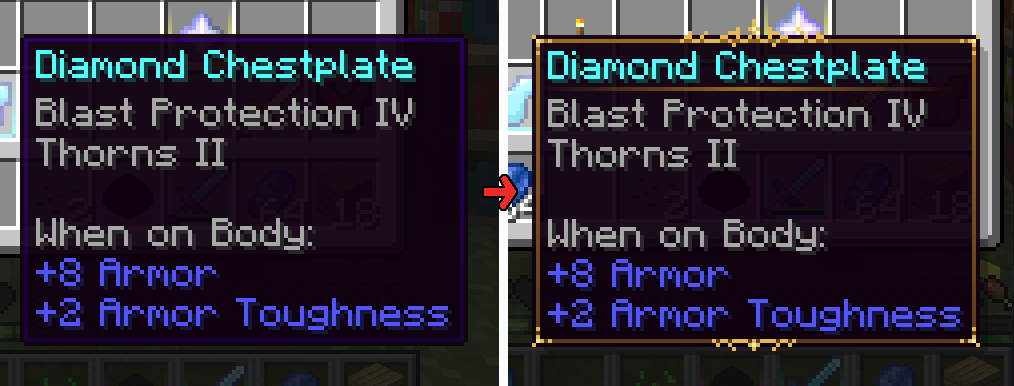
Before / After
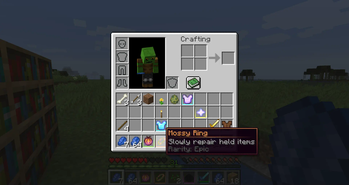
Try out the matching border color option.
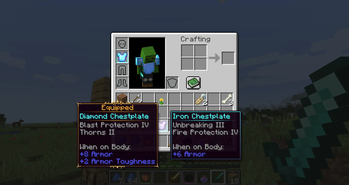
Integrates with Equipment Compare!
История
Версии проекта
Опубликованные версии и оригинальные файлы Modrinth.
v1.6.2.1ПоследняяRelease
18.08.2026 · 11 767 загрузки
Fabric26.2
Fixed crash on startup with newest JEI versions.
v1.6.1.1Release
18.08.2026 · 2 366 загрузки
Fabric26.126.1.126.1.2
Fixed crash on startup with newest JEI versions.
v1.6.0.1Release
18.08.2026 · 4 477 загрузки
Fabric1.21.11
Fixed crash on startup with newest JEI versions.
v1.6.2Release
30.06.2026 · 1 527 загрузки
Forge26.2
Initial 26.2 port
v1.6.2Release
30.06.2026 · 2 193 загрузки
Neoforge26.2
Initial 26.2 port
v1.6.2Release
30.06.2026 · 31 085 загрузки
Fabric26.2
Initial 26.2 port
v1.6.1Release
23.06.2026 · 909 загрузки
Forge26.126.1.126.1.2
Initial 26.1 port
v1.6.1Release
23.06.2026 · 1 678 загрузки
Neoforge26.126.1.126.1.2
Initial 26.1 port
v1.6.1Release
23.06.2026 · 12 979 загрузки
Fabric26.126.1.126.1.2
Initial 26.1 port
v1.6.0Release
21.05.2026 · 1 465 загрузки
Forge1.21.11
Initial 1.21.11 port (thank you Mat0u5).
v1.6.0Release
21.05.2026 · 1 785 загрузки
Neoforge1.21.11
Initial 1.21.11 port (thank you Mat0u5).
v1.6.0Release
21.05.2026 · 36 181 загрузки
Fabric1.21.11
Initial 1.21.11 port (thank you Mat0u5).
v1.5.5Release
08.04.2025 · 11 170 загрузки
Forge1.21.1
- Fixed an issue that could cause GUI elements to disappear when used in conjunction with Trash Slot mod.
- Added slight shading to the background of 3D item previews to help distinguish dark items.
- Fixed an issue that could cause 3D item previews to cut through tooltips.
v1.5.5Release
08.04.2025 · 433 937 загрузки
Neoforge1.21.1
- Fixed an issue that could cause GUI elements to disappear when used in conjunction with Trash Slot mod.
- Added slight shading to the background of 3D item previews to help distinguish dark items.
- Fixed an issue that could cause 3D item previews to cut through tooltips.
v1.5.5Release
08.04.2025 · 633 132 загрузки
Fabric1.21.1
- Fixed an issue that could cause GUI elements to disappear when used in conjunction with Trash Slot mod.
- Added slight shading to the background of 3D item previews to help distinguish dark items.
- Fixed an issue that could cause 3D item previews to cut through tooltips.
v1.5.4Release
07.04.2025 · 191 загрузки
Forge1.21.1
- Fixed a bug that could prevent some valid equipment items from showing 3D models when set to "EQUIPMENT" mode.
- Fixed more instances of broken overlapping tooltips.
v1.5.4Release
07.04.2025 · 604 загрузки
Neoforge1.21.1
- Fixed a bug that could prevent some valid equipment items from showing 3D models when set to "EQUIPMENT" mode.
- Fixed more instances of broken overlapping tooltips.
v1.5.4Release
07.04.2025 · 961 загрузки
Fabric1.21.1
- Fixed a bug that could prevent some valid equipment items from showing 3D models when set to "EQUIPMENT" mode.
- Fixed more instances of broken overlapping tooltips.
v1.5.3Release
03.04.2025 · 202 загрузки
Forge1.21.1
- Fixed incorrect attack damage displayed on tools when the "fixMC271840" option was enabled.
- Fixed a crash when installed with Shulker Box Tooltips mod.
- The "equipment" setting for displaying 3D item models now shows models for anything with the "c:tools" or "c:armors" tag, as well as anything with durability.
v1.5.3Release
03.04.2025 · 2 310 загрузки
Neoforge1.21.1
- Fixed incorrect attack damage displayed on tools when the "fixMC271840" option was enabled.
- Fixed a crash when installed with Shulker Box Tooltips mod.
- The "equipment" setting for displaying 3D item models now shows models for anything with the "c:tools" or "c:armors" tag, as well as anything with durability.
v1.5.3Release
03.04.2025 · 7 004 загрузки
Fabric1.21.1
- Fixed incorrect attack damage displayed on tools when the "fixMC271840" option was enabled.
- Fixed a crash when installed with Shulker Box Tooltips mod.
- The "equipment" setting for displaying 3D item models now shows models for anything with the "c:tools" or "c:armors" tag, as well as anything with durability.
v1.5.2Release
01.04.2025 · 223 загрузки
Forge1.21.1
- Added Ars Nouveau school tooltip compatibility.
- Fixed overlapping tooltips rendering improperly.
- Tooltip borders are now automatically disabled for modded items that mimic Legendary Tooltips functionality.
- Fixed tooltip spacing on tooltips with a 3D item preview.
- Compact tooltips option now compacts tooltips more reliably.
- Fixed title centering being off for tooltips with multiple title lines and a 3D item preview.
- Fixed incorrect vertical alignment on tooltips with multiple title lines.
- Fixed tooltips sometimes rendering incorrectly on modded screens provided by Titanium library.
- Improved compatibility with other mods that alter tooltip colors.
- Added a new configuration option to display name separators on all tooltips, instead of just item tooltips (enabled by default).
- Experimental: Added tooltip scrolling and tooltip max size options. (disabled by default)
v1.5.2Release
01.04.2025 · 1 799 загрузки
Neoforge1.21.1
- Added Ars Nouveau school tooltip compatibility.
- Fixed overlapping tooltips rendering improperly.
- Tooltip borders are now automatically disabled for modded items that mimic Legendary Tooltips functionality.
- Fixed tooltip spacing on tooltips with a 3D item preview.
- Compact tooltips option now compacts tooltips more reliably.
- Fixed title centering being off for tooltips with multiple title lines and a 3D item preview.
- Fixed incorrect vertical alignment on tooltips with multiple title lines.
- Fixed tooltips sometimes rendering incorrectly on modded screens provided by Titanium library.
- Improved compatibility with other mods that alter tooltip colors.
- Added a new configuration option to display name separators on all tooltips, instead of just item tooltips (enabled by default).
- Experimental: Added tooltip scrolling and tooltip max size options. (disabled by default)
v1.5.2Release
01.04.2025 · 1 402 загрузки
Fabric1.21.1
- Added Ars Nouveau school tooltip compatibility.
- Fixed overlapping tooltips rendering improperly.
- Tooltip borders are now automatically disabled for modded items that mimic Legendary Tooltips functionality.
- Fixed tooltip spacing on tooltips with a 3D item preview.
- Compact tooltips option now compacts tooltips more reliably.
- Fixed title centering being off for tooltips with multiple title lines and a 3D item preview.
- Fixed incorrect vertical alignment on tooltips with multiple title lines.
- Fixed tooltips sometimes rendering incorrectly on modded screens provided by Titanium library.
- Improved compatibility with other mods that alter tooltip colors.
- Added a new configuration option to display name separators on all tooltips, instead of just item tooltips (enabled by default).
- Experimental: Added tooltip scrolling and tooltip max size options. (disabled by default)
v1.5.1Release
07.02.2025 · 4 686 загрузки
Forge1.21.4
- Ported to 1.21.4.
- Added new config option "fix_mc271840" that applies a fix for MC-271840 (Displayed weapon damage does not take Sharpness into account).
v1.5.1Release
07.02.2025 · 3 796 загрузки
Neoforge1.21.4
- Ported to 1.21.4.
- Added new config option "fix_mc271840" that applies a fix for MC-271840 (Displayed weapon damage does not take Sharpness into account).
v1.5.1Release
07.02.2025 · 189 947 загрузки
Fabric1.21.4
- Ported to 1.21.4.
- Added new config option "fix_mc271840" that applies a fix for MC-271840 (Displayed weapon damage does not take Sharpness into account).
v1.5.0Release
17.12.2024 · 924 загрузки
Forge1.21.3
- Ported to 1.21.3.
- Added new options to frame_definitions.json to allow resizing frame components for resource-pack defined frames. (Thank you enso-x)
v1.5.0Release
17.12.2024 · 408 загрузки
Neoforge1.21.3
- Ported to 1.21.3.
- Added new options to frame_definitions.json to allow resizing frame components for resource-pack defined frames. (Thank you enso-x)
v1.5.0Release
17.12.2024 · 12 777 загрузки
Fabric1.21.3
- Ported to 1.21.3.
- Added new options to frame_definitions.json to allow resizing frame components for resource-pack defined frames. (Thank you enso-x)
v1.1.11Release
18.09.2024 · 113 841 загрузки
Forge1.12.2
- Fixed a bug where color code-specified item colors were sometimes not working.
- Fixed a bug where (non-color) formatting codes were overwriting rarity colors.
v1.3.4Release
24.08.2024 · 20 625 загрузки
Fabric1.19.2
- Fixed a bug that caused non-english languages to be parsed improperly in resource pack frame definitions.
v1.4.11Release
02.08.2024 · 55 102 загрузки
Neoforge1.211.21.1
- Prevented mod from loading when installed on dedicated servers.
v1.4.11Release
02.08.2024 · 6 600 загрузки
Forge1.211.21.1
- Prevented mod from loading when installed on dedicated servers.
v1.4.11Release
02.08.2024 · 461 108 загрузки
Fabric1.211.21.1
- Prevented mod from loading when installed on dedicated servers.
v1.4.10Release
30.07.2024 · 262 загрузки
Neoforge1.21
- Fixed a crash that could occur with JEI or REI when Equipment Compare was not installed.
- Fixed a rare crash in renderTick.
v1.4.10Release
30.07.2024 · 267 загрузки
Forge1.21
- Fixed a crash that could occur with JEI or REI when Equipment Compare was not installed.
- Fixed a rare crash in renderTick.
v1.4.10Release
30.07.2024 · 5 345 загрузки
Fabric1.21
- Fixed a crash that could occur with JEI or REI when Equipment Compare was not installed.
- Fixed a rare crash in renderTick.
v1.4.8Release
28.07.2024 · 206 загрузки
Neoforge1.21
- Updated to support new Iceberg services API.
v1.4.8Release
28.07.2024 · 180 загрузки
Forge1.21
- Updated to support new Iceberg services API.
v1.4.8Release
28.07.2024 · 2 509 загрузки
Fabric1.21
- Updated to support new Iceberg services API.
v1.4.7Release
27.07.2024 · 175 загрузки
Neoforge1.21
- Initial Minecraft 1.21 port.
- First ever NeoForge release.
- Fixed a bug that could cause the title separator line to appear in the wrong location.
v1.4.7Release
27.07.2024 · 197 загрузки
Forge1.21
- Initial Minecraft 1.21 port.
- Fixed a bug that could cause the title separator line to appear in the wrong location.
v1.4.7Release
27.07.2024 · 2 138 загрузки
Fabric1.21
- Initial Minecraft 1.21 port.
- Fixed a bug that could cause the title separator line to appear in the wrong location.
v1.4.6Release
22.05.2024 · 2 804 загрузки
Forge1.20.6
- Added support for Minecraft 1.20.6.
v1.4.6Release
14.05.2024 · 36 195 загрузки
Fabric1.20.51.20.6
- Added support for Minecraft 1.20.5 / 1.20.6.
v1.4.5Release
23.04.2024 · 2 331 012 загрузки
Fabric1.201.20.1
- Fixed a bug that could cause crashes when installed on dedicated servers. (Which is not needed for the mod to function.)
- Fixed log spam issue with REI.
v1.4.5Release
08.12.2023 · 213 824 загрузки
Fabric1.20.21.20.4
- Ported to 1.20.2.
v1.4.5Release
01.12.2023 · 12 363 загрузки
Forge1.20.21.20.4
- Ported to 1.20.2.
- Fixed a bug that could cause crashes when installed on dedicated servers. (Which is not needed for the mod to function.)
v1.4.5Release
24.07.2023 · 2 548 060 загрузки
Forge1.201.20.1
- Fixed conflict with Optifine that caused tooltips to be invisible.
v1.4.4Release
18.07.2023 · 1 622 776 загрузки
Fabric1.201.20.1
- Added support for Minecraft 1.20.
v1.4.4Release
18.07.2023 · 1 596 загрузки
Forge1.201.20.1
- Added support for Minecraft 1.20.
- Fixed a bug that could prevent data-defined borders from updating when the resource pack that provides them changes.
- Fixed a conflict with TooltipFix that could cause titles from not being centered properly.
v1.4.3Release
12.07.2023 · 5 258 загрузки
Fabric1.20.1
- First 1.20.1 release.
v1.4.2Release
12.07.2023 · 6 724 загрузки
Forge1.20.1
- First 1.20.1 release.
v1.4.3Release
01.05.2023 · 20 117 загрузки
Fabric1.19.4
- Fixed an incompatibility with TooltipFix that could cause wrapped tooltips to have incorrectly centered titles.
v1.4.2Release
17.04.2023 · 5 741 загрузки
Forge1.19.4
1.4.2
- First Minecraft 1.19.4 release.
- Added configuration option to set rotation speed of 3D item previews.
- Slightly increased default rotation speed.
1.4.1
- Fixed a bug that could cause non-item tooltips to try to show an item model when item previews were set to ALL.
v1.4.2Release
17.04.2023 · 1 648 загрузки
Fabric1.19.4
- First Minecraft 1.19.4 release.
- Added configuration option to set rotation speed of 3D item previews.
- Slightly increased default rotation speed.
v1.1.9Release
28.01.2023 · 52 146 загрузки
Forge1.12.2
- Fixed crash when mod was installed on servers.
- Added new configuration options:
shineRepeat- If enabled, the shine effect on tooltips will continuously repeat.shineSync- If enabled, the horizontal and vertical shine effects will play at the same time.shineTicks- The speed at which the shine effect will play.- Fixed a bug causing the shine effect to tick twice as fast as intended.
- Fixed a bug causing the shine effect to not show on Equipment Compare comparison tooltips.
- Thanks to Shivaxi and fonnymunkey for this update!
v1.4.1Release
15.01.2023 · 16 838 загрузки
Fabric1.19.3
1.4.1
- Fixed a bug that could cause non-item tooltips to try to show an item model when item previews were set to ALL.
1.4.0
- Added new option to display 3D item previews inside of tooltips.
- This option can be set to "none", "all", or "equipment" to determine which items will show previews. The equipment option will show previews for all items with durability.
-
Previews displayed will be the equipped model for armor/horse armor and tools/weapons, the full block entity model for block entities, entity model for minecarts/boats, and item model for everything else.
-
Added new option to "compact" tooltips, which removes the "When held in main hand" and similar text, resulting in smaller tooltips for equipped items.
- Fixed a bug that caused tooltip shine animation to play at a faster speed when playing at high FPS.
v1.4.0Release
29.12.2022 · 1 514 загрузки
Forge1.19.3
1.4.0
- Added new option to display 3D item previews inside of tooltips.
- This option can be set to "none", "all", or "equipment" to determine which items will show previews. The equipment option will show previews for all items with durability.
- Previews displayed will be the equipped model for armor/horse armor and tools/weapons, the full block entity model for block entities, entity model for minecarts/boats, and item model for everything else.
- Added new option to "compact" tooltips, which removes the "When held in main hand" and similar text, resulting in smaller tooltips for equipped items.
- Fixed a bug that caused tooltip shine animation to play at a faster speed when playing at high FPS.
- Added support for Minecraft 1.19.3.
v1.3.3Release
15.11.2022 · 13 132 загрузки
Fabric1.18.2
- Added missing Prism dependency.
v1.3.3Release
15.11.2022 · 562 815 загрузки
Fabric1.191.19.11.19.2
1.3.3
* Added missing Prism dependency.
1.3.2
* Fixed a bug that could prevent resources from reloading properly.
1.3.1
* Fixed a bug that caused data-defined custom frames to persist after frame definitions files were removed.
* Fixed a bug that sometimes caused separator lines under item titles to not render.
* Fixed a bug that caused legacy configuration conversion to fail.
1.3.0
* All color handling is now handled by Prism library.
- Now supports web colors for easier color definitions.
- Now supports animated colors for both borders and backgrounds.
- Now supports automatic border colors, which is the new default. This means any border images can have automatically determined border and background colors that match the image.
* The color section in the configuration file is now in a more compact format. Configuration files in the old format will be automatically converted.
* Both start and end background colors can now be specified separately.
v1.3.1Release
15.11.2022 · 83 726 загрузки
Forge1.16.5
1.3.1
* Fixed a bug that caused data-defined custom frames to persist after frame definitions files were removed.
* Fixed a bug that sometimes caused separator lines under item titles to not render.
* Fixed a bug that caused legacy configuration conversion to fail.
1.3.0
* All color handling is now handled by Prism library.
- Now supports web colors for easier color definitions.
- Now supports animated colors for both borders and backgrounds.
- Now supports automatic border colors, which is the new default. This means any border images can have automatically determined border and background colors that match the image.
* The color section in the configuration file is now in a more compact format. Configuration files in the old format will be automatically converted.
* Both start and end background colors can now be specified separately.
1.2.5
* Fixed a bug that caused excessive configuration file backups.
* First Forge 1.19 release.
1.2.4
* Fixed a bug that caused a file not found error on startup on Fabric.
* Fixed typo causing mod version string to be incorrect on Forge.
1.2.3
* Fixed a bug with non-square tooltip border textures.
* Added blacklist configuration option.
1.2.2
* Fixed a bug that prevented resource pack frame definitions files from beings loaded on Fabric.
* Fixed a bug that prevented configuration file changes from being detected while in game on Fabric.
1.2.1
* Fixed a crash bug that could occur when then "borders match rarity" option was disabled.
* Fixed a graphical glitch that could occur when custom borders are specified with a non-default texture size.
1.2.0
Configuration Improvements
- Added documentation block to top of config file.
- Reordered config file to follow a more logical order.
- Tooltip background colors can now be configured.
- All color values can now be optionally specified as strings (color names or hex codes).
New Features
- Added tooltip title centering option, which is on by default.
- Added minimum width enforcement option, which is off by default.
- Added new custom frame definition functionality for mod-defined borders.
- Mod authors can use this code-based method to add any number of entirely custom borders to items.
- Added new custom frame definition functionality that can be included in resource packs.
- Mod authors or resource pack authors can use this data-based method to add any number of entirely custom borders to items.
Bug Fixes
- Fixed a bug where tooltip shadows would not match the height of Equipment Compare comparison tooltips.
- Fixed a crash bug caused by certain tooltip border colors.
- Fixed a bug where creative inventory tab tooltips would render separators outside of the tooltip.
- Fixed a bug where separators would sometimes draw in the wrong place when comparing items with Equipment Compare.
v1.3.1Release
15.11.2022 · 393 891 загрузки
Forge1.18.2
- Fixed a crash that could occur when trying to display some modded tooltip components.
v1.3.1Release
15.11.2022 · 120 034 загрузки
Forge1.191.19.11.19.2
- Fixed a crash that could occur when trying to display some modded tooltip components.
Листайте товары колесом или стрелками