

Товар
О товаре
Custom Damage Overlay Color
This resource pack allows to change overlay color of all entities when they take damage. By defult this resource pack changes it to green, as an example.
Versions: 1.17 — 1.21.11
Works with both Optifine and Sodium.
How to change the color
Go into the resource pack and open a file assets/minecraft/shaders/include/change_damage_overlay.glsl, choose a color and put it into the second line of the file. For example if you want to change the color to purple (#AA00FF) with 50% transparency, the second line of the file would look like this:
vec4 RGBColor = vec4(170,0,255,127);
And if you want cyan (#00FFFF) color with the same transparency as in vanilla, it would look like this:
vec4 RGBColor = vec4(0,255,255,178);
Превью
Изображения товара
Окружение
Требования и совместимость
Совместимость и требования
MinecraftVanilla1.17 – 1.21.11
Локальный хост
Required
Хостинг на сервисах
Unsupported
Условия
Лицензия
Условия использования, изменения и распространения этого товара.
MIT LicenseModrinth
Релиз
Последний релиз
v1.2
02.01.2026 · Modrinth
Tested in 1.21.11
Галерея
Изображения проекта
Скриншоты и изображения из оригинальной страницы Modrinth.
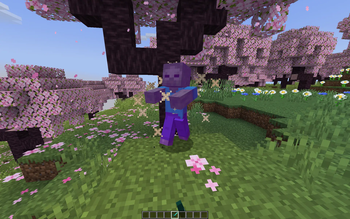
Color changed to purple
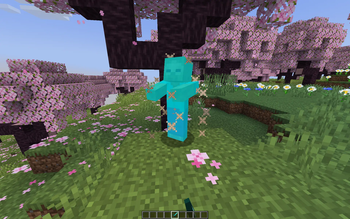
Color changed to cyan with less transparency
История
Версии проекта
Опубликованные версии и оригинальные файлы Modrinth.
v1.2ПоследняяRelease
02.01.2026 · 9 125 загрузки
Minecraft1.20.21.20.31.20.41.20.51.20.61.211.21.11.21.2
Tested in 1.21.11
v1.1Release
13.09.2025 · 2 431 загрузки
Minecraft1.20.21.20.31.20.41.20.51.20.61.211.21.11.21.2
Updated to support 1.21.6-1.21.8
v1.0Release
21.09.2024 · 1 892 загрузки
Minecraft1.171.17.1
For 1.17 — 1.17.1
v1.0Release
21.09.2024 · 1 781 загрузки
Minecraft1.181.18.11.18.21.191.19.11.19.21.19.31.19.4
For 1.18 — 1.20.1
v1.0Release
21.09.2024 · 7 474 загрузки
MinecraftVanilla1.20.21.20.31.20.41.20.51.20.61.211.21.11.21.2
For 1.20.2 — 1.21.4
Листайте товары колесом или стрелками