

Product
About

Easily show all your points of interest on your server's Pl3xMap without running a single command.
Added markers
- Open Parties and Claims claimed chunks
- Shopkeepers shops
- Player made areas
- Nether Portals
- End Portals
- End Gateways
- Lightning strikes
- Beacons
- Signs
- Cross-dimensional players
All without the need for any commands and all fully configurable
How to -
Make an area 1. Get a lodestone and a banner (all the same color) for all corners of your area. 2. Give all banners the name of your area in an anvil. 3. Place a lodestone with one of the banners on top on every corner. 4. Admire your area on the web map. - An area can have a max distance of 512 blocks between its furthest points. - The names on the banners need to be an exact match. - The placement order does not matter, the points will be connected automatically. - You can add or remove points as you wish, the area will adapt. - 2 points in a straight line create a circle. - 2 points not in a straight line create a rectangle. Add a portal marker 1. Go through a portal. 2. Admire your portal on the web map. Add a beacon marker 1. Place a beacon. 2. Activate the beacon. 3. Admire your b~~e~~acon on the web map. Add a sign marker 1. Place a sign on top of a lodestone. 2. Write some text on your sign. 3. Admire your sign on the web map.FAQ
Q: The layers are not showing up on my web map, what do I do?
A: You most likely use custom names for your worlds. Make sure they use the correct suffix structure: {worldname}, {worldname}_nether, {worldname}_the_end
Q: Why are some points not showing up?
A: Areas are made out of the outermost points. If you have points inside the area they will not be used. Or the points are too far apart from the center.
Q: Can I customize area labels?
A: Yes! Area names support basic HTML tags such as <b>, <i>, <u>, <br>, and <span style="color: #RRGGBB;"> {text} </span>.
Q: Why is my area a small triangle?
A: You either have too few points (minimum 3) or your points are too far apart.
Q: How to reload the config?
A: Pl3xMarkers listens to Pl3xMap's reload, so you can reload using /pl3xmap reload
Demo
The Pl3xMarkers mod started out as Helix Markers, for my server; Helix Survival
You can check its webmap at https://map.hexasis.eu/
Preview
Product images
Environment
Requirements & compatibility
Compatibility & requirements
FabricFoliaPaperPurpurQuilt1.21.7 – 1.21.81.21.10 – 1.21.1126.1.226.2
Local host
Unsupported
Hosting on services
Required
Terms
License
Terms for using, modifying and redistributing this product.
Apache License 2.0Modrinth
Release
Latest release
v0.8.3+26.2
13.08.2026 · Modrinth
Folia Compat
- Adapted the plugin to be allowed to be used on a Folia server
Gallery
Project images
Screenshots and images from the original Modrinth page.
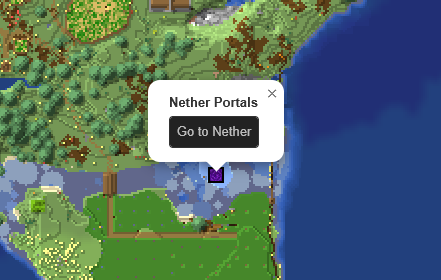
Nether Portal in the Overworld

Nether Portal in The Nether
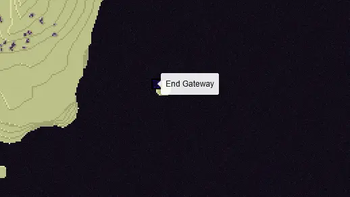
End Gateway in The End

End Portal in the Overworld

An area in the Overworld

Beacon in the Overworld
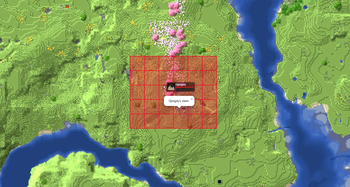
OPAC claimed chunks in the Overworld

Shopkeepers Players Shop

Shopkeepers Admin Shop
History
Project versions
Published versions and original Modrinth files.
v0.8.3+26.2LatestAlpha
13.08.2026 · 129 downloads
FabricFoliaPaperPurpurQuilt26.2
Folia Compat
- Adapted the plugin to be allowed to be used on a Folia server
v0.8.2+26.2Beta
08.08.2026 · 76 downloads
FabricFoliaPaperPurpurQuilt26.2
Shattering Discovery
- Fixed Nether Portals markers being incorrectly created on Paper causing them to not be removed on break.
- Recommended to manually remove all portals with a Y-coordinate of 0 in
plugins/Pl3xMarkers/[world]/nether_portals.json
- Recommended to manually remove all portals with a Y-coordinate of 0 in
v0.8.1+26.2Beta
22.07.2026 · 102 downloads
FabricFoliaPaperPurpurQuilt26.2
Cross-Dimensional
- Show players in the nether transparently on the overworld map and vice-versa
- Fixed area points not being removed when lodestone broken instead of banner
- Fixed area points not being removed on being exploded
- Added config option for nether portal naming and showing
- Do not change marker name if new name is the same
v0.8.0+26.2Beta
12.07.2026 · 86 downloads
FabricFoliaPaperPurpurQuilt26.2
Mark Your Sulfur Caves
- Removed storage migration (if updating from a version older than 0.7.0, first update to 0.7.1 - 0.7.5, then update to 0.8.0)
- Cleaned up back-end code to make using this mod easier to use as library for other mods
- Added handling of areas with only 2 points (see mod description changes)
- Added naming of Nether Portals with Name Tags
- Updated to 26.2
v0.7.5+26.2Beta
12.07.2026 · 13 downloads
FabricFoliaPaperPurpurQuilt26.2
Mark Your Sulfur Caves
- Updated to 26.2
v0.7.5+26.1.2Beta
29.06.2026 · 126 downloads
FabricFoliaPaperPurpurQuilt26.1.2
World Handling
- Fixed a bug in world handling causing error spam in the console
v0.7.4+26.1.2Beta
31.05.2026 · 213 downloads
FabricFoliaPaperPurpurQuilt26.1.2
Portal Destination Error
- Fixed a crash occurring when going through a portal with an invalid destination.
v0.7.3+26.1.2Beta
17.05.2026 · 93 downloads
FabricFoliaPaperPurpurQuilt26.1.2
Permanent Tooltips and Cleaner Claims
- Added a new look for tooltips, which are always visible and look more like vanilla map markers.
- This is a config option per marker type, so you can disable it if you prefer the old style.
- Added logic to OPAC claims to merge connected chunks into single visible claims.
- At this moment in time chunks creating hollow areas are shown as an 'outer' and 'inner' claim.
v0.7.2+26.1.2Beta
16.05.2026 · 26 downloads
FabricFoliaPaperPurpurQuilt26.1.2
Bug Fixes
- Fixed sign markers not being removed correctly when the sign is broken.
- Fixed migration happening on every start-up creating a lot of folders.
- Fixed a crash caused by disabling some of the marker layers.
- Fixed feedback sounds not playing on Fabric.
v0.7.1+26.1.2Beta
13.05.2026 · 44 downloads
FabricFoliaPaperPurpurQuilt26.1.2
Fixes and Automatic Migration
- Fixed an issue where disabling areas would crash the server on a player joining.
- Added automatic migration; if you are coming from a version between 0.5.0 and 0.7.0, all markers will automatically be
converted to the new storage system.- The old system did not store the Y-coordinate of markers, passive markers as Nether Portals and Beacons will
update these automatically, but things like areas and signs have to be edited to update. - This migration will be removed in the 1.0 release, so if you are still on a version before 0.7.0, please update as
soon as possible to avoid losing data.
- The old system did not store the Y-coordinate of markers, passive markers as Nether Portals and Beacons will
v0.7.0+26.1.2Alpha
10.05.2026 · 32 downloads
FabricFoliaPaperPurpurQuilt26.1.2
26.1.2 And New Storage System
- Updated the mod to 26.1.2
- Rewrote a large portion of the mod to use a cleaner storage system.
- This storage system is definitely experimental in implementation, but the file structure shouldn't change anymore
towards 1.0 - As of now, there is no automatic migration if you're coming from an older version, this will come in the beta
release
- This storage system is definitely experimental in implementation, but the file structure shouldn't change anymore
v0.6.7+1.21.11Beta
16.03.2026 · 418 downloads
FabricFoliaPaperPurpurQuilt1.21.11
Live Lightning Strike markers
- Added a lightning strike marker on the web map which appears for 3 seconds where a lightning strike occurs in the
world.- This works for natural lightning strikes and those caused by players using a Channeling trident and other mods
or plugins.
- This works for natural lightning strikes and those caused by players using a Channeling trident and other mods
v0.6.6+1.21.11Beta
14.02.2026 · 181 downloads
FabricFoliaPaperPurpurQuilt1.21.11
Signs fixes and config
- Fixed wall signs being added as markers when placed on top of a lodestone
- Remove markers when a sign is (made) empty
- Added a config option to fill in all lines of a sign pop-up
v0.6.5+1.21.11Beta
23.01.2026 · 108 downloads
FabricFoliaPaperPurpurQuilt1.21.11
Signs Config Fix
- Fixed signs and end gateway markers config settings being merged
v0.6.4+1.21.11Beta
23.01.2026 · 27 downloads
FabricFoliaPaperPurpurQuilt1.21.11
Shopkeepers compat
- Added support for Shopkeepers (Paper only) shops as markers on the web
map.
v0.6.3+1.21.11Beta
22.01.2026 · 34 downloads
FabricFoliaPaperPurpurQuilt1.21.11
Signs and pings
- Added sign markers - place a sign on a lodestone, and it will show up on the map.
- Fixed action bar messages showing up from portals that already have markers.
v0.6.2+1.21.11Beta
02.01.2026 · 96 downloads
FabricFoliaPaperPurpurQuilt1.21.11
Entry and exit update
- Added an action bar message when entering and exiting areas.
v0.6.1+1.21.11Beta
01.01.2026 · 29 downloads
FabricFoliaPaperPurpurQuilt1.21.11
1.21.11 stability update
- Added an optional area size label to area popups (this is off by default, enable it in the config)
- Fixed config not generating correctly on Fabric
- Updated to Pl3xMap public version
v0.6.0-snapshot+1.21.11Alpha
31.12.2025 · 55 downloads
FabricFoliaPaperPurpurQuilt1.21.11
Updated to 1.21.11
- Updated to Minecraft 1.21.11.
v0.6.0+1.21.10Beta
01.11.2025 · 276 downloads
FabricFoliaPaperPurpurQuilt1.21.10
Open Parties And Claims compatibility
- Added compatibility with Open Parties and Claims, showing claimed chunks on the map with their respective colors and names.
- OPAC is a Fabric (and Forge) mod, meaning this feature is only available for Fabric.
v0.5.1+1.21.10Beta
31.10.2025 · 28 downloads
FabricFoliaPaperPurpurQuilt1.21.10
Paper storage fix
- Fixed the save file location on Paper.
!! Warning !!
Files should be moved automatically, but in case it doesn't work,
please move the files manually from 'config/pl3xmarkers' to 'plugins/Pl3xMarkers'
v0.5.0+1.21.10Beta
28.10.2025 · 30 downloads
FabricFoliaPaperPurpurQuilt1.21.10
Major rewrite and cleanup
- Changed storage to use JSON instead of SQLite
- Added a config with options to toggle layers and change options like max area size and layer priority
- The config can be reloaded alongside Pl3xMap using the
/pl3xmap reloadcommand - Added feedback in the form of action messages and sounds when placing/removing markers or points
!! Warning !!
This storage rewrite is not backwards compatible with previous versions of the plugin.
All existing markers and areas will be lost upon updating to this version.
v0.4.4+1.21.10Beta
18.10.2025 · 86 downloads
FabricFoliaPaperPurpurQuilt1.21.10
Area fixes and improvements.
- Fixed an error causing the first point of an area to not be registered.
- Reworked the algorithm for calculating area boundaries to improve consistency.
- Areas are now limited to a max diameter of 512 blocks instead of 128 blocks between points.
v0.4.3+1.21.10Alpha
17.10.2025 · 29 downloads
FabricFoliaPaperPurpurQuilt1.21.10
Some area changes
- Fixed strokes not rendering around areas.
- Added HTML sanitization to prevent stuff like iframes in area labels...
v0.4.2+1.21.10Alpha
17.10.2025 · 31 downloads
FabricFoliaPaperPurpurQuilt1.21.10
Bug fixes
- Fixed the error on unloading chunks with beacons.
- Changed registration logic for layers and icons to prevent race conditions.
- Added Pl3xMap as dependency on bukkit to prevent other issues.
v0.4.1+1.21.10Alpha
17.10.2025 · 21 downloads
FabricFoliaPaperPurpurQuilt1.21.10
Custom World names support
Updated the logic for layers and portals to support custom world names.
This means that if your world is named "MyWorld", the mod will now correctly identify "MyWorld", "MyWorld_nether", and "MyWorld_the_end".
v0.4.0+1.21.10Alpha
17.10.2025 · 31 downloads
FabricFoliaPaperPurpurQuilt1.21.10
Spigot implementation
Added support for spigot servers using the same technique as Pl3xMap.
v0.3.1+1.21.10Beta
13.10.2025 · 40 downloads
Fabric1.21.10
Updated to 1.21.10 release
Changed the dependency of Pl3xMap to the official 1.21.10 release.
v0.3.1-snapshot+1.21.10Alpha
12.10.2025 · 21 downloads
Fabric1.21.10
Updated to 1.21.10
This version is based on Pl3xMap 1.21.10-snapshot, which can be found on Github.
v0.3.1+1.21.7Beta
29.08.2025 · 112 downloads
Fabric1.21.71.21.8
Fixed a start-up issue
Scroll products with the wheel or arrows