

Maxi's JourneyMap Cobblemon Minimap Icons
vU11
Modrinth
•
131 followers
•
366 897 downloads
by
Maxitotito
Adds entity icons of Pokémon found in the Cobblemon Mod to JourneyMap in Pixel or Shuffle style!
Product
About

No matter the dimension nor form (regional, normal & shiny), you will see your Pokémon!
This resource pack adds entity icons of Pokémon found in the Cobblemon Mod to JourneyMap' minimap and fullscreen map, in pixel-art style. Supports up-to-date Cobblemon version.

- JourneyMap version 5.9.5 or newer

 |
 |
|---|---|
| Pixel Icons & Shinier Shinies: For those who want an old style and also want to spot Shinies slightly easier. | Shuffle Icons: For those who want a fun style while searching for those Pokémon. |

- Download the JourneyMap+Cobblemon.zip.
- Put it inside the folder resourcepacks of your Minecraft installation. An easy way to access this folder is via the ingame Options → Resource Packs, and click the bottom left button (Open Pack Folder).
- Select the JourneyMap+Cobblemon resourse pack from the available packs ingame (Options → Resource Packs).
- Click Done.
- On JourneyMap Options, both minimap Preset and Fullscreen map, set Mob Display to Icons.

-
I can't see any Pokémon on my map
For you to see Pokémon on your minimap/fullscreen map, you have to set Mob Display to Icons in your JourneyMap options. You have to set this for both presets and fullscreen map options.

-
I've set Mob Display to Icons but I still can't see any Pokémon
You have to make sure to, at least, have the version 5.9.5 of JourneyMap for the resourcepack to work. -
I have the correct JM version but I still don't see my Pokémon
Remember to Select (move to the right column) the correct resourcepack from your Available list on your game Options → Resource Packs. -
How can I make the icons bigger?
Just as seen above, aside from the Mob Display option is Mob Display Scale, you can set this number to your preference. Remember to set this number on the preset you will be using and/or on the fullscreen map.
Check out my other projects!
Preview
Product images
Environment
Requirements & compatibility
Compatibility & requirements
Minecraft1.19.21.20.11.21.1
Local host
Required
Hosting on services
Unsupported
Terms
License
Terms for using, modifying and redistributing this product.
Mozilla Public License 2.0Modrinth
Release
Latest release
vU11
21.03.2026 · Modrinth
Update 11: FullDex 1.0
General Notes
- Added support for whole Pokédex mons.
- Tested on
journeymap-fabric-1.21.1-6.0.0-beta.56.
Specific Notes
- Whole Pokédex support has generic naming on their files, it may be that in future updates the names of the mons change, in which case I will update the pack to match those new names.
- Removed fakemon counterparts for now officially supported mons.
Pixel Version
- Pokémon size standarized (this was something bugging me since ages...
Gallery
Project images
Screenshots and images from the original Modrinth page.
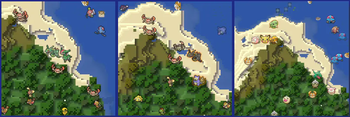
3 versions!
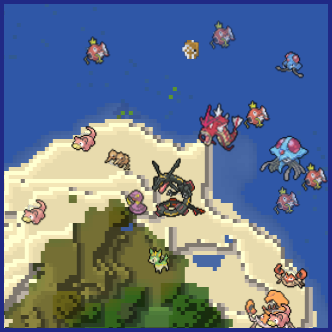
Shiny Cobblemon on Minimap
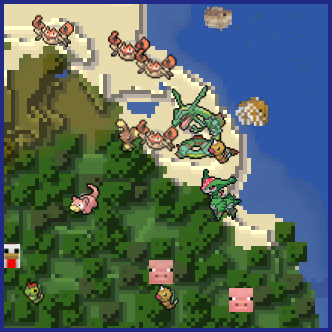
Cobblemon Icons on Minimap
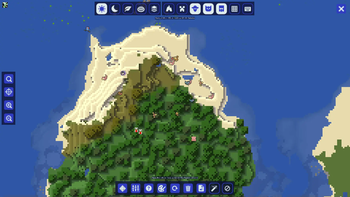
Cobblemon Icons on Fullscreen Map


History
Project versions
Published versions and original Modrinth files.
vU11LatestRelease
21.03.2026 · 49 320 downloads
Minecraft1.21.1
Update 11: FullDex 1.0
General Notes
- Added support for whole Pokédex mons.
- Tested on
journeymap-fabric-1.21.1-6.0.0-beta.56.
Specific Notes
- Whole Pokédex support has generic naming on their files, it may be that in future updates the names of the mons change, in which case I will update the pack to match those new names.
- Removed fakemon counterparts for now officially supported mons.
Pixel Version
- Pokémon size standarized (this was something bugging me since ages 🙀)
Shuffle Version
- I will release the FullDex version of Shuffle when I fix some errors I'm having 😫
Please report any missing mons or problem on Discord!
vU10Release
13.02.2026 · 8 886 downloads
Minecraft1.21.1
Update 10
General Notes
- Tested on
journeymap-fabric-1.21.1-6.0.0-beta.54.
Specific Notes
- Added
AllTheMons x Mega Showdown [v3.3.0]datapack support for Pixel Art version.
Pixel Version
- 1.7.3 Cobblemon version support.
Shuffle Version
- Yes, you guessed it, I'm working on it 🙈
Known Issues
- Nothing aside from Spiritomb Shiny not showing its Shiny icon on the minimap.
Please report any missing mons or problem on Discord!
vU9Release
07.02.2026 · 24 267 downloads
Minecraft1.21.1
Update 9
General Additions
- Added Cobblemon 1.7.3 compatibility for Pixel Version.
- Tested on
journeymap-fabric-1.21.1-6.0.0-beta.54.
Specific Additions
- Added
[COBBLEMON] Eternal Floettedatapack support for Pixel Art version.
Pixel Version
- Now works with 1.7.3 Cobblemon!
Shuffle Version
- Working on it I swear!
Known Issues
- Spiritomb Shiny does not have a Shiny form per-se (it is an emissive), so it is not shown as Shiny in the map.
Please report any missing mons or problem on Discord!
vU8Release
26.11.2025 · 39 817 downloads
Minecraft1.21.1
Update 8
General Additions
- Added Cobblemon 1.7.1 compatibility for Pixel Version.
- Tested on
journeymap-fabric-1.21.1-6.0.0-beta.52.
Specific Additions
- None.
Pixel Version
- Now works with 1.7.1 Cobblemon!
Shuffle Version
- Still working on the version overhaul, please wait for it 😿
Known Issues
- Spiritomb Shiny does not have a Shiny form per-se (it is an emissive), so it is not shown as Shiny in the map.
Please report any missing mons or problem on Discord!
vU7Release
15.06.2025 · 44 340 downloads
Minecraft1.21.1
Update 7
General Additions
- Added
AllTheMons 2.3,MysticMons_v3.2.1datapacks compatibility for Pixel Version.
Specific Additions
Pixel Version
- Adjusted old sprites to ensure consistency for most icons.
Shuffle Version
- I'm planning to overhaul whole Suffle Version so no Update 7 planned for this one, so as an user of this version myself, sorry for the trouble 😿
Known Issues
- Spiritomb Shiny does not have a Shiny form per-se (it is an emissive), so it is not shown as Shiny in the map.
Please report any missing mons or problem on Discord!
v6_PixelRelease
28.01.2025 · 63 082 downloads
Minecraft1.21.1
Pixel Version
- Added up to 1.6.1 Cobblemon version Pokémon!
- Fully working and tested on
journeymap-fabric-1.21.1-6.0.0-beta.37
Please report any missing mons or problem on Discord!
v6_ShuffleRelease
28.01.2025 · 6 695 downloads
Minecraft1.21.1
Shuffle Version
- Added up to 1.6.1 Cobblemon version Pokémon!
- Fully working and tested on
journeymap-fabric-1.21.1-6.0.0-beta.37
Please report any missing mons or problem on Discord!
v5_PixelSShiniesRelease
02.01.2025 · 7 721 downloads
Minecraft1.21.1
Pixel + Shinier Shinies Version
Shinier Shinies: Offers visual help for Shiny Pokémon in the minimap.
- Added up to 1.6.0 Cobblemon version Pokémon!
- Fully working and tested on
journeymap-fabric-1.21.1-6.0.0-beta.32
Please report any missing mons or problem on Discord!
v5_ShuffleRelease
01.01.2025 · 829 downloads
Minecraft1.21.1
Shuffle Version:
- Added 1.6.0 Cobblemon Pokémon!
- Fully working and tested on
journeymap-fabric-1.21.1-6.0.0-beta.32
Please report any missing mons on Discord!
v4_ShuffleRelease
15.05.2024 · 44 150 downloads
Minecraft1.20.1
Shuffle version:
- Added Cobblemon 1.5 mons!
- Tested on
journeymap-1.20.1-5.9.21-fabric
Please report any missing mon or problem!
v3_ShuffleRelease
23.12.2023 · 6 740 downloads
Minecraft1.20.1
Shuffle version:
- Added support for Cobblemon 1.4.1 Pokémon: Drifloon, Drifblim, Litwick, Lampent, Chandelure, Zubat (yes, Zubat)
v3_PixelSShiniesRelease
23.12.2023 · 43 359 downloads
Minecraft1.20.1
Shinier Shinies version:
- Added support for Cobblemon 1.4.1 Pokémon: Drifloon, Drifblim, Litwick, Lampent, Chandelure, Zubat (yes, Zubat)
v1.2_ShuffleRelease
31.10.2023 · 4 020 downloads
Minecraft1.20.1
- Added support for Cobblemon 1.4 Pokémon.
- Added placeholder icons for Pokémon unique to the mod, more info about those can be found here: Pokémon/Unique Forms.
- Due to the unavailability of some shiny icons on newer generations, some Pokémon uses their normal icon with shiny glow instead.
Known issues:
<ul>
<li>Spiritomb uses its normal icon while in shiny form, this is due to Cobblemon way of handling this Pokémon's forms.</li>
</ul>
v1.2_PixelShinierRelease
20.10.2023 · 5 955 downloads
Minecraft1.20.1
Shinier Shinies version:
- Added support for Cobblemon 1.4 Pokémon.
- Added substitute (finally!) icon files.
Hotfixes (file replaced):
- 2023-10-21: Added missing Ponyta icons.
- 2023-10-27: Added missing Exeggcute & Exeggutor icons.
- 2023-10-29: Added missing Meowth, Persian & Raichu icons.
- 2023-10-30: Added missing Pikachu, Rapidash, Farfetchd, Wooper, [PH] Forretress, [PH] Milktank & [PH] Torterra icons.
[PH] stands as placeholder for Unique Forms with no custom icons available at the moment.
v1.1_ShuffleRelease
23.04.2023 · 4 276 downloads
Minecraft1.19.2
- Initial release of Shuffle version.
- Special thanks to HauntedCactus for letting me use their GEN9 icons.
- Minimap suggested Mob Display Scale: 0.85~1.0. Since these Poké Icons are larger than MC Mobs, you will still see them larger than those vanilla creatures.
- Display Scale suggested up to 1.5 to avoid losing too much detail.
- Since it's harder to differentiate shiny Pokémon on some cases using Suffle Icons, I've included the ShinierShinies aura to this Shuffle version. Also included for those who didn't have an original Shuffle shiny form, too.
v1.1_PixelShinierShiniesRelease
10.04.2023 · 10 768 downloads
Minecraft1.19.2
- Including everything in JM+Cobblemon1.3.2 version, this iteration adds an aura effect on every shiny in the minimap, making spotting and differentiating those Pokémon variants slightly easier!

v1.1_PixelRelease
10.04.2023 · 1 738 downloads
Minecraft1.19.2
- Added Torterra variety tree icons, including their (non-alt) shiny forms (original icons by MBCMechachu, thank you :D).
- Changed large icons for overall icon size consistency.
- Made a Shinier Shinies version to spot Shiny Pokémon slightly easier on your map. You can download this version here.
v1.0Release
04.04.2023 · 989 downloads
Minecraft1.19.2
- Initial release
- Includes every icon for the Pokémon currently available in Cobblemon v1.3.2 for Minecraft 1.19.2
Scroll products with the wheel or arrows