
EN 🌐
# ABOUT:
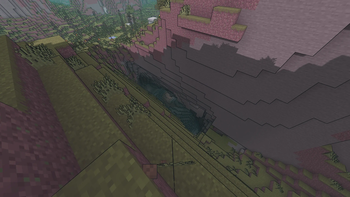
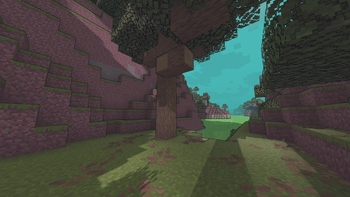
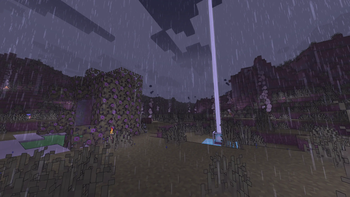
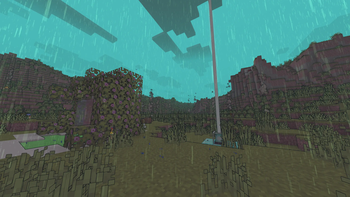
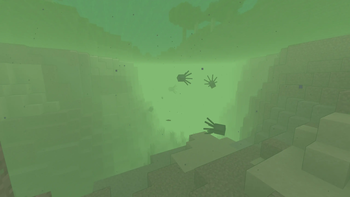
**Miasma** - Cel-shading shader, familiar to many from the game **Borderlands**. In this interpretation, the shader transforms the world of Minecraft into a toxic, acidic planet that is uninhabitable but mesmerizing to look at!
- Miasma: the world breathes poison.
- Light bends through venomous air.
- Soil hums with decay.
- Step carefully—the planet remembers.
##### _Perfect for: Players looking for a unique, stylized experience, horror maps, or creating content with a bold, artistic look._
### SCREENSHOT:

## DEMO VIDEO
## LINKS:
- [Discord](
https://discord.gg/Cz2sCWz5Wh) (Discuss, Bug Reports, Etc.)
- [YouTube](
https://www.youtube.com/@lolip_p)
- [Telegram](
https://t.me/LoLip_p_Community)
## INSTALL THE SHADERS
- Download Client Which Supports Installing Shaders Such As Optifine And Iris
- Download The Shaders
- Copy Shaders to /.minecraft/shaderpacks
- Launch Minecraft, Go To Options --> Video Settings --> Shaders
- Choose **Miasma**
RU 🐻
# О:
**Miasma** — шейдер с эффектом «цел-шейдинг», знакомый многим по игре **Borderlands**. В этой интерпретации шейдер превращает мир Minecraft в токсичную, кислую планету, непригодную для жизни, но завораживающую взгляд!
- Миазмы: мир дышит ядом.
- Свет преломляется в ядовитом воздухе.
- Почва гудит от гниения.
- Шагайте осторожно — планета помнит.
##### _Идеально подходит для: игроков, которые ищут уникальный стилизованный опыт, карты в жанре хоррор или создают контент с ярким художественным оформлением._
### СКРИНШОТ:

## ДЕМО ВИДЕО
## ССЫЛКИ:
- [Discord](
https://discord.gg/Cz2sCWz5Wh) (Discuss, Bug Reports, Etc.)
- [YouTube](
https://www.youtube.com/@lolip_p)
- [Telegram](
https://t.me/LoLip_p_Community)
## УСТАНОВИТЕ ШЕЙДЕРЫ
- Загрузите клиент, поддерживающий установку шейдеров, таких как Optifine и Iris
- Загрузите шейдеры
- Скопируйте шейдеры в /.minecraft/shaderpacks
- Запустите Minecraft, перейдите в «Настройки» --> «Настройки видео» --> «Шейдеры»
- Выберите **Miasma**
DE 🍺
# ÜBER:
**Miasma** – Cel-Shading-Shader, vielen bekannt aus dem Spiel **Borderlands**. In dieser Interpretation verwandelt der Shader die Welt von Minecraft in einen giftigen, sauren Planeten, der unbewohnbar ist, aber faszinierend anzusehen!
- Miasma: Die Welt atmet Gift.
- Das Licht wird durch die giftige Luft gebrochen.
- Der Boden summt vor Verfall.
- Gehen Sie vorsichtig – der Planet erinnert sich.
##### _Perfekt für: Spieler, die ein einzigartiges, stilisiertes Erlebnis suchen, Horror-Karten oder die Erstellung von Inhalten mit einem kühnen, künstlerischen Look.
### SCREENSHOT:

## DEMO-VIDEO
## LINKS:
- [Discord](
https://discord.gg/Cz2sCWz5Wh) (Diskussionen, Fehlerberichte usw.)
- [YouTube](
https://www.youtube.com/@lolip_p)
- [Telegram](
https://t.me/LoLip_p_Community)
## INSTALLIEREN DER SHADER
- Client herunterladen, der die Installation von Shadern wie Optifine und Iris unterstützt.
- Shader herunterladen.
- Shader in den Ordner „/.minecraft/shaderpacks” kopieren.
- Minecraft starten, zu „Optionen” --> „Videoeinstellungen” --> „Shader” gehen.
- **Miasma** auswählen.
CH 🐉
# 关于:
**瘴气**——一种细胞着色器,许多玩家通过游戏《无主之地》对其有所了解。在此版本中,该着色器将《我的世界》的世界转化为一片有毒的酸性星球,虽然无法居住,却令人着迷!
- 瘴气弥漫:世界呼吸着毒液。
- 光线在毒气中折射变形。
- 土壤因腐朽而低鸣。
- 步履需慎——这颗星球铭记着一切。
##### _适用场景:追求独特风格化体验的玩家、恐怖主题地图,或打造大胆艺术风格内容的创作者。_
### 截图展示:

## 演示视频
## 相关链接:
- [Discord](
https://discord.gg/Cz2sCWz5Wh) (讨论区、错误报告等)
- [YouTube](
https://www.youtube.com/@lolip_p)
- [Telegram](
https://t.me/LoLip_p_Community)
## 安装着色器
- 下载支持安装着色器的客户端(如Optifine或Iris)
- 下载着色器文件
- 将着色器复制至 /.minecraft/shaderpacks 目录
- 启动Minecraft,进入选项 --> 视频设置 --> 着色器
- 选择 **Miasma**