

A desaturated, horror-themed shader pack for OptiFine and Iris. Features atmospheric film-grain night lighting and automatically makes the eyes of zombies, creepers, and animals glow blood-red without needing external resource packs.
Товар
Про товар
ZombieHorrorShader
ZombieHorrorShader is a lightweight post-processing shader pack for Iris and OptiFine designed to turn your Minecraft world into a gritty, suspenseful zombie apocalypse.
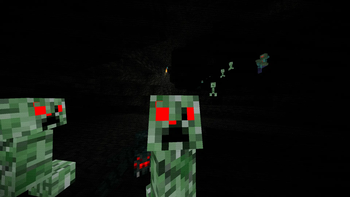
Instead of requiring heavy custom resource packs or complex mod setups, this shader handles everything dynamically. It alters the game's colors to create a cold, desaturated, horror-movie aesthetic while automatically forcing the eyes of hostile and passive mobs to glow blood-red in the dark.
Features
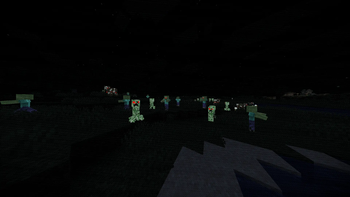
- Atmospheric Night Lighting: Deep shadows are lifted slightly with a cold, pale-blue "ambient moonlight." This keeps the night incredibly spooky and suspenseful while ensuring the terrain remains navigable and playable.
- Sickly Movie Palette: The game's colors are desaturated and shifted toward a pale, greenish-grey tone. Warm lighting from torches, lanterns, and fire remains vibrant, creating a stark visual contrast.
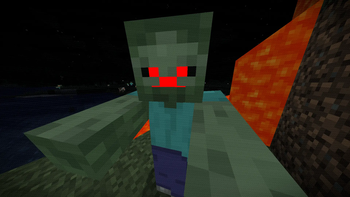
- Automatic Red Glowing Eyes: No resource packs required! The shader automatically isolates the eyes of key mobs and forces them to glow bright, emissive red in the dark:
- Zombies, Skeletons, Strays, Husks, Drowned, and Wither Skeletons
- Creepers
- Pigs, Cows, Sheep, and Chickens
- Smart Pixel Targeting: The glowing eye feature uses model height and color-detection checks to ensure only the actual dark pupils of the mobs glow, preventing any red bleeding on their bodies, legs, or armor.
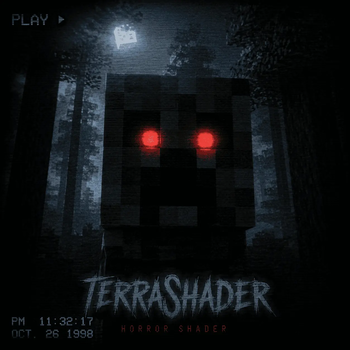
- Vignette & Film Grain: A subtle, animated VHS-style film grain and a dark vignette frame the screen to create a claustrophobic, retro horror atmosphere.
Installation
Requirements
- Iris Shader Loader (Fabric/Quilt) OR OptiFine (Forge/Vanilla).
Steps
- Download the
ZombieHorrorShaderZIP file. - Place the ZIP file inside your Minecraft directory's
shaderpacksfolder. - Launch Minecraft, open Options -> Video Settings -> Shaders.
- Select
ZombieHorrorShaderand press Done. - Note: Ensure that your in-game brightness is adjusted to your liking to match the horror theme!
Performance
- Because this shader operates purely on a lightweight post-processing and entity rendering pipeline, it has an incredibly minimal impact on performance (FPS), making it highly optimized for lower-end systems and large modpacks.
- Compatible with standard vanilla and modded zombie entities from popular mods (such as Rotten Creatures, The Graveyard, Mutant Monsters, and Born in Chaos).
Прев’ю
Зображення товару
Середовище
Вимоги та сумісність
Сумісність і вимоги
IrisOptifine1.17 – 1.21.1126.126.1.126.1.226.2
Локальний хост
Required
Хостинг на сервісах
Unsupported
Умови
Ліцензія
Умови використання, зміни та поширення цього товару.
LicenseRef-All-Rights-ReservedModrinth
Реліз
Останній реліз
v1.0.0
25.06.2026 · Modrinth
1.0.0 — First Official Release!
This is the debut release of ZombieHorrorShader, a lightweight post-processing shader pack designed to bring a high-suspense zombie apocalypse atmosphere to Minecraft.
🌟 Key Features:
- Spooky Ambient Moonlight: Adjusted the overall night lighting and added a cold, pale-blue ambient glow (
moonlightAmbient). This ensures you can actually see the landscape and navigate the world without losing the creepy horror movie aesthetic. - **Smart...
Галерея
Зображення проєкту
Скриншоти та зображення з оригінальної сторінки Modrinth.
Історія
Версії проєкту
Опубліковані версії та оригінальні файли Modrinth.
v1.0.0ОстанняRelease
25.06.2026 · 4 916 завантаження
IrisOptifine1.171.17.11.181.18.11.18.21.191.19.11.19.2
1.0.0 — First Official Release!
This is the debut release of ZombieHorrorShader, a lightweight post-processing shader pack designed to bring a high-suspense zombie apocalypse atmosphere to Minecraft.
🌟 Key Features:
- Spooky Ambient Moonlight: Adjusted the overall night lighting and added a cold, pale-blue ambient glow (
moonlightAmbient). This ensures you can actually see the landscape and navigate the world without losing the creepy horror movie aesthetic. - Smart Glowing Red Eyes: No resource packs required! The shader automatically isolates the eyes of key mobs and forces them to glow blood-red in the dark.
- Leg & Body Glow Fix: Implemented height-mapping and luminance thresholds. The red glow now locks perfectly onto actual eye pupils, ensuring the legs, shoulders, and bodies of cows, pigs, and zombies remain completely dark and unaffected.
- Spooky Desaturation: Applied a cinematic desaturation filter and a dark vignette to induce a claustrophobic horror feel.
- Performance Optimization: Fully optimized utilizing the modern
gtexturepipeline to prevent silent compiler crashes and ensure a rock-solid, high-FPS experience on both OptiFine and Iris/Sodium.
🧟 Supported Mobs (Dynamic Eye Glowing):
- Undead & Skeletons: Zombies, Husks, Drowned, Skeletons, Strays, Wither Skeletons, Zombie Villagers, Giants, and Bogged.
- Hostile: Creepers.
- Passive Mobs: Cows, Pigs, Sheep, and Chickens.
Гортайте товари колесом або стрілками