

Adds a mod menu to view the list of mods you have installed.
Product
About
Mod Menu
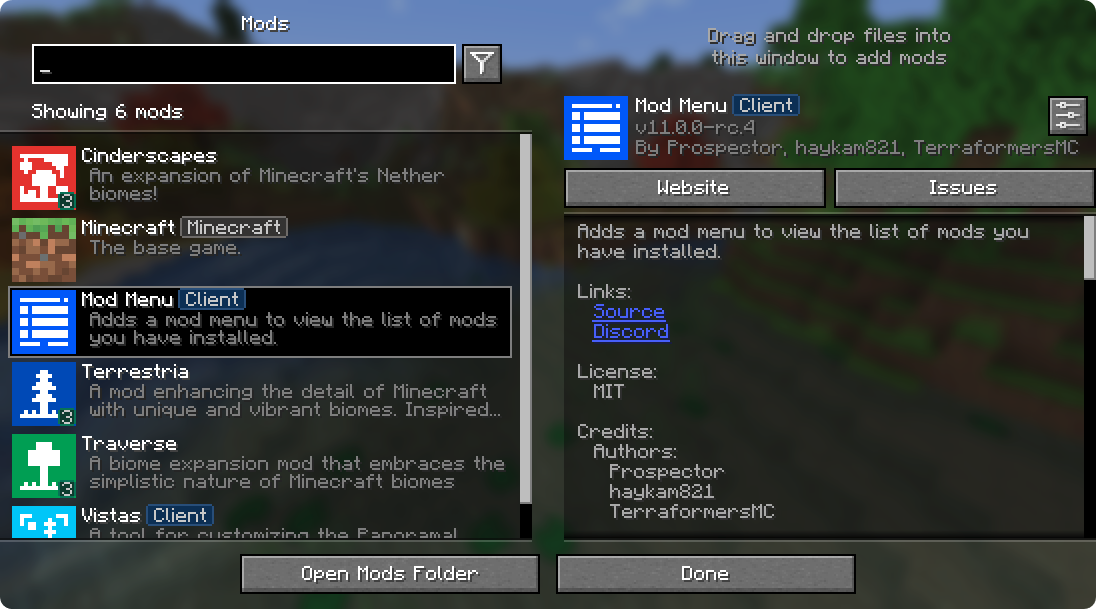
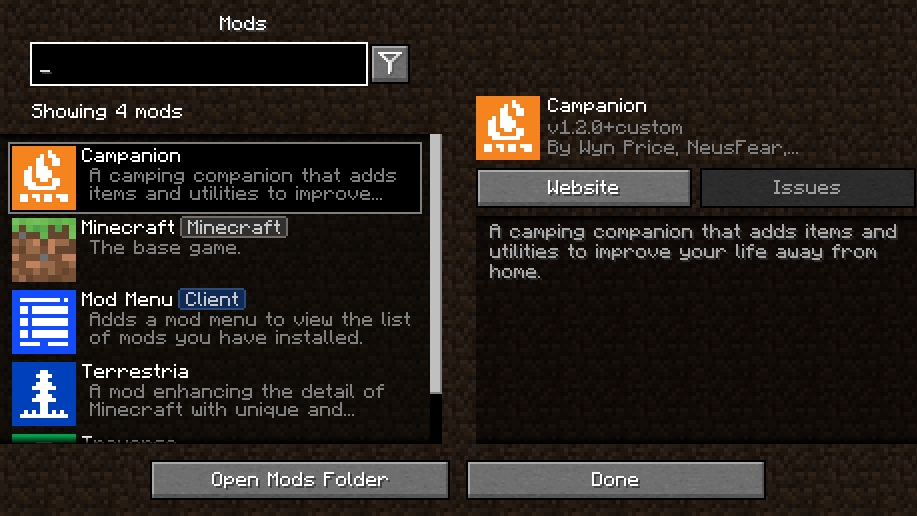
Mod Menu lets you view the mods you have installed and, if supported by the mod, enables quick and easy access to the mod's config screens.
Mod Menu also supports some more advanced features, such as translatable mod names and descriptions, support for QuickText formatting in mod descriptions thanks to Patbox's Text Placeholder API, filters library mods out from regular mods, a mod update checker for mods hosted on Modrinth or that provide their own update sources, and deep configuration for all the features we provide.
Supported Platforms
Mod Menu is currently available for Fabric or Quilt on Minecraft: Java Edition 1.14 or newer.
Developers
Mod Menu includes a number of APIs for developers to improve how their mod appears in Mod Menu. These come in the form of language keys, JSON metadata, and even a Java API.
Translation API
You can translate your mod's name, summary, and description all without touching any Java code. Simply add translation keys in the supported format to any language you'd like.
Translation API Documentation Here's an example of Mod Menu's translations into Pirate Speak. To create your own, simply replace `modmenu` at the end (***NOT*** the one in the beginning) of the translation key with your own mod ID, for example `modmenu.descriptionTranslation.traverse`. `en_pt.json`"modmenu.nameTranslation.modmenu": "Menu o' mods!",
"modmenu.descriptionTranslation.modmenu": "Menu o' mods ye installed matey!",
"modmenu.summaryTranslation.modmenu": "Menu o' mods ye installed matey!"
Fabric Metadata API
There's a number of things you can add just with metadata in your fabric.mod.json.
All of these are added to a custom block in your fabric.mod.json for Mod Menu's metadata. Here's an example usage of many of the features this API provides:
fabric.mod.json
{
  ...
  "custom": {
    "modmenu": {
      "links": {
        "modmenu.discord": "https://discord.gg/jEGF5fb"
      },
      "badges": [ "library", "deprecated" ],
      "parent": {
        "id": "example-api",
        "name": "Example API",
        "description": "Modular example library",
        "icon": "assets/example-api-module-v1/parent_icon.png",
        "badges": [ "library" ]
      },
      "update_checker": true
    }
  }
}
"custom": {
    "modmenu": {
        "links": {
          "modmenu.discord": "https://discord.gg/jEGF5fb"
        }
    }
}
 Parents are used to display a mod as a child of another one. This is meant to be used for mods divided into different modules. The following element in a `fabric.mod.json` will define the mod as a child of the mod 'flamingo':
`fabric.mod.json`
Parents are used to display a mod as a child of another one. This is meant to be used for mods divided into different modules. The following element in a `fabric.mod.json` will define the mod as a child of the mod 'flamingo':
`fabric.mod.json`
"custom": {
    "modmenu": {
        "parent": "flamingo"
    }
}
"custom": {
    "modmenu": {
        "parent": {
            "id": "this-mod-isnt-real",
            "name": "Fake Mod",
            "description": "Do cool stuff with this fake mod",
            "icon": "assets/real-mod/fake-mod-icon.png",
            "badges": [ "library" ]
        }
    }
}
"custom": {
    "modmenu": {
        "update_checker": false
    }
}
Quilt Metadata API
Since Mod Menu supports Quilt as well, the same APIs in the Fabric Metadata API section are also available for Quilt mods, but the format for custom metadata is slightly different.
Instead of a "modmenu" block inside of a "custom" block, you put the "modmenu" block as an element in the root object. So it should look like:
quilt.mod.json
{
  ...
  "modmenu": {
    // Here's where your links, badges, etc. stuff goes
  }
}
Java API
To use the Java API, you'll need to add Mod Menu as a compile-time dependency in your gradle project. This won't make your mod require Mod Menu, but it'll be present in your environment for you to test with.
build.gradle
// Add the Terraformers maven repo to your repositories block
repositories {
  maven {
    name = "Terraformers"
    url = "https://maven.terraformersmc.com/"
  }
}

// Add Mod Menu as a dependency in your environment
dependencies {
  // Prior to Minecraft 26.x, use "modImplementation" instead
  implementation("com.terraformersmc:modmenu:${project.modmenu_version}")
}
Then, define the version of Mod Menu you're using in your gradle.properties. You can get the latest version number here, but you may need a different version if you're not using the latest Minecraft version. See the versions page for a full list of versions.
gradle.properties
modmenu_version=VERSION_NUMBER_HERE
Java API Documentation ### Getting Started To use the API, implement the ModMenuApi interface on a class and add that as an entry point of type "modmenu" in your `fabric.mod.json` like this: `fabric.mod.json`If you don't want it in your environment for testing but still want to compile against Mod Menu for using the Java API, you can use
modCompileOnlyinstead ofmodImplementation(this will work even if Mod Menu is not updated to the version of Minecraft you're running).
"entrypoints": {
  "modmenu": [ "com.example.mod.ExampleModMenuApiImpl" ]
}
@Override
public void attachModpackBadges(Consumer<String> consumer) {
    consumer.accept("modmenu"); // Indicates that 'modmenu' is part of the modpack
}
Screen createModsScreen(Screen previous)
Text createModsButtonText()
Preview
Product images
Environment
Requirements & compatibility
Compatibility & requirements
FabricQuilt1.14.41.15.21.16.11.16.4 – 1.21.1126.126.1.126.1.226.2
Local host
Required
Hosting on services
Unsupported
Terms
License
Terms for using, modifying and redistributing this product.
MIT LicenseModrinth
Release
Latest release
v21.0.0-alpha.1
23.07.2026 · Modrinth
- Update to 26.3-snapshot-5
- Publish to gnomecraft maven
- Update to 26.3-snapshot; thanks Jab125 and EnderPhantomWing
Gallery
Project images
Screenshots and images from the original Modrinth page.

Mod Menu Banner
Mod Menu v11 Screenshot
Mod Menu
modmen ubanner
History
Project versions
Published versions and original Modrinth files.
v21.0.0-alpha.1LatestAlpha
23.07.2026 · 1 195 downloads
FabricQuilt26.3-snapshot-5
- Update to 26.3-snapshot-5
- Publish to gnomecraft maven
- Update to 26.3-snapshot; thanks Jab125 and EnderPhantomWing
v20.0.1Release
09.07.2026 · 873 236 downloads
FabricQuilt26.2
- Fix allowing 26.3-snapshot-1 and -2
v17.0.1-beta.1Beta
09.07.2026 · 340 730 downloads
FabricQuilt1.21.11
- Again fix selection and scroll amount not restoring, thanks fishstiz (resolves #1020)
- Apply SHOW_LIBRARIES config to child mods; thanks to NotRyken
- Fix mod list entry width after filtering thanks to Zaxoosh (resolves #1015)
- Improve how update checking is executed (thanks litetex)
- Fix extra comma in es_es.json
- Delete untranslated l18n files (thanks Madis0)
- Delete untranslated l18n files (thanks Madis0)
- Fix non-numeric update versions getting v prefix (thanks JustPyrrha)
- Add timeouts for HTTP workers to prevent hangs (thanks litetex)
v18.0.0Release
09.07.2026 · 429 916 downloads
FabricQuilt26.126.1.126.1.2
- Update zh_tw.json, thanks StarsShine11904
- Update en_ud.json, thanks Fhilips613
- Update Malay and Malay (Jawi) translations (thanks NuruddinPlays)
- Update Estonian translation, thanks Madis0
- Again fix selection and scroll amount not restoring, thanks fishstiz (resolves #1020)
- Apply SHOW_LIBRARIES config to child mods; thanks to NotRyken
- Update uk_ua.json, thanks StarmanMine142
v20.0.0Release
08.07.2026 · 85 286 downloads
FabricQuilt26.2
- Releasing stable for 26.2
- Update zh_tw.json, thanks StarsShine11904
- Update en_ud.json, thanks Fhilips613
v20.0.0-beta.4Beta
22.06.2026 · 923 822 downloads
FabricQuilt26.2
- Update uk_ua.json, thanks StarmanMine142
- Update Malay and Malay (Jawi) translations (thanks NuruddinPlays)
- Change small buttons to SpriteIconButton (mod compat) (thanks, samswi)
v20.0.0-beta.3Beta
18.06.2026 · 377 142 downloads
FabricQuilt26.2
- Update to 26.2 release
- Update Estonian translation, thanks Madis0
- Add new default option to show only configurable libraries, thanks Patbox
v20.0.0-beta.2Beta
14.06.2026 · 746 365 downloads
FabricQuilt26.2-rc-226.2
- Identical to beta.1; testing CF work-around
v20.0.0-beta.1Beta
13.06.2026 · 1 092 downloads
FabricQuilt26.2-rc-226.2
- Again fix selection and scroll amount not restoring, thanks fishstiz (resolves #1020)
- Apply SHOW_LIBRARIES config to child mods; thanks to NotRyken
- Improve handling of "modded version" in TitleScreen; thanks litetex
- Update to Minecraft 26.2-rc-2, thanks Jab125
v20.0.0-alpha.1Alpha
29.05.2026 · 14 784 downloads
FabricQuilt26.2-pre-2
- Bump Text Placeholder API
- Update Korean "Buy Me a Coffee" (Resolves #1029)
- Update to 26.2-pre-2 (thanks, Jab125)
v19.0.0-alpha.1Alpha
09.05.2026 · 14 820 downloads
FabricQuilt26.2-snapshot-6
- Update to 26.2-snapshot-6
v18.0.0-beta.1Beta
09.05.2026 · 2 887 727 downloads
FabricQuilt26.126.1.126.1.2
- Fix mod list entry width after filtering thanks to Zaxoosh (resolves #1015)
- Minor updates to Polish translation thanks to lumiscosity
- Update Korean localization thanks to minejango2
- Update fil_ph.json thanks to StartsMercury
v18.0.0-alpha.8Alpha
25.03.2026 · 4 481 855 downloads
FabricQuilt26.126.1.126.1.2
- Prevent dev dependency on Text Placeholder API
- Restore Text Placeholders
v17.0.0Release
25.03.2026 · 5 506 228 downloads
FabricQuilt1.21.11
- Fix inversion of config mode (thanks sisby-folk)
v16.0.1Release
25.03.2026 · 519 852 downloads
FabricQuilt1.21.91.21.10
- Fix inversion of config mode (thanks sisby-folk)
v15.0.2Release
25.03.2026 · 404 057 downloads
FabricQuilt1.21.61.21.71.21.8
- Fix inversion of config mode (thanks sisby-folk)
v14.0.2Release
25.03.2026 · 188 525 downloads
FabricQuilt1.21.5
- Fix inversion of config mode (thanks sisby-folk)
v13.0.4Release
25.03.2026 · 659 682 downloads
FabricQuilt1.21.4
- Fix inversion of config mode (thanks sisby-folk)
v12.0.1Release
25.03.2026 · 47 857 downloads
FabricQuilt1.21.21.21.3
- Fix inversion of config mode (thanks sisby-folk)
v11.0.4Release
25.03.2026 · 2 576 604 downloads
FabricQuilt1.211.21.1
- Fix inversion of config mode (thanks sisby-folk)
v18.0.0-alpha.7Alpha
24.03.2026 · 109 450 downloads
FabricQuilt26.1
- Improve how update checking is executed (thanks litetex)
- Update French translations (thanks p-sage)
- Update Chinese translation for pause menu (thanks EastCation)
- Add Filipino (Philippines) translation by wackycreeper
- Fix inversion of config mode (thanks sisby-folk)
- Bump versions for Minecraft 26.1.
v18.0.0-alpha.6Alpha
14.03.2026 · 9 935 downloads
FabricQuilt26.1-pre-2
- Update to Minecraft 26.1-pre-2
- Fix extra comma in es_es.json
v18.0.0-alpha.5Alpha
22.01.2026 · 32 329 downloads
FabricQuilt26.1-snapshot-426.1-snapshot-5
- Update to Minecraft 26.1-snapshot-4
- Delete untranslated l18n files (thanks Madis0)
- Update Estonian translations (thanks Madis0)
- Fix non-numeric update versions getting v prefix (thanks JustPyrrha)
- Add timeouts for HTTP workers to prevent hangs (thanks litetex)
v16.0.0Release
11.01.2026 · 1 130 165 downloads
FabricQuilt1.21.91.21.10
- Initially select top mod entry
- Translations
v15.0.1Release
11.01.2026 · 458 059 downloads
FabricQuilt1.21.61.21.71.21.8
- Add links to contacts' e-mail if present in fmj
- Translations
v14.0.1Release
10.01.2026 · 176 302 downloads
FabricQuilt1.21.5
- Improves style match with vanilla
- Fixes mod selection box (resolves #843)
v17.0.0-beta.2Beta
10.01.2026 · 6 136 039 downloads
FabricQuilt1.21.11
- Initially select top mod entry
v18.0.0-alpha.4Alpha
10.01.2026 · 4 451 downloads
FabricQuilt26.1-snapshot-2
- Initially select top mod entry
- Prevents config button click crash
- Update for FAPI 0.140.3 and above
- Text placeholders will not work until Text Placeholder API is ported
v18.0.0-alpha.3Alpha
24.12.2025 · 11 843 downloads
FabricQuilt26.1-snapshot-1
- Fix crash when loading the pause menu
- Text placeholders will not work until Text Placeholder API is ported
v18.0.0-alpha.2Alpha
24.12.2025 · 905 downloads
FabricQuilt26.1-snapshot-1
- Moving myself to Authors
- Reverting to the old mod icon
- Port to 26.1-snapshot-1 deobfuscated; thanks to
henkelmax - Text placeholders will not work until Text Placeholder API is ported
v16.0.0-rc.2Beta
23.12.2025 · 441 497 downloads
FabricQuilt1.21.91.21.10
- ModMenu no longer displays a configuration icon for mods which implement the API but do not override
ModMenuApi.getModConfigScreenFactory()(thanksrcubedev) - This does not change the API
- Add Feature: Mail-To Contacts
- Open the right mods folder (resolves #937)
- Make "Update" icon y match Realms icon
- Don't scroll when show/hide children (Resolves #911)
- Reverse traversal of sort button when SHIFT is pressed (resolves #897)
- Make HAS_UPDATE sort include child updates
v17.0.0-beta.1Beta
22.12.2025 · 1 686 648 downloads
FabricQuilt1.21.11
- ModMenu no longer displays a configuration icon for mods which implement the API but do not override
ModMenuApi.getModConfigScreenFactory()(thanksrcubedev) - This does not change the API
- Bundle fabric-resource-loader-v1 not v0
- Add Feature: Mail-To Contacts
- Open the right mods folder (resolves #937)
- Make "Update" icon y match Realms icon
- Don't scroll when show/hide children (Resolves #911)
- Reverse traversal of sort button when SHIFT is pressed (resolves #897)
- Make HAS_UPDATE sort include child updates
v14.0.0Release
13.11.2025 · 262 199 downloads
FabricQuilt1.21.5
- Release unchanged stable for 1.21.5
v17.0.0-alpha.1Alpha
12.11.2025 · 6 051 601 downloads
FabricQuilt25w46a1.21.11-pre11.21.11-pre21.21.11-pre31.21.11-pre41.21.11-pre51.21.11-rc11.21.11-rc2
- Add Bluesky translation
- Update to 25w46a
v16.0.0-rc.1Beta
02.10.2025 · 6 938 585 downloads
FabricQuilt1.21.91.21.10-rc11.21.10
- Updated to Minecraft 1.21.9
v15.0.0Release
30.08.2025 · 2 848 681 downloads
FabricQuilt1.21.61.21.71.21.8
No Changelog Available
v15.0.0-beta.3Beta
20.06.2025 · 5 015 916 downloads
FabricQuilt1.21.61.21.71.21.8
No Changelog Available
v15.0.0-beta.2Beta
18.06.2025 · 102 328 downloads
FabricQuilt1.21.6
- Fix description list Background-gradient widget / scroll bar (thanks sakura-ryoko)
v15.0.0-beta.1Beta
17.06.2025 · 12 602 downloads
FabricQuilt1.21.6-rc11.21.6
- Update to 1.21.6-rc1 thanks to lowercasebtw
v14.0.0-rc.2Beta
25.03.2025 · 4 553 612 downloads
FabricQuilt1.21.5-rc11.21.5-rc21.21.5
- Fixed concurrency issue when loading mod metadata
v14.0.0-rc.1Beta
25.03.2025 · 8 485 downloads
FabricQuilt1.21.5-rc11.21.5-rc21.21.5
- Updated to 1.21.5
v14.0.0-beta.2Beta
11.03.2025 · 24 971 downloads
FabricQuilt25w09a25w09b25w10a
- Removed redundant stacetrace logging for mod icon errors
- Updated Ukrainian translation
- Fix scroll position being reset when returning to the Mods screen
- Optimize description rendering
- Make generated mods appear as children of their containing mod
- Update to 25w09a
v13.0.3Release
11.03.2025 · 4 169 561 downloads
FabricQuilt1.21.4
- Removed redundant stacetrace logging for mod icon errors
- Updated Ukrainian translation
- Fix scroll position being reset when returning to the Mods screen
- Optimize description rendering
- Make generated mods appear as children of their containing mod
v14.0.0-beta.1Beta
12.02.2025 · 4 775 downloads
FabricQuilt25w06a
- Updated to 25w06a
v13.0.2Release
12.02.2025 · 884 889 downloads
FabricQuilt1.21.4
- Updated German translations
- Updated Slovak translations
- Updated Ukrainian translations
v13.0.1Release
21.01.2025 · 770 625 downloads
FabricQuilt1.21.4
- Updated Vietnamese translation
- Updated Tartar translation
- Updated Slovakian translation
v13.0.0Release
06.01.2025 · 365 347 downloads
FabricQuilt1.21.4
- Fix crash when using keyboard navigation at the end of the list
v13.0.0-beta.1Beta
03.12.2024 · 673 303 downloads
FabricQuilt1.21.4-rc31.21.4
- Port to 1.21.4
- Add sort option to sort by update
v12.0.0Release
03.12.2024 · 473 207 downloads
FabricQuilt1.21.2-pre11.21.2-pre21.21.2-pre31.21.2-pre41.21.2-pre51.21.2-rc11.21.21.21.3
- Add sort option to sort by update
v12.0.0-beta.1Beta
14.10.2024 · 492 816 downloads
FabricQuilt1.21.2-pre11.21.2-pre21.21.2-pre31.21.2-pre41.21.2-pre51.21.2-rc11.21.2-rc21.21.2
- Updated to 1.21.2-pre3
- Fix Mods screen being slow to open the first time
- Config screen errors no longer show until after a user has tried to open them
- Fix drag-n-drop not supporting Quilt mods
- Updated Polish translation
- Fixed issue with drag-n-drop toast having the same line displayed twice
- Updated Korean translations
- Fixed Belarusian translation
- Fixed issues with parent mods
- Improve compatibility with other mods' mixins
v11.0.3Release
14.10.2024 · 18 881 032 downloads
FabricQuilt1.211.21.1
- Fix Mods screen being slow to open the first time
- Config screen errors no longer show until after a user has tried to open them
- Fix drag-n-drop not supporting Quilt mods
- Updated Polish translation
- Fixed issue with drag-n-drop toast having the same line displayed twice
- Updated Korean translations
- Fixed Belarusian translation
- Fixed issues with parent mods
v11.0.2Release
25.08.2024 · 2 207 675 downloads
FabricQuilt1.211.21.1
- Improve compatibility with other mods' mixins
v12.0.0-alpha.1Alpha
25.08.2024 · 4 842 downloads
FabricQuilt24w33a24w34a24w35a
- Improve compatibility with other mods' mixins
- Update for 24w31a
v11.0.1Release
21.06.2024 · 3 156 263 downloads
FabricQuilt1.211.21.1-rc11.21.1
- Fixed "Server Links" button overlapping Mods button in "Insert" mode
v11.0.0Release
18.06.2024 · 213 417 downloads
FabricQuilt1.21
- Fixed mods button not showing up on servers with Server Links
- Changed functionality of Game Mode display option "Replace Bugs" to "Replace", which now replaces both Give Feedback and Report Bugs, these are now both found in Mod Menu under the Minecraft entry. "Below Bugs" is now "Insert
v9.2.0Release
18.06.2024 · 1 153 933 downloads
FabricQuilt1.20.4
- Fixed broken Chinese translation
- Fixed update checker exception
- Fixed update checker promoting downgrades
- Added support for QuickText in mod descriptions
- Newlines in descriptions are no longer forced to be paragraphs, so single linebreaks are now allowed
- Fixed update checker promoting downgrades
- Fixed crash with unknown badges
- Updated Belarusian Translation
- Updated Polish Translation
- Updated Tatar Translation
- Update Chinese Translation
- Fixed credits role translation keys not being lowercased
- Fixed contributors being sorted
v10.0.0Release
18.06.2024 · 682 353 downloads
FabricQuilt1.20.51.20.6
- Fixed broken Chinese translation
- Fixed update checker exception
- Fixed update checker promoting downgrades
- Updated Belarusian Translation
- Updated Polish Translation
- Updated Tatar Translation
- Update Chinese Translation
- Fixed credits role translation keys not being lowercased
- Fixed contributors being sorted
- Added support for QuickText in mod descriptions
- Newlines in descriptions are no longer forced to be paragraphs, so single linebreaks are now allowed
- Fixed update checker promoting downgrades
- Fixed text now having shadows properly
- Fixed crash with unknown badges
v11.0.0-rc.4Beta
16.06.2024 · 52 509 downloads
FabricQuilt1.21
- Fixed broken Chinese translation
v11.0.0-rc.2Beta
15.06.2024 · 24 105 downloads
FabricQuilt1.21
- Fixed Options screen rendering twice
- Fixed update checker exception
- Fixed update checker promoting downgrades
- Fixed text not having shadows properly
- Fixed crash with unknown badges
- Updated Belarusian Translation
- Updated Polish Translation
- Updated Tatar Translation
- Update Chinese Translation
- Fixed credits role translation keys not being lowercased
- Fixed contributors being sorted
- Added support for QuickText in mod descriptions
- Newlines in descriptions are no longer forced to be paragraphs, so single linebreaks are now allowd
v11.0.0-rc.1Beta
15.06.2024 · 976 downloads
FabricQuilt1.21
- Fixed Options screen rendering twice
- Fixed update checker exception
- Fixed update checker promoting downgrades
- Fixed text not having shadows properly
- Fixed crash with unknown badges
- Updated Belarusian Translation
- Updated Polish Translation
- Updated Tatar Translation
- Update Chinese Translation
- Fixed credits role translation keys not being lowercased
- Fixed contributors being sorted
- Added support for QuickText in mod descriptions
- Newlines in descriptions are no longer forced to be paragraphs, so single linebreaks are now allowd
v11.0.0-beta.2Beta
14.06.2024 · 70 969 downloads
FabricQuilt1.21
No Changelog Available
v11.0.0-beta.1Beta
04.06.2024 · 112 299 downloads
FabricQuilt1.21-pre21.21-pre31.21-pre41.21-rc11.21
- Fix update checker not being run when config screen is closed without the Done button
v10.0.0-beta.1Beta
22.04.2024 · 604 938 downloads
FabricQuilt1.20.5-rc31.20.51.20.6-rc11.20.624w18a
- Add update checkers for Fabric Loader and Quilt Loader
- Add API for mods to provide update checkers for other mods
- Fix Mod Menu build metadata not being properly stripped from the User Agent string generation for privacy
- Group mod credits together by role
- No longer promotes updates to beta or alpha versions by default
- Fixed disable_update_checker config option not working
- Delay loading API implementations until it's first needed in attempt to fix Architectury API's usage (beta)
- Change Twitter name to X (Twitter)
v9.2.0-beta.2Beta
22.04.2024 · 446 787 downloads
FabricQuilt1.20.4
- Fix update checker not being run when config screen is closed without the Done button
v9.2.0-beta.1Beta
22.04.2024 · 1 519 downloads
FabricQuilt1.20.4
- Add update checkers for Fabric Loader and Quilt Loader
- Add API for mods to provide update checkers for other mods
- Fix Mod Menu build metadata not being properly stripped from the User Agent string generation for privacy
- Group mod credits together by role
- No longer promotes updates to beta or alpha versions by default
- Fixed disable_update_checker config option not working
v9.1.0-beta.1Beta
04.04.2024 · 285 136 downloads
FabricQuilt1.20.4
- Delay loading API implementations until it's first needed in attempt to fix Architectury API's usage (beta)
- Change Twitter name to X (Twitter)
v10.0.0-alpha.3Alpha
08.03.2024 · 16 474 downloads
FabricQuilt24w10a24w11a24w12a24w13a24w14potato24w14a1.20.5-pre1
- Change Twitter name to X (Twitter)
- Update Belarusian translations
v10.0.0-alpha.1Alpha
29.02.2024 · 2 560 downloads
FabricQuilt24w09a24w10a
No Changelog Available
v9.0.0Release
18.12.2023 · 1 093 299 downloads
FabricQuilt1.20.3-pre41.20.3-rc11.20.31.20.4-rc11.20.423w51a23w51b24w03a
- Fix missing error icon on mod icons
v8.0.1Release
18.12.2023 · 613 719 downloads
FabricQuilt1.20.2
- Fix missing error icon on mod icons
v9.0.0-pre.1Beta
29.11.2023 · 72 000 downloads
FabricQuilt1.20.3-pre41.20.3-rc11.20.31.20.4-rc11.20.4
- Updated to 1.20.3-pre4
- Updated Belarusian translations
- Updated Chinese translations
- Updated Norwegian Bokmål translations
v9.0.0-alpha.3Alpha
17.11.2023 · 2 612 downloads
FabricQuilt23w46a1.20.3-pre11.20.3-pre21.20.3-pre31.20.3-pre4
No Changelog Available
v9.0.0-alpha.2Alpha
03.11.2023 · 2 446 downloads
FabricQuilt23w44a23w45a
- Updated to 23w44a
v9.0.0-alpha.1Alpha
18.10.2023 · 3 555 downloads
FabricQuilt23w42a
- Updated to 23w42a
v8.0.0Release
25.09.2023 · 438 949 downloads
FabricQuilt1.20.223w40a
No Changelog Available
v8.0.0-beta.2Beta
08.09.2023 · 12 978 downloads
FabricQuilt23w31a23w32a23w33a23w35a1.20.2-pre11.20.2-pre21.20.2-pre31.20.2-pre4
- Update Tatar translations
- Update Vietnamese translations
- Fix child mods hidden via config not being hidden
v7.2.2Release
08.09.2023 · 21 076 646 downloads
FabricQuilt1.20.1
- Update Tatar translations
- Update Vietnamese translations
- Fix child mods hidden via config not being hidden
v8.0.0-beta.1Beta
08.09.2023 · 478 downloads
FabricQuilt23w31a23w32a23w33a23w35a1.20.2-pre11.20.2-pre2
No Changelog Available
v6.3.1Release
18.07.2023 · 539 603 downloads
FabricQuilt1.19.423w12a23w13a23w13a_or_b23w14a
- Add the library badge to Fabric Language Kotlin
- Add a search term for updateable mods
v7.2.1Release
18.07.2023 · 985 214 downloads
FabricQuilt1.20.1
- Add the library badge to Fabric Language Kotlin
- Add a search term for updateable mods
v5.1.0Release
18.07.2023 · 85 547 downloads
FabricQuilt1.19.3
- Update French translations
- Updates Tatar translations
- Add dev env tag to update checker user agent
- Fix update checker not working for Quilt mods
- Fixed update checker error when it could not find a primary file on Modrinth
- Changed mod names to be prioritized when searching
- Removed April Fools "virus checker" joke
- Updated translations
- Updated translations
v6.3.0Release
18.07.2023 · 2 441 downloads
FabricQuilt1.19.423w12a23w13a23w13a_or_b23w14a
- Update French translations
- Updates Tatar translations
- Strip version prefixes in update checker message
- Hide update indicator for hidden mods
- Hide child libraries of non-library parents when libraries are hidden
- Add dev env tag to update checker user agent
- Fix text wrapping in mod descriptions
- Fix update checker not working for Quilt mods
- Fixed update checker error when it could not find a primary file on Modrinth
- Fixes double-clicking on a mod sometimes activating on a single click
- Changes double-click to prioritize opening the config of a parent mod if Quick Configure is enabled
- Changed mod names to be prioritized when searching
v7.2.0Release
18.07.2023 · 7 589 downloads
FabricQuilt1.20.1
- Update French translations
- Updates Tatar translations
- Strip version prefixes in update checker message
- Hide update indicator for hidden mods
- Fix shadows rendering behind the scrollable description text
- Hide child libraries of non-library parents when libraries are hidden
- Add dev env tag to update checker user agent
- Fix text wrapping in mod descriptions
- Fix update checker not working for Quilt mods
v7.1.0Release
17.06.2023 · 493 385 downloads
FabricQuilt1.20.1
- Changed mod names to be prioritized when searching
- Fixed update checker error when it could not find a primary file on Modrinth
- Fixes double-clicking on a mod sometimes activating on a single click
- Changes double-click to prioritize opening the config of a parent mod if Quick Configure is enabled
v6.2.3Release
08.06.2023 · 70 922 downloads
FabricQuilt1.19.423w12a23w13a23w13a_or_b23w14a
- Removed April Fools "virus checker" joke
v7.0.1Release
08.06.2023 · 709 136 downloads
FabricQuilt1.201.20.1-rc11.20.1
- Removed April Fools "virus checker" joke
v7.0.0Release
07.06.2023 · 55 045 downloads
FabricQuilt1.20
No Changelog Available
v6.2.2Release
29.04.2023 · 252 667 downloads
FabricQuilt1.19.423w12a23w13a23w13a_or_b23w14a
- Changed the way buttons are moved on the title screen to only move button widgets.
v7.0.0-beta.2Beta
29.04.2023 · 3 752 downloads
FabricQuilt23w17a23w18a1.20-pre11.20-pre21.20-pre31.20-pre41.20-pre51.20-pre6
- Changed the way buttons are moved on the title screen to only move button widgets.
v7.0.0-beta.1Beta
20.04.2023 · 622 downloads
FabricQuilt23w16a
- Updated to 23w16a
v6.2.1Release
20.04.2023 · 56 356 downloads
FabricQuilt1.19.423w12a23w13a23w13a_or_b23w14a
- Change the Java background color to always be red by default
- Implemented a workaround for an issue with mods relying on the time the API's config screen factory providers are used.
v1.14.5+build.30Release
18.04.2023 · 36 959 downloads
Fabric1.16.1
v6.2.0Release
18.04.2023 · 12 681 downloads
FabricQuilt1.19.423w12a23w13a23w13a_or_b23w14a
- Fixed a crash when other mods added non-clickable widgets to the Game Menu
- Optimized loading of config screen factory providers
- Fixed partially obscured description entries not being rendered
v6.1.0Release
16.04.2023 · 8 362 downloads
FabricQuilt1.19.423w12a23w13a23w13a_or_b23w14a
No Changelog Available
v6.1.0-rc.4Beta
17.03.2023 · 106 361 downloads
FabricQuilt1.19.423w12a23w13a23w13a_or_b23w14a
- Fixed config button overlay being too large on compact mode
- Fixed parent mod child toggle button area being too large on compact mode
- Added ability to double-click parent mods to expand and collapse
v6.1.0-rc.3Beta
17.03.2023 · 3 257 downloads
FabricQuilt1.19.4
- Added ability to double-click a mod or click its icon to access its configuration screen
- Fixed the Mods button being one pixel too high in the Game Menu in Icon mode
v6.1.0-rc.2Beta
16.03.2023 · 1 160 downloads
FabricQuilt1.19.4
- Fixed the Mods button in the Game Menu
- Added a separate config option for the button positioning in the Game Menu
- Added support for High Contrast mode
v6.1.0-rc.1Beta
14.03.2023 · 4 200 downloads
FabricQuilt23w07a1.19.4-pre11.19.4-pre21.19.4-pre31.19.4-pre41.19.4-rc11.19.4-rc21.19.4-rc3
- Updated to 1.19.4 RC 3
- Updated translations
v6.1.0-beta.3Beta
18.02.2023 · 917 downloads
FabricQuilt23w07a
- Strip Mod Menu build metadata from user agent for privacy
- Include mod loader and MC version in user agent
v5.1.0-beta.4Beta
18.02.2023 · 84 874 downloads
FabricQuilt1.19.3
- Strip Mod Menu build metadata from user agent for privacy
- Include mod loader and MC version in user agent
v4.2.0-beta.2Beta
18.02.2023 · 1 547 369 downloads
FabricQuilt1.19.2
- Strip Mod Menu build metadata from user agent for privacy
- Include mod loader and MC version in user agent
v4.2.0-beta.1Beta
17.02.2023 · 3 392 downloads
FabricQuilt1.19.2
- Fixed modpack badge being added to builtin mods
- Updated translations
- Fixed a crash on the pause screen
- Use translation keys for default Minecraft and Java descriptions
- Update Mod Menu credits list
- Give builtin "java" mod more pleasing random background colors
- Updated translations
- Allow mod names to be localized
- Added an option to disable the random colors of the builtin 'java' mod
- Added options to disable mod name and description localization.
- Builtin 'java' mod is now named "Java" with vendor details in the description
- Add "Config mode" option for modpack creators
- Add option for modpack creators to hide specific mods' config menus
- Added Modrinth mod update checker
- Added config for modpack authors to disable specific mods' update checkers
- Fix hash checking sometimes disregarded on Quilt
- Updated translations
v5.1.0-beta.3Beta
17.02.2023 · 1 206 downloads
FabricQuilt1.19.3
- Fix hash checking sometimes disregarded on Quilt
- Fix missing translation for update indicator option
v6.1.0-beta.2Beta
17.02.2023 · 220 downloads
FabricQuilt23w07a
- Fix hash checking sometimes disregarded on Quilt
- Fix missing translation for update indicator option
v6.1.0-beta.1Beta
17.02.2023 · 361 downloads
FabricQuilt23w07a
- Update checker now only makes a single Modrinth API request
- Added config for modpack authors to disable specific mods' update checkers
- Updated translations
- Updated to 23w07a
v5.1.0-beta.2Beta
17.02.2023 · 620 downloads
FabricQuilt1.19.3
- Update checker now only makes a single Modrinth API request
- Added config for modpack authors to disable specific mods' update checkers
v5.1.0-beta.1Beta
17.02.2023 · 420 downloads
FabricQuilt1.19.3
- Added Modrinth mod update checker
- Add "Config mode" option for modpack creators
- Add option for modpack creators to hide specific mods' config menus
- Allow mod names to be localized
- Added an option to disable the random colors of the builtin 'java' mod
- Added options to disable mod name and description localization.
- Builtin 'java' mod is now named "Java" with vendor details in the description
- Updated translations
- Give builtin "java" mod more pleasing random background colors
- Update Mod Menu credits list
- Use translation keys for default Minecraft and Java descriptions
v6.1.0-alpha.2Alpha
17.02.2023 · 164 downloads
FabricQuilt23w07a
- Updated translations
- Updated to 23w07a
v6.1.0-alpha.1Alpha
06.02.2023 · 587 downloads
FabricQuilt23w05a
- Updated to 23w05a
- Add "Config mode" option for modpack creators
- Add option for modpack creators to hide specific mods' config menus
- Allow mod names to be localized
- Added an option to disable the random colors of the builtin 'java' mod
- Added options to disable mod name and description localization.
- Builtin 'java' mod is now named "Java" with vendor details in the description
- Give builtin "java" mod more pleasing random background colors
- Update Mod Menu credits list
- Use translation keys for default Minecraft and Java descriptions
v6.0.0-beta.1Beta
21.01.2023 · 559 downloads
FabricQuilt23w03a
- Updated to Snapshot 23w03a
v5.0.2Release
10.12.2022 · 81 524 downloads
FabricQuilt1.19.3
- Fixed a crash on the pause screen
v2.0.17Release
08.12.2022 · 614 112 downloads
Fabric1.171.17.1
- Updated translations
v3.2.5Release
08.12.2022 · 554 900 downloads
FabricQuilt1.18.2
- Updated translations
v4.1.2Release
08.12.2022 · 443 656 downloads
FabricQuilt1.19.2
- Updated translations
v5.0.1Release
08.12.2022 · 9 481 downloads
FabricQuilt1.19.3
- Updated translations
- Updated to 1.19.3
v5.0.0Release
08.12.2022 · 792 downloads
FabricQuilt1.19.3
- Updated to 1.19.3
v5.0.0-alpha.4Alpha
20.11.2022 · 1 030 downloads
FabricQuilt22w43a
- Fixed modpack badge being added to builtin mods
v4.1.1Release
20.11.2022 · 40 980 downloads
FabricQuilt1.19.2
- Fixed modpack badge being added to builtin mods
v5.0.0-alpha.3Alpha
17.11.2022 · 183 downloads
FabricQuilt22w43a
- Updated to 22w46a
v5.0.0-alpha.2Alpha
10.11.2022 · 209 downloads
FabricQuilt22w43a
- Updated to 22w45a
v5.0.0-alpha.1Alpha
04.11.2022 · 216 downloads
FabricQuilt22w43a
- Updated to 22w43a
- Added the modpack badge
- Updated translations
v4.1.0Release
04.11.2022 · 22 910 downloads
FabricQuilt1.19.2
- Added the modpack badge
- Updated translations
v3.2.4Release
03.11.2022 · 20 482 downloads
FabricQuilt1.18.2
- Updated translations
v2.0.16Release
03.11.2022 · 1 596 downloads
Fabric1.171.17.1
- Updated translations
v1.10.7Release
17.10.2022 · 13 566 downloads
Fabric1.15.2
- Fixed crash when sort mode is null
v1.7.17Release
07.09.2022 · 32 055 downloads
Fabric1.14.4
v4.0.6Release
06.08.2022 · 116 322 downloads
FabricQuilt1.19.2
- Updated to 1.19.2
v4.0.5Release
27.07.2022 · 30 108 downloads
FabricQuilt1.19.1
- Update to 1.19.1
v4.0.4Release
13.07.2022 · 698 824 downloads
FabricQuilt1.19
- Fix Fabric API icon if Fabric API fatjar is not present
v4.0.3Release
12.07.2022 · 2 335 downloads
FabricQuilt1.19
- Fixed broken mod icon log spam
- Fixed overflowing credit entries
v4.0.2Beta
04.07.2022 · 752 downloads
FabricQuilt1.19.1-pre2
v4.0.1Beta
27.06.2022 · 963 downloads
FabricQuilt1.19.1-rc1
- Update translations
- Add keybind
- Added support for Quilt Loader's contributor roles
- Added hardcoding to give Quilt Loader the library badge
v3.2.3Release
27.06.2022 · 131 311 downloads
FabricQuilt1.18.2
- Add keybind
- Updated translations
- Fixed Thai Language
v2.0.15Release
27.06.2022 · 3 732 downloads
Fabric1.171.17.1
- Disabled deprecation warnings by default
- Update translations
- Add keybind
v1.16.23Release
27.06.2022 · 686 688 downloads
Fabric1.16.5
- Disabled deprecation warnings by default
- Add keybind
- Updated translations
v4.0.0Release
07.06.2022 · 54 222 downloads
Fabric1.1922w24a
- Fixed Thai Language
v3.2.2Release
13.05.2022 · 101 468 downloads
FabricQuilt1.18.2
- Updated Chinese (Traditional) translation
- Updated Chinese (Simplified) translation
- Updated Chinese (Literary) translation
- Fix search terms
- Updated Thai translation
- Updated Spanish (Mexico) translation
- Updated Thai translation
- Updated Thai translation
- Updated Russian translation
- Updated Russian translation
- Updated Estonian translation
- Updated Estonian translation
- Updated Russian translation
- Updated Thai translation
- Updated Chinese (Traditional) translation
- Updated Thai translation
- Updated Thai translation
- Updated Chinese (Simplified) translation
- Added Thai translation
- Updated Chinese (Simplified) translation
- Updated Vietnamese translation
- Updated Vietnamese translation
- Updated Chinese (Simplified) translation
- Updated Chinese (Simplified) translation
- Updated Chinese (Simplified) translation
- Updated Chinese (Simplified) translation
- Updated Chinese (Simplified) translation
- Added Vietnamese translation
- Updated Chinese (Simplified) translation
- Updated Malay translation
- Updated Czech translation
- Updated Malay translation
- Updated Russian translation
- Updated Polish translation
- Updated Japanese translation
- Updated Estonian translation
- Updated German translation
- Added Czech translation
- Updated Polish translation
- Updated Polish translation
v3.2.1Release
25.04.2022 · 5 751 downloads
FabricQuilt1.18.2
- Added support for Quilt Loader's contributor roles
- Added hardcoding to give Quilt Loader the library badge
v4.0.0-beta.4Beta
21.04.2022 · 847 downloads
Fabric22w16b22w17a22w18a22w19a1.19-pre11.19-pre21.19-pre31.19-pre4
- Fixed a spammy debug line being shipped
v4.0.0-beta.3Beta
21.04.2022 · 201 downloads
Fabric22w16b
- Updated to 22w16b
v4.0.0-beta.2Beta
16.04.2022 · 318 downloads
Fabric22w15a
- Updated to 1.19 Snapshot 22w15a
- Added a bunch of credits
v3.1.1Release
11.04.2022 · 5 141 downloads
FabricQuilt1.18.2
- Fixed Mojang's copyright notice missing on the title screen
- Updated Russian translation
- Updated Japanese translation
- Updated Estonian translation
v3.1.0Release
01.03.2022 · 15 103 downloads
Fabric1.18.2
- Watching the Minecraft Credits will return you back to the Mods screen
- Updated Portuguese translation
- Updated Arabic translation
- Updated Chinese (Traditional) translation
- Updated Chinese (Simplified) translation
- Updated Turkish translation
- Updated Swedish translation
- Updated Russian translation
- Updated Portuguese (Brazil) translation
- Updated Polish translation
- Updated lzh (generated) (lzh) translation
- Updated Mongo (lol_US) translation
- Updated Korean translation
- Updated Japanese translation
- Updated Italian translation
- Updated French translation
- Updated Finnish translation
- Updated Persian translation
- Updated Estonian translation
- Updated Spanish (Mexico) translation
- Updated English (en_WS) translation
- Updated English (en_UD) translation
- Updated English (en_PT) translation
- Updated German translation
- Updated Catalan translation
- Updated Bulgarian translation
- Updated Malay translation
- Updated Portuguese translation
- Updated Arabic translation
- Updated Chinese (Traditional) translation
- Updated Chinese (Simplified) translation
- Updated Swedish translation
- Updated Russian translation
- Updated Portuguese (Brazil) translation
- Updated Polish translation
- Updated lzh (generated) (lzh) translation
- Updated Korean translation
- Updated Japanese translation
- Updated Italian translation
- Updated French translation
- Updated Finnish translation
- Updated Persian translation
- Updated Spanish (Mexico) translation
- Updated English (en_WS) translation
- Updated English (en_UD) translation
- Updated English (en_PT) translation
- Updated German translation
- Updated Bulgarian translation
- Added Malay translation
- Updated Catalan translation
- Updated Spanish (Mexico) translation
- Updated Chinese (Simplified) translation
- Updated Portuguese translation
- Updated Portuguese translation
- Updated Russian translation
- Updated Estonian translation
- Added Portuguese translation
- Added more metadata for the "Java" entry
- Update Minecraft license to display Minecraft EULA
- Updated to Minecraft 1.18.2
- Add some default metadata for Fabric API parent group
- Updated Portuguese translation
- Updated Arabic translation
- Updated Chinese (Traditional) translation
- Updated Chinese (Simplified) translation
- Updated Turkish translation
- Updated Swedish translation
- Updated Russian translation
- Updated Portuguese (Brazil) translation
- Updated Polish translation
- Updated lzh (generated) (lzh) translation
- Updated Mongo (lol_US) translation
- Updated Korean translation
- Updated Japanese translation
- Updated Italian translation
- Updated French translation
- Updated Finnish translation
- Updated Persian translation
- Updated Estonian translation
- Updated Spanish (Mexico) translation
- Updated English (en_WS) translation
- Updated English (en_UD) translation
- Updated English (en_PT) translation
- Updated German translation
- Updated Catalan translation
- Updated Bulgarian translation
- Updated Malay translation
- Updated Portuguese translation
- Updated Arabic translation
- Updated Chinese (Traditional) translation
- Updated Chinese (Simplified) translation
- Updated Swedish translation
- Updated Russian translation
- Updated Portuguese (Brazil) translation
- Updated Polish translation
- Updated lzh (generated) (lzh) translation
- Updated Korean translation
- Updated Japanese translation
- Updated Italian translation
- Updated French translation
- Updated Finnish translation
- Updated Persian translation
- Updated Estonian translation
- Updated Spanish (Mexico) translation
- Updated English (en_WS) translation
- Updated English (en_UD) translation
- Updated English (en_PT) translation
- Updated German translation
- Updated Bulgarian translation
- Added Malay translation
- Updated Catalan translation
- Updated Spanish (Mexico) translation
- Updated Chinese (Simplified) translation
- Updated Portuguese translation
- Updated Portuguese translation
- Updated Russian translation
- Updated Estonian translation
- Added Portuguese translation
v3.0.1Release
18.12.2021 · 58 234 downloads
Fabric1.181.18.1-pre11.18.1-rc11.18.1-rc21.18.1-rc31.18.122w03a22w05a
- Updated Estonian translation
- Made badge-based search terms translatable
- Added description and summary search
v3.0.0Release
03.10.2021 · 7 960 downloads
Fabric1.18
- Removed deprecated Mod Menu API, mods must use
com.terraformersmc.modmenu.api.ModMenuApinow - Removed deprecated custom value loading, mods must use the
modmenucontainer custom value now
v2.0.14Release
03.10.2021 · 10 323 downloads
Fabric1.171.17.1
- Added config option to disable deprecation warnings
- Added Arabic translation
- Updated Russian translation
- Updated Portuguese (Brazil) translation
- Updated Turkish translation
- Updated German translation
v1.16.22Release
03.10.2021 · 12 428 downloads
Fabric1.16.5
- Added config option to disable deprecation warnings
- Added Arabic translation
- Updated Russian translation
- Updated Portuguese (Brazil) translation
- Updated Turkish translation
- Updated German translation
v1.16.21Release
27.09.2021 · 899 downloads
Fabric1.16.5
- Fixed immediate crash when using Java 1.8
v2.1.1Release
26.09.2021 · 421 downloads
Fabric21w37a21w38a
- Removed deprecated Mod Menu API, mods must use
com.terraformersmc.modmenu.api.ModMenuApinow - Removed deprecated custom value loading, mods must use the
modmenucontainer custom value now
v2.0.13Release
26.09.2021 · 1 043 downloads
Fabric1.171.17.1
- Updated English (en_PT) translation
- Updated Mongo (lol_US) translation
v1.16.20Release
26.09.2021 · 907 downloads
Fabric1.16.5
- Updated English (en_PT) translation
- Updated Mongo (lol_US) translation
v2.1.0Release
21.09.2021 · 259 downloads
Fabric21w37a21w38a
No Changelog Available
v2.0.12Release
21.09.2021 · 659 downloads
Fabric1.171.17.1
- Fixed Minecraft crash caused by broken mod config screens
- Updated German translation
v1.16.19Release
21.09.2021 · 499 downloads
Fabric1.16.5
- Fixed Minecraft crash caused by broken mod config screens
- Updated German translation
v2.0.11Release
17.09.2021 · 843 downloads
Fabric1.171.17.1
- Updated Russian translation
- Updated Russian translation
- Updated Bulgarian translation
- Updated English (en_PT) translation
- Updated English (en_UD) translation
- Updated English (en_WS) translation
- Updated Italian translation
v1.16.18Release
17.09.2021 · 374 downloads
Fabric1.16.5
- Updated Russian translation
- Updated Bulgarian translation
- Updated English (en_PT) translation
- Updated English (en_UD) translation
- Updated English (en_WS) translation
- Updated Italian translation
- Updated Russian translation
v2.0.10Release
06.09.2021 · 1 135 downloads
Fabric1.171.17.1
- Fixed Java icon loosing background color when selected
v1.16.17Release
06.09.2021 · 534 downloads
Fabric1.16.5
- Updated Portuguese (Brazil) translation
v2.0.9Release
02.09.2021 · 676 downloads
Fabric1.171.17.1
- Fixed a crash when optional dependencies were used in mod config screens
v1.16.16Release
02.09.2021 · 382 downloads
Fabric1.16.5
- Fixed a crash when optional dependencies were used in mod config screens
v1.16.15Release
01.09.2021 · 321 downloads
Fabric1.16.5
- Updated Portuguese (Brazil) translation
v2.0.8Release
01.09.2021 · 244 downloads
Fabric1.171.17.1
- Updated Portuguese (Brazil) translation
- Updated Swedish translation
v2.0.7Release
30.08.2021 · 1 143 downloads
Fabric1.171.17.1
- Updated ɥsᴉꞁᵷuƎ translation
- Updated LOLCAT translation
- Updated Portuguese (Brazil) translation
- Updated Swedish translation
v1.16.14Release
30.08.2021 · 488 downloads
Fabric1.16.5
- Updated ɥsᴉꞁᵷuƎ translation
- Updated LOLCAT translation
- Updated Portuguese (Brazil) translation
- Updated Swedish translation
v2.0.6Release
27.08.2021 · 727 downloads
Fabric1.171.17.1
- Added mod list hotkeys: SPACE to open/close a list of child mods, LEFT to select the parent or close the list, RIGHT to open the list or select the first child
v1.16.13Release
27.08.2021 · 372 downloads
Fabric1.16.5
- Added mod list hotkeys: SPACE to open/close a list of child mods, LEFT to select the parent or close the list, RIGHT to open the list or select the first child
v2.0.5Release
19.08.2021 · 1 081 downloads
Fabric1.171.17.1
- Fixed a crash when mods declare themselves as their own parent
- Updated Italian translation
- Added Classical Chinese Language translation
- Updated German translation
- Updated French translation
- Updated Turkish translation
- Updated Persian translation
v1.16.12Release
19.08.2021 · 402 downloads
Fabric1.16.5
- Fixed a crash when mods declare themselves as their own parent
- Updated German translation
- Updated French translation
- Updated Turkish translation
- Updated Persian translation
v2.0.4Release
25.07.2021 · 2 504 downloads
Fabric1.171.17.1
- Fixed sounds resuming when exiting Mod Menu with ESC while paused
- Update Polish Translation
v1.16.11Release
25.07.2021 · 783 downloads
Fabric1.16.5
- Fixed sounds resuming when exiting Mod Menu with ESC while paused
- Update Polish Translation
v2.0.3Release
20.07.2021 · 938 downloads
Fabric1.171.17.1
No Changelog Available
v1.16.10Release
20.07.2021 · 483 downloads
Fabric1.16.5
- Added Korean Translation
v2.0.2Release
12.06.2021 · 2 767 downloads
Fabric1.171.17.1
- Update Persian Translation
- Allow for more "dynamic" provider factories through the API
- Added Korean Translation
- Fixed some rendering issues from the 21w14a port
- Update Russian Translation
- Updated Catalan translation
- Handle errors in API implementations more gracefully
- Updated Simplified Chinese Translation
- Updated to 21w14a
- Re-ported Mod Menu v1.16.7 to Minecraft Snapshot 20w06a (from Minecraft 1.16.5)
v2.0.0-beta.7Beta
31.05.2021 · 521 downloads
Fabric1.17-pre1
- Update Persian Translation
- Allow for more "dynamic" provider factories through the API
- Added Korean Translation
- Fixed some rendering issues from the 21w14a port
- Update Russian Translation
- Updated Catalan translation
- Handle errors in API implementations more gracefully
- Updated Simplified Chinese Translation
- Updated to 21w14a
- Re-ported Mod Menu v1.16.7 to Minecraft Snapshot 20w06a (from Minecraft 1.16.5)
v2.0.0-beta.5Beta
29.05.2021 · 226 downloads
Fabric1.17-pre1
No Changelog Available
v1.10.6Release
10.04.2021 · 935 downloads
Fabric1.15.2
- Fix crash with default API getId implementation resulting in NPE
v2.0.0-beta.4Beta
10.04.2021 · 302 downloads
Fabric21w14a
- Update Persian Translation
- Allow for more "dynamic" provider factories through the API
- Added Korean Translation
- Fixed some rendering issues from the 21w14a port
v2.0.0-beta.3Beta
08.04.2021 · 185 downloads
Fabric21w14a
- Update Russian Translation
- Updated Catalan translation
- Handle errors in API implementations more gracefully
- Updated Simplified Chinese Translation
- Updated to 21w14a
v1.16.9Release
08.04.2021 · 2 842 downloads
Fabric1.16.5
- Allow for more "dynamic" provider factories through the API
- Updated Persian Translation
- Updated Catalan translation
- Updated Russian Translation
v1.16.8Release
20.02.2021 · 1 416 downloads
Fabric1.16.5
- Handle errors in API implementations more gracefully
- Updated Simplified Chinese Translation
v2.0.0-beta.2Beta
11.02.2021 · 379 downloads
Fabric21w06a
- Re-ported Mod Menu v1.16.7 to Minecraft Snapshot 21w06a (from Minecraft 1.16.5)
v1.10.5Release
11.02.2021 · 377 downloads
Fabric1.15.2
- Added a default implementation to getModId to allow for backwards compatible mods
v1.16.7Release
11.02.2021 · 839 downloads
Fabric1.16.5
- Include fabric-api-base
- Added translations for Wiki and Crowdin link keys
v1.16.6Release
05.02.2021 · 440 downloads
Fabric1.16.5
- Mark Better Mod Button as incompatible
- Handle errors from other mods' config factories more gracefully, will now just log and remove the mod's config button.
v1.16.5Release
03.02.2021 · 5 547 downloads
Fabric1.16.5
- Added additional link key translations for common links
v1.16.4Release
03.02.2021 · 626 downloads
Fabric1.16.5
- Moved the licensing information above credits
- Changed the order of the config buttons
- Updated Finnish translation
v1.16.3Release
02.02.2021 · 773 downloads
Fabric1.16.5
- Fixed incorrect error being logged when a mod defines an invalid icon
- Fixed an error being logged when no icon is at the default path
v1.16.2Release
02.02.2021 · 528 downloads
Fabric1.16.5
- Fixed icons for mods that were using the default icon path
- Added the old button textures to the Programmer Art resource pack
- Update Catalan translation
- Updated Turkish translation
v1.16.1Release
01.02.2021 · 825 downloads
Fabric1.16.5
- Updated Estonian translation
- Fixed a bug with the mod count
- Added mod id tooltip for fake mods
v1.16.0Release
01.02.2021 · 535 downloads
Fabric1.16.5
- Fixed two of the Mods button style names being wrong
- Added an API for getting the Mods button text
v1.15.0Release
01.02.2021 · 15 272 downloads
Fabric1.16.41.16.5
- Major internal refactors
- Added links, contributors, and license information
- Added an options screen for Mod Menu
- Added a compact list mode option
- Added an options to change Mods button style to: Below Realms (Default), Shrink Realms, Replace Realms, and Fabric Icon
- Added an option to hide mod badges
- Added an option to move where the mod count is displayed (on button, on title screen, both, neither)
- Added options to specify whether or not to count libraries, children, and hidden mods in the mod count
- Added options to hide mod links, credits, or license info
- Added options to disable the modification of the title screen and/or game menu screen
- Changed the hardcoded icon for "java
- Probably more that got forgotten about in this massive update
v1.14.15Release
23.01.2021 · 8 036 downloads
Fabric1.16.5
Scroll products with the wheel or arrows