

A shop plugin that allows players to easily sell/buy any items from a chest without any commands.
Товар
Про товар



对于不方便使用 Discord 或 Github Issue Tracker 的用户,也可在 QQ 社区群内 966701484 内寻求热心社区人员的帮助
We have documents now! Finally!
Features
- Easy to use, simply click and type price to create the shops.
- NBT Data, Enchantment, Tool Damage, Potion, and Mob Egg supports.
- Dynamically switch the display language according to the client language, internationalization friendly.
- Unlimited store support.
- Blacklist support & bypass permissions.
- Shops that buy and sell items in a double-chest.
- UUID support (of course)
- A cool item preview both in chat and GUI.
- Chat Control Panel to change the settings of your shop. Just click to modify everything.
- World/region protection plugins support, and lots of compatibility modules can be downloaded.
- ProtocolLib/PacketEvents based Virtual DisplayItem (better for performance) support.
- Multi-currency support: Use different currencies in shops from any economy that supports VaultUnlocked. We also support Vault by default!
- Tax and ongoing fee support!
- Hide commands from help if the player had no permission.
- Sign header color and clear description on the info sign for different shops status.
- MiniMessage support, create fancy messages as you want.
- H2 (local) or MySQL (remote) support.
- Advanced transaction mechanism, rollback any Inventory/Economy operation when it failed to execute to prevent player dupes.
- InventoryWrapper API offers custom inventory ability for developers.
- Advanced Event Bus to allow user block protection check event transfer to a specific plugin.
- Fast cache layer, handle more than 1k+ shops without any lag! (Require ProtocolLib installed)
- Per-shop permission management.
- Shop benefits between shop owner and other players!
- Much much more! Cannot put them all in there!
Or with addons to add more features
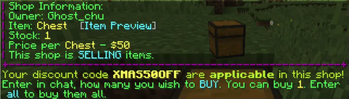
- Discount code
- Plan metrics
- DiscordSRV notifications
How to Install
QuickShop requires Minecraft 1.20+ to be run. Any versions below 1.20 were unsupported.
* Install Vault and an economy plugin supported by Vault.
* If you are using multi-currency, you will need an economy plugin that supports VaultUnlocked.
* Install optional ProtocolLib or PacketEvents which can greatly improve QuickShop performance.
* Spigot is no longer supported in recent updates. We recommend switching to Paper or its forks to ensure optimal performance.
* Download QuickShop jar and put it in your plugins folder.
* Download other compatibility modules or add-ons if you need them.
* Only install compatibility modules that you need, they're not open box to use, you need configure them.
* Most cases, Hikari can handle region protections by itself, you don't need them.
* Turn on the server and here we go!
Commands
Note: Most features can be accessed by control panel or interaction with the shop, in most cases, you don't need those commands.
* /quickshop unlimited
Makes your Shop buy/sell Items in unlimited quantity or limited
* /quickshop setowner
Change the Shop Owner.
* /quickshop buy
Change the shop to buying items.
* /quickshop sell
Change the shop to selling items.
* /quickshop price
Change the buy/sell price of the item.
* /quickshop clean
Removes any loaded shop that doesn't have any items in stock.
* /quickshop find
Find the nearest shop that sells items that start with the provided text. E.g. /quickshop find dia will find the nearest shop that buys/sells diamonds.
* /quickshop fetchmessage
Fetch shop message manually from the database.
* /quickshop info
Show QuickShop information.
* /quickshop debug
Enable/Disable Debug Mode.
* /quickshop create [item]
Command to create the shop with the item in hand or specified.
* /quickshop currency
Command to specified the currency the shop using.
The Economy plugin must support the Multi-Currency feature and be supported by QuickShop.
* /quickshop supercreate
Create a shop while bypassing any protection checks.
* /quickshop paste
Collects useful information and pastes it on Pastebin.
* /quickshop staff
Manage staff in your shop.
* /quickshop staff add
Add a player as staff to your shop.
* /quickshop staff del
Remove a player as staff from your shop.
* /quickshop staff clear
Remove all staff members from your shop.
* /quickshop staff list
Show all current staff members of your shop.
* /quickshop cleanghost
Remove all broken shops.
* /quickshop export
Export all shop data to a zip.
This command is CONSOLE ONLY!
* /quickshop recovery
Recover all shops from a TXT file or Paste.
This command is CONSOLE ONLY and may remove/override any existing shop on your Server! Make a backup first and try it with a clean database!
* /quickshop size
Change the bulk size.
Requires the "allow-stacks" option in the config to be enabled for the command to work.
* /quickshop purge
Purge the old shops, for more information please check the purge option in config.yml
Requires the "purge" option in the config to be enabled for the command to work.
/quickshop transfer
Transfer ALL shops from one player to another.
* /quickshop item
Change the item of the shop.
Requires the "allow-stacks" option in the config to be enabled for the command to work.
* /quickshop removeworld
Remove all shops in a specific world.
* /quickshop name
Naming or un-naming a shop with a specific name.
* /quickshop permission
Tweaking the per-shop permissions, or add/remove player into/from specific groups.
* /quickshop database
View and manage QuickShop-Hikari status.
* /quickshop benefit*
View and manage yout shop benefits.
Aliases:
- /shop
- /qs
- /chestshop
- /cshop
(customize the aliases in config.yml)
Permissions
If you're a lazy owner, simply give the player quickshop.player permission node which contains all needs to let the player create and use quick shops.
But if you're a pro owner, there is also a detailed list to allow control of everything:
Detailed Permissions ### Player Permissions: * quickshop.use Required for any QuickShop Actions. * quickshop.create.sell Required to make a shop (Sell-Mode) * quickshop.create.buy Required to make a shop (Buy-Mode) or to switch from Sell to Buy-Mode. * quickshop.create.stacks Required to allow selling items in stacks. * quickshop.create.changeitem Allows a player to change a shop's item. * quickshop.create.changeamount Allows a player to change the item amount per buy/sell. * quickshop.create.changeprice Allows a player to change the buy/sell price of their shops. * quickshop.create.double Allows a player to create a double chest shop. * quickshop.create.cmd Required to have access to the `/quickshop create` command. This command may bypass certain protections of not-supported protection plugins! * quickshop.transfer Required to transfer all owned shops to another player. * quickshop.find Required to use `/quickshop find ` * quickshop.fetchmessage Required to use `/quickshop fetchmessage` * quickshop.staff Required to use `/quickshop staff` and all its subcommands. * quickshop.preview Required to use the GUI Item Preview. * quickshop.currency Required to use the `/quickshop currency ` * quickshop.shopnaming Required to use the `/quickshop name ` * quickshop.permission Required to use the `/quickshop permission` * quickshop.benefit Required to use the `/quickshop benefit` ### Admin Permissions: * quickshop.unlimited Required to use `/quickshop unlimited` * quickshop.alwayscounting Required to use `/quickshop alwayscounting` * quickshop.setowner Required to use /quickshop setowner * quickshop.other.destroy Allows the player to remove/destroy the shops of others. * quickshop.other.open Allows the player to open chests of other shops and take/put items from/into it. * quickshop.other.price Allows the player to change the price of someone's shop. * quickshop.transfer.other Required to transfer ALL shops of someone to another player. * quickshop.refill Allows the player to refill their shops using a command, essentially making the shop having unlimited items. * quickshop.empty Allows the player to clear the shop's inventory. * quickshop.clean Allows the purging/removal of any Shops that have no items in stock. * quickshop.bypass. Required to sell blacklisted items (E.g. bedrock). * quickshop.price.restriction.bypass. Required to bypass a specific price limit rule. * quickshop.alerts Required to receive notifications about possible cheating, plugin warnings and updates. * quickshop.info Required to use `/quickshop info` * quickshop.debug Required to use `/quickshop debug` * quickshop.paste Required to use `/quickshop paste` * quickshop.purge Required to use `/quickshop purge` * quickshop.create.admin Required to bypass any protection-checks while creating a shop using /quickshop supercreate * quickshop.tax Permission to bypass the tax fee. * quickshop.tax.bypassunlimited Permission to bypass the tax fee but only in the unlimited shop. * quickshop.cleanghost Permission to remove any broken shop using `/quickshop cleanghost` * quickshop.export Permission to use /quickshop export This permission is pointless since the command is console only. * quickshop.recovery Permission to use /quickshop recovery This permission is pointless since the command is console only. * quickshop.removeworld Permission to remove all shops in a world using /quickshop removeworld * quickshop.other.changeitem Allows the player to change the item of someone's shop. * quickshop.other.changeamount Allows the player to change the bulk amount of someone's shop. * quickshop.other.shopnaming Allows the player to change the name of someone's shop. * quickshop.bypass.namefee Allows the player to bypass the fee of shop naming. * quickshop.database Permission to use `/quickshop database`How to create a shop
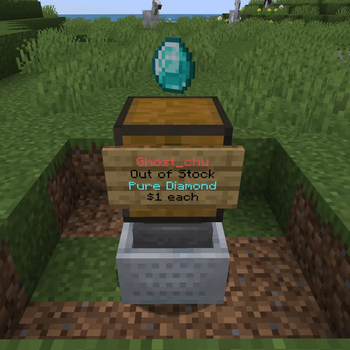
To create a shop, place down a chest and left-click it with the number of items you want to sell.
For example: If I want to sell 16 diamonds will I need to hold 16 diamonds in my hand and left-click the chest with it. (Need allow-stacks: true and permission).

You will then be prompted to type in the chat, how much you would like to sell this item for.
Note: You may encounter issues with the chat system if you're on a BungeeCord network that utilizes a global chat plugin like BungeeChat. In such a case will you need to use commands to create a shop!
After you completed those steps should an item be displayed on top (Can be toggled off in the configuration) and a sign with info be placed on the side of the chest.
A Shop may not be created if there is no space around the chest to place down a sign.
How to buy/sell Items
To buy or sell an Item from/to a Shop will you need to left-click the sign.
You will then be prompted to write the amount you want to buy/sell in chat.
Whether a shop sells or buys items depends on the displayed info on the sign.

Advanced Features
Item Preview GUI
Preview the item you will purchase before actual purchase to avoid scam!

Shop Control Panel
Shop Control Panel allows tweaks to your shop with one click, no command needs!

Shop Staff
Shop owner can able to managing shop staff by using the command /quickshop staff <add/del/list> <player>, which allow shop staff to access your shop to manage the stock.
Ender Chest Inventory Linkage
Install OpenInv and openinv compatibility module and you will be able to use /quickshop echest to link your quick shop to your ender chest inventory! So all your echest shops can share with your ender chest inventory!
Rules-Based Price Limiter
Create rules to limit shops' prices with specific materials!
Translation OTA & Override system
Unlike other plugins, QuickShop uses CrowdinOTA technology to update our translation over the air. You can always enjoy the latest translations. All translations will keep updated with the cloud.
If you need to customize the translation, you can follow our guide to use the override customize system!
Shop Purger
Purge shops that owner no longer active or banned!
Our compatibility modules also offer purge player shops while it leave teams/islands/lands.
Interaction Controller & Direct Trade
Custom the click behavior through interaction.yml!
You can sell or buy 1 or all things directly by sneaking clicking (or any behavior you configured).
Item Stacking
Enable the allow-stack option in config.yml, then you can create a stacking shop by holding more than one item in hand. So players must buy items that are multiples of their holding.

Per shop permission management
Have you ever considered putting another player in full charge of your shop?
Or just ban a player to avoid him purchase your shop?
You can do this now with per shop permission management.

Compatibility Modules
QuickShop-Hikari officially provides some plugins compatibility modules to make them work more closely with QuickShop, here is a list that we currently support:
* AdvancedRegionMarket (Remove shops when region reset)
* BentoBox (Remove shops while the member was kicked out of the team)
* Clearlag (Prevent clear the QuickShop displays if you hadn't installed ProtocolLib)
* GriefPrevention (Remove shops on untrusted, unclaimed,
expired, resized, etc.)
* Lands (Remove shops while member leaves)
* NoCheatPlus (anti-cheat compatibility)
* OpenInv (Offers a command /quickshop echest to link with your EnderChest)
* PlotSquared (Remove shops when a player is untrusted)
* Towny (Remove shops while resident left or plot clear/destroyed; Taxes go town bank account etc.)
* Residence (Region creation/purchase control.)
* WorldEdit (Remove shops while blocks removed by WorldEdit)
* WorldGuard (Register flags to control creates and trades in allowed regions, you usually don't need this)
* SuperiorSkyblock (Remove shops when a player kicked, un co-op, island reset etc.)
* EcoEnchants (Show EcoEnchants's enchantments)
* Reforges (Show Reforges stuff in preview item GUI)
Enhanced Addons
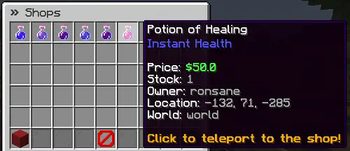
ShopSearch by Ronsane
Adds a /finditem command in game for searching through all the shops on the server.
[Download]
DiscordSRV
Forward in-game notifactions to Discord EmbedMessage and DM players.
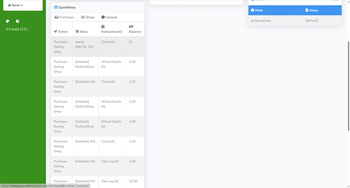
Plan
Showcase your server recent QuickShop-Hikari activities like purchases and shops list.
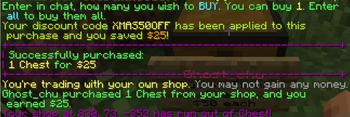
Discount
Add discount codes to your QuickShop-Hikari server with custom name, rate, range, expired time and
price threshold.
Known Incompatible Plugins
Some plugins may not work together with QuickShop and there is little we can do on our side to fix this.
* Pretty much any BungeeCord Chat plugin.
To solve the BungeeCord Chat conflicting, download and install Compat-BungeeCord compatibility module under versions.
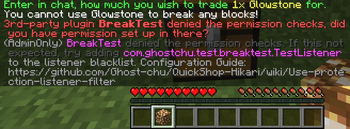
* Plugins handling BlockBreakEvents
If you are a server administrator (with quickshop.alert privileges), you will receive an admin-only message instructing you how to configure the filter.
Or you can directly disable the protection-checks, but it will allow players to create shops everywhere!
* ChatControl Pro/Red
You can use /quickshop amount <amount> to set the price instead.
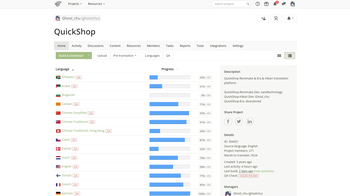
Help us translate QuickShop!
You can help us to translate QuickShop into as many languages as possible!


You can find the currently worked on translations over at Crowdin:
https://crowdin.com/project/qs-hikari
Can't find your language?
Open an issue on Issue Tracker!
FAQ
Q: Can I create a shop that sells AND buys items?
A: No. Each shop can only sell or buy but not both at once. You can however use a double-chest to have two shops. One buying and one selling the item.
Q: Can I use item currency like diamonds?
A: No. We won't add it. But you can choose some economy plugins that allows you to use item currency.
Q: The plugin doesn't respond when creating a shop. Is it broken?
A: Some plugins may cancel the Shop-creation. Most commonly is this the case with protection plugins. You can disable the shop.protection-checking in the config to bypass this.
Q: How can I create a Shop selling stacks?
A: To create such a shop, follow these steps:
1. Set "allow-stacks" to true in the config.yml and reload the plugin.
2. Give the player (Yourself) the permission quickshop.create.stacks
3. Hold the number of items to buy/sell and create the shop as normal.
Q: Can I create a shop that bypasses the default vanilla stack-size?
A: Yes. Enable the custom-item-stacksize option in the config.yml and reload the plugin. Afterward, can you use /quickshop stack
Q: My shop was broken/denied by XXX non-protection plugin. Why?
A: QuickShop creates a fake BlockBreakEvent to check if you can build in that area. Some plugins may interfere with this event by canceling it. Try Use protection listener filter to fix it.
Q: How can I migrate from H2 to MySQL, MariaDB (or vice-versa)?
A: See Docs
Q: The plugin is giving a NoDefClassFound/NoMethodFound error in the console, why?
A: This may be caused either by odd plugins that QuickShop does (not) support or by having a damaged/corrupted jar of QuickShop. Try to update the plugin and also test it with ONLY QuickShop installed. If the issue persists, report it to us on GitHub!
Q: How can I change or delete some messages?
A: Edit the messages in your message.json file. To remove a message, just change its content to an empty String ("").
Q: Can you add support for plugin X?
A: Maybe. Please open an issue on our GitHub for this.
Q: It cannot load on 1.7/1.8/1.9/1.10/1.11/1.12/1.13/1.14/1.15/1.16/1.17/1.18/1.19.
A: See "Tested Minecraft Versions", latest version only supports 1.20 and above.
Migrate from QuickShop-Reremake
QuickShop-Hikari is different from Reremake and data are not compatible with each other.
Hikari offers a converter that allows you to convert the data from Reremake to Hikari.
https://quickshop-community.github.io/QuickShop-Hikari-Documents/docs/addon/reremake-migrator
Bug Reports
Supports
User Documentation
Developer API
- Maven repository & QuickShopAPI
- Code Fragment -> Shop Lookup
- Code Fragment -> Register QuickShop Command
- Code Fragment -> InventoryWrapper API (Hook shop inventory to another block, entity, and plugin virtual inventory)
- Overview -> API Package
- Code Fragment -> Customize display item implement with ServiceInjector (TODO)
Javadoc can be download use Maven or checked there.
Can I repost/reprint this plugin to xxx like mcbbs etc?
We allow you to repost this plugin for free in other places as long as you follow two basic rules:
* Keep the link to the original resource (This one) and the source code link.
* Don't remove the author's name or claim that are the original authors.
* For MineBBS reposters: This resource is currently on hold pending a decision, please do not repost without authorization at MineBBS.
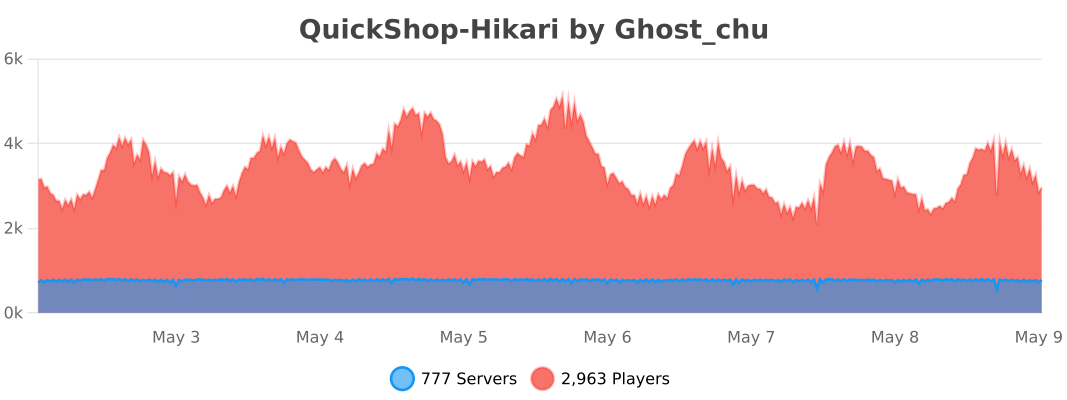
Metrics
Прев’ю
Зображення товару
Середовище
Вимоги та сумісність
Сумісність і вимоги
FoliaPaperPurpurSpigot1.18.2 – 1.21.1126.126.1.126.1.2
Локальний хост
Unsupported
Хостинг на сервісах
Required
Умови
Ліцензія
Умови використання, зміни та поширення цього товару.
GNU Affero General Public License v3.0 onlyModrinth
Реліз
Останній реліз
v6.2.0.11
14.02.2026 · Modrinth
Major Changes
- Removed Spigot Platform Modules, and stopped loading QS if Spigot is detected. This will mean that unless the protocol changes that we use for display items, QS won't need updated for each version.
- Revamped Economy Code Completely
- New classes for all economy-related systems
- Any economy-related or benefits-related events are incompatible with previous versions.
- Added sign layout customizations per-type allowing you to change how lines are configured, an empty...
Галерея
Зображення проєкту
Скриншоти та зображення з оригінальної сторінки Modrinth.
Discount Addon - Notice from Purchasing
Shop Protection #hopper
Permission Checks Conflicting Demo
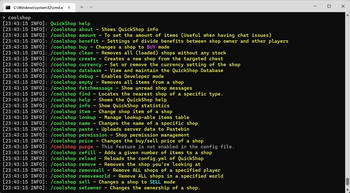
Command Alias Demo

Discount Addon - Tab Complete
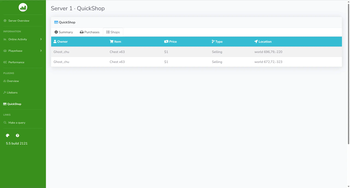
Plan Addon - Global Shops List
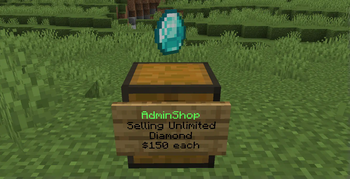
A unlimited shop
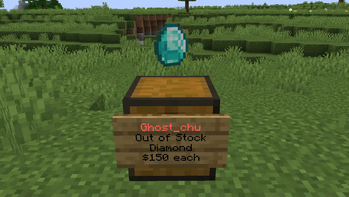
A limited shop
Crowdin Page
Ronsane's Shop Search Addon
Discount Addon - Saved money
Plan Addon - Per player shop purchase logs

Discount Addon - Query Code Information
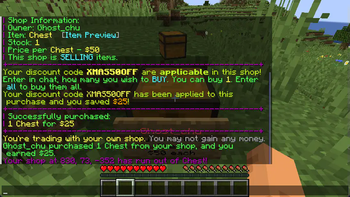
Discount Addon - Discounting
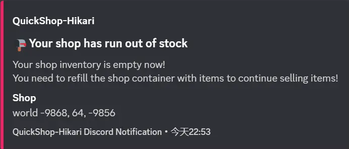
Discord Addon - Showcase - Out of stock
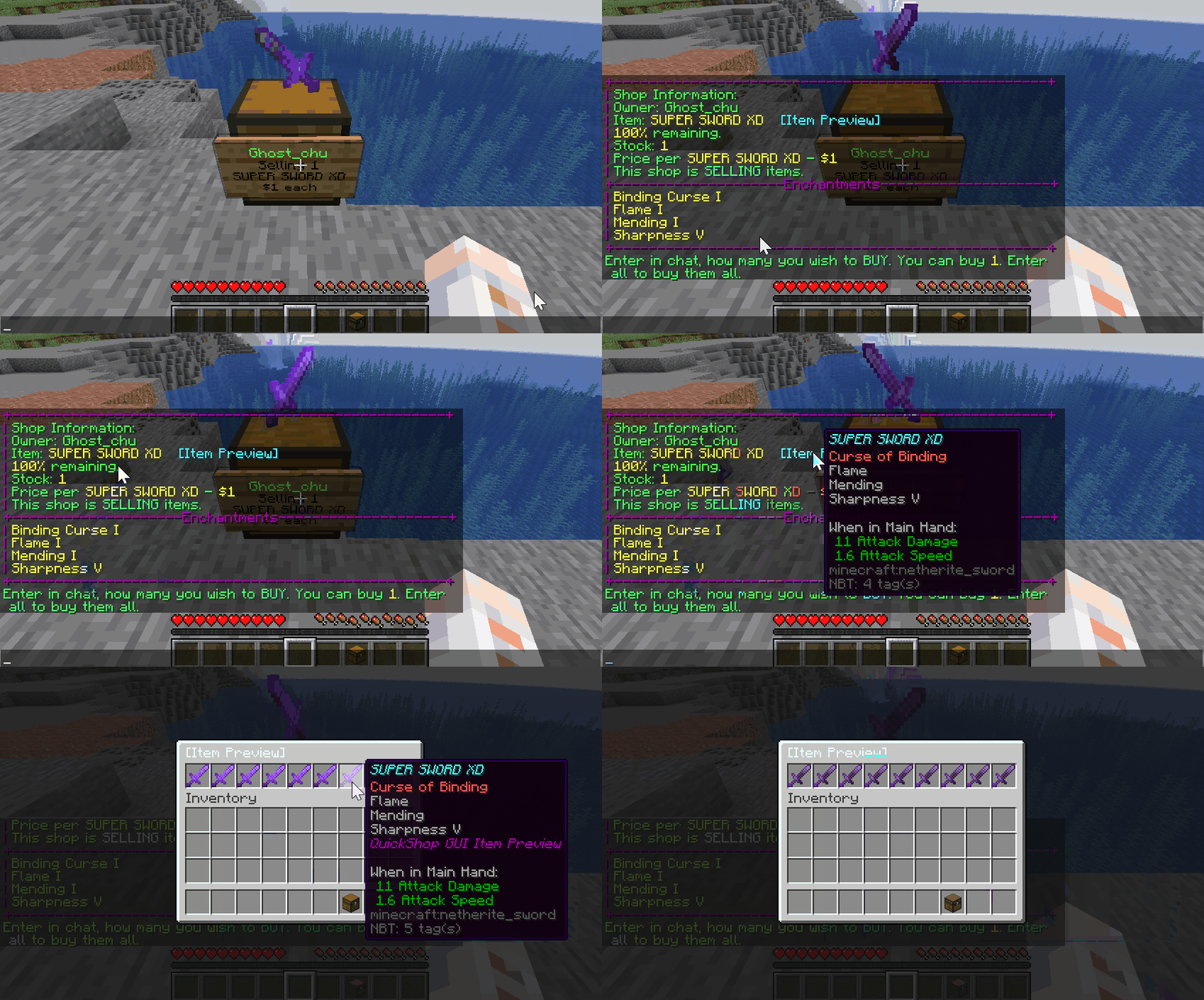
Previewing Item
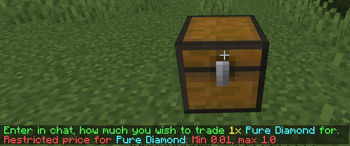
Price Limiter Demi

Shop Protection #fire
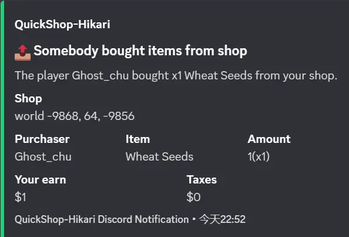
Discord Addon - Showcase - Bought
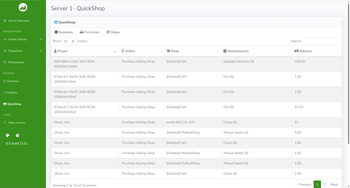
Plan Addon - Global Purchase logs
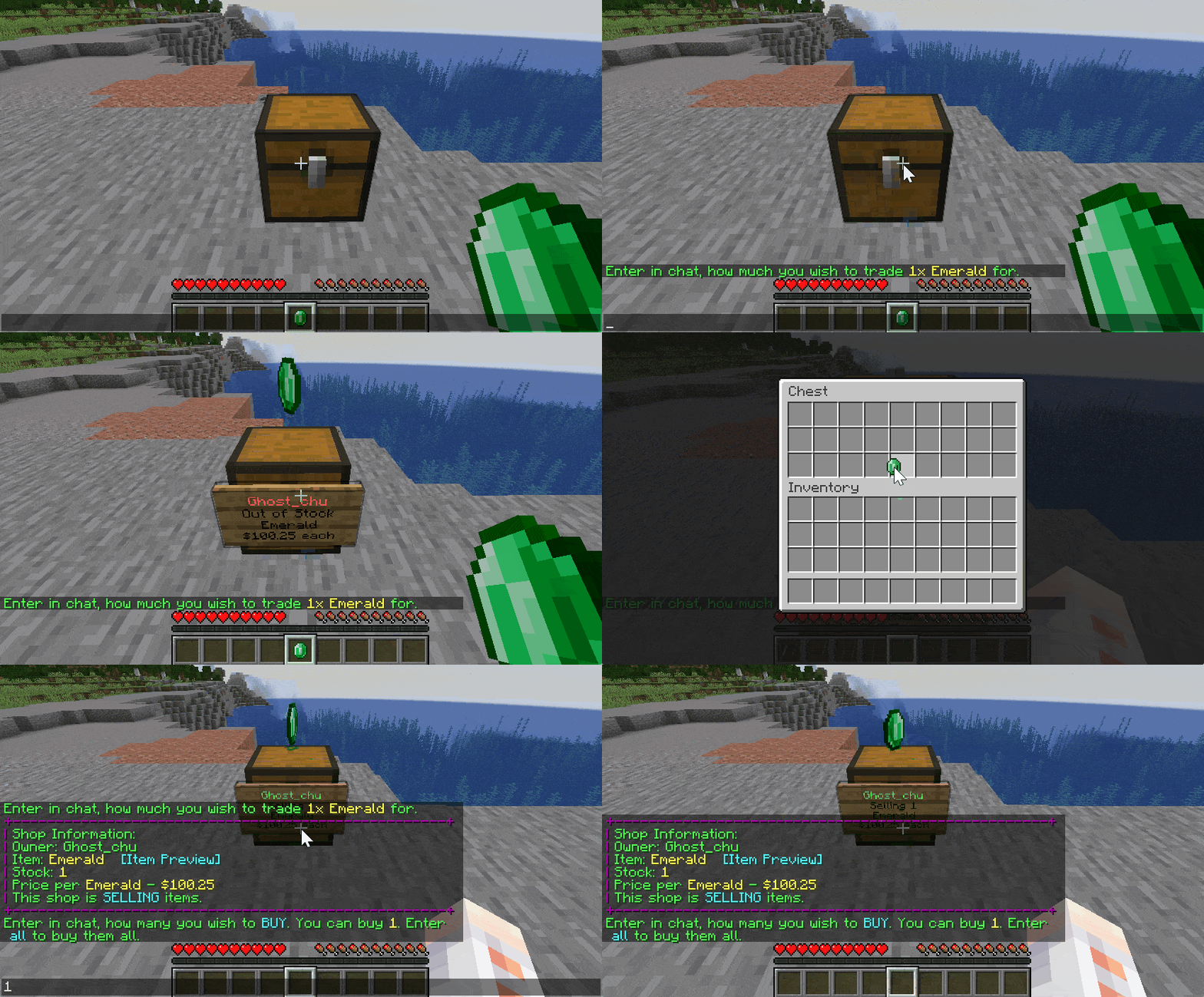
Create a shop
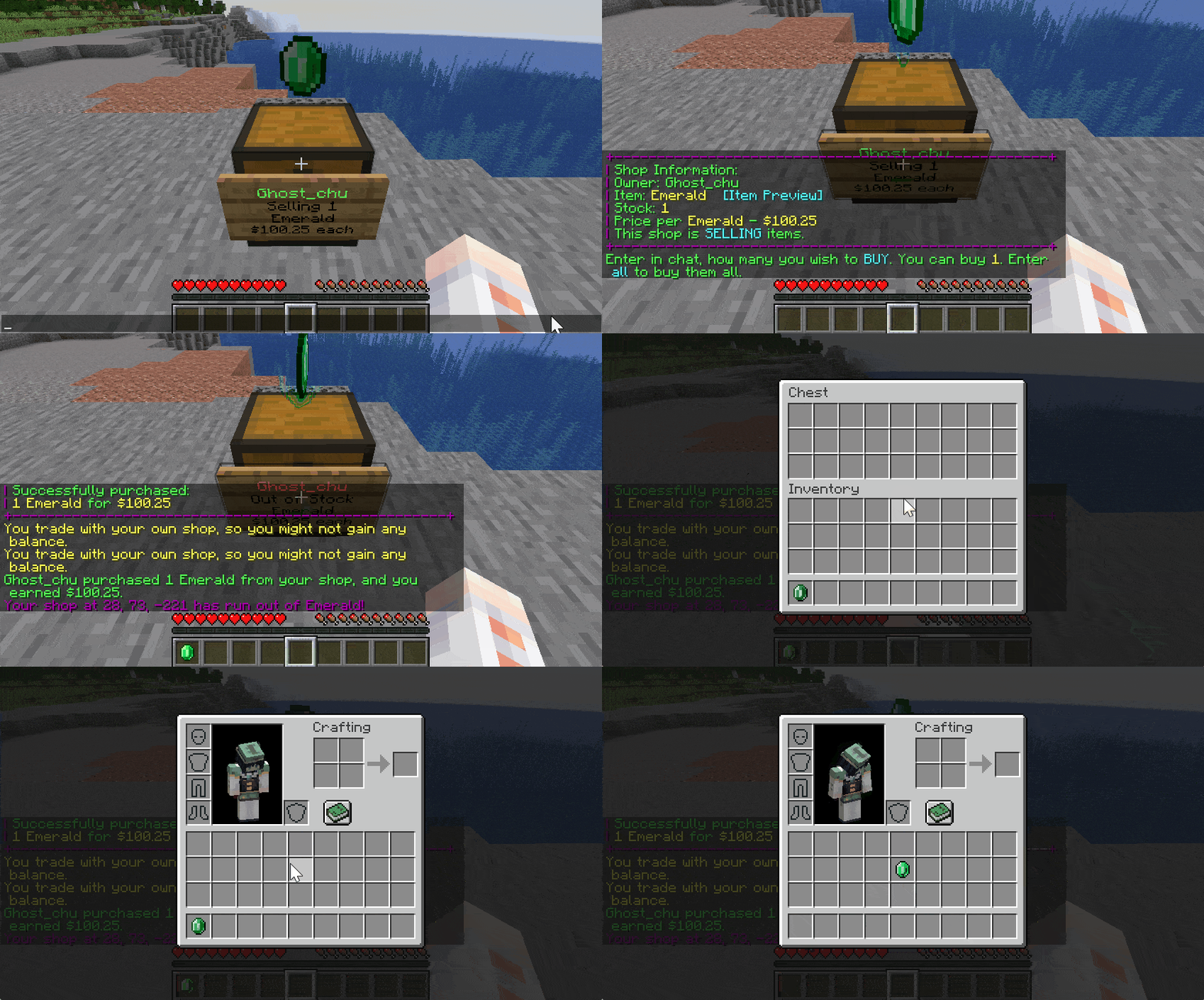
Purchase a shop
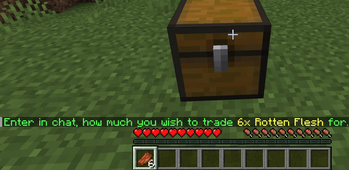
Create stacking shop

Per shop management
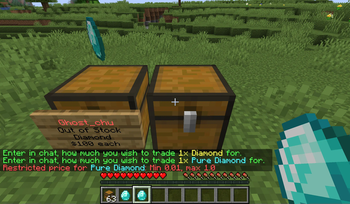
Item Reference Demo
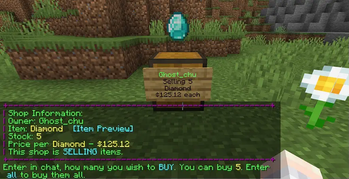
Banner

Shop Finding
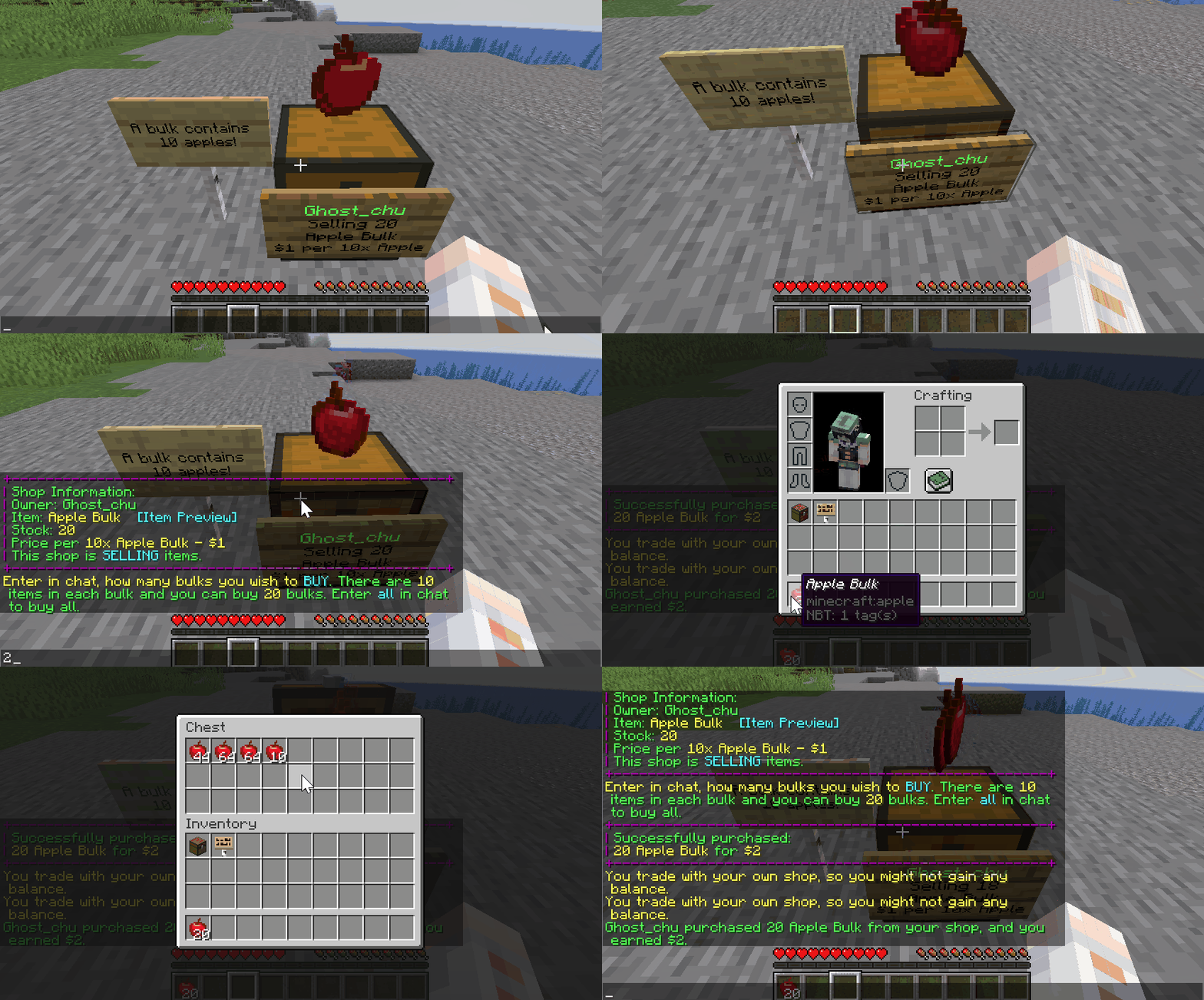
Purchase a stacking shop
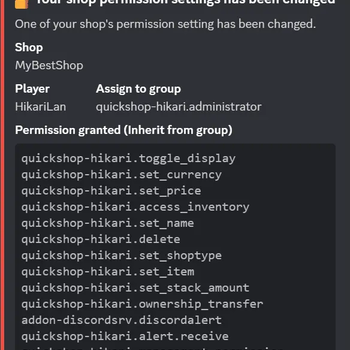
Discord Addon - Showcase - Permission Alert
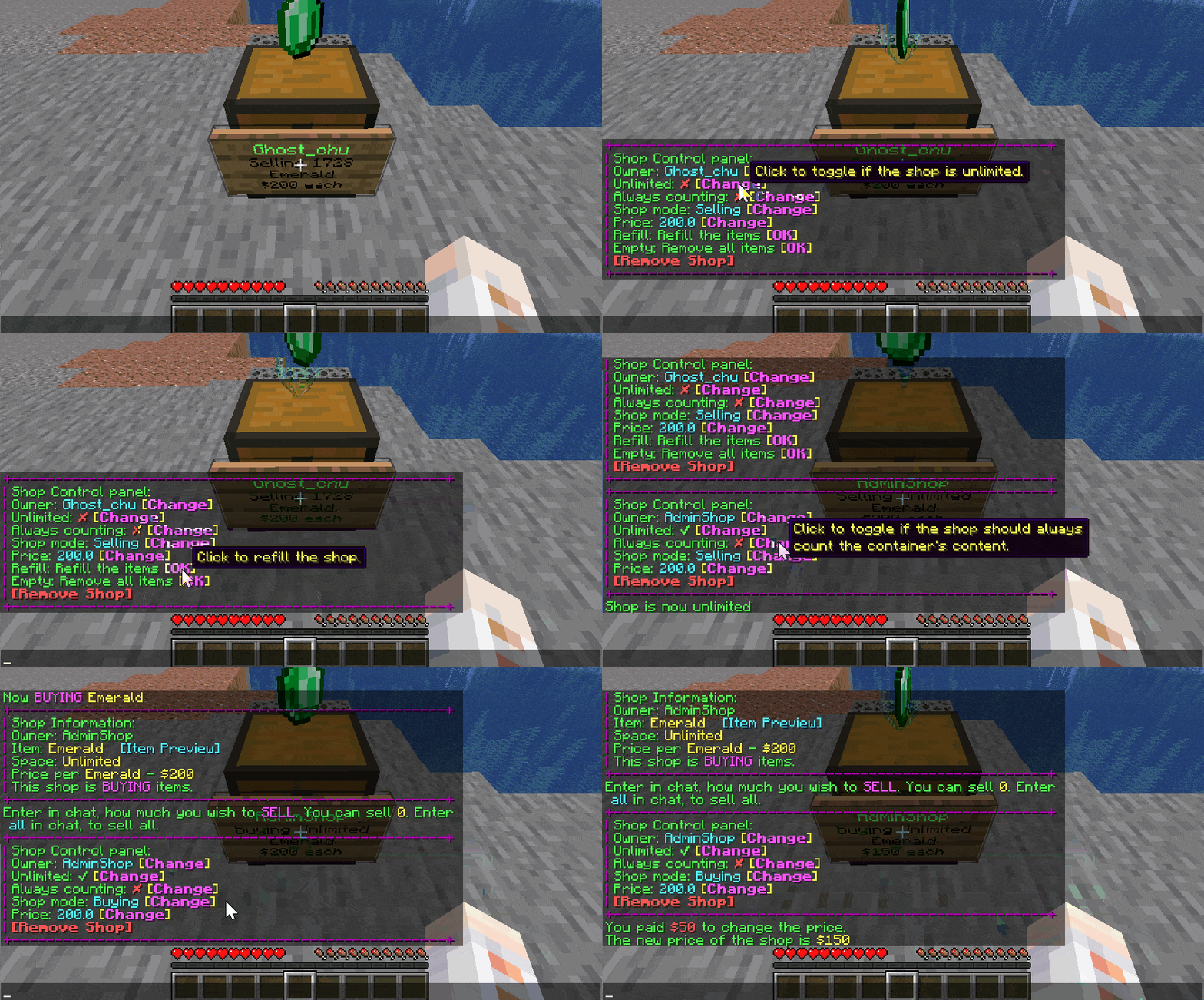
Control Panel Showcase
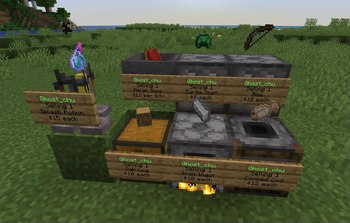
Multiple Shop Blocks
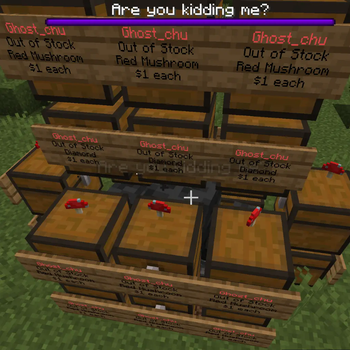
Shop Protection #wither
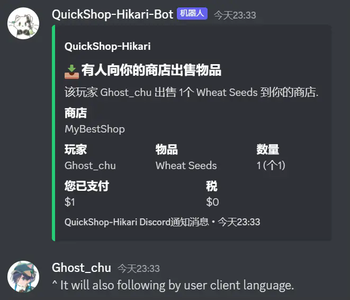
Discord Addon - Showcase - Per player i18n
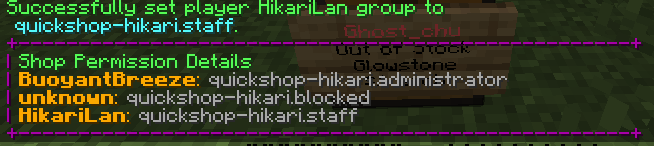
Per shop management add player demo
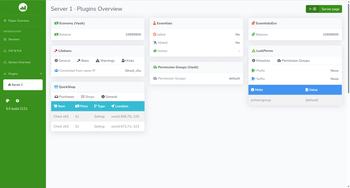
Plan Addon - Per player shops list



Історія
Версії проєкту
Опубліковані версії та оригінальні файли Modrinth.
v6.2.0.11ОстанняRelease
14.02.2026 · 39 431 завантаження
FoliaPaperPurpur1.201.20.11.20.21.20.31.20.41.20.51.20.61.21
Major Changes
- Removed Spigot Platform Modules, and stopped loading QS if Spigot is detected. This will mean that unless the protocol changes that we use for display items, QS won't need updated for each version.
- Revamped Economy Code Completely
- New classes for all economy-related systems
- Any economy-related or benefits-related events are incompatible with previous versions.
- Added sign layout customizations per-type allowing you to change how lines are configured, an empty string('') will leave an empty line for that line of the sign.
  #The layout of signs for shops.
  layout:

    #The layout of BUYING shops.
    BUYING:
      line1: "header"
      line2: "trading"
      line3: "item"
      line4: "price"

    #The layout of FROZEN shops.
    FROZEN:
      line1: "header"
      line2: "trading"
      line3: "item"
      line4: "price"

    #The layout of SELLING shops.
    SELLING:
      line1: "header"
      line2: "trading"
      line3: "item"
      line4: "price"
- Add wildcard support for item blacklist patterns(thanks to bennycallanan)
-
Added support for wildcard patterns in the item blacklist configuration, allowing users to block entire categories of items with simple patterns.
-
Features
- Wildcard patterns like _AXE and _SPAWN_EGG now work in blacklist configuration
- Supports * for any characters and ? for single character matching
- Case-insensitive pattern matching
- Overhauled GUI system(thanks to Yusakidev)
- Implemented gui.yml configuration file for customizing the GUI.
- Implemented better filtering for qs browse
- Implement GUI system to be more stable, and less error prone.
- Added gui.yml for fully configurable GUI layouts and text
- Browse menu: search, sort (price/name/stock), and filter (all/buying/selling/in-stock)
- Staff menu: search functionality for player/staff selection
- Grouped item pages for better shop browsing
- Refactored all menu pages to use configurable display/lore
- Added worldedit compat to QS internally as it's widely used.
- Revamped the taxation system to be more flexible and easier to configure.
- introduced a new progressive tax system that allows you to tax based on the balance of players.(suggested by YuanYuanOwO)
- introduced the ability to tax the player interacting with the shop, the owner, or both
- all tax-related configurations have been moved under the shop-tax section of the config. this may require reconfiguration of your tax settings.
- added a new ShopEnhancedTaxEvent, deprecated the old ShopTaxEvent.
- Added a new TaxManager, and TaxProvider interfaces, this allows for custom tax providers to be added by addons/third-party developers.
Addons/Compats Changes
- Added UltimateClaims compat
- Added SimpleClaimSystem compat
- Added Quests by Pika addon
- Added BetonQuest addon
- Added Pl3xMap addon
- MatcherPlus Compat Improvements
- Added support for CrazyCrates
- Added support for ExcellentCrates
- Added support for SilkSpawners.
- WorldGuard Compat Improvements(Thanks to golovin12)
- Added clear permission handling:
- Region owners and members automatically have permission to create and trade in their own regions.
- Other players must have the appropriate WorldGuard flags enabled (quickshophikari-create, quickshophikari-trade) to interact with shops.
- If a shop is located outside any region, default QuickShop behavior applies (no extra restrictions)
- Added colored markers based on shop state for bluemap(thanks to YusakiDev)
- Updated dynmap/towny addons to use the new ShopTypeEnhancedEvent instead of ShopTypeEvent.
- Removed worldedit compat, it's now included in the main plugin.
- Added support for global flags to the worldguard compat.
Internals/Developer APIs
- Removed several deprecated methods and classes.
- Revamped the interaction manager. It is now more flexible and allows external additions
- This involves two classes InteractionBehavior and InteractionType.
- InteractionType details the type of interaction such as: STANDING_LEFT_CLICK_SIGN, STANDING_LEFT_CLICK_SHOP
- InteractionBehavior outlines a behavior for an InteractionType such as CONTROL_PANEL and TRADE_UI
- Added UserLimitCalculationEvent, which allows for custom limits to be applied to users.
- This is useful for limiting the number of shops a user can have, or adding on to the existing limits provided by the ranks system without needing to implement a new RankLimiter.
- Added a new ShopLayoutProvider interface, and default implementation.
- This allows for custom layouts to be used for shops, allowing for more customization.
- This also allows for developers to override the default layout provider and create their own implementation.
- How to make your own?
- Implement the classes you would like to then register with the InteractionManager:
-
```java
InteractionManager manager = QuickShop.getInstance().getInteractionManager();manager.interaction(new MyTradeInteraction());
manager.behavior(new MyTradeBehavior());
```
- Replaced some Apache Commons calls that could be easily replaced with built-in java methods, reduces some calls by ~ 1100ms/method call
- Deprecated the ShopType enum, and the ShopTypeEvent. These are replaced with the new IShopType interface and implementing classes.
- The new event is ShopTypeEnhancedEvent.
- This allows for third-party addons to add their own shop types, and simplifies code checks for translations.
- Updated config system to use Boosted-yaml
- this allows for auto-updating of config files without complex update scripts
- this also allows for the config system to not be minecraft-dependent.
- Replaced logical PaperLib calls with native PaperAPI calls.
Minor Changes
- Bump Java version up to 21
- Added shop.display-allow-enchants to enable/disable enchantments for display items on shops.
- Added workaround for packetevents not supporting custom enchants on itemstacks for virtual display items.
- Using locale translations for shop-type in mode toggle icon(thanks to ExyiN)
- Bumped Residence version for the compat(thanks to YuanYuanOwO)
- add world whitelist support(thanks to wling-art)
- added /qs database save command, which saves all currently dirty-marked shops to the database.
- Split up interactions _SHOPBLOCK into _SHOPBLOCK and _CONTAINER.
- _SHOPBLOCK relates to shops, where _CONTAINER relates to shop-valid containers that are not currently shops.
- Added inventory as an option for command panel, this is useful for adding a secondary option for players to open a shop's inventory.
- Moved crowdin arguments from system properties to config.yml
- crowdin-host
- use-crowdin-ota
Fixes
- Fixes issue with item price restrictions(thanks to maxcom1)
- Fixes issue with 1.20.x protocol lib displays(thanks to YuanYuanOwO)
- Fixes issue when no item is in hand for itemdebug(thanks to YuanYuanOwO)
- Fixes issue with dominion addon(thanks to YuanYuanOwO)
- Add a simple check to avoid this. If it is not own shop, reject limit request directly.(Thanks to YuanYuanOwO)
- Fix NPE by not setting tax for price in TransactionBuilder(thanks to maxcom1)
- Fixes /quickshop suggestprice to differentiate between buy/sell shops. (Thanks to MidSpike)
- PacketEvents ClassNotFoundException with ProtocolLib(thanks to wling-art)
- Reallocate block state access to region thread for shop creation(thanks to r00tbeerman)
- resolve SLF4J StaticLoggerBinder loading error(thanks to wling-art)
- sign hijacking issue by validating sign facing direction(thanks to wling-art)
- Performance improvements for QuickShop disabling to prevent potential freezes.
- Fixed issue with 1.20.4 packetevents virtual displays not staying put.
- Fixes critical issue in GriefPrevention compatibility plugin.
- Fixes issue with shop owner not getting money when benefits active.
- Fixes for lands addon on folia, Use regionThread for Folia compatibility(thanks to YusakiDev)
- Fixes for TRADE_DIRECT on stacking shops
- Fixes issue for protocollib 5.4.0 with undocumented packet changes.
- Fixes issue where item stacks could be used on creation above the max stack size.
- Fixes issue with BukkitAudiences-related crashes on 1.21.11.
- Fix issue with shop deletion when getting too impatient.
- Fix the permission check issue when a shop owned by a non-owner is transferred to someone else. (thanks to YuanYuanOwO)
- Fix ui with supertool (thanks to YuanYuanOwO)
- Fix issue with logs generating outside debug mode.
- Fix issue with /qs find.
- Fix configuration loading timing.
- Fix configuration loading/creation warning message language.
- Fix command description language key mismatch(thanks to wling-art)
- Fix qs clean command on folia(thanks to wling-art)
- Fix per-player-shop-sign on folia(thanks to wling-art)
- Fix potential recursive deadlock in virtual display packet sending(thanks to wling-art)
- Fix configuration loading/creation warning message language.
- Fix issue with /qs browse and ShopItemOnly addon not behaving properly together on folia.
- Fix issue with PLAN using outdated APIs.
- Fix issue with /qs clean on folia.(thanks to wling-art)
- Fix issue with /qs cleanghost on folia(thanks to wling-art)
- More thread safety fixes for shops on folia.(thanks to wling-art)
- Fix owner payment calculations with benefits(thanks to wling-art)
v6.2.0.10Release
28.07.2025 · 29 071 завантаження
FoliaPaperPurpurSpigot1.201.20.11.20.21.20.31.20.41.20.51.20.61.21
6.2.0.10
Major Changes
- Added support for 1.21.6 for paper(spigot has not been updated as we look to deprecate spigot support, nag the spigot developers about modernizing their API)
- Added support for 1.21.7 for paper(spigot has not been updated as we look to deprecate spigot support, nag the spigot developers about modernizing their API)
- Added support for 1.21.8 for paper(spigot has not been updated as we look to deprecate spigot support, nag the spigot developers about modernizing their API)
- Some internal updates for packetevents(2.9.0 is now required.)
- Updated Lands support
Addon Changes
- Added MatcherPlus Addon
- Allows support for BreweryX and AdvancedItems stacks in shops with improved matching abilities
- Added FabledSkyblock Compat
- Added Dominion Compat
- Added HuskTowns Compat
- Added IridiumSkyblock Compat
- Added member-create for member creation in ARM compat
- Added admin-override and quickshop.arm.admin permission for admin overrides in ARM
Minor Changes
- Added configurations for the coordinates of the display item.
- Added /qs toggledisplayall on/off server/owned
- Players need to have permission node quickshop.toggledisplayall.admin to toggle all on the server.
- Added ability to use abbreviations in /qs price and /qs create commands such as 2.5k for 2500
- Added ability to set default display status using shop.default-display in config.yml
Fixes
- Fixed issue with display item being sent to the moon on 1.21.5
- Fixed issue where TRADE_UI interactions interfered with quick create.
- Fixed issue with displays on protocollib falling through the chest
- Fixed issue with signs on .9 and previous .10 snapshots on early versions
- Implemented some performance improvements for paper servers
- Fixed all outstanding issues with Folia usage.(thanks to RootB33R/SleazLee for contributions)
Possible 6.2.0.11 Features
Here's an outline for some features that may arrive in 6.2.0.11:
- Additional compats/addons that have been piling up.
- see: https://github.com/QuickShop-Community/QuickShop-Hikari/issues/1756
- gradle?(interested to see compilation time uplifts)
- Update documentation
- Update configuration comments
- Update configuration system?
- auto updating?
- Allows removal of the update code
- Remove waste spigot modules?
- Any versions of 1.20 that can be discarded due to low use?
- Bug fixing, of course
- Sign parser implementation?
- probably have to re-evaluate since it's been awhile since it has been looked at...
v6.2.0.9-RELEASE-1Release
01.04.2025 · 15 285 завантаження
FoliaPaperPurpurSpigot1.201.20.11.20.21.20.31.20.41.20.51.20.61.21
6.2.0.9 - Important Note: Contains Exploit Fix, Please Update ASAP.
Remember to backup your DB before updating.
Major Changes
Exploit Fix Included for GUI Exploit
This build fixes an exploit in the GUI system that was recently outlined.
Lots of Events Changes
See discord changelog for event system here
Control Panel Component System Overhaul
The shop control panel system has been overhaul to separate it into different classes. This allows third-party
plugins to add additional components to the control panel easily. There was also an added event, ControlComponentGenerateEvent,
which is called PRE, MAIN, and POST of a ControlComponent being generated. The MAIN phase supports changing
the ControlComponent object with a custom one that will replace the original during control panel sending.
Introduction of the Revamped Packet System
-
About:
- A modular and scalable system for managing packets related to virtual display items in Minecraft.
- Supports both ProtocolLib and PacketEvents libraries for greater flexibility.
-
Custom Packet Factories:
- Modular implementation of
PacketFactoryfor game versions 1.20.x and 1.21.x. - Packet types:
- Spawn Packet: Spawns a virtual item entity at a specific location.
- Metadata Packet: Updates the visual properties of virtual items.
- Velocity Packet: Adds motion/velocity to entities (currently optional).
- Destroy Packet: Removes the entity from the client view.
- Modular implementation of
-
Error Handling and Logging:
- Enhanced debug logs to trace packet-related issues.
- Detailed error messages for missing factories or unregistered listeners.
Improvements:
- Better modular design to facilitate support for future Minecraft versions.
Deprecations:
- Legacy packet handling mechanisms replaced with this new Packet System.
Event System Overhaul
Added
- event/Phase.java - Introduces a phase-based event system to track different stages of an event lifecycle.
- event/PhasedEvent.java - Defines events that occur within different phases, allowing better event state management.
Packet Handling Events:
- event/packet/handler/PacketHandlerAddedEvent.java - Triggered when a new packet handler is registered in the system.
- event/packet/handler/PacketHandlerInitEvent.java - Fired when a packet handler is initialized, useful for debugging or custom setups.
- event/packet/send/PacketHandlerSendDestroyEvent.java - Dispatched when a packet instructs a client to remove an entity from their view.
- event/packet/send/PacketHandlerSendMetaEvent.java - Fired when metadata about an entity is sent via packets.
- event/packet/send/PacketHandlerSendSpawnEvent.java - Triggered when an entity is spawned using packet-based communication.
Shop Events
- ShopUpdateEvent has been replaced with the ShopDatabaseEvent
- ShopAuthorizeEvent has been replaced with the ShopPermissionCheckEvent
- ShopClick, ShopCreate, ShopDelete, ShopLoad have been replaced with similar named events, but they are in the event.management package now, and are phased events.
Shop Settings Events:
- event/settings/ShopSettingEvent.java - Generic event to handle changes in shop settings dynamically.
- event/settings/package-info.java - Documentation package containing metadata for shop settings.
- event/settings/type/ShopCurrencyEvent.java - Handles changes in the currency type used in a shop.
- event/settings/type/ShopDisplayEvent.java - Triggers updates when a shop’s display settings (e.g., holograms, signs) are modified.
- event/settings/type/ShopItemEvent.java - Fired when the main item being sold in a shop is changed.
- event/settings/type/ShopNameEvent.java - Occurs when a shop’s name is updated.
- event/settings/type/ShopOwnerEvent.java - Manages ownership transfers and modifications in a shop.
- event/settings/type/ShopOwnerNameEvent.java - Triggered when the owner's display name is modified.
- event/settings/type/ShopPlayerGroupEvent.java - Handles updates to the player group associated with a shop.
- event/settings/type/ShopPriceEvent.java - Dispatched when an item’s price is changed in a shop.
- event/settings/type/ShopSignLinesEvent.java - Manages updates to sign-based shop displays.
- event/settings/type/ShopTaxAccountEvent.java - Fired when a shop's tax account information is modified.
- event/settings/type/ShopTypeEvent.java - Tracks changes in the classification or type of shop.
- event/settings/type/ShopUnlimitedEvent.java - Handles changes to a shop’s unlimited stock setting.
- event/settings/type/benefit/ShopBenefitAddEvent.java - Fired when a new benefit (e.g., discounts, loyalty rewards) is added to a shop.
- event/settings/type/benefit/ShopBenefitEvent.java - General event for tracking shop benefit modifications.
- event/settings/type/benefit/ShopBenefitRemoveEvent.java - Triggered when a shop benefit is removed.
Removed
- event/details/ShopItemChangeEvent.java - Replaced with
ShopItemEvent.javafor a more consistent structure. - event/details/ShopNamingEvent.java - Merged into
ShopNameEvent.java. - event/details/ShopOwnerNameGettingEvent.java - Superseded by
ShopOwnerNameEvent.java. - event/details/ShopOwnershipTransferEvent.java - Now handled by
ShopOwnerEvent.java. - event/details/ShopPlayerGroupSetEvent.java - Integrated into
ShopPlayerGroupEvent.java. - event/details/ShopPriceChangeEvent.java - Merged into
ShopPriceEvent.java. - event/details/ShopTypeChangeEvent.java - Replaced by
ShopTypeEvent.java. - event/details/ShopUnlimitedStatusEvent.java - Now managed under
ShopUnlimitedEvent.java. - event/display/ShopDisplayItemDespawnEvent.java - Removed in favor of
ShopDisplayEvent.java. - event/display/ShopDisplayItemSafeGuardEvent.java - Consolidated into a broader display event category.
- event/economy/ShopTaxAccountChangeEvent.java - Now included in
ShopTaxAccountEvent.java. - event/economy/ShopTaxAccountGettingEvent.java - No longer necessary due to a refactored shop economy system.
- event/packet/PacketHandlerAddedEvent.java - Moved to
event/packet/handler/PacketHandlerAddedEvent.java. - event/packet/PacketHandlerInitEvent.java - Now handled by
event/packet/handler/PacketHandlerInitEvent.java.
Modified
- event/AbstractQSEvent.java - Updated base event structure to support phase-based execution.
- event/QSCancellable.java - Added new cancel conditions to prevent unintended event termination.
Packet Events:
- event/package-info.java - Updated to reflect new event structures.
- event/packet/PacketHandlerEvent.java - Now supports additional packet handling scenarios.
Minor Changes
- If a player doesn't have permissions for CONTROL_PANEL_UI it'll open the TRADE_UI for them
- Added the quickshopdontsend override to allow server owners to prevent certain messages from sending(paper only)
- Made it so invalid chat entries for UIs escape the chat ui
Config Changes
- added shop.control-panel to control what components of the text control panel are enabled.
- added shop.sign-wax to control if the shop sign is waxed or not, default is false.
- added shop.display-protocol which allows you to select packetevents or protocollib for packet handling
Fixes
- readded the /qs history permissions to the default quickshop.player
- fixed issue where some folks wouldn't have the encoded db column
- Fixed issue with reached-maximum-can-create not being implemented correctly
- fixed issue where pistons would move shulker shops.
- fixed issue where colored shulkers could be bought and put inside non-colored shulker
- fixed issue with griefprevent /transfer command not unregistering owner
- fixed issue where signs weren't updated when lock was set to false
- Fixed issue where slime compat explosive pick wasn't being caught by QS(Thanks to YuanYuanOwO and Starfruit)
- Fixed exploit(thanks to macaw/casper for being the first to report this)
Version Changes
- Removed support for 1.18 and 1.19. These versions had minimal usage.
- Added support for 1.21.5
v6.2.0.8Release
23.01.2025 · 8 280 завантаження
FoliaPaperPurpurSpigot1.201.20.11.20.21.20.31.20.41.20.51.20.61.21
6.2.0.8
Major Changes
- Added initial Folia Support
- CONTROL_PANEL_UI is a new interaction that allows you to use a GUI control panel instead of the chat one.
- From this GUI you can add/remove staff, transfer ownership, set selling mode of shop, change the price and delete the shop!
- Readded QS History GUI
- Removed Real Item and Entity displays; They provided no advantages over virtual displays and mainly caused issues.
- If protocol lib is not up-to-date/installed it will default to no display.
- Added /qs browse [world], which allows a player to view the shops by server or by world depending of if they attach world as an argument
- Added TRADE_UI interaction, which opens up a GUI-based trading menu for the player to buy/sell predefined, and custom amounts from/to a shop.
- Updated to MC 1.21.3, MC 1.21.4.
- Added VaultUnlocked Support
Minor Changes
- Added 2 new interaction behaviours that will be coming soon. CONTROL_PANEL_UI and TRADE_UI
- Made it so that when price change fees are set to 0, the fee charge message isn't sent.
- Added /qs staffall to manage staff for all shops.
- Added a new shop mode, frozen.
- This allows admins/shop staff to hault trading with the shop temporarily
- This mode was added to the Shop Keeper menu.
- This mode was added to the text-based control panel.
- This mode introduces new commands: /qs silentfreeze and /qs freeze
- Made the default action for /qs suggestprice try to use the itemstack in hand when shop not in sight.
- Added shop.finding.global to remove distance limit for /qs find
- Made sign shop sign waxed to prevent modifications(thanks to ThiagoROX)
- Add SignOpen listener(thanks to ThiagoROX)
- Add sub command overrides(thanks to ThiagoROX)
Internals
- Added style guidelines.
- Added final inside code where possible.
- Made ShopNamingEvent get called when unsetting shop name.
- Added ShopUnlimitedStatusEvent that is called when changing the unlimited status of a shop.
- Rearranged Events into different packages. This will break plugins that rely on the events.
Discord Changes
- Added Sponsor role for those that sponsor through GitHub.
Compat Plugins
- Towny
- Added ruined town config to remove shops when town goes into ruins.
Addon Plugins
SuperiorSkyblock
- Made it so the compat plugin can delete shops when someone is banned from an island.
Fixes
- Fixed issue with Velocity and Bungee Compat Jars
- Fixed issue with Towny Compat Jar not removing shops when plot is cleared, or town is deleted.
- Fix item restrictions being bypassed using shulkers(thanks to TauCubed)
- Fix Towny town/nation account lookup with Essentials(thanks to galacticwarrior9)
Notes
- Pending removal of 1.18/1.19 support soon.
v6.2.0.7Release
25.08.2024 · 11 122 завантаження
PaperPurpurSpigot1.201.20.11.20.21.20.31.20.41.20.51.20.61.21
Changelog
- Completely rewrote display item code
- Added new completely revamped item matcher, set work-type to 3 which corrects lots of issues(still in testing phase)
- Added 1.21.1 support, this will be the new default, which should allow for future updates to continue to work so long as the protocol doesn't change.
- Add finding enchantments on books and gear support for find sub command(thanks SarahGreyWolf)
Other Notes
- Testing builds for folia support may be found on the discord.
- RealItemDisplay will be getting removed in a future release. It is inefficient and causes more issues than it's worth. Please move to virtual displays.
v6.2.0.6Release
21.07.2024 · 5 600 завантаження
PaperPurpurSpigot1.18.21.191.19.11.19.21.19.31.19.41.201.20.1
Bug Fixes
- Fixed exploit with shop items and certain functionality(thanks to bridgelol)
- Temporarily disabled QS history while working on replacement due to errors end-users are running into.
- Fixed issue with enchantment restrictions not detecting them in enchanted books(thanks toTauCubed)
What's Changed
Full Changelog: https://github.com/QuickShop-Community/QuickShop-Hikari/compare/6.2.0.5...6.2.0.6
v6.2.0.5Release
14.06.2024 · 5 768 завантаження
PaperPurpurSpigot1.18.21.191.19.11.19.21.19.31.19.41.201.20.1
New Features
- 1.21 support
Bug Fixes
- Fixed
/qs cleanmay delete all stores - Fixed
/qs cleanghostmay delete all stores
v6.2.0.4Release
08.06.2024 · 2 196 завантаження
PaperPurpurSpigot1.18.21.191.19.11.19.21.19.31.19.41.201.20.1
Changes
- Virtual Display Item available again when use ProtocolLib Build 710 and up, please update your ProtocolLib
Bug Fixes
- Fixed display item check when using RealDisplayItem, the check may delete non-display item from player/container inventory if an item contains lore that is a valid JSON string. It should won't affcet most servers.
- Fixed
/quickshop cleanghostwon't delete the stores that trading blacklisted items
v6.2.0.3Release
29.05.2024 · 2 419 завантаження
PaperPurpurSpigot1.18.21.191.19.11.19.21.19.31.19.41.201.20.1
Ahhh forget to update version number!
v6.2.0.2Release
29.05.2024 · 1 390 завантаження
PaperPurpurSpigot1.18.21.191.19.11.19.21.19.31.19.41.201.20.1
Bug Fixes
- Fixed entity explosion may not check attached block
Bug Fixes (6.2.0.1)
- History GUI's paging button doesn't use translated text
- 1.20.4/1.20.5 didn't use Spigot new potion API
- The potion effect level in shop info panel always smaller one than actual level in RomanNumber
- The blank lines may send to players when you set a translatable text to empty
- Fixed
quickshop.alertthat should be use asquickshop.alertsin PlayerListener
v6.2.0.1Release
29.05.2024 · 1 420 завантаження
PaperPurpurSpigot1.18.21.191.19.11.19.21.19.31.19.41.201.20.1
Bug Fixes
- History GUI's paging button doesn't use translated text
- 1.20.4/1.20.5 didn't use Spigot new potion API
- The potion effect level in shop info panel always smaller one than actual level in RomanNumber
- The blank lines may send to players when you set a translatable text to empty
- Fixed
quickshop.alertthat should be use asquickshop.alertsin PlayerListener
v6.2.0.0Release
15.05.2024 · 2 500 завантаження
PaperPurpurSpigot1.18.21.191.19.11.19.21.19.31.19.41.201.20.1
Warning! Due to Minecraft's major update to ItemStack, downgrading is not an option! Please backup all data before upgrading!
Reremake users: This is the last chance to complete your migration from Reremake to Hikari before you upgrade to 1.20.5/1.20.6. The migration requires QuickShop-Reremake to be up and running. After upgrading to 1.20.5/1.20.6, Reremake will no longer work properly.
1.18, 1.19 users: All versions 1.18 and 1.19 have been marked as “End Of Life” and these versions are no longer supported. It may be broken in a future update. Please consider upgrading to 1.20.x!
It's been a long time! This release has been delayed several times due to huge changes in 1.20.5/1.20.6. But anyway, 6.2.0.0 is here now!
New Features
- 1.20.5/1.20.6 supports both for Spigot and Paper
- The hover item preview function on Spigot 1.20.6 is not available at the moment, please click to access the GUI to preview the item
- The virtual DisplayItem feature of 1.20.6 has been temporarily disabled because ProtocolLib has not been updated yet.
Displayentity support for display-item- The use of ItemDisplay as a hover is now supported, which has better performance than RealDisplayItem (both for Server and Client). Set
display-typeto3to enable ItemDisplay entity - Displaying detailed levels of potion effects is now supported on 1.20.5+
/quickshop historyenhance- New subcommands:
/quickshop history owned,/quickshop history accessibleand/quickshop history globalto allow you query multiple stores transaction history in single queryowned: Select all shops which you're owneraccessible: Select all shops which you have per-shop permission to access the store historyglobal: Select all shops on this server (require permission)
Bug Fixes
- Fixed
/quickshop benefitcommand may not save when remove users - Fixed chunks load/unload loop on specific Spigot versions when use RealDisplayItem
- Fixed double-chest related issues
- QuickShop may only recognizes half inventory of a DoubleChest store that spans a Chunk junction after chunk unload/server restart
- When creating a store on a DoubleChest, symbolLink is always bound to the side with type=left, no matter which side of the DoubleChest the store cube is on. After the user destroys the corresponding side of the chest, the store will be invalidated.
- Fixed the issue that some items in the History GUI could not be displayed because they were out of the GUI display range.
- Fixed show-tax purchase messages doesn't show tax currency in message.
Debugging
We added localized text and Tab completion to allow all users to use QuickShop-Hikari's built-in debugging tools.
These debug commands are for debugging purposes only and have no operational confirmation. Using them incorrectly may result in inconsistent status or loss of data. Figure out what happens before you execute them.
All commands are started with prefix: /quickshop debug
dev/debug/devmode: Toggle debug modesigns: Print the coordinates of the all identifiable information sign for the store you are looking atupdateplayersigns <player name>: Refresh the contents of the store information boards in all designated players' stores.force-shops-reload: Unload all loaded stores and re-load them (to refresh the state)force-shoploader-reload: Unload and delete them from memory, then re-execute the ShopLoader sequence to reload all stores from the database.check-shop-status/check-shop-debug: Prints quite useful store status debugging information to confirm the current state of the store in memorytoggle-shop-load-status: Simulate store loading/unloading without changing the chunks loading stateset-property: Register/change the Java property sheet to change specific behavior via property switch without touch startup command line (They are usually changed through the startup parameters). For security reasons, this command is restricted to change QuickShop-Hikari properties only, any request to change any other properties will be denied.reset-shop-caches: Reset store lookup cache for benchmark/or debugging possible cache update issuesreset-dbmanager: Force reset of SQLManager, only for MySQL data sources, using this command on H2 will cause the plugin to crashdump-db-connections: Dump SQLManager's Current Active Queries on chat.stop-db-any-queries: Force close SQLManager's currently active queries.toggle-db-debugmode: Toggles the debugging state of SQLManager and prints the executed SQL statements and performance timings on the console when SQLManager debug mode is enabled.dump-hikaricp-status: Printing status information for HikariCP.set-hikaricp-capacity: Dynamically change the size of HikariCP's connection pool to allow more connections to be fetched urgently.item-info: Prints the NBT data for the item in hand (if any) and the item in the store (if any). If the item is in the hand and is looking at a store, it will also output the item match.mark-all-shops-dirty: Forces all store change status indicators to be flagged as changes not saved in order to force a refresh of their current data into the database.clean-display-entities: Scans all loaded blocks and removes any entities recognized as QuickShop DisplayItem. Useful when uncleared entities appear after changing the DisplayItem type.
Ko-fi supporters
Thanks to these friends on Ko-fi for their support in this update, they are:
- GradynWursten(GNUGradyn)
- Namiu
- narumincho
- lunar
(The names are in no particular order)
v6.1.0.2Release
21.04.2024 · 2 860 завантаження
PaperPurpurSpigot1.18.21.191.19.11.19.21.19.31.19.41.201.20.1
Bug fixes
- Fixed H2 driver conflict on some server setup and cause the startup failure.
v6.1.0.1Release
17.04.2024 · 1 890 завантаження
PaperPurpurSpigot1.18.21.191.19.11.19.21.19.31.19.41.201.20.1
Performance Improves
- Optimized shop loading logic, significantly improved the loading speed of stores when the world loads, now skipping any unrelated stores.
Bug Fixes
- Fixed NoClassDefError when starting up without ProtocolLib
- Fixed cached stock/space API
v6.1.0.0Release
10.04.2024 · 1 917 завантаження
PaperPurpurSpigot1.18.21.191.19.11.19.21.19.31.19.41.201.20.1
New Features
- Added CoinsEngine Economy API support
- Added Treasury Economy API support
- [Compat] Added VoidChest compatibility module, contributed by @GeorgeV220 (first contribution)
Changes
- Number formatting now follows player's locale
- Messages now will delay to send while player logging in
- QUser now use Fork-Join-Pool to resolve
- InventoryWrapper can now verify that it is still valid
Performance
- Display item teleport now use Paper API if available
- Avoid create empty YamlConfiguration instance if no extra data for shop to save memory (lazy init)
Bug Fixes
- Compat/Addon's API
getShopsmay returns the shops that not in selection and cause accident deletion if they in same chunk - Added multiple missing localization keys
- Player may still to charged even ShopPriceChangeEvent has been cancelled
- Shop creation may failed if user entered a super large number like
999999999999999999999999999999.99with default new generated configuration - Some parts didn't use QuickShop's Permission Manager
- Some commands are using the wrong permission node
quickshop.usepermission node was ignored/qs staff clearand/qs staff removewon't save to database after modified staff list- Shop display still spawned even player use
/qs toggledisplayto turned it off if server enabled display auto despawn - Fixed TNE economy type may populate StackOverFlow error while purchasing
Other
Several new Startup Flags have been added to allow users to fine-tune the internal implementation, which will be made available on-demand by developers in the support channel.
v6.0.0.10Release
22.02.2024 · 3 728 завантаження
PaperPurpurSpigot1.18.21.191.19.11.19.21.19.31.19.41.201.20.1
Bug Fixes
- On some server platform, database sources settings may not read properly.
v6.0.0.9Release
22.02.2024 · 1 671 завантаження
PaperPurpurSpigot1.18.21.191.19.11.19.21.19.31.19.41.201.20.1
Bug Fixes
- Plugin may crashed on startup due incorrect configuration upgrade script.
- (Try-to) fix double-chest may cannot detect another half-part items.
- [COMPACT] GriefPrevention compatibility module may crash on startup if build don't have ClaimResizeEvent.
Summary by CodeRabbit
- New Features
- Enhanced logging in the GriefPrevention compatibility module for better startup and event handling visibility.
- Improved error handling in the configuration reload process to ensure stability.
- Bug Fixes
- Fixed an issue with handling
DoubleChestinstances in inventory management, ensuring proper functionality.
- Fixed an issue with handling
- Chores
- Updated dependencies to the latest version (
6.0.0.9) across various modules for improved performance and compatibility. - Adjusted configuration scripts to accommodate new donation key handling.
- Updated dependencies to the latest version (
v6.0.0.8Release
14.02.2024 · 1 879 завантаження
PaperPurpurSpigot1.18.21.191.19.11.19.21.19.31.19.41.201.20.1
Bug Fixes
- Fixed top N valuable customers query
- Fixed Minecraft vanilla bug can break the shop container
- (Try to-) fix the GriefPrevention compat's permission override
- Fixed ItemFlag may not respected.
(6.0.0.8 is a hot patch for 6.0.0.7)
v6.0.0.6Release
07.02.2024 · 1 836 завантаження
PaperPurpurSpigot1.18.21.191.19.11.19.21.19.31.19.41.201.20.1
Bug Fixes
- Fixed
/quickshop historycommand will stuck when user using MySQL.
Optimization
- The store now saves after startup only after modifications have occurred.
v6.0.0.5Release
06.02.2024 · 1 714 завантаження
PaperPurpurSpigot1.18.21.191.19.11.19.21.19.31.19.41.201.20.1
If you meet HikariPool-1 - Connection is not available, request timed out after 30000ms. errors in past versions, please upgrade to this version and see if it still happening, and join our Discord server to participate in the discussion of the issue. We are investigating this issue and releasing mitigation measures.
Bug Fixes
- Fixed NoClassDefError on Paper 1.20.1 (It's definitely fixed this time :) )
Optimization
- Resolved SQL query performance to avoid performing full table scans and causing severe query performance degradation
Changes
- Temporarily deactivated statistical metrics about the database, which we found were blocking in the main server thread and triggering a server crash when there were problems with the database connection
- Add performance indicators for newly added ShopHistory-related queries to provide feedback on query performance in Paste.
- Adjust logger to reduce useless logging.
- Added several debug subcommands to check for database performance issues and HikariCP related issues.
- Changed ShopHistory related queries from parallel to serial and limited the number of simultaneous executions to 1 to avoid completely exhausting all available connections to HikariCP and crashing the plugin.
v6.0.0.4Release
05.02.2024 · 1 423 завантаження
PaperPurpurSpigot1.18.21.191.19.11.19.21.19.31.19.41.201.20.1
Bug Fixes
- Fixed shop history query use database executor, causes a deadlock on execution resources and results in a query execution failure
- Fixed an issue where the default HikariCP pool parameters in the configuration file were incorrect, now incorrect configuration keys and configuration values will be automatically migrated and adjusted. Care should be taken to avoid accidental value changes if you have changed the relevant parameters manually.
v6.0.0.3Release
05.02.2024 · 1 197 завантаження
PaperPurpurSpigot1.18.21.191.19.11.19.21.19.31.19.41.201.20.1
Optimization
- We have noticed that the new
/quickshop historyfeature is applying more database pressure due tolog_purchasenot being configured with proper indexing. This hot patch will create an index for log_purchase to alleviate the performance issue. - If you still continue to experience query performance issues after this update, please join our Discord to provide feedback.
v6.0.0.1Release
04.02.2024 · 1 647 завантаження
PaperPurpurSpigot1.18.21.191.19.11.19.21.19.31.19.41.201.20.1
This is a hot-patch for 6.0.0.0 major update.
Fixes
- [ADDON] Reremake-Migrator doesn't work with 6.0.0.0
- [ADDON] BlueMap Addon doesn't work (NullPointerException)
- [ADDON] ItemsAdder Addon don't load due package name changes
Although all updates is addon related, but you also need update QuickShop-Hikari it self.
v6.0.0.0Release
03.02.2024 · 1 823 завантаження
PaperPurpurSpigot1.18.21.191.19.11.19.21.19.31.19.41.201.20.1
6.0.0.0 Major Update - Furina
Focalors & Furina, Artist Tiko
For the Lunar New Year, QuickShop-Hikari has received a new major update that includes several feature updates for large networks and transaction-oriented servers. At the same time, we also fixed some bugs.
New Features
Shop History
The new Shop History feature allows you to open a store history panel for all past trade requests that have occurred in this store.
At the same time, you will be able to see your Most Valuable Customers, showing those players who have made the most transactions in your store.
The panel also will allow you to view the number and value of transactions for the last 24h, 3d, 7d, 30d, all-time, and unique purchasers count.
This feature is based on a long-existing transaction logging system, so after you upgrade, you can view the transaction history that created before the upgrade.
Change the shop sign material
New command /quickshop sign <material> that allow users to change their shop's info sign material.
Transfer Shop Ownership
Added New command /quickshop transferownership for shop transfer.
* This new command will allow player request to transfer a shop to another player, without re-create the shop.
* To complete the transfer, the requested player must accept the transfer request.
* To avoid ambiguity, the old /quickshop transfer command is now renamed /quickshop transferall.
Price Suggestion
New command /quickshop suggestprice that calculates the most expensive price, the cheapest price, the average price, and the median price for other stores on this server that have the same items and selling patterns as the current store, so that players can set appropriate prices for their stores.
Addons
- [Addon][Discoumt] New command
/quickshop discount listall - The new command allows server administrators to list all discount codes on the server for better management.
- [Addon][Slimefun] New Addon to allow the use Item Expression to reference a Slimefun items.
- [Addon][ItemAdder] New Addon to allow the use Item Expression to reference a ItemAdder items.
- [Addon][Lands] Now supports deleting all stores in Land when it's deleted.
- [Addon][List] The command
/quickshop listare now presented in a paged format, and you can toggle the paging by appending a number. No more crowding the chat box when there are tons of stores.
Misc
- Added new configuration item
shop.info-panel.show-enchantments,shop.info-panel.show-effects,shop.info-panel.show-durability, to allow you disable some information on shop info panel to avoid too much data crowned your chat.
Improvements
- Added delete confirmation for [Remove Shop] button in shop control panel.
Optimization
- Improved checking of the best mirror source, which now gains speed and enables correct use of the best mirror source to resolve plugin dependencies. This is a significant improvement for users in mainland China.
- Multiplexing of libraries cached by the Spigot Libraries Loader (
SERVER_ROOT/libraries) is now supported to reduce network requests and traffic consumption.
Refactor / Changes
- Introduced a new registry system and plan to convert more modules to use this system in the future.
- The control panel now suggest new
/quickshop transferownershipinstead/quickshop setowner. - API to
Shop#getRemainingStockandShop#getRemaingingSpacenow supports async call, to retrieve cached data from database.
Bug Fixes
- EconomyFormatter may use incorrect currency to format the balance.
- Fix NoClassDefError on some Paper 1.20.2 instances. (hopefully)
- Fixed the command sounds doesn't work at all
- Fixed tab-complete doesn't work for non-operator players.
- Fixed
respect-item-flagoption doesn't work.
Addons
- [Addon][DiscordSRV] Re-build with DiscordSRV 1.27.0 to fix linked accounts related features.
- [Addon][DiscordSRV] Fixed messages may send twice for shop owners.
v5.2.0.14Release
14.01.2024 · 2 072 завантаження
PaperPurpurSpigot1.18.21.191.19.11.19.21.19.31.19.41.201.20.1
Tweaks
- EcoEnchants fixes missing enchantments, QuickShop-Hikari now works with EcoEnchants 12.2.1 or later, and the compatibility module works properly.
- The ability for users to disable the built-in dependency resolver via startup flag and fallback to SpigotLibraryLoader by copying the list of dependencies into the libraries field of plugin.yml helps to solve the Aether illegal access issue reported on Mohist.
We are still working with the Mohist developers to resolve this issue. MC 1.20.4 or later builds of Mohist are not affected by this issue.
v5.2.0.13Release
08.01.2024 · 1 272 завантаження
PaperPurpurSpigot1.18.21.191.19.11.19.21.19.31.19.41.201.20.1
Bug Fixes
- Fixed relocation bug that caused addons reporting NoClassDefFoundError/ClassCastException.
- Fixed decimal-format always report the language key is missing.
v5.2.0.12Release
05.01.2024 · 1 499 завантаження
PaperPurpurSpigot1.18.21.191.19.11.19.21.19.31.19.41.201.20.1
Bug Fixes
- Fixed broken DiscordSRV addon (maybe also other 3rd-party addons).
- Fixed China Geo detection for optimized libraries resolver doesn't work if CloudFlare services cannot be accessed (which is common in China mainland).
v5.2.0.11Release
05.01.2024 · 916 завантаження
PaperPurpurSpigot1.18.21.191.19.11.19.21.19.31.19.41.201.20.1
Bug Fixes
- Fixed
/qs permisisondoesn't save the changes - Fixed plugin on Paper 1.20.1 may report NoClassDefException.
Optimization
- SpigotLibraryLoader is abandoned and dependency resolution is now handled by QuickShop-Hikari itself.
- Added mirror for dependency resolution for server in China.
- Users in China will use Maven Central mirrors from Aliyun, Tencent Cloud, and NetEase to accelerate dependency resolution.
- Users in Global will keep the original (Maven Central) repository.
v5.2.0.10Release
03.01.2024 · 1 125 завантаження
PaperPurpurSpigot1.18.21.191.19.11.19.21.19.31.19.41.201.20.1
Fixed a security issue:
Missing store ownership check when a player modifies a user's store permissions using the /qs permission command. This allows the user to take over arbitrary store permissions, including the administrator store.
This patch will not revoke permissions, you will need to do a check on the store's already set Per-player permissions property to avoid pre-existing exploits.
For past versions, you can disable the command interface for the per-player permission system to avoid new exploits /lp group default permission set quickshop.permission false.
However, upgrading is still recommended.
Considering that this security vulnerability allows for store privilege escalation (including unlimited stores, aka AdminShop) and allows for the modification of store transaction contents, prices, and disruption of the server's economic system, we strongly recommend that you plan an update immediately and utilize LuckPerms through the guide to disable this feature before you maintain it.
v5.2.0.9Release
02.01.2024 · 682 завантаження
PaperPurpurSpigot1.18.21.191.19.11.19.21.19.31.19.41.201.20.1
Bug Fixes
/qs reloadwill cause OngoingFeeWatcher to be executed early- Repeated execution of restarting the server is within the design.
- Fixed an issue where store owners would not automatically grant ADMINISTRATOR permissions.
Summary by CodeRabbit
- Dependency Updates
- Updated
quickshop-hikarito version5.2.0.9. - Upgraded Maven compiler plugin to version
3.12.1. - Updated versions-maven-plugin to version
2.16.2. - Incremented
EcoEnchantsto version11.2.0. - Updated
ecoto version6.68.0. - Upgraded
LandsAPIto version6.42.15. - Updated
townyto version0.100.0.17. -
Incremented
EconomyCoredependency to version0.1.2.6-Pre3. -
Refactor
- Modified permission handling logic in
ContainerShop. - Adjusted module reload process in
QuickShop.
v5.2.0.8Release
19.12.2023 · 1 581 завантаження
PaperPurpurSpigot1.18.21.191.19.11.19.21.19.31.19.41.201.20.1
This is a quick update to prevent QuickShop-Hikari running on server which installed EcoEnchants v11+ to avoid data corruption.
Also updated Adventure Lib to 4.15.0 for MC 1.20.3+ compatibility.
v5.2.0.7Release
10.12.2023 · 1 303 завантаження
PaperPurpurSpigot1.18.21.191.19.11.19.21.19.31.19.41.201.20.1
This update introduces support for Spigot 1.20.4.
New Features
- 1.20.4 supports
- You may need update ProtocolLib to ProtocolLib#675 or higher if you're running a 1.20.4 server.
- You may need update NBT-API to 2.12.2-SNAPSHOT or higher if you're running a 1.20.4 server, you can download from QuickShop-Hikari's support channel or click here
v5.2.0.6Release
16.11.2023 · 2 216 завантаження
PaperPurpurSpigot1.18.21.191.19.11.19.21.19.31.19.41.201.20.1
As always, we keep it updated with bug fixes and performance improvements.
New
-Dcom.ghostchu.quickshop.shop.ContainerShop.updateShopSignOnLoaddebug startup flag was added, when it set to true, the shop will update their signs when shop enter the loaded state from unloaded state, This will result in lower performance, but will improve the update lag of the signs. Startup use only on servers that are confirmed to have this issue.- [ADDON] Reremake-Migrator now able to migrate QuickShopBan addon's data.
- [ADDON] Reremake-Migrator now able to migrate QuickShop-Reremake's transaction logs into database.
Optimization
- Reintroduced an optimized StackWalker API to improve the performance of the background logger.
This contribution was submitted by @SirYwell. 👍
Changes
- In new QuickShop-Hikari installations, transaction logs are now logged to the database by default instead of the qs.log file, and you can manually change the configuration file to restore the original behavior.
Bug Fixes
- Fixed Inventory Holder
isValid()check issue - Disabled the BlockState fetching optimization for the Paper platform, which seems to no longer be needed since the 1.16 update, when the speed of the BS API was significantly improved, and was causing inconsistent fetched state errors.
- Fixed the issue where the display of some words in the store information board did not follow the language setting.
- Fixed plugin crash when ProtocolLib not installed and display-type was set to VIRUAL_DISPLAYITEM.
Summary by CodeRabbit
- Dependency Updates
- Updated
quickshop-hikaridependency across multiple modules. -
Updated
BlueMapAPI,Plan,ChestProtectAPI,EcoEnchants,LandsAPI,openinvapi,worldedit-bukkit,Reforges,towny,item-nbt-api-plugin,specialsource-maven-plugin,placeholderapi,EconomyCore,csvjdbc,slf4j-jdk14,commons-text,commons-compress, and variousnet.kyoriartifacts to their latest versions. -
New Features
- Introduced new search functionality for transaction logs in the
reremake-migratormodule. - Added a new
MockPluginclass for mocking plugin behavior. -
Implemented a new
ShopLogsMigrateclass for migrating shop logs to a database. -
Bug Fixes
-
Fixed null-safe comparison in
griefpreventioncompatibility module. -
Refactor
- Simplified error handling in
VirtualDisplayItemManager. - Streamlined
isValidmethod inBukkitInventoryWrapper. - Enhanced double chest handling in
BukkitInventoryWrapperManager. - Removed unnecessary asynchronous behavior in
UtilandLogclasses. -
Adjusted
PerfMonitorto useLog.Callerdirectly. -
Documentation, Style, Tests, Chores, Revert
- No specific end-user facing changes noted in these categories.
v5.2.0.5Release
14.10.2023 · 1 905 завантаження
PaperPurpurSpigot1.18.21.191.19.11.19.21.19.31.19.41.201.20.1
This is a cumulative update to fix bug reports received since the last LTS release.
Compatibility
We have partnered with the developers of Mohist and worked on improving the stability of QuickShop-Hikari on Hybird Server.
In the latest Mohist 1.20.1/.2 you can run QuickShop-Hikari perfectly and QuickShop-Hikari protects its store containers from being accessed by other mods pipes or machines.
Also, in the latest version of Mohist 1.20.1/.2, QuickShop-Hikari is able to use most of the Mod containers as store containers.
Bug Fixes
- Fixed annoying NPE error when loading a store that is in an unloaded world during startup, althrough it won't cause any actual issues.
- [Addon] Fixed an issue where the item stack amount setting was not preserved for stores that migrated from Reremake.
Changes
- Disabling the H2 compatibility warning on Mohist will test H2 to work fine on Mohist.
- Added
/quickshop debug reset-shop-cachessubcommand to allow user purge all caches from memory to debugging the cache issues.
Privacy
To inform you of warnings about QuickShop-Hikari in accordance with our Privacy Transparency Policy.
We received a data breach alert from the Rollbar* cloud service informing us that our Access Token (post_server_items) had been compromised and a forced reset was performed on our affected Token, not only QuickShop-Hikari but also QuickShop-Reremake affected.
However, our Access Token (post_server_items) is distributed with Jar, so whether it was compromised or not doesn't affect us in any way - it's inherently public and we use it for public purposes. As a result, this forced reset caused the Rollbar to no longer be able to report bugs in older versions of QuickShop-Hikari, where we distributed the new Access Token (post_server_items).
We practice our privacy policy and therefore all submitted data is submitted in the minimal sample and anonymized. Your data is therefore not affected. Although no QuickShop-Hikari is actually affected, you can always disable the error log reporting feature if you want.
* Rollbar is a service used by QuickShop-Hikari AND QuickShop-Reremake that used for collecting error logs that generated by QuickShop plugin.
*This warning only affects developers who sign up for Rollbar (that's me), and based on current research, this warning has no effect on QuickShop users.
v5.2.0.4Release
24.09.2023 · 1 648 завантаження
PaperPurpurSpigot1.18.21.191.19.11.19.21.19.31.19.41.201.20.1
Cheers! Catching up with the tail end of September, we're releasing the first of LTS build of Cyno before October rolls around.
An LTS release is a quality-proven version that we release every so often (usually for a longer period of time).
Long-term stable support releases are selected by observing user reports, logging in automated bug reporters, and manual testing.
The LTS version is suitable for operation in large networks and production environments. It is recommended that you upgrade.
Upgrade from previous LTS (4.2.2.12)
- Read the change log of 5.0.0.0 (Cyno), quick look at the major updates in version 5.x. You should also read the changelogs for all versions in between, if possible.
- Backup everyting including the databases and worlds.
- Upgrade QuickShop-Hikari and all Addons, Compacts, make sure they are the same version.
- Upgrade your NBTAPI to a appropriate version if you're on a Spigot server.
- Startup the server and check if everything is running correctly.
Tested under
- Spigot 1.18.2 (EOL): CraftBukkit version 3498-Spigot-b081915-10ba1be (MC: 1.18.2) (Implementing API version 1.18.2-R0.1-SNAPSHOT)
- Paper 1.18.2 (EOL): Paper version git-Paper-388 (MC: 1.18.2) (Implementing API version 1.18.2-R0.1-SNAPSHOT) (Git: fc9ee65 on ver/1.18.2)
- Spigot 1.19.1 (EOL): CraftBukkit version 3563-Spigot-2183145-1e3bf58 (MC: 1.19.1) (Implementing API version 1.19.1-R0.1-SNAPSHOT)
- Paper 1.19.1 (EOL): Paper version git-Paper-111 (MC: 1.19.1) (Implementing API version 1.19.1-R0.1-SNAPSHOT) (Git: 02831e3)
- Spigot 1.19.2 (EOL): CraftBukkit version 3610-Spigot-6198b5a-19df23a (MC: 1.19.2) (Implementing API version 1.19.2-R0.1-SNAPSHOT)
- Paper 1.19.2 (EOL): Paper version git-Paper-307 (MC: 1.19.2) (Implementing API version 1.19.2-R0.1-SNAPSHOT) (Git: 476ef25)
- Spigot 1.19.3 (EOL): CraftBukkit version 3670-Spigot-454acb7-bd29f41 (MC: 1.19.3) (Implementing API version 1.19.3-R0.1-SNAPSHOT)
- Paper 1.19.3 (EOL): Paper version git-Paper-448 (MC: 1.19.3) (Implementing API version 1.19.3-R0.1-SNAPSHOT) (Git: 155aa36)
- Spigot 1.19.4: CraftBukkit version 3763-Spigot-7d7b241-5a5e43e (MC: 1.19.4) (Implementing API version 1.19.4-R0.1-SNAPSHOT)
- Paper 1.19.4: Paper version git-Paper-550 (MC: 1.19.4) (Implementing API version 1.19.4-R0.1-SNAPSHOT) (Git: 483368e on ver/1.19.4)
- Spigot 1.20.1: CraftBukkit version 3871-Spigot-d2eba2c-3f9263b (MC: 1.20.1) (Implementing API version 1.20.1-R0.1-SNAPSHOT)
- Paper 1.20.1: Paper version git-Paper-196 (MC: 1.20.1) (Implementing API version 1.20.1-R0.1-SNAPSHOT) (Git: 773dd72)
- Spigot 1.20.2: CraftBukkit version 3877-Spigot-17ca32d-f070277 (MC: 1.20.2) (Implementing API version 1.20.2-R0.1-SNAPSHOT)
- Paper 1.20.2: Paper version git-Paper-197 (MC: 1.20.2) (Implementing API version 1.20.2-R0.1-SNAPSHOT) (Git: e284bb1)
For non-1.20.x versions of the Spigot server, you may need to manually download the appropriate NBTAPI plugin.
Versions marked as End Of Life will no longer provide active technical support and we strongly recommend that you upgrade as soon as possible.
The migration script for Hikari-3.x has been removed, so if you are upgrading from Hikari-3.x, please download the last stable version of Hikari-3.x that supports Hikari-3.x to upgrade, and then upgrade to this LTS version.
Changes between 5.2.0.3 to 5.2.0.4
Bug Fixes
- Fixed 1.18.2, 1.19.1, 1.19.2 compatibilities.
Privacy
We have always valued the privacy of our users, so to ensure our privacy transparency and your right to know, we have publicized changes to our data collection list.
The following statistical metrics have been added to the data collection list.
- Research - ProtocolLib Version
- We collect this so we can know the which one ProtocolLib is popular. ProtocolLib sometimes releases destructive updates, so we collect this metric to know the distribution of ProtocolLib versions among users and remove unused ProtocolLib workaround code to improve code maintainability and program performance.
- Statistic - Server Software Build Version
- Spigot and Paper always release updates during their version support cycles. Counting the server-side software versions used by users lets us know which builds are popular. And it allows us to be more aggressive with newly added APIs, This can improve code maintainability, stability and program performance.
- Research - Geyser
- We've released the display control addon for Geyser users, but we're ultimately undecided about a Geyser-specific update. The data collected from this research allows us to analyze the QuickShop-Hikari user base to check if Geyser or Floodgate is installed, and with the percentage of users who have the statistics, we will decide whether to add support for Geyser GUIs and the like. We also welcome your feedback on our Discord server.
v5.2.0.3Release
24.09.2023 · 949 завантаження
PaperPurpurSpigot1.18.21.191.19.11.19.21.19.31.19.41.201.20.1
Bug Fixes
- [ADDON] Fixed DiscordSRV Addon URL parsing exception.
- [ADDON] Fixed DiscordSRV Addon Location Z always showing the the Y value.
- [ADDON] Fixed DiscordSRV Addon displaying the item translation key instead of the item material name.
- [ADDON] Fixed Reremake-Migrator unloading the Reremake from Async thread, it won't affect upgrade but an exception will thrown.
v5.2.0.2Release
23.09.2023 · 872 завантаження
PaperPurpurSpigot1.18.21.191.19.11.19.21.19.31.19.41.201.20.1
This build tested with Spigot server sofware CraftBukkit version 3877-Spigot-17ca32d-f070277 (MC: 1.20.2) (Implementing API version 1.20.2-R0.1-SNAPSHOT).
New Features
- Introduced VirtualDisplayItem on MC 1.20.2 based on Spigot 1.20.2 and PLIB 1.20.2 Pull Request #2501.
- This feature is built based on ProtocolLib PR snapshots, so the system may change and cause it to stop working when ProtocolLib is finally released.
-
To use the VDI system on 1.20.2, use the ProtocolLib build from PR #2501, which is available here.
-
[ADDON] Reremake-Migrator now able to migrate the translations from Reremake from MineDown syntax to MiniMessage syntax and also convert file format from JSON to YAML.
Deleted
- Upgrade scripts for Hikari 3.x and earlier have been removed (both Database and Configurations), and users who are still using a version of Hikari 3.x will need to upgrade to 5.2.0.1, the last version that supported upgrade scripts for 3.x, before upgrading to a higher version.
- This doesn't happen all the time, and the reason for removing them is that they were used to migrate from Reremake, but there are now better migration tools.
Bug Fixes
- Fix incorrect initialization of Database Version metadata.
- [ADDON] Fixed price restrict rules migration bug in Reremake-Migrator.
v5.2.0.1Release
22.09.2023 · 1 031 завантаження
PaperPurpurSpigot1.18.21.191.19.11.19.21.19.31.19.41.201.20.1
This update brings the initial 1.20.2 update, this build tested with Spigot server sofware CraftBukkit version 3877-Spigot-17ca32d-f070277 (MC: 1.20.2) (Implementing API version 1.20.2-R0.1-SNAPSHOT).
New Features
- [Hightlight] 1.20.2 initial support
- This build is compatible with Spigot 1.20.2.
- The compatibility of this build with Paper 1.20.2 is unknown, and Paper 1.20.2 has not been released at the time of this posting.
- The compatibility of this build with VirtualDisplayItem with ProtocolLib on MC 1.20.2 is unknown, and ProtocolLib not released a version that compatiable with MC 1.20.2 at the time of this posting.
- When they are released, we will test them as soon as possible and release fixes as soon as they are found to be available.
Bug Fixes
- If VirtualDisplayItem initialization failed, VDI was incorrectly and permanently disabled (even if the user installed ProtocolLib correctly afterwards), we fixed this issue and automatically re-enabled VDI support for all users.
- QuickShop-Hikari will test VDI at startup and if it is not available, it will disable VDI for this server session.
- Fixed text hover, click events, and translation strings not working on Spigot platforms due to Adventure versioning issues.
- We correctly tuned Adventure's components and passed the Spigot 1.20.2 and Paper 1.20.1 test and made them available to all users in this build.
- To address chat issues on Spigot, all messages are now converted from Adventure format to Spigot's BungeeChat format before they are about to be sent (on Spigot platform only).
- Fixed NoSuchMethodError when using RealDisplayItem on some builds of Paper/Paper's forks.
v5.2.0.0Release
21.09.2023 · 1 047 завантаження
PaperPurpurSpigot1.18.21.191.19.11.19.21.19.31.19.41.201.20.1
As usual, we add more features to QuickShop-Hikari by releasing new versions, optimizing performance and fixing bugs. Sit back with a cup of tea and enjoy the new update!
New Features
- [Experimental] Added the support for Arclight hybird server software.
- Tested with Arclight version arclight-1.20.1-1.0.1-c3fc1d3 (MC: 1.20.1) (Implementing API version 1.20.1-R0.1-SNAPSHOT) with mods TwilightForest and Create.
- When running in Hybird Server Software, the H2 database is temporarily unavailable because it seems unstable and destroying the data. The MySQL must be used.
- The Bukkit plugin does not prevent Forge Mods from manipulating blocks (In hybird server, Bukkit is a mod that running UNDER Forge), so Mods can bypass QuickShop's store protections unless they use fake players for permission checks.
- This feature is experimental and at your own risk.
- MySQL 8+ support
- We added the MySQL 8+ parameters to the default configuration file and can now connect to MySQL 8+ databases without modifying the QuickShop or MySQL configuration.
Changes
- The table
shop_map'sworldfield data length now extended to 255 for better handling modded server worlds.
Bug Fixes
- The database upgrade script never runs.
- The NBTAPI checks didn't runs properly on Spigot. It caused QuickShop-Hikari always repeat downloads NBTAPI.
v5.1.2.1Release
20.09.2023 · 929 завантаження
PaperPurpurSpigot1.18.21.191.19.11.19.21.19.31.19.41.201.20.1
Re-published cause last update actually still using 5.1.1.1 code base.
Bug Fixes
- Fixed the commands that need lookup username/uuid stuck on the users who migrated Reremake. (thanks Lunar (dr.lunar))
Changes
- Rewrite PlayerFinder
- We've done a major rewrite of PlayerFinder to solve problems and improve performance.
- Now when the plugin performs a correlation query for a specific username or UUID, if any other part is requesting a correlation query for the same username or UUID, the two query requests will be merged into a single task, which helps to remove duplicated query tasks and minimize the number of unnecessary queries, which helps to alleviate the pressure on the database and reduce the consumption of Mojang API request quota.
- The maximum execution time for username-to-UUID queries is now reduced from 1 day to 30 seconds to avoid unlimited query task stacking.
- If the query fails, the username is used to generate a UUID via the Bukkit standard offline player UUID algorithm.
- By default, the results of successful query requests are now cached in QuickShop-Hikari's database to be optimized for the next query.
- It is now possible to correctly preheat the PlayerFinder cache from usercache.json, which helps optimize queries and improve cache hit rates.
- Primary and secondary task executors were introduced, primarily for tasks that are short, small, but require a quick response - such as commands.
Secondary task executors are used primarily for long, large numbers of tasks that do not require a fast response - such as cache baking.
The cache baking task should now no longer block commands. - Added a new debug subcommand to PlayerFinder, which now allows you to query the primary and secondary ExecuteService's in-queue task stacking and output its specific information. By attaching the reset parameter, you can force the interruption of all outstanding queries and reset the queue.
- Added new metrics to Paste, you can now view UUID/username cache hits rate via Paste.
v5.1.2.0Release
20.09.2023 · 1 040 завантаження
PaperPurpurSpigot1.18.21.191.19.11.19.21.19.31.19.41.201.20.1
Bug Fixes
- Fixed the commands that need lookup username/uuid stuck on the users who migrated Reremake. (thanks Lunar (dr.lunar))
Changes
- Rewrite PlayerFinder
- We've done a major rewrite of PlayerFinder to solve problems and improve performance.
- Now when the plugin performs a correlation query for a specific username or UUID, if any other part is requesting a correlation query for the same username or UUID, the two query requests will be merged into a single task, which helps to remove duplicated query tasks and minimize the number of unnecessary queries, which helps to alleviate the pressure on the database and reduce the consumption of Mojang API request quota.
- The maximum execution time for username-to-UUID queries is now reduced from 1 day to 30 seconds to avoid unlimited query task stacking.
- If the query fails, the username is used to generate a UUID via the Bukkit standard offline player UUID algorithm.
- By default, the results of successful query requests are now cached in QuickShop-Hikari's database to be optimized for the next query.
- It is now possible to correctly preheat the PlayerFinder cache from usercache.json, which helps optimize queries and improve cache hit rates.
- Primary and secondary task executors were introduced, primarily for tasks that are short, small, but require a quick response - such as commands.
Secondary task executors are used primarily for long, large numbers of tasks that do not require a fast response - such as cache baking.
The cache baking task should now no longer block commands. - Added a new debug subcommand to PlayerFinder, which now allows you to query the primary and secondary ExecuteService's in-queue task stacking and output its specific information. By attaching the reset parameter, you can force the interruption of all outstanding queries and reset the queue.
- Added new metrics to Paste, you can now view UUID/username cache hits rate via Paste.
v5.1.1.1Release
19.09.2023 · 1 288 завантаження
PaperPurpurSpigot1.18.21.191.19.11.19.21.19.31.19.41.201.20.1
Bug Fixes
- Fixed QUserImpl NullPointerException when player purcahing a converted shop.
v5.1.1.0Release
18.09.2023 · 932 завантаження
PaperPurpurSpigot1.18.21.191.19.11.19.21.19.31.19.41.201.20.1
New Features
- [ADDON] Reremake Migrator (docs)
- We have finally released the available QuickShop-Reremake data migration tool that helps you to migrate from QuickShop-Reremake to QuickShop-Hikari!
- The data migration tool migrates most of the configuration settings, created stores, store metadata, store extension data.
- To learn how to use this tool, see the wiki page.
- The tool is currently an experimental feature, and despite our internal testing, it may not cover all edge cases. If problems arise, please join the Discord server for technical support.
Bug Fixes
- Privacy settings and caching settings may not write into configuration correctly, it will cause all privacy options default to DECLINED and shop lookup caching will be disabled, it may hurt the server performance. This build fixed and re-enabled them.
v5.1.0.0Release
17.09.2023 · 923 завантаження
PaperPurpurSpigot1.18.21.191.19.11.19.21.19.31.19.41.201.20.1
Artist: Ghost_chu - Server group photo
Another regular update for QuickShop-Hikari! In this update we've made a special update to privacy protection, increasing user control over data collection and sending. In addition to this, we have fixed several bugs, optimized performance, and brought some extended feature updates.
The Minecraft 1.20.2 is coming soon, and we'll be adapting the new version as soon as it's released, so we'll see you again in 1.20.2! (If there are no new bugs that need to be fixed urgently ;))
New Features
- Privacy Controller
- We've always taken our users' privacy seriously, and in 5.1.0.0 we've added a brand new privacy management tool.
- The privacy controller and reviews all privacy related requests, like paste, bStats, rollbar error tracker.
- This tool provides an efficient switch for data processing within QuickShop-Hikari, allowing the management of data processing for the entire assortment or for individual modules.
- You can review the audit log in
/quickshop pastereport. - The goal of this tool is not GDPR compliance, but we also don't deal with non-anonymized processing; the data transferred to bStats, Rollbar etc. is all anonymized; the tool primarily allows users to opt-out of some outgoing data. This provides an option other than disabling the entire bStats or error handler.
- Our goal is to plug as many modules that will execute external data transfer into this controller as possible and provide a command that allows you to quickly disable, enable them, these missing pieces will be added gradually in future versions.
- [COMPACT] AngelChest Compatibility Module.
- This module can disallow users create shop on a AngenChest and prevent AngelChest being deleted when executing Protection Checking.
- [COMPACT] ChestProtect Compatibility Module.
- This module can disallow users create shop on a container that proteced by ChestProtect, and prevent protect removing by executing Protection Checking.
Reworks
- Rewrited shop cache system
- The new Shop Lookup Cache module improves code maintainability so that we can apply it to more places in future releases.
- After the rewrite, the cache hit statistics for this module now reflect the real data.
- Reduced cache size, too large a size reduces cache lookup performance and leads to wasted memory usage.
Optimizes
- Improved performance of out-of-cache shop lookups, and chunk loading is now no longer performed in non-necessary cases.
Changes
- Added and default enabled option that cancel the fake Protection Checking Event (BlockBreakEvent) before pass to MONITOR listeners.
- This can alleviate conflicts or error logging with some plugins.
- Updated TNE-API to TNE-Recode (0.1.2.2-Pre-1), this should fix an incompatibility issue that arose with newer versions of TNE. (contributed by @creatorfromhell )
- [ADDON] Improved BlueMap addon. (contributed by @ItsJuls )
Bug Fixes
- Fixed
shop.blacklist-loressetting doesn't work at all. - The code implementation of this feature was accidentally removed in an earlier updates.
- We rewrote the code for the relevant functions and the new check will ignore color and style symbols in lores.
- Fixed minor CSS issue in generated paste.
- [ADDON] Fixed DiscordSRV json message template parsing issue, now load the JSON message template from the language file with the correct mapping name.
API Changes
- Added
ShopManager#getShopsViaCacheandShopManager#getShopsIncludeAttachedViaCacheinterfaces. - Deleted ShopCache class cause it was replaced by new ShopCaching system.
Privacy Changes
- We've added a new bStats data collection (similar to QuickShop-Reremake) Here's a list of all the new collection items, you can opt out of them at any time using the new PrivacyController.
- In order to comply with our privacy transparency requirements, we explain the uses of the metrics we collect in more detail below.
- Collecting the all QuickShop-Hikari's addons/compactibility module's name that installed on your server.
- We use this metric to understand the popularity of extensions among the user community and consider merging popular expansions into the core. We also use this metric to discover new third-party modules.
- Collecting the QuickShop-Hikari's feature status of allow-stacks
- We use this metric to understand the popularity of this feature and decide if we should put it default enabled in default configuration.
- Collecting the QuickShop-Hikari's feature status of protection-checker-listener-blacklist
- We use this metric to understand most popular blacklist settings across our users, this allows us to work with its authors to improve compatibility.
- Collecting the QuickShop-Hikari's command alias.
- We use this metric to understand most popular/most disabled command alias of quickshop, then we will consider put them into/remove them from default alias list.
- Collecting the QuickShop-Hikari's database type you're using.
- We use this metric to understand most popular database type, and targeted to improve its query, insert and modify performance.
- Collecting the QuickShop-Hikari's database version.
- We use this metric as a reference so that we don't drop support for older but popular database versions.
- Collecting the QuickShop-Hikari's database vendor.
- We use this metric to know the name of the specific database vendor that the user is using so that we can use an optimized JDBC driver for the specific database vendor, such as MariaDB or OceanBase.
- Collecting the QuickShop-Hikari's economy bridge type that user using.
- We use this metric to understand the types of economic bridging plugins used by our users so that we can improve the corresponding economic bridging plugin transaction processing and transactional performance, and optimize performance using asynchrony and callbacks where supported.
- Collecting QuickShop-Hikari's item matcher type that user using.
- We use this metric to check the popularity between different ItemMatchers in order to improve them. It also helps us understand the popularity of some of the ItemMatcher implementations that are known to be problematic in order to decide if we should write mitigations.
- Collecting QuickShop-Hikari's display type that user using.
- We use this metric to check the popularity of different DisplayImpl's across servers so that we can decide whether to optimize them or maintain the status quo. It also helps us to see if the popularity of the faster VirtualDisplayItem has suffered due to the demand for ProtocolLib.
- Collecting QuickShop-Hikari's total shops amount on your server.
- This metric ends up on bStats as a total of all stores on all servers. This metric helps us average the size of the number of server stores in order to decide whether to optimize lookup or cache performance, or whether we should not over-optimize. When this value rises for a period of time, we may initiate a performance optimization topic update program within Discord so that we can look for potential operational performance issues.
- Collecting QuickShop-Hikari's background debug logger switch status.
- We use this metric as a reference to get a rough idea of whether a large number of users are being affected by the unknown performance degradation of DebugLogger and to improve its performance if needed, which seems to be good, at least for now.
- Other metrics collected by bStats it self.
- Just like other plugins and your server software, here is some basic metrics data collected by bStats and we can't control them. To out-put from them, go to
/plugins/bStats/config.ymlto disable bStats.
- Just like other plugins and your server software, here is some basic metrics data collected by bStats and we can't control them. To out-put from them, go to
v5.0.0.7Release
06.09.2023 · 994 завантаження
PaperPurpurSpigot1.18.21.191.19.11.19.21.19.31.19.41.201.20.1
4.x to 5.x is a major breaking update, read the 5.x main-changelog here before upgrading from 4.x to 5.
New Features
/qs findoutputs now support hover item previewing- [ADDON]
/qs listoutputs now support hover item previewing - [ADDON]
/qs listnow supports tab-completing for online players if player have permission to listing other shops
Changes
- Barrel now added to default store container list, this change will only affect the new generated configuration.
- Maxmium item price in
price-restriction.ymlwas limit to up to999999999999999999999999999999.99 (1.0E30)to adapt decimal (32,2) to avoid over database data type limit to prevent SQLException, this change will only affect the new generated configuration. - Some invalid configuration nodes will be removed from configuration after this update (those options nolonger works for a long time ago).
Bug Fixes
- Fixed shop deleting was recorded as shop creating in database.
- Fixed
PackageUtil#parsePackageProperlydoesn't work when user disabled debug logger, it also affected-Dcom.ghostchu.quickshopproperly args.
v5.0.0.6Release
31.08.2023 · 953 завантаження
PaperPurpurSpigot1.18.21.191.19.11.19.21.19.31.19.41.201.20.1
4.x to 5.x is a major breaking update, read the 5.x main-changelog here before upgrading from 4.x to 5.
This is a hot fix for 5.0.0.5 version.
Hot fix
- Fixed SQLException when trying to fetch players offline messages from database.
5.0.0.5
New Features
- Added new
backup-policysettings. - This option allows the user to control the triggering of database backups
- Rate-limit for player block clicking
- This is a very basic frequency limit, QuickShop will only respond to a single click event from the same player within 125 milliseconds.
- This helps to solve the problem of players maliciously clicking on squares quickly, causing QuickShop to look up, parse, and calculate store data frequently, resulting in tick-time increases
- Shop locks are not limited by this frequency; they are fast enough to find without excessive computation, and in redstone environments will even use cached lookups without causing computational stress.
We're planned apply the rate-limit to more modules in future to avoid affect server performances by players maliciously actions.
Optimization
- The players offline messages are not persistent in memory but fetch from database in async.
- We note that on large networks huge amounts of transaction logs may be generated, which are loaded into memory at startup and increase RAM usage.
- However QuickShop will always perform the same operation on the database while manipulating the content. This made the in-memory copy meaningless, so we moved it all to the database and read and write asynchronously when needed.
Changes
- QuickShop-Hikari nolonger automaticlly backup H2 databases on startup.
- QuickShop-Hikari nolonger automaticlly backup databases on shop purges.
Bug Fixes
- Fixed debug logs in paste is all empty lines.
- [ADDON] Fixed discount addon lost all discount codes after server restart.
v5.0.0.5Release
31.08.2023 · 843 завантаження
PaperPurpurSpigot1.18.21.191.19.11.19.21.19.31.19.41.201.20.1
4.x to 5.x is a major breaking update, read the 5.x main-changelog here before upgrading from 4.x to 5.
New Features
- Added new
backup-policysettings. - This option allows the user to control the triggering of database backups
- Rate-limit for player block clicking
- This is a very basic frequency limit, QuickShop will only respond to a single click event from the same player within 125 milliseconds.
- This helps to solve the problem of players maliciously clicking on squares quickly, causing QuickShop to look up, parse, and calculate store data frequently, resulting in tick-time increases
- Shop locks are not limited by this frequency; they are fast enough to find without excessive computation, and in redstone environments will even use cached lookups without causing computational stress.
We're planned apply the rate-limit to more modules in future to avoid affect server performances by players maliciously actions.
Optimization
- The players offline messages are not persistent in memory but fetch from database in async.
- We note that on large networks huge amounts of transaction logs may be generated, which are loaded into memory at startup and increase RAM usage.
- However QuickShop will always perform the same operation on the database while manipulating the content. This made the in-memory copy meaningless, so we moved it all to the database and read and write asynchronously when needed.
Changes
- QuickShop-Hikari nolonger automaticlly backup H2 databases on startup.
- QuickShop-Hikari nolonger automaticlly backup databases on shop purges.
Bug Fixes
- Fixed debug logs in paste is all empty lines.
- [ADDON] Fixed discount addon lost all discount codes after server restart.
v5.0.0.4Release
30.08.2023 · 841 завантаження
PaperPurpurSpigot1.18.21.191.19.11.19.21.19.31.19.41.201.20.1
4.x to 5.x is a major breaking update, read the 5.x main-changelog here before upgrading from 4.x to 5.
Bug Fixes
- Fixed background logger's logs always unreadable random string in debug paste.
- 5.0.0.1 to 5.0.0.3 now marked unsupported due this bug. To continue get the support, please use the version > 5.0.0.4 or the latest LTS (4.2.2.12).
- [ADDON] Fixed discount addon will always apply -100% discounting to percentage discount code.
v5.0.0.3Release
29.08.2023 · 773 завантаження
PaperPurpurSpigot1.18.21.191.19.11.19.21.19.31.19.41.201.20.1
4.x to 5.x is a major breaking update, read the 5.x main-changelog here before upgrading from 4.x to 5.
New Features
- QuickShop-Hikari now able to automaticlly download NBT-API from Modrinth on Spigot server, this improves the out-of-the-box experience for users of Spigot.
Bug Fixes
- The
[Preview Item]button doesn't work and only print the command help. - Shop creation failure when user trying make a shop with item that name contains Emoji due database tables is
utf8chatset rather thanutf8mb4. Thanks 针织薄外套 (kioproject) and Clxdy (clxdywindows) report it. - By install this update, your quickshop tables in database will automaticlly convert to
utf8mb4charset. - The empty signs won't be removed after shop creation failed. Thanks 针织薄外套 (kioproject) report it.
- [ADDON] DiscordSRV addon doesn't work when sending embed messages. Thanks @Subdevell and Maoyue report it.
- The purchase log won't send and out-of-stock log will send twich when a selling shop run out of stock. Thanks 针织薄外套 (kioproject) report it.
- [ADDON] Fixed Velocity compatibility module doesn't work. Thanks @Q2297045667 (Missing_Love) report it.
v5.0.0.2Release
27.08.2023 · 869 завантаження
PaperPurpurSpigot1.18.21.191.19.11.19.21.19.31.19.41.201.20.1
4.x to 5.x is a major breaking update, read the 5.x main-changelog here before upgrading from 4.x to 5.
New Feature
- New
/qs debug set-property <key-value>sub command to dynamically change the JVM property. - For safety, you're only able to change the quickshop related properties.
Improved
- Improved background debug logger
- From
0.1329msper record to0.0061msper record by moving cost tasks into a async executor, it improved the performance on busy server when there have LOTS of debug logs on server main thread. - By set
-Dquickshop-hikari-disable-debug-logger=truewill able to disable the debug logger's stack trace completely when you running a huge server, but remember you will need re-enable it before reporting the bugs/errors to us.
v5.0.0.1Release
24.08.2023 · 949 завантаження
PaperPurpurSpigot1.18.21.191.19.11.19.21.19.31.19.41.201.20.1
5.0.0.1
A small fix for multiple NPE on the server who set tax-account to empty string.
5.0.0.0 - Cyno
5.0.0.0 is a BREAKING UPDATE with ton of BREAKING CHANGES, and will kill most of 3rd-party addons.
It may also lead to data corrupt, world corrupt, MAKE SURE YOU CREATE A FULL BACKUP BEFORE INSTALL THE UPDATE.
Latest LTS build: 4.2.2.12
September is coming, welcome to the new "Cyno" update!
Cyno update mainly makes drastic changes to the underlying code of QuickShop-Hikari in order to solve some performance issues and historical problems.
New Features
- System account support (QUser)
- QuickShop-Hikari now able to handle the system account (username based)
- To specify a system account, you need to add square brackets around the account name:
[SystemAccount] - This feature is useful when economy plugins handle player-based UUIDs separately from system-based Usernames.
- The system account will not trigger the query from Username to UUID, and the standard Bukkit OfflinePlayer method will be used to calculate UUID
- All player-related API and internal calls are replaced with QUser.
- Player related inputs now support UUID, username, username based on system account
- For example:
/qs setowner Ghost_chu(Username)/qs setowner 7351a6fd-a09a-4c2d-aae9-86252d079a4c(UUID)/qs setowner [SystemAccount](Username based System account)- The store information panel now provides store owner information viewing.
- Including UUID, Username, Display As. Both support for Virtual Account (System Account) and Real Player Account
| Real Exists Player | Virtual System Account |
|---|---|
Changes
- Shop Purger's return-fee settings has been removed (Now keeps the same logic as normal user delete).
- Name lookup in async settings has been removed, almost all name lookup are async now.
/qsnolonger as main-command, but/quickshopinstead./qsstill presents in config.yml as a alias of/quickshop.
Improves & Optimized
- Improved shop register logic to relieve the shop loading issue on modded servers.
- [ADDON] Prevent un-necessary chunks loading during handle the island delete.
- [ADDON] Handle the island delete chunks operations in async if user using Paper or Paper's fork server software.
- Improved store loading performance, it can save lots of time on both large network and small server.
- Improved symlink resolution performance for InventoryWrapper.
- Improved uuid2Name or name2Uuid lookups in a number of locations, they will now be handled in an asynchronous thread to avoid network IO on the ServerThread.
- Inventory check alert now included into i18n system and translatable.
Bug Fixes
- Fixed the URL in update notification are non-clickable.
- [ADDON] Fix multiple addons's permission override doesn't work.
- Fixed
/qs setownerresult may won't save into database. - Fixed store information panel missing the centered enchantments title for enchanted items.
New Compatibility Modules
EcoEnchants
This addon added EcoEnchants support for:
- Display the EcoEnchants's enchantments name on sign and shop info panel.
- Display the EcoEnchants's enchantments in the hover item previewing.
Click Here To EcoEnchants Addon Wiki

Reforges
This addon added Reforges support for:
- Display the Reforges's reforges on shop info panel
Click Here To Reforges Addon Wiki

API Changes
- Added ItemPreviewComponentPopulateEvent
- Added ItemPreviewComponentPrePopulateEvent
- Removed outdated API endpoints.
- Refactored ShopManager API & Shops API
Dependencies
The following Maven dependencies were updated.
- BlueMapAPI
- Plan
- BentoBox
- Towny
- LandsAPI
- Apache Commons Lang3
- WorldGuard
- EssentialsX
- BungeeCord-API
First time contributor
@tdiant
v5.0.0.0Release
23.08.2023 · 1 070 завантаження
PaperPurpurSpigot1.18.21.191.19.11.19.21.19.31.19.41.201.20.1
5.0.0.0 - Cyno
5.0.0.0 is a BREAKING UPDATE with ton of BREAKING CHANGES, and will kill most of 3rd-party addons.
It may also lead to data corrupt, world corrupt, MAKE SURE YOU CREATE A FULL BACKUP BEFORE INSTALL THE UPDATE.
Downgrade without backup is impossible
Latest LTS build: 4.2.2.12
September is coming, welcome to the new "Cyno" update!
Cyno update mainly makes drastic changes to the underlying code of QuickShop-Hikari in order to solve some performance issues and historical problems.
New Features
- System account support (QUser)
- QuickShop-Hikari now able to handle the system account (username based)
- To specify a system account, you need to add square brackets around the account name:
[SystemAccount] - This feature is useful when economy plugins handle player-based UUIDs separately from system-based Usernames.
- The system account will not trigger the query from Username to UUID, and the standard Bukkit OfflinePlayer method will be used to calculate UUID
- All player-related API and internal calls are replaced with QUser.
- Player related inputs now support UUID, username, username based on system account
- For example:
/qs setowner Ghost_chu(Username)/qs setowner 7351a6fd-a09a-4c2d-aae9-86252d079a4c(UUID)/qs setowner [SystemAccount](Username based System account)- The store information panel now provides store owner information viewing.
- Including UUID, Username, Display As. Both support for Virtual Account (System Account) and Real Player Account
| Real Exists Player | Virtual System Account |
|---|---|
Changes
- Shop Purger's return-fee settings has been removed (Now keeps the same logic as normal user delete).
- Name lookup in async settings has been removed, almost all name lookup are async now.
/qsnolonger as main-command, but/quickshopinstead./qsstill presents in config.yml as a alias of/quickshop.
Improves & Optimized
- Improved shop register logic to relieve the shop loading issue on modded servers.
- [ADDON] Prevent un-necessary chunks loading during handle the island delete.
- [ADDON] Handle the island delete chunks operations in async if user using Paper or Paper's fork server software.
- Improved store loading performance, it can save lots of time on both large network and small server.
- Improved symlink resolution performance for InventoryWrapper.
- Improved uuid2Name or name2Uuid lookups in a number of locations, they will now be handled in an asynchronous thread to avoid network IO on the ServerThread.
- Inventory check alert now included into i18n system and translatable.
Bug Fixes
- Fixed the URL in update notification are non-clickable.
- [ADDON] Fix multiple addons's permission override doesn't work.
- Fixed
/qs setownerresult may won't save into database. - Fixed store information panel missing the centered enchantments title for enchanted items.
New Compatibility Modules
EcoEnchants
This addon added EcoEnchants support for:
- Display the EcoEnchants's enchantments name on sign and shop info panel.
- Display the EcoEnchants's enchantments in the hover item previewing.
Click Here To EcoEnchants Addon Wiki
Reforges
This addon added Reforges support for:
- Display the Reforges's reforges on shop info panel
Click Here To Reforges Addon Wiki
API Changes
- Added ItemPreviewComponentPopulateEvent
- Added ItemPreviewComponentPrePopulateEvent
- Removed outdated API endpoints.
- Refactored ShopManager API & Shops API
Dependencies
The following Maven dependencies were updated.
- BlueMapAPI
- Plan
- BentoBox
- Towny
- LandsAPI
- Apache Commons Lang3
- WorldGuard
- EssentialsX
- BungeeCord-API
First time contributor
@tdiant
v4.2.2.12Release
15.07.2023 · 1 516 завантаження
PaperPurpurSpigot1.18.21.191.19.11.19.21.19.31.19.41.201.20.1
Bug Fixes
- Fixes an issue where the maximum number of caps is miscalculated when a player has multiple QuickShop Ranks permission nodes at the same time
This should be the last one revision of 4.2.2, it is stable enough and I will focus on adding new features in 4.3/4.2.3, stay tuned!
v4.2.2.11Release
09.07.2023 · 926 завантаження
PaperPurpurSpigot1.18.21.191.19.11.19.21.19.31.19.41.201.20.1
Bug Fixes
- Fixed plugin NPE when platform module failed to load or failure in boot phase.
- Fixed RankLimiter do not use default values when default value larger.
- Fixed that quickshop preventing player to editing the non-shop sign that attached on a shop.
- Fixed ShopClickEvent never fired.
Changes
Addon-Limited
- Displays the player's remaining quota when the player interacts with a restricted shop.
v4.2.2.10Release
14.06.2023 · 1 317 завантаження
PaperPurpurSpigot1.18.21.191.19.11.19.21.19.31.19.41.201.20.1
Bug Fixes
- Fixed IllegalArugmentException while shutting down the server when QuickShop-Hikari installed on a server that behind the BungeeCord proxy. (thanks @164ebr)
v4.2.2.9Release
14.06.2023 · 724 завантаження
PaperPurpurSpigot1.18.21.191.19.11.19.21.19.31.19.41.201.20.1
Bug Fixes
- Fixed NPE when player click the chest with nothing in hand.
v4.2.2.8Release
14.06.2023 · 750 завантаження
PaperPurpurSpigot1.18.21.191.19.11.19.21.19.31.19.41.201.20.1
Changes
- Dropped 1.18.0, 1.18.1 supports, now we only support 1.18.2 and higher versions.
Bug Fixes
- Fixed
shop.disable-quick-createdoesn't work at all. - Fixed Material translation key doesn't process by config translation keys mapper.
- Fixed the ray-tracing for putting the shop information sign incorrect that may lead the shop sign will put in wrong location if the player using Bedrock Edition.
- Fixed Player are able edit the shop sign on Minecraft 1.20 and higher.
v4.2.2.7Release
09.06.2023 · 1 091 завантаження
PaperPurpurSpigot1.18.21.191.19.11.19.21.19.31.19.41.20
Bug Fixes
- Fixed the Sign had no texts on Spigot 1.20 platform.
- Fixed name resolver may took too much time on every startup, now it will cache the failure requests and save the time in next startup.
- Fixed
/qs itemwon't trigger the display update even the shop item already changed. It caused the display desync. - Fixed LocaleLib initialization failure.
- Fixed enchantment, material client-side translation doesn't work at all.
v4.2.2.5Release
09.06.2023 · 808 завантаження
PaperPurpurSpigot1.18.21.191.19.11.19.21.19.31.19.41.20
Bug Fixes
- Fixed the Sign had no texts on Spigot 1.20 platform.
- Fixed name resolver may took too much time on every startup, now it will cache the failure requests and save the time in next startup.
- Fixed
/qs itemwon't trigger the display update even the shop item already changed. It caused the display desync.
v4.2.2.4Release
08.06.2023 · 725 завантаження
PaperPurpurSpigot1.18.21.191.19.11.19.21.19.31.19.41.20
Fixed VirtualDisplayItem on Minecraft 1.20.
v4.2.2.3Release
08.06.2023 · 786 завантаження
PaperPurpurSpigot1.18.21.191.19.11.19.21.19.31.19.41.20
This is a quick fix for Bukkit/Spigot 1.20 compatibility.
v4.2.2.2Release
08.06.2023 · 854 завантаження
PaperPurpurSpigot1.18.21.191.19.11.19.21.19.31.19.4
New Features
- Added support for Minecraft 1.20 and Spigot 1.20.
- New DisplayControl addon, it can auto detect Geyser and Floodgate players and disable VirtualDisplayItem for them, it also bring
/qs displaycontrol <auto/enable/disable>to allow players control client display behavior.
If quickshop behind the a bungeecord proxy, you may need install BungeeCord-Geyser compatibility module to make it works.
Performance
- Improved VirtualDisplayItem performance.
- Improved startup performance on some large network.
Bug Fixes
- Fixed resources leaking in database helper.
- Fixed paste debug logs are actually pulling timings logs.
- Fixed BungeeCord detecting actually doesn't work at all.
This may also resolved chat workaround on BungeeCord doesn't work issue.
v4.2.2.1Release
24.05.2023 · 909 завантаження
PaperPurpurSpigot1.18.21.191.19.11.19.21.19.31.19.4
4.2.2.1
Bug Fixes
- Command
/qs buyuse wrong permission, it now following thequickshop.create.controlas same as/qs sellbehavior. - QuickShop Paste Generator use incorrect type
PermissionforDebugtype logs generator.
Flags
- New
ignoreProtocolLibEnableStatusstatup flag allow user disableProtocolLib enable statuscheck.
v4.2.2.0Release
17.04.2023 · 1 192 завантаження
PaperPurpurSpigot1.18.21.191.19.11.19.21.19.31.19.4
Rewritten buggy old VirtualDisplayItem system with better one, also fixed dupelicated displays in past versions.
Thanks @Kaya @KrunchyTaco @Lufano @maty and @YuanYuanOwO for reporting it!
v4.2.2.0-betaBeta
17.04.2023 · 788 завантаження
PaperPurpurSpigot1.18.21.191.19.11.19.21.19.31.19.4
THIS IS A BETA BUILD, DO NOT INSTALL ON YOUR LIVE SERVER UNLESS YOU HAVE FULL BACKUP
Technical update, rewritten the unstable and buggy virtual display item system.
v4.2.1.1Release
14.04.2023 · 985 завантаження
PaperPurpurSpigot1.18.21.191.19.11.19.21.19.3
Just bump the version number
v4.2.1.0Release
14.04.2023 · 804 завантаження
PaperPurpurSpigot1.18.21.191.19.11.19.21.19.3
Warning: This update contains API changes, some 3rd-party addons may stop working after update.
Removed
- DisplayItem-Centered on double-chest store now completely deleted, The code maintainer of this function no longer updates it, and it has created a lot of trouble, making it worth not to keep it again.
Fixes
- When the Quickshop-Hikari runs on the Paper software, the custom enchantment added by a third-party plugin may cause the API call error and prevent the player from accessing the store.
- For the enchantments that creates the errors, we will try to display a fallback name.
- Fixed dupelicated Util reloading registry.
- Fixed
/qs pastemay stop working if updater has been disabled or failed to check the updates.
Changes
- Most of errors now contains a human-friendly simple description.
v4.2.0.2Release
25.03.2023 · 1 021 завантаження
PaperPurpurSpigot1.18.21.191.19.11.19.21.19.3
4.2.0.1's hot fix for removing debug STDOUT.
v4.2.0.1Release
24.03.2023 · 716 завантаження
PaperPurpurSpigot1.18.21.191.19.11.19.21.19.3
Important: Running QuickShop-Hikari on the Spigot server now requires an NBT-API dependency, Paper and its Fork are not affected.
QuickShop-Hikari 1st Anniversary!
It has been a year since the first stable release of QuickShop-Hikari.
Thank you to everyone who supported and used QuickShop-Hikari, your great suggestions and ideas made QuickShop-Hikari get epic feature enhancements in the past year.
And thanks to the early supporters and beta testers for their hard work testing so that QuickShop-Hikari becomes more stable and runs smoothly!
New Features
- On Paper and Spigot 1.19.4 or higher, QuickShop-Hikari is now able to display the item names of potions. (example:
Potion->Potion of Speed, orSpeed->Potion of Speed.) They are now displayed in the same format as the client. - The store information sign on Spigot server are able to correctly display and render translation components by access NBT directly through NBT-API (thanks @tr7zw for the help)
- Added Dynmap Addon into official addons bundle.
- Added BlueMap Addon into official addons bundle.
- Redesigned CommandHandler stuff, The new command system can resolve colon variables from commands.
5.1. Colon variables are separate from the parameter variables, are ordered, and can be added at any position (e.g-foo:bar).
5.2. Command now supports arguments with space inside, just wrap the string containing spaces with the "`" symbol.
5.3. The API has been changed accordingly and developers are advised to upgrade the relevant classes. The original classes will not be removed for a long time and every effort will be made to provide forward compatibility.
Bug Fixes
- Fixed translation files locating issue in Apollo Converter (the thing that Hikari used for converting from Reremake), now MineDown messages.json should can be correctly converting to MiniMessage format.
- Fixed the incorrect price logging in price changing logger.
Optimization
- Redesigned BatchBukkitExecutor, it now more smart and reduces the performance overhead associated with frequent thread scheduling.
- Move
/qs cleanghostcommand to use new BatchBukkitExecutor.
Misc
- Platform field now included into Paste so you can check which one Platform module enabled for your server.
- CommandContainer binding now included into Paste so you can check the specificed quickshop subcommand handler class name.
- Updated translations from Crowdin.
v4.1.1.0Release
20.03.2023 · 826 завантаження
PaperPurpurSpigot1.18.21.191.19.11.19.21.19.3
New Features
- Added Spigot & Paper 1.19.4 supports.
Misc
- Bump Adventure to
4.13.0 - Bump Adventure Platform Bukkit to
4.3.0 - Bump EasySQL-HikariCP to
0.4.7
v4.1.0.4Release
11.03.2023 · 823 завантаження
PaperPurpurSpigot1.18.21.191.19.11.19.21.19.3
Long time no see! After a nice holiday and a busy exam week, I'm gradually getting back to my old update frequency and planning new functional updates.
But how, I hope you enjoy the update :)
Paper users: If you're running into java.lang.NoClassDefFoundError with addons installed but doesn't working, it's a Paper new plugin loader bug, make sure you have update to Paper-#445 or higher.
Bug Fixes
- Fixed
/qs exportcommand will create an IOException and doesn't work at all. - Fixed GSON creates IllegalAccessException when I/O per-player notifaction settings on some servers.
- Fixed
/qs importcommand doesn't work if database configured prefix.
Removed
- NoCheatPlus compatibility module was excluded from bundle compatibility modules pack since it's repository down and nobody maintains it. (If there are other forks of active development, please let me know.)
1.1. If QuickShop-Hikari is conflicting with the anti-cheat plugin you are using, please open an Issue and I will try to resolve it. - Netease regional legal restrictions has been removed since it not necessary anymore.
v4.1.0.3Release
14.02.2023 · 1 132 завантаження
PaperPurpurSpigot1.18.21.191.19.11.19.21.19.3
There are important notes on this update, please read the changelog
EN: Since 4.1.0.3, QuickShop-Hikari are disallowed to be load that the server located at Mainland China due potential legal risks, please read Regional legal restrictions. This decision should won't affect any users out of mainland China.
ZH: 自 4.1.0.3 以来,由于可能的法律风险,QuickShop-Hikari 将不再允许位于中国大陆地区的服务器加载,请阅读区域法律限制.
Privacy Policy
We have updated our privacy policy to reflect the changes we have made.
We are now sending you our new privacy policy to ensure that you are informed.
We will send an IP lookup request to CloudFlare to determine if your server is located in mainland China. For more information, please see: Regional legal restrictions.
The URL we will request: https://cloudflare.com/cdn-cgi/trace.
Fixes
- Fixed H2 database won't close until JVM exited.
Optimization
- Created a new batch processing mechanism to avoid server stopping response issues that can occur when a large number of tasks (e.g ShopPurger) are executed.
- The new mechanism limits the maximum number of tasks that can be executed in a period of time and will try to reduce the impact on TPS as much as possible and compensate for TPS time by suspending tasks when they exceed the expected time.
v4.1.0.2Release
31.01.2023 · 1 031 завантаження
PaperPurpurSpigot1.18.21.191.19.11.19.21.19.3
Bug Fixes
- Fixed StackOverFlowError for reloadConfig loop.
v4.1.0.1Release
30.01.2023 · 698 завантаження
PaperPurpurSpigot1.18.21.191.19.11.19.21.19.3
Bug Fixes
- The shops around in spawnchunks won't be loaded since 4.0.0.0.
- Compatibility Modules doesn't work at all since 4.0.0.0.
Special thanks to @Spaex for reports and help debugging
v4.1.0.0Release
30.01.2023 · 828 завантаження
PaperPurpurSpigot1.18.21.191.19.11.19.21.19.3
The first release after the Lunar New Year!
Guys how are you? We're starting to get back to normal life after lighting up a lot of fireworks (hah) to celebrate the Lunar New Year, so now allow me to serve up a stack of delicious updates!
Bug Fixes
- All compatibility modules stopping works in 4.0.0.0, please update your all compatibility modules to adapt the new versions.
- Incorrect dependency structure leads to ClassLoader conflicts on some servers, so that the plugin cannot be loaded, mitigation measures have been invoked in this version, and the effects are still to be observed.
Optimization
- Reduced JAR size from 7.7MB to 2.8MB.
Addons
Discord Addon
- Added per-player notifaction settings, player are able to use command
/qs discordto toggle the DM.
List Addon
- The addon
listhas been added into main-line, this addon allow player to check all shops they owned, check the document here.
Limited Addon
- The addon
limitedhas been added into main-line, this addon allow store owners to set a limit on the number of sales for their store over a period of time,check the document here.
ShopItemOnly addon
- The addon
shopitemonlyhas been added into main-line, this addon prevents players from putting non-store items into store containers, check the document here.
v4.0.0.0Release
20.01.2023 · 993 завантаження
PaperPurpurSpigot1.18.21.191.19.11.19.21.19.3
Happy Lunar New Year!
We're celebrating our major event - the Lunar New Year!
Like Christmas, Lunar New Year is a fairly important holiday in mainland China. People leave their work behind and return to their hometowns to reunite with their loved ones and family and celebrate the new year of the lunar calendar together.
I'd like to send Lunar New Year wishes to everyone in the lovely Minecraft community!
This update is a major update, please take care to backup your server and database.
It is very difficult to roll back without a backup.
New features
- Added
/qs debug purgeplayerscacheto purge PLAYERS database table. - Paster now contains more useful data.
- Those paste entires has been added into paste:
- PlayerFinder
- Performance Monitor logs
- MiscUtils data (including General, Shopable Types, Custom StackSize etc.)
- TextManager data (including fallback language, local mapping prefix, file pathes, distribution url, available languages, post processors and caching stats)
- Nexus Manager data
- ItemMarker rules
- Price Limiter settings and rules
- Rank Limiter permission nodes
- Interaction Controller mappings
- PAPI Manager placeholder handlers and caching stats
- Added ton of new PlaceHolders.
- All placeholders are caching for 15mins by default to reduce the server performance impacts.
- You can find those placeholders from our documents.
- All placeholders:
%qs_metrics_recent_purchases_global_all_x%- Count all purchases in recent x days with all types%qs_metrics_recent_purchases_global_selling_x%- Count all purchases in recent x days which only selling shops%qs_metrics_recent_purchases_global_buying_x%- Count all purchases in recent x days which only buying shops%qs_metrics_recent_purchases_global_buying_x%- Count all purchases in recent x days which only buying shops%qs_metrics_recent_purchases_player_all_x%- Count all purchases in recent x days with all types%qs_metrics_recent_purchases_player_selling_x%- Count all purchases in recent x days which only selling shops for single player%qs_metrics_recent_purchases_player_buying_x%- Count all purchases in recent x days which only buying shops for single player%qs_metrics_recent_purchases_player_buying_x%- Count all purchases in recent x days which only buying shops for single player%qs_metrics_recent_transactionamount_global_all_x%- Count all purchases transaction amount in recent x days with all types%qs_metrics_recent_transactionamount_global_selling_x%- Count all purchases transaction amount in recent x days which only selling shops%qs_metrics_recent_transactionamount_global_buying_x%- Count all purchases transaction amount in recent x days which only buying shops%qs_metrics_recent_transactionamount_global_buying_x%- Count all purchases transaction amount in recent x days which only buying shops%qs_metrics_recent_transactionamount_player_all_x%- Count all purchases transaction amount in recent x days with all types%qs_metrics_recent_transactionamount_player_selling_x%- Count all purchases transaction amount in recent x days which only selling shops for single player%qs_metrics_recent_transactionamount_player_buying_x%- Count all purchases transaction amount in recent x days which only buying shops for single player%qs_metrics_recent_transactionamount_player_buying_x%- Count all purchases transaction amount in recent x days which only buying shops for single player%qs_shopmanager_global_total_all%- Count all shops in this server%qs_shopmanager_global_total_selling%- Count all selling shops in this server%qs_shopmanager_global_total_buying%- Count all buying in this server%qs_shopmanager_global_total_loaded%- Count loaded shops in this server%qs_shopmanager_global_total_unloaded%- Count unloaded shops in this server%qs_shopmanager_player_total_all%- Count all shops in this server for single player%qs_shopmanager_player_total_selling%- Count all selling shops in this server for single player%qs_shopmanager_player_total_buying%- Count all buying in this server for single player%qs_shopmanager_player_total_loaded%- Count loaded shops in this server for single player%qs_shopmanager_player_total_unloaded%- Count unloaded shops in this server for single player%qs_metadata_fork%- Gets the QuickShop fork name%qs_metadata_version%- Gets the QuickShop version
- Added ItemExpression.
- Please our documents for more.
- Added enchantment support for both blacklist and price-limit based on new ItemExpression system.
- Including enchantment level restrictions
- Added switch ToggleDisplay ability into shop control panel.
- Added
/qs debug updateplayersigns <player>command to allow batch updates all shops info sign for a specific player.
Bug fixes
- Fixed economy loading issue on serval servers.
- Fixed QuickShopItemMatcher cannot correct matching items (thanks @Lufano for reporting it).
Performance optimization
- Baking shops owner uuid<->name mapping in asynchronous threads.
- Loading transaction messages in asynchronous threads.
- Reduced unnecessary shop loading.
- Restricted the sign update watcher can max cost 50ms in single loop.
- Prevent shops loading on server startup if they're in unloaded chunks.
- Caching configuration values and pre-bake decimal formatter in busy tasks.
- Improved database upgrading / check for schame updates speed.
- Improved command handler lookup speed.
API changes
- QuickShop no-longer extends the JavaPlugin, this may break some 3rd-party addons.
- QuickShop logger now replaced by SLF4J.
- Some util funcations moved into PlatformUtil or CommonUtil.
- JsonUtil was moved into common module.
- Exposed PlayerFinder in QuickShopAPI
- Added
QuickShopAPI#getSemVersionfor returning a Semver object. - Added
ShopCreateSuccessEventevent.
Upcoming changes
The following features could not be included in 4.0.0.0 due to time constraints. We are celebrating the Lunar New Year, and as soon as our holiday is over, I will get back to development work and bring them to QuickShop-Hikari.
The following features have been confirmed and are in the process of being implemented.
- Shop Inventory Rebinding
- Allow user change the shop inventory out of shop container, player can easily binding to another container, or multiple container, to extend the shop.
- This allows players to add the contents of multiple chests/containers to a single shop and update inventory/space information simultaneously.
- If you have OpenInv installed, it can also bind the player's EnderChest inventory.
- It is also possible to bind inventory from a plugin, or even from players and entities, if someone is willing to support InventoryWrapper API.
- Extend DiscordSRV addon and allow players self enable/disable DM notifactions.
- Add discord commands into DiscordSRV addon that allow players use discord command to query shops or transaction logs.
- Migrate addons from QuickShop-Suite into QuickShop-Hikari mainline, and also adapt the per-player localization system.
- Dynmap Integration
v3.6.1.5Release
12.01.2023 · 892 завантаження
PaperPurpurSpigot1.18.21.191.19.11.19.21.19.3
This is a small optional bug fix for Hikari.
Bug Fixes
- If user upgrading from Reremake legacy version (which released before Minecraft 1.16 updates), the shop sign won't be correctly upgraded or recognized. (It fixed in 3.6.1.5 and all exists signs should be recongnized and upgraded after user click it.) Thanks for @Magma from server ria.red for reporting it (Well, that's probably what happens when production environment servers are upgraded only once in many years XD, I recommend that all server administrators for set up a upgrade schedule for updating plugins).
Other Stuff
We're working on Hikari-v4.0.0.0 and focus on performance optimize (multi-threaded, async, caching etc.), improve loading logic, boost startup speed and improve user experience so it will ready for large network.
Also, this is a great opportunity to make feature requests to us (because this change to the API will create changes, and once the API is fixed, it will be difficult for us to make major feature changes)
You can create your feature request on our Discusstions or Issue Tracker, Looking forward to seeing your thoughts.
v3.6.1.4Release
09.01.2023 · 604 завантаження
PaperPurpurSpigot1.18.21.191.19.11.19.21.19.3
This might be last version of v3 branch, we're developing Hikari v4!
Unless there are major errors in this version, it is unlikely that we will release a new version in a short time.
3.6.1.4/stable
Bug Fixes
- Fix top-level command tab-complete doesn't work.
- Database version didn't bump to
11and cause dupilicate upgrade.
New Features
N/A
Optimization
N/A
v3.6.1.3Release
06.01.2023 · 797 завантаження
PaperPurpurSpigot1.18.21.191.19.11.19.21.19.3
New Features
- New option
shop.async-owner-name-fetchhas been added into configuration.
  #[BETA] Should we async fetch the owner name?
  #If you enable this option, the calls for ContainerShop#ownerName will return the cached result.
  #If the request out of cache, QuickShop-Hikari will allow up to 20 ms for sync fetch username.
  #Then it will turn to background and return "N/A" this time.
  #This may cause some display problems (e.g. the info sign will show that the shop owner is N/A)
  #But once the cache is completed for fetching in the background, the next request will return the correct username
  #This is very useful for large servers, because sometimes players may accidentally load a large number of long ago shops, resulting in a large number of main route IO requests for username queries and causing a spike in lagging
  async-owner-name-fetch: false
Optimize
- Improved parallel player username <-> uuid query workflow, reduced unnecessary Bukkit OfflinePlayer API requests (which it really slow)
- Pre-fill username lookup cache with server's
usercache.jsonto boost initialization cache for improve the cache hit rate - Added
EssentialsXdata sources, now QuickShop will also use EssentialsX's data for mapping query (still, in parallel) - Move
/qs staffuuidquery tasks from server thread to standalone async thread to avoid tps loss - Move
/qs unlimiteduuid query tasks from server thread to standalone async thread to avoid tps loss - Move
/qs benefituuid query tasks from server thread to standalone async thread to avoid tps loss - Move
/qs staffuuid query tasks from server thread to standalone async thread to avoid tps loss - Move
/qs transferuuid query tasks from server thread to standalone async thread to avoid tps loss - Move
/qs permissionuuid query tasks from server thread to standalone async thread to avoid tps loss - Move MsgUtil msg sending functions username query tasks from server thread to standalone async thread to avoid tps loss
v3.6.1.2Release
05.01.2023 · 641 завантаження
PaperPurpurSpigot1.18.21.191.19.11.19.21.19.3
Check the change log in https://modrinth.com/plugin/quickshop-hikari/version/3.6.1.0
This version hot fixed username lookup bugs in 3.6.1.0 and 3.6.1.1.
v3.6.1.1Release
05.01.2023 · 701 завантаження
PaperPurpurSpigot1.18.21.191.19.11.19.21.19.3
Hot fix for 3.6.1.0 for startup NPE on some server
v3.6.1.0Release
05.01.2023 · 624 завантаження
PaperPurpurSpigot1.18.21.191.19.11.19.21.19.3
3.6.1.0
NOTE: Due the API changes, you might need also update your Addons and Compatibility Modules.
WARNING: Due the database updates, downgrade from 3.6.1.0 without backup is impossible, BACKUP BEFORE INSTALLING THE UPDATE.
New Features
- The new FastPlayerFinder.
- The new FastPlayerFinder replaced old PlayerFinder for better uuid<->username lookup performance, see this this article for more.
- The Performance Monitor.
- We have added a Performance Monitor for monitoring the QuickShop-Hikari internal performance, see the article above for more.
Regression
CrowdinOTA back online with alternative.
We moved from Crowdin Content Delivery Network to ourself CloudFlare based infrastructure, see this article for details.
By updating to 3.6.1.0, the CrowdinOTA feature will re-enabled on your server.
If it is inconvenient to update the plug-in at this time (for example, code audit is required), you can make the following adjustments to your startup script to switch your existing installation to the new CrowdinOTA endpoint (required QuickShop-Hikari 3.6.0.2 or 3.6.0.3):
-Dcom.ghostchu.quickshop.localization.text.SimpleTextManager.enableCrowdinOTA=true -Dcom.ghostchu.quickshop.localization.text.SimpleTextManager.crowdinHost=https://crowdinota.hikari.r2.quickshop-powered.top
it should looks like this:
java -Xmx4G -Dcom.ghostchu.quickshop.localization.text.SimpleTextManager.enableCrowdinOTA=true -Dcom.ghostchu.quickshop.localization.text.SimpleTextManager.crowdinHost=https://crowdinota.hikari.r2.quickshop-powered.top -jar paper.jar nogui
Optimization
- PlayerFinder performance has been optimized for large minecraft network by rewriting. Now we will execute multiple queries in parallel to maximize response speed. (The working mode of this mechanism is similar to the snap answer.)
- The loading speed of a single shop is improved by removing unnecessary symbol link creation requests (aka.
InventoryWrapper#mklink). - By disabling the display-item center alignment function by default, the loading speed of a single shop is improved, and the peak of TPS lag caused by chain block loading is avoided as far as possible.
- The schedulded container integrity check is no longer performed after loading in the shop. Due to the introduction of the new InventoryWrapper mechanism, the check has been completed at the time of
InventoryWrapper#locate.
API Changes
QuickShop#getPlayerFinder has been replaced by FastPlayerFinder.
Database Schema Changes
qs_players
Please see Database Schema page for latest database schema.
Supporters
Thanks for supporters on Ko-fi for donation ❤
- OnlyPW
v3.6.0.3Release
30.12.2022 · 761 завантаження
PaperPurpurSpigot1.18.21.191.19.11.19.21.19.3
Please update to this version
Hi there, before the change log content, I want kindly ask you to upgrade your Hikari instance to 3.6.0.3 and I will show you for why.
An E-mail from Crowdin
Today (2022/12/30), I have received a e-mail from Crowdin Team and here is the content:
Hi there,

Greetings from Crowdin, hope you're going great🎄

Sorry to bother you during the holiday season, but our team did an annual review and we noticed that your team is actively using [Over-The-Air Content Delivery](https://support.crowdin.com/content-delivery/)feature, which is a paid option. The price is based on the number of requests ($3/1M requests) and the transferred data ($2/10GB) - if you have up to 1M requests and 10GB of data transfer, CDN is free.

According to our database, there were already sent 19M requests and 50GB of data was transferred for a total amount of 72 USD. You can also see this information in the [Payments](https://crowdin.com/settings#payments)tab, and I'm also sharing the document with detailed statistics about your OTA usage in the last months; please find it attached.

There is no need for you to pay the previous debt, but as you are already aware that CDN is a paid option, we kindly ask you to remove CDN from your code at your earliest convenience (preferably within the next month), so no new debt will grow or we can discuss the suitable ways for you to pay for future OTA usage if you would like to keep using it

Please let me know your thoughts on the matter

Looking forward to hearing from you,
And the attachment cdn_usage.txt:
+----------+----------+-----------------------+
| date     | requests | transferred_gigabytes |
+----------+----------+-----------------------+
| Apr 2022 |  1241624 |                 4.729 |
| May 2022 |  1374644 |                 3.768 |
| Jun 2022 |  2477846 |                 6.025 |
| Jul 2022 |  2649011 |                 6.571 |
| Aug 2022 |  2814239 |                 6.446 |
| Sep 2022 |  2255808 |                 4.454 |
| Oct 2022 |  2257621 |                 5.098 |
| Nov 2022 |  2087014 |                 4.902 |
| Dec 2022 |  1924092 |                 7.711 |
I was shocked that I never noticed Crowdin Over-The-Air Distribution as a paid feature. Because it is freely available and unlimited in my Open Source Plans account.
Then I have a quick re-check for the Pricing pages and Crowdin's KB, I still can't find a description of Over-The-Air as a paid feature and its billing standard.
Well, as the email said, "Now I know that it is a charging function", so I deleted the Distributions of Remake and Hikari from the Crowdin Control Panel, and hoped Crowdin would not charge me any more.
After disable the Distributions
After that, I replied this email:
I'm sorry I didn't realize that my program has so many users and CDN requests!

Follow your advice, I have already removed Distributions from Crowdin's control panel after I received this mail and I will also remove Crowdin Over-The-Air related codes from the next version.

I am very grateful for your willingness to waive my bill for last month.

Since I can't control my users to upgrade to a new version that without Crowdin OTA functionality, I want to know if I will still receive bills from Crowdin OTA functionality after I removed all Distributions from Crowdin control panel?

Thank you for informing me about it.
Later, I was so shocked by Crowdin Team's reply.
Hi there,

If deleting only distribution (but keeping it in your code still) there will be no data transfer, but there will still be requests

In general, if you do not plan to use it as a paid feature, it would be great to delete it from your code as well
Well, I can't force anyone to update their plugin, this is users right.
So I continued to contact Crowdin Team and got the following reply.
Thank you for your quick reply!
My code uses GPLv3 license and distributes precompiled JARs in binary form.
I will release a new version that removes OTA functions as soon as possible, but I cannot force users to upgrade to a new version (if users are unwilling to uninstall my software from their devices). I have not designed telemetry and remote disabled functions for my software.
At the same time, my Distributions ID has been distributed along with the source code for a long time.
So I want to confirm the following questions to you:
1. Whether the Over The Air function can be completely disabled by myself or Crowdin Team, or whether I must pay the bill for any invalid request.
2. If I delete the Crowdin Project associated with it and recreate it, will the invalid request of the project before deletion continue to be charged.
3. If I do not pay the relevant bills, only the Over The Air function will be disabled or the entire account (even for the Open Source plan).
4. Whether Open Source plans to have a free Over The Air quota, because for a long time in the past, I did not notice that Crowdin mentioned the cost of Over The Air.

5. Earlier, I agreed to participate in the test invitation of Crowdin Enterprise and created the project and account (Open Source plan). But I didn't really use it because I was an open source project.
Should I contact customer support and delete my account and project in Crowdin Enterprise to avoid unnecessary bills?
Reply:
Hi Ghost,

Thanks and yes, we understand you cannot force users to use the new version of the app, so for now, what's needed for you is just to remove the OTA functions from your app's code and release the new version. As long as users switch the version, the number of requests will decrease

Currently, we calculate all the requests sent to the distribution and even if you remove the account\project\disctibition, the requests will still be sent to AWS (Over-the-Air technology is built on top of AWS infrastructure)

I'm afraid we also cannot stop the requests sent to AWS as they are external, and we cannot simply control that on our end so a solution for now, let's agree to the following:
you remove OTA feature from your code and release the new version of the app;
we keep monitoring the number of requests received from your users;
in a month, we'll get back to you with the latest statistic - there is a big chance the number of requests will drop significantly and you will fit the free tier of CDN usage (up to 1M requests and 10GB of data transfer).
during this month, there won't be a need to pay any bill for CDN;
you're also welcome to keep your accounts in Crowdin :)

Does it sound fine to you?
Alright, I agree.
So here we go
Since 3.6.0.3, the function of CrowdinOTA is completely disabled from plugin.
For other versions, you should not be able to get the latest translated files from the cloud because we terminated Distributions, the backup translation of the plug-in will replace CrowdinOTA, and you do not need to make any other changes.
For earlier versions that do not yet support offline backup translation, the plug-in may stop working, you must upgrade to any version that support offline translations.
Once again, I am very sorry for the inconvenience.
What about future
Sandtechnology and I are building our own infrastructure for QuickShop, which we are actively discussing and conducting technical verification.
Once we have a viable alternative, we will test it and add it to the official version.
3.6.0.3 Changelog
Removed
- Removed Crowdin Over-The-Air translations update services.
- Both Hikari and Reremake has affected, across all versions.
New Features
- New EliteMobs compatibility modules
- This module will prevent player create or purchase a shop that trading items with EliteMobs's Soulbound enchantments to avoid trade scam.
Bug Fixes
Everything looks great, no bugs found.
v3.6.0.2Release
23.12.2022 · 685 завантаження
PaperPurpurSpigot1.18.21.191.19.11.19.21.19.3
3.6.0.2
Last update before 2023! Merry Christmas and Happy New Year!
Bug Fixes
- Fixed broken
display-item-use-name. - Fixed VirtualDisplayItem stuff won't reload on
/qs reloadcommand. - Fixed Item Blacklist reloading doesn't work properly, it won't purge already registered entires.
- Fixed Adventure mode player shops clicking detecting.
v3.6.0.1Release
19.12.2022 · 770 завантаження
PaperPurpurSpigot1.18.21.191.19.11.19.21.19.3
3.6.0.1
This is a hotfix for 3.6.0.0.
Bug Fixes
- Fixed CrowdinOTA will cause plugin hard crash if cannot load manifest over Internet from Crowdin server.
- Fixed Language Override system doesn't load overrides from
/overrides/<locale>/messages.yml
Addon-Discount
Bug Fixes
- Fixed command description translation missing and shown a translate key.
v3.6.0.0Release
18.12.2022 · 843 завантаження
PaperPurpurSpigot1.18.21.191.19.11.19.21.19.3
3.6.0.0
Merry Christmas, everyone!
We brought a Christmas update from QuickShop Hikari! Don't worry, Santa Claus will put the update in your chimney.
~~Until it is blackened by smoke and becomes outdated.~~
Highlights
New addons Plan and Discount now joined QuickShop-Hikari addon's family!
Scroll down to read change logs about our addons!
| Plan | Discount |
|---|---|
 |
 |
New Features
N/A
Bug Fixes
- Translation override system doesn't work.
The file incorrect created as a same file directory.
Override file incorrect merge with exists translation. - Translation fallback logic doesn't work.
- Fixed purchase logger always record zero for item amount in database.
Developer Changes
- New event
ShopInfoPanelEventadded into QuickShop-Hikari, event will raise after user clicked shop container and info panel printed. - QuickShop-Common module's CommonUtil new added
CommonUtil#parseTime(String)method to allow developer convert a Zulu Time (2022-12-17T10:31:37Z) or UNIX Timestamp in seconds1671273097to Java Date.
Addon Family
DiscordSRV
Download
- Added DiscordSRV artifacts to Modrinth, CodeMC.io and Github Releases artifacts list, You're able to download jars from the sites shown above.
Bug Fixes
- Fixed the placeholders with emptry string may cause bad embed message error, it was fixed by replacing empty string to ZERO width space.
Plan
Plan addon allow server owners to showcase the recent QuickShop-Hikari activities on the server.
Data Tracked
Recorded data can be displayed from Hikari v2.0.0.0 onwards, but only after version 3.6.0.0 can Item amount in Purchase History be displayed correctly.
Global Scope- Total shops amount
- All shops (to a Shops list)
- Recent Purchase History (include deleted or invalided shops), only in recent 365 days and 1000 rows will be shown up.
Due the Plan limitations, We can't add more data into the list because the maxmium columns are hardcoded limited to 5 in server scope.
And still is Plan limitations, the list sorting is disturbed, so the display order is not the actual order.
- Total shops amount
- All owned shops (to a Shops list)
- Recent Purchase History (include deleted or invalided shops), only in recent 365 days and 50 rows will be shown up.
Due the Plan limitations, We can't add more data into the list because the maxmium columns are hardcoded limited to 4 in server scope.
And still is Plan limitations, the list sorting is disturbed, so the display order is not the actual order.
Showcase
| Global Purchases | Player Purchases |
|---|---|
|
 |
| Global Shops | Player Shops |
|---|---|
 |
 |
Localization
Due the Plan limitations, translate Plan addon is impossible.
Discount
Discount Addon added Discount Code in your QuickShop-Hikari server.
Permission
- quickshopaddon.discount.use (default: everyone)
Permission to use any/qs discountcommands. - quickshopaddon.discount.bypass (default: OP)
Permission to bypass the owner checks to force config discount codes, add non-self shops in allow list or remove a discount code. - quickshopaddon.discount.create.server_all_shops (default: OP)
Permission to create discount code that applied to all shops in your server. - quickshopaddon.discount.create.player_all_shops (default: everyone)
Permission to create discount code that applied to player themself shops. - quickshopaddon.discount.create.specific_shops (default: everyone)
Permission to create discount code that applied to shops in the code allow list.
Create a discount code
To create a discount code, you need use discount command:
/qs discount create <code> <code-type> <rate> [max-usage] [threshold] [expired-time]
Command pretty long, but you have in-game command assistant to help you in your tab complete hint.

- SERVER_ALL_SHOPS (Applied to all shops in your server)
- PLAYER_ALL_SHOPS (Applied to all shops belongs to code creator)
- SPECIFIC_SHOPS (Applied to shops in allow list that added by command
/qs discount config <code> addshop)
Install a code
To use a Discount Code, you need install them before purchase shops.
/qs discount install <code>
The installed code will remember during this session.
Uninstall a code
To uninstall a Discount Code, you need use command:
/qs discount uninstall <code>
Show detailes for a installed discount code
To use info subcommand, you can query the code creator, range, remaining usage, expired time, threshold and discount rate.
/qs disount info

Remove discount code
To remove your a specified discount code, execute command:
/qs discount remove <code>
Check if discount code can be applied to specific shop
You need install a discount code first, then you click the shop you want to check, a promot message will show up when you can enjoy the discount in this shop.
If code not accepted by target shop, you will also receive a warning message when you click it.

Apply the discounting
You need install a discount code first, then purchase a shop that accept your code.
Then discount will applied to your puchase, and your remaining count will be consumed.

NOTE: If the above additional conditions are not met, the Discount Code will not be applied and you will not get a discount, but at the same time, the Discount Code will not be consumed, and the prompt message will contain the specific reason.
Auto Purge Expired Code
An expired discount code will automaticlly removed while server startup or in 30mins.
Before they got purged, players who use a expired code will receive a error message that says the code has been expired.
Convert your time
Expired time accepts both Zulu Time format and UNIX Timestamp in seconds format:

There have a such pretty online website can help you convert the time:
https://www.unixtimestamp.com/
For Zulu Time (ISO 8601 Extended) format:
yyyy-MM-dd'T'HH:mm:ssZZ
Note that the server time zone is used for calculations during the conversion.
Some other stuff
Since Nov 20, 2018, I have spent thousands of hours on QuickShop series projects, I have maintain these projects for up to four years.
The fifth year is coming, I would appreciate it if you could light up Star and Fork buttons for Github Repository❤.


Full Changelog: https://github.com/Ghost-chu/QuickShop-Hikari/compare/3.5.0.3...3.6.0.0
v3.6.0.0-beta2Beta
17.12.2022 · 549 завантаження
PaperPurpurSpigot1.18.21.191.19.11.19.21.19.3
Discount Addon and Bug Fixes
Discount Addon
Christmas is coming! We've launched a new Beta version of Addon: Discount.
Now create a Discount Code and let others enjoy discounts in your store!
Create a discount code
To create a discount code, you need use command /qs discount create, there have few options you can custom including:
* code name (e.g XMAS50OFF)
* code type
* PLAYER_ALL_SHOPS for all your shops
* SPECIFIC_SHOPS
* SERVER_ALL_SHOPS for all shops on this server (administrator)
* max usage (like you can use this code up to 5 times)
* -1 for unlimited
* price rate
* percentage: 30% is -70%
* fixed: 50 is -50$
* threshold (e.g only purchase over 500$ in one time then you can enjoy -50$ discount)
* -1 for unlimited
* expire time
* -1 for unlimited
* Support UNIX timestamp in seconds format.
* Support Zulu standard format.
Follow the in-game tab-completer to fill arguments to create a discount code.


There is time format example:
Install your discount code
By execute command /qs discount install <code> to install a discount code, then it will applied to every purchase that applicable your installed discount code.

If discount codes are available, you will receive a prompt message when you clicking the shop.

Check your discount code information
By execute the command /qs discount info, you will able to check discount code information that you installed.

QuickShop-Hikari
New features
- Impl ShopInfoPanel event.
Bug Fixes
- Fixed QuickShop-Hikari languages override system.
- Fixed QuickShop-Hikari languages safe fallback system.
v3.6.0.0-beta1Beta
16.12.2022 · 559 завантаження
PaperPurpurSpigot1.18.21.191.19.11.19.21.19.3
In 3.6.0.0-beta1, our addon family welcomed a new member, Plan.
By install Plan integration, our addon will add a new page and few panel into your overview and per-player metric page.
It is worth mentioning that QuickShop-Hikari has been available for statistical purposes since it was published, but we have never formally written extensions for it to show the data.
The purchase related history has a bug in the past QuickShop Hikari, which causes all the item amount data of Purchases to be zero.
Since 3.6.0.0-beta1, this error has been repaired and new data has been recorded normally.
WARNING: If you executed /qs database purgelogs before, all your metrics will be purged.
Global Metrics
Summary
In global metrics summary panel, you will able to check the total shops and total purchases on your server.

Purchases
In global metrics purchases panel, you will able to check recent 1000 purchases in recent 365 days.
Even deleted and invalid shops are included.
We intentionally limited the size of the displayed dataset to avoid database pressure on large networks.

Shops
In global metrics shops panel, you will able to check all actived shops on your server, even shop out of stock or out of space.
Deleted shops are excluded.
Player Metrics
Not only global, but also per player metrics!
By clicking Playerbase -> Player List -> <username>, you will able to access Plan per-player profile page.
In per-player profile page, expand the Plugins menu on the left nav, you will able to see QuickShop-Hikari panels.
Summary
In player metrics summary panel, you will be able to check how many shops that player owned.

Purchases
In player metrics purchases panel, you will be able to check this player recent 50 purchases.
We intentionally limited the size of the displayed dataset to avoid database pressure on large networks.
Shops
In player metrics shops panel, you will be able to check this player all shops on this server.
Limitations
- Server global data will update periodical, it finished by Plan's scheduler, we can't control it.
- Player personal data will update when they left the server.
- Due to the limitations of Plan's API, it is impossible to localize text display.
- At present, the number of entries is hard coded and cannot be modified. We will provide the ability to modify them using configuration files later.
v3.5.0.3Release
15.12.2022 · 568 завантаження
PaperPurpurSpigot1.18.21.191.19.11.19.21.19.3
Bug Fixes
- Fixed VirtualDisplayItem on 1.19.3 with ProtocolLib build 5.0.0-SNAPSHOT.
Tested on Paper git-Paper-334 (MC: 1.19.3)
v3.5.0.2Release
15.12.2022 · 528 завантаження
PaperPurpurSpigot1.18.21.191.19.11.19.21.19.3
Bug Fixes
- Fixed VirtualDisplayItem reporting
java.lang.ClassNotFoundException: com.comphenix.protocol.wrappers.WrappedDataValue. - Fixed VirtualDisplayItem reporting
java.lang.RuntimeException: Failed to find NMS class: network.syncher.DataWatcher$b.
For 1.19.3 users, no impacts of those bugs, if you hit java.lang.ClassNotFoundException: com.comphenix.protocol.wrappers.WrappedDataValue on 1.19.3, upgrade ProtocolLib.
Tested on Paper 1.19.2 and Paper 1.19.3.
v3.5.0.1Release
15.12.2022 · 540 завантаження
PaperPurpurSpigot1.18.21.191.19.11.19.21.19.3
Bug Fixes
- Fixed broken VirualDisplayItem (1.19.2) on 3.5.0.0.
v3.5.0.0Release
15.12.2022 · 601 завантаження
PaperPurpurSpigot1.18.21.191.19.11.19.21.19.3
New Features
- DiscordSRV addon (beta), it's a standalone plugin and need you install DiscordSRV.
- Players who linked with their Discord in game now can receive the discord alerts through DM.
- Including:
- Anyone sold/bought items to/from your shop.
- The shop permission settings changed.
- The shop transfer to you.
- The shop has run out of space.
- The shop has run out of stock.
- Same as QuickShop-Hikari it self, the messages send to players though Discord also use client display languages.
- If player offline, QuickShop-Hikari will try to use latest known client language.
- User now able to add new languages by create a folder in
overridesfolder with locale code as name, and same name yaml file inside folder. - You can create a locale named
hackfor example, and add a same name language to game client by using Resources Pack, and QuickShop-Hikari will detect new language and loading translation from custom languages. - (upstream) VirtualDisplayItem 1.19.3 support.
Bug Fixes
- Rewrtitten SimpleTextManager, CrowdinOTA and LanguageFilesManager
- Replaced CrowdinOTA codes to a standalone, bug-free library CrowdinOTA
- This fixed incorrect cache handling, QuickShop-Hikari can correct handling the translations that cached in disk, and validating them when next loading to make sure files exists, up-to-date.
- This also make translation cache files name be more friendly (human readable).
- Rewritten files loading logic in SimpleTextManager.
- This fixed incorrect override order and incorrect whole section override.
- It always loading files by order: built-in failback -> bundled -> crowdin -> user override
- Fixed strings lost issue if user or crowdin or bundled translations only override part of strings in a section.
- Fixed translations merge function.
- Fixed third-party addons translations registering function.
- Fixed
debug.delete-corrupt-shopsdoesn't work. (contributed by @Nlkomaru)
Developer
ShopPlayerGroupSetEventnow provides player's uuid in event.
Misc
- Bump adventure-minimessage-platform from 4.1.2 to 4.2.0.
Screenshots
There is quick preview of new features:


v3.5.0.0-beta1Beta
11.12.2022 · 490 завантаження
PaperPurpurSpigot1.18.21.191.19.11.19.21.19.3
Today is my birthday! 🎂 And here is birthday update!
This is a beta build, don't install on live server unless you have full backup.
New Features
- DiscordSRV addon (beta), it's a standalone plugin and need you install DiscordSRV.
- Players who linked with their Discord in game now can receive the discord alerts through DM.
- Including:
- Anyone sold/bought items to/from your shop.
- The shop permission settings changed.
- The shop transfer to you.
- The shop has run out of space.
- The shop has run out of stock.
- Same as QuickShop-Hikari it self, the messages send to players though Discord also use client display languages.
- If player offline, QuickShop-Hikari will try to use latest known client language.
- User now able to add new languages by create a folder in
overridesfolder with locale code as name, and same name yaml file inside folder. - You can create a locale named
hackfor example, and add a same name language to game client by using Resources Pack, and QuickShop-Hikari will detect new language and loading translation from custom languages.
Bug Fixes
- Rewrtitten SimpleTextManager, CrowdinOTA and LanguageFilesManager
- Replaced CrowdinOTA codes to a standalone, bug-free library CrowdinOTA
- This fixed incorrect cache handling, QuickShop-Hikari can correct handling the translations that cached in disk, and validating them when next loading to make sure files exists, up-to-date.
- This also make translation cache files name be more friendly (human readable).
- Rewritten files loading logic in SimpleTextManager.
- This fixed incorrect override order and incorrect whole section override.
- It always loading files by order: built-in failback -> bundled -> crowdin -> user override
- Fixed strings lost issue if user or crowdin or bundled translations only override part of strings in a section.
- Fixed translations merge function.
- Fixed third-party addons translations registering function.
Developer
ShopPlayerGroupSetEventnow provides player's uuid in event.
Misc
- Bump adventure-minimessage-platform from 4.1.2 to 4.2.0.
Screenshots
There is quick preview of new features:
v3.4.0.3Release
08.12.2022 · 734 завантаження
PaperPurpurSpigot1.18.21.191.19.11.19.21.19.3
3.4.0.3 released with 1.19.3 compatibility
New Features
- Spigot 1.19.3 compatibility.
- New command
/qs database purgehistoryfor purge x days ago logs from your database.
Translations
- Updated translations from Crowdin.
v3.4.0.2Release
27.11.2022 · 1 158 завантаження
PaperPurpurSpigot1.18.21.191.19.11.19.2
New Features
- [BETA] Velocity Compatibility Module (contribute by 4drian3d)
/qs findnow supports Item Reference
Bug Fixes
/qs exportcommand doesn't work anymore.
v3.4.0.1Release
24.11.2022 · 744 завантаження
PaperPurpurSpigot1.18.21.191.19.11.19.2
New Feautures
- [BETA] Added BungeeCord Compatibility Module (https://github.com/Ghost-chu/QuickShop-Hikari/discussions/536).
Bug Fixes
- Fixed
/qs lookup createcommand always report name must applied to regex\w.
v3.4.0.0Release
20.11.2022 · 523 завантаження
PaperPurpurSpigot1.18.21.191.19.11.19.2
3.4.0.0
Warning: This is a major update, have a lots internal changes, please make sure you have backup for worlds, databases and configs!
Warning: This update contains database structure changes, downgrade without backup is impossible and may kill your shop data!
New Features:
- [BETA] Shop Benefits!
Now you are able to add players into your shop benefits! Share the earnings together with customize percentage! (only selling shops) [/qs benefit] Check Details - Compatibility module Lands now support LandsAPI 6.22.0 and up only.
- Compatibility ARM now build against advanced-region-market 3.13.12.
- Discord server link now added into ErrorReporter, now you will see our discord server link while QuickShop catch any internal error then you can report it instantly.
Bug Fixes
- Fixed exception in
/qs findcommand when any of shop not loaded correctly. - Fixed RollbarErrorReporter sometimes report non quickshop errors.
- Fixed loan feature doesn't work in some situation.
- Fixed the tax value range warning description.
- Fixed dupilicate Crowdin manifest retrieve, this should can improve CrowdinOTA performance by reduce the Internet API requests.
- Fixed debug logger may blocked the threads if any error occurs between after logger lock locked and before lock released.
- Fixed incorrect Crowdin link in
config.yml
Security
- Fixed potential XXE attacks exploit.
Removed
- Option
trying-fix-banlance-insuffientnow removed from configuration since it doesn't work well, most economy plugin can handle balance cache correctly, if something doesn't work, it should be economy plugin side issue. - Removed command
/qs debug sql <sql>function now completely removed from source code and binary. - Some un-used classes and staled classes now removed from both source code and binary.
Optimize
- Optimized heap memory usage by reduce same fields in objects.
- General code clean up and optimize.
Dependencies
- Update towny from 0.98.3.10 to 0.98.4.2.
- Update PlotSquared-Core from 6.10.1 to 6.10.4.
- Update PlotSquared-Bukkit from 6.10.1 to 6.10.4.
- Update LandsAPI from 6.15.0 to 6.20.0. (breaking)
- Update unirest-java from 3.13.11 to 3.13.12 .
- Update commons-compress from 1.21 to 1.22.
- Update advanced-region-market from 3.3.6 to 3.13.12.
Misc
- Updated developer list in
plugin.ymlfrom Github Repository Contributors, thanks for contributing!
v3.4.0.0-SNAPSHOTBeta
19.11.2022 · 448 завантаження
PaperPurpurSpigot1.18.21.191.19.11.19.2
3.4.0.0 SNAPSHOT
BACKUP YOUR DATA BEFORE INSTALL SNAPSHOT BUILDS, NEVER RUN SNAPSHOT ON LIVE SERVER
New Features:
- Shop Benefits!
Now you are able to add players into your shop benefits! Share the earnings together with customize percentage! (only selling shops) [/qs benefit] Check Details - Compatibility module Lands now support LandsAPI 6.22.0.
Bug Fixes
- Fixed exception in
/qs findcommand when any of shop not loaded correctly. - Fixed RollbarErrorReporter sometimes report non quickshop errors.
- Fixed loan feature doesn't work in some situation.
Security
- Fixed potential XXE attacks exploit.
v3.3.0.1Release
18.10.2022 · 428 завантаження
PaperPurpurSpigot1.18.21.191.19.11.19.2
A hot fix for last version that fixed purchase failed bug.
v3.3.0.0Release
17.10.2022 · 604 завантаження
PaperSpigot1.18.21.191.19.11.19.2
3.3.0.0 Minor Changelog

This update is sponsored by the club cat, say "Hello" to "Huahua".
New features
- Per-player i18n shop infomation sign. (img1)
- QuickShop-Hikari now support packet based shop infomation sign with ProtocolLib installed. Multiple player can see same sign in same time with different language display now.
- In this version, compatibility modules will provide the shop creation cancel details (like reason).
- User may need upgrade the compatibility modules to use this feature.
- In this version, player may able to set the shop stack size over the default limit (64). (img2)
Bug Fixes
- Fixed SQLite error for username-uuid lookup mapping caches, it now use memory cache instead.
- Fixed 3rd-party integration resources won't be released after QuickShop-Hikari disabled.
- Fixed database resources won't be released after QuickShop-Hikari disabled.
- Fixed economy hooks loaded in early statup stage, it will load in first server tick to make sure all economy plugin can be loaded.
- Fixed internal-error rollback logic, now it will take a snapshot for shop and trader inventory for error rollbacking instead count amount and add/remove items.
- Normally, this mechanic should not be triggered, it is a misconfigured or misprogrammed protection mechanism to avoid players or shops from losing/duplicating items and money.
- Fixed
/qs pastereported paste missing the Timings, Transactions and Cron logs.
API changes
- TextManager now allow 3rd-party addons register their language k-v to QuickShop locale system.
Images
img1:

img2:
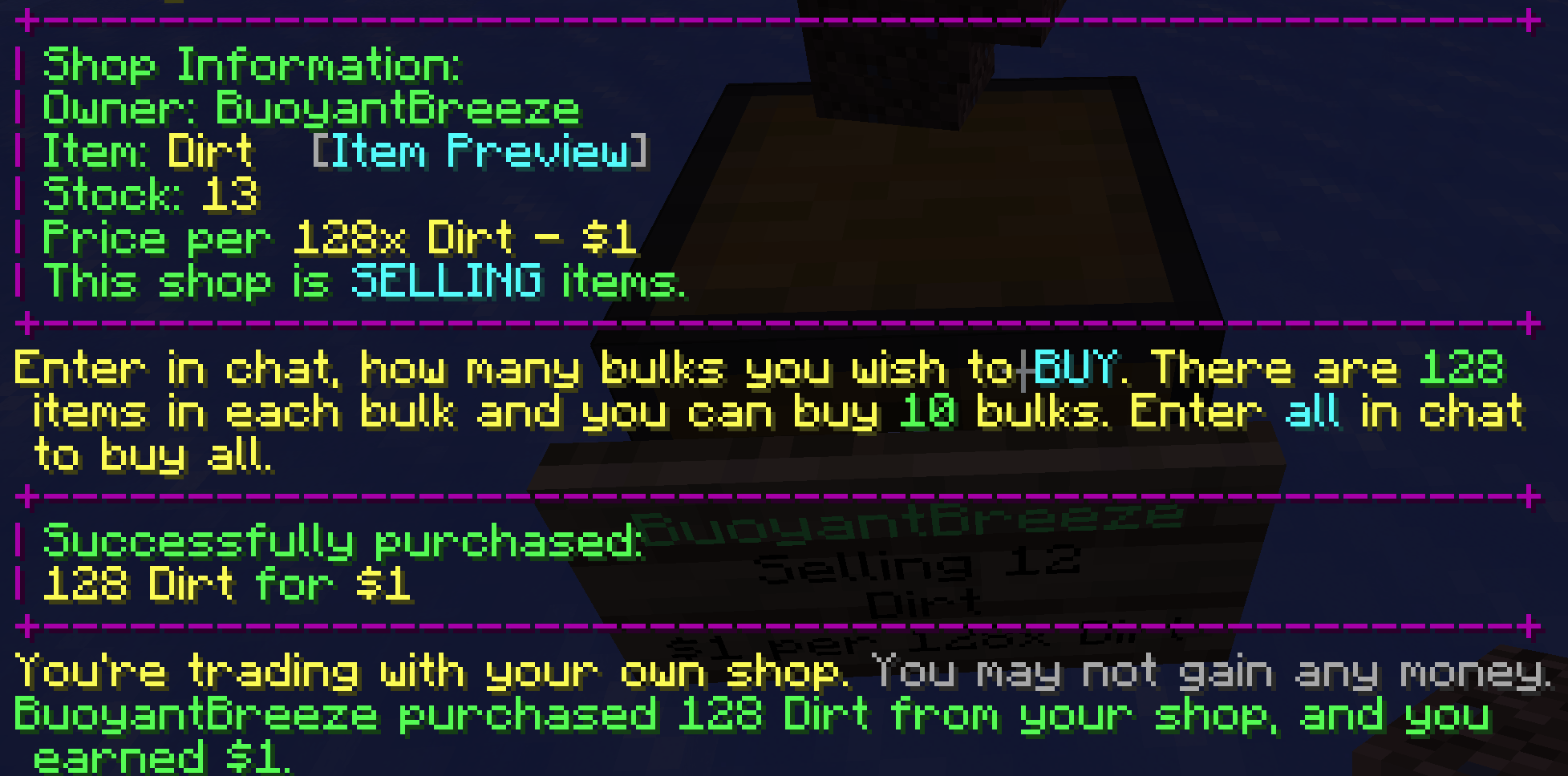
v3.2.0.2Release
12.09.2022 · 108 завантаження
PaperPurpurSpigot1.18.21.191.19.11.19.2
3.2.0.2 ChangeLog
Bug Fixes
- Fixed Economy Services Injector.
- The custom economy services now can be loaded without an native supported economy service.
- Fixed
custom-command-aliasfeature, it has been broked for a long time and should working now! - Fixed
/qs taxaccountcommand may produce NullPointerException. - Fixed qscompat-clearlag ConcurrentModificationException.
v3.2.0.1Release
28.08.2022 · 75 завантаження
PaperPurpurSpigot1.18.21.191.19.11.19.2
Fixed a bug that MySQL driver report exception: Unknown column 'SHOPS.id' in 'on clause'.
v3.2.0.0Release
27.08.2022 · 373 завантаження
PaperPurpurSpigot1.18.21.191.19.11.19.2
3.2.0.0 ChangeLog
This update tooked a little long of time due my personal things, but anyway, it's here and enjoy it!
Optimize
- Improved shops loading logic.
should now get better loading performance, compare old and new loading time cost. - Improved isolated data logic.
- the old isolated data scanning will begin once server booted up, which may increase the load on the database.
- the old isolated data scanning need pull all shops data back to local and calculate one-by-one which slow and may increase the load on the database.
- new logic will pre-processing them with SQL, calculations will be done on the database so it will have better performance.
- we do same thing on shops loading logic, seems it working well :)
- Tweak internal logger buffer size and this should reduce the memory footprint by a small amount.
- Improved shops auto-save logic.
- shops auto-save is now parallel.
- shops are no longer actively saving changes to the database immediately, we will check every shop that has been modified and update the database every once in a while.
*all changes will save into memory when server shutting down. - Improved database auto-backup.
- hikari now actively backs up the database before breaking changes, both H2 and MySQL users.
Bug fixes
- Users may can increase the database load if them spam click the shop block.
- Hikari may conflict with LastLoginAPI's H2/HikariCP.
Гортайте товари колесом або стрілками