

Product
About
Custom Damage Overlay Color
This resource pack allows to change overlay color of all entities when they take damage. By defult this resource pack changes it to green, as an example.
Versions: 1.17 — 1.21.11
Works with both Optifine and Sodium.
How to change the color
Go into the resource pack and open a file assets/minecraft/shaders/include/change_damage_overlay.glsl, choose a color and put it into the second line of the file. For example if you want to change the color to purple (#AA00FF) with 50% transparency, the second line of the file would look like this:
vec4 RGBColor = vec4(170,0,255,127);
And if you want cyan (#00FFFF) color with the same transparency as in vanilla, it would look like this:
vec4 RGBColor = vec4(0,255,255,178);
Preview
Product images
Environment
Requirements & compatibility
Compatibility & requirements
MinecraftVanilla1.17 – 1.21.11
Local host
Required
Hosting on services
Unsupported
Terms
License
Terms for using, modifying and redistributing this product.
MIT LicenseModrinth
Release
Latest release
v1.2
02.01.2026 · Modrinth
Tested in 1.21.11
Gallery
Project images
Screenshots and images from the original Modrinth page.
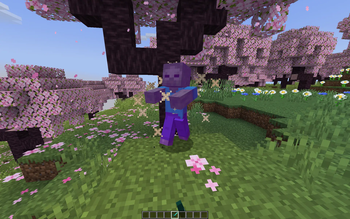
Color changed to purple
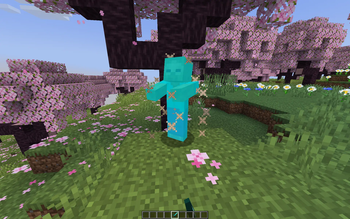
Color changed to cyan with less transparency
History
Project versions
Published versions and original Modrinth files.
v1.2LatestRelease
02.01.2026 · 9 125 downloads
Minecraft1.20.21.20.31.20.41.20.51.20.61.211.21.11.21.2
Tested in 1.21.11
v1.1Release
13.09.2025 · 2 431 downloads
Minecraft1.20.21.20.31.20.41.20.51.20.61.211.21.11.21.2
Updated to support 1.21.6-1.21.8
v1.0Release
21.09.2024 · 1 892 downloads
Minecraft1.171.17.1
For 1.17 — 1.17.1
v1.0Release
21.09.2024 · 1 781 downloads
Minecraft1.181.18.11.18.21.191.19.11.19.21.19.31.19.4
For 1.18 — 1.20.1
v1.0Release
21.09.2024 · 7 474 downloads
MinecraftVanilla1.20.21.20.31.20.41.20.51.20.61.211.21.11.21.2
For 1.20.2 — 1.21.4
Scroll products with the wheel or arrows